warning HONDA ODYSSEY 2022 Repair Manual
[x] Cancel search | Manufacturer: HONDA, Model Year: 2022, Model line: ODYSSEY, Model: HONDA ODYSSEY 2022Pages: 782, PDF Size: 27.17 MB
Page 594 of 782
Continued593
uuHonda Sensing ®u Collision Mitigation Braking SystemTM (CMBSTM)
Driving
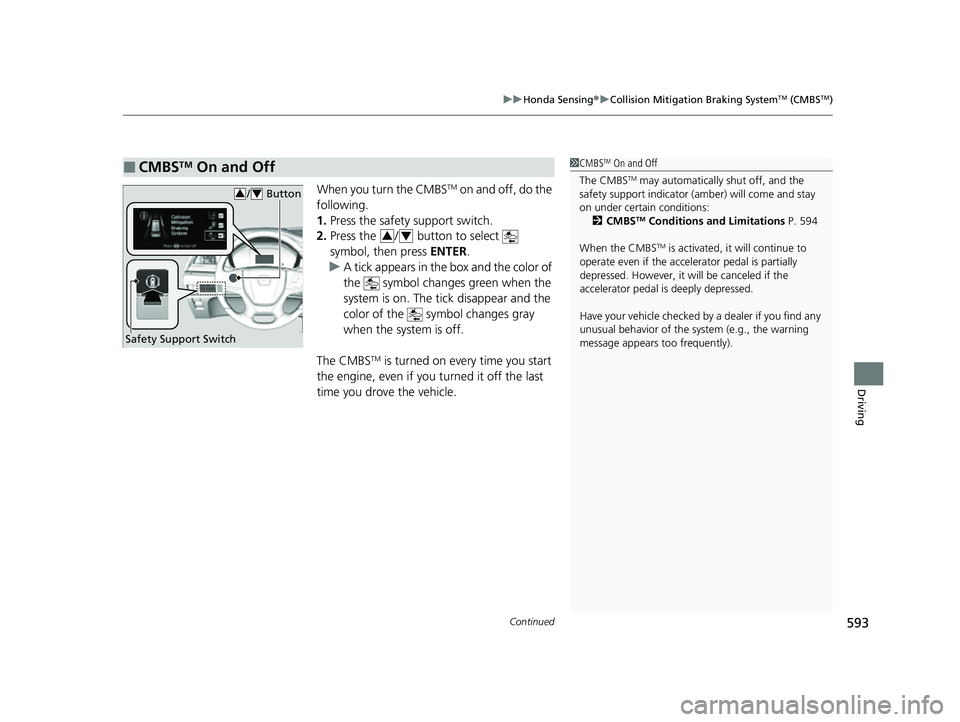
When you turn the CMBSTM on and off, do the
following.
1. Press the safety support switch.
2. Press the / button to select
symbol, then press ENTER.
u A tick appears in the box and the color of
the symbol changes green when the
system is on. The tick disappear and the
color of the symbol changes gray
when the system is off.
The CMBS
TM is turned on every time you start
the engine, even if you turned it off the last
time you drove the vehicle.
■CMBSTM On and Off1 CMBSTM On and Off
The CMBS
TM may automatically shut off, and the
safety support indicator (amb er) will come and stay
on under certain conditions: 2 CMBS
TM Conditions and Limitations P. 594
When the CMBS
TM is activated, it will continue to
operate even if the accele rator pedal is partially
depressed. However, it w ill be canceled if the
accelerator pedal is deeply depressed.
Have your vehicle checked by a dealer if you find any
unusual behavior of the system (e.g., the warning
message appears too frequently).
Safety Support Switch
/ Button34
34
22 US ODYSSEY-31THR6400.book 593 ページ 2020年11月16日 月曜日 午後1時41分
Page 601 of 782
600
uuHonda Sensing ®u Adaptive Cruise Control (ACC) with Low Speed Follow
Driving
Adaptive Cruise Control (ACC) with Low Speed
Follow
Helps maintain a constant vehicle speed a nd a set following-interval behind a vehicle
detected ahead of yours and, if the detect ed vehicle comes to a stop, can decelerate
and stop your vehicle, without you having to keep your foot on the brake or the
accelerator.
When ACC with Low Speed Follow slows y our vehicle by applying the brakes, your
vehicle’s brake lights will illuminate.
1 Adaptive Cruise Control (ACC) with Low Speed Follow
Important Reminder
As with any system, there are limits to ACC with Low
Speed Follow. Use the brake pedal whenever
necessary, and always keep a safe interval between
your vehicle and other vehicles.
3WARNING
Improper use of ACC with Low Speed
Follow can lead to a crash.
Use ACC with Low Speed Follow only when
driving on expressways or freeways and in
good road and weather conditions.
3WARNING
ACC with Low Speed Follow has limited
braking capability and may not stop your
vehicle in time to avoid a collision with a
vehicle that quickly stops in front of you.
Always be prepared to apply the brake
pedal if the conditions require.
When to use
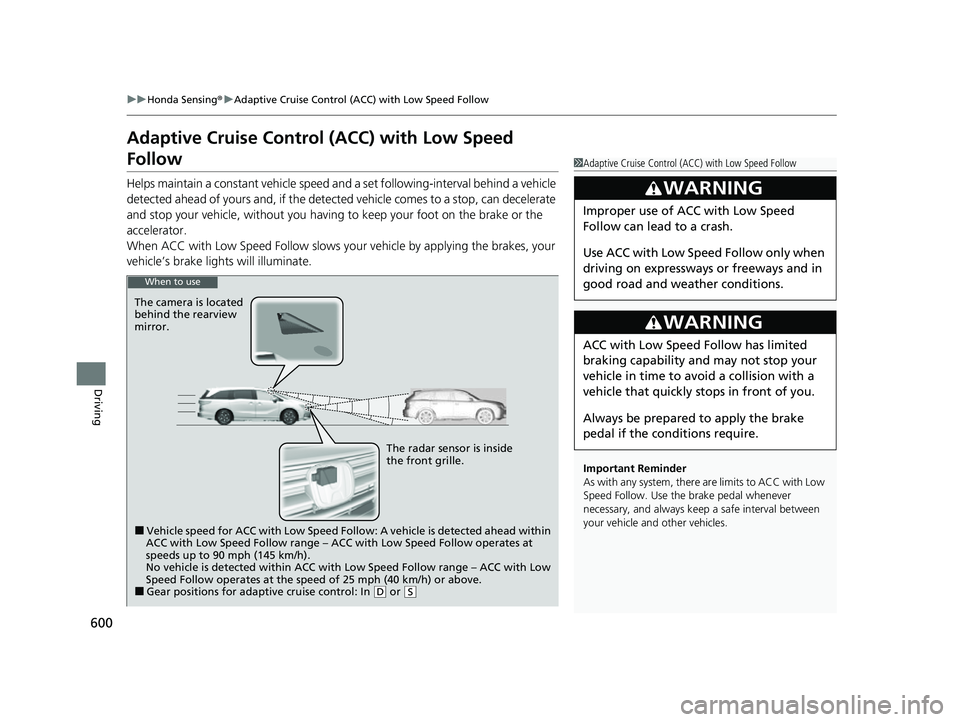
The camera is located
behind the rearview
mirror.
The radar sensor is inside
the front grille.
■Vehicle speed for ACC with Low Speed Follow: A vehicle is detected ahead within
ACC with Low Speed Follow range – ACC with Low Speed Follow operates at
speeds up to 90 mph (145 km/h).
No vehicle is detected within ACC with Low Speed Follow range – ACC with Low
Speed Follow operates at the speed of 25 mph (40 km/h) or above.
■Gear positions for adaptive cruise control: In ( D or (S
22 US ODYSSEY-31THR6400.book 600 ページ 2020年11月16日 月曜日 午後1時41分
Page 607 of 782
uuHonda Sensing ®u Adaptive Cruise Control (ACC) with Low Speed Follow
606
Driving
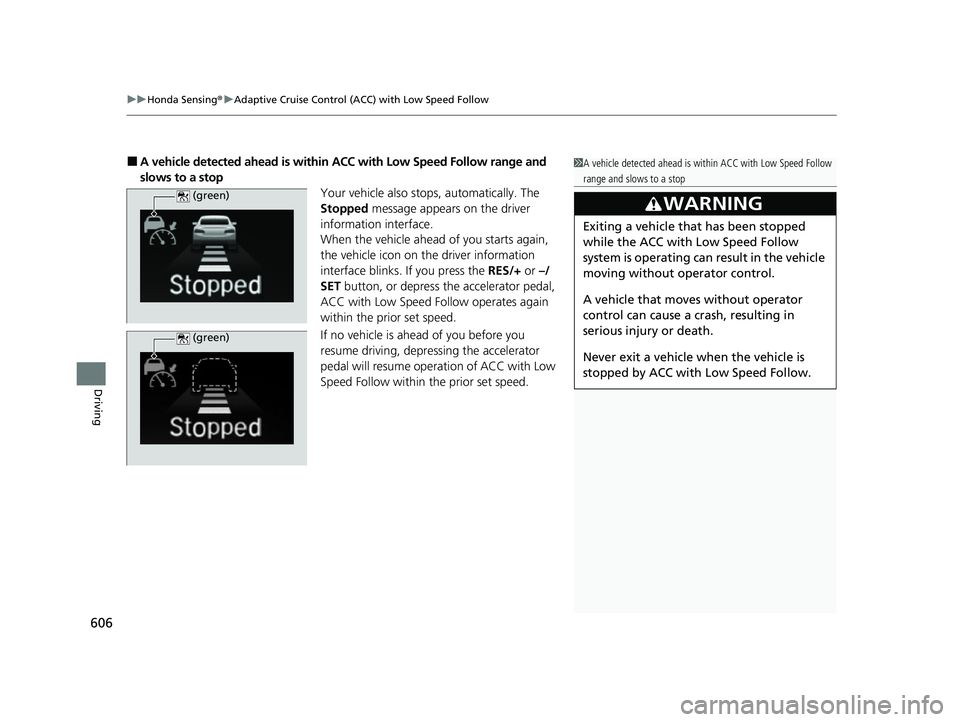
■A vehicle detected ahead is within ACC with Low Speed Follow range and
slows to a stop Your vehicle also stops, automatically. The
Stopped message appears on the driver
information interface.
When the vehicle ahead of you starts again,
the vehicle icon on the driver information
interface blinks. If you press the RES/+ or –/
SET button, or depress the accelerator pedal,
ACC with Low Speed Follow operates again
within the prior set speed.
If no vehicle is ahead of you before you
resume driving, depressing the accelerator
pedal will resume operation of ACC with Low
Speed Follow within the prior set speed.1 A vehicle detected ahead is within ACC with Low Speed Follow
range and slows to a stop
3WARNING
Exiting a vehicle that has been stopped
while the ACC with Low Speed Follow
system is operating can result in the vehicle
moving without operator control.
A vehicle that moves without operator
control can cause a crash, resulting in
serious injury or death.
Never exit a vehicle when the vehicle is
stopped by ACC with Low Speed Follow.
(green)
(green)
22 US ODYSSEY-31THR6400.book 606 ページ 2020年11月16日 月曜日 午後1時41分
Page 608 of 782
Continued607
uuHonda Sensing ®u Adaptive Cruise Control (ACC) with Low Speed Follow
Driving
The system may automatically shut off and the indicator will come on under
certain conditions. Some examples of these conditions are listed below. Other
conditions may reduce some of the ACC functions.
2 Front Sensor Camera P. 635
2 Radar Sensor P. 637
■Environmental conditions
Driving in bad weather (r ain, fog, snow, etc.).
■Roadway conditions
Driving on a snowy or wet roadway (obscured lane marking, vehicle tracks, reflected
lights, road spra y, high contrast).
■Vehicle conditions
• The outside of the windshield is blocked by dirt, mud, leaves, wet snow, etc.
• An abnormal tire or wheel condition (wrong size, varied size or construction,
improperly inflated, co mpact spare tire, etc.).
• The camera temperature gets too high.
• The parking brake is applied.
• The front grille is dirty.
• The vehicle is tilted due to a heavy load or suspension modifications.
• Tire chains are installed.
• The vehicle is towing a trailer.
■ACC with Low Speed Follow Conditions and Limitations1ACC with Low Speed Follow Conditions and Limitations
If you need the radar sensor to be repaired, or
removed, or the radar se nsor cover is strongly
impacted, turn off the system by pressing the
button and take your vehicle to a dealer.
Have your vehicle checked by a dealer if you find any
unusual behavior of the system (e.g., the warning
message appears too frequently).
22 US ODYSSEY-31THR6400.book 607 ページ 2020年11月16日 月曜日 午後1時41分
Page 617 of 782
616
uuHonda Sensing ®u Lane Keeping Assist System (LKAS)
Driving
Lane Keeping Assist System (LKAS)
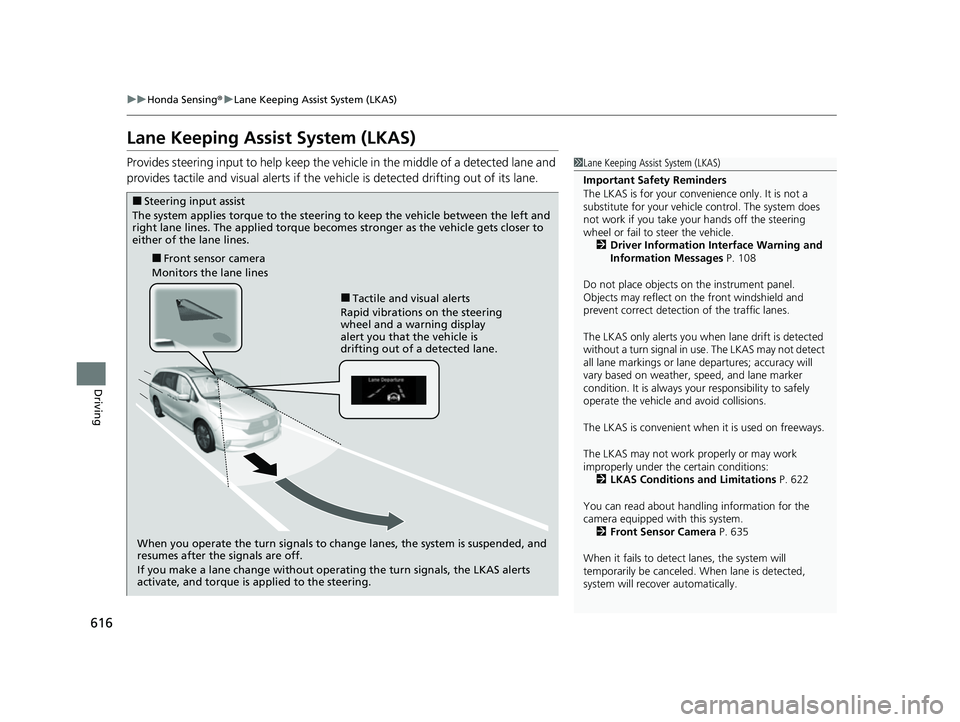
Provides steering input to help keep the vehicle in the middle of a detected lane and
provides tactile and visual alerts if the ve hicle is detected drifting out of its lane.1Lane Keeping Assist System (LKAS)
Important Safety Reminders
The LKAS is for your convenience only. It is not a
substitute for your vehicle control. The system does
not work if you take y our hands off the steering
wheel or fail to steer the vehicle. 2 Driver Information Interface Warning and
Information Messages P. 108
Do not place objects on the instrument panel.
Objects may reflect on th e front windshield and
prevent correct detectio n of the traffic lanes.
The LKAS only alerts you when lane drift is detected
without a turn signal in use. The LKAS may not detect
all lane markings or lane departures; accuracy will
vary based on weather, speed, and lane marker
condition. It is always your responsibility to safely
operate the vehicle an d avoid collisions.
The LKAS is convenient when it is used on freeways.
The LKAS may not work properly or may work
improperly under the certain conditions:
2 LKAS Conditions and Limitations P. 622
You can read about handling information for the
camera equipped with this system. 2 Front Sensor Camera P. 635
When it fails to detect lanes, the system will
temporarily be canceled. When lane is detected,
system will recover automatically.
■Tactile and visual alerts
Rapid vibrations on the steering
wheel and a warning display
alert you that the vehicle is
drifting out of a detected lane.
■Front sensor camera
Monitors the lane lines
■Steering input assist
The system applies torque to the steering to keep the vehicle between the left and
right lane lines. The applied torque becomes stronger as the vehicle gets closer to
either of the lane lines.
When you operate the turn signals to change lanes, the system is suspended, and
resumes after the signals are off.
If you make a lane change without operating the turn signals, the LKAS alerts
activate, and torque is applied to the steering.
22 US ODYSSEY-31THR6400.book 616 ページ 2020年11月16日 月曜日 午後1時41分
Page 618 of 782
Continued617
uuHonda Sensing ®u Lane Keeping Assist System (LKAS)
Driving
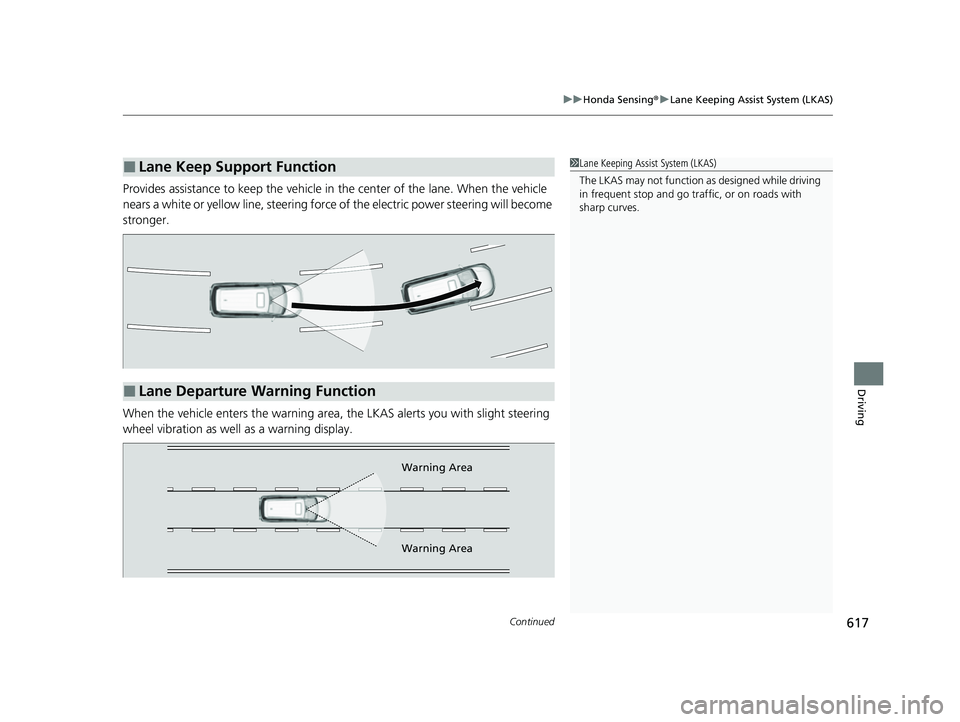
Provides assistance to keep the vehicle in the center of the lane. When the vehicle
nears a white or yellow line, steering force of the electric power steering will become
stronger.
When the vehicle enters the warning area, the LKAS alerts you with slight steering
wheel vibration as well as a warning display.
■Lane Keep Support Function1 Lane Keeping Assist System (LKAS)
The LKAS may not function as designed while driving
in frequent stop and go traf fic, or on roads with
sharp curves.
■Lane Departure Warning Function
Warning Area
Warning Area
22 US ODYSSEY-31THR6400.book 617 ページ 2020年11月16日 月曜日 午後1時41分
Page 627 of 782
uuHonda Sensing ®u Road Departure Mitigation (RDM) System
626
Driving
The system becomes ready to start sear ching for lane markings when all the
following conditions are met:
• The vehicle is traveling between about 45 and 90 mph (72 and 145 km/h).
• The vehicle is on a straight or slightly curved road.
• The turn signals are off.
• The brake pedal is not depressed.
• The wipers are not in high speed operation.
• The vehicle is not accelerating or braking, and the steering wheel is not being
turned.
• The system makes a determination that th e driver is not actively accelerating,
braking or steering.
■How the System Activates1 Road Departure Mitigation (RDM) System
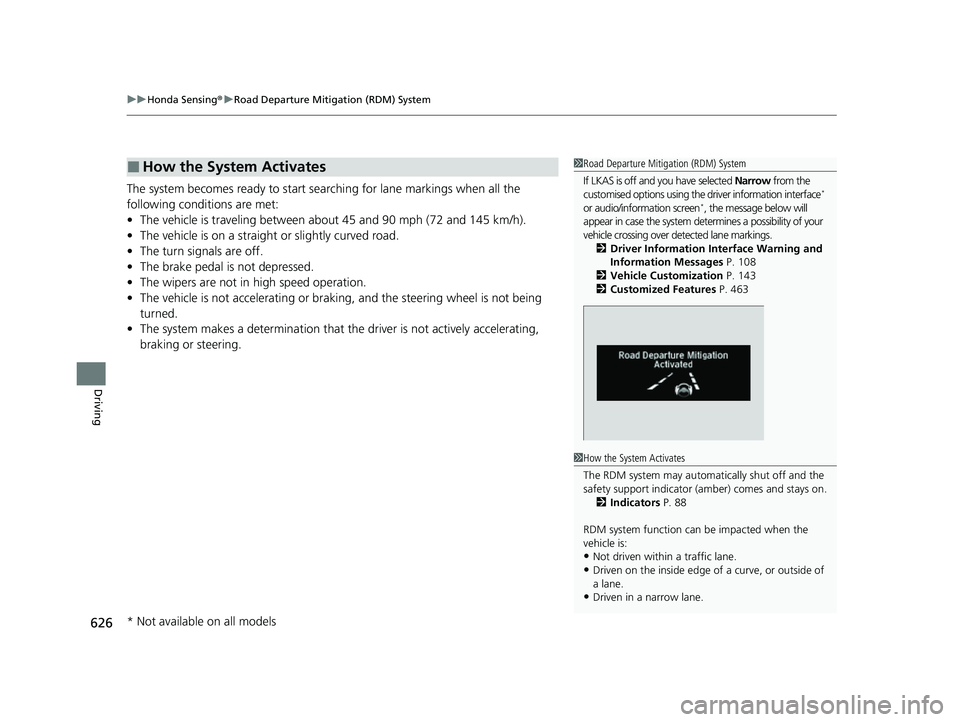
If LKAS is off and you have selected Narrow from the
customised options using the driver information interface
*
or audio/information screen*, the message below will
appear in case the system dete rmines a possibility of your
vehicle crossing over de tected lane markings.
2 Driver Information Interface Warning and
Information Messages P. 108
2 Vehicle Customization P. 143
2 Customized Features P. 463
1How the System Activates
The RDM system may automa tically shut off and the
safety support indicator (a mber) comes and stays on.
2 Indicators P. 88
RDM system function can be impacted when the
vehicle is:
•Not driven within a traffic lane.
•Driven on the inside edge of a curve, or outside of
a lane.
•Driven in a narrow lane.
* Not available on all models
22 US ODYSSEY-31THR6400.book 626 ページ 2020年11月16日 月曜日 午後1時41分
Page 628 of 782
Continued627
uuHonda Sensing ®u Road Departure Mitigation (RDM) System
Driving
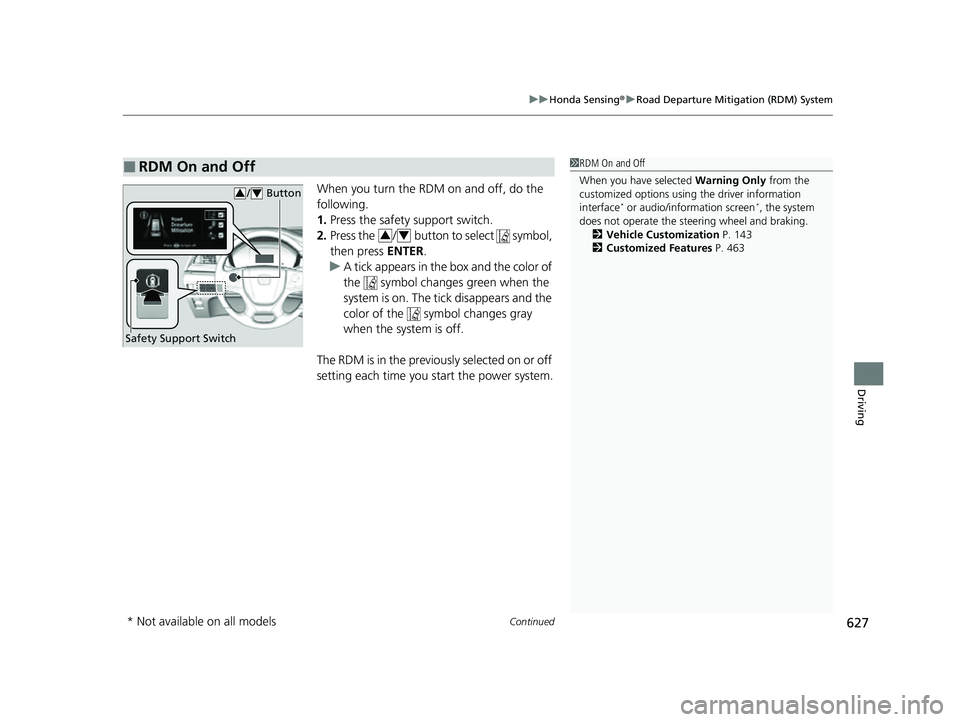
When you turn the RDM on and off, do the
following.
1. Press the safety support switch.
2. Press the / button to select symbol,
then press ENTER.
u A tick appears in the box and the color of
the symbol changes green when the
system is on. The tick disappears and the
color of the symbol changes gray
when the system is off.
The RDM is in the previous l y s e l e c t e d o n o r o f f
setting each time you start the power system.
■RDM On and Off1 RDM On and Off
When you have selected Warning Only from the
customized options using the driver information
interface
* or audio/information screen*, the system
does not operate the steering wheel and braking. 2 Vehicle Customization P. 143
2 Customized Features P. 463
Safety Support Switch
/ Button34
34
* Not available on all models
22 US ODYSSEY-31THR6400.book 627 ページ 2020年11月16日 月曜日 午後1時41分
Page 643 of 782
uuBraking uBrake System
642
Driving
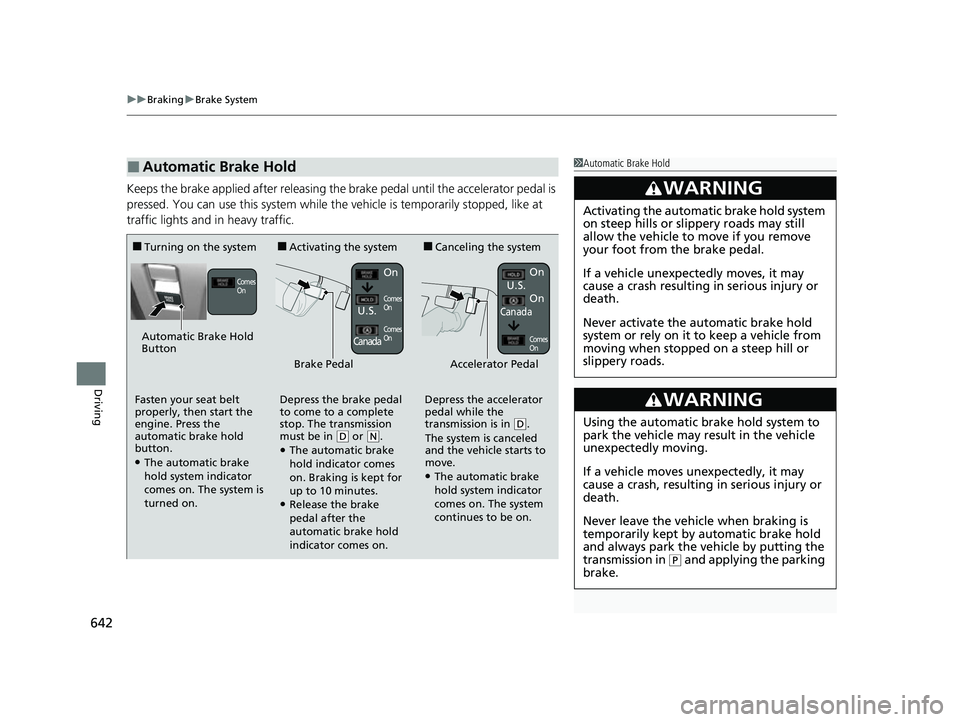
Keeps the brake applied after releasing the brake pedal until the accelerator pedal is
pressed. You can use this system while the vehicle is temporarily stopped, like at
traffic lights and in heavy traffic.
■Automatic Brake Hold1Automatic Brake Hold
3WARNING
Activating the automatic brake hold system
on steep hills or slippery roads may still
allow the vehicle to move if you remove
your foot from the brake pedal.
If a vehicle unexpectedly moves, it may
cause a crash resulting in serious injury or
death.
Never activate the automatic brake hold
system or rely on it to keep a vehicle from
moving when stopped on a steep hill or
slippery roads.
3WARNING
Using the automatic brake hold system to
park the vehicle may result in the vehicle
unexpectedly moving.
If a vehicle moves unexpectedly, it may
cause a crash, resulting in serious injury or
death.
Never leave the vehicle when braking is
temporarily kept by automatic brake hold
and always park the vehicle by putting the
transmission in
( P and applying the parking
brake.
■Turning on the system■Activating the system■Canceling the system
Automatic Brake Hold
Button
Comes
OnOn
Comes
On
Comes
On
On
U.S.
Canada
Brake PedalAccelerator Pedal
Fasten your seat belt
properly, then start the
engine. Press the
automatic brake hold
button.
●The automatic brake
hold system indicator
comes on. The system is
turned on. Depress the brake pedal
to come to a complete
stop. The transmission
must be in
(
D or (N.●The automatic brake
hold indicator comes
on. Braking is kept for
up to 10 minutes.
●Release the brake
pedal after the
automatic brake hold
indicator comes on. Depress the accelerator
pedal while the
transmission is in
(
D.
The system is canceled
and the vehicle starts to
move.
●The automatic brake
hold system indicator
comes on. The system
continues to be on. U.S.
CanadaOn
Comes
On
22 US ODYSSEY-31THR6400.book 642 ページ 2020年11月16日 月曜日 午後1時41分
Page 648 of 782
647
uuParking Your Vehicle uWhen Stopped
Driving
Always set the parking brake, in particu lar if you are parked on an incline.1When Stopped
3WARNING
The vehicle can roll aw ay if left unattended
without confirming that Park is engaged.
A vehicle that rolls away could cause a crash
resulting in seriou s injury or death.
Always keep your foot on the brake pedal
until you have confirmed that
( P is shown
on the gear position Indicator.
22 US ODYSSEY-31THR6400.book 647 ページ 2020年11月16日 月曜日 午後1時41分