warning HONDA ODYSSEY 2022 Workshop Manual
[x] Cancel search | Manufacturer: HONDA, Model Year: 2022, Model line: ODYSSEY, Model: HONDA ODYSSEY 2022Pages: 782, PDF Size: 27.17 MB
Page 475 of 782
474
uuCustomized Features u
Features
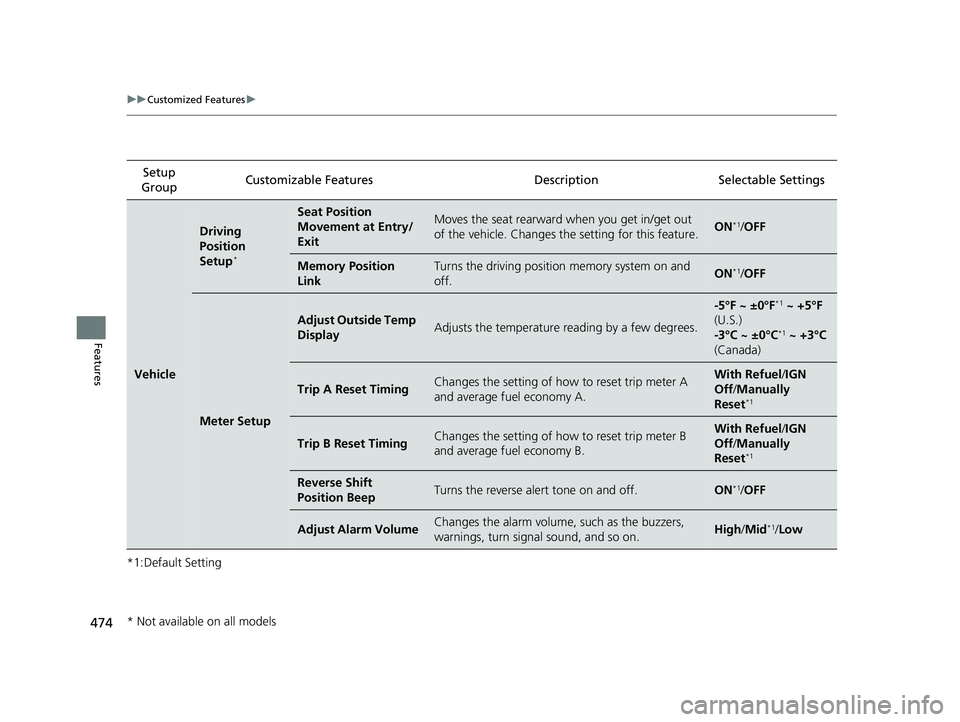
*1:Default SettingSetup
Group Customizable Features Description Selectable Settings
Vehicle
Driving
Position
Setup
*
Seat Position
Movement at Entry/
ExitMoves the seat rearward when you get in/get out
of the vehicle. Changes the setting for this feature.ON*1/
OFF
Memory Position
LinkTurns the driving position memory system on and
off.ON*1/ OFF
Meter Setup
Adjust Outside Temp
DisplayAdjusts the temperature reading by a few degrees.
-5°F ~ ±0°F*1 ~ +5°F
(U.S.)
-3°C ~ ±0°C
*1 ~ +3°C
(Canada)
Trip A Reset TimingChanges the setting of how to reset trip meter A
and average fuel economy A.With Refuel /IGN
Off /Manually
Reset
*1
Trip B Reset TimingChanges the setting of how to reset trip meter B
and average fuel economy B.With Refuel /IGN
Off /Manually
Reset
*1
Reverse Shift
Position BeepTurns the reverse alert tone on and off.ON*1/ OFF
Adjust Alarm VolumeChanges the alarm volume, such as the buzzers,
warnings, turn signal sound, and so on.High /Mid*1/Low
* Not available on all models
22 US ODYSSEY-31THR6400.book 474 ページ 2020年11月16日 月曜日 午後1時41分
Page 477 of 782
476
uuCustomized Features u
Features
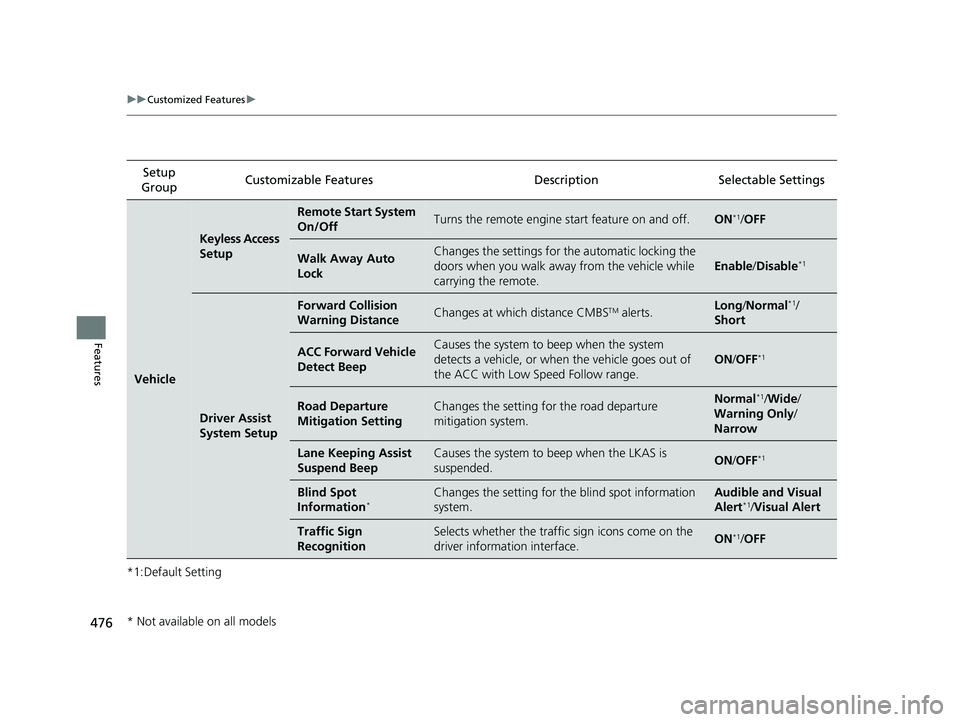
*1:Default SettingSetup
Group Customizable Features Description Selectable Settings
Vehicle
Keyless Access
Setup
Remote Start System
On/OffTurns the remote engine
start feature on and off.ON*1/OFF
Walk Away Auto
LockChanges the settings for the automatic locking the
doors when you walk away from the vehicle while
carrying the remote.
Enable /Disable*1
Driver Assist
System Setup
Forward Collision
Warning DistanceChanges at which distance CMBSTM alerts.Long /Normal*1/
Short
ACC Forward Vehicle
Detect BeepCauses the system to beep when the system
detects a vehicle, or when the vehicle goes out of
the ACC with Low Speed Follow range.
ON /OFF*1
Road Departure
Mitigation SettingChanges the setting for the road departure
mitigation system.Normal*1/ Wide /
Warning Only /
Narrow
Lane Keeping Assist
Suspend BeepCauses the system to b eep when the LKAS is
suspended.ON /OFF*1
Blind Spot
Information*Changes the setting for the blind spot information
system.Audible and Visual
Alert*1/ Visual Alert
Traffic Sign
RecognitionSelects whether the traffic sign icons come on the
driver information interface.ON*1/OFF
* Not available on all models
22 US ODYSSEY-31THR6400.book 476 ページ 2020年11月16日 月曜日 午後1時41分
Page 542 of 782
541
uuBefore Driving uMaximum Load Limit
Continued
Driving
Maximum Load Limit
The maximum load for your ve hicle is 1,173 lbs (532 kg).
The maximum load for your ve hicle is 1,340 lbs (608 kg).
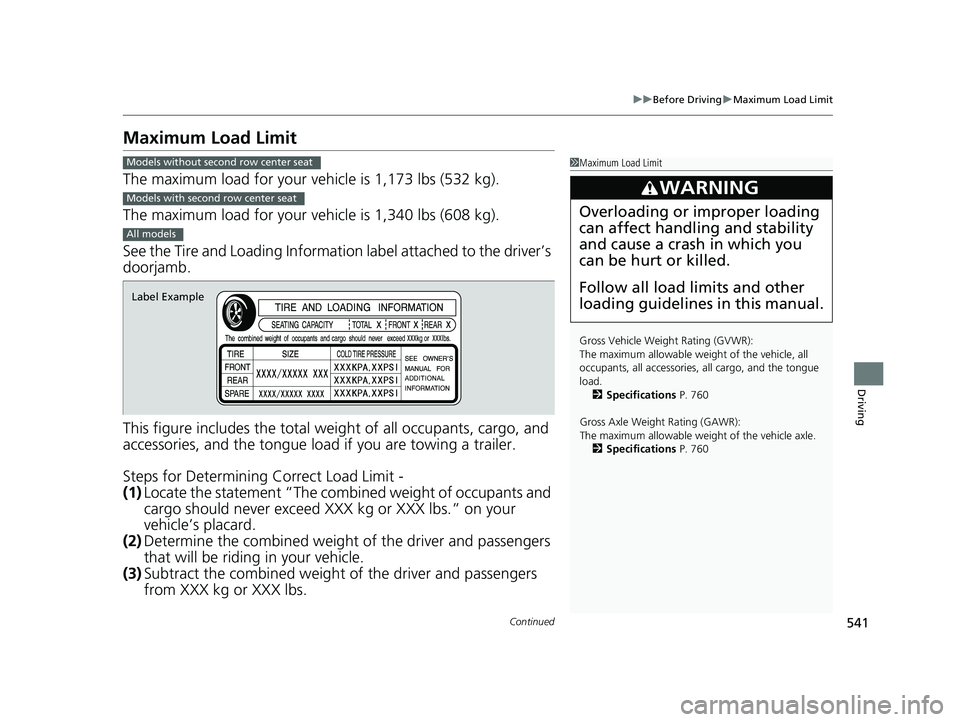
See the Tire and Loading Information label attached to the driver’s
doorjamb.
This figure includes the total weig ht of all occupants, cargo, and
accessories, and the tongue load if you are towing a trailer.
Steps for Determining Correct Load Limit -
(1) Locate the statement “The combined weight of occupants and
cargo should never exceed XXX kg or XXX lbs.” on your
vehicle’s placard.
(2) Determine the combined weight of the driver and passengers
that will be riding in your vehicle.
(3) Subtract the combined weight of the driver and passengers
from XXX kg or XXX lbs.
1Maximum Load Limit
Gross Vehicle Weight Rating (GVWR):
The maximum allowable weight of the vehicle, all
occupants, all a ccessories, all cargo, and the tongue
load. 2 Specifications P. 760
Gross Axle Weight Rating (GAWR):
The maximum allowable weight of the vehicle axle. 2 Specifications P. 760
3WARNING
Overloading or improper loading
can affect handling and stability
and cause a crash in which you
can be hurt or killed.
Follow all load limits and other
loading guidelines in this manual.
Models without second row center seat
Models with second row center seat
All models
Label Example
22 US ODYSSEY-31THR6400.book 541 ページ 2020年11月16日 月曜日 午後1時41分
Page 545 of 782
544
Driving
Towing a Trailer
Towing Preparation
Your vehicle can tow a trailer if you carefully observe the load limits, use the proper
equipment, and follow the towing guidelin es. Check the load limits before driving.
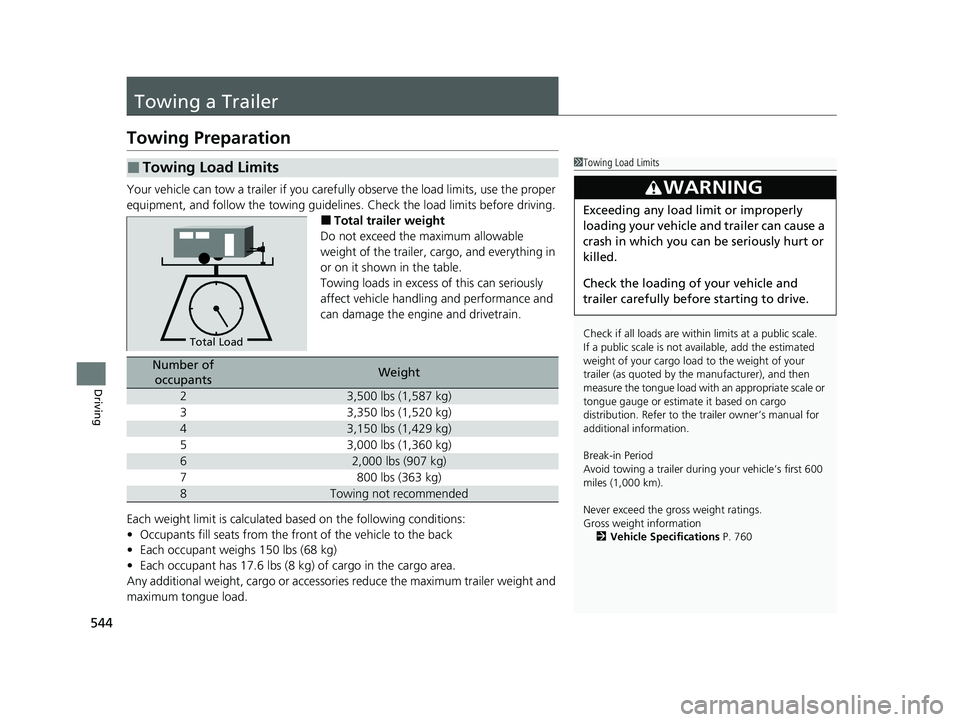
■Total trailer weight
Do not exceed the maximum allowable
weight of the trailer, cargo, and everything in
or on it shown in the table.
Towing loads in excess of this can seriously
affect vehicle handling and performance and
can damage the engine and drivetrain.
Each weight limit is calculated based on the following conditions:
• Occupants fill seats from the fro nt of the vehicle to the back
• Each occupant weighs 150 lbs (68 kg)
• Each occupant has 17.6 lbs (8 kg) of cargo in the cargo area.
Any additional weight, cargo or accessori es reduce the maximum trailer weight and
maximum tongue load.
■Towing Load Limits1 Towing Load Limits
Check if all loads are within limits at a public scale.
If a public scale is not av ailable, add the estimated
weight of your cargo load to the weight of your
trailer (as quoted by the manufacturer), and then
measure the tongue load with an appropriate scale or
tongue gauge or estima te it based on cargo
distribution. Refer to the trailer owner’s manual for
additional information.
Break-in Period
Avoid towing a trailer duri ng your vehicle’s first 600
miles (1,000 km).
Never exceed the gross weight ratings.
Gross weight information
2 Vehicle Specifications P. 760
3WARNING
Exceeding any load limit or improperly
loading your vehicle and trailer can cause a
crash in which you can be seriously hurt or
killed.
Check the loading of your vehicle and
trailer carefully before starting to drive.
Total Load
Number of
occupantsWeight
23,500 lbs (1,587 kg)
33,350 lbs (1,520 kg)
43,150 lbs (1,429 kg)
53,000 lbs (1,360 kg)
62,000 lbs (907 kg)
7800 lbs (363 kg)
8Towing not recommended
22 US ODYSSEY-31THR6400.book 544 ページ 2020年11月16日 月曜日 午後1時41分
Page 553 of 782
uuWhen Driving uStarting the Engine
552
Driving
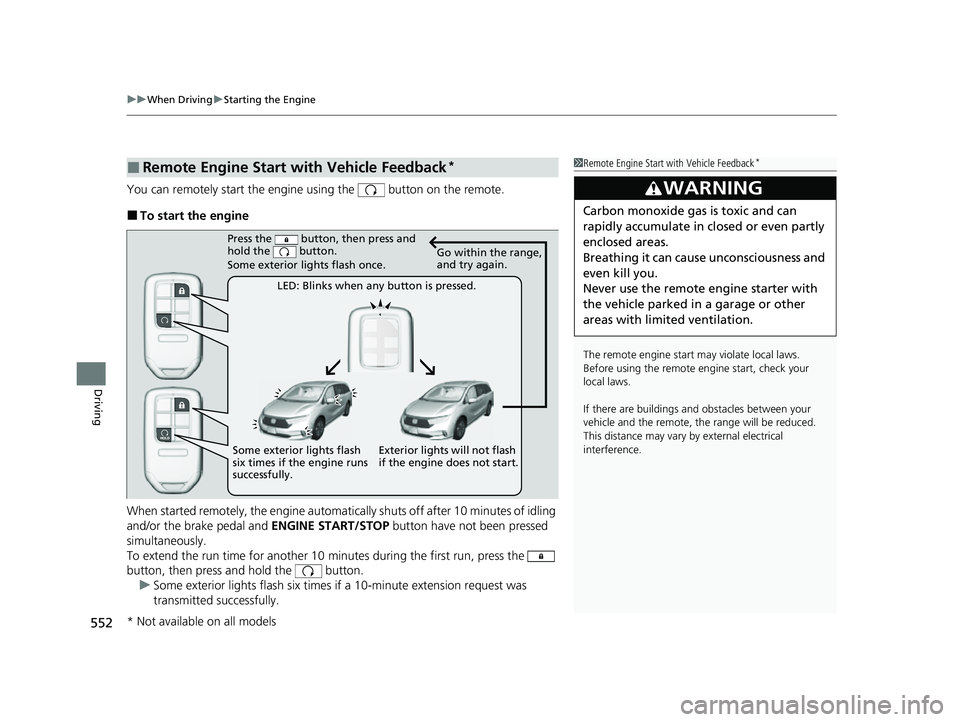
You can remotely start the engine using the button on the remote.
■To start the engine
When started remotely, the engine automati cally shuts off after 10 minutes of idling
and/or the brake pedal and ENGINE START/STOP button have not been pressed
simultaneously.
To extend the run time for another 10 minutes during the first run, press the
button, then press and hold the button.
u Some exterior lights flash six times if a 10-minute extension request was
transmitted successfully.
■Remote Engine Start with Vehicle Feedback*1Remote Engine Start with Vehicle Feedback*
The remote engine start may violate local laws.
Before using the remote e ngine start, check your
local laws.
If there are buildings an d obstacles between your
vehicle and the remote, th e range will be reduced.
This distance may vary by external electrical
interference.
3WARNING
Carbon monoxide ga s is toxic and can
rapidly accumulate in closed or even partly
enclosed areas.
Breathing it can cause unconsciousness and
even kill you.
Never use the remote engine starter with
the vehicle parked in a garage or other
areas with limited ventilation.
Press the button, then press and
hold the button.
Some exterior lights flash once.
LED: Blinks when any button is pressed. Go within the range,
and try again.
Exterior lights will not flash
if the engine does not start.
Some exterior lights flash
six times if the engine runs
successfully.
* Not available on all models
22 US ODYSSEY-31THR6400.book 552 ページ 2020年11月16日 月曜日 午後1時41分
Page 556 of 782
555
uuWhen Driving uStarting the Engine
Driving
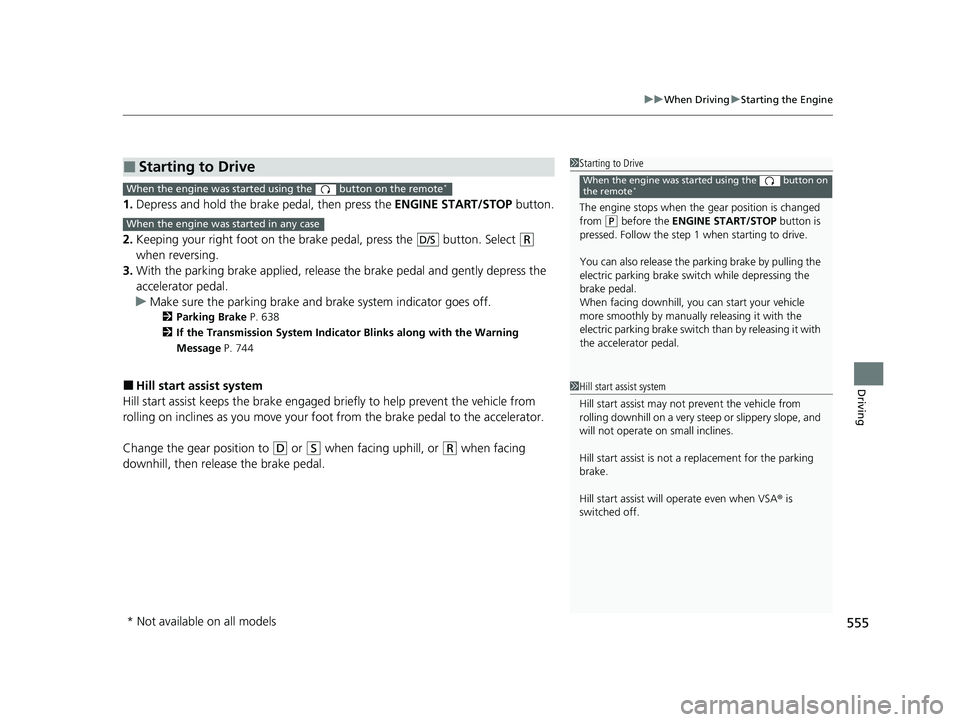
1. Depress and hold the brake pedal, then press the ENGINE START/STOP button.
2. Keeping your right foot on the br ake pedal, press the button. Select
(R
when reversing.
3. With the parking brake applied, release the brake pedal and gently depress the
accelerator pedal.
u Make sure the parking brake and brake system indicator goes off.
2Parking Brake P. 638
2 If the Transmission System Indicator Blinks along with the Warning
Message P. 744
■Hill start assist system
Hill start assist keeps the brake engaged br iefly to help prevent the vehicle from
rolling on inclines as you move your foot from the brake pedal to the accelerator.
Change the gear position to
(D or (S when facing uphill, or (R when facing
downhill, then release the brake pedal.
■Starting to Drive1 Starting to Drive
The engine stops when the gear position is changed
from
( P before the ENGINE START/STOP button is
pressed. Follow the step 1 when starting to drive.
You can also release the parking brake by pulling the
electric parking brake sw itch while depressing the
brake pedal.
When facing downhill, you can start your vehicle
more smoothly by manually releasing it with the
electric parking brake switch than by releasing it with
the accelerator pedal.
When the engine was started using the button on
the remote*When the engine was started using the button on the remote*
When the engine was started in any case
D/S
1 Hill start assist system
Hill start assist may not prevent the vehicle from
rolling downhill on a very st eep or slippery slope, and
will not operate on small inclines.
Hill start assist is not a replacement for the parking
brake.
Hill start assist will operate even when VSA ® is
switched off.
* Not available on all models
22 US ODYSSEY-31THR6400.book 555 ページ 2020年11月16日 月曜日 午後1時41分
Page 559 of 782
558
uuWhen Driving uShifting
Driving
Shifting
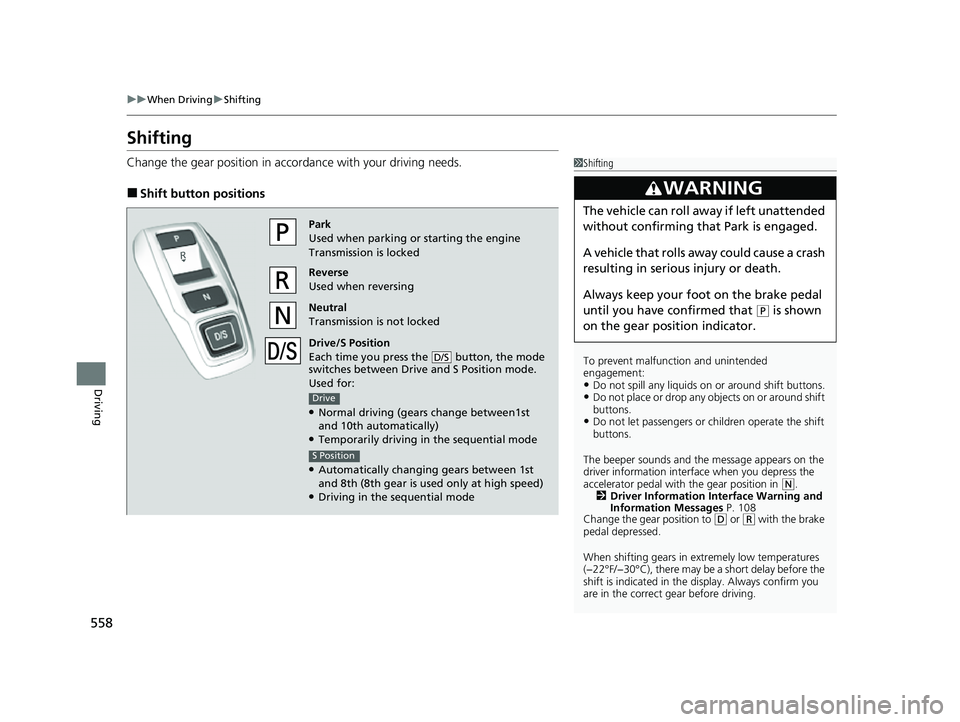
Change the gear position in acco rdance with your driving needs.
■Shift button positions
1Shifting
To prevent malfunc tion and unintended
engagement:
•Do not spill any liquids on or around shift buttons.•Do not place or drop any objects on or around shift
buttons.
•Do not let passengers or ch ildren operate the shift
buttons.
The beeper sounds and the message appears on the
driver information interf ace when you depress the
accelerator pedal with the gear position in
( N.
2 Driver Information Interface Warning and
Information Messages P. 108
Change the gear position to
( D or (R with the brake
pedal depressed.
When shifting gears in extremely low temperatures
(−22°F/−30°C), there may be a short delay before the
shift is indicated in the di splay. Always confirm you
are in the correct gear before driving.
3WARNING
The vehicle can roll aw ay if left unattended
without confirming that Park is engaged.
A vehicle that rolls away could cause a crash
resulting in seriou s injury or death.
Always keep your foot on the brake pedal
until you have confirmed that
( P is shown
on the gear position indicator.
Park
Used when parking or starting the engine
Transmission is locked
Reverse
Used when reversing
Neutral
Transmission is not locked
Drive/S Position
Each time you press the button, the mode
switches between Drive and S Position mode.
Used for:
●Normal driving (gears change between1st
and 10th automatically)
●Temporarily driving in the sequential mode
●Automatically changing gears between 1st
and 8th (8th gear is used only at high speed)
●Driving in the sequential mode
D/S
Drive
S Position
22 US ODYSSEY-31THR6400.book 558 ページ 2020年11月16日 月曜日 午後1時41分
Page 582 of 782
581
uuWhen Driving uBlind spot information System*
Continued
Driving
Blind spot information System*
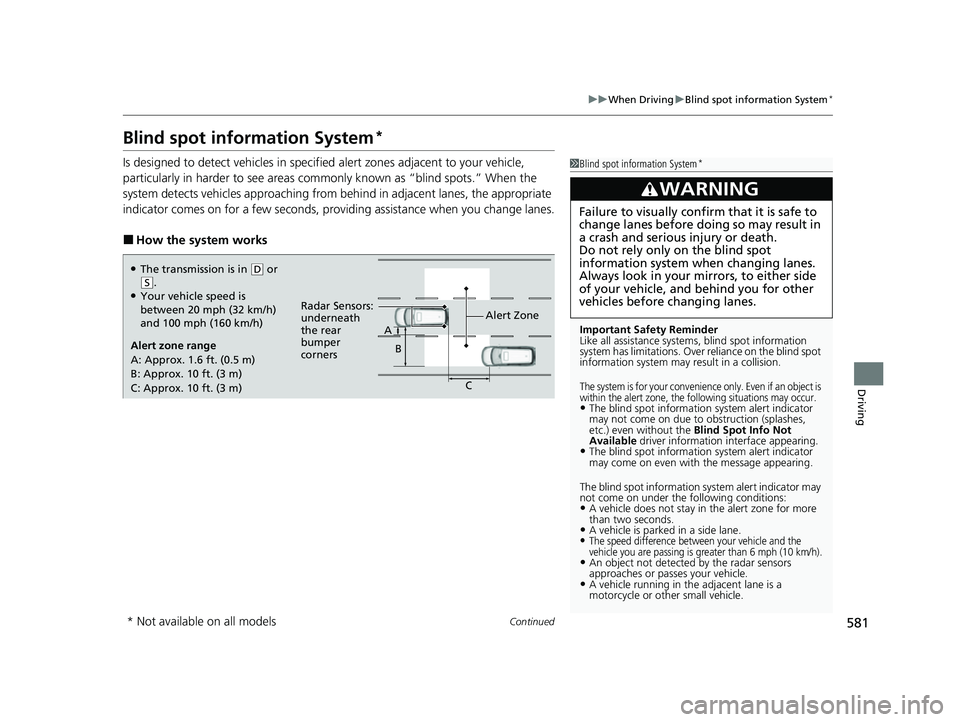
Is designed to detect vehicles in specified alert zones adjacent to your vehicle,
particularly in harder to see areas comm only known as “blind spots.” When the
system detects vehicles approaching from be hind in adjacent lanes, the appropriate
indicator comes on for a few seconds, providing assistance when you change lanes.
■How the system works
1 Blind spot information System*
Important Safety Reminder
Like all assistance systems, blind spot information
system has limitations. Over reliance on the blind spot
information system may result in a collision.
The system is for your convenience only. Even if an object is
within the alert zone, the following situations may occur.
•The blind spot informatio n system alert indicator
may not come on due to obstruction (splashes,
etc.) even without the Blind Spot Info Not
Available driver information interface appearing.
•The blind spot information system alert indicator
may come on even with the message appearing.
The blind spot information system alert indicator may
not come on under the following conditions:
•A vehicle does not stay in the alert zone for more
than two seconds.
•A vehicle is parked in a side lane.•The speed difference between your vehicle and the
vehicle you are passing is greater than 6 mph (10 km/h).
•An object not detected by the radar sensors
approaches or passes your vehicle.
•A vehicle running in the adjacent lane is a
motorcycle or other small vehicle.
3WARNING
Failure to visually confirm that it is safe to
change lanes before doing so may result in
a crash and serious injury or death.
Do not rely only on the blind spot
information system wh en changing lanes.
Always look in your mi rrors, to either side
of your vehicle, and behind you for other
vehicles before changing lanes.
●The transmission is in ( D or (S.●Your vehicle speed is
between 20 mph (32 km/h)
and 100 mph (160 km/h)
Alert zone range
A: Approx. 1.6 ft. (0.5 m)
B: Approx. 10 ft. (3 m)
C: Approx. 10 ft. (3 m) Alert Zone
Radar Sensors:
underneath
the rear
bumper
corners A
B
C
* Not available on all models
22 US ODYSSEY-31THR6400.book 581 ページ 2020年11月16日 月曜日 午後1時41分
Page 585 of 782
584
uuWhen Driving uLaneWatchTM*
Driving
LaneWatchTM*
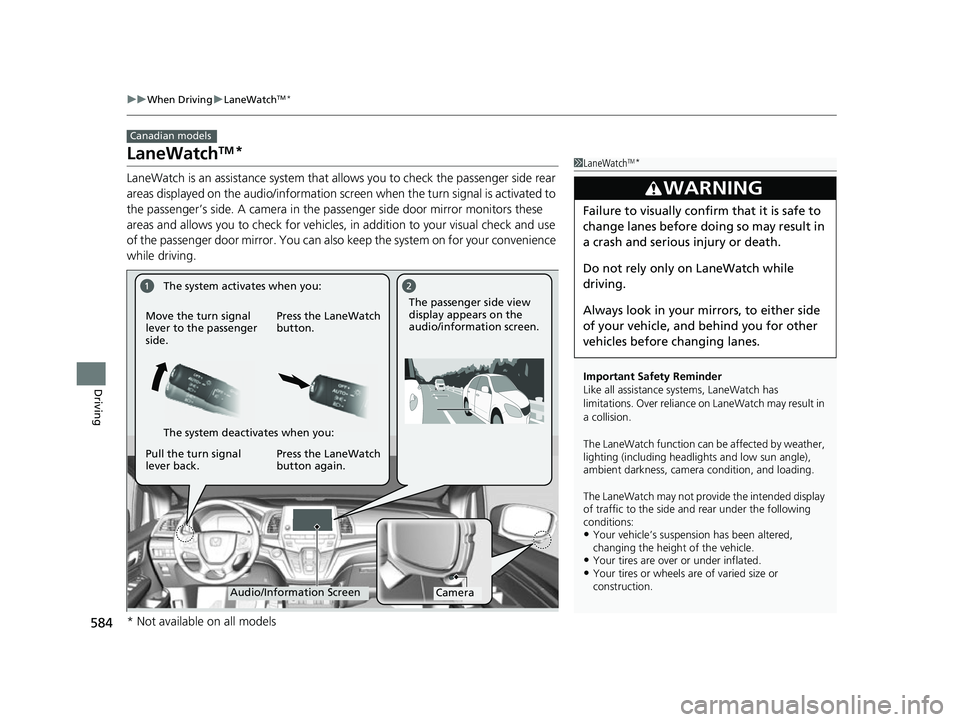
LaneWatch is an assistance system that allows you to check the passenger side rear
areas displayed on the audio/information screen when the turn signal is activated to
the passenger’s side. A camera in the pass enger side door mirror monitors these
areas and allows you to chec k for vehicles, in addition to your visual check and use
of the passenger door mirror. You can also keep the system on for your convenience
while driving.
Canadian models
1 LaneWatchTM*
Important Safety Reminder
Like all assistance systems, LaneWatch has
limitations. Over reliance on LaneWatch may result in
a collision.
The LaneWatch function can be affected by weather,
lighting (including headli ghts and low sun angle),
ambient darkness, camera condition, and loading.
The LaneWatch may not prov ide the intended display
of traffic to the side and rear under the following
conditions:
•Your vehicle’s suspensi on has been altered,
changing the height of the vehicle.
•Your tires are over or under inflated.•Your tires or wheels are of varied size or
construction.
3WARNING
Failure to visually confirm that it is safe to
change lanes before doing so may result in
a crash and serious injury or death.
Do not rely only on LaneWatch while
driving.
Always look in your mi rrors, to either side
of your vehicle, and behind you for other
vehicles before changing lanes.
CameraAudio/Information Screen
Move the turn signal
lever to the passenger
side.
Press the LaneWatch
button.
Pull the turn signal
lever back. Press the LaneWatch
button again. The passenger side view
display appears on the
audio/information screen.
The system activates when you:
The system deactivates when you:
* Not available on all models
22 US ODYSSEY-31THR6400.book 584 ページ 2020年11月16日 月曜日 午後1時41分
Page 593 of 782
592
uuHonda Sensing ®u Collision Mitigation Braking SystemTM (CMBSTM)
Driving
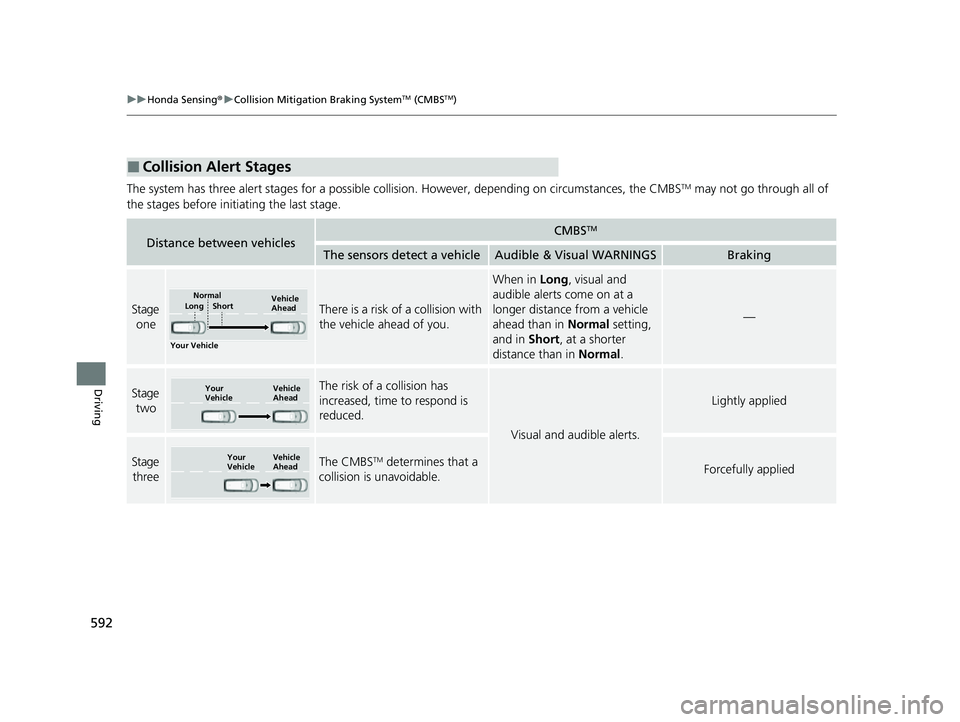
The system has three alert stages for a possible collision. However, depending on circumstances, the CMBSTM may not go through all of
the stages before initiating the last stage.
■Collision Alert Stages
Distance between vehiclesCMBSTM
The sensors detect a vehicleAudible & Visual WARNINGSBraking
Stage oneThere is a risk of a collision with
the vehicle ahead of you.
When in Long, visual and
audible alerts come on at a
longer distance from a vehicle
ahead than in Normal setting,
and in Short, at a shorter
distance than in Normal.
—
Stage
twoThe risk of a collision has
increased, time to respond is
reduced.
Visual and audible alerts.
Lightly applied
Stage three The CMBSTM determines that a
collision is unavoidable.Forcefully applied
Your Vehicle Vehicle
Ahead
Normal
Short
Long
Your
Vehicle Vehicle
Ahead
Your
Vehicle
Vehicle
Ahead
22 US ODYSSEY-31THR6400.book 592 ページ 2020年11月16日 月曜日 午後1時41分