key HONDA ODYSSEY 2022 Service Manual
[x] Cancel search | Manufacturer: HONDA, Model Year: 2022, Model line: ODYSSEY, Model: HONDA ODYSSEY 2022Pages: 782, PDF Size: 27.17 MB
Page 463 of 782
462
uuCustomized Features u
Features
*1:Default Setting
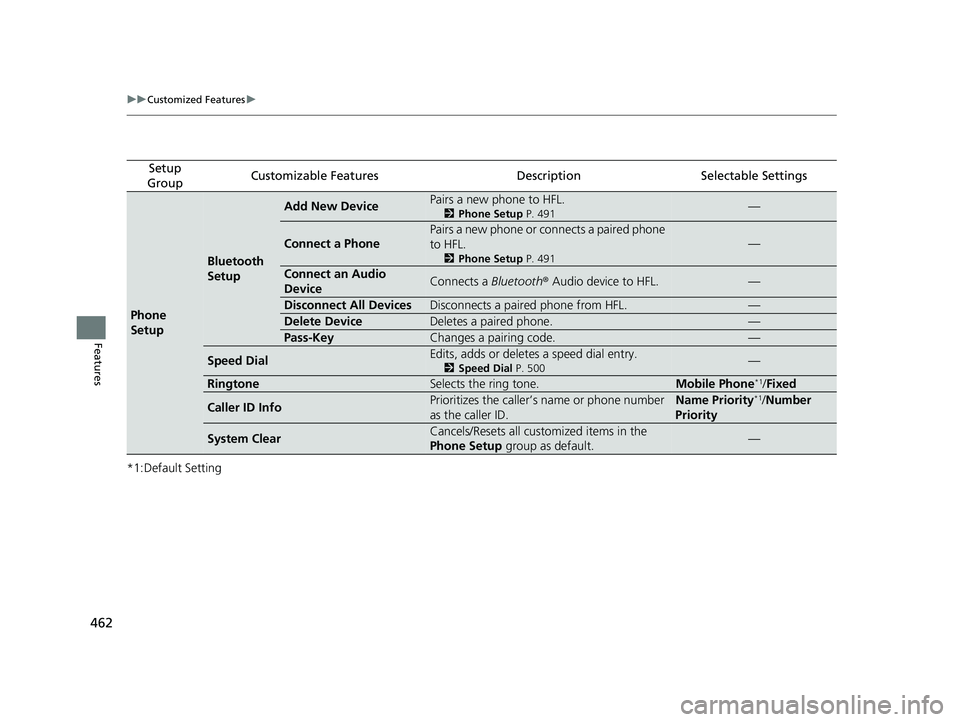
Setup
GroupCustomizable FeaturesDescriptionSelectable Settings
Phone
Setup
Bluetooth
Setup
Add New DevicePairs a new phone to HFL.
2 Phone Setup P. 491—
Connect a Phone
Pairs a new phone or connects a paired phone
to HFL.
2Phone Setup P. 491
—
Connect an Audio
DeviceConnects a Bluetooth® Audio device to HFL.—
Disconnect All DevicesDisconnects a paired phone from HFL.—
Delete DeviceDeletes a paired phone.—
Pass-KeyChanges a pairing code.—
Speed DialEdits, adds or deletes a speed dial entry.
2Speed Dial P. 500—
RingtoneSelects the ring tone.Mobile Phone*1/Fixed
Caller ID InfoPrioritizes the caller’s name or phone number
as the caller ID.Name Priority*1/Number
Priority
System ClearCancels/Resets all customized items in the
Phone Setup group as default.—
22 US ODYSSEY-31THR6400.book 462 ページ 2020年11月16日 月曜日 午後1時41分
Page 468 of 782
467
uuCustomized Features u
Continued
Features
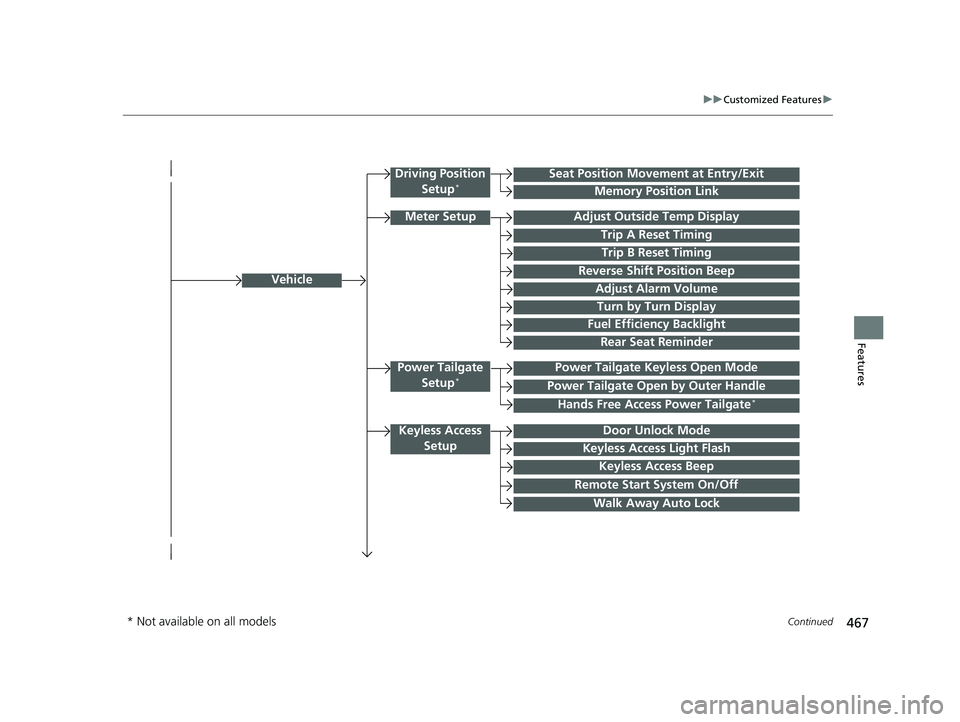
Vehicle
Driving Position
Setup*Seat Position Movem ent at Entry/Exit
Memory Position Link
Meter SetupAdjust Outside Temp Display
Trip A Reset Timing
Trip B Reset Timing
Reverse Shift Position Beep
Adjust Alarm Volume
Turn by Turn Display
Power Tailgate
Setup*Power Tailgate Keyless Open Mode
Power Tailgate Open by Outer Handle
Keyless Access SetupDoor Unlock Mode
Keyless Access Light Flash
Keyless Access Beep
Remote Start System On/Off
Walk Away Auto Lock
Fuel Efficiency Backlight
Hands Free Access Power Tailgate*
Rear Seat Reminder
* Not available on all models
22 US ODYSSEY-31THR6400.book 467 ページ 2020年11月16日 月曜日 午後1時41分
Page 469 of 782
468
uuCustomized Features u
Features
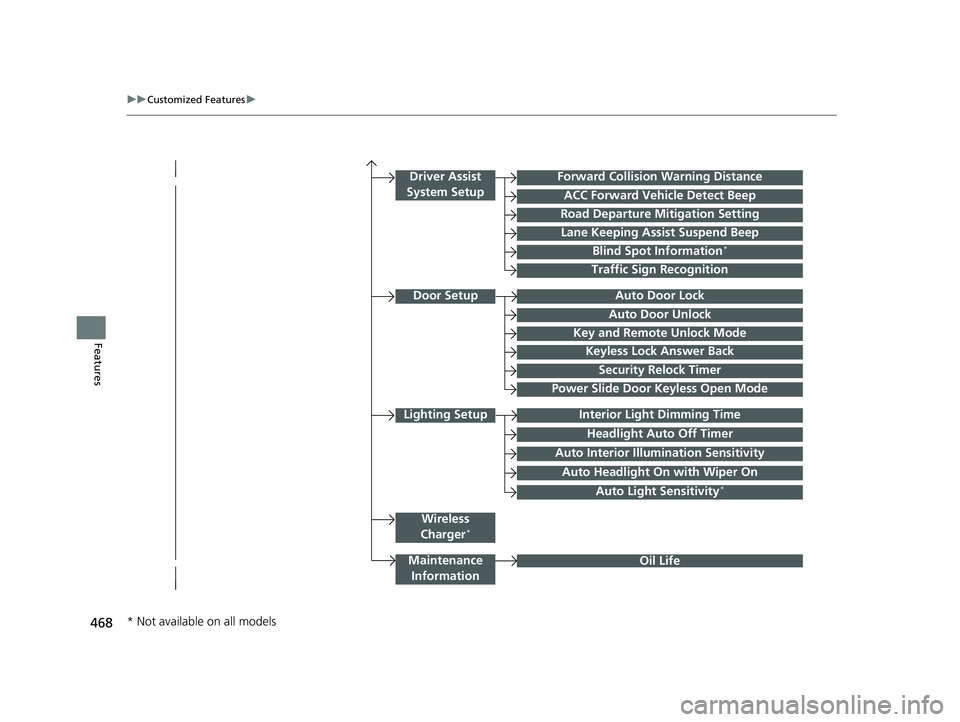
Lighting SetupInterior Light Dimming Time
Headlight Auto Off Timer
Forward Collision Warning Distance
ACC Forward Vehicle Detect Beep
Auto Interior Illu mination Sensitivity
Door SetupAuto Door Lock
Auto Door Unlock
Key and Remote Unlock Mode
Keyless Lock Answer Back
Security Relock Timer
Driver Assist
System Setup
Oil Life
Road Departure Mitigation Setting
Lane Keeping Assist Suspend Beep
Blind Spot Information*
Power Slide Door Keyless Open Mode
Wireless
Charger*
Traffic Sign Recognition
Maintenance Information
Auto Headlight On with Wiper On
Auto Light Sensitivity*
* Not available on all models
22 US ODYSSEY-31THR6400.book 468 ページ 2020年11月16日 月曜日 午後1時41分
Page 476 of 782
475
uuCustomized Features u
Continued
Features
*1:Default SettingSetup
Group Customizable Features Description Selectable Settings
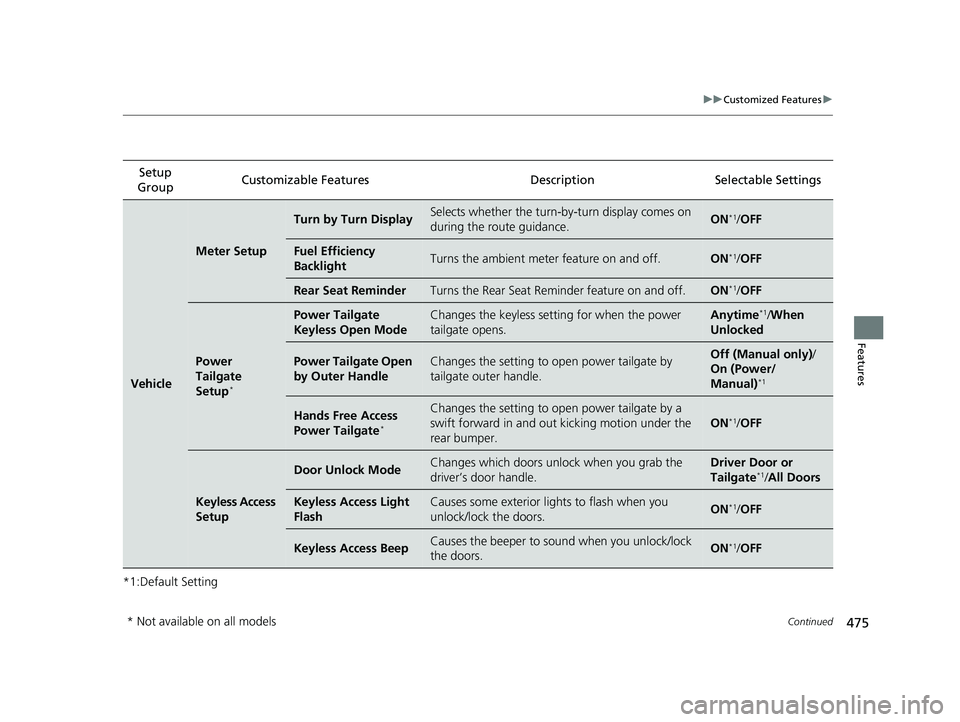
Vehicle
Meter Setup
Turn by Turn DisplaySelects whether the turn-b
y-turn display comes on
during the route guidance.ON*1/ OFF
Fuel Efficiency
BacklightTurns the ambient meter feature on and off.ON*1/OFF
Rear Seat ReminderTurns the Rear Seat Reminder feature on and off.ON*1/OFF
Power
Tailgate
Setup
*
Power Tailgate
Keyless Open ModeChanges the keyless setting for when the power
tailgate opens.Anytime*1/When
Unlocked
Power Tailgate Open
by Outer HandleChanges the setting to open power tailgate by
tailgate outer handle.Off (Manual only) /
On (Power/
Manual)
*1
Hands Free Access
Power Tailgate*
Changes the setting to open power tailgate by a
swift forward in and out kicking motion under the
rear bumper.
ON*1/ OFF
Keyless Access
Setup
Door Unlock ModeChanges which doors unlock when you grab the
driver’s door handle.Driver Door or
Tailgate*1/All Doors
Keyless Access Light
FlashCauses some exterior lights to flash when you
unlock/lock the doors.ON*1/OFF
Keyless Access BeepCauses the beeper to so und when you unlock/lock
the doors.ON*1/ OFF
* Not available on all models
22 US ODYSSEY-31THR6400.book 475 ページ 2020年11月16日 月曜日 午後1時41分
Page 477 of 782
476
uuCustomized Features u
Features
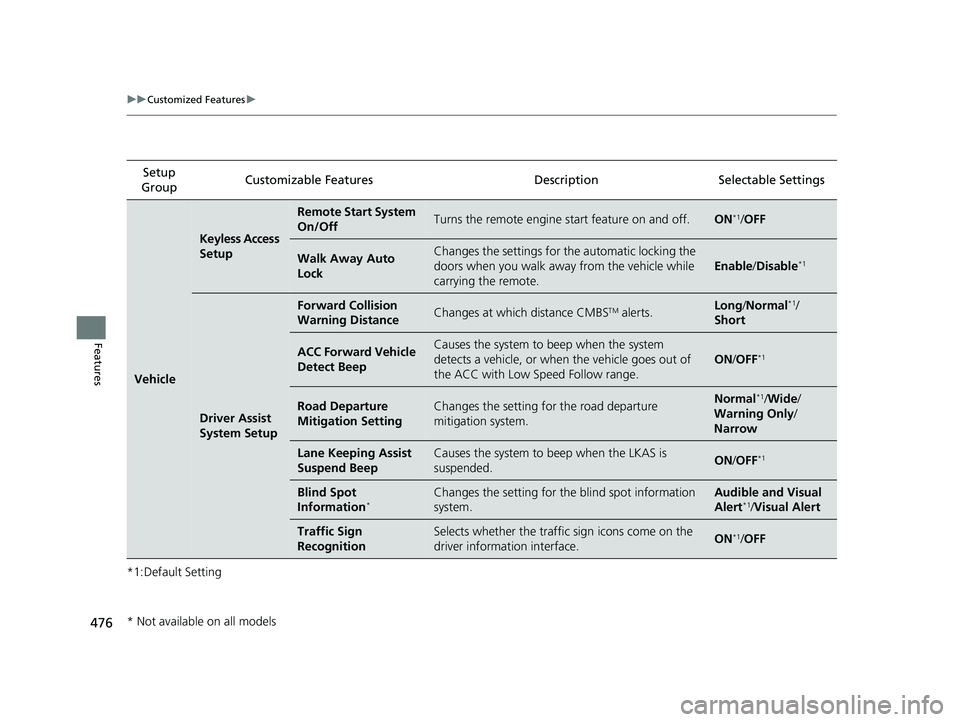
*1:Default SettingSetup
Group Customizable Features Description Selectable Settings
Vehicle
Keyless Access
Setup
Remote Start System
On/OffTurns the remote engine
start feature on and off.ON*1/OFF
Walk Away Auto
LockChanges the settings for the automatic locking the
doors when you walk away from the vehicle while
carrying the remote.
Enable /Disable*1
Driver Assist
System Setup
Forward Collision
Warning DistanceChanges at which distance CMBSTM alerts.Long /Normal*1/
Short
ACC Forward Vehicle
Detect BeepCauses the system to beep when the system
detects a vehicle, or when the vehicle goes out of
the ACC with Low Speed Follow range.
ON /OFF*1
Road Departure
Mitigation SettingChanges the setting for the road departure
mitigation system.Normal*1/ Wide /
Warning Only /
Narrow
Lane Keeping Assist
Suspend BeepCauses the system to b eep when the LKAS is
suspended.ON /OFF*1
Blind Spot
Information*Changes the setting for the blind spot information
system.Audible and Visual
Alert*1/ Visual Alert
Traffic Sign
RecognitionSelects whether the traffic sign icons come on the
driver information interface.ON*1/OFF
* Not available on all models
22 US ODYSSEY-31THR6400.book 476 ページ 2020年11月16日 月曜日 午後1時41分
Page 478 of 782
477
uuCustomized Features u
Continued
Features
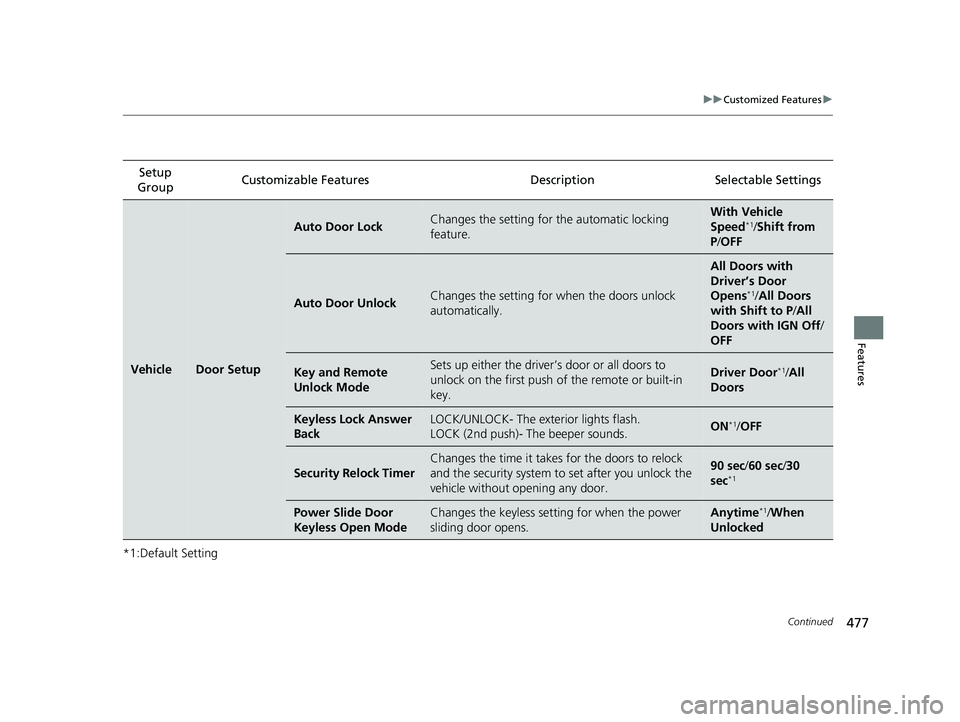
*1:Default SettingSetup
Group Customizable Features Description Selectable Settings
VehicleDoor Setup
Auto Door LockChanges the setting for
the automatic locking
feature.With Ve hicle
Speed*1/ Shift from
P /OFF
Auto Door UnlockChanges the setting for when the doors unlock
automatically.
All Doors with
Driver’s Door
Opens
*1/ All Doors
with Shift to P /All
Doors with IGN Off /
OFF
Key and Remote
Unlock ModeSets up either the driver’s door or all doors to
unlock on the first push of the remote or built-in
key.Driver Door*1/ All
Doors
Keyless Lock Answer
BackLOCK/UNLOCK- The exterior lights flash.
LOCK (2nd push)- The beeper sounds.ON*1/ OFF
Security Relock Timer
Changes the time it takes for the doors to relock
and the security system to set after you unlock the
vehicle without opening any door.90 sec/ 60 sec/30
sec*1
Power Slide Door
Keyless Open ModeChanges the keyless setting for when the power
sliding door opens.Anytime*1/ When
Unlocked
22 US ODYSSEY-31THR6400.book 477 ページ 2020年11月16日 月曜日 午後1時41分
Page 489 of 782
488
uuBluetooth ® HandsFreeLink ®u HFL Menus
Features
*1 : Appears only when a phone is connected to HFL.
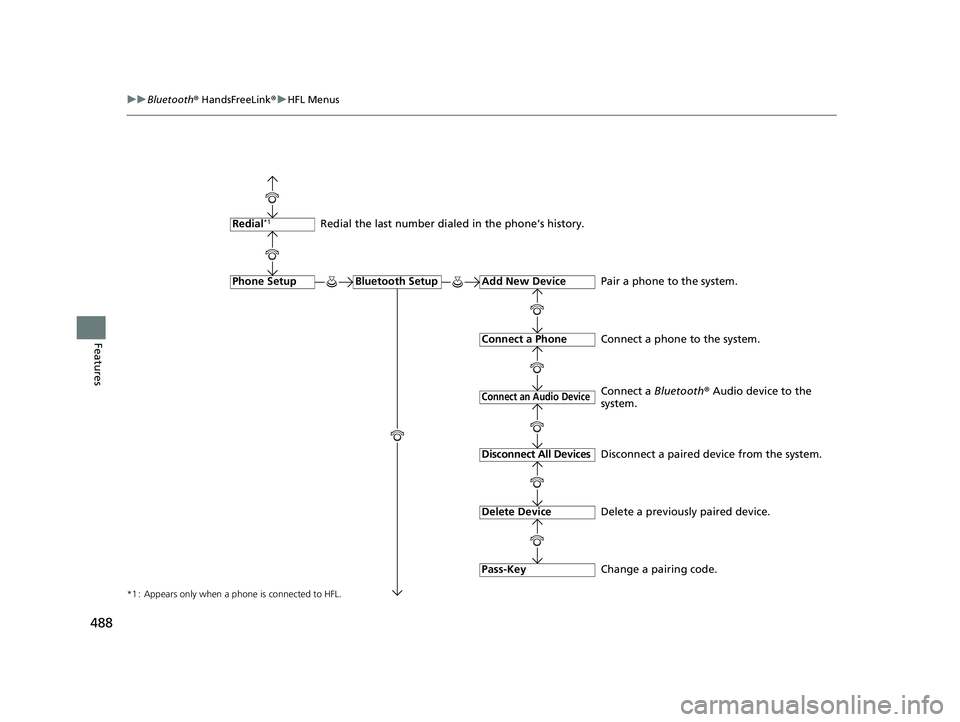
Redial the last number dialed in the phone’s history.
Add New Device
Connect a Phone
Connect an Audio Device
Bluetooth SetupPhone Setup
Redial*1
Pair a phone to the system.
Connect a phone to the system.
Change a pairing code.
Disconnect All Devices
Delete Device
Pass-Key
Disconnect a paired device from the system.
Delete a previously paired device. Connect a
Bluetooth® Audio device to the
system.
22 US ODYSSEY-31THR6400.book 488 ページ 2020年11月16日 月曜日 午後1時41分
Page 496 of 782
495
uuBluetooth ® HandsFreeLink ®u HFL Menus
Continued
Features
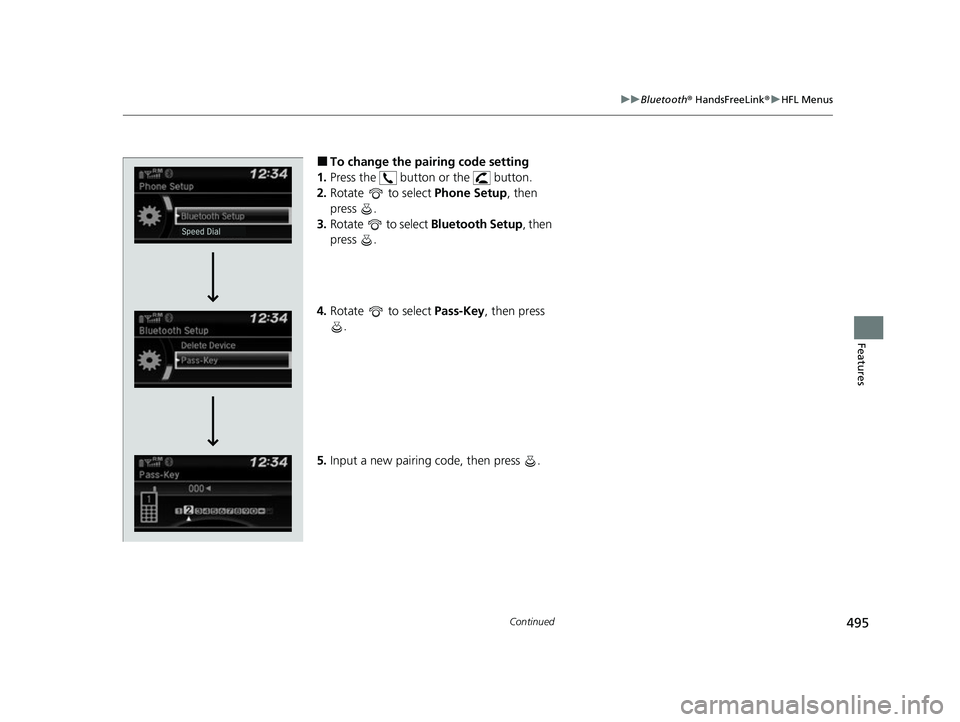
■To change the pairing code setting
1. Press the button or the button.
2. Rotate to select Phone Setup, then
press .
3. Rotate to select Bluetooth Setup, then
press .
4. Rotate to select Pass-Key, then press
.
5. Input a new pairing code, then press .
22 US ODYSSEY-31THR6400.book 495 ページ 2020年11月16日 月曜日 午後1時41分
Page 515 of 782
514
uuBluetooth ® HandsFreeLink ®u HFL Menus
Features
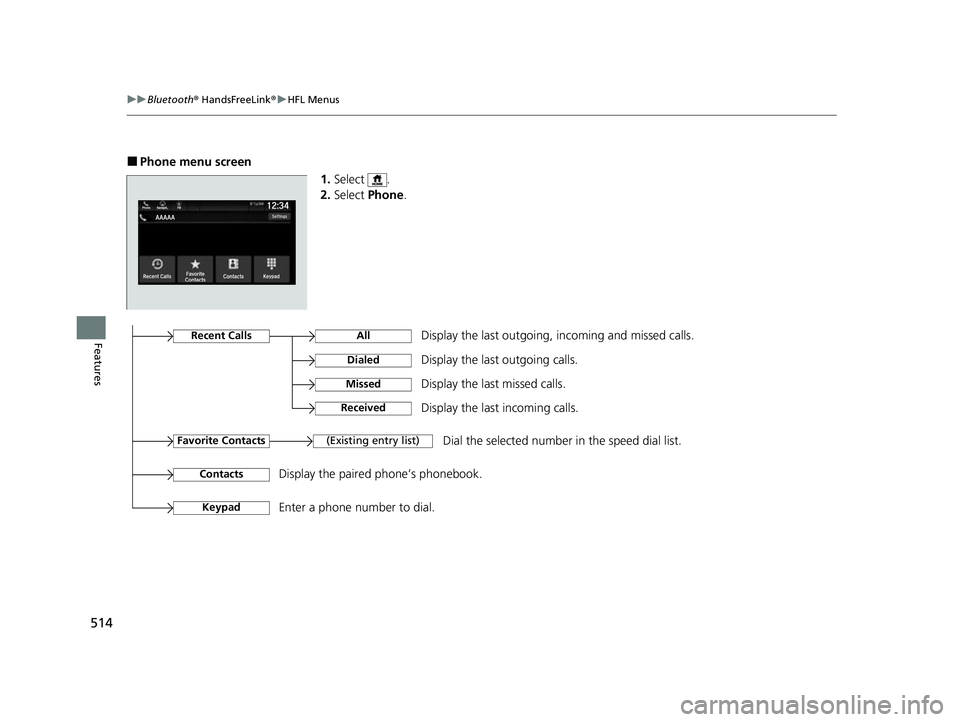
■Phone menu screen
1.Select .
2. Select Phone .
Display the last outgoing, incoming and missed calls.Recent Calls
Favorite Contacts
All
Dialed
Received
Display the last outgoing calls.
Display the last incoming calls.
MissedDisplay the last missed calls.
KeypadEnter a phone number to dial.
(Existing entry list)Dial the selected number in the speed dial list.
ContactsDisplay the paired phone’s phonebook.
22 US ODYSSEY-31THR6400.book 514 ページ 2020年11月16日 月曜日 午後1時41分
Page 521 of 782
520
uuBluetooth ® HandsFreeLink ®u HFL Menus
Features
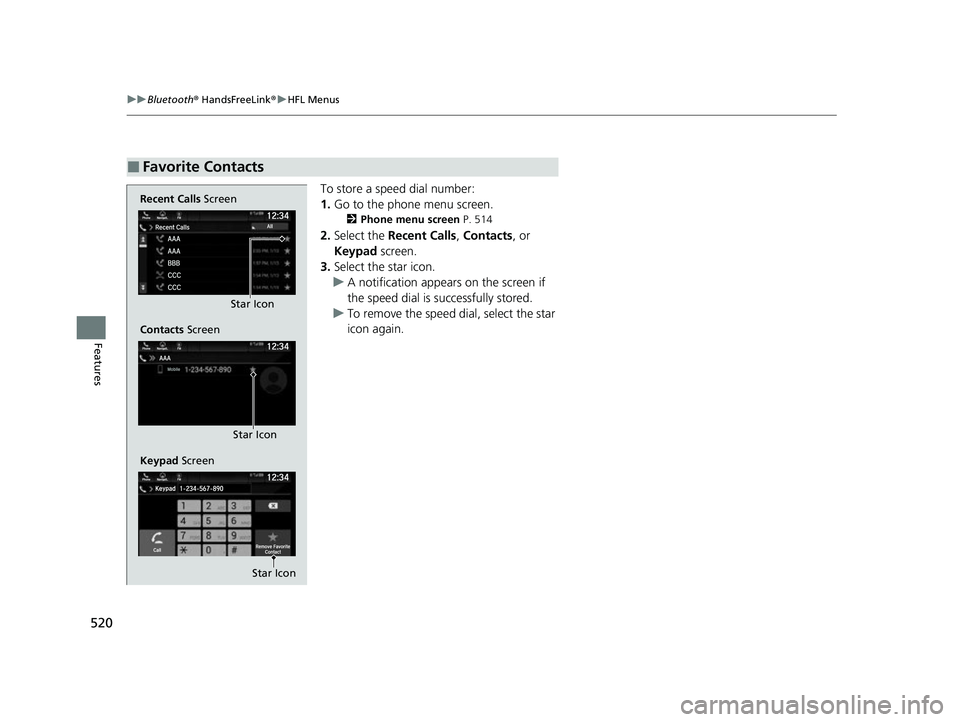
To store a speed dial number:
1. Go to the phone menu screen.
2 Phone menu screen P. 514
2.Select the Recent Calls , Contacts, or
Keypad screen.
3. Select the star icon.
u A notification appears on the screen if
the speed dial is successfully stored.
u To remove the speed dial, select the star
icon again.
■Favorite Contacts
Recent Calls Screen
Contacts Screen
Keypad Screen Star Icon
Star Icon
Star Icon
22 US ODYSSEY-31THR6400.book 520 ページ 2020年11月16日 月曜日 午後1時41分