lock HONDA ODYSSEY 2023 Owners Manual
[x] Cancel search | Manufacturer: HONDA, Model Year: 2023, Model line: ODYSSEY, Model: HONDA ODYSSEY 2023Pages: 707, PDF Size: 23.9 MB
Page 606 of 707
uuMaintenance Under the Hood uChanging the Engine Oil and Oil Filter
604
Maintenance
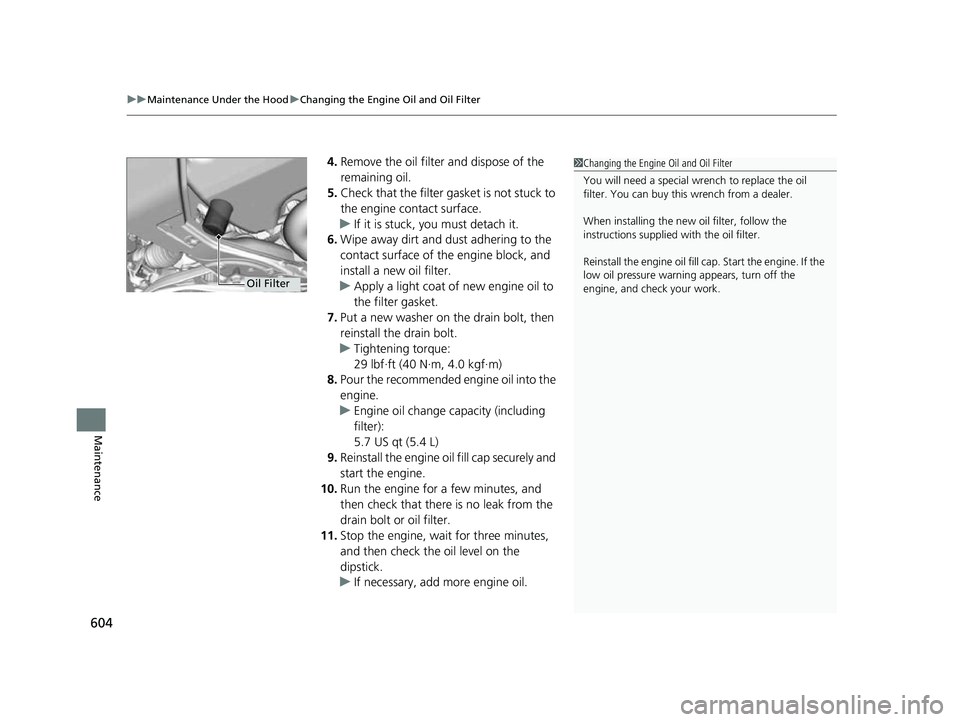
4. Remove the oil filter and dispose of the
remaining oil.
5. Check that the filter ga sket is not stuck to
the engine contact surface.
u If it is stuck, you must detach it.
6. Wipe away dirt and dust adhering to the
contact surface of the engine block, and
install a new oil filter.
u Apply a light coat of new engine oil to
the filter gasket.
7. Put a new washer on the drain bolt, then
reinstall the drain bolt.
u Tightening torque:
29 lbf∙ft (40 N∙m, 4.0 kgf∙m)
8. Pour the recommended engine oil into the
engine.
u Engine oil change capacity (including
filter):
5.7 US qt (5.4 L)
9. Reinstall the engine oi l fill cap securely and
start the engine.
10. Run the engine for a few minutes, and
then check that there is no leak from the
drain bolt or oil filter.
11. Stop the engine, wait for three minutes,
and then check the oil level on the
dipstick.
u If necessary, add more engine oil.1Changing the Engine Oil and Oil Filter
You will need a special wrench to replace the oil
filter. You can buy this wrench from a dealer.
When installing the new oil filter, follow the
instructions supplied with the oil filter.
Reinstall the engine oil fill cap. Start the engine. If the
low oil pressure warning appears, turn off the
engine, and check your work.
Oil Filter
23 US ODYSSEY-31THR6500.book 604 ページ 2022年1月24日 月曜日 午前11時35分
Page 608 of 707
uuMaintenance Under the Hood uEngine Coolant
606
Maintenance
1. Make sure the engine and radiator are
cool.
2. Remove the engine compartment cover.
2 Engine Compartment Cover P. 599
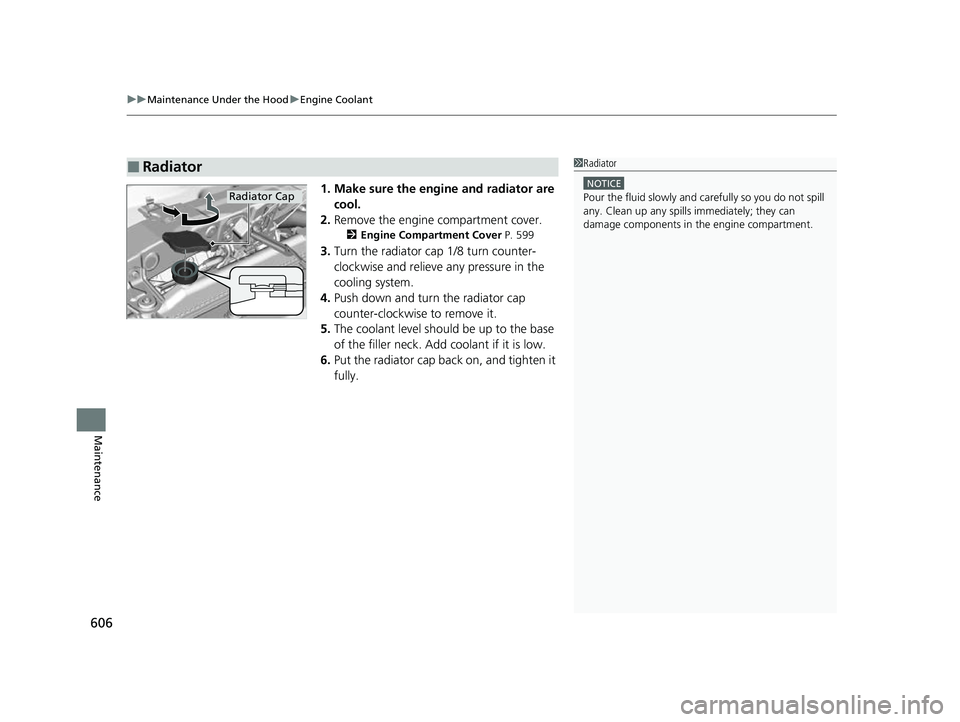
3.Turn the radiator cap 1/8 turn counter-
clockwise and relieve any pressure in the
cooling system.
4. Push down and turn the radiator cap
counter-clockwise to remove it.
5. The coolant level should be up to the base
of the filler neck. Add coolant if it is low.
6. Put the radiator cap back on, and tighten it
fully.
■Radiator1Radiator
NOTICE
Pour the fluid slowly and ca refully so you do not spill
any. Clean up any spills immediately; they can
damage components in the engine compartment.Radiator Cap
23 US ODYSSEY-31THR6500.book 606 ページ 2022年1月24日 月曜日 午前11時35分
Page 613 of 707
611
uuReplacing Light Bulbs uFront Turn Signal Light Bulbs
Maintenance
Front Turn Signal Light Bulbs
When replacing, use the following bulbs.
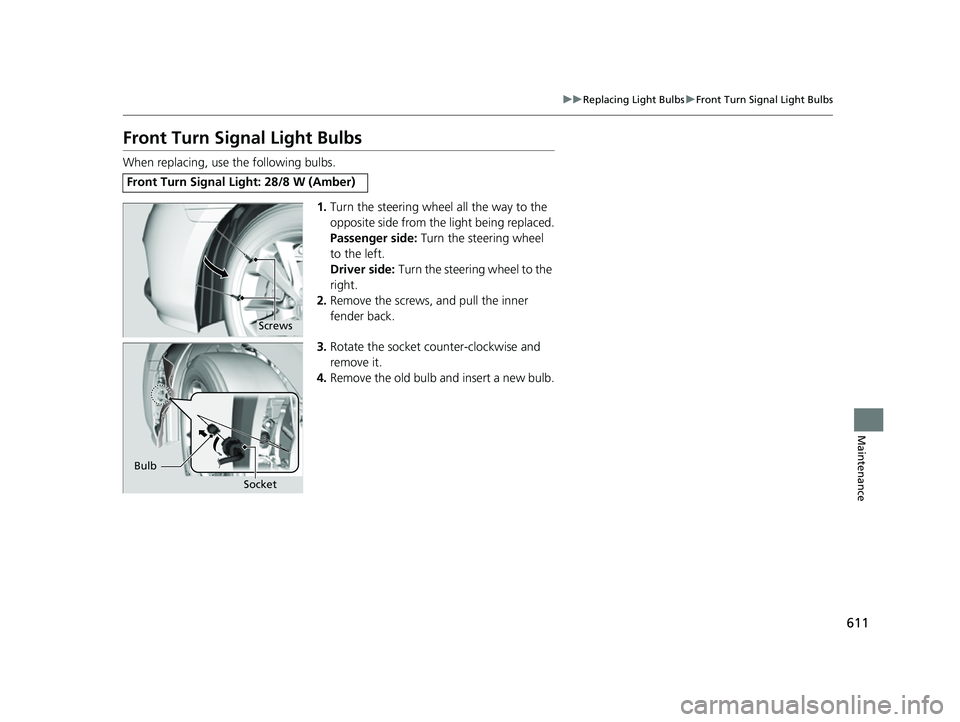
1.Turn the steering wheel all the way to the
opposite side from the light being replaced.
Passenger side: Turn the steering wheel
to the left.
Driver side: Turn the steering wheel to the
right.
2. Remove the screws, and pull the inner
fender back.
3. Rotate the socket counter-clockwise and
remove it.
4. Remove the old bulb and insert a new bulb.
Front Turn Signal Light: 28/8 W (Amber)
Screws
Bulb
Socket
23 US ODYSSEY-31THR6500.book 611 ページ 2022年1月24日 月曜日 午前11時35分
Page 614 of 707
612
uuReplacing Light Bulbs uFront Side Marker Light Bulbs
Maintenance
Front Side Marker Light Bulbs
When replacing, use the following bulb.
1.Turn the steering wheel all the way to the
opposite side from the light being replaced.
Passenger side: Turn the steering wheel
to the left.
Driver side: Turn the steering wheel to the
right.
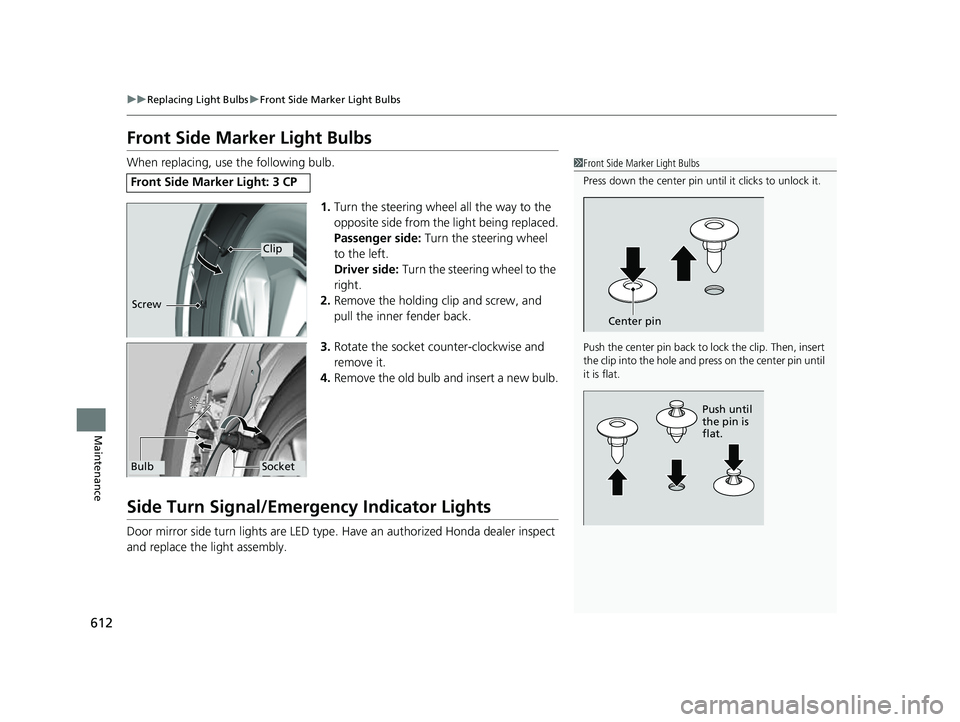
2. Remove the holding clip and screw, and
pull the inner fender back.
3. Rotate the socket counter-clockwise and
remove it.
4. Remove the old bulb and insert a new bulb.
Side Turn Signal/Emergency Indicator Lights
Door mirror side turn lights are LED type. Have an authorized Honda dealer inspect
and replace the light assembly.
Front Side Marker Light: 3 CP
1 Front Side Marker Light Bulbs
Press down the center pin until it clicks to unlock it.
Push the center pin back to lock the clip. Then, insert
the clip into the hole and press on the center pin until
it is flat.
Center pin
Push until
the pin is
flat.
Clip
Screw
SocketBulb
23 US ODYSSEY-31THR6500.book 612 ページ 2022年1月24日 月曜日 午前11時35分
Page 616 of 707
614
uuReplacing Light Bulbs uBrake, Rear Turn Signal Light Bulbs, and Rear Side Marker/Taillights
Maintenance
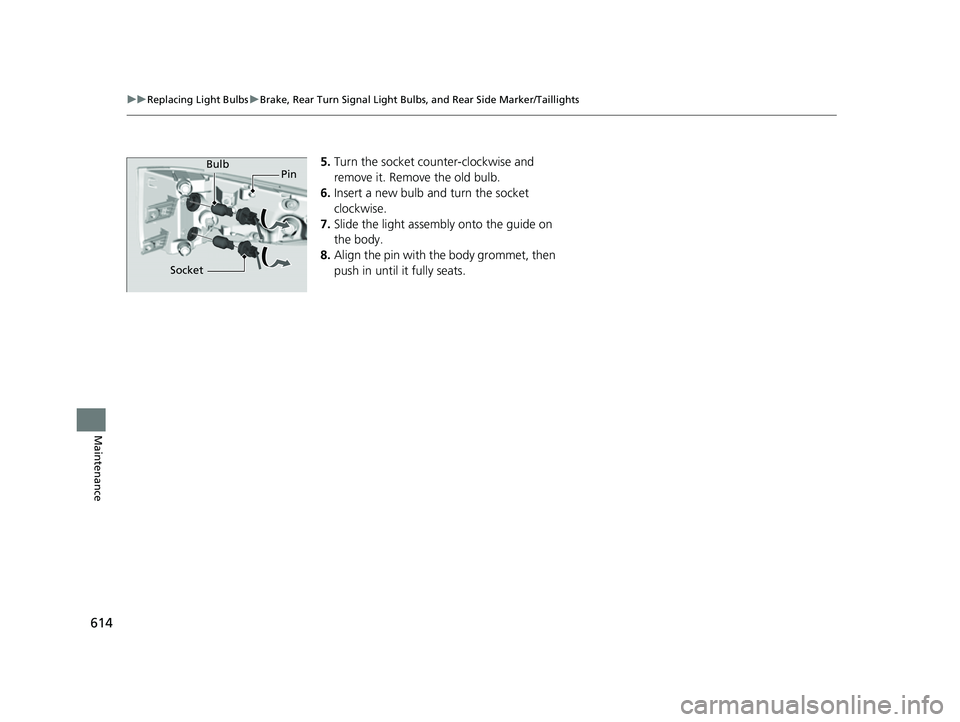
5. Turn the socket counter-clockwise and
remove it. Remove the old bulb.
6. Insert a new bulb and turn the socket
clockwise.
7. Slide the light assembly onto the guide on
the body.
8. Align the pin with the body grommet, then
push in until it fully seats.Bulb
Socket Pin
23 US ODYSSEY-31THR6500.book 614 ページ 2022年1月24日 月曜日 午前11時35分
Page 617 of 707
615
uuReplacing Light Bulbs uBack-Up Light Bulbs/Taillights
Maintenance
Back-Up Light Bulbs/Taillights
When replacing, use the following bulbs.
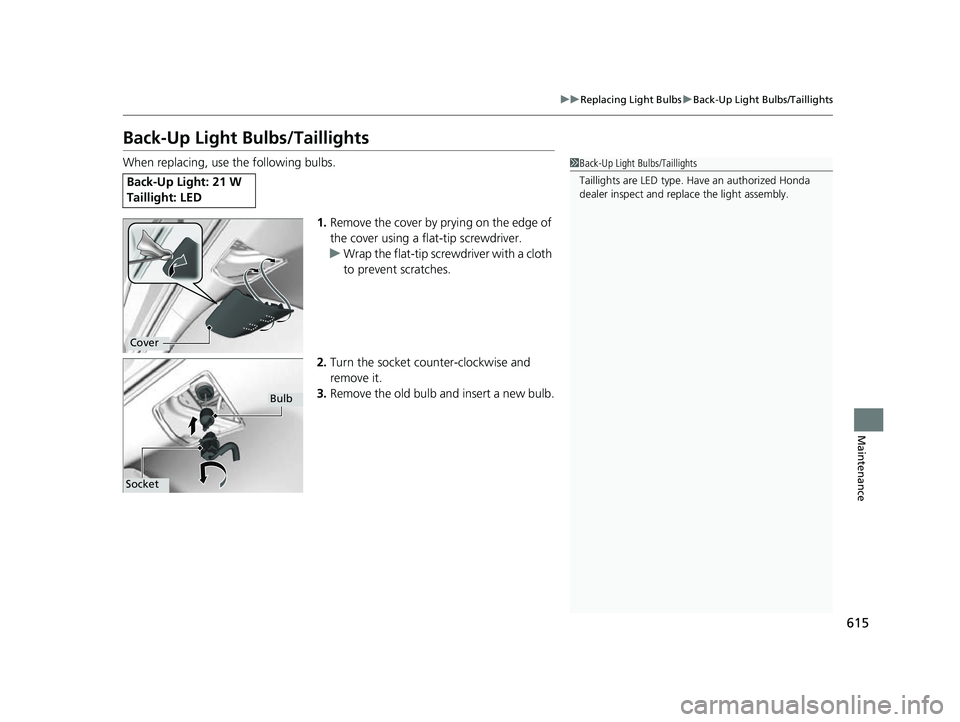
1.Remove the cover by prying on the edge of
the cover using a flat-tip screwdriver.
u Wrap the flat-tip screwdriver with a cloth
to prevent scratches.
2. Turn the socket counter-clockwise and
remove it.
3. Remove the old bulb and insert a new bulb.
Back-Up Light: 21 W
Taillight: LED
1Back-Up Light Bulbs/Taillights
Taillights are LED type. Ha ve an authorized Honda
dealer inspect and replace the light assembly.
Cover
Bulb
Socket
23 US ODYSSEY-31THR6500.book 615 ページ 2022年1月24日 月曜日 午前11時35分
Page 621 of 707
Continued619
uuChecking and Maintaining Wiper Blades uChanging the Rear Wiper Blade Rubber
Maintenance
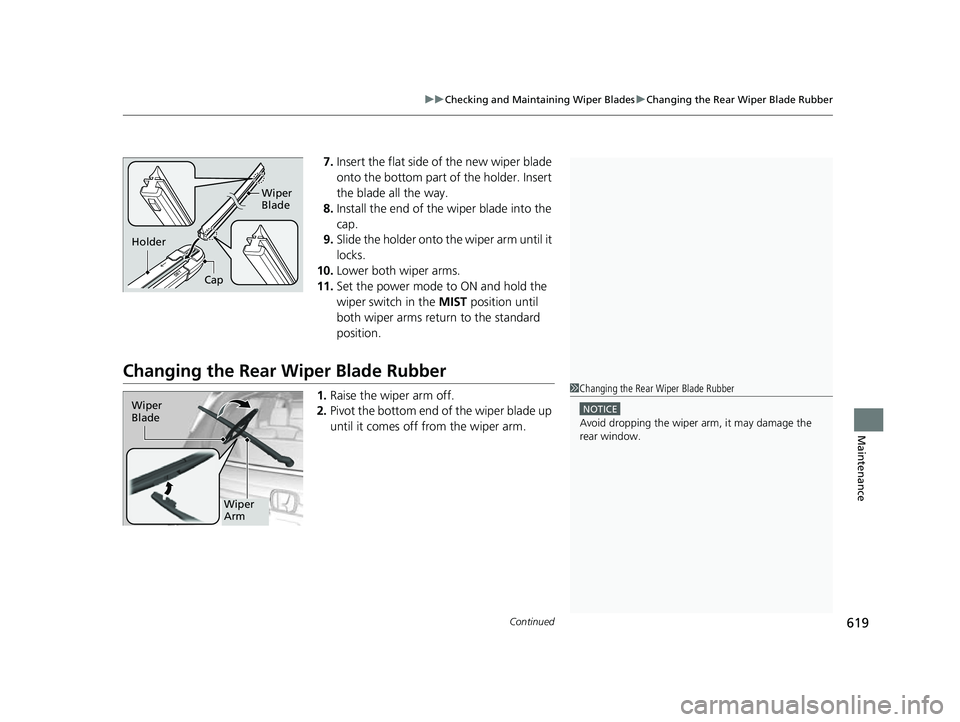
7. Insert the flat side of the new wiper blade
onto the bottom part of the holder. Insert
the blade all the way.
8. Install the end of the wiper blade into the
cap.
9. Slide the holder onto th e wiper arm until it
locks.
10. Lower both wiper arms.
11. Set the power mode to ON and hold the
wiper switch in the MIST position until
both wiper arms return to the standard
position.
Changing the Rear Wiper Blade Rubber
1.Raise the wiper arm off.
2. Pivot the bottom end of the wiper blade up
until it comes off from the wiper arm.
Cap Wiper
Blade
Holder
1
Changing the Rear Wiper Blade Rubber
NOTICE
Avoid dropping the wiper ar m, it may damage the
rear window.
Wiper
Blade
Wiper
Arm
23 US ODYSSEY-31THR6500.book 619 ページ 2022年1月24日 月曜日 午前11時35分
Page 632 of 707
630
Maintenance
Battery
Checking the Battery
The condition of the battery is monitored by a
sensor located on the negative terminal of the
battery. If there is a problem with this sensor,
the driver information interface will display a
warning message. If this happens, have your
vehicle inspected by a dealer.
Check the battery te rminals for corrosion
monthly.
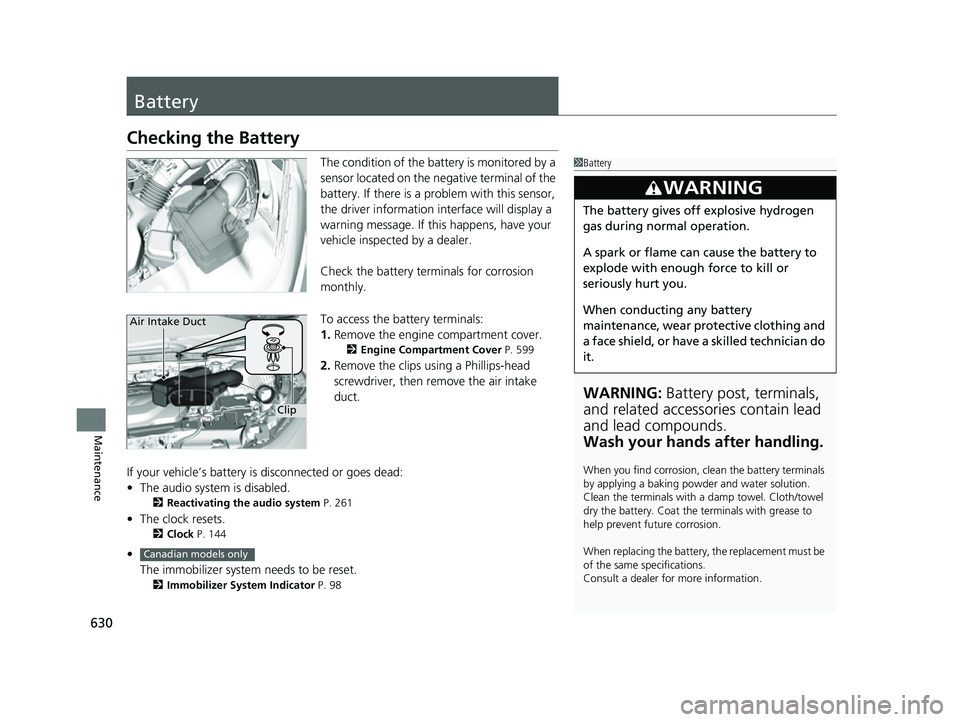
To access the battery terminals:
1. Remove the engine compartment cover.
2 Engine Compartment Cover P. 599
2.Remove the clips using a Phillips-head
screwdriver, then remove the air intake
duct.
If your vehicle’s battery is disconnected or goes dead:
• The audio system is disabled.
2 Reactivating the audio system P. 261
•The clock resets.
2 Clock P. 144
•
The immobilizer system needs to be reset.
2 Immobilizer System Indicator P. 98
1Battery
WARNING: Battery post, terminals,
and related accessories contain lead
and lead compounds.
Wash your hands after handling.
When you find corrosion, cl ean the battery terminals
by applying a baking powder and water solution.
Clean the terminals with a damp towel. Cloth/towel
dry the battery. Coat the terminals with grease to
help prevent future corrosion.
When replacing the battery, the replacement must be
of the same specifications.
Consult a dealer for more information.
3WARNING
The battery gives off explosive hydrogen
gas during normal operation.
A spark or flame can cause the battery to
explode with enough force to kill or
seriously hurt you.
When conducting any battery
maintenance, wear prot ective clothing and
a face shield, or have a skilled technician do
it.
Clip
Air Intake Duct
Canadian models only
23 US ODYSSEY-31THR6500.book 630 ページ 2022年1月24日 月曜日 午前11時35分
Page 639 of 707
Continued637
uuCleaning uInterior Care
Maintenance
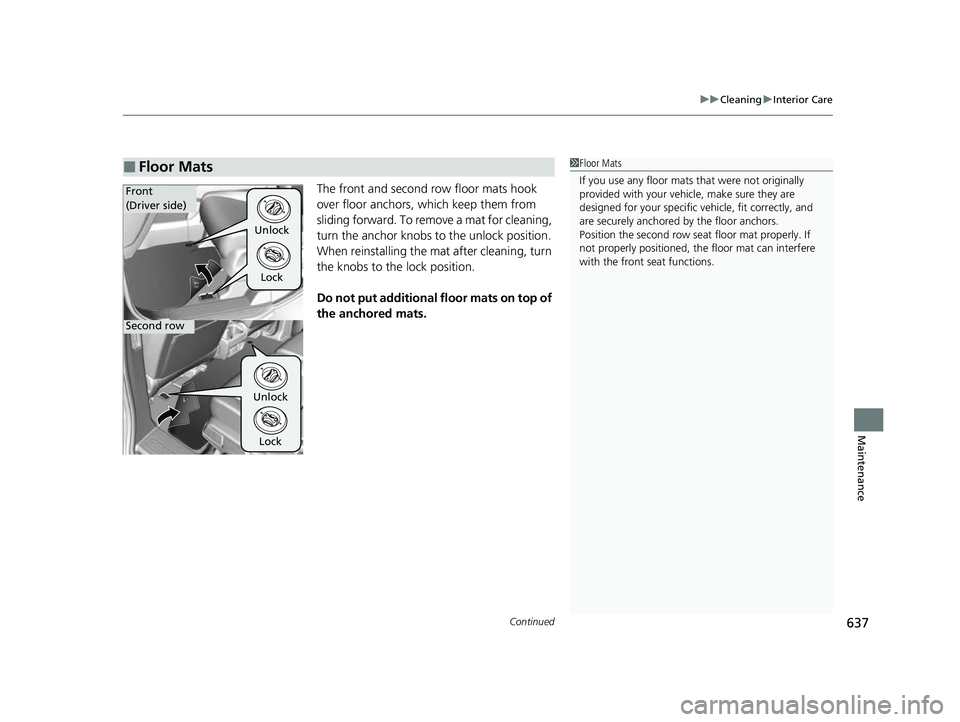
The front and second row floor mats hook
over floor anchors, which keep them from
sliding forward. To remove a mat for cleaning,
turn the anchor knobs to the unlock position.
When reinstalling the mat after cleaning, turn
the knobs to the lock position.
Do not put additional floor mats on top of
the anchored mats.
■Floor Mats1Floor Mats
If you use any floor mats that were not originally
provided with your vehicle, make sure they are
designed for your specific ve hicle, fit correctly, and
are securely anchored by the floor anchors.
Position the second row seat floor mat properly. If
not properly positioned, th e floor mat can interfere
with the front seat functions.
Unlock
Lock
UnlockLock
Front
(Driver side)
Second row
23 US ODYSSEY-31THR6500.book 637 ページ 2022年1月24日 月曜日 午前11時35分
Page 647 of 707
645
Handling the Unexpected
This chapter explains how to handle unexpected troubles.
ToolsTypes of Tools .................................. 646
If a Tire Goes Flat Changing a Flat Tire ......................... 647
Engine Does Not Start Checking the Engine ........................ 656
If the Remote Battery is Weak .......... 657
Emergency Engine Stop ................... 658
If the Battery Is Dead ....................... 659
Overheating How to Handle Overheating ............. 661
Indicator, Coming On/Blinking
If the Engine Oil Low Warning Appears ....... 663
If the Charging System Indicator Comes
On ................................................. 664
If the Malfunction Indicator Lamp Comes On or Blinks ................................... 664
If the Brake System Indicator (Red) Comes
On or Blinks ................................... 665
If the Brake System Indicator (Red) Comes On or Blinks at the Same Time When the Brake
System Indicator (Amber) Comes On ..... 666
If the Electric Power Steering (EPS) System Indicator Comes On ....................... 667
If the Low Tire Pressure/TPMS Indicator Comes On or Blinks........................ 667 If the Transmission System Indicator Blinks
along with the Warning Message... 668
Fuses Fuse Locations ................................. 669
Inspecting and Changing Fuses ........ 675
Emergency Towing ........................... 676
If You Cannot Unlock the Fuel Fill Door ... 677
If You Cannot Open the Tailgate .... 678
When You Cannot Close the Power Sliding Doors ................................... 680
Refueling
Refueling From a Portable Fuel Container .... 681
23 US ODYSSEY-31THR6500.book 645 ページ 2022年1月24日 月曜日 午前11時35分