audio HONDA ODYSSEY 2023 Owners Manual
[x] Cancel search | Manufacturer: HONDA, Model Year: 2023, Model line: ODYSSEY, Model: HONDA ODYSSEY 2023Pages: 707, PDF Size: 23.9 MB
Page 581 of 707
579
uuParking Your Vehicle uCross Traffic Monitor
Driving
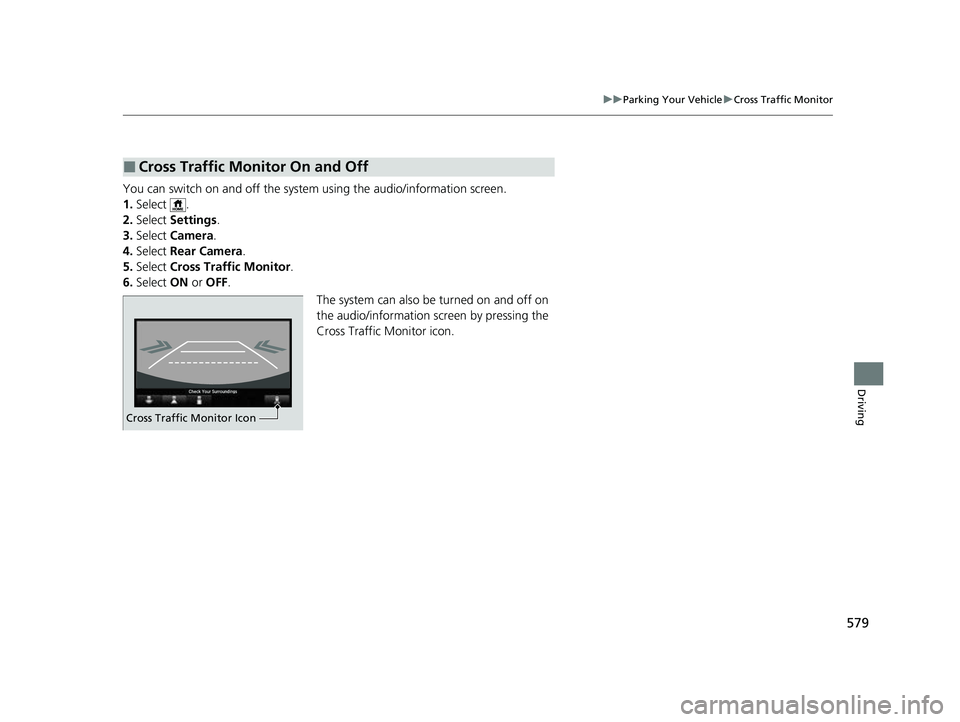
You can switch on and off the system using the audio/information screen.
1. Select .
2. Select Settings .
3. Select Camera .
4. Select Rear Camera .
5. Select Cross Traffic Monitor .
6. Select ON or OFF .
The system can also be turned on and off on
the audio/information screen by pressing the
Cross Traffic Monitor icon.
■Cross Traffic Monitor On and Off
0024004900460044004C0001003A0050005600530001003400560053005300500056004F0045004A004F00480054
Cross Traffic Monitor Icon
23 US ODYSSEY-31THR6500.book 579 ページ 2022年1月24日 月曜日 午前11時35分
Page 582 of 707
580
Driving
Multi-View Rear Camera
About Your Multi-View Rear Camera
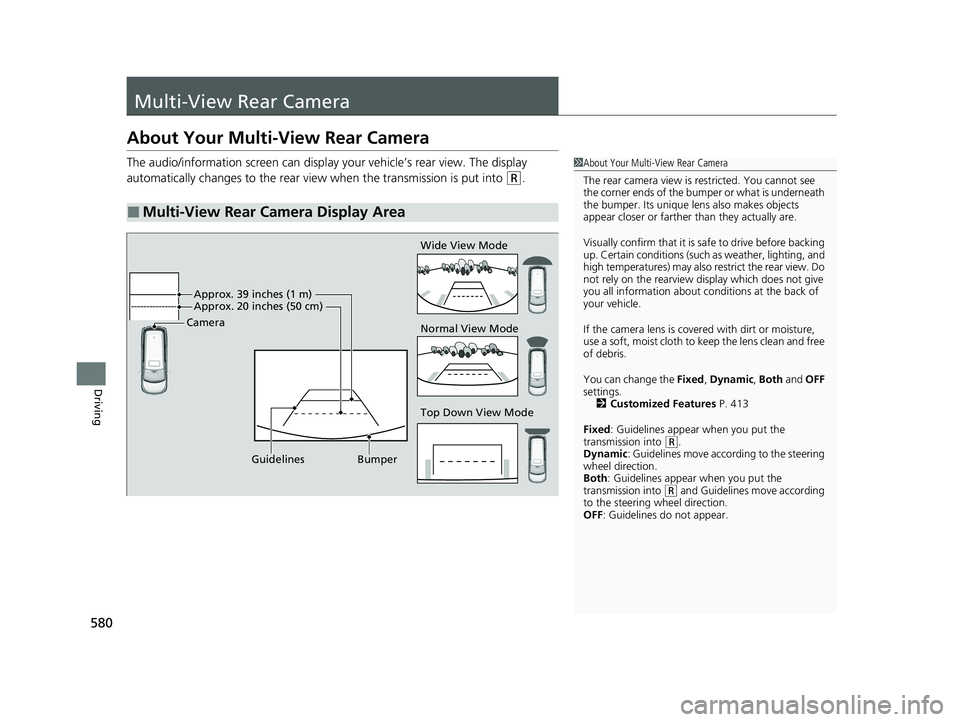
The audio/information screen can display your vehicle’s rear view. The display
automatically changes to the rear view when the transmission is put into
(R.
■Multi-View Rear Camera Display Area
1About Your Multi-View Rear Camera
The rear camera view is restricted. You cannot see
the corner ends of the bumper or what is underneath
the bumper. Its unique le ns also makes objects
appear closer or farther than they actually are.
Visually confirm that it is safe to drive before backing
up. Certain conditions (such as weather, lighting, and
high temperatures) may also restrict the rear view. Do
not rely on the rearview display which does not give
you all information about conditions at the back of
your vehicle.
If the camera lens is cove red with dirt or moisture,
use a soft, moist cloth to keep the lens clean and free
of debris.
You can change the Fixed, Dynamic , Both and OFF
settings. 2 Customized Features P. 413
Fixed: Guidelines appear when you put the
transmission into
( R.
Dynamic : Guidelines move according to the steering
wheel direction.
Both : Guidelines appear when you put the
transmission into
( R and Guidelines move according
to the steering wheel direction.
OFF: Guidelines do not appear.
Top Down View Mode Normal View Mode Wide View Mode
Guidelines Bumper
Camera
Approx. 39 inches (1 m)
Approx. 20 inches (50 cm)
23 US ODYSSEY-31THR6500.book 580 ページ 2022年1月24日 月曜日 午前11時35分
Page 598 of 707
uuMaintenance MinderTMuTo Use Maintenance MinderTM
596
Maintenance
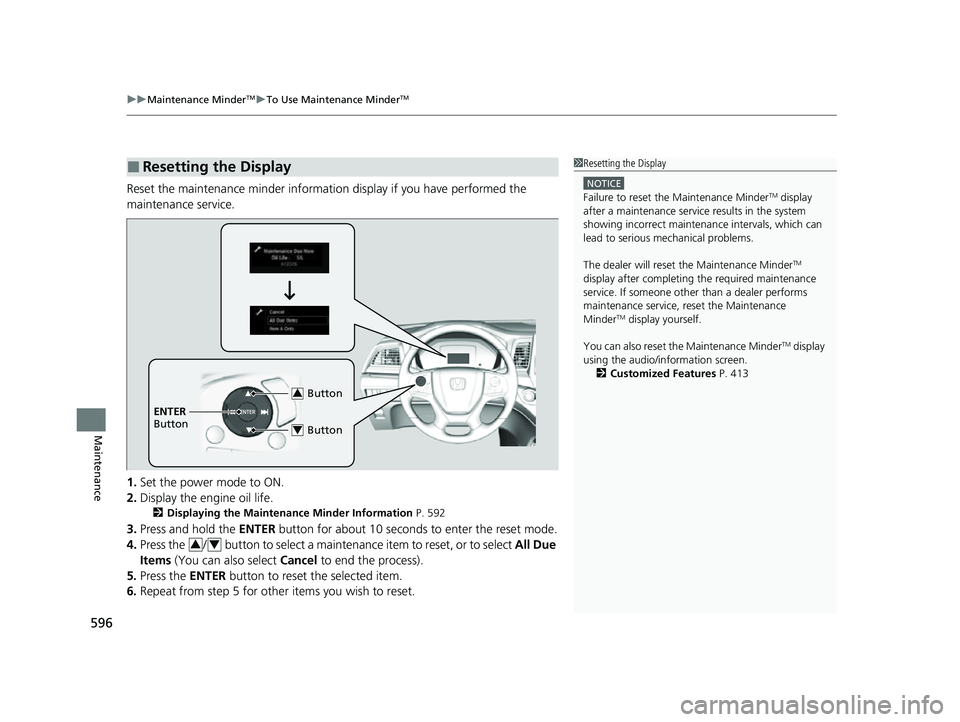
Reset the maintenance minder informat ion display if you have performed the
maintenance service.
1. Set the power mode to ON.
2. Display the engine oil life.
2 Displaying the Maintenance Minder Information P. 592
3.Press and hold the ENTER button for about 10 seconds to enter the reset mode.
4. Press the / button to select a maintenance item to reset, or to select All Due
Items (You can also select Cancel to end the process).
5. Press the ENTER button to reset the selected item.
6. Repeat from step 5 for other items you wish to reset.
■Resetting the Display1Resetting the Display
NOTICE
Failure to reset the Maintenance MinderTM display
after a maintenance servic e results in the system
showing incorrect maintenance intervals, which can
lead to serious mechanical problems.
The dealer will reset the Maintenance Minder
TM
display after completing th e required maintenance
service. If someone other than a dealer performs
maintenance service, reset the Maintenance
Minder
TM display yourself.
You can also reset the Maintenance Minder
TM display
using the audio/information screen. 2 Customized Features P. 413
Button3
ENTER
Button
Button4
34
23 US ODYSSEY-31THR6500.book 596 ページ 2022年1月24日 月曜日 午前11時35分
Page 632 of 707
630
Maintenance
Battery
Checking the Battery
The condition of the battery is monitored by a
sensor located on the negative terminal of the
battery. If there is a problem with this sensor,
the driver information interface will display a
warning message. If this happens, have your
vehicle inspected by a dealer.
Check the battery te rminals for corrosion
monthly.
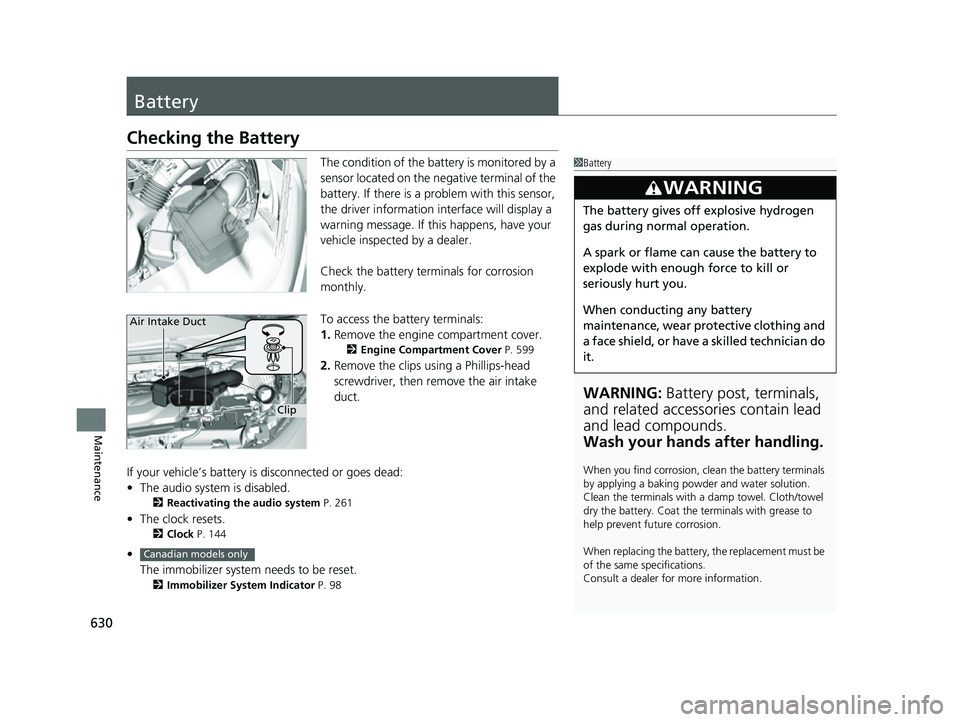
To access the battery terminals:
1. Remove the engine compartment cover.
2 Engine Compartment Cover P. 599
2.Remove the clips using a Phillips-head
screwdriver, then remove the air intake
duct.
If your vehicle’s battery is disconnected or goes dead:
• The audio system is disabled.
2 Reactivating the audio system P. 261
•The clock resets.
2 Clock P. 144
•
The immobilizer system needs to be reset.
2 Immobilizer System Indicator P. 98
1Battery
WARNING: Battery post, terminals,
and related accessories contain lead
and lead compounds.
Wash your hands after handling.
When you find corrosion, cl ean the battery terminals
by applying a baking powder and water solution.
Clean the terminals with a damp towel. Cloth/towel
dry the battery. Coat the terminals with grease to
help prevent future corrosion.
When replacing the battery, the replacement must be
of the same specifications.
Consult a dealer for more information.
3WARNING
The battery gives off explosive hydrogen
gas during normal operation.
A spark or flame can cause the battery to
explode with enough force to kill or
seriously hurt you.
When conducting any battery
maintenance, wear prot ective clothing and
a face shield, or have a skilled technician do
it.
Clip
Air Intake Duct
Canadian models only
23 US ODYSSEY-31THR6500.book 630 ページ 2022年1月24日 月曜日 午前11時35分
Page 638 of 707
636
Maintenance
Cleaning
Interior Care
Use a damp cloth with a mixture of mild detergent and warm water to remove dirt.
Use a clean cloth to remove detergent residue.
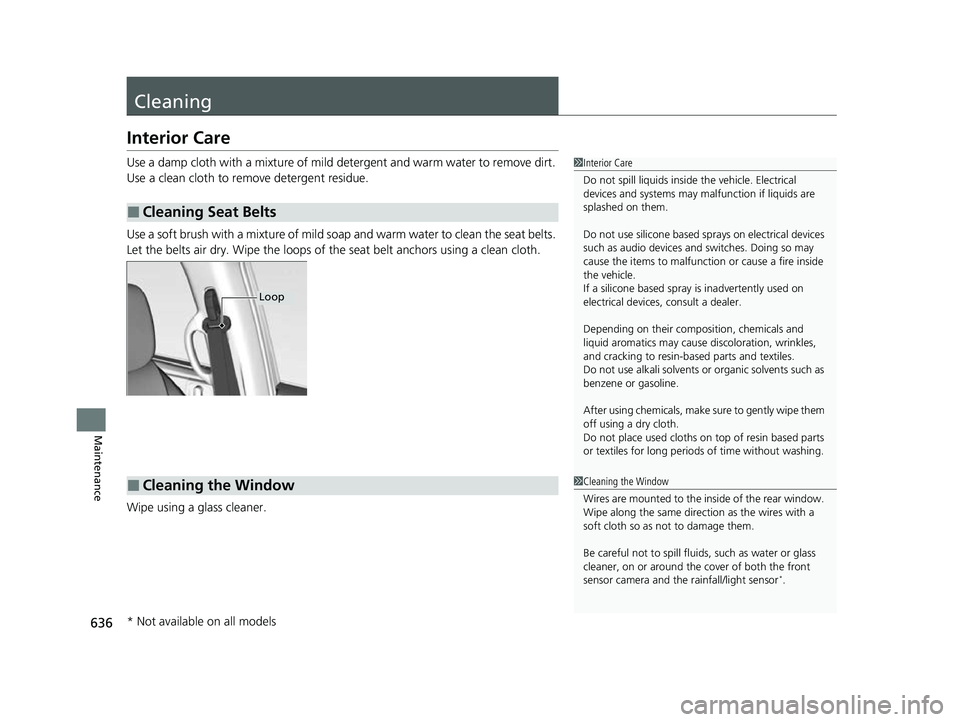
Use a soft brush with a mixture of mild soap and warm water to clean the seat belts.
Let the belts air dry. Wipe the loops of the seat belt anchors using a clean cloth.
Wipe using a glass cleaner.
■Cleaning Seat Belts
1 Interior Care
Do not spill liquids inside the vehicle. Electrical
devices and systems may ma lfunction if liquids are
splashed on them.
Do not use silicone based sprays on electrical devices
such as audio devices and switches. Doing so may
cause the items to malfunction or cause a fire inside
the vehicle.
If a silicone based spray is inadvertently used on
electrical devices, consult a dealer.
Depending on their compos ition, chemicals and
liquid aromatics may cause discoloration, wrinkles,
and cracking to resin-ba sed parts and textiles.
Do not use alkali solvents or organic solvents such as
benzene or gasoline.
After using chemicals, make su re to gently wipe them
off using a dry cloth.
Do not place used cloths on top of resin based parts
or textiles for long periods of time without washing.
Loop
■Cleaning the Window1Cleaning the Window
Wires are mounted to the in side of the rear window.
Wipe along the same direct ion as the wires with a
soft cloth so as not to damage them.
Be careful not to spill fluids, such as water or glass
cleaner, on or around the co ver of both the front
sensor camera and the rainfall/light sensor
*.
* Not available on all models
23 US ODYSSEY-31THR6500.book 636 ページ 2022年1月24日 月曜日 午前11時35分
Page 661 of 707
659Continued
Handling the Unexpected
If the Battery Is Dead
Jump Starting Procedure
Turn off the power to electric devices, such as audio and lights. Turn off the engine,
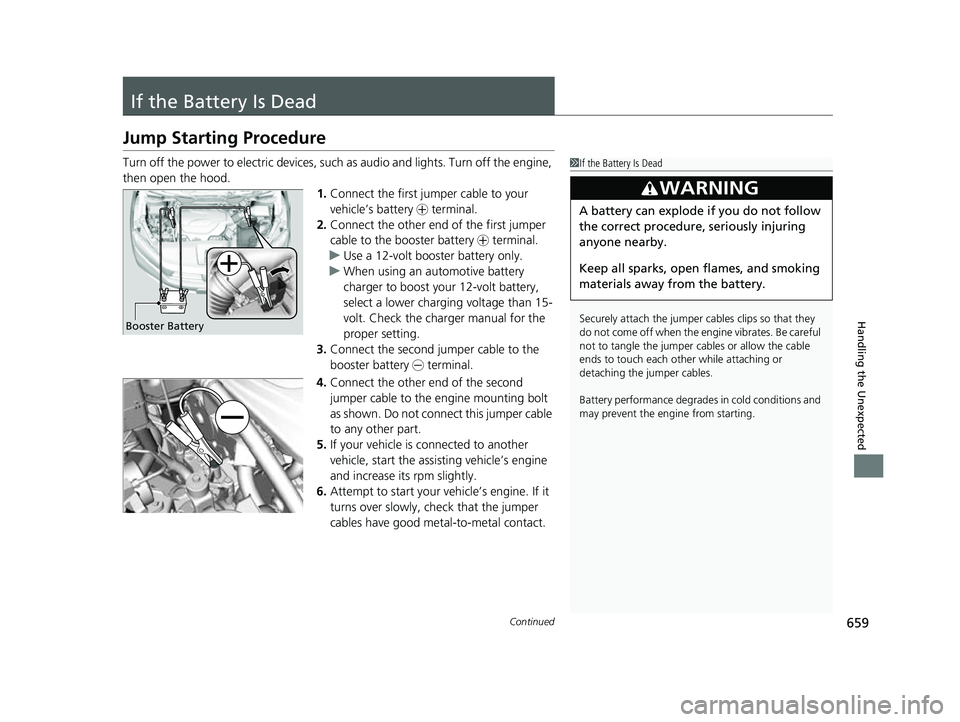
then open the hood. 1.Connect the first jumper cable to your
vehicle’s battery + terminal.
2. Connect the other end of the first jumper
cable to the booster battery + terminal.
u Use a 12-volt booster battery only.
u When using an automotive battery
charger to boost your 12-volt battery,
select a lower charging voltage than 15-
volt. Check the charger manual for the
proper setting.
3. Connect the second jumper cable to the
booster battery - terminal.
4. Connect the other end of the second
jumper cable to the engine mounting bolt
as shown. Do not connect this jumper cable
to any other part.
5. If your vehicle is connected to another
vehicle, start the assisting vehicle’s engine
and increase its rpm slightly.
6. Attempt to start your ve hicle’s engine. If it
turns over slowly, check that the jumper
cables have good metal-to-metal contact.1 If the Battery Is Dead
Securely attach the jumper cables clips so that they
do not come off when the e ngine vibrates. Be careful
not to tangle the jumper cables or allow the cable
ends to touch each other while attaching or
detaching the jumper cables.
Battery performance degrades in cold conditions and
may prevent the engi ne from starting.
3WARNING
A battery can explode if you do not follow
the correct procedure, seriously injuring
anyone nearby.
Keep all sparks, open flames, and smoking
materials away from the battery.
Booster Battery
23 US ODYSSEY-31THR6500.book 659 ページ 2022年1月24日 月曜日 午前11時35分
Page 674 of 707
672
uuFuses uFuse Locations
Handling the Unexpected
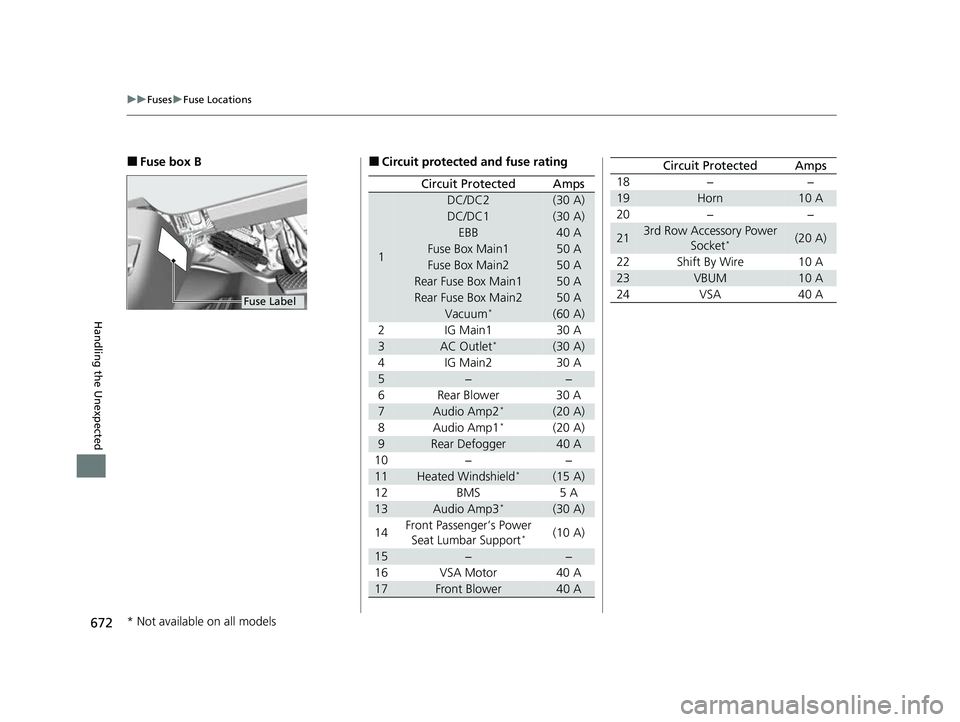
■Fuse box B
Fuse Label
■Circuit protected and fuse rating
Circuit ProtectedAmps
1
DC/DC2(30 A)
DC/DC1(30 A)
EBB40 A
Fuse Box Main150 A
Fuse Box Main250 A
Rear Fuse Box Main150 A
Rear Fuse Box Main250 A
Vacuum*(60 A)
2 IG Main1 30 A
3AC Outlet*(30 A)
4 IG Main2 30 A
5−−
6 Rear Blower 30 A
7Audio Amp2*(20 A)
8 Audio Amp1*(20 A)
9Rear Defogger40 A
10 − −
11Heated Windshield*(15 A)
12 BMS 5 A
13Audio Amp3*(30 A)
14 Front Passenger’s Power
Seat Lumbar Support
*(10 A)
15−−
16 VSA Motor 40 A
17Front Blower40 A
18 − −
19Horn10 A
20 − −
213rd Row Accessory Power Socket*(20 A)
22 Shift By Wire 10 A
23VBUM10 A
24 VSA 40 A
Circuit ProtectedAmps
* Not available on all models
23 US ODYSSEY-31THR6500.book 672 ページ 2022年1月24日 月曜日 午前11時35分
Page 698 of 707
Index
696
Index
Index
A
ABS (Anti-lock Brake System)................... 567
AC Power Outlet ....................................... 242
Accessories and Modifications ................. 642
Accessory Power Sockets .......................... 240
Adaptive Cruise Control (ACC) with Low Speed Follow ........................................... 523
Additives
Coolant ................................................... 605
Engine Oil ................................................ 600
Washer .................................................... 609
Additives, Engine Oil ................................ 600
Adjusting Armrest ................................................... 228
Front and Second Row Outer and Third Row Outer Head Restraints Positions.............. 225
Front Seats .............................................. 212
Mirrors .................................................... 209
Second Row Seats ................................... 215
Steering Wheel ........................................ 208
Third Row Seats ....................................... 220
Agile Handling Assist ................................ 501
Air Conditioning System (Climate Control System) .................................................... 250
Changing the Mode ................................ 250
Defrosting the Windshield and Windows ............................................... 252
Dust and Pollen Filter ............................... 635
Sensors .................................................... 256
Using Automatic Climate Control ............ 250
Air Pressure ....................................... 622, 685 Airbags
........................................................ 49
Advanced Airbags ..................................... 55
Airbag Care............................................... 66
Event Data Recorder .................................... 0
Front Airbags (SRS) .................................... 52
Indicator.............................................. 63, 95
Knee Airbags............................................. 57
Passenger Airbag Off Indicator .................. 64
Sensors ..................................................... 49
Side Airbags .............................................. 60
Side Curtain Airbags.................................. 62
AM/FM Radio ............................................ 297
Android Auto
TM........................................ 335
Anti-lock Brake System (ABS) .................. 567
Indicator.................................................... 95
Apple CarPlay ........................................... 332
Armrest ..................................................... 228
AT&T Hotspot ........................................... 330
Audio Remote Controls ........................... 262
Audio System ............................................ 258
Adjusting the Sound................................ 291
Audio/Information Screen........................ 265
Auxiliary Input Jack.................................. 261
Display Setup .......................................... 292
Error Messages ........................................ 339
File Manager ........................................... 285
General Information ................................ 341
Home Screen........................................... 271
How to Delete a File ................................ 288
How to Transfer a File ............................. 285
How to Update Wirelessly ....................... 279 How to Update with a USB Device .......... 283
Limitations for Manual Operation ............ 293
MP3/WMA/AAC ............................. 313, 316
My Honda Music..................................... 316
Playing Social Playlist ............................... 322
Reactivating ............................................ 261
Recommended CDs ................................ 342
Remote Controls ..................................... 262
Security Code ......................................... 261
Selecting an Audio Source ...................... 293
Status Area ............................................. 276
System Updates ...................................... 279
Theft Protection ...................................... 261
USB Flash Drives...................................... 344
USB Ports ................................................ 259
Wallpaper Setup ..................................... 269
Audio/Information Screen ....................... 265
Authorized Manuals ................................ 694
Auto Door Locking/Unlocking ................ 160
Customize .............................................. 427
Auto High-Beam ...................................... 197
Indicator ................................................... 95
Auto Idle Stop Indicator (Green) ............ 100
Auto Idle Stop OFF Indicator ................... 100
Auto Idle Stop Suspend Indicator ........... 101
Auto Idle Stop System Indicator (Amber) ................................................... 100
Automatic Brake Hold
Indicator ................................................... 91
Automatic Brake Hold System Indicator ................................................... 91
23 US ODYSSEY-31THR6500.book 696 ページ 2022年1月24日 月曜日 午前11時35分
Page 699 of 707
697
Index
Automatic Operation (automatic lighting control) ................................................... 193
Automatic Transmission .......................... 483
Creeping......................................... 481, 483
Fluid ....................................................... 607
Kickdown ............................................... 483
Shift Operation ....................................... 486
Shifting ................................................... 484
Auxiliary Input Jack ................................. 261
Average Fuel Economy ............................ 133
B
Battery...................................................... 630
Charging System Indicator ................ 92, 664
If the Battery Is Dead............................... 659
Maintenance (Checking the Battery) ....... 630
Maintenance (Replacing) ................. 632, 633
Belts (Seat) .................................................. 40
Beverage Holders ..................................... 234
Blank ......................................................... 139
Blind spot information System ................ 506
Bluetooth ® Audio ..................................... 320
Bluetooth ® HandsFreeLink ®................... 435
Blu-ray/DVD Rear Entertainment System ..................................................... 365
Audio Sources for Front and Rear Seats... 386
Auxiliary Console Panels.......................... 367
DVD or Blu-ray
TM Player Error Messages... 411
Front Control Panel Operation ................ 378
HDMI
TM Port............................................ 368 How Much Farther?
TM.............................. 385
Media Servers .......................................... 385
Operating the System .............................. 369
Overhead Screen ..................................... 368
Playable Disc Region Codes ..................... 409
Playable Disc Types .................................. 409
Playable Discs .......................................... 387
Playing a Disc in the Rear ......................... 383
Playing a DVD/Blu-ray
TM........................... 372
Playing a Video Using the HDMITM........... 384
Playing an iPod and a USB Flash Drive in the
Rear....................................................... 383
Playing Apps ............................................ 381
Rear DVD or Blu-ray
TM Menu .................... 373
Rear System Setup ................................... 379
Recommended Discs ................................ 410
Selecting the Audio Source using Front
Control Panel......................................... 378
Setting the DVD or Blu-ray
TM Menu .......... 380
System Controls .............................. 372, 382
System Settings ....................................... 376
Video Accessibility ................................... 370
Wireless Headphones .............................. 366
Booster Seats (For Children) ...................... 84
Brake System ............................................. 561
Anti-lock Brake System (ABS) ................... 567
Brake Assist System ................................. 568
Fluid ........................................................ 608
Foot Brake ............................................... 564
Indicator (Amber) ........................ 89, 90, 666
Indicator (Red) ........................... 88, 665, 666 Parking Brake .......................................... 561
Brightness Control (Instrument Panel) .... 205
Built-in Key ............................................... 147
Bulb Replacement .................................... 610
Back-Up Lights/Taillights .......................... 615
Brake, Rear Turn Signal Lights, and Rear Side Marker/Taillights .................................... 613
Front Side Marker Lights.......................... 612
Front Turn Signal Lights ........................... 611
High-Mount Brake Light .......................... 616
Parking/Daytime Running Lights .............. 610
Rear License Plate Light ........................... 616
Side Turn Signal/Emergency Indicator Lights .................................................... 612
Bulb Specifications ................................... 684
C
CabinTalk®.............................................. 461
CabinWatch ®........................................... 460
Car Wash Mode ........................................ 488
Carbon Monoxide Gas ............................... 85
Cargo Hooks ............................................. 237
Carrying Cargo ................................. 465, 467
Center Pocket ........................................... 233
Certification Label .................................... 686
Changing Bulbs ........................................ 610
Charging System Indicator ................. 92, 664
Child Safety ................................................. 67
Childproof Door Locks............................. 159
23 US ODYSSEY-31THR6500.book 697 ページ 2022年1月24日 月曜日 午前11時35分
Page 704 of 707
702
Index
Displaying Maintenance Minder
Information............................................ 592
Engine Oil Low Warning .......................... 663
Oil Life ..................................................... 137
Recommended Engine Oil ........................ 600
Viscosity .................................................. 600
One-Motion 60/40 Split 3rd-Row Magic Seat ®...................................................... 221
Open Source Licenses ............................... 359
Opening/Closing Hood ....................................................... 598
Moonroof ................................................ 187
Power Windows ...................................... 184
Sliding Doors ........................................... 172
Tailgate ................................................... 161
Outside Temperature Display .................. 129
Overheating .............................................. 661
P
Panic Mode............................................... 183
Parking ...................................................... 569
Parking Brake ............................................ 561
Parking Brake and Brake System Indicator
(Amber) ....................................... 89, 90, 666
Parking Brake and Brake System Indicator (Red) .......................................... 88, 665, 666
Parking Sensor System .............................. 571
Passenger Airbag Off Indicator ................. 64
Passing Indicators ..................................... 192
Phone ........................................................ 138 Playing
Bluetooth ® Audio ........................ 320
Power Sliding Doors ................................. 174
Unable to Close....................................... 680
Power Tailgate ......................................... 164
Unable to Open....................................... 678
Power Windows ....................................... 184
Precautions While Driving Rain ........................................................ 482
Pregnant Women ....................................... 47
Puncture (Tire) .......................................... 647
R
Radiator.................................................... 606
Radio (FM/AM) ......................................... 297
Radio (SiriusXM ®) ..................................... 300
Radio Data System (RDS) ......................... 299
Range ........................................................ 133
RDS (Radio Data System) ......................... 299
Readiness Codes (Emissions Testing) ....... 689
Rear Defogger/Heated Door Mirror
Button ..................................................... 203
Rear Entertainment System ..................... 365
Rear Seat Reminder .................................. 223
Rear Seats (Folding Down) .............. 216, 221
Rearview Mirror ....................................... 209
Refueling .................................................. 582
Fuel Gauge.............................................. 127
Gasoline .......................................... 582, 684
Low Fuel Indicator ..................................... 94
Regulations ............................... 504, 624, 687 Remote Transmitter
................................. 153
Removing a Second Row Outer Seat ...... 218
Removing the Second Row Center Seat ......................................................... 217
Replacement
Battery ............................................ 632, 633
Bulbs ...................................................... 610
Front Wiper Blade Rubber ....................... 617
Fuses ...................................... 669, 671, 674
Tires........................................................ 627
Reporting Safety Defects ......................... 688S
Safe Driving................................................ 35
Safety Check ............................................... 39
Safety Labels .............................................. 86
Safety Message ............................................ 3
Seat Belts .................................................... 40
Adjusting the Shoulder Anchor ................. 44
Automatic Seat Belt Tensioners ................. 42
Checking .................................................. 48
Detachable Anchor ................................... 45
Fastening .................................................. 43
Installing a Child Seat with a Lap/Shoulder
Seat Belt ................................................. 77
Pregnant Women...................................... 47
Reminder .................................................. 41
Warning Indicator ............................... 41, 94
Seat Heaters ..................................... 247, 248
23 US ODYSSEY-31THR6500.book 702 ページ 2022年1月24日 月曜日 午前11時35分