charging HONDA ODYSSEY 2023 User Guide
[x] Cancel search | Manufacturer: HONDA, Model Year: 2023, Model line: ODYSSEY, Model: HONDA ODYSSEY 2023Pages: 707, PDF Size: 23.9 MB
Page 490 of 707
![HONDA ODYSSEY 2023 User Guide uuWhen Driving uShifting
488
Driving
■If you want to keep the transmission in (N position [car wash mode]
With the engine running:
1. Press and hold the brake pedal.
2. Select
(N, then release the](/img/13/58873/w960_58873-489.png "HONDA ODYSSEY 2023 User Guide uuWhen Driving uShifting
488
Driving
■If you want to keep the transmission in (N position [car wash mode]
With the engine running:
1. Press and hold the brake pedal.
2. Select
(N, then release the")
uuWhen Driving uShifting
488
Driving
■If you want to keep the transmission in (N position [car wash mode]
With the engine running:
1. Press and hold the brake pedal.
2. Select
(N, then release the button to display (Neutral) (N hold mode on the driver
information interface.
3. Press and hold
(N again for two seconds.
u This puts the vehicle in car wash mode which must be used when your vehicle
is pulled through a conveyor type automatic car wash where you or an
attendant do not remain in the vehicle.
If the ENGINE STOP/START button is pressed
after car wash mode has been activated, the
power mode will change to ACCESSORY and
a message will be displayed on the driver
information interface. u For 15 minutes the gear position remains
in
(N with the power mode in
ACCESSORY. After that, the position
automatically changes to
(P and the
power mode changes to OFF.
u Manually changing to
(P cancels
ACCESSORY mode. The
(P indicator
comes on and the power mode changes
to OFF. You must always shift to
(P
when car wash mode is no longer
needed.
1 If you want to keep the transmission in (N position [car wash
mode]
NOTICE
When transmission is too hot, carwash mode may
not be available. Let the engine idle and cool down
transmission.
The transmission may not stay in
(N position while
the following indicator is on:
•Transmission system indicator.
•Malfunction indicator lamp.•Charging system indicator.
23 US ODYSSEY-31THR6500.book 488 ページ 2022年1月24日 月曜日 午前11時35分
Page 633 of 707
631
uuBattery uCharging the AGM Battery
Maintenance
Charging the AGM Battery
AGM labeled batteries like those installed in your vehicle require a compatible
charger to be properly charged. Damage to the battery can result if the battery is
charged improperly or with the wrong equi pment. For more information on how to
charge your vehicle’s AGM battery, consult a dealer.1 Battery
The battery installed in this vehicle is specifically
designed for a model wi th Auto Idle Stop.
Using a battery other than this specified type may
shorten the battery life, a nd prevent Auto Idle Stop
from activating. If you need to replace the battery,
make sure to select the specified type and size. Ask a
dealer for more details.
23 US ODYSSEY-31THR6500.book 631 ページ 2022年1月24日 月曜日 午前11時35分
Page 647 of 707
645
Handling the Unexpected
This chapter explains how to handle unexpected troubles.
ToolsTypes of Tools .................................. 646
If a Tire Goes Flat Changing a Flat Tire ......................... 647
Engine Does Not Start Checking the Engine ........................ 656
If the Remote Battery is Weak .......... 657
Emergency Engine Stop ................... 658
If the Battery Is Dead ....................... 659
Overheating How to Handle Overheating ............. 661
Indicator, Coming On/Blinking
If the Engine Oil Low Warning Appears ....... 663
If the Charging System Indicator Comes
On ................................................. 664
If the Malfunction Indicator Lamp Comes On or Blinks ................................... 664
If the Brake System Indicator (Red) Comes
On or Blinks ................................... 665
If the Brake System Indicator (Red) Comes On or Blinks at the Same Time When the Brake
System Indicator (Amber) Comes On ..... 666
If the Electric Power Steering (EPS) System Indicator Comes On ....................... 667
If the Low Tire Pressure/TPMS Indicator Comes On or Blinks........................ 667 If the Transmission System Indicator Blinks
along with the Warning Message... 668
Fuses Fuse Locations ................................. 669
Inspecting and Changing Fuses ........ 675
Emergency Towing ........................... 676
If You Cannot Unlock the Fuel Fill Door ... 677
If You Cannot Open the Tailgate .... 678
When You Cannot Close the Power Sliding Doors ................................... 680
Refueling
Refueling From a Portable Fuel Container .... 681
23 US ODYSSEY-31THR6500.book 645 ページ 2022年1月24日 月曜日 午前11時35分
Page 661 of 707
659Continued
Handling the Unexpected
If the Battery Is Dead
Jump Starting Procedure
Turn off the power to electric devices, such as audio and lights. Turn off the engine,
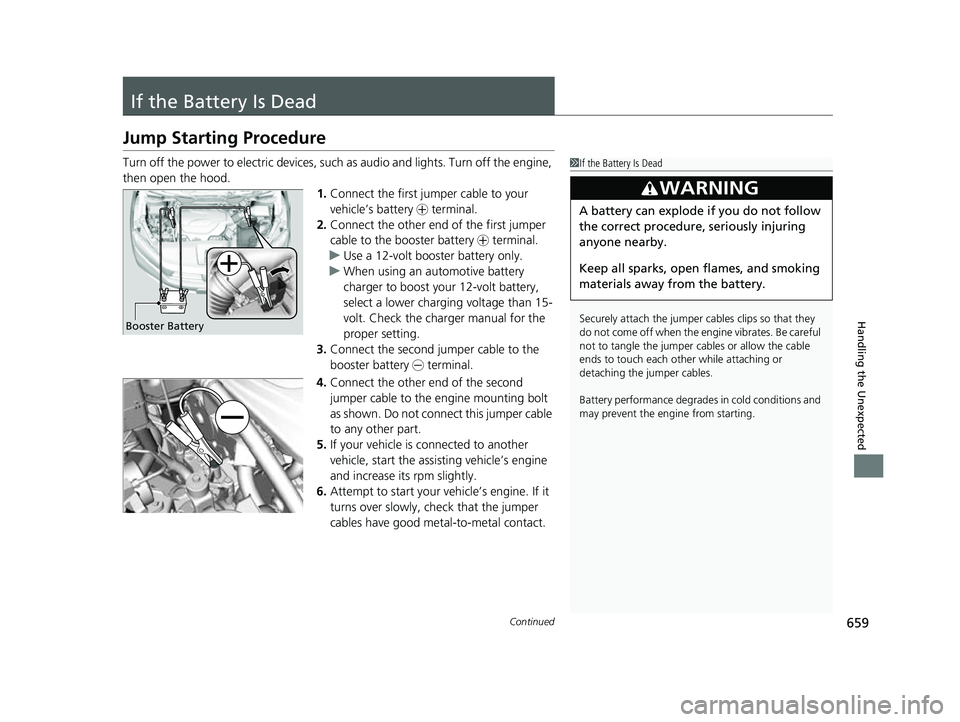
then open the hood. 1.Connect the first jumper cable to your
vehicle’s battery + terminal.
2. Connect the other end of the first jumper
cable to the booster battery + terminal.
u Use a 12-volt booster battery only.
u When using an automotive battery
charger to boost your 12-volt battery,
select a lower charging voltage than 15-
volt. Check the charger manual for the
proper setting.
3. Connect the second jumper cable to the
booster battery - terminal.
4. Connect the other end of the second
jumper cable to the engine mounting bolt
as shown. Do not connect this jumper cable
to any other part.
5. If your vehicle is connected to another
vehicle, start the assisting vehicle’s engine
and increase its rpm slightly.
6. Attempt to start your ve hicle’s engine. If it
turns over slowly, check that the jumper
cables have good metal-to-metal contact.1 If the Battery Is Dead
Securely attach the jumper cables clips so that they
do not come off when the e ngine vibrates. Be careful
not to tangle the jumper cables or allow the cable
ends to touch each other while attaching or
detaching the jumper cables.
Battery performance degrades in cold conditions and
may prevent the engi ne from starting.
3WARNING
A battery can explode if you do not follow
the correct procedure, seriously injuring
anyone nearby.
Keep all sparks, open flames, and smoking
materials away from the battery.
Booster Battery
23 US ODYSSEY-31THR6500.book 659 ページ 2022年1月24日 月曜日 午前11時35分
Page 666 of 707
664
uuIndicator, Coming On/Blinking uIf the Charging System Indicator Comes On
Handling the Unexpected
If the Charging System Indicator Comes On
■Reasons for the indicator to come on
Comes on when there is a prob lem with the charging system.
■What to do when the indicator comes on
Turn off the climate con trol system, rear defogger, and other electrical
systems, and immediately contact a dealer for repairs.
If the Malfunction Indicator Lamp Comes On or
Blinks
■Reasons for the indicator la mp to come on or blink
• Comes on when there is a problem with the engine emissions control
system.
• Blinks when engine misfiring is detected.
■What to do when the indicator lamp comes on
Avoid high speeds and immediately get your vehicle inspected at a
dealer.
■What to do when the indicator lamp blinks
Park the vehicle in a safe place with no flammable items and wait at least
10 minutes or more with the engine stopped until it cools.
1 If the Charging System Indicator Comes On
If you need to stop temporarily, do not turn off the
engine. Restarting the engi ne may rapidly discharge
the battery.
1 If the Malfunction Indicato r Lamp Comes On or Blinks
NOTICE
If you drive with the malf unction indicator lamp on,
the emissions control system and the engine could be
damaged.
If the malfunction indicator lamp blinks again when
restarting the engine, drive to the nearest dealer at
31 mph (50 km/h) or less. Have your vehicle
inspected.
23 US ODYSSEY-31THR6500.book 664 ページ 2022年1月24日 月曜日 午前11時35分
Page 699 of 707
697
Index
Automatic Operation (automatic lighting control) ................................................... 193
Automatic Transmission .......................... 483
Creeping......................................... 481, 483
Fluid ....................................................... 607
Kickdown ............................................... 483
Shift Operation ....................................... 486
Shifting ................................................... 484
Auxiliary Input Jack ................................. 261
Average Fuel Economy ............................ 133
B
Battery...................................................... 630
Charging System Indicator ................ 92, 664
If the Battery Is Dead............................... 659
Maintenance (Checking the Battery) ....... 630
Maintenance (Replacing) ................. 632, 633
Belts (Seat) .................................................. 40
Beverage Holders ..................................... 234
Blank ......................................................... 139
Blind spot information System ................ 506
Bluetooth ® Audio ..................................... 320
Bluetooth ® HandsFreeLink ®................... 435
Blu-ray/DVD Rear Entertainment System ..................................................... 365
Audio Sources for Front and Rear Seats... 386
Auxiliary Console Panels.......................... 367
DVD or Blu-ray
TM Player Error Messages... 411
Front Control Panel Operation ................ 378
HDMI
TM Port............................................ 368 How Much Farther?
TM.............................. 385
Media Servers .......................................... 385
Operating the System .............................. 369
Overhead Screen ..................................... 368
Playable Disc Region Codes ..................... 409
Playable Disc Types .................................. 409
Playable Discs .......................................... 387
Playing a Disc in the Rear ......................... 383
Playing a DVD/Blu-ray
TM........................... 372
Playing a Video Using the HDMITM........... 384
Playing an iPod and a USB Flash Drive in the
Rear....................................................... 383
Playing Apps ............................................ 381
Rear DVD or Blu-ray
TM Menu .................... 373
Rear System Setup ................................... 379
Recommended Discs ................................ 410
Selecting the Audio Source using Front
Control Panel......................................... 378
Setting the DVD or Blu-ray
TM Menu .......... 380
System Controls .............................. 372, 382
System Settings ....................................... 376
Video Accessibility ................................... 370
Wireless Headphones .............................. 366
Booster Seats (For Children) ...................... 84
Brake System ............................................. 561
Anti-lock Brake System (ABS) ................... 567
Brake Assist System ................................. 568
Fluid ........................................................ 608
Foot Brake ............................................... 564
Indicator (Amber) ........................ 89, 90, 666
Indicator (Red) ........................... 88, 665, 666 Parking Brake .......................................... 561
Brightness Control (Instrument Panel) .... 205
Built-in Key ............................................... 147
Bulb Replacement .................................... 610
Back-Up Lights/Taillights .......................... 615
Brake, Rear Turn Signal Lights, and Rear Side Marker/Taillights .................................... 613
Front Side Marker Lights.......................... 612
Front Turn Signal Lights ........................... 611
High-Mount Brake Light .......................... 616
Parking/Daytime Running Lights .............. 610
Rear License Plate Light ........................... 616
Side Turn Signal/Emergency Indicator Lights .................................................... 612
Bulb Specifications ................................... 684
C
CabinTalk®.............................................. 461
CabinWatch ®........................................... 460
Car Wash Mode ........................................ 488
Carbon Monoxide Gas ............................... 85
Cargo Hooks ............................................. 237
Carrying Cargo ................................. 465, 467
Center Pocket ........................................... 233
Certification Label .................................... 686
Changing Bulbs ........................................ 610
Charging System Indicator ................. 92, 664
Child Safety ................................................. 67
Childproof Door Locks............................. 159
23 US ODYSSEY-31THR6500.book 697 ページ 2022年1月24日 月曜日 午前11時35分
Page 702 of 707
700
Index
HDMITM Port.............................................. 368
Head Restraints ......................................... 225
Headlights ................................................. 192
Aiming .................................................... 610
Auto High-Beam ...................................... 197
Automatic Operation ............................... 193
Dimming ......................................... 192, 196
Operating ................................................ 192
Heated Steering Wheel ............................ 246
Heated Windshield Button ...................... 204
Heaters (Seat) .................................... 247, 248
HFL (HandsFreeLink ®)............................... 435
High Beam Indicator ................................... 97
HomeLink ® Universal Transceiver ............ 432
Honda App License Agreement ............... 345
Honda Sensing ®...................................... 509
HondaLink ®............................................. 324
I
Identification Numbers
Engine and Transmission.......................... 686
Vehicle Identification ............................... 686
Illumination Control
Knob ....................................................... 205
Immobilizer System .................................. 181
Indicator .................................................... 98
Indicators ..................................................... 88
Adaptive Cruise Control (ACC) with Low Speed Follow (Amber) ............................ 103 Adaptive Cruise Control (ACC) with Low
Speed Follow (White/Green) .................. 103
Anti-lock Brake System (ABS)..................... 95
Auto High-Beam ....................................... 95
Auto Idle Stop (Green)............................. 100
Auto Idle Stop OFF .................................. 100
Auto Idle Stop Suspend ........................... 101
Auto Idle Stop System (Amber) ................ 100
Automatic Brake Hold ............................... 91
Automatic Brake Hold System ................... 91
Charging System ............................... 92, 664
Cruise Mode (White/Green) ..................... 104
Econ Mode................................................ 99
Electric Power Steering (EPS) System .. 96, 667
Engine Oil Low Warning .......................... 663
Fog Light ................................................... 98
Gear Position............................................. 92
Hazard Warning ........................................ 97
High Beam ................................................ 97
Immobilizer System ................................... 98
Lane Keeping Assist System (LKAS) (Amber) ................................................. 102
Lane Keeping Assist System (LKAS) (White/Green)........................................ 102
Lights On .................................................. 98
Low Fuel ................................................... 94
Low Tire Pressure/TPMS ............. 97, 504, 667
Malfunction Indicator Lamp............... 91, 664
Normal Mode ............................................ 99
Parking Brake a nd Brake System
(Amber) ..................................... 89, 90, 666 Parking Brake and Brake System
(Red) ....................................... 88, 665, 666
Safety Support (Amber)........................... 104
Safety Support (Green/Gray) ................... 107
Seat Belt Reminder .............................. 41, 94
Security System Alarm............................... 98
Snow Mode .............................................. 99
Supplemental Restraint System ........... 63, 95
System Message ....................................... 99
Transmission System ......................... 93, 668
Turn Signal ............................................... 97
Vehicle Stability Assist
TM (VSA ®)
System ............................................ 96, 499
VSA ® OFF .......................................... 96, 500
Information .............................................. 683
Instant Fuel Economy .............................. 133
Instrument Panel ........................................ 87
Brightness Control .................................. 205
Integrated Sunshades .............................. 249
Interior Lights ........................................... 229
Interior Rearview Mirror ......................... 209
iPad ........................................................... 344
iPhone ....................................................... 344
iPod ................................................... 310, 344
J
Jack (Wheel Nut Wrench) ........................ 650
Jump Starting ........................................... 659
23 US ODYSSEY-31THR6500.book 700 ページ 2022年1月24日 月曜日 午前11時35分