display HONDA ODYSSEY 2023 User Guide
[x] Cancel search | Manufacturer: HONDA, Model Year: 2023, Model line: ODYSSEY, Model: HONDA ODYSSEY 2023Pages: 707, PDF Size: 23.9 MB
Page 147 of 707
145
uuClock uAdjusting the Clock
Controls
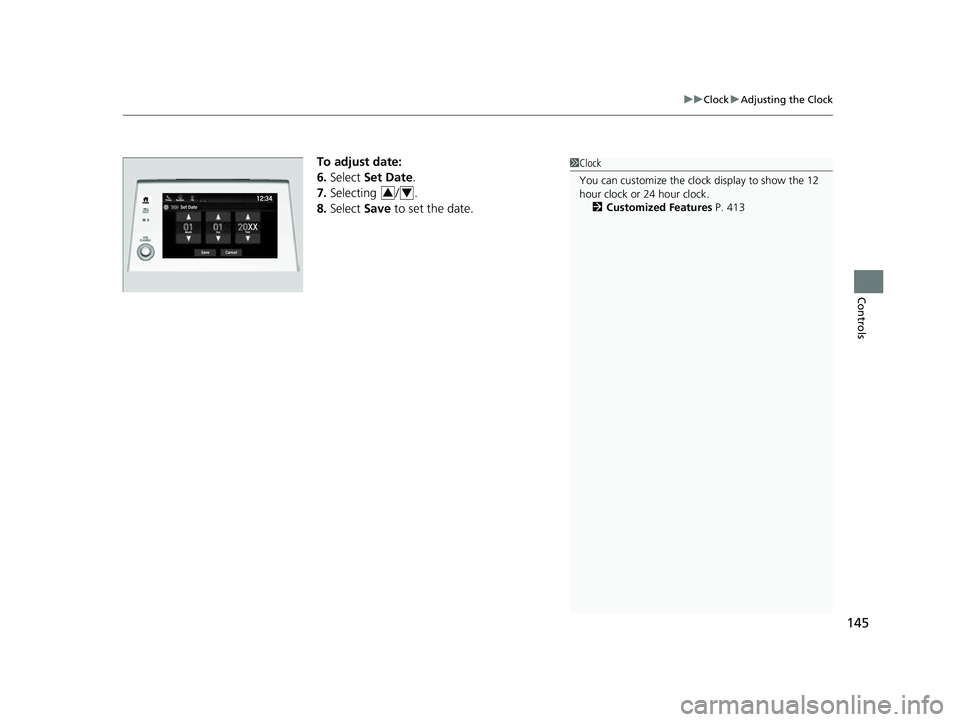
To adjust date:
6. Select Set Date.
7. Selecting / .
8. Select Save to set the date.1Clock
You can customize the clock display to show the 12
hour clock or 24 hour clock.
2 Customized Features P. 413
34
23 US ODYSSEY-31THR6500.book 145 ページ 2022年1月24日 月曜日 午前11時35分
Page 167 of 707

Continued165
uuTailgate uOpening/Closing the Power Tailgate*
Controls
Use a forward and back kicking motion for
about 1 second under the center of the rear
bumper to open or close the power tailgate
while carrying the keyless remote.
u Some exterior lights flash and a beeper
sounds, then the tailgate begins to
move.
■Using the Hands Free Access*1Using the Hands Free Access*
During rain or in other instances when the vehicle
becomes wet, the sensor may not properly detect
your foot motion.
When performing work on or around the rear section
of the vehicle, you may in advertently open or close
the tailgate.
To prevent this from happe ning, select Customized
Features on the audio/info rmation screen display and
then select OFF for the feature.
2 Customized Features P. 413
If you hold your foot under the bumper for too long
or sweep your foot from side to side, the power
tailgate does not open or close.
This function will not opera te if you don’t have the
keyless remote on you. Please make sure you have
the keyless remote on you.
* Not available on all models
23 US ODYSSEY-31THR6500.book 165 ページ 2022年1月24日 月曜日 午前11時35分
Page 252 of 707
250
Controls
Climate Control System
Using Automatic Climate Control
The automatic climate control system maintains the interior temperature you select.
The system also selects the proper mix of heated or cooled air that raises or lowers
the interior temperature to your preference as quickly as possible.1Using Automatic Climate Control
Press the FRONT CLIMATE button to display A/C,
MODE, and fan control information on the audio/
information screen for several seconds. Select icon to
turn on or off A/C, change the vent mode, or change
the fan speed.
During idle-stops, air-conditioning is suspended, and
only the blower remains ac tive. If you do not want
air-conditioning suspended, press Auto Idle Stop OFF
button to cancel idle-stop.
If any buttons are presse d while using the climate
control system in auto, the function of the button
that was pressed will take priority.
The AUTO indicator will go off, but functions
unrelated to the button that were pressed will be
controlled automatically.
To prevent cold air from bl owing in from outside, the
fan may not start i mmediately when the AUTO
button is pressed.
If the interior is very warm, you can cool it down
more rapidly by partial ly opening the windows,
turning the system on AUTO, and setting the
temperature to low. Change the fresh mode to
recirculation mode until the temperature cools down.
When you set the temperat ure to the lower or upper
limit, Lo or Hi is displayed.
23 US ODYSSEY-31THR6500.book 250 ページ 2022年1月24日 月曜日 午前11時35分
Page 256 of 707
254
uuClimate Control System uRear Climate Control System
Controls
Rear Climate Control System
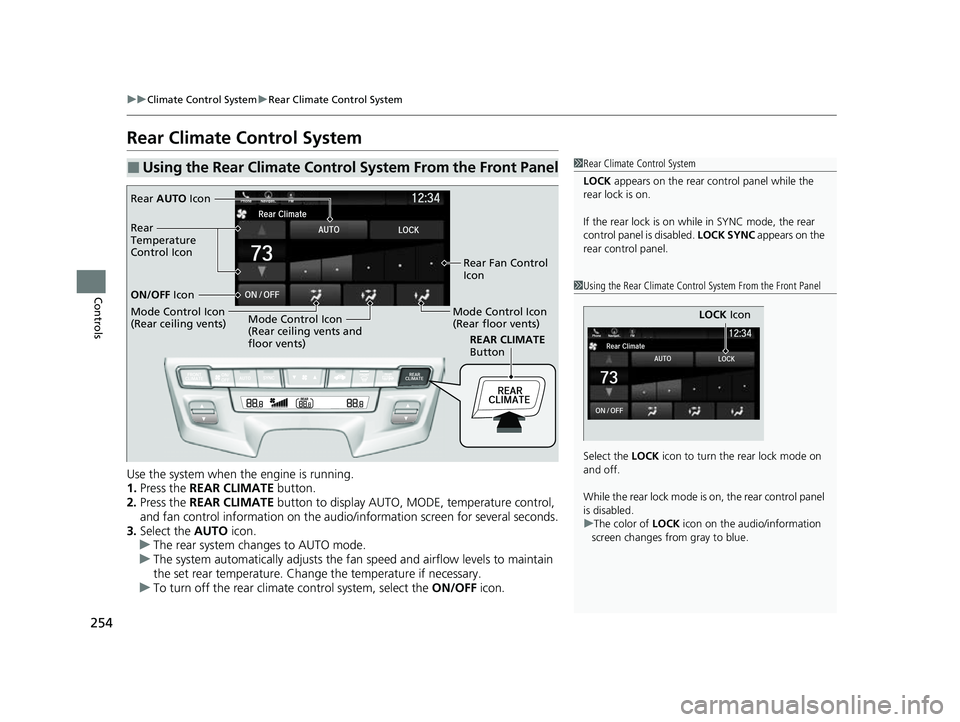
Use the system when the engine is running.
1. Press the REAR CLIMATE button.
2. Press the REAR CLIMATE button to display AUTO, MO DE, temperature control,
and fan control information on the audio/ information screen for several seconds.
3. Select the AUTO icon.
u The rear system changes to AUTO mode.
u The system automatically adjusts the fan speed and airflow levels to maintain
the set rear temperature. Change the temperature if necessary.
u To turn off the rear climate control system, select the ON/OFF icon.
■Using the Rear Climate Control System From the Front Panel1Rear Climate Control System
LOCK appears on the rear control panel while the
rear lock is on.
If the rear lock is on while in SYNC mode, the rear
control panel is disabled. LOCK SYNC appears on the
rear control panel.
1 Using the Rear Climate Control System From the Front Panel
Select the LOCK icon to turn the rear lock mode on
and off.
While the rear lock mode is on, the rear control panel
is disabled.
u The color of LOCK icon on the audio/information
screen changes from gray to blue.
LOCK Icon
REAR CLIMATE
Button
Rear AUTO Icon
Rear Fan Control
Icon
Mode Control Icon
(Rear floor vents)
Mode Control Icon
(Rear ceiling vents and
floor vents)
Mode Control Icon
(Rear ceiling vents) ON/OFF
Icon
Rear
Temperature
Control Icon
23 US ODYSSEY-31THR6500.book 254 ページ 2022年1月24日 月曜日 午前11時35分
Page 259 of 707
257
Features
This chapter describes how to operate technology features.
Audio System
About Your Audio System ................ 258
USB Ports ......................................... 259
Auxiliary Input Jack .......................... 261
Audio System Theft Protection ......... 261
Audio Remote Controls .................... 262
Audio System Basic Operation ........ 264
Audio/Information Screen ................ 265
System Updates ............................... 279
File Manager .................................... 285
Adjusting the Sound ........................ 291
Display Setup ................................... 292
Voice Control Operation .................. 294 Playing AM/FM Radio ....................... 297
Playing SiriusXM
® Radio*................. 300
Playing an iPod ................................ 310
Playing a USB Flash Drive ................. 313
Playing My Honda Music .................. 316
Playing Bluetooth ® Audio................. 320
Playing Social Playlist ........................ 322
HondaLink ®..................................... 324
Wi-Fi Connection ............................. 329
AT&T Hotspot
*................................ 330
Siri Eyes Free .................................... 331
Apple CarPlay .................................. 332
Android Auto
TM................................ 335 Audio Error Messages
...................... 339
General Information on the Audio System.. 341Blu-ray/DVD Rear Entertainment System*... 365Customized Features........................ 413
HomeLink ® Universal Transceiver*.. 432
Bluetooth® HandsFreeLink® ............. 435
CabinWatch ®
*................................... 460
CabinTalk ®*....................................... 461
* Not available on all models
23 US ODYSSEY-31THR6500.book 257 ページ 2022年1月24日 月曜日 午前11時35分
Page 261 of 707
259
uuAudio System uUSB Ports
Continued
Features
USB Ports
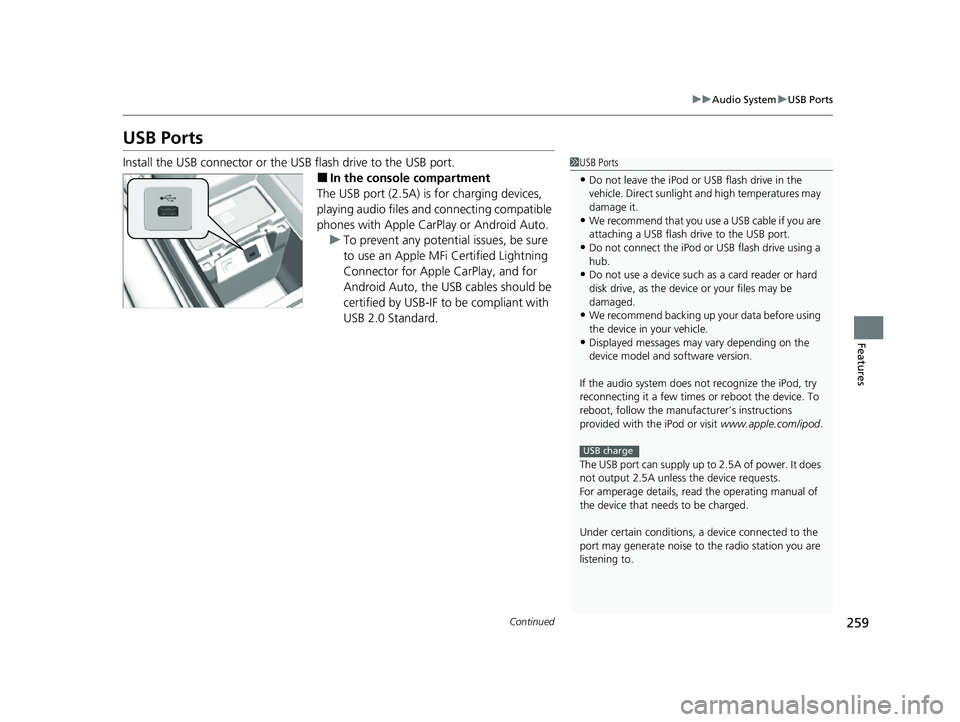
Install the USB connector or the USB flash drive to the USB port.
■In the consol e compartment
The USB port (2.5A) is for charging devices,
playing audio files and connecting compatible
phones with Apple CarPlay or Android Auto. u To prevent any potenti al issues, be sure
to use an Apple MFi Certified Lightning
Connector for Apple CarPlay, and for
Android Auto, the USB cables should be
certified by USB-IF to be compliant with
USB 2.0 Standard.
1 USB Ports
•Do not leave the iPod or USB flash drive in the
vehicle. Direct sunlight and high temperatures may
damage it.
•We recommend that you us e a USB cable if you are
attaching a USB flash drive to the USB port.
•Do not connect the iPod or USB flash drive using a
hub.
•Do not use a device such as a card reader or hard
disk drive, as the device or your files may be
damaged.
•We recommend backing up yo ur data before using
the device in your vehicle.
•Displayed messages may vary depending on the
device model and software version.
If the audio system does not recognize the iPod, try
reconnecting it a few times or reboot the device. To
reboot, follow the manufac turer’s instructions
provided with the iPod or visit www.apple.com/ipod.
The USB port can supply up to 2.5A of power. It does
not output 2.5A unless the device requests.
For amperage details, read the operating manual of
the device that ne eds to be charged.
Under certain condi tions, a device connected to the
port may generate noise to the radio station you are
listening to.
USB charge
23 US ODYSSEY-31THR6500.book 259 ページ 2022年1月24日 月曜日 午前11時35分
Page 263 of 707
261
uuAudio System uAuxiliary Input Jack
Features
Auxiliary Input Jack
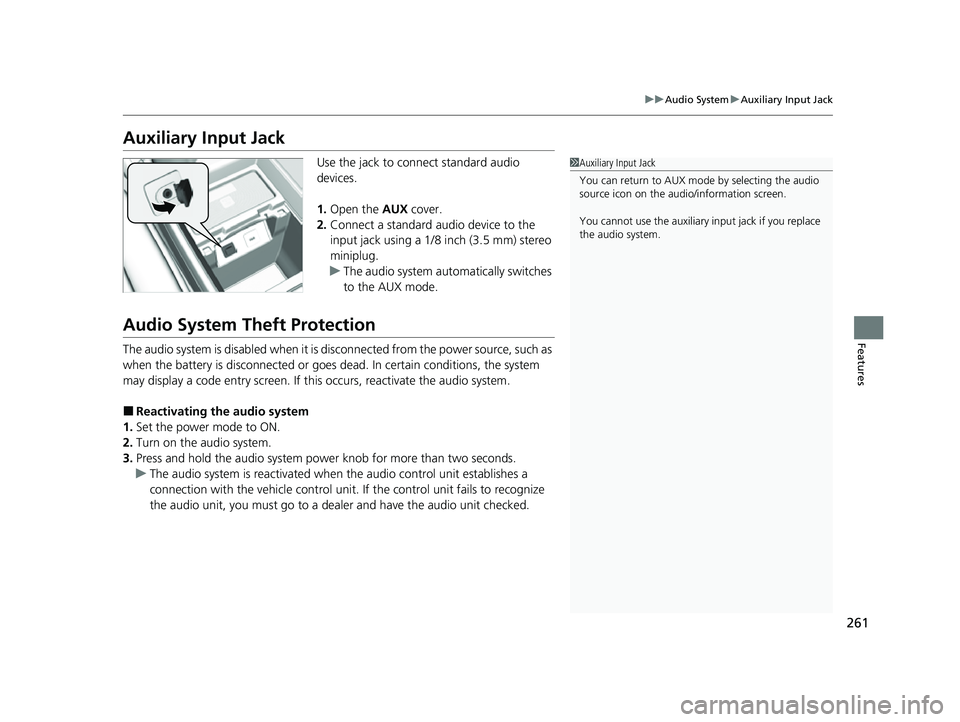
Use the jack to connect standard audio
devices.
1. Open the AUX cover.
2. Connect a standard audio device to the
input jack using a 1/8 inch (3.5 mm) stereo
miniplug.
u The audio system auto matically switches
to the AUX mode.
Audio System Theft Protection
The audio system is disabled when it is disconnected from the power source, such as
when the battery is disconnected or goes dead. In certain conditions, the system
may display a code entry screen. If this occurs, reactivate the audio system.
■Reactivating the audio system
1. Set the power mode to ON.
2. Turn on the audio system.
3. Press and hold the audio system power knob for more than two seconds.
u The audio system is reac tivated when the audio co ntrol unit establishes a
connection with the vehicl e control unit. If the control unit fails to recognize
the audio unit, you must go to a dealer and have the audio unit checked.
1 Auxiliary Input Jack
You can return to AUX mode by selecting the audio
source icon on the audio/information screen.
You cannot use the auxiliary input jack if you replace
the audio system.
23 US ODYSSEY-31THR6500.book 261 ページ 2022年1月24日 月曜日 午前11時35分
Page 266 of 707
264
Features
Audio System Basic Operation
To use the audio system function, the power mode must be in ACCESSORY or ON.
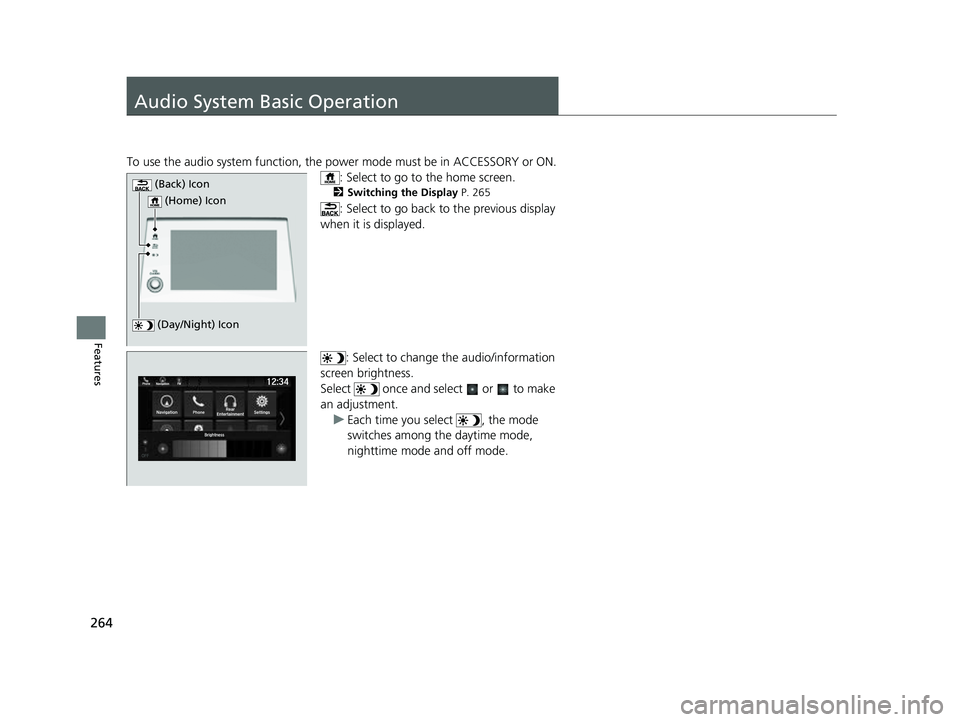
: Select to go to the home screen.
2Switching the Display P. 265
: Select to go back to the previous display
when it is displayed.
: Select to change the audio/information
screen brightness.
Select once and select or to make
an adjustment. u Each time you select , the mode
switches among the daytime mode,
nighttime mode and off mode.
(Day/Night) Icon
(Home) Icon
(Back) Icon
23 US ODYSSEY-31THR6500.book 264 ページ 2022年1月24日 月曜日 午前11時35分
Page 267 of 707
265
uuAudio System Basic Operation uAudio/Information Screen
Continued
Features
Audio/Information Screen
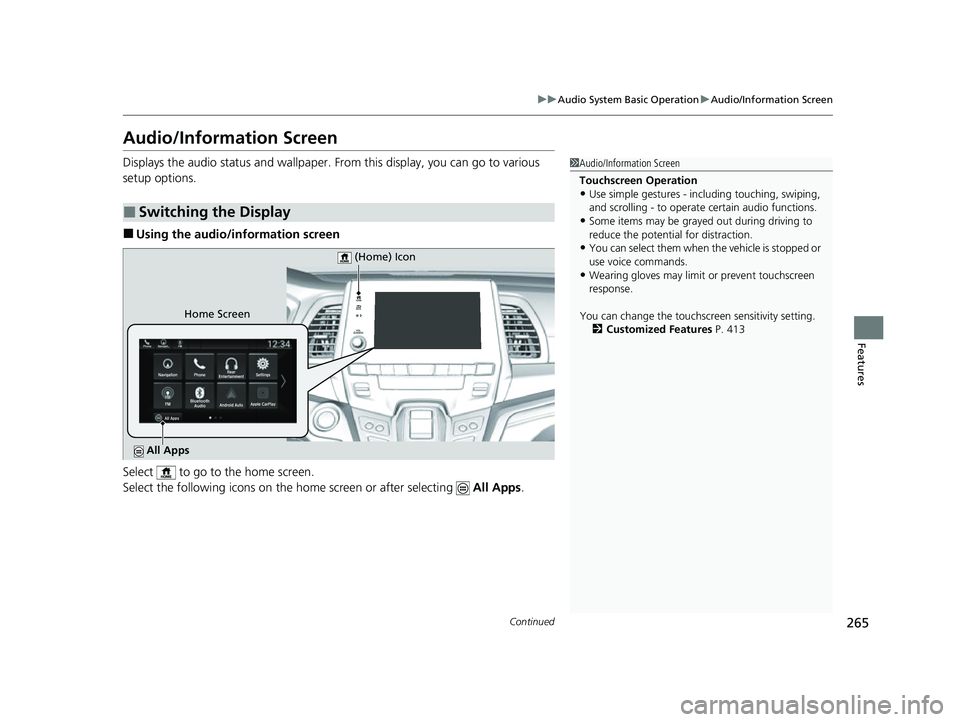
Displays the audio status and wallpaper. From this display, you can go to various
setup options.
■Using the audio/in formation screen
Select to go to the home screen.
Select the following icons on the home screen or after selecting All Apps.
■Switching the Display
1Audio/Information Screen
Touchscreen Operation
•Use simple gestures - in cluding touching, swiping,
and scrolling - to operate certain audio functions.
•Some items may be grayed out during driving to
reduce the potential for distraction.
•You can select them when the vehicle is stopped or
use voice commands.
•Wearing gloves may limit or prevent touchscreen
response.
You can change the touchs creen sensitivity setting.
2 Customized Features P. 413
Home Screen (Home) Icon
All Apps
23 US ODYSSEY-31THR6500.book 265 ページ 2022年1月24日 月曜日 午前11時35分
Page 268 of 707
266
uuAudio System Basic Operation uAudio/Information Screen
Features
■Phone
Displays the HFL information.
2 Bluetooth ® HandsFreeLink ® P. 435
■Trip Computer
Displays the trip computer information.
• Current Drive tab: Displays the current trip information.
• Trip A /Trip B tab: Displays information for the current and three previous drives.
The information is stored every time you reset Trip A/B.
To reset Trip A/B, select Reset.
To change the setting of how to reset Trip A/B, select Settings, then select Trip
A Reset Method or Trip B Reset Method .
■Clock
Displays the clock.
■System Updates
Updates the software versi on of the audio system.
2System Updates P. 279
■FM/AM/Sirius XM*/USB/Bluetooth Audio/AUX Input/My Honda Music/
Social Playlist
Displays the each audio information.
■Settings
Enters the customiz ing menu screen.
2Customized Features P. 413
* Not available on all models
23 US ODYSSEY-31THR6500.book 266 ページ 2022年1月24日 月曜日 午前11時35分