display HONDA ODYSSEY 2023 Owner's Guide
[x] Cancel search | Manufacturer: HONDA, Model Year: 2023, Model line: ODYSSEY, Model: HONDA ODYSSEY 2023Pages: 707, PDF Size: 23.9 MB
Page 291 of 707
Continued289
uuAudio System Basic Operation uFile Manager
Features
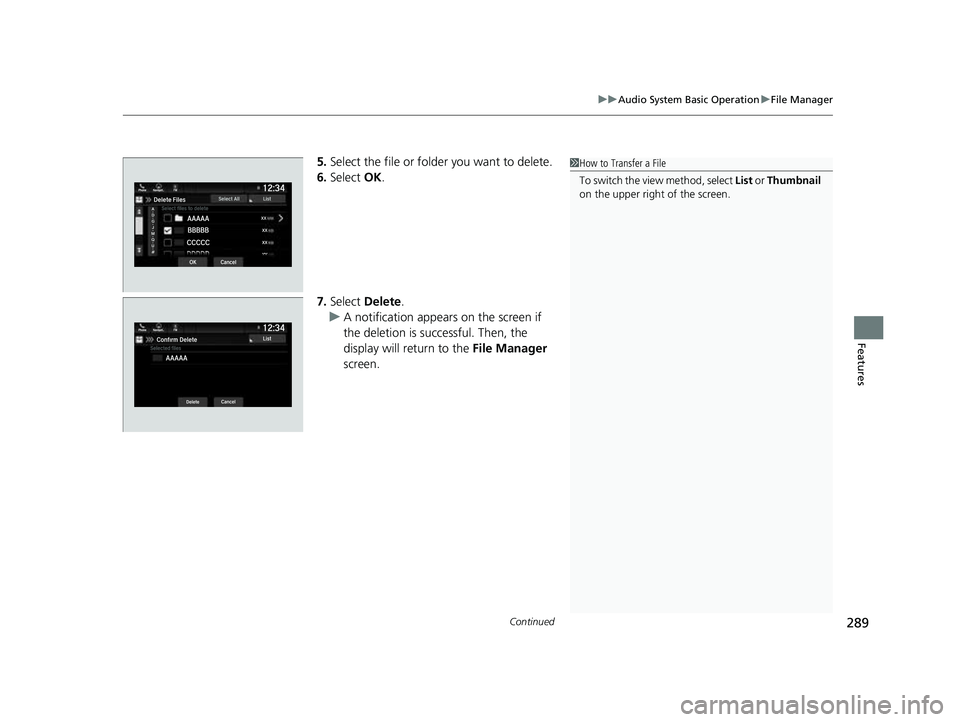
5. Select the file or folder you want to delete.
6. Select OK.
7. Select Delete .
u A notification appears on the screen if
the deletion is successful. Then, the
display will return to the File Manager
screen.1 How to Transfer a File
To switch the view method, select List or Thumbnail
on the upper right of the screen.
23 US ODYSSEY-31THR6500.book 289 ページ 2022年1月24日 月曜日 午前11時35分
Page 292 of 707
uuAudio System Basic Operation uFile Manager
290
Features
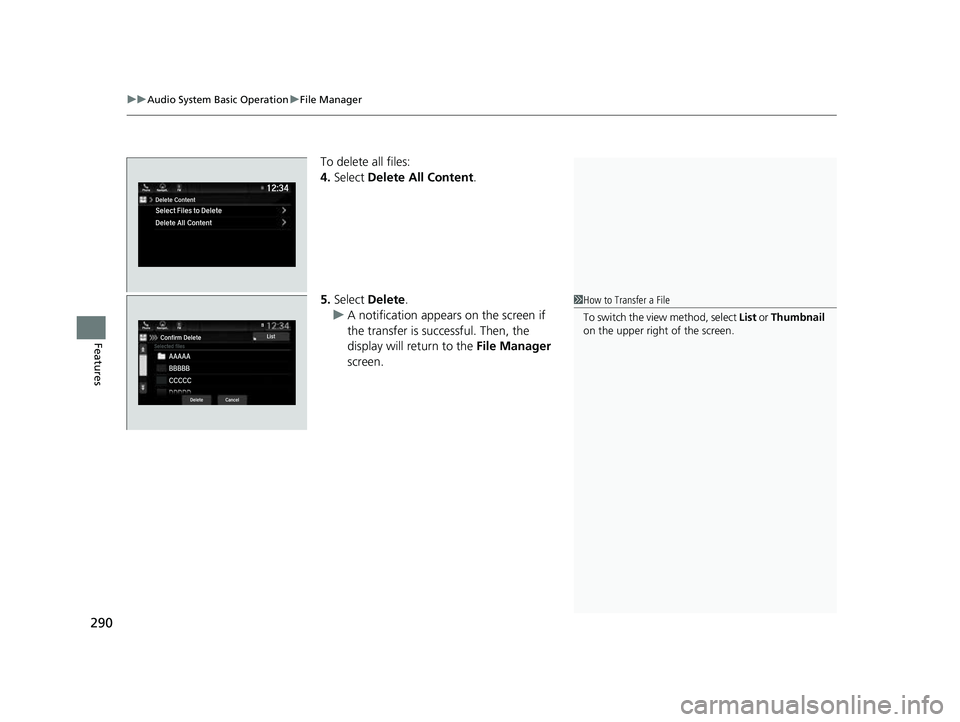
To delete all files:
4. Select Delete All Content .
5. Select Delete.
u A notification appears on the screen if
the transfer is successful. Then, the
display will return to the File Manager
screen.
1 How to Transfer a File
To switch the view method, select List or Thumbnail
on the upper right of the screen.
23 US ODYSSEY-31THR6500.book 290 ページ 2022年1月24日 月曜日 午前11時35分
Page 294 of 707
292
uuAudio System Basic Operation uDisplay Setup
Features
Display Setup
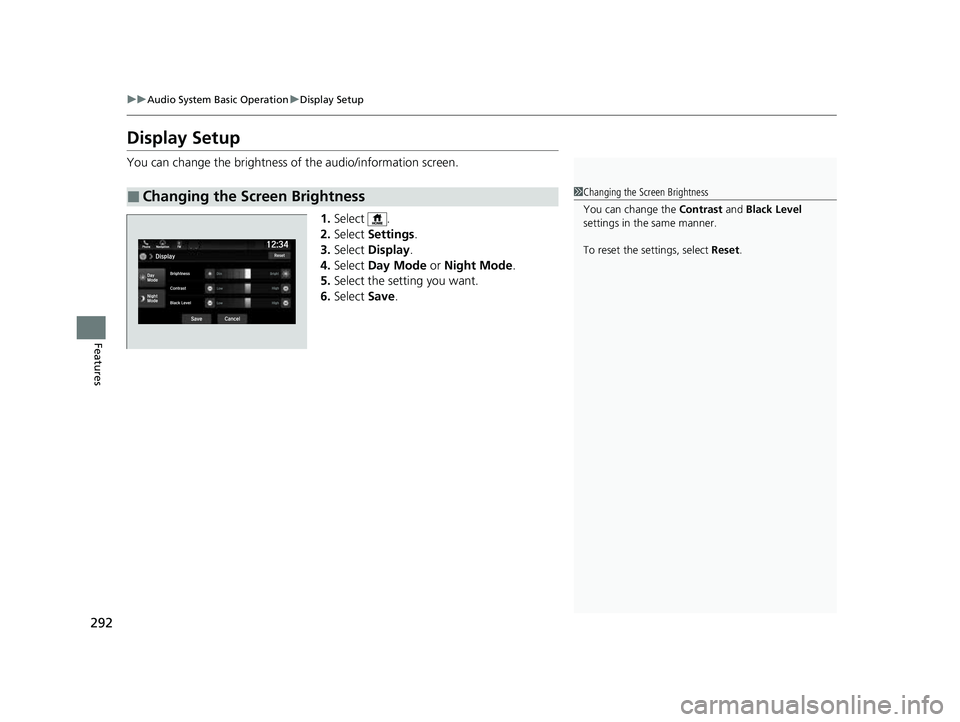
You can change the brightness of the audio/information screen.
1.Select .
2. Select Settings .
3. Select Display .
4. Select Day Mode or Night Mode .
5. Select the setting you want.
6. Select Save.
■Changing the Screen Brightness1Changing the Screen Brightness
You can change the Contrast and Black Level
settings in the same manner.
To reset the settings, select Reset.
23 US ODYSSEY-31THR6500.book 292 ページ 2022年1月24日 月曜日 午前11時35分
Page 295 of 707
293
uuAudio System Basic Operation uDisplay Setup
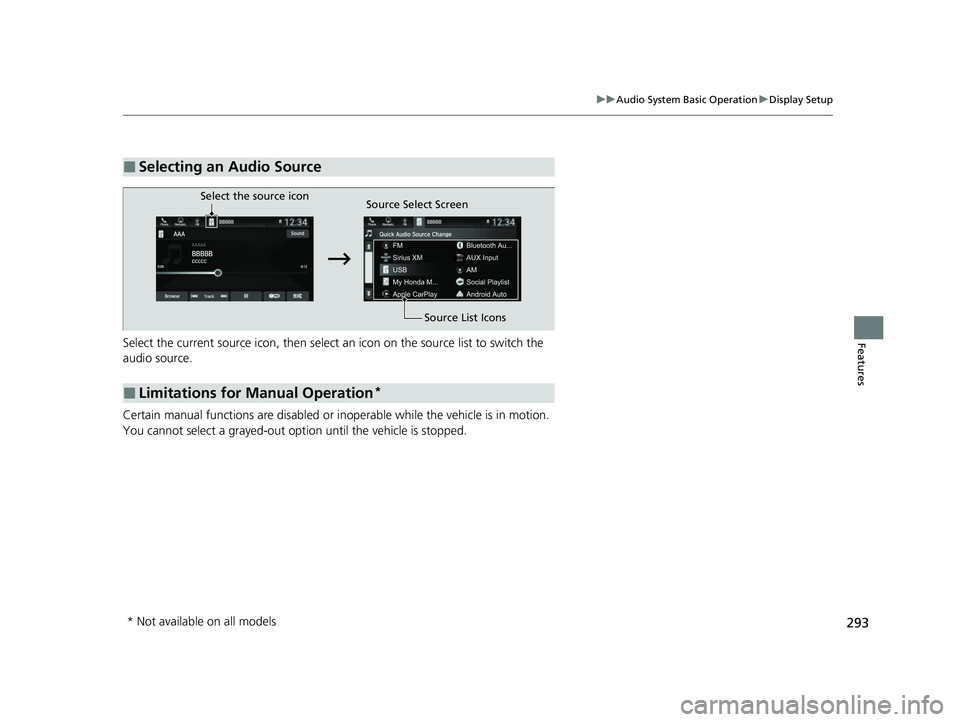
FeaturesSelect the current source icon, then select an icon on the source list to switch the
audio source.
Certain manual functions are disabled or inoperable while the vehicle is in motion.
You cannot select a grayed-out option until the vehicle is stopped.
■Selecting an Audio Source
■Limitations for Manual Operation*
Select the source icon Source Select Screen
Source List Icons
* Not available on all models
23 US ODYSSEY-31THR6500.book 293 ページ 2022年1月24日 月曜日 午前11時35分
Page 299 of 707
297
uuAudio System Basic Operation uPlaying AM/FM Radio
Continued
Features
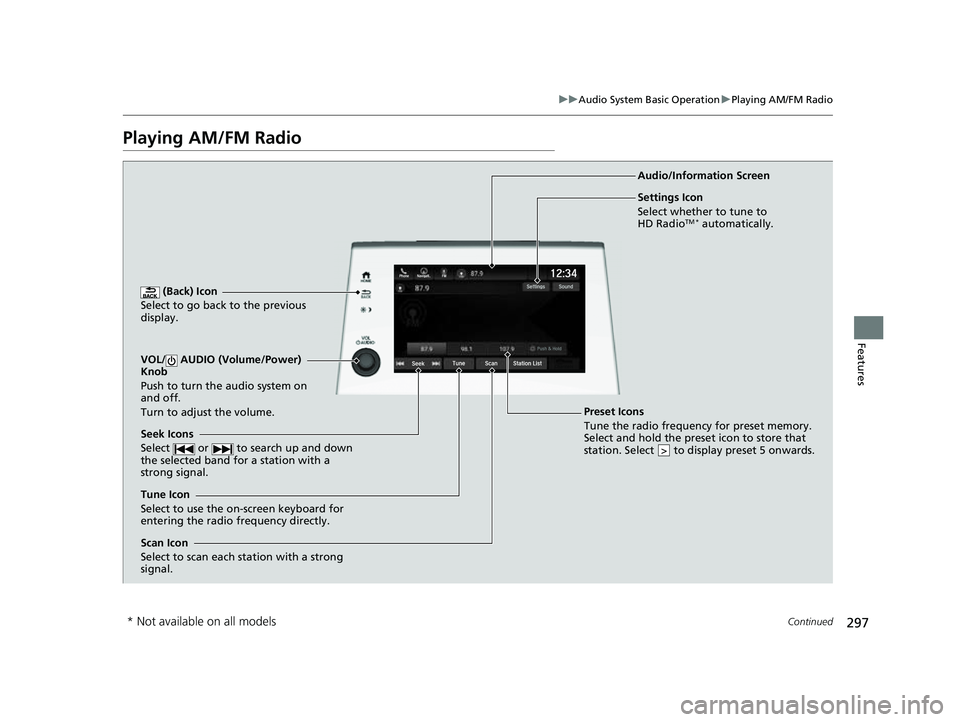
Playing AM/FM Radio
(Back) Icon
Select to go back to the previous
display.
Seek Icons
Select or to search up and down
the selected band for a station with a
strong signal.
VOL/ AUDIO (Volume/Power)
Knob
Push to turn the audio system on
and off.
Turn to adjust the volume.
Tune Icon
Select to use the on-screen keyboard for
entering the radio frequency directly. Audio/Information Screen
Scan Icon
Select to scan each station with a strong
signal.
Preset Icons
Tune the radio frequency for preset memory.
Select and hold the preset icon to store that
station. Select to display preset 5 onwards.
>
Settings Icon
Select whether to tune to
HD Radio
TM * automatically.
* Not available on all models
23 US ODYSSEY-31THR6500.book 297 ページ 2022年1月24日 月曜日 午前11時35分
Page 300 of 707
uuAudio System Basic Operation uPlaying AM/FM Radio
298
Features
To store a station:
1. Tune to the selected station.
2. Select and hold the preset number fo r the station you want to store.
Lists the strongest stations on the selected band.
1. Select Station List to display a list.
2. Select the station.
■Manual update
Updates your available station list at any time.
1. Select Station List to display a list.
2. Select Refresh .
■Preset Memory
■Station List
1Preset Memory
The ST indicator appears on the display indicating
stereo FM broadcasts.
Stereo reproduction in AM is not available.
Switching the Audio Mode
Press the or button on the steering wheel or
select the audio source icon on the screen. 2 Audio Remote Controls P. 262
You can store 12 AM/FM st ations into preset
memory.
HD Radio Technology manufactured under license
from iBiquity Digi tal Corporation. U.S. and Foreign
Patents. HD Radio
TM and the HD, HD Radio, and
“Arc” logos are proprietary trademarks of iBiquity
Digital Corp.
34
Models with HD RadioTM feature
23 US ODYSSEY-31THR6500.book 298 ページ 2022年1月24日 月曜日 午前11時35分
Page 301 of 707
299
uuAudio System Basic Operation uPlaying AM/FM Radio
Features
Samples each of the strongest stations on th e selected band for 10 seconds. To turn
off scan, select Stop or .
Provides text data information related to your selected RDS-capable FM station.
■To find an RDS station from Station List
1. Select Station List to display a list while listening to an FM station.
2. Select the station.
■Manual update
Updates your available st ation list at any time.
1. Select Station List to display a list while listening to an FM station.
2. Select Refresh .
Displays the subchannel list when an HD Radio
TM station is selected while listening to
an FM station.
1. Select HD Radio Channels.
2. Select the channel number.
■Scan
■Radio Data System (RDS)
■HD Subchannel
1Radio Data System (RDS)
When you select an RDS-capable FM station, the RDS
automatically turns on, and the frequency display
changes to the station name. However, when the
signals of that station become weak, the display
changes from the statio n name to the frequency.
Models with HD RadioTM feature
23 US ODYSSEY-31THR6500.book 299 ページ 2022年1月24日 月曜日 午前11時35分
Page 302 of 707
300
uuAudio System Basic Operation uPlaying SiriusXM ® Radio*
Features
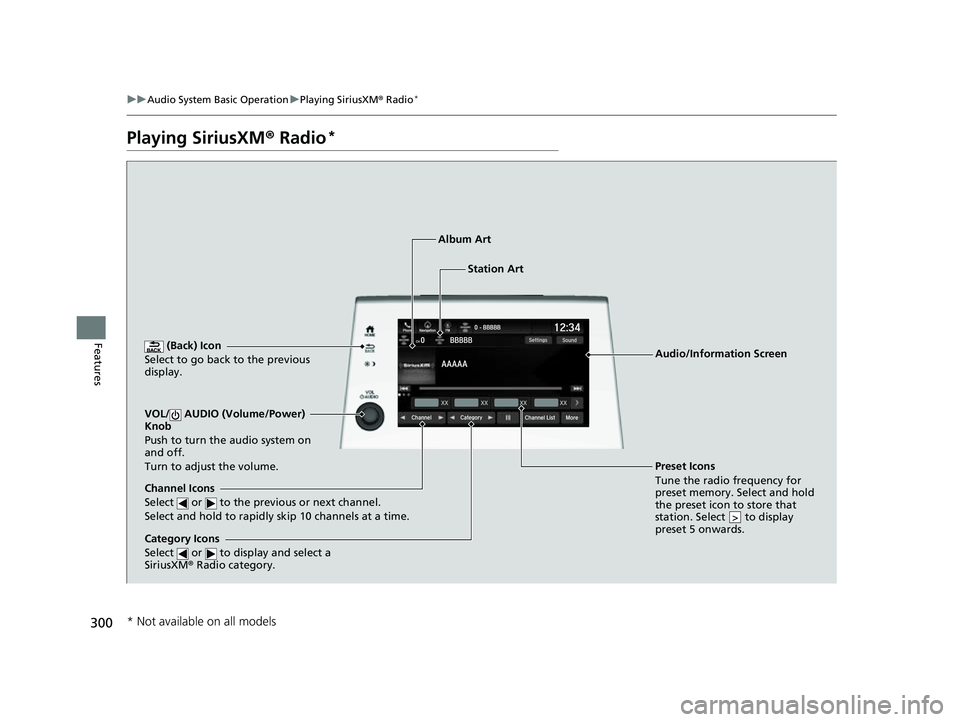
Playing SiriusXM ® Radio*
(Back) Icon
Select to go back to the previous
display.
Channel Icons
Select or to the previous or next channel.
Select and hold to rapidly skip 10 channels at a time.
VOL/ AUDIO (Volume/Power)
Knob
Push to turn the audio system on
and off.
Turn to adjust the volume.
Category Icons
Select or to display and select a
SiriusXM ® Radio category.
Audio/Information Screen
Preset Icons
Tune the radio fr equency for
p r
eset memory. Select and hold
the preset icon to store that
station. Select to display
preset 5 onwards.
>
Album Art
Station Art
* Not available on all models
23 US ODYSSEY-31THR6500.book 300 ページ 2022年1月24日 月曜日 午前11時35分
Page 305 of 707
Continued303
uuAudio System Basic Operation uPlaying SiriusXM ® Radio*
Features
Suggested channel listing received from SiriusXM ® can be displayed and selected.
1. Select Channel List .
2. Select the featured channel list title you want to listen to.
u The selected channel list of the title is displayed.
3. Select the channel.
■Listening to Featured Channels1Listening to Featured Channels
Up to three featured channels by SiriusXM ® can be
displayed.
Featured channel lists are at the top of the channel
list.
To switch the sorting method, select Number , Name
or Category on the upper right of the screen.
Select Keypad to use the on-screen keyboard for
entering the channel number directly.
23 US ODYSSEY-31THR6500.book 303 ページ 2022年1月24日 月曜日 午前11時35分
Page 312 of 707
310
uuAudio System Basic Operation uPlaying an iPod
Features
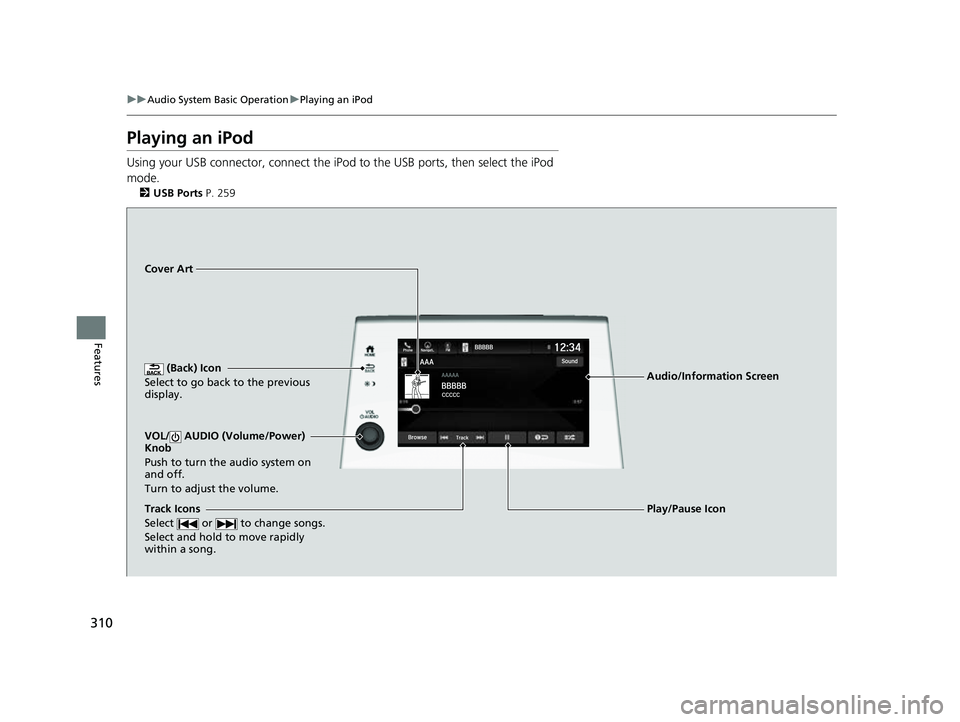
Playing an iPod
Using your USB connector, connect the iPod to the USB ports, then select the iPod
mode.
2 USB Ports P. 259
(Back) Icon
Select to go back to the previous
display.
Track Icons
Select or to change songs.
Select and hold to move rapidly
within a song.
VOL/ AUDIO (Volume/Power)
Knob
Push to turn the audio system on
and off.
Turn to adjust the volume.
Cover Art
Audio/Information Screen
Play/Pause Icon
23 US ODYSSEY-31THR6500.book 310 ページ 2022年1月24日 月曜日 午前11時35分