phone HONDA ODYSSEY 2023 User Guide
[x] Cancel search | Manufacturer: HONDA, Model Year: 2023, Model line: ODYSSEY, Model: HONDA ODYSSEY 2023Pages: 707, PDF Size: 23.9 MB
Page 260 of 707
258
Features
Audio System
About Your Audio System
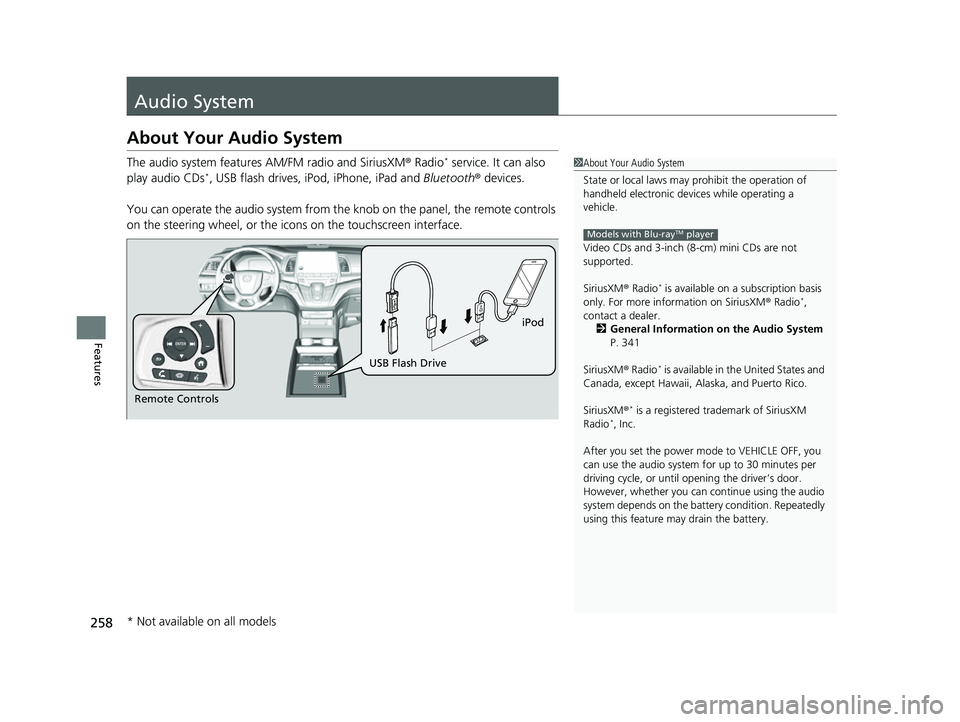
The audio system features AM/FM radio and SiriusXM® Radio* service. It can also
play audio CDs*, USB flash drives, iPod, iPhone, iPad and Bluetooth® devices.
You can operate the audio system from th e knob on the panel, the remote controls
on the steering wheel, or the icons on the touchscreen interface.
1About Your Audio System
State or local laws may pr ohibit the operation of
handheld electronic devices while operating a
vehicle.
Video CDs and 3-inch (8 -cm) mini CDs are not
supported.
SiriusXM ® Radio
* is available on a subscription basis
only. For more information on SiriusXM ® Radio*,
contact a dealer. 2 General Information on the Audio System
P. 341
SiriusXM ® Radio
* is available in the United States and
Canada, except Ha waii, Alaska, and Puerto Rico.
SiriusXM ®
* is a registered tra demark of SiriusXM
Radio*, Inc.
After you set the power m ode to VEHICLE OFF, you
can use the audio system for up to 30 minutes per
driving cycle, or until opening the driver’s door.
However, whether you can continue using the audio
system depends on the batter y condition. Repeatedly
using this feature ma y drain the battery.
Models with Blu-rayTM player
Remote Controls iPod
USB Flash Drive
* Not available on all models
23 US ODYSSEY-31THR6500.book 258 ページ 2022年1月24日 月曜日 午前11時35分
Page 261 of 707
259
uuAudio System uUSB Ports
Continued
Features
USB Ports
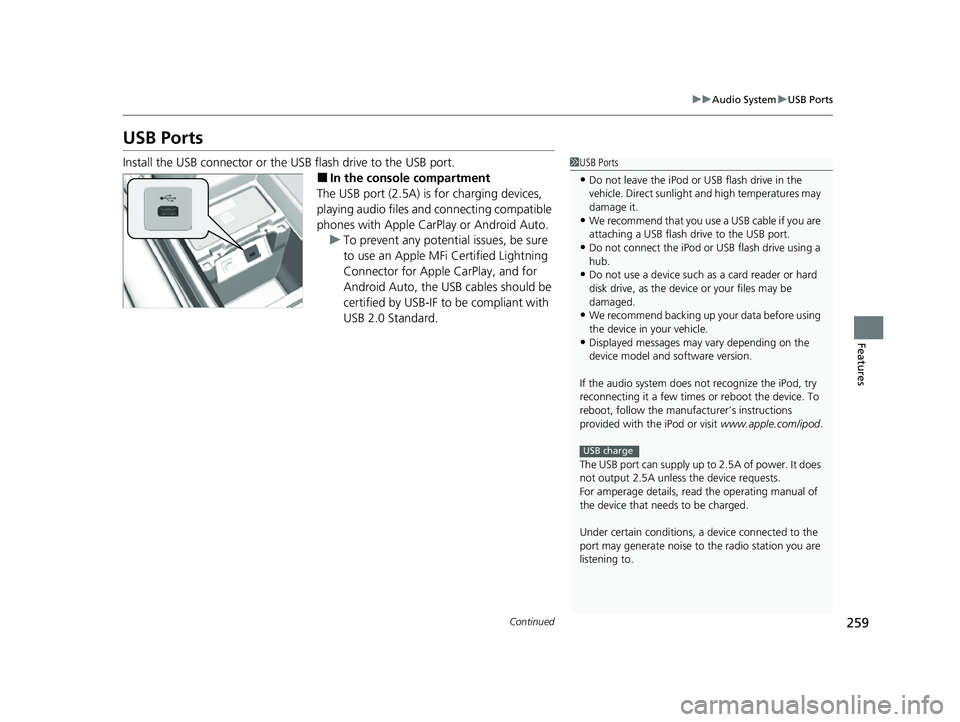
Install the USB connector or the USB flash drive to the USB port.
■In the consol e compartment
The USB port (2.5A) is for charging devices,
playing audio files and connecting compatible
phones with Apple CarPlay or Android Auto. u To prevent any potenti al issues, be sure
to use an Apple MFi Certified Lightning
Connector for Apple CarPlay, and for
Android Auto, the USB cables should be
certified by USB-IF to be compliant with
USB 2.0 Standard.
1 USB Ports
•Do not leave the iPod or USB flash drive in the
vehicle. Direct sunlight and high temperatures may
damage it.
•We recommend that you us e a USB cable if you are
attaching a USB flash drive to the USB port.
•Do not connect the iPod or USB flash drive using a
hub.
•Do not use a device such as a card reader or hard
disk drive, as the device or your files may be
damaged.
•We recommend backing up yo ur data before using
the device in your vehicle.
•Displayed messages may vary depending on the
device model and software version.
If the audio system does not recognize the iPod, try
reconnecting it a few times or reboot the device. To
reboot, follow the manufac turer’s instructions
provided with the iPod or visit www.apple.com/ipod.
The USB port can supply up to 2.5A of power. It does
not output 2.5A unless the device requests.
For amperage details, read the operating manual of
the device that ne eds to be charged.
Under certain condi tions, a device connected to the
port may generate noise to the radio station you are
listening to.
USB charge
23 US ODYSSEY-31THR6500.book 259 ページ 2022年1月24日 月曜日 午前11時35分
Page 268 of 707
266
uuAudio System Basic Operation uAudio/Information Screen
Features
■Phone
Displays the HFL information.
2 Bluetooth ® HandsFreeLink ® P. 435
■Trip Computer
Displays the trip computer information.
• Current Drive tab: Displays the current trip information.
• Trip A /Trip B tab: Displays information for the current and three previous drives.
The information is stored every time you reset Trip A/B.
To reset Trip A/B, select Reset.
To change the setting of how to reset Trip A/B, select Settings, then select Trip
A Reset Method or Trip B Reset Method .
■Clock
Displays the clock.
■System Updates
Updates the software versi on of the audio system.
2System Updates P. 279
■FM/AM/Sirius XM*/USB/Bluetooth Audio/AUX Input/My Honda Music/
Social Playlist
Displays the each audio information.
■Settings
Enters the customiz ing menu screen.
2Customized Features P. 413
* Not available on all models
23 US ODYSSEY-31THR6500.book 266 ページ 2022年1月24日 月曜日 午前11時35分
Page 279 of 707
Continued277
uuAudio System Basic Operation uAudio/Information Screen
Features
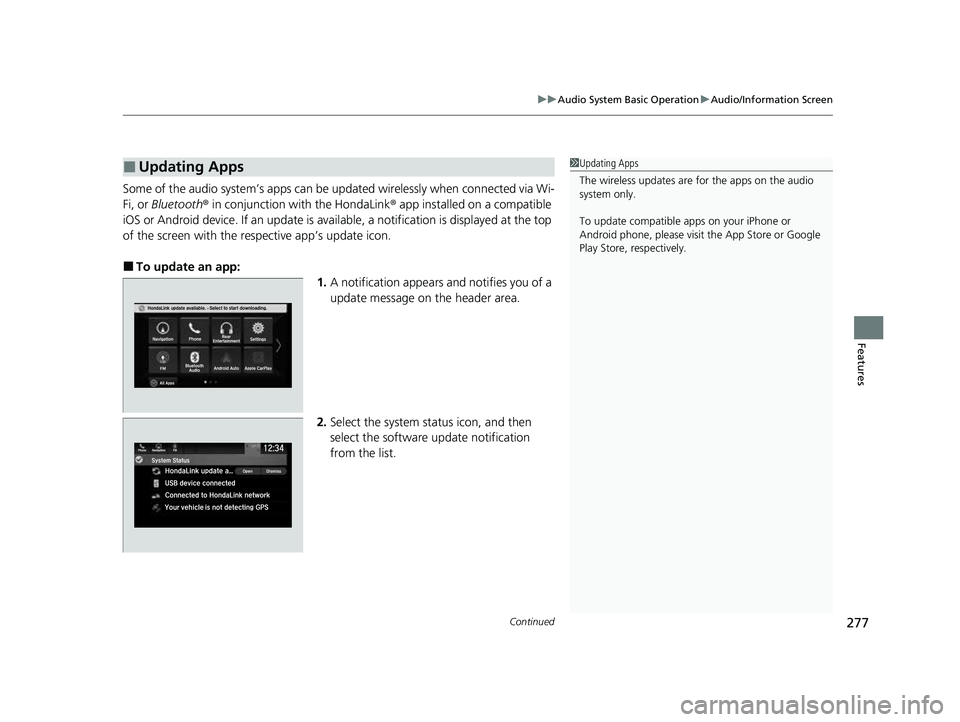
Some of the audio system’s apps can be updated wirelessly when connected via Wi-
Fi, or Bluetooth ® in conjunction with the HondaLink ® app installed on a compatible
iOS or Android device. If an update is avai lable, a notification is displayed at the top
of the screen with the re spective app’s update icon.
■To update an app:
1.A notification appears and notifies you of a
update message on the header area.
2. Select the system status icon, and then
select the software update notification
from the list.
■Updating Apps1Updating Apps
The wireless updates are for the apps on the audio
system only.
To update compatible a pps on your iPhone or
Android phone, please visit the App Store or Google
Play Store, respectively.
23 US ODYSSEY-31THR6500.book 277 ページ 2022年1月24日 月曜日 午前11時35分
Page 280 of 707
278
uuAudio System Basic Operation uAudio/Information Screen
Features
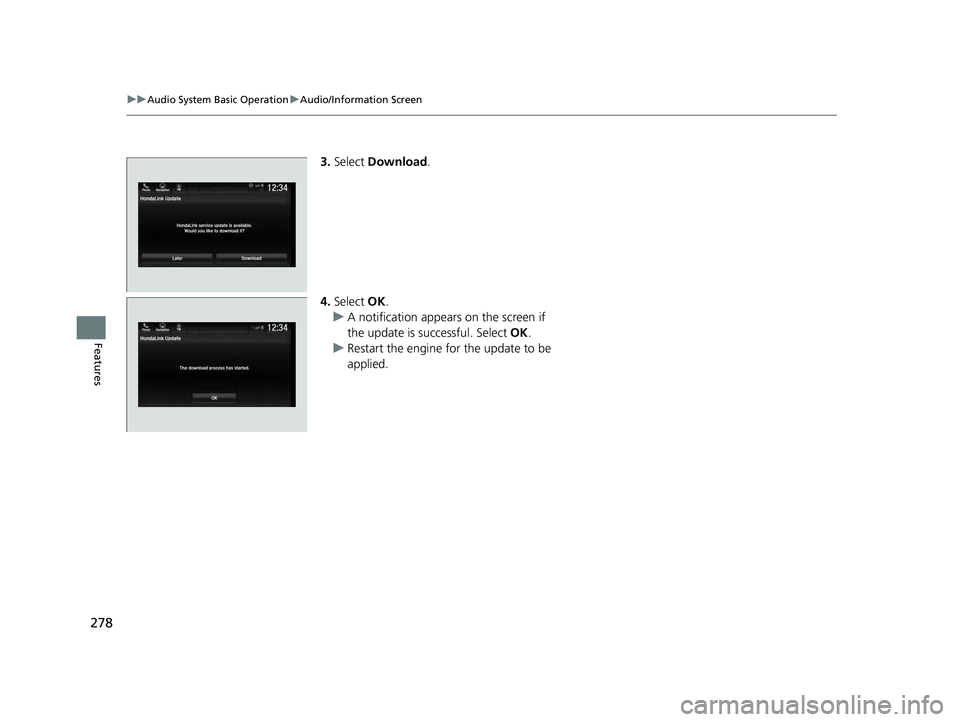
3. Select Download .
4. Select OK.
u A notification appears on the screen if
the update is successful. Select OK.
u Restart the engine for the update to be
applied.
LaterDownload
HondaLink Update
HondaLink service update is available.Would you like to download it?
12:34Phone Navigation FM
23 US ODYSSEY-31THR6500.book 278 ページ 2022年1月24日 月曜日 午前11時35分
Page 296 of 707
294
uuAudio System Basic Operation uVoice Control Operation
Features
Voice Control Operation
Your vehicle has a voice control system that allows hands-free operation.
The voice control system uses the (tal k) and (back) buttons on the steering
wheel and a microphone near the map lights on the ceiling.
To achieve optimum voice recognition when using the voice control system:
• Make sure the correct screen is displa yed for the voice command that you are
using.
The system recognizes only certain commands.
Available voice commands.
2 Voice Portal Screen P. 295
•Close the windows and moonroof*.
• Adjust the dashboard and side vents so air does not blow onto the microphone
on the ceiling.
• Speak clearly in a clear, natural speaking voice without pausing between words.
• Reduce any background noise if possible. The system may misinterpret your
command if more than one person is speaking at the same time.
■Voice Recognition
1Voice Control Operation
When you press the button, a helpful prompt asks
what you would like to do. Press and release the
button again to bypass this prompt and give a
command.
1 Voice Recognition
The voice control system can only be used from the
driver’s seat because the microphone unit removes
noises from the front passenger’s side.
* Not available on all models
23 US ODYSSEY-31THR6500.book 294 ページ 2022年1月24日 月曜日 午前11時35分
Page 297 of 707
295
uuAudio System Basic Operation uVoice Control Operation
Continued
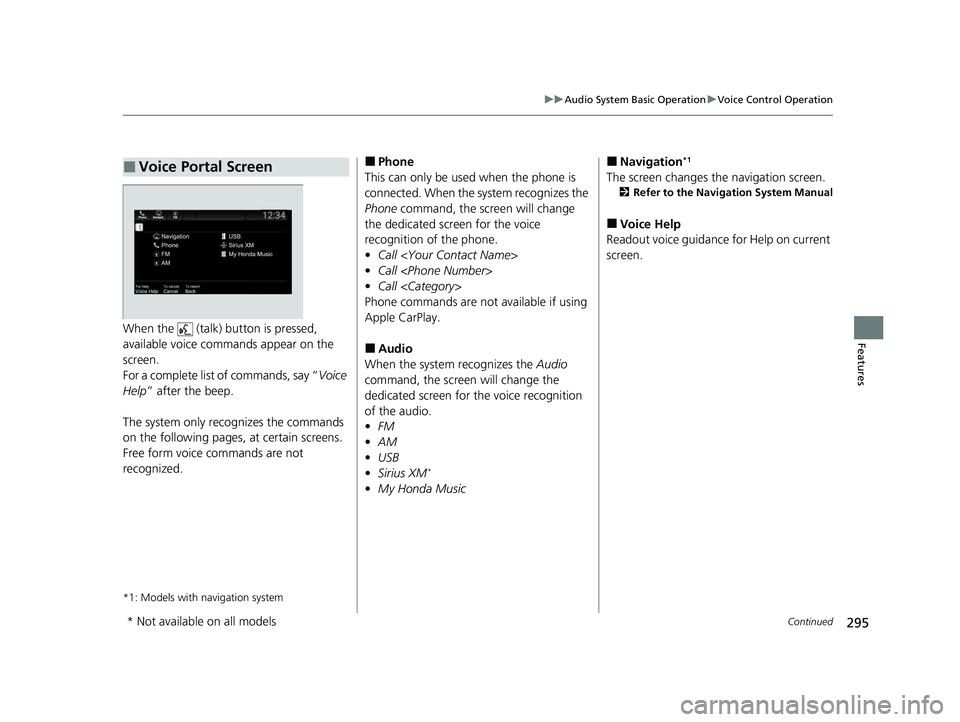
FeaturesWhen the (talk) button is pressed,
available voice comma nds appear on the
screen.
For a complete list of commands, say “ Voice
Help ” after the beep.
The system only recognizes the commands
on the following pages, at certain screens.
Free form voice commands are not
recognized.
*1: Models with navigation system
■Voice Portal Screen■Phone
This can only be used when the phone is
connected. When the sy stem recognizes the
Phone command, the screen will change
the dedicated screen for the voice
recognition of the phone.
• Call
• Call
• Call
Phone commands are not available if using
Apple CarPlay.
■Audio
When the system recognizes the Audio
command, the screen will change the
dedicated screen for the voice recognition
of the audio.
• FM
• AM
• USB
• Sirius XM
*
•My Honda Music
■Navigation*1
The screen changes the navigation screen.
2 Refer to the Navigation System Manual
■Voice Help
Readout voice guidance for Help on current
screen.
* Not available on all models
23 US ODYSSEY-31THR6500.book 295 ページ 2022年1月24日 月曜日 午前11時35分
Page 298 of 707
296
uuAudio System Basic Operation uVoice Control Operation
Features
The system accepts th ese commands on the
dedicated screen for the voice recognition
of the phone.
• Call
• Call
• Call
■Phone Commands
The system accepts these commands on the
dedicated screen for the voice recognition
of the audio.
■FM Commands
• Tune to <87.7-107.9> FM
■AM Commands
• Tune to <530-1710> AM
■Sirius XM Commands*
•Channel <1-999>
• Channel
■USB/My Honda Music Commands
• Play Artist
• Play Album
• Play Genre
• Play Playlist
• Play Music
• Play Song
■Audio Commands
* Not available on all models
23 US ODYSSEY-31THR6500.book 296 ページ 2022年1月24日 月曜日 午前11時35分
Page 313 of 707
Continued311
uuAudio System Basic Operation uPlaying an iPod
Features
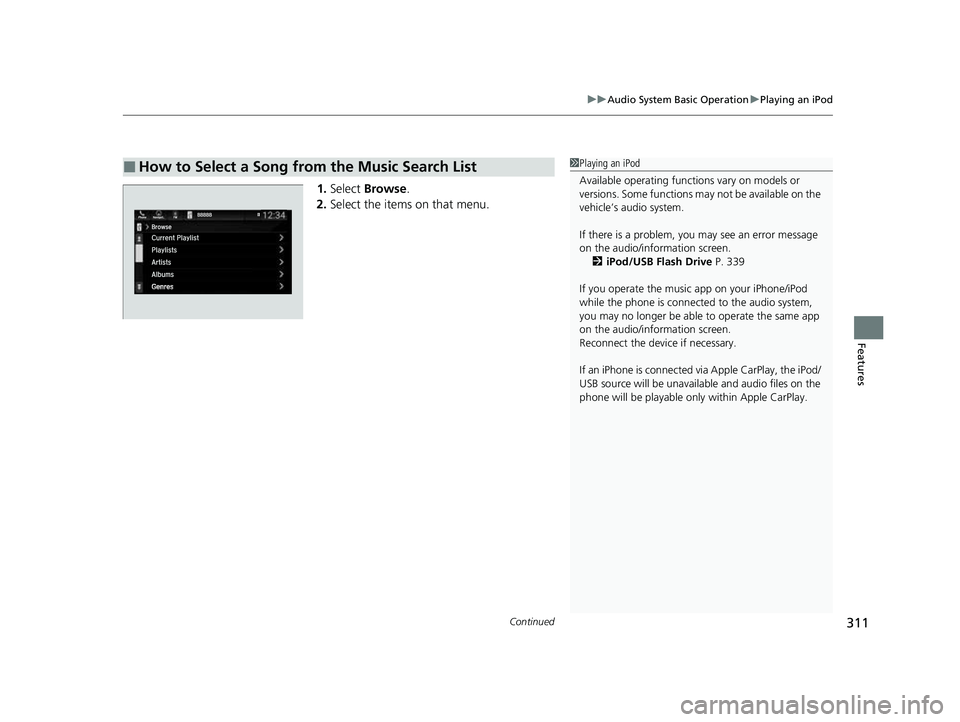
1. Select Browse .
2. Select the items on that menu.
■How to Select a Song from the Music Search List1Playing an iPod
Available operating functi ons vary on models or
versions. Some functions ma y not be available on the
vehicle’s audio system.
If there is a problem, you may see an error message
on the audio/information screen. 2 iPod/USB Flash Drive P. 339
If you operate the musi c app on your iPhone/iPod
while the phone is connected to the audio system,
you may no longer be able to operate the same app
on the audio/information screen.
Reconnect the devi ce if necessary.
If an iPhone is connected vi a Apple CarPlay, the iPod/
USB source will be unavailable and audio files on the
phone will be playable onl y within Apple CarPlay.
23 US ODYSSEY-31THR6500.book 311 ページ 2022年1月24日 月曜日 午前11時35分
Page 315 of 707
313
uuAudio System Basic Operation uPlaying a USB Flash Drive
Continued
Features
Playing a USB Flash Drive
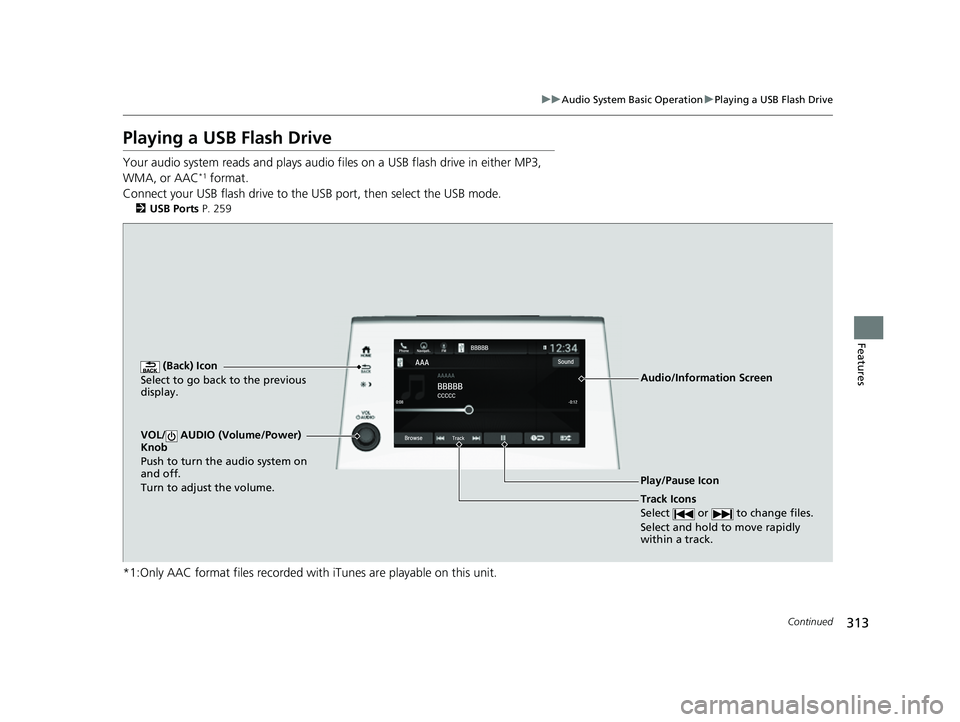
Your audio system reads and plays audio f iles on a USB flash drive in either MP3,
WMA, or AAC*1 format.
Connect your USB flash drive to the USB port, then select the USB mode.
2 USB Ports P. 259
*1:Only AAC format files recorded with iTunes are playable on this unit.
AAAAAAAA
CCCCCBBBBB
BBBBB
BrowseTrack
Phone Navigati.. FMSound
0:08 -0:12
AAAAAAAAAAA
CCCCCCCCBBBBBB
BBBBBBBBBBBBBBB
BrowseTrack
PhoneNavigati..FMSound
0:08-0:121
(Back) Icon
Select to go back to the previous
display.
Track Icons
Select or to change files.
Select and hold to move rapidly
within a track.
VOL/ AUDIO (Volume/Power)
Knob
Push to turn the audio system on
and off.
Turn to adjust the volume.
Audio/Information Screen
Play/Pause Icon
23 US ODYSSEY-31THR6500.book 313 ページ 2022年1月24日 月曜日 午前11時35分