lock HONDA ODYSSEY 2023 Owner's Manual
[x] Cancel search | Manufacturer: HONDA, Model Year: 2023, Model line: ODYSSEY, Model: HONDA ODYSSEY 2023Pages: 707, PDF Size: 23.9 MB
Page 71 of 707
69
uuChild Safety uSafety of Infants and Small Children
Continued
Safe Driving
Safety of Infants and Small Children
An infant must be properly restrained in a rear-facing child seat until the infant
reaches the seat manufacturer’s weight or height limit for the seat.
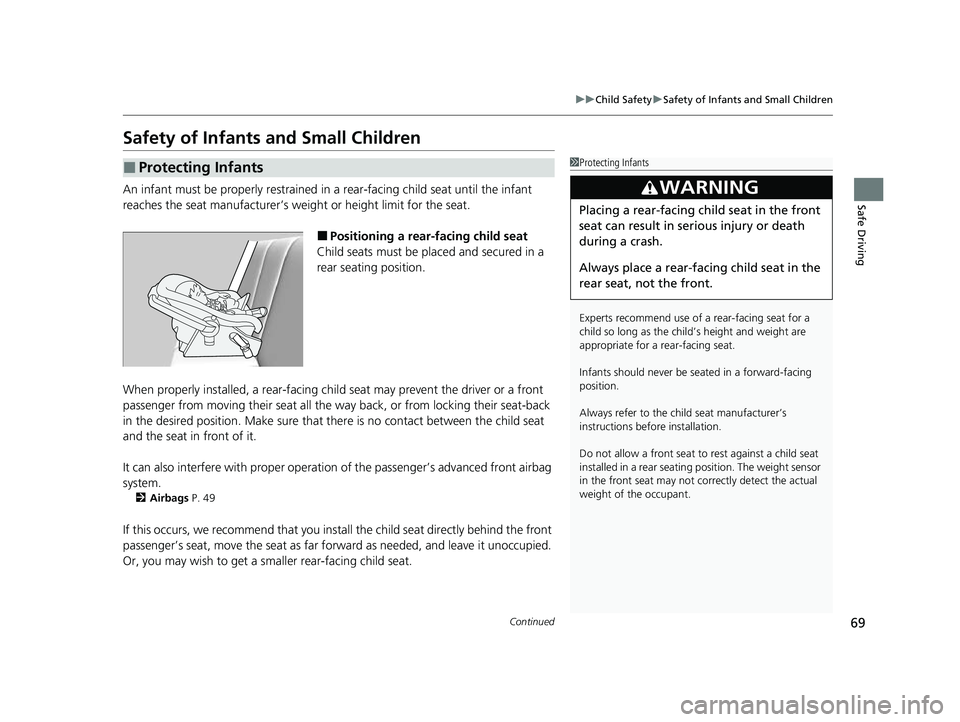
■Positioning a rear-facing child seat
Child seats must be placed and secured in a
rear seating position.
When properly installed, a rear-facing chil d seat may prevent the driver or a front
passenger from moving their seat all the wa y back, or from locking their seat-back
in the desired position. Make sure that there is no contact between the child seat
and the seat in front of it.
It can also interfere with proper operation of the passenger’s advanced front airbag
system.
2 Airbags P. 49
If this occurs, we recommend that you insta ll the child seat directly behind the front
passenger’s seat, move the seat as far fo rward as needed, and leave it unoccupied.
Or, you may wish to get a smaller rear-facing child seat.
■Protecting Infants1 Protecting Infants
Experts recommend use of a rear-facing seat for a
child so long as the child’ s height and weight are
appropriate for a rear-facing seat.
Infants should never be s eated in a forward-facing
position.
Always refer to the child seat manufacturer’s
instructions before installation.
Do not allow a front seat to rest against a child seat
installed in a rear seating position. The weight sensor
in the front seat may not co rrectly detect the actual
weight of the occupant.
3WARNING
Placing a rear-facing child seat in the front
seat can result in serious injury or death
during a crash.
Always place a rear-fac ing child seat in the
rear seat, not the front.
23 US ODYSSEY-31THR6500.book 69 ページ 2022年1月24日 月曜日 午前11時35分
Page 78 of 707
76
uuChild Safety uSafety of Infants and Small Children
Safe Driving
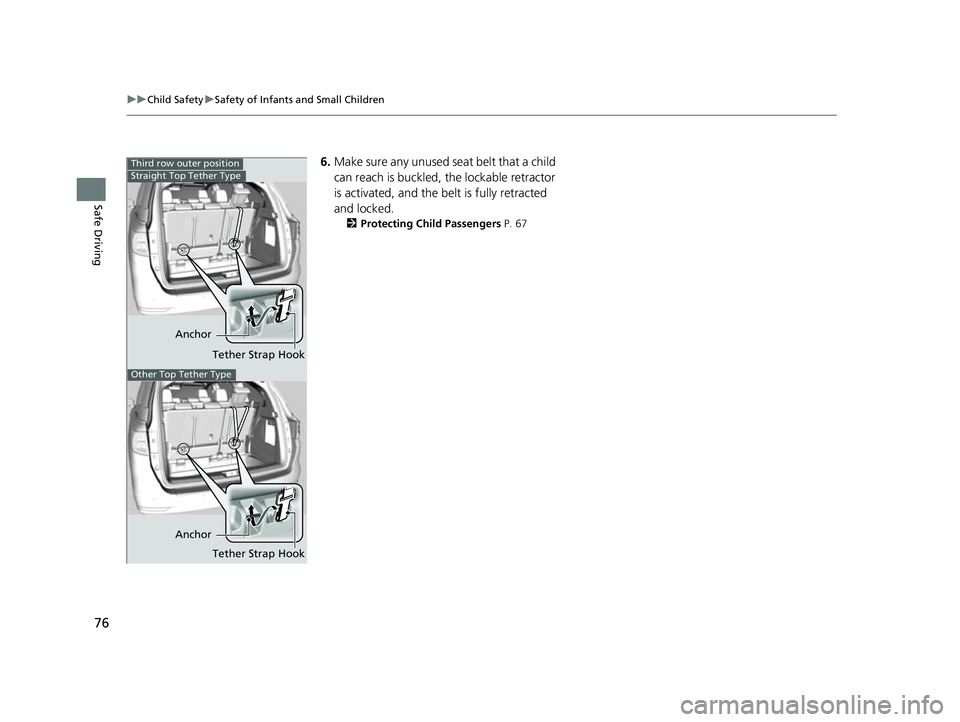
6. Make sure any unused seat belt that a child
can reach is buckled, the lockable retractor
is activated, and the be lt is fully retracted
and locked.
2 Protecting Child Passengers P. 67
Anchor
Tether Strap Hook
Third row outer positionStraight Top Tether Type
Other Top Tether Type
AnchorTether Strap Hook
23 US ODYSSEY-31THR6500.book 76 ページ 2022年1月24日 月曜日 午前11時35分
Page 79 of 707
Continued77
uuChild Safety uSafety of Infants and Small Children
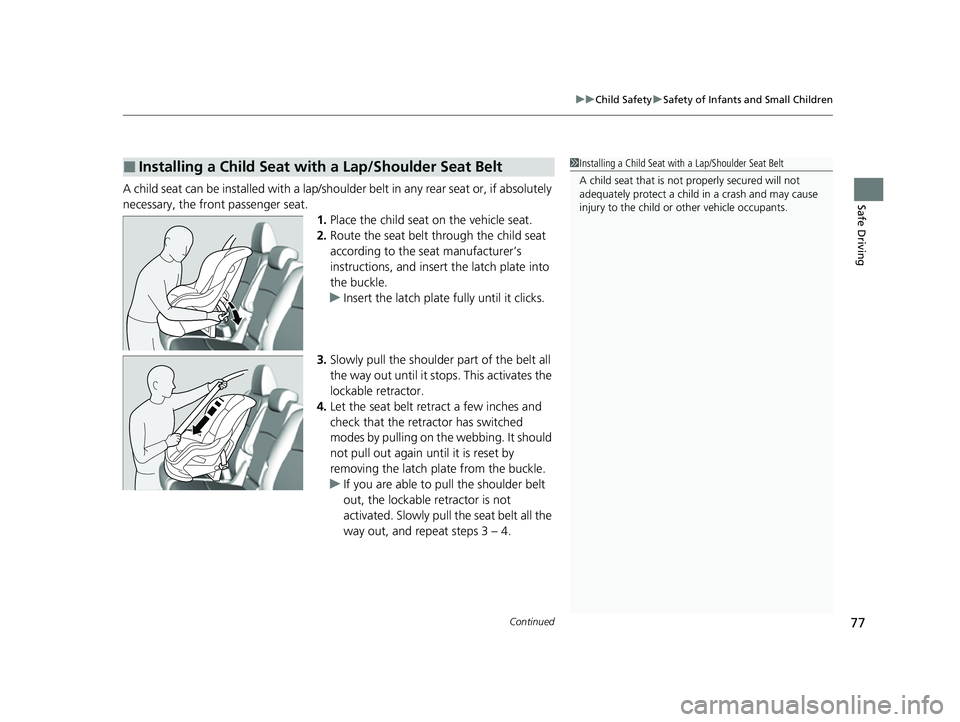
Safe DrivingA child seat can be installed with a lap/should er belt in any rear seat or, if absolutely
necessary, the front passenger seat. 1.Place the child seat on the vehicle seat.
2. Route the seat belt through the child seat
according to the seat manufacturer’s
instructions, and insert the latch plate into
the buckle.
u Insert the latch plate fully until it clicks.
3. Slowly pull the shoulder part of the belt all
the way out until it stops. This activates the
lockable retractor.
4. Let the seat belt retract a few inches and
check that the retractor has switched
modes by pulling on the webbing. It should
not pull out again until it is reset by
removing the latch pl ate from the buckle.
u If you are able to pull the shoulder belt
out, the lockable retractor is not
activated. Slowly pull the seat belt all the
way out, and repeat steps 3 – 4.
■Installing a Child Seat with a Lap/Shoulder Seat Belt1Installing a Child Seat with a Lap/Shoulder Seat Belt
A child seat that is not properly secured will not
adequately protect a child in a crash and may cause
injury to the child or other vehicle occupants.
23 US ODYSSEY-31THR6500.book 77 ページ 2022年1月24日 月曜日 午前11時35分
Page 80 of 707
uuChild Safety uSafety of Infants and Small Children
78
Safe Driving
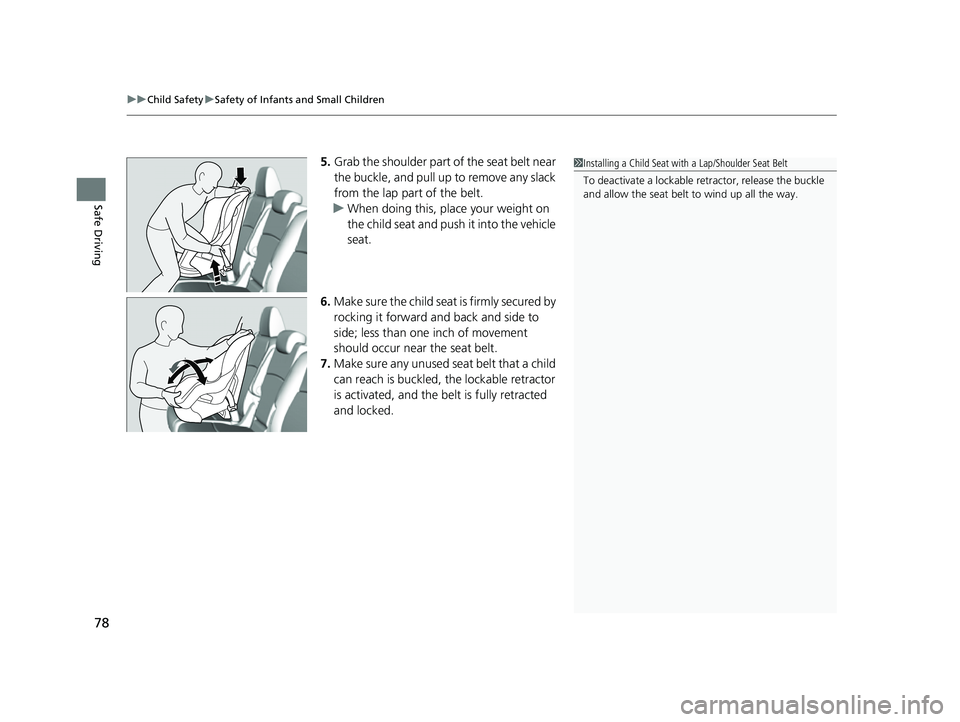
5. Grab the shoulder part of the seat belt near
the buckle, and pull up to remove any slack
from the lap part of the belt.
u When doing this, plac e your weight on
the child seat and push it into the vehicle
seat.
6. Make sure the child seat is firmly secured by
rocking it forward and back and side to
side; less than one inch of movement
should occur near the seat belt.
7. Make sure any unused seat belt that a child
can reach is buckled, the lockable retractor
is activated, and the be lt is fully retracted
and locked.1 Installing a Child Seat with a Lap/Shoulder Seat Belt
To deactivate a lockable retractor, release the buckle
and allow the seat belt to wind up all the way.
23 US ODYSSEY-31THR6500.book 78 ページ 2022年1月24日 月曜日 午前11時35分
Page 97 of 707
95
uuIndicators u
Continued
Instrument Panel
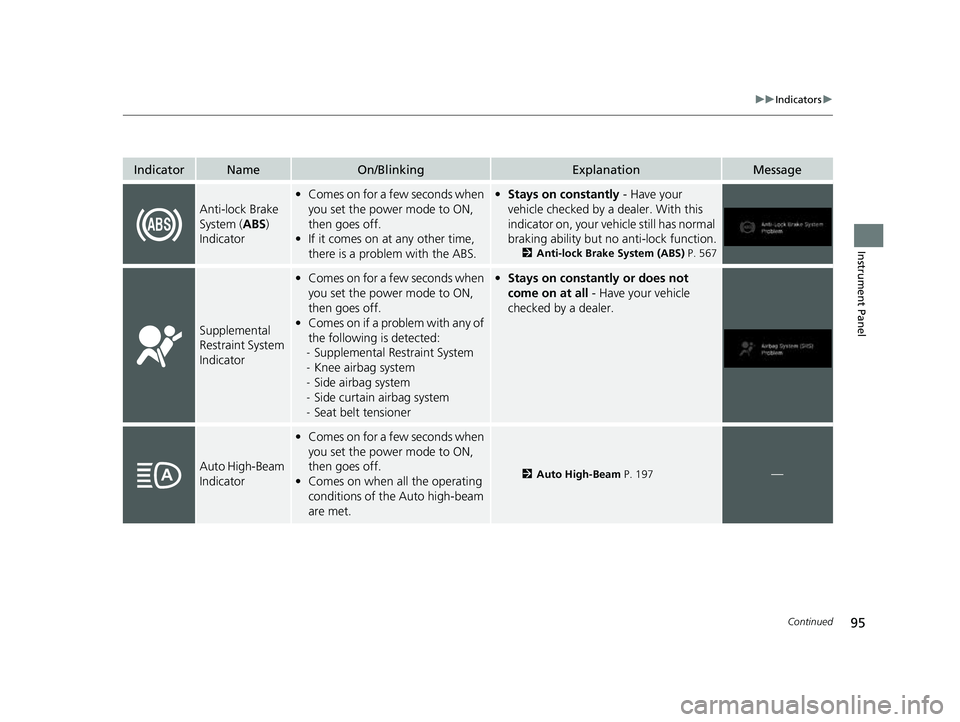
IndicatorNameOn/BlinkingExplanationMessage
Anti-lock Brake
System (ABS)
Indicator
• Comes on for a few seconds when
you set the power mode to ON,
then goes off.
• If it comes on at any other time,
there is a problem with the ABS.•Stays on constantly - Have your
vehicle checked by a dealer. With this
indicator on, your vehicle still has normal
braking ability but no anti-lock function.
2 Anti-lock Brake System (ABS) P. 567
Supplemental
Restraint System
Indicator
•Comes on for a few seconds when
you set the power mode to ON,
then goes off.
• Comes on if a problem with any of
the following is detected:
- Supplemental Restraint System
- Knee airbag system
- Side airbag system
- Side curtain airbag system
- Seat belt tensioner• Stays on constantly or does not
come on at all - Have your vehicle
checked by a dealer.
Auto High-Beam
Indicator
• Comes on for a few seconds when
you set the power mode to ON,
then goes off.
• Comes on when all the operating
conditions of the Auto high-beam
are met.
2 Auto High-Beam P. 197—
23 US ODYSSEY-31THR6500.book 95 ページ 2022年1月24日 月曜日 午前11時35分
Page 107 of 707
105
uuIndicators u
Continued
Instrument Panel
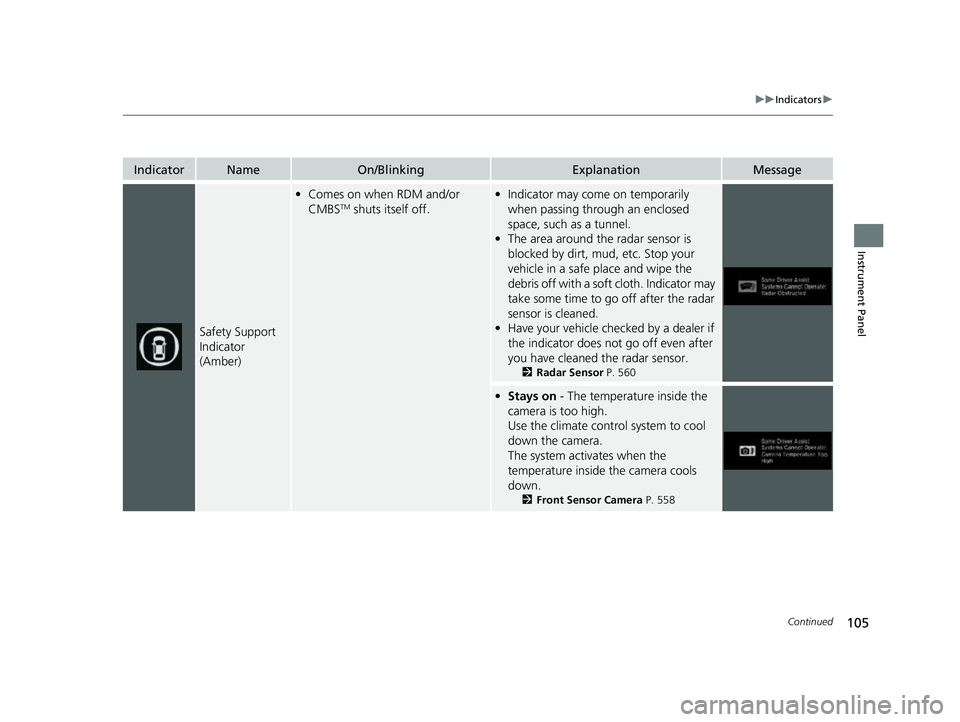
IndicatorNameOn/BlinkingExplanationMessage
Safety Support
Indicator
(Amber)
•Comes on when RDM and/or
CMBSTM shuts itself off.
•Indicator may come on temporarily
when passing through an enclosed
space, such as a tunnel.
• The area around the radar sensor is
blocked by dirt, mud, etc. Stop your
vehicle in a safe place and wipe the
debris off with a soft cloth. Indicator may
take some time to go off after the radar
sensor is cleaned.
• Have your vehicle chec ked by a dealer if
the indicator does not go off even after
you have cleaned the radar sensor.
2 Radar Sensor P. 560
•Stays on - The temperature inside the
camera is too high.
Use the climate control system to cool
down the camera.
The system activates when the
temperature inside the camera cools
down.
2 Front Sensor Camera P. 558
23 US ODYSSEY-31THR6500.book 105 ページ 2022年1月24日 月曜日 午前11時35分
Page 108 of 707
106
uuIndicators u
Instrument Panel
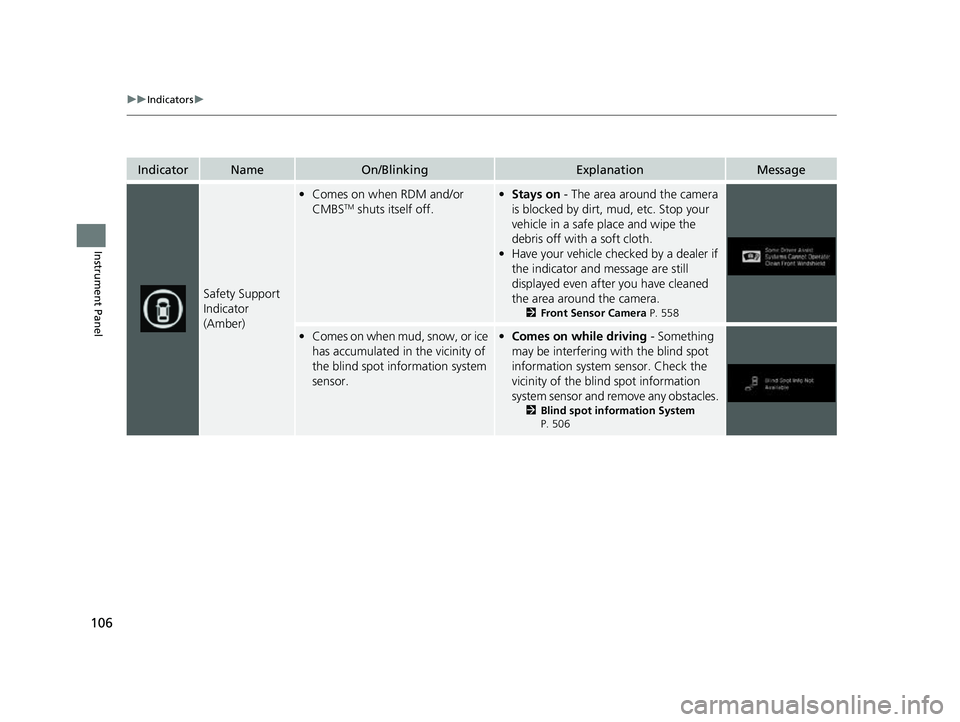
IndicatorNameOn/BlinkingExplanationMessage
Safety Support
Indicator
(Amber)
•Comes on when RDM and/or
CMBSTM shuts itself off.
•Stays on - The area around the camera
is blocked by dirt, mud, etc. Stop your
vehicle in a safe place and wipe the
debris off with a soft cloth.
• Have your vehicle checked by a dealer if
the indicator and message are still
displayed even after you have cleaned
the area around the camera.
2 Front Sensor Camera P. 558
•Comes on when mud, snow, or ice
has accumulated in the vicinity of
the blind spot information system
sensor.•Comes on while driving - Something
may be interfering with the blind spot
information system sensor. Check the
vicinity of the blind spot information
system sensor and remove any obstacles.
2 Blind spot information System
P. 506
23 US ODYSSEY-31THR6500.book 106 ページ 2022年1月24日 月曜日 午前11時35分
Page 114 of 707
112
uuIndicators uDriver Information Interface Wa rning and Information Messages
Instrument Panel
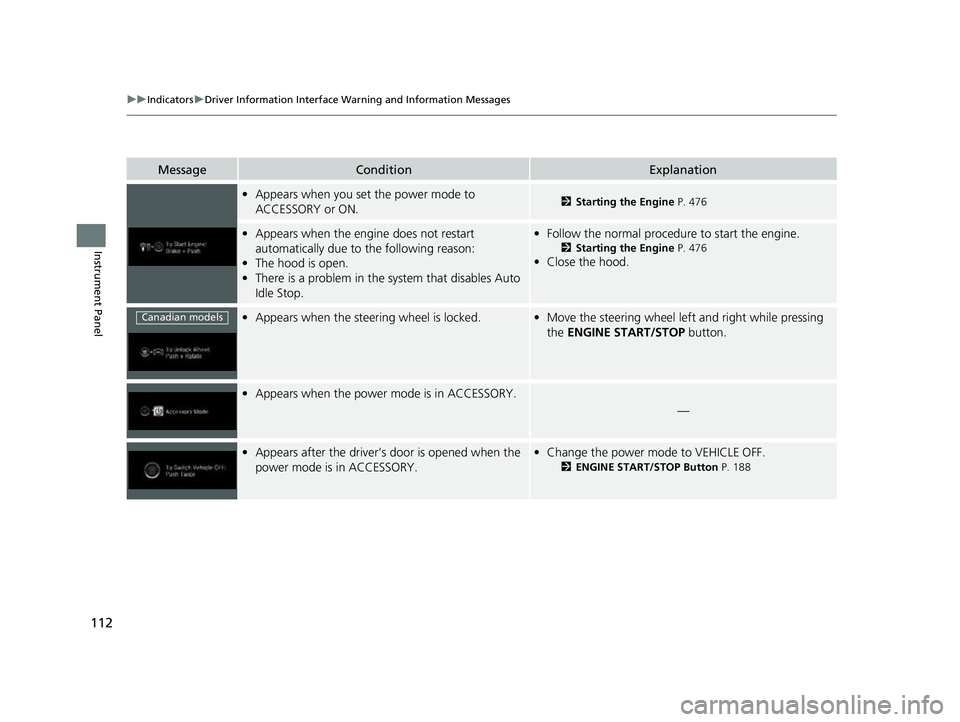
MessageConditionExplanation
•Appears when you set the power mode to
ACCESSORY or ON.2 Starting the Engine P. 476
•Appears when the engine does not restart
automatically due to the following reason:
• The hood is open.
• There is a problem in the sy stem that disables Auto
Idle Stop.• Follow the normal procedure to start the engine.
2 Starting the Engine P. 476
•Close the hood.
•Appears when the steering wheel is locked.•Move the steering wheel left and right while pressing
the ENGINE START/STOP button.
•Appears when the power mode is in ACCESSORY.
—
•Appears after the driver’s door is opened when the
power mode is in ACCESSORY.•Change the power mode to VEHICLE OFF.
2 ENGINE START/STOP Button P. 188
Canadian models
23 US ODYSSEY-31THR6500.book 112 ページ 2022年1月24日 月曜日 午前11時35分
Page 122 of 707
120
uuIndicators uDriver Information Interface Wa rning and Information Messages
Instrument Panel
MessageConditionExplanation
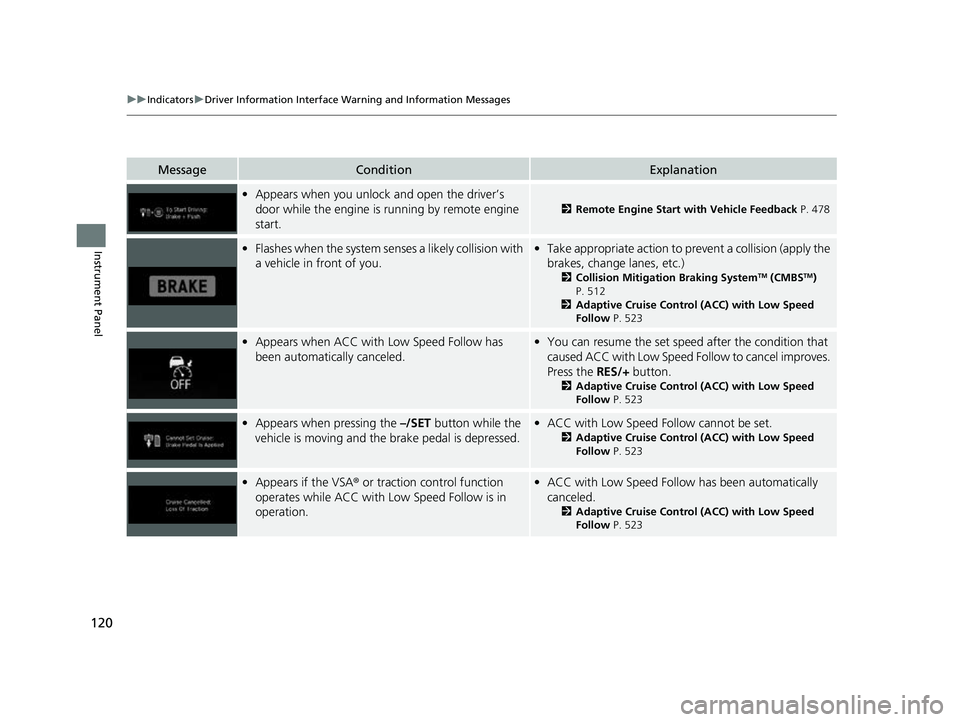
•Appears when you unlock and open the driver’s
door while the engine is running by remote engine
start.
2 Remote Engine Start with Vehicle Feedback P. 478
•Flashes when the system senses a likely collision with
a vehicle in front of you.•Take appropriate action to prevent a collision (apply the
brakes, change lanes, etc.)
2 Collision Mitigation Braking SystemTM (CMBSTM)
P. 512
2 Adaptive Cruise Control (ACC) with Low Speed
Follow P. 523
•Appears when ACC with Low Speed Follow has
been automatically canceled.•You can resume the set speed after the condition that
caused ACC with Low Speed Fo llow to cancel improves.
Press the RES/+ button.
2Adaptive Cruise Control (ACC) with Low Speed
Follow P. 523
•Appears when pressing the –/SET button while the
vehicle is moving and the brake pedal is depressed.• ACC with Low Speed Follow cannot be set.
2 Adaptive Cruise Control (ACC) with Low Speed
Follow P. 523
•Appears if the VSA ® or traction control function
operates while ACC with Low Speed Follow is in
operation.• ACC with Low Speed Follow has been automatically
canceled.
2 Adaptive Cruise Control (ACC) with Low Speed
Follow P. 523
23 US ODYSSEY-31THR6500.book 120 ページ 2022年1月24日 月曜日 午前11時35分
Page 128 of 707
126
uuIndicators uDriver Information Interface Wa rning and Information Messages
Instrument Panel
MessageConditionExplanation
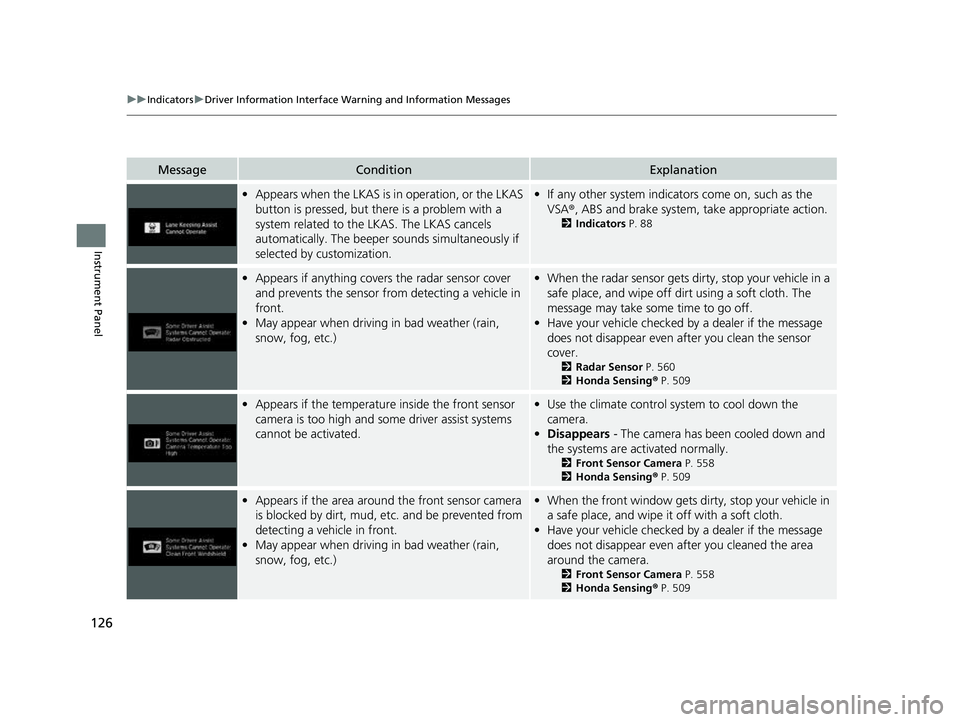
•Appears when the LKAS is in operation, or the LKAS
button is pressed, but there is a problem with a
system related to the LKAS. The LKAS cancels
automatically. The beeper s ounds simultaneously if
selected by customization.• If any other system indicators come on, such as the
VSA ®, ABS and brake system, take appropriate action.
2Indicators P. 88
•Appears if anything covers the radar sensor cover
and prevents the sensor from detecting a vehicle in
front.
• May appear when driving in bad weather (rain,
snow, fog, etc.)•When the radar sensor gets dirty, stop your vehicle in a
safe place, and wipe off dirt using a soft cloth. The
message may take some time to go off.
• Have your vehicle checked by a dealer if the message
does not disappear even after you clean the sensor
cover.
2 Radar Sensor P. 560
2 Honda Sensing ® P. 509
• Appears if the temperature inside the front sensor
camera is too high and some driver assist systems
cannot be activated.•Use the climate control sy stem to cool down the
camera.
• Disappears - The camera has been cooled down and
the systems are activated normally.
2 Front Sensor Camera P. 558
2 Honda Sensing ® P. 509
• Appears if the area around the front sensor camera
is blocked by dirt, mud, etc. and be prevented from
detecting a vehicle in front.
• May appear when driving in bad weather (rain,
snow, fog, etc.)•When the front window gets dirty, stop your vehicle in
a safe place, and wipe it off with a soft cloth.
• Have your vehicle checked by a dealer if the message
does not disappear even after you cleaned the area
around the camera.
2 Front Sensor Camera P. 558
2 Honda Sensing ® P. 509
23 US ODYSSEY-31THR6500.book 126 ページ 2022年1月24日 月曜日 午前11時35分