seats HONDA ODYSSEY 2023 Service Manual
[x] Cancel search | Manufacturer: HONDA, Model Year: 2023, Model line: ODYSSEY, Model: HONDA ODYSSEY 2023Pages: 707, PDF Size: 23.9 MB
Page 369 of 707
367
uuBlu-ray/DVD Rear Entertainment System*uAuxiliary Console Panels
Features
Auxiliary Console Panels
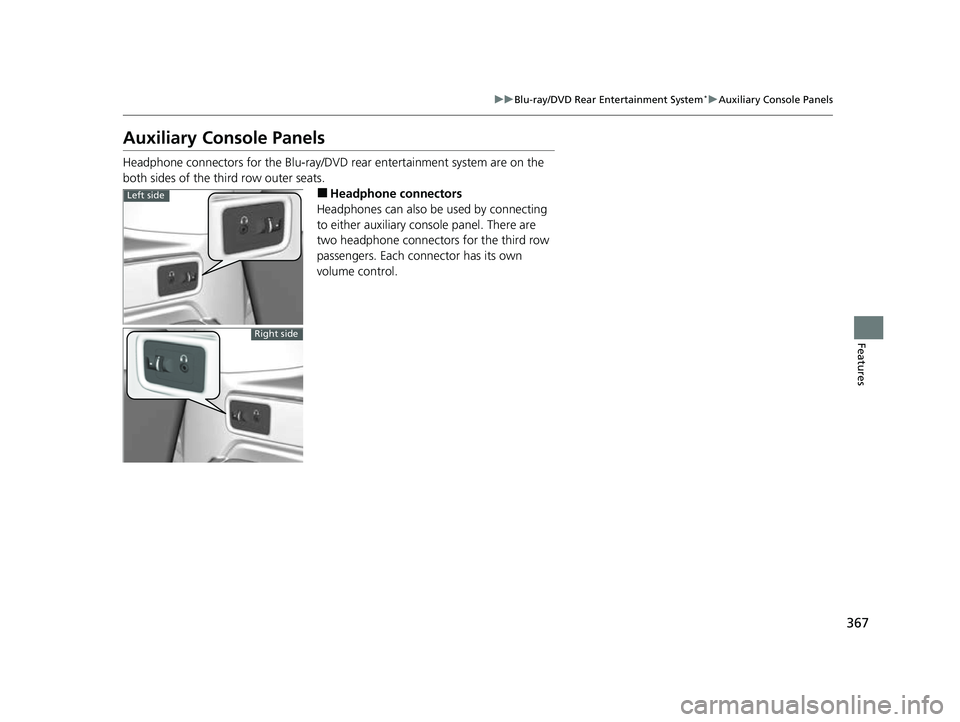
Headphone connectors for the Blu-ray/DV D rear entertainment system are on the
both sides of the third row outer seats.
■Headphone connectors
Headphones can also be used by connecting
to either auxiliary console panel. There are
two headphone connectors for the third row
passengers. Each connector has its own
volume control.Left side
Right side
23 US ODYSSEY-31THR6500.book 367 ページ 2022年1月24日 月曜日 午前11時35分
Page 383 of 707
381
uuBlu-ray/DVD Rear Entertainment System*uPlaying Apps
Continued
Features
Playing Apps
You can play apps such as USB, iPod, HDMI ® and more from the rear seats.1Playing Apps
Streaming Applications
Your vehicle’s Blu-ray/DVD rear entertainment system
comes pre-loaded with audi o streaming applications.
Before launching any application, first confirm that
your vehicle’s date and time are set correctly. Having
the incorrect date and time settings may prevent your
applications from operating correctly.
You can set the date and ti me on the front display in
the following steps.
Select Home Settings Date & Time Set Date &
Time
Your vehicle is equipped wi th the ability to apply
software updates. When a software update is
provided to your vehicle, please accept the update
and allow the installation to complete.
Disclaimer:
The audio quality of your streaming applic ations will
depend on your internet connection.
If you experience lagging or disconnections, check
your connection and conf irm it is operational.
23 US ODYSSEY-31THR6500.book 381 ページ 2022年1月24日 月曜日 午前11時35分
Page 388 of 707
386
uuBlu-ray/DVD Rear Entertainment System*uAudio Sources for Front and Rear Seats
Features
Audio Sources for Front and Rear Seats
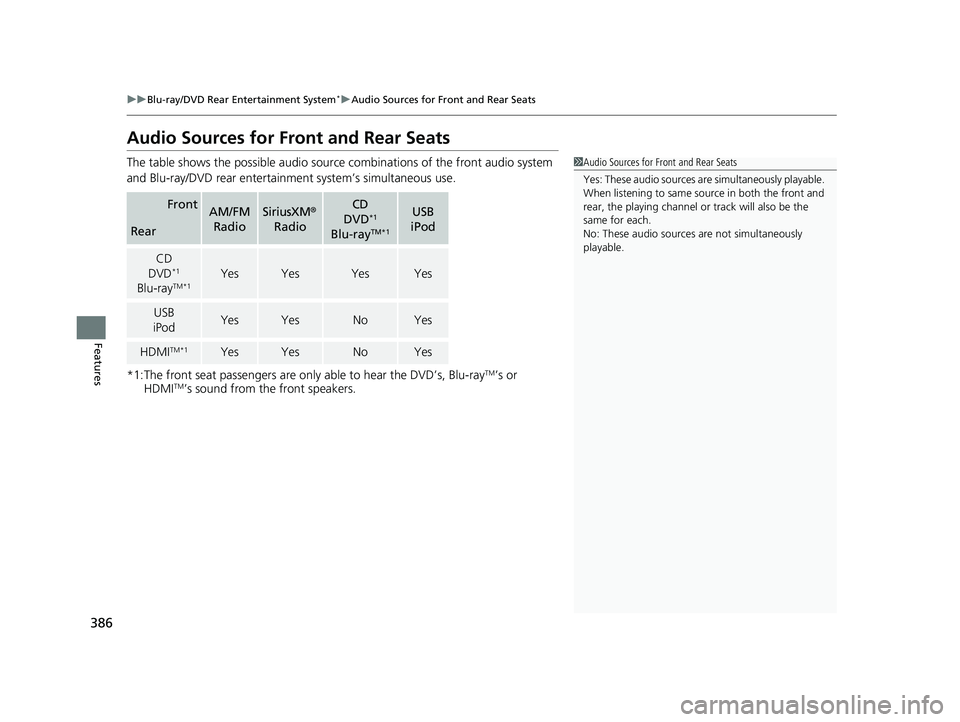
The table shows the possible audio source combinations of the front audio system
and Blu-ray/DVD rear entertainme nt system’s simultaneous use.
*1:The front seat passengers are only able to hear the DVD’s, Blu-ray
TM’s or
HDMITM’s sound from the front speakers.
FrontAM/FM
RadioSiriusXM ®
RadioCD
DVD*1
Blu-rayTM*1
USB
iPod
Rear
CD
DVD*1
Blu-rayTM*1YesYesYesYes
USB
iPodYesYesNoYes
HDMITM*1YesYesNoYes
1 Audio Sources for Front and Rear Seats
Yes: These audio sources ar e simultaneously playable.
When listening to same source in both the front and
rear, the playing channel or track will also be the
same for each.
No: These audio sources are not simultaneously
playable.
23 US ODYSSEY-31THR6500.book 386 ページ 2022年1月24日 月曜日 午前11時35分
Page 467 of 707
Continued465
uuBefore Driving uDriving Preparation
Driving
• Store or secure all items on board properly.
u Carrying too much cargo, or improperly storing it, can affect your vehicle’s
handling, stability, sto pping distance, and tires, and make it unsafe.
2Maximum Load Limit P. 467
•Do not pile items higher than the seat height.
u They can block your view and may be thrown forward in the event of sudden
braking.
• Do not place anything in the front seat footwells. Make sure to secure the floor
mat.
u An object or unsecured floor mat can in terfere with your brake and accelerator
pedal operation while driving.
• If you have any animals on board, do not let them move around in the vehicle.
u They may interfere with driving and a crash could occur.
• Securely close and lock al l doors and the tailgate.
2Locking/Unlocking the Doors from the Inside P. 156
•Adjust your seating position properly.
u Adjust the head restraint, too.
2Seats P. 212
2 Adjusting the Front and Second Row Outer and Third Row Outer Head
Restraints Positions P. 225
•Adjust the mirrors and steering wh eel properly for your driving.
u Adjust them while sitting in the proper driving position.
2 Mirrors P. 209
2 Adjusting the Steering Wheel P. 208
■Interior Checks1Interior Checks
The headlight aim is set by the factory, and does not
need to be adjusted. Howeve r, if you regularly carry
heavy items in the cargo area or tow a trailer, have
the aiming readjusted at a dealer or by a qualified
technician.
23 US ODYSSEY-31THR6500.book 465 ページ 2022年1月24日 月曜日 午前11時35分
Page 468 of 707
466
uuBefore Driving uDriving Preparation
Driving
• Be sure items placed on the floor behind the front seats cannot roll under the
seats.
u They can interfere with the driver’s ability to operate the pedals, the operation
of the seats, or the operation of the sensors under the seats.
• Everyone in the vehicle must fasten their seat belt.
2Fastening a Seat Belt P. 43
•Make sure that the indicators in the instrument panel come on when you start the
vehicle, and go off soon after.
u Always have a dealer check the vehicle if a problem is indicated.
2 Indicators P. 88
23 US ODYSSEY-31THR6500.book 466 ページ 2022年1月24日 月曜日 午前11時35分
Page 472 of 707
470
Driving
Towing a Trailer
Towing Preparation
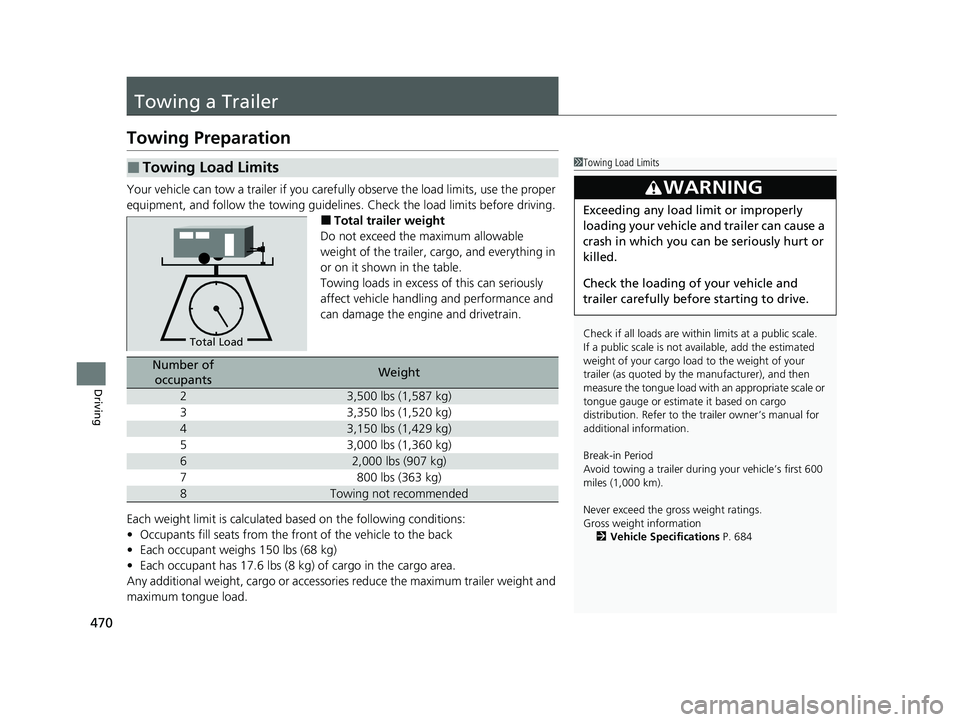
Your vehicle can tow a trailer if you carefully observe the load limits, use the proper
equipment, and follow the towing guidelin es. Check the load limits before driving.
■Total trailer weight
Do not exceed the maximum allowable
weight of the trailer, cargo, and everything in
or on it shown in the table.
Towing loads in excess of this can seriously
affect vehicle handling and performance and
can damage the engine and drivetrain.
Each weight limit is calculated based on the following conditions:
• Occupants fill seats from the fro nt of the vehicle to the back
• Each occupant weighs 150 lbs (68 kg)
• Each occupant has 17.6 lbs (8 kg) of cargo in the cargo area.
Any additional weight, cargo or accessori es reduce the maximum trailer weight and
maximum tongue load.
■Towing Load Limits1 Towing Load Limits
Check if all loads are within limits at a public scale.
If a public scale is not av ailable, add the estimated
weight of your cargo load to the weight of your
trailer (as quoted by the manufacturer), and then
measure the tongue load with an appropriate scale or
tongue gauge or estima te it based on cargo
distribution. Refer to the trailer owner’s manual for
additional information.
Break-in Period
Avoid towing a trailer duri ng your vehicle’s first 600
miles (1,000 km).
Never exceed the gross weight ratings.
Gross weight information
2 Vehicle Specifications P. 684
3WARNING
Exceeding any load limit or improperly
loading your vehicle and trailer can cause a
crash in which you can be seriously hurt or
killed.
Check the loading of your vehicle and
trailer carefully before starting to drive.
Total Load
Number of
occupantsWeight
23,500 lbs (1,587 kg)
33,350 lbs (1,520 kg)
43,150 lbs (1,429 kg)
53,000 lbs (1,360 kg)
62,000 lbs (907 kg)
7800 lbs (363 kg)
8Towing not recommended
23 US ODYSSEY-31THR6500.book 470 ページ 2022年1月24日 月曜日 午前11時35分
Page 616 of 707
614
uuReplacing Light Bulbs uBrake, Rear Turn Signal Light Bulbs, and Rear Side Marker/Taillights
Maintenance
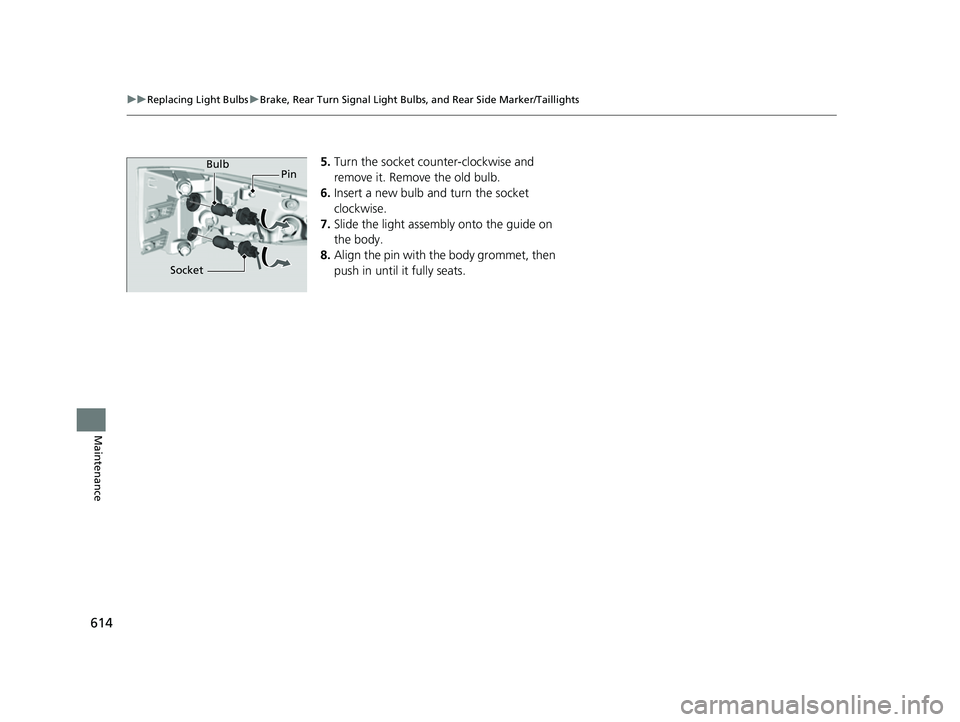
5. Turn the socket counter-clockwise and
remove it. Remove the old bulb.
6. Insert a new bulb and turn the socket
clockwise.
7. Slide the light assembly onto the guide on
the body.
8. Align the pin with the body grommet, then
push in until it fully seats.Bulb
Socket Pin
23 US ODYSSEY-31THR6500.book 614 ページ 2022年1月24日 月曜日 午前11時35分
Page 640 of 707
uuCleaning uInterior Care
638
Maintenance
To properly clean leather:
1. Use a vacuum or soft dry cloth first to remove any dirt or dust.
2. Clean the leather with a soft cloth dampen ed with a solution comprised of 90%
water and 10% neutral soap.
3. Wipe away any soap residu e with a clean damp cloth.
4. Wipe away residual water and allow leather to air dry in the shade.
■Maintaining Genuine Leather*1Maintaining Genuine Leather*
It is important to clean or wipe away dirt or dust as
soon as possible. Spills can soak into leather resulting
in stains. Dirt or dust ca n cause abrasions in the
leather. In addition, pl ease note that some dark
colored clothing can rub onto the leather seats
resulting in discol oration or stains.
* Not available on all models
23 US ODYSSEY-31THR6500.book 638 ページ 2022年1月24日 月曜日 午前11時35分
Page 644 of 707
642
Maintenance
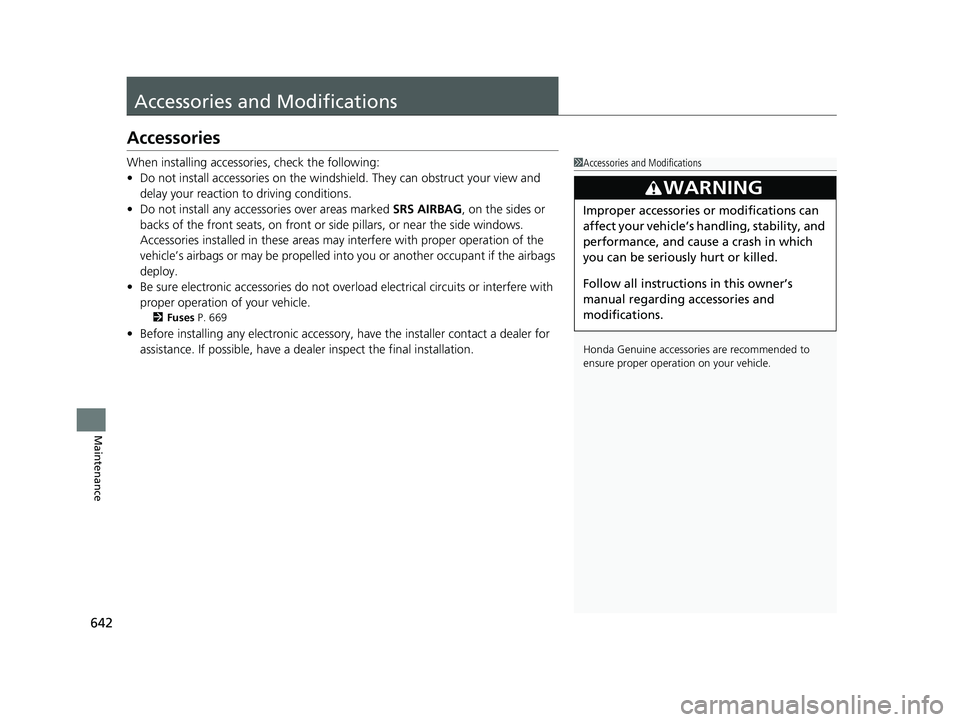
Accessories and Modifications
Accessories
When installing accessories, check the following:
• Do not install accessories on the windshield. They can obstruct your view and
delay your reaction to driving conditions.
• Do not install any access ories over areas marked SRS AIRBAG, on the sides or
backs of the front seats, on front or si de pillars, or near the side windows.
Accessories installed in these areas may interfere with proper operation of the
vehicle’s airbags or may be propelled into you or another occupant if the airbags
deploy.
• Be sure electronic accessories do not over load electrical circuits or interfere with
proper operation of your vehicle.
2 Fuses P. 669
•Before installing any electron ic accessory, have the installer contact a dealer for
assistance. If possible, have a dealer inspect the final installation.
1 Accessories and Modifications
Honda Genuine accessor ies are recommended to
ensure proper operati on on your vehicle.
3WARNING
Improper accessories or modifications can
affect your vehicle’s handling, stability, and
performance, and cause a crash in which
you can be seriously hurt or killed.
Follow all instruction s in this owner’s
manual regarding accessories and
modifications.
23 US ODYSSEY-31THR6500.book 642 ページ 2022年1月24日 月曜日 午前11時35分
Page 698 of 707
Index
696
Index
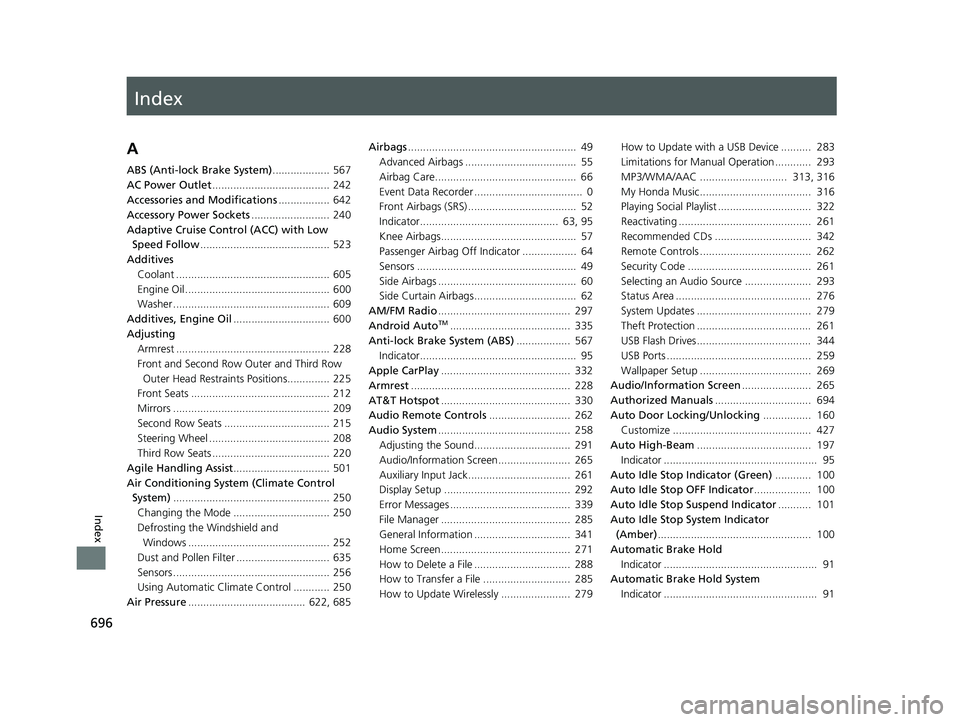
Index
A
ABS (Anti-lock Brake System)................... 567
AC Power Outlet ....................................... 242
Accessories and Modifications ................. 642
Accessory Power Sockets .......................... 240
Adaptive Cruise Control (ACC) with Low Speed Follow ........................................... 523
Additives
Coolant ................................................... 605
Engine Oil ................................................ 600
Washer .................................................... 609
Additives, Engine Oil ................................ 600
Adjusting Armrest ................................................... 228
Front and Second Row Outer and Third Row Outer Head Restraints Positions.............. 225
Front Seats .............................................. 212
Mirrors .................................................... 209
Second Row Seats ................................... 215
Steering Wheel ........................................ 208
Third Row Seats ....................................... 220
Agile Handling Assist ................................ 501
Air Conditioning System (Climate Control System) .................................................... 250
Changing the Mode ................................ 250
Defrosting the Windshield and Windows ............................................... 252
Dust and Pollen Filter ............................... 635
Sensors .................................................... 256
Using Automatic Climate Control ............ 250
Air Pressure ....................................... 622, 685 Airbags
........................................................ 49
Advanced Airbags ..................................... 55
Airbag Care............................................... 66
Event Data Recorder .................................... 0
Front Airbags (SRS) .................................... 52
Indicator.............................................. 63, 95
Knee Airbags............................................. 57
Passenger Airbag Off Indicator .................. 64
Sensors ..................................................... 49
Side Airbags .............................................. 60
Side Curtain Airbags.................................. 62
AM/FM Radio ............................................ 297
Android Auto
TM........................................ 335
Anti-lock Brake System (ABS) .................. 567
Indicator.................................................... 95
Apple CarPlay ........................................... 332
Armrest ..................................................... 228
AT&T Hotspot ........................................... 330
Audio Remote Controls ........................... 262
Audio System ............................................ 258
Adjusting the Sound................................ 291
Audio/Information Screen........................ 265
Auxiliary Input Jack.................................. 261
Display Setup .......................................... 292
Error Messages ........................................ 339
File Manager ........................................... 285
General Information ................................ 341
Home Screen........................................... 271
How to Delete a File ................................ 288
How to Transfer a File ............................. 285
How to Update Wirelessly ....................... 279 How to Update with a USB Device .......... 283
Limitations for Manual Operation ............ 293
MP3/WMA/AAC ............................. 313, 316
My Honda Music..................................... 316
Playing Social Playlist ............................... 322
Reactivating ............................................ 261
Recommended CDs ................................ 342
Remote Controls ..................................... 262
Security Code ......................................... 261
Selecting an Audio Source ...................... 293
Status Area ............................................. 276
System Updates ...................................... 279
Theft Protection ...................................... 261
USB Flash Drives...................................... 344
USB Ports ................................................ 259
Wallpaper Setup ..................................... 269
Audio/Information Screen ....................... 265
Authorized Manuals ................................ 694
Auto Door Locking/Unlocking ................ 160
Customize .............................................. 427
Auto High-Beam ...................................... 197
Indicator ................................................... 95
Auto Idle Stop Indicator (Green) ............ 100
Auto Idle Stop OFF Indicator ................... 100
Auto Idle Stop Suspend Indicator ........... 101
Auto Idle Stop System Indicator (Amber) ................................................... 100
Automatic Brake Hold
Indicator ................................................... 91
Automatic Brake Hold System Indicator ................................................... 91
23 US ODYSSEY-31THR6500.book 696 ページ 2022年1月24日 月曜日 午前11時35分