ECO mode HONDA ODYSSEY 2023 Workshop Manual
[x] Cancel search | Manufacturer: HONDA, Model Year: 2023, Model line: ODYSSEY, Model: HONDA ODYSSEY 2023Pages: 707, PDF Size: 23.9 MB
Page 207 of 707
205
uuOperating the Switches Around the Steering Wheel uBrightness Control
Controls
Brightness Control
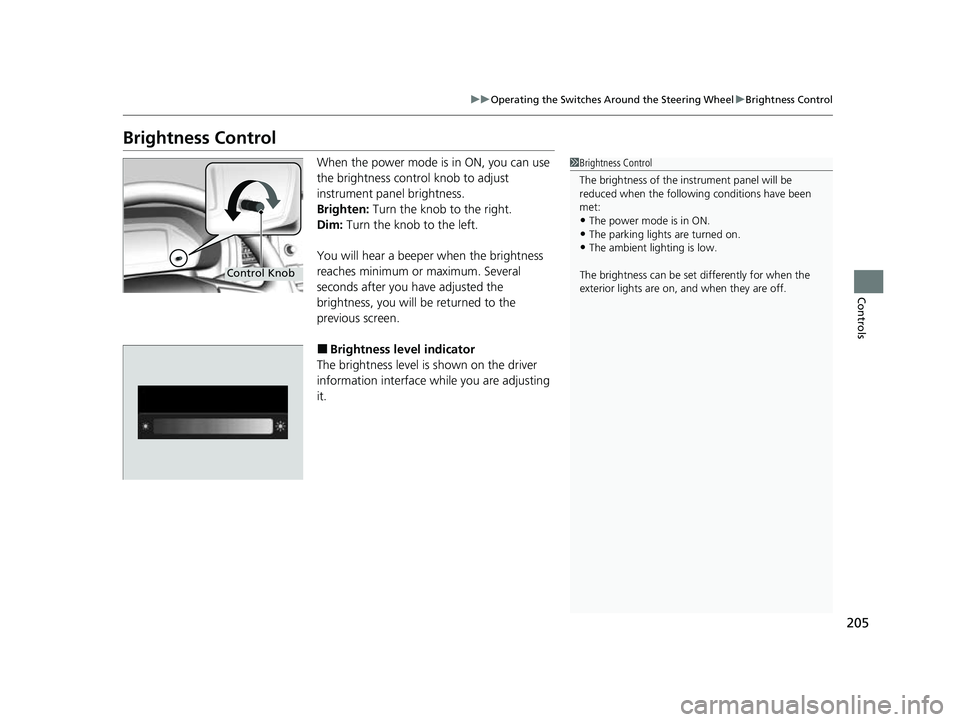
When the power mode is in ON, you can use
the brightness control knob to adjust
instrument panel brightness.
Brighten: Turn the knob to the right.
Dim: Turn the knob to the left.
You will hear a beeper when the brightness
reaches minimum or maximum. Several
seconds after you have adjusted the
brightness, you will be returned to the
previous screen.
■Brightness level indicator
The brightness level is shown on the driver
information interface while you are adjusting
it.
1 Brightness Control
The brightness of the in strument panel will be
reduced when the followi ng conditions have been
met:
•The power mode is in ON.
•The parking lights are turned on.•The ambient lighting is low.
The brightness can be set differently for when the
exterior lights are on, and when they are off.
Control Knob
23 US ODYSSEY-31THR6500.book 205 ページ 2022年1月24日 月曜日 午前11時35分
Page 208 of 707
206
uuOperating the Switches Around the Steering Wheel uDriving Position Memory System*
Controls
Driving Position Memory System*
You can store two driver’s seat positions (except for power lumbar) and outside
mirror positions with the driv ing position memory system.
When you unlock and open the driver’s door with a remote, the seat and outside
mirrors adjust automatically to one of the two preset positions.
When you enter the vehicle, the driver in formation interface briefly shows you which
remote transmitter you used to unlock the vehicle.
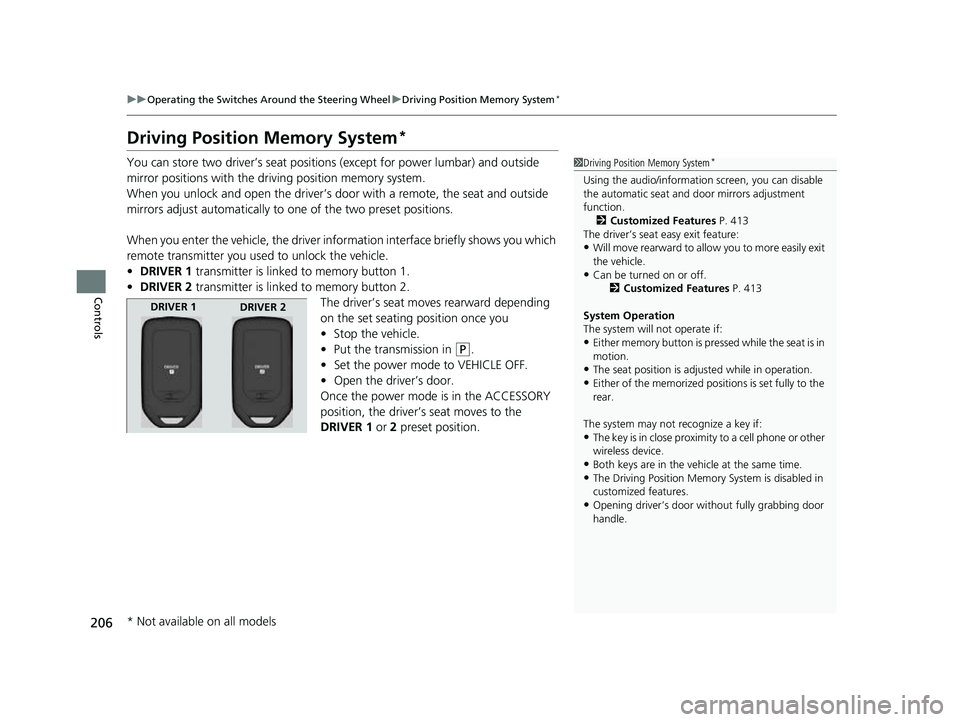
• DRIVER 1 transmitter is linked to memory button 1.
• DRIVER 2 transmitter is linked to memory button 2.
The driver’s seat moves rearward depending
on the set seating position once you
•Stop the vehicle.
• Put the transmission in
(P.
• Set the power mode to VEHICLE OFF.
• Open the driver’s door.
Once the power mode is in the ACCESSORY
position, the driver’s seat moves to the
DRIVER 1 or 2 preset position.
1Driving Position Memory System*
Using the audio/informati on screen, you can disable
the automatic seat and d oor mirrors adjustment
function.
2 Customized Features P. 413
The driver’s seat easy exit feature:
•Will move rearward to allow you to more easily exit
the vehicle.
•Can be turned on or off. 2Customized Features P. 413
System Operation
The system will not operate if:
•Either memory button is pressed while the seat is in
motion.
•The seat position is adju sted while in operation.•Either of the memorized positions is set fully to the
rear.
The system may not recognize a key if:
•The key is in close proximity to a cell phone or other
wireless device.
•Both keys are in the vehicle at the same time.
•The Driving Position Memory System is disabled in
customized features.
•Opening driver’s door wi thout fully grabbing door
handle.
DRIVER 1 DRIVER 2
* Not available on all models
23 US ODYSSEY-31THR6500.book 206 ページ 2022年1月24日 月曜日 午前11時35分
Page 209 of 707
207
uuOperating the Switches Around the Steering Wheel uDriving Position Memory System*
Controls
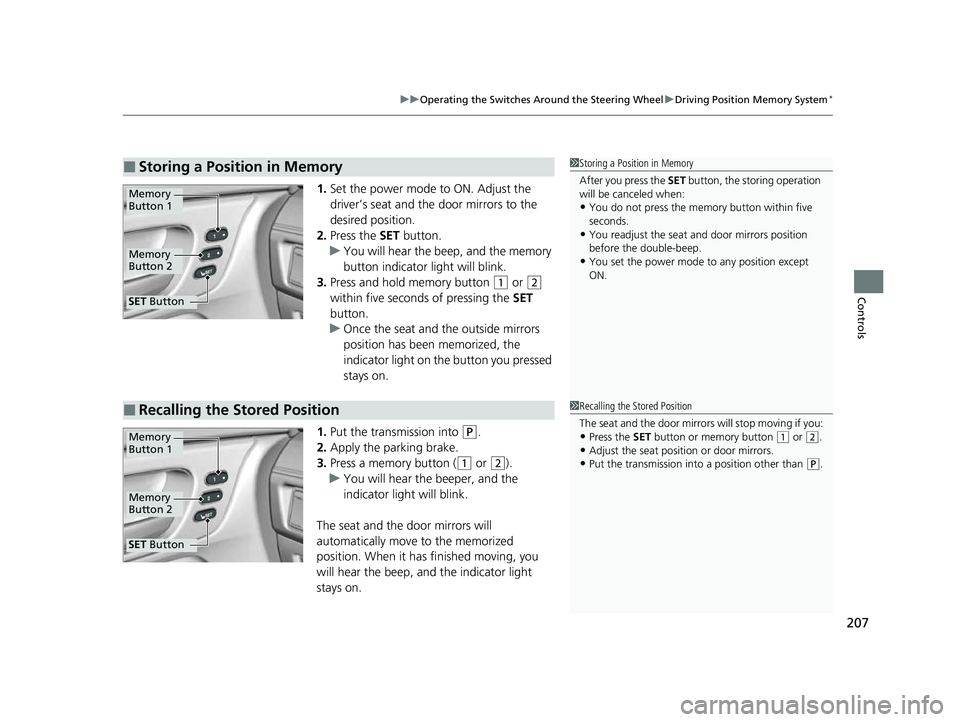
1. Set the power mode to ON. Adjust the
driver’s seat and the door mirrors to the
desired position.
2. Press the SET button.
u You will hear the beep, and the memory
button indicator light will blink.
3. Press and hold memory button
(1 or (2
within five seconds of pressing the SET
button.
u Once the seat and the outside mirrors
position has been memorized, the
indicator light on the button you pressed
stays on.
1. Put the transmission into
(P.
2. Apply the parking brake.
3. Press a memory button (
(1 or (2).
u You will hear the beeper, and the
indicator light will blink.
The seat and the door mirrors will
automatically move to the memorized
position. When it has finished moving, you
will hear the beep, and the indicator light
stays on.
■Storing a Position in Memory1 Storing a Position in Memory
After you press the SET button, the storing operation
will be canceled when:
•You do not press the memory button within five
seconds.
•You readjust the seat and door mirrors position
before the double-beep.
•You set the power mode to any position except
ON.
Memory
Button 1
Memory
Button 2
SET Button
■Recalling the Stored Position1Recalling the Stored Position
The seat and the door mirrors will stop moving if you:
•Press the SET button or memory button (1 or (2.
•Adjust the seat position or door mirrors.•Put the transmission into a position other than (P.
Memory
Button 1
Memory
Button 2
SET Button
23 US ODYSSEY-31THR6500.book 207 ページ 2022年1月24日 月曜日 午前11時35分
Page 225 of 707
223
uuSeats uRear Seat Reminder
Controls
Rear Seat Reminder
This feature alerts you to th e possible presence of passengers or items in the second
row or third row seats before you exit the ve hicle. It activates when the vehicle is set
to VEHICLE OFF if the rear doors were open ed shortly before or after the vehicle was
set to ON.
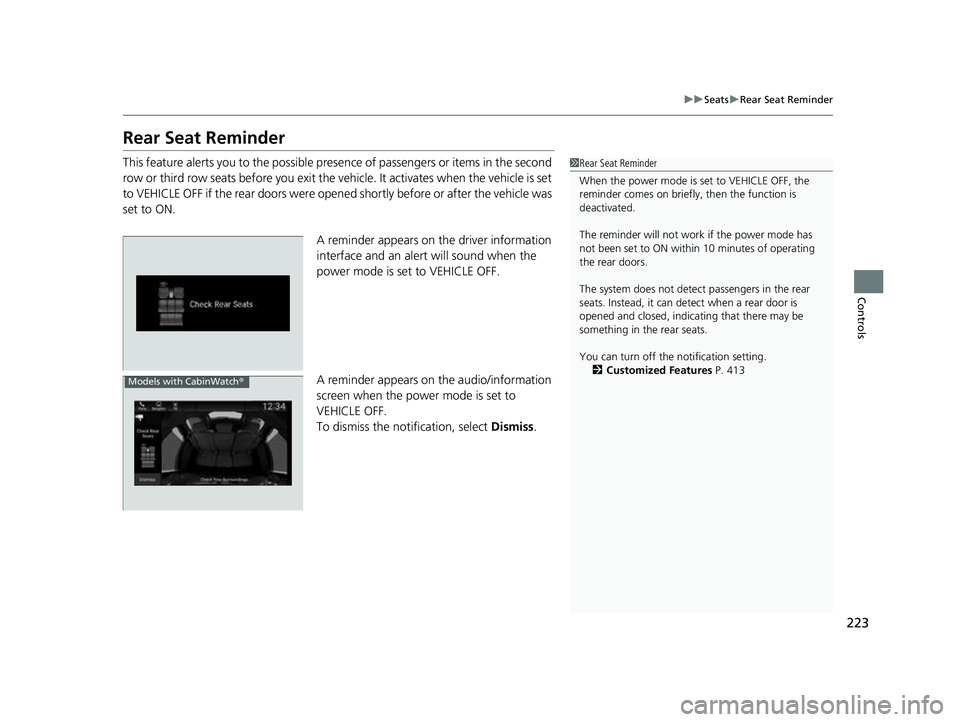
A reminder appears on the driver information
interface and an alert will sound when the
power mode is set to VEHICLE OFF.
A reminder appears on the audio/information
screen when the power mode is set to
VEHICLE OFF.
To dismiss the notification, select Dismiss.1Rear Seat Reminder
When the power mode is set to VEHICLE OFF, the
reminder comes on briefly, then the function is
deactivated.
The reminder will not work if the power mode has
not been set to ON within 10 minutes of operating
the rear doors.
The system does not detect passengers in the rear
seats. Instead, it can detect when a rear door is
opened and closed, indica ting that there may be
something in the rear seats.
You can turn off the notification setting. 2 Customized Features P. 413
Models with CabinWatch ®
23 US ODYSSEY-31THR6500.book 223 ページ 2022年1月24日 月曜日 午前11時35分
Page 231 of 707
229Continued
Controls
Interior Convenience Items
Interior Lights
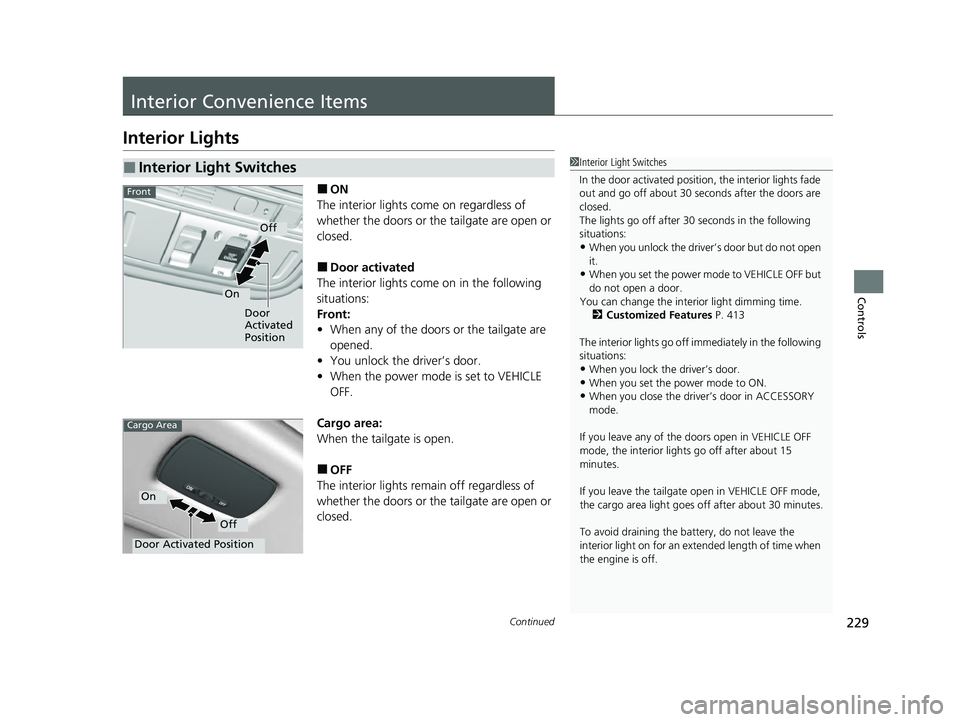
■ON
The interior lights come on regardless of
whether the doors or the tailgate are open or
closed.
■Door activated
The interior lights come on in the following
situations:
Front:
• When any of the doors or the tailgate are
opened.
• You unlock the driver’s door.
• When the power mode is set to VEHICLE
OFF.
Cargo area:
When the tailgate is open.
■OFF
The interior lights remain off regardless of
whether the doors or the tailgate are open or
closed.
■Interior Light Switches1 Interior Light Switches
In the door activated position, the interior lights fade
out and go off about 30 seconds after the doors are
closed.
The lights go off after 30 seconds in the following
situations:
•When you unlock the driver’s door but do not open
it.
•When you set the power mode to VEHICLE OFF but
do not open a door.
You can change the inte rior light dimming time.
2 Customized Features P. 413
The interior lights go off im mediately in the following
situations:
•When you lock the driver’s door.
•When you set the power mode to ON.•When you close the driver’s door in ACCESSORY
mode.
If you leave any of the doors open in VEHICLE OFF
mode, the interior light s go off after about 15
minutes.
If you leave the tailgate open in VEHICLE OFF mode,
the cargo area light goes of f after about 30 minutes.
To avoid draining the ba ttery, do not leave the
interior light on for an extended length of time when
the engine is off.
Door
Activated
Position
Off
On
Front
Door Activated Position
Off
On
Cargo Area
23 US ODYSSEY-31THR6500.book 229 ページ 2022年1月24日 月曜日 午前11時35分
Page 245 of 707
Continued243
uuInterior Convenience Items uOther Interior Convenience Items
Controls
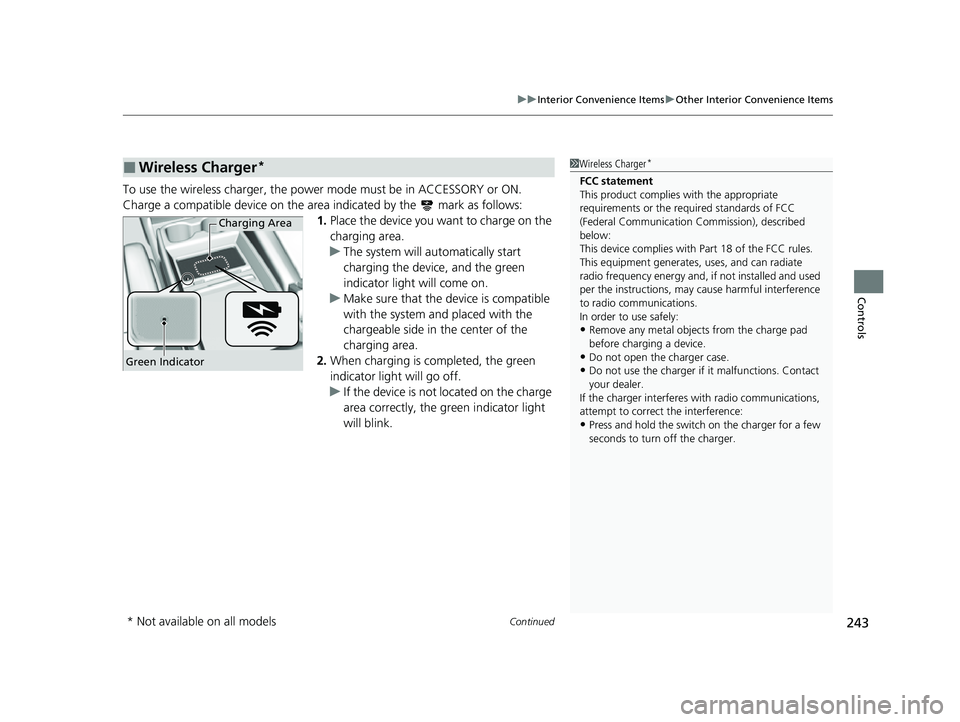
To use the wireless charger, the power mode must be in ACCESSORY or ON.
Charge a compatible device on the ar ea indicated by the mark as follows:
1. Place the device you want to charge on the
charging area.
u The system will au tomatically start
charging the device, and the green
indicator light will come on.
u Make sure that the device is compatible
with the system and placed with the
chargeable side in the center of the
charging area.
2. When charging is completed, the green
indicator light will go off.
u If the device is not located on the charge
area correctly, the green indicator light
will blink.
■Wireless Charger*1Wireless Charger*
FCC statement
This product complies with the appropriate
requirements or the requ ired standards of FCC
(Federal Communication Commission), described
below:
This device complies with Part 18 of the FCC rules.
This equipment generates, uses, and can radiate
radio frequency energy and, if not installed and used
per the instructions, may cause harmful interference
to radio communications.
In order to use safely:
•Remove any metal objects from the charge pad
before charging a device.
•Do not open the charger case.•Do not use the charger if it malfunctions. Contact
your dealer.
If the charger interferes with radio communications,
attempt to correct the interference:
•Press and hold the switch on the charger for a few
seconds to turn off the charger.
Green Indicator
Charging Area
* Not available on all models
23 US ODYSSEY-31THR6500.book 243 ページ 2022年1月24日 月曜日 午前11時35分
Page 247 of 707
Continued245
uuInterior Convenience Items uOther Interior Convenience Items
Controls
1Wireless Charger*
NOTICE
Do not place any magneti c recording media or
precision machines within the charging area while
charging.
The data on your cards such as credit cards can be
lost because of the magneti c effect. Also, precision
machines such as watches may malfunction.
“Qi” and marks are the registered trademarks
owned by Wire less Power Consortium (WPC).
mark is the registered trademark owned by
Power Matters Alliance (PMA).
In the following cases, ch arging may stop or not start:
•The device is already fully charged.•The temperature of the device is extremely high
while charging.
•You are at a place that emits strong
electromagnetic waves or noises, such as a TV
station, electric power plant, or gas station.
A device may not charge if the si ze or shape of its chargeable
side is not appropriate for use with the charging area.
Not all devices are compatible with the system.
During the charging phase, it is normal for the
charging area and de vice to heat up.
Charging may be briefl y interrupted when:
•All the doors and the tailgate are closed
- to avoid interference with the proper functioning
of the keyless access system.
•The position of the device is altered.
Do not charge more than one device at a time on a
charging area.
* Not available on all models
23 US ODYSSEY-31THR6500.book 245 ページ 2022年1月24日 月曜日 午前11時35分
Page 251 of 707
249
uuInterior Convenience Items uOther Interior Convenience Items
Controls
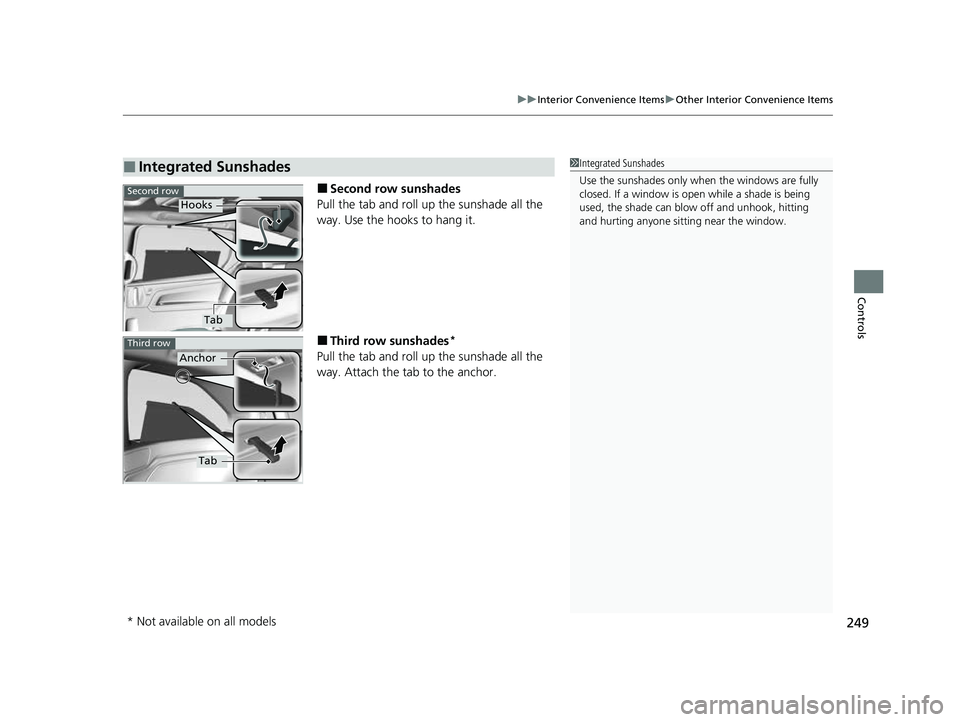
■Second row sunshades
Pull the tab and roll up the sunshade all the
way. Use the hooks to hang it.
■Third row sunshades*
Pull the tab and roll up the sunshade all the
way. Attach the tab to the anchor.
■Integrated Sunshades1 Integrated Sunshades
Use the sunshades only when the windows are fully
closed. If a window is open while a shade is being
used, the shade can blow off and unhook, hitting
and hurting anyone sitting near the window.
Second row
Hooks
Tab
Third row
Anchor
Tab
* Not available on all models
23 US ODYSSEY-31THR6500.book 249 ページ 2022年1月24日 月曜日 午前11時35分
Page 252 of 707
250
Controls
Climate Control System
Using Automatic Climate Control
The automatic climate control system maintains the interior temperature you select.
The system also selects the proper mix of heated or cooled air that raises or lowers
the interior temperature to your preference as quickly as possible.1Using Automatic Climate Control
Press the FRONT CLIMATE button to display A/C,
MODE, and fan control information on the audio/
information screen for several seconds. Select icon to
turn on or off A/C, change the vent mode, or change
the fan speed.
During idle-stops, air-conditioning is suspended, and
only the blower remains ac tive. If you do not want
air-conditioning suspended, press Auto Idle Stop OFF
button to cancel idle-stop.
If any buttons are presse d while using the climate
control system in auto, the function of the button
that was pressed will take priority.
The AUTO indicator will go off, but functions
unrelated to the button that were pressed will be
controlled automatically.
To prevent cold air from bl owing in from outside, the
fan may not start i mmediately when the AUTO
button is pressed.
If the interior is very warm, you can cool it down
more rapidly by partial ly opening the windows,
turning the system on AUTO, and setting the
temperature to low. Change the fresh mode to
recirculation mode until the temperature cools down.
When you set the temperat ure to the lower or upper
limit, Lo or Hi is displayed.
23 US ODYSSEY-31THR6500.book 250 ページ 2022年1月24日 月曜日 午前11時35分
Page 253 of 707
Continued251
uuClimate Control System uUsing Automatic Climate Control
Controls
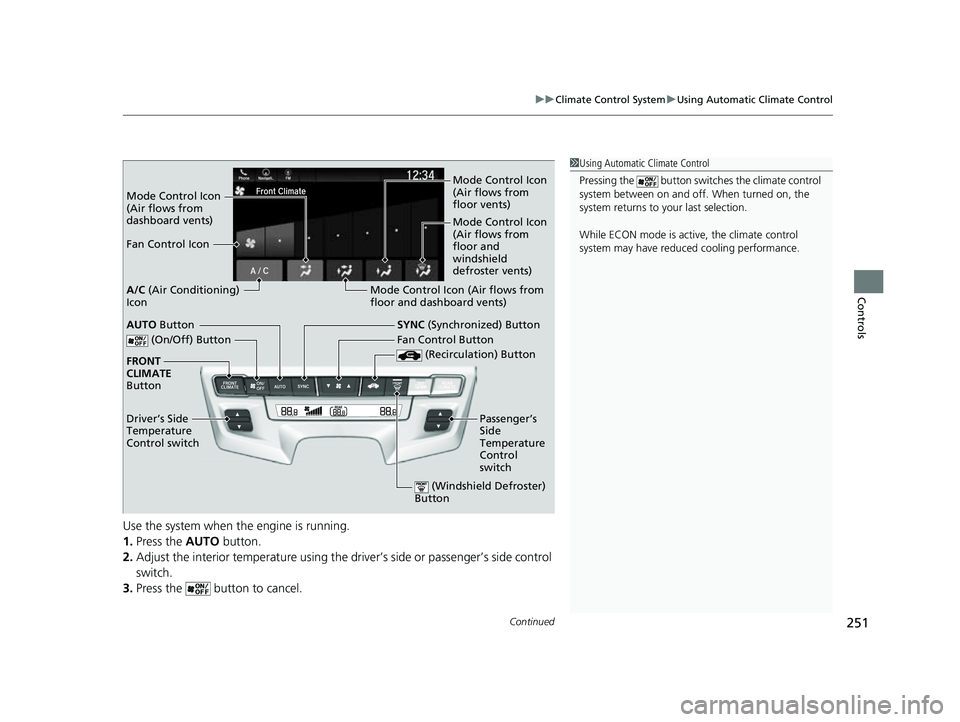
Use the system when the engine is running.
1. Press the AUTO button.
2. Adjust the interior temperature using the dr iver’s side or passenger’s side control
switch.
3. Press the button to cancel.
1Using Automatic Climate Control
Pressing the button switch es the climate control
system between on and off. When turned on, the
system returns to your last selection.
While ECON mode is active, the climate control
system may have reduced cooling performance.
Mode Control Icon
(Air flows from
dashboard vents) Mode Control Icon
(Air flows from
floor vents)
Mode Control Icon
(Air flows from
floor and
windshield
defroster vents)
Fan Control Icon
Mode Control Icon (Air flows from
floor and dashboard vents)
A/C
(Air Conditioning)
Icon
(On/Off) Button
(Recirculation) Button
SYNC (Synchronized) Button
FRONT
CLIMATE
Button
Driver’s Side
Temperature
Control switch Fan Control Button
Passenger’s
Side
Temperature
Control
switchAUTO Button
(Windshield Defroster)
Button
23 US ODYSSEY-31THR6500.book 251 ページ 2022年1月24日 月曜日 午前11時35分