lights HONDA PASSPORT 2000 2.G User Guide
[x] Cancel search | Manufacturer: HONDA, Model Year: 2000, Model line: PASSPORT, Model: HONDA PASSPORT 2000 2.GPages: 267, PDF Size: 3.03 MB
Page 82 of 267
Shifting the Transfer Control
Lever
4H 4L: Stop the vehicle. Place
the transmission leverin "N" (Neutral)
position. Then move the transfer controllever from 4H to 4L,
or 4L to 4H.
Move the transfer control lever
quickly and securely between
positions. Do not stop midway.
The transfer gear box can be
damaged if the control lever is not
firmly in gear. Some noise is
normal when shifting.
Always stop the vehicle before shifting between low and high range (4H 4L or 4L 4H).
If the 4WD indicator continues to
blink rapidly, it indicates that the system was shifted out of
sequence. Stop the vehicle, select 4WD with the 4WD-2WD switch,
shift the lever from 4L to 4H, then
select 2WD. Drive in a straight
line to reset the system. If the indicator continues to blink, see
your Honda dealer.
Do not use 4-wheel drive for
driving on dry pavement. This
causes noise and wear, and taking
tight turns can damage thetransfer case and driveshafts. It
also reduces fuel economy.
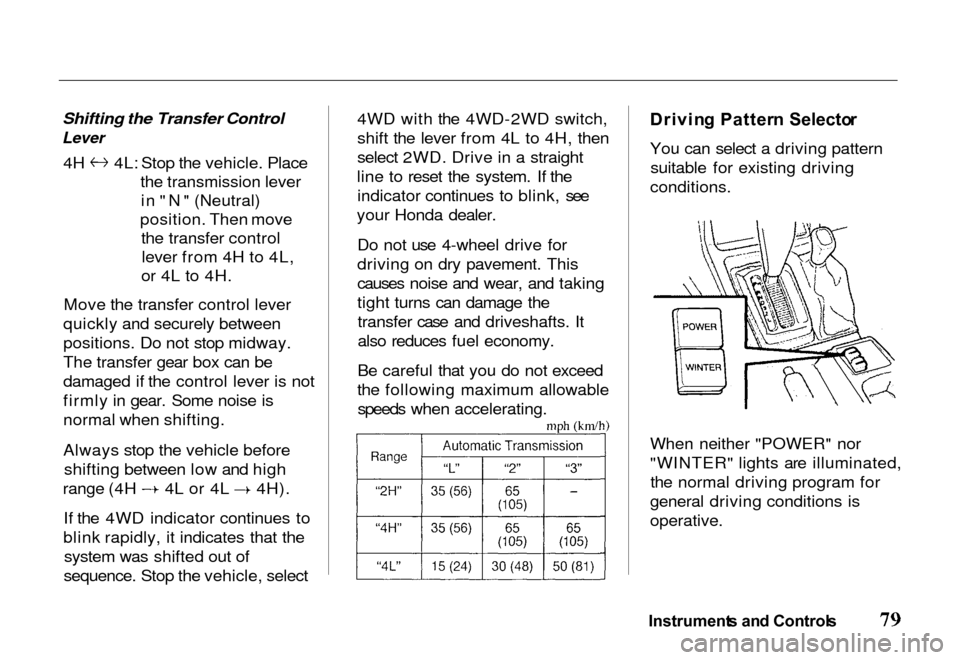
Be careful that you do not exceed
the following maximum allowable speeds when accelerating.
Drivin
g Patter n Selecto r
You can select a driving pattern suitable for existing driving
conditions.
When neither "POWER" nor
"WINTER" lights are illuminated, the normal driving program for
general driving conditions is
operative.
Instrument s an d Control s
Page 84 of 267
5-Spee
d Manua l Transmissio n
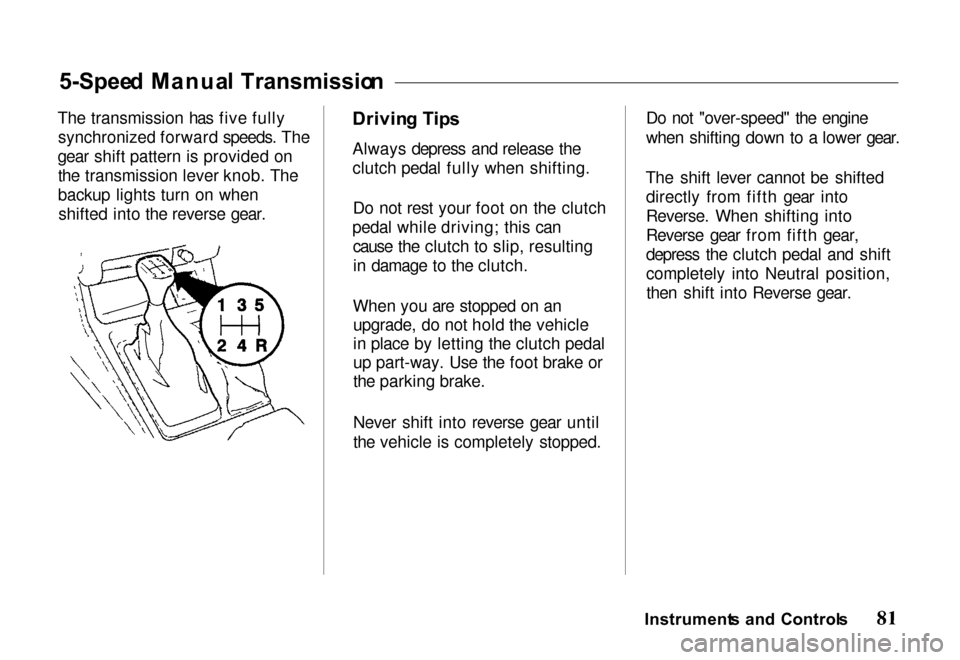
The transmission has five fully synchronized forward speeds. The
gear shift pattern is provided on the transmission lever knob. The
backup lights turn on whenshifted into the reverse gear. Drivin
g Tip s
Always depress and release the
clutch pedal fully when shifting.
Do not rest your foot on the clutch
pedal while driving; this can cause the clutch to slip, resultingin damage to the clutch.
When you are stopped on an upgrade, do not hold the vehicle
in place by letting the clutch pedal
up part-way. Use the foot brake or
the parking brake.
Never shift into reverse gear until
the vehicle is completely stopped. Do not "over-speed" the engine
when shifting down to a lower gear.
The shift lever cannot be shifted directly from fifth gear into
Reverse. When shifting into
Reverse gear from fifth gear,
depress the clutch pedal and shift
completely into Neutral position,then shift into Reverse gear.Instrument s an d Control s
Page 85 of 267
Shif
t Spee d Char t
The lower gears of the transmission are used for normal
acceleration of the vehicle to the
desired cruising speed. The
highest gear of the transmission is used to maintain the desiredspeed. The fifth gear is
recommended for use in
maintaining highway cruising speeds. Use of the fifth gear in
city traffic is not recommended.
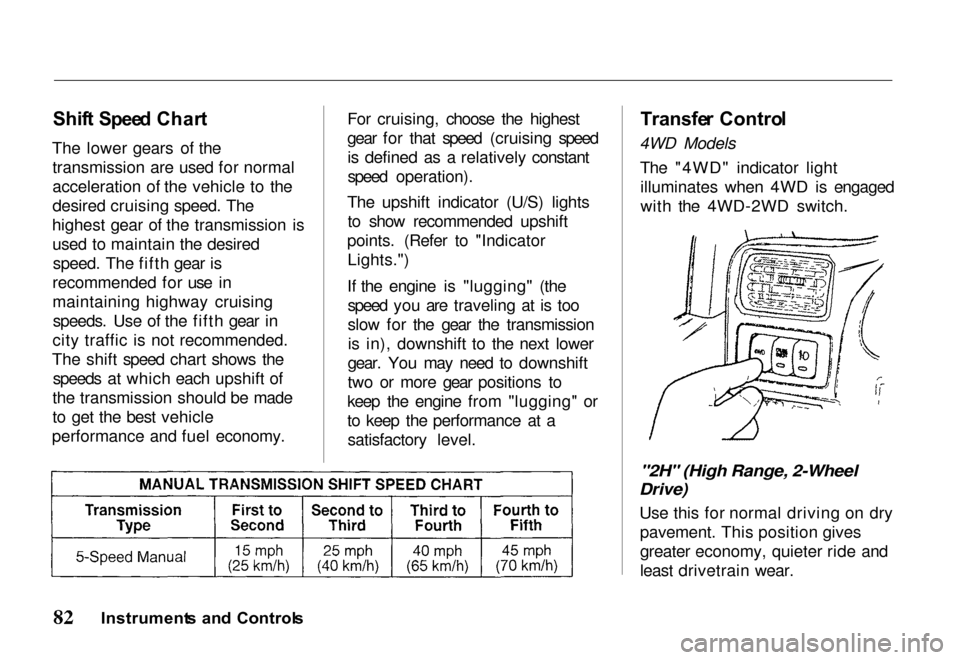
The shift speed chart shows the speeds at which each upshift of
the transmission should be made
to get the best vehicle
performance and fuel economy. For cruising, choose the highest
gear for that speed (cruising speed
is defined as a relatively constant
speed operation).
The upshift indicator (U/S) lights to show recommended upshift
points. (Refer to "Indicator Lights.")
If the engine is "lugging" (the speed you are traveling at is too
slow for the gear the transmissionis in), downshift to the next lower
gear. You may need to downshift
two or more gear positions to
keep the engine from "lugging" or
to keep the performance at a satisfactory level.
Transfe
r Contro l
4WD Models
The "4WD" indicator lightilluminates when 4WD is engaged
with the 4WD-2WD switch.
"2H" (High Range, 2-Wheel
Drive)
Use this for normal driving on drypavement. This position gives
greater economy, quieter ride and
least drivetrain wear.
Instrument s an d Control s
Page 98 of 267
Interio
r Feature s
Keys and Ignition .......... 97
Steering Column Lock/
Ignition Switch ........ 97 LOCK .............. 97
ACC ................ 97
ON ................. 97START .............. 97
Key Removal ........... 98
Key Reminder .......... 98
Guard Against Theft ..... 98
Locks ................... 99 Power Door Locks ...... 100
Child-Safe Door Locks .. 101
Mirrors ................. 101 Interior Mirror ......... 101Power Mirrors ......... 101Vanity Mirror .......... 102 Power Windows .......... 103
Checking the CircuitBreaker ............. 104
Tailgate ................ 104 Operation ............. 104
Hood Release ............ 105
Interior Lights ........... 107 Luggage Light ......... 107Dome Light ........... 107
Courtesy Lights ........ 108
Map Lights............ 108
Moonroof ............... 108 Conveniences ............ 109
Beverage Holder ....... 109
Sun Visor ............. 110Glove Box ............ 110
Assist Grip ............ 111
Horn Button ........... 11
Tilt Steering Wheel ..... 1
11
1
Cigarette Lighte
r ....... 112
Ashtrays .............. 112
Accessory Power Outlets . 113
Interio r Feature s
Page 104 of 267
Child-Saf
e Doo r Lock s
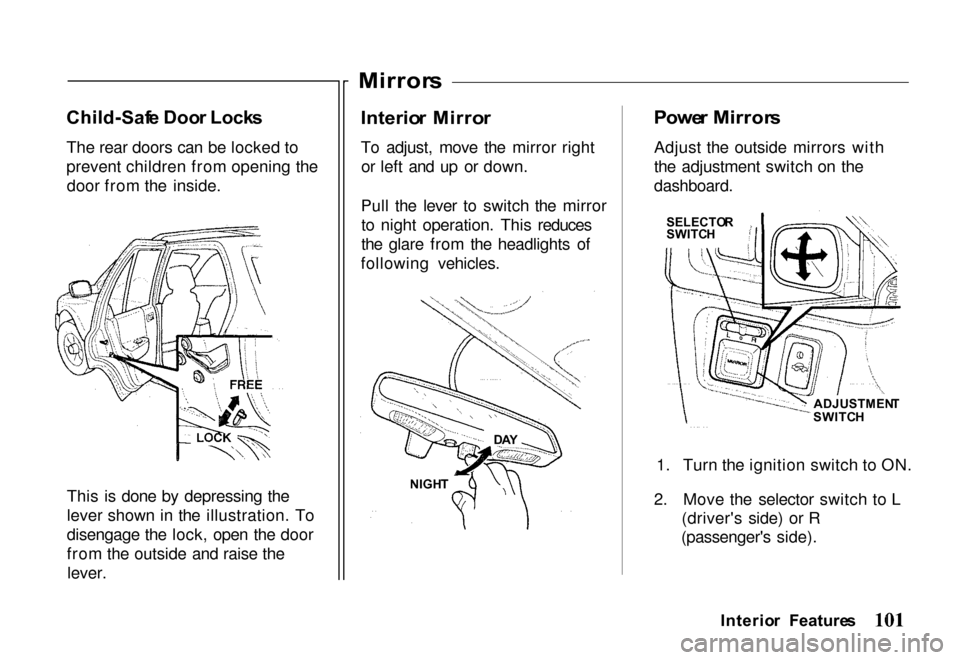
The rear doors can be locked to
prevent children from opening the door from the inside.
This is done by depressing the
lever shown in the illustration. To
disengage the lock, open the door
from the outside and raise thelever.
Mirror
s
Interio r Mirro r
To adjust, move the mirror right or left and up or down.
Pull the lever to switch the mirror to night operation. This reduces
the glare from the headlights of
following vehicles.
Powe
r Mirror s
Adjust the outside mirrors with
the adjustment switch on the
dashboard.
1. Turn the ignition switch to ON.
2. Move the selector switch to L (driver's side) or R
(passenger's side).
Interio r Feature s
DA Y
NIGH T
ADJUSTMEN
T
SWITC H
SELECTO
R
SWITC H
Page 111 of 267
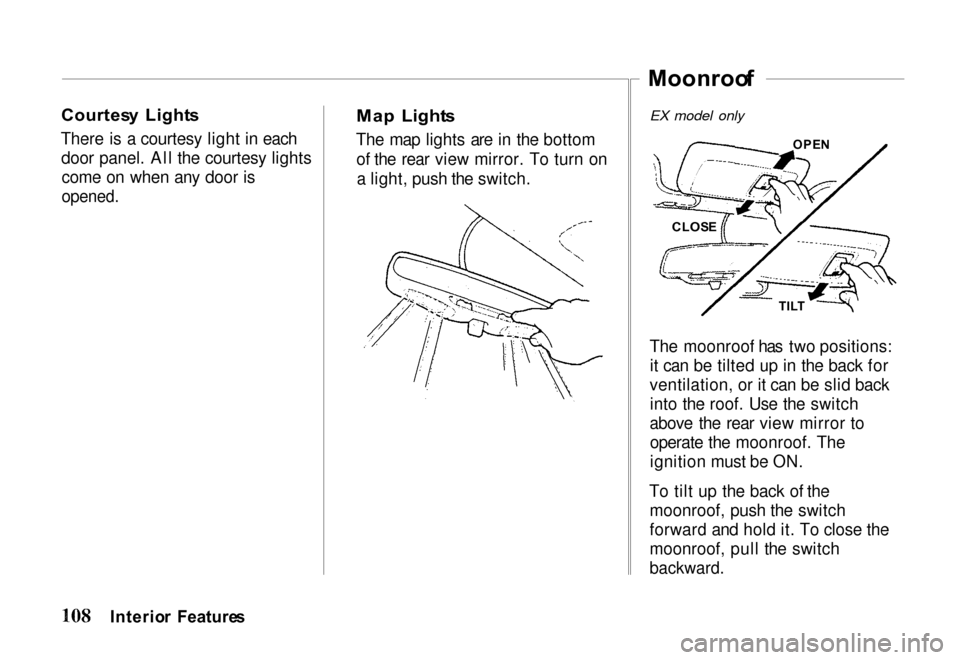
Courtes
y Light s
There is a courtesy light in each door panel. All the courtesy lightscome on when any door is
opened.
Ma
p Light s
The map lights are in the bottom of the rear view mirror. To turn ona light, push the switch.
Moonroo
f
OPEN
The moonroof has two positions: it can be tilted up in the back for
ventilation, or it can be slid back into the roof. Use the switch
above the rear view mirror to operate the moonroof. The
ignition must be ON.
To tilt up the back of the moonroof, push the switch
forward and hold it. To close the
moonroof, pull the switch
backward.
Interio r Feature s
EX model only
CLOS E
TILT
Page 119 of 267
Heatin
g an d Coolin g
This system combines heating and
cooling capabilities for comfort in all weather conditions.
During air conditioning operation,
slight increases and decreases in
engine speed/power may be
noticed. This is normal, as the system is designed to cycle the
compressor ON and OFF to
maintain desired cooling. The
reduced compressor operation should benefit fuel economy.
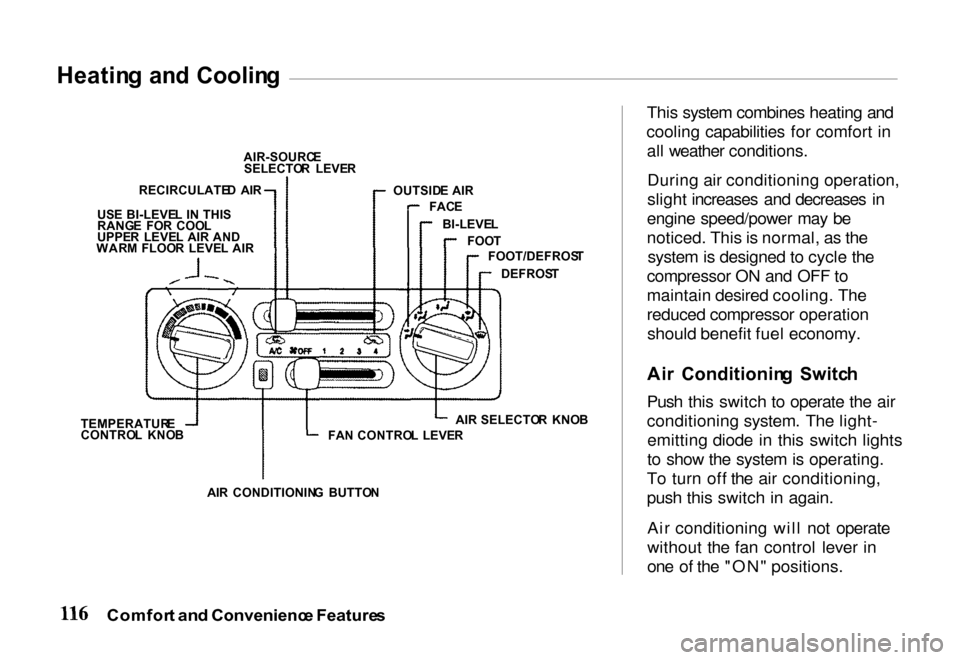
Ai r Conditionin g Switc h
Push this switch to operate the air
conditioning system. The light- emitting diode in this switch lights
to show the system is operating.
To turn off the air conditioning,
push this switch in again.
Air conditioning will not operate
without the fan control lever in
one of the "ON" positions.
Comfor t an d Convenienc e Feature s
AIR-SOURC
E
SELECTO R LEVE R
OUTSID E AIR
FAC E
BI-LEVE L
FOO T
FOOT/DEFROS T
DEFROS T
FA N CONTRO L LEVE RAIR
SELECTO R KNO B
AI R CONDITIONIN G BUTTO N
TEMPERATUR
E
CONTRO L KNO B
US
E BI-LEVE L I N THI S
RANG E FO R COO L
UPPE R LEVE L AIR AND
WAR M FLOO R LEVE L AI R
RECIRCULATE
D AI R
Page 130 of 267
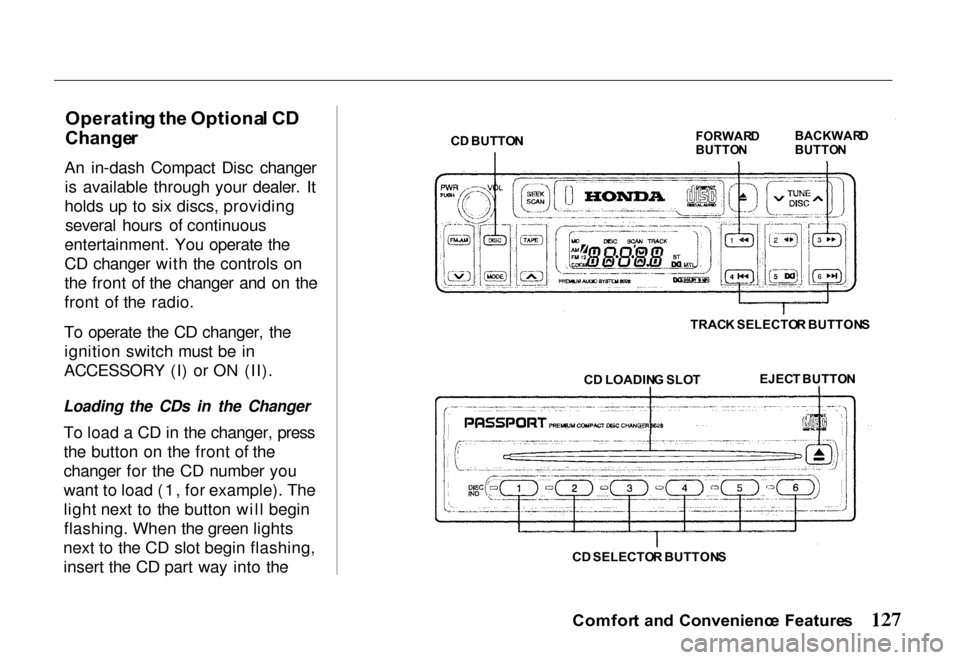
Operatin
g th e Optiona l C D
Change r
An in-dash Compact Disc changer is available through your dealer. It
holds up to six discs, providing several hours of continuous
entertainment. You operate the
CD changer with the controls on
the front of the changer and on the
front of the radio.
To operate the CD changer, the ignition switch must be in
ACCESSORY (I) or ON (II).
Loading the CDs in the Changer
To load a CD in the changer, press
the button on the front of the
changer for the CD number you
want to load (1, for example). The
light next to the button will beginflashing. When the green lights
next to the CD slot begin flashing, insert the CD part way into the
Comfort an d Convenienc e Feature s
C
D BUTTO N
FORWAR
D
BUTTO N BACKWAR
D
BUTTO N
TRAC K SELECTO R BUTTON S
C D LOADIN G SLO T
EJEC
T BUTTO N
C D SELECTO R BUTTON S
Page 150 of 267
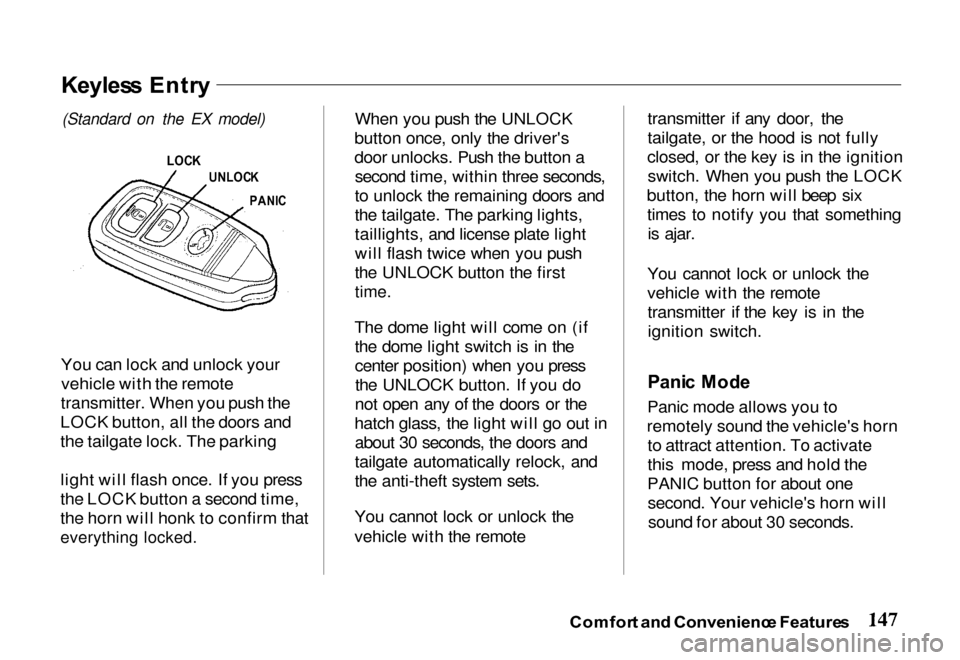
You can lock and unlock your
vehicle with the remote
transmitter. When you push the
LOCK button, all the doors and
the tailgate lock. The parking
light will flash once. If you press
the LOCK button a second time,
the horn will honk to confirm that
everything locked.
When you push the UNLOCK
button once, only the driver's
door unlocks. Push the button a second time, within three seconds,
to unlock the remaining doors and
the tailgate. The parking lights,
taillights, and license plate light
will flash twice when you push
the UNLOCK button the first
time.
The dome light will come on (if the dome light switch is in the
center position) when you pressthe UNLOCK button. If you do
not open any of the doors or the
hatch glass, the light will go out in about 30 seconds, the doors and
tailgate automatically relock, and
the anti-theft system sets.
You cannot lock or unlock the
vehicle with the remote transmitter if any door, the
tailgate, or the hood is not fully
closed, or the key is in the ignition switch. When you push the LOCK
button, the horn will beep six times to notify you that somethingis ajar.
You cannot lock or unlock the
vehicle with the remote transmitter if the key is in the
ignition switch.
Pani c Mod e
Panic mode allows you to
remotely sound the vehicle's horn to attract attention. To activate
this mode, press and hold the
PANIC button for about one second. Your vehicle's horn willsound for about 30 seconds.
Comfor t an d Convenienc e Feature s
Keyles s Entr y
(Standard on
the EX model)
LOC K
UNLOC K
PANI C
Page 151 of 267
To cancel panic mode before 30
seconds, press any button on the
remote transmitter. You can also turn the ignition switch to
ACCESSORY.
Anti-Thef
t Syste m
The anti-theft system is designed
to protect your vehicle and its contents from theft. Any attempt
to forcibly open any door, the
tailgate, or the hood without using
the key or the remote transmitterwill cause the system to alarm.
The horn sounds and the headlights flash for approximately
three minutes. The starter motor
circuit is disabled so the engine
cannot be started. After threeminutes, the system resets. Activatin
g th e Syste m
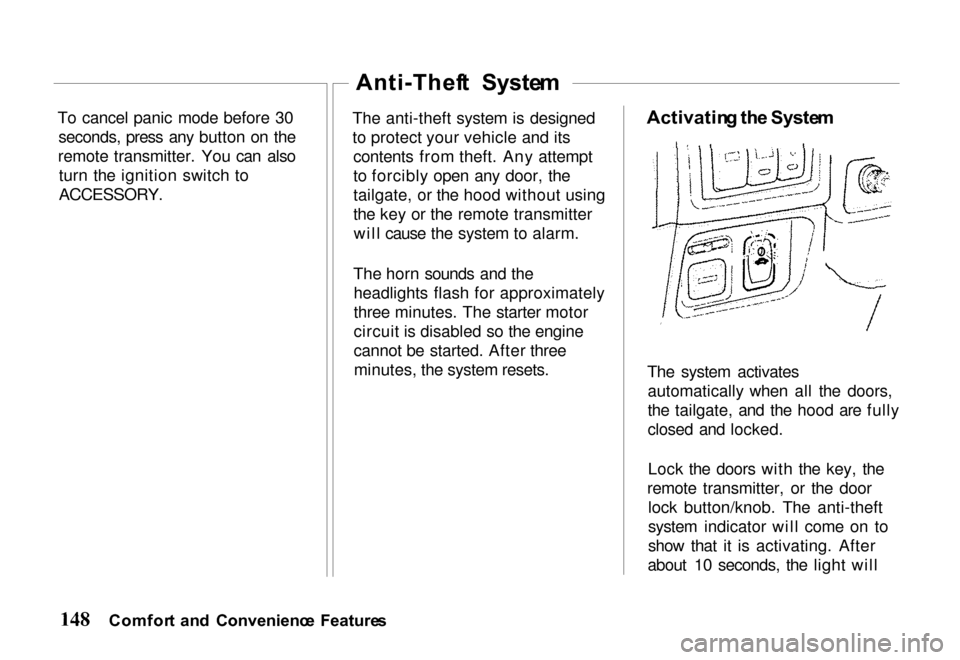
The system activates automatically when all the doors,
the tailgate, and the hood are fully
closed and locked.
Lock the doors with the key, the
remote transmitter, or the door lock button/knob. The anti-theft
system indicator will come on to
show that it is activating. After
about 10 seconds, the light will
Comfor t an d Convenienc e Feature s