lock HONDA PASSPORT 2000 2.G Owner's Manual
[x] Cancel search | Manufacturer: HONDA, Model Year: 2000, Model line: PASSPORT, Model: HONDA PASSPORT 2000 2.GPages: 267, PDF Size: 3.03 MB
Page 75 of 267
Rea
r Windo w an d Mirro r
Defogger s
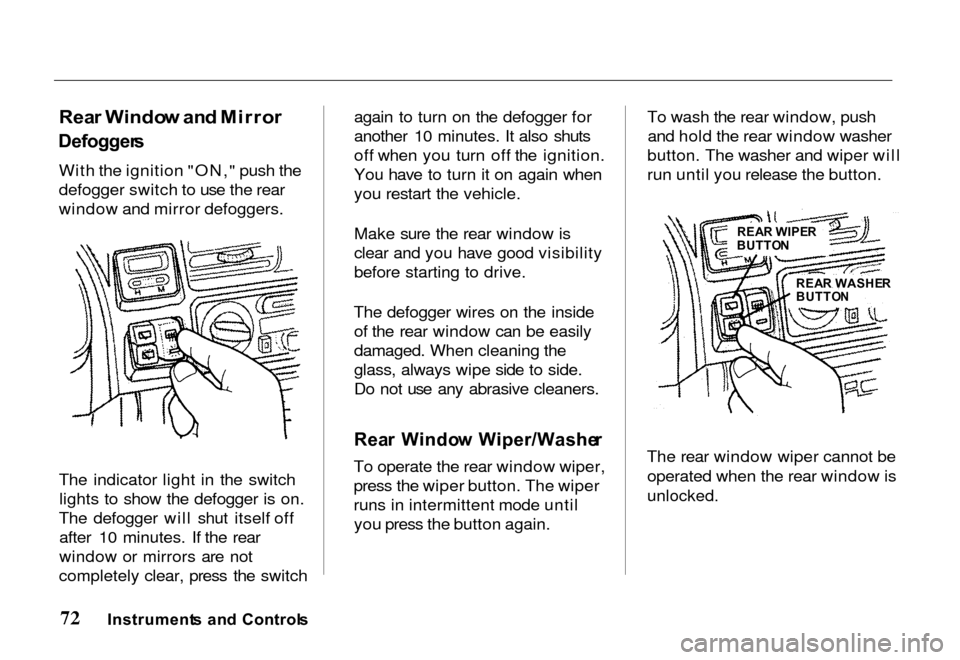
With the ignition "ON," push the
defogger switch to use the rear
window and mirror defoggers.
The indicator light in the switch lights to show the defogger is on.
The defogger will shut itself off after 10 minutes. If the rear
window or mirrors are not
completely clear, press the switch again to turn on the defogger for
another 10 minutes. It also shuts
off when you turn off the ignition.
You have to turn it on again when
you restart the vehicle.
Make sure the rear window is
clear and you have good visibility
before starting to drive.
The defogger wires on the inside of the rear window can be easily
damaged. When cleaning the
glass, always wipe side to side.
Do not use any abrasive cleaners.
Rea r Windo w Wiper/Washe r
To operate the rear window wiper,
press the wiper button. The wiper
runs in intermittent mode until you press the button again. To wash the rear window, push
and hold the rear window washer
button. The washer and wiper will
run until you release the button.
The rear window wiper cannot be operated when the rear window is
unlocked.
Instrument s an d Control s
REAR WIPE R
BUTTO N
REA R WASHE R
BUTTO N
Page 78 of 267
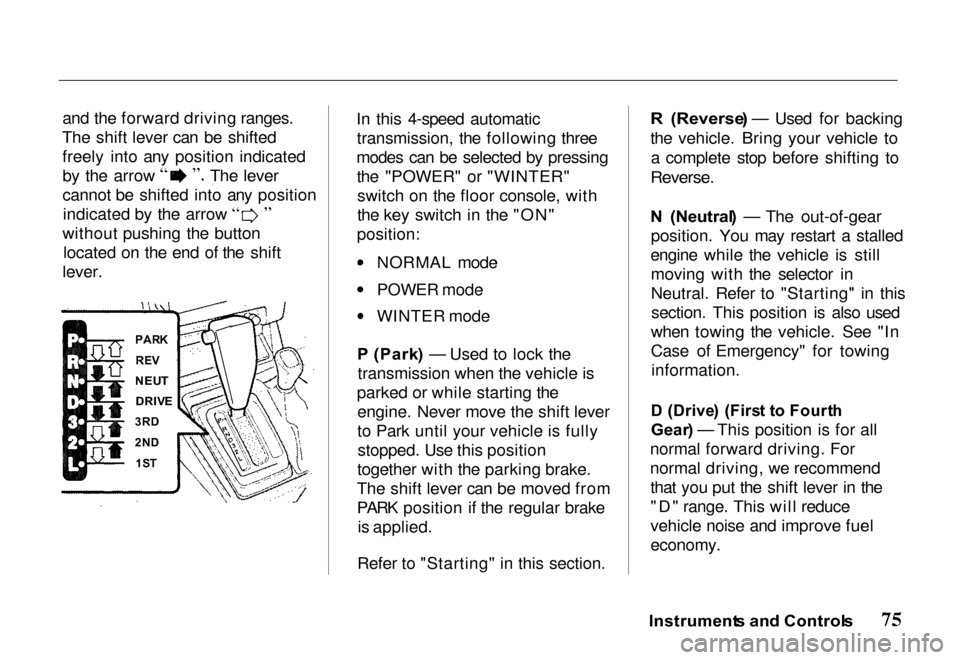
and the forward driving ranges.
The shift lever can be shifted freely into any position indicated by the arrow The lever
cannot be shifted into any position
indicated by the arrow
without pushing the button located on the end of the shift
lever. In this 4-speed automatic
transmission, the following three
modes can be selected by pressing the "POWER" or "WINTER"switch on the floor console, with
the key switch in the "ON"
position: NORMAL mode
POWER mode
WINTER mode
P (Park ) — Used to lock the
transmission when the vehicle is
parked or while starting the engine. Never move the shift lever
to Park until your vehicle is fullystopped. Use this position
together with the parking brake.
The shift lever can be moved from
PARK position if the regular brake is applied.
Refer to "Starting" in this section.R (Reverse ) — Used for backing
the vehicle. Bring your vehicle to a complete stop before shifting to
Reverse.
N (Neutral ) — The out-of-gear
position. You may restart a stalled
engine while the vehicle is still moving with the selector in
Neutral. Refer to "Starting" in thissection. This position is also used
when towing the vehicle. See "In
Case of Emergency" for towing information.
D (Drive ) (Firs t t o Fourt h
Gear ) — This position is for all
normal forward driving. For
normal driving, we recommend that you put the shift lever in the
"D" range. This will reduce
vehicle noise and improve fuel
economy.
Instrument s an d Control s
PAR
K
RE V
NEU T
DRIV E
3R D
2N D
1S T
Page 92 of 267
Fore/Af
t Sea t Adjustmen t
See pages 10-11 for important
safety information and warnings
about how to properly position
seats and seat-backs.
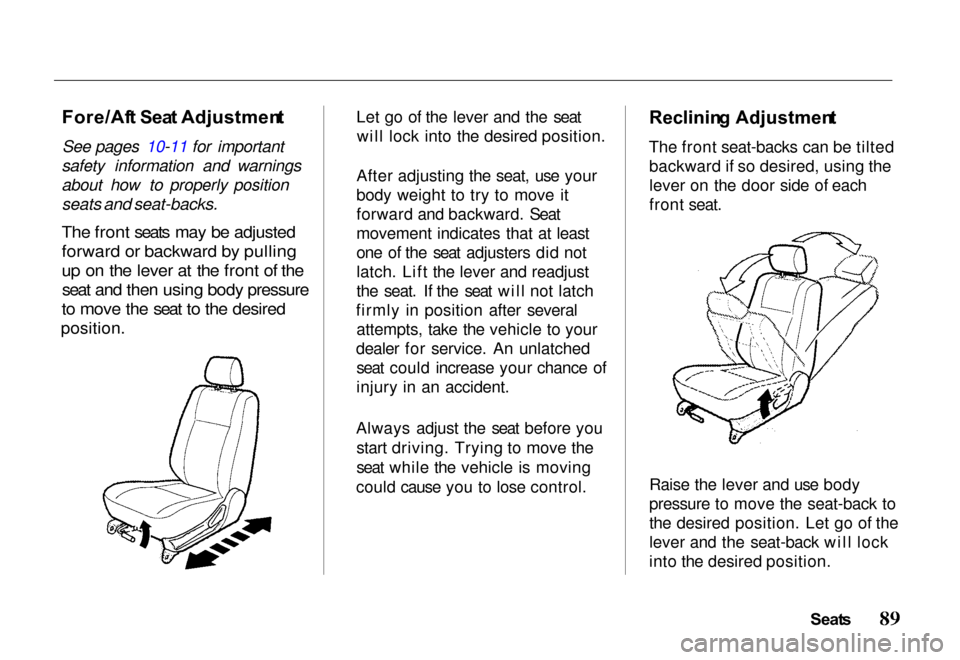
The front seats may be adjusted
forward or backward by pulling
up on the lever at the front of the seat and then using body pressure
to move the seat to the desired
position.
Let go of the lever and the seat
will lock into the desired position.
After adjusting the seat, use your
body weight to try to move it
forward and backward. Seat
movement indicates that at least
one of the seat adjusters did not
latch. Lift the lever and readjust
the seat. If the seat will not latch
firmly in position after several attempts, take the vehicle to your
dealer for service. An unlatched seat could increase your chance of
injury in an accident.
Always adjust the seat before you start driving. Trying to move the
seat while the vehicle is moving
could cause you to lose control.
Reclinin
g Adjustmen t
The front seat-backs can be tilted backward if so desired, using the
lever on the door side of each
front seat.
Raise the lever and use body
pressure to move the seat-back to
the desired position. Let go of the
lever and the seat-back will lock
into the desired position.
Seats
Page 93 of 267
Keep the seat belt's webbing and
latch clear of the seat parts when
you tilt the folding seats forward
or backward. This helps to
prevent damage to the seat belt
system.
Adjust the seat-back before you
start driving. Trying to adjust the
seat-back with the vehicle in
motion could cause you to lose
control.
Hea d Restraint s
See page 12 for important safety information and warnings about
how to properly position the head
restraints.
Head restraints are designed to
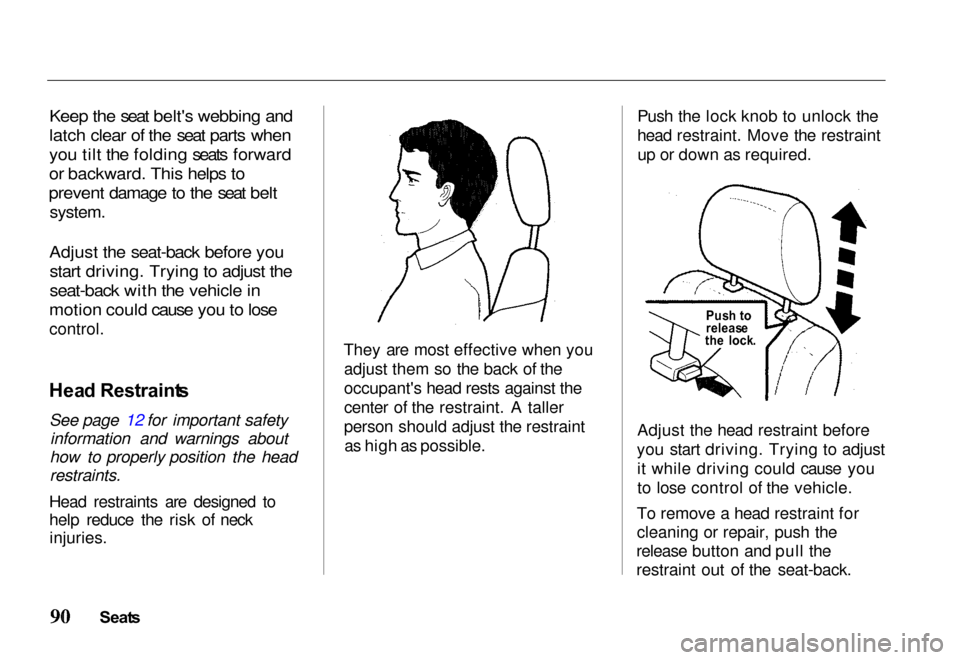
help reduce the risk of neck injuries. They are most effective when you
adjust them so the back of the
occupant's head rests against the
center of the restraint. A taller
person should adjust the restraintas high as possible. Push the lock knob to unlock the
head restraint. Move the restraint
up or down as required.
Adjust the head restraint before
you start driving. Trying to adjust it while driving could cause you
to lose control of the vehicle.
To remove a head restraint for
cleaning or repair, push the
release button and pull the
restraint out of the seat-back.
Seat s
Pus
h t o
releas e
th e lock .
Page 94 of 267
Rea
r Sea t
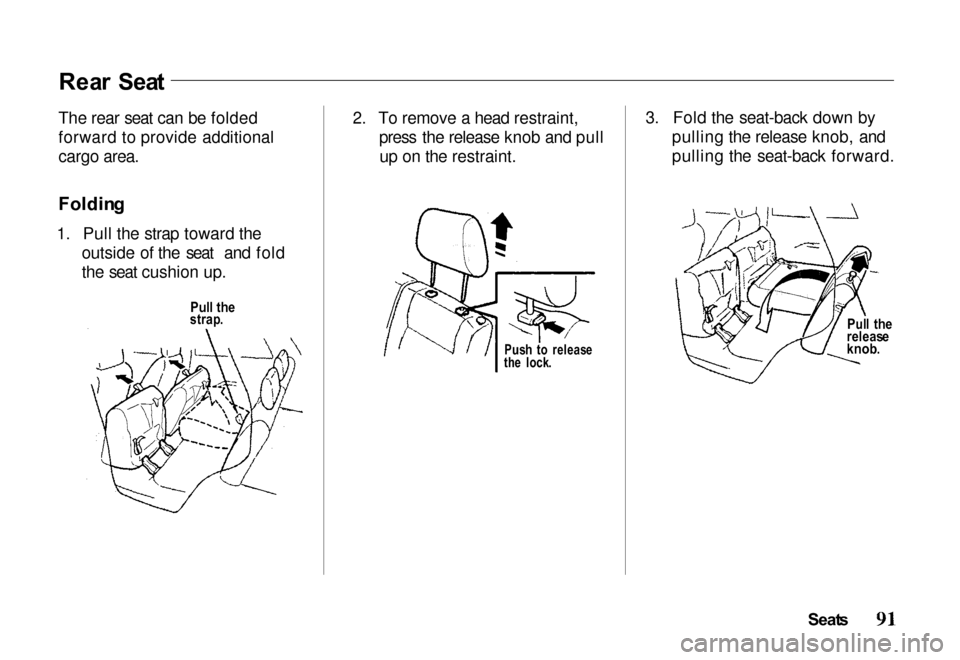
The rear seat can be folded
forward to provide additional
cargo area.
Foldin g
1. Pull the strap toward the outside of the seat and fold
the seat cushion up. 2. To remove a head restraint,
press the release knob and pullup on the restraint. 3. Fold the seat-back down by
pulling the release knob, and
pulling the seat-back forward.
Seats
Pul
l th e
releas e
knob .
Pul
l th e
strap .
Push t o releas e
th e lock .
Page 95 of 267
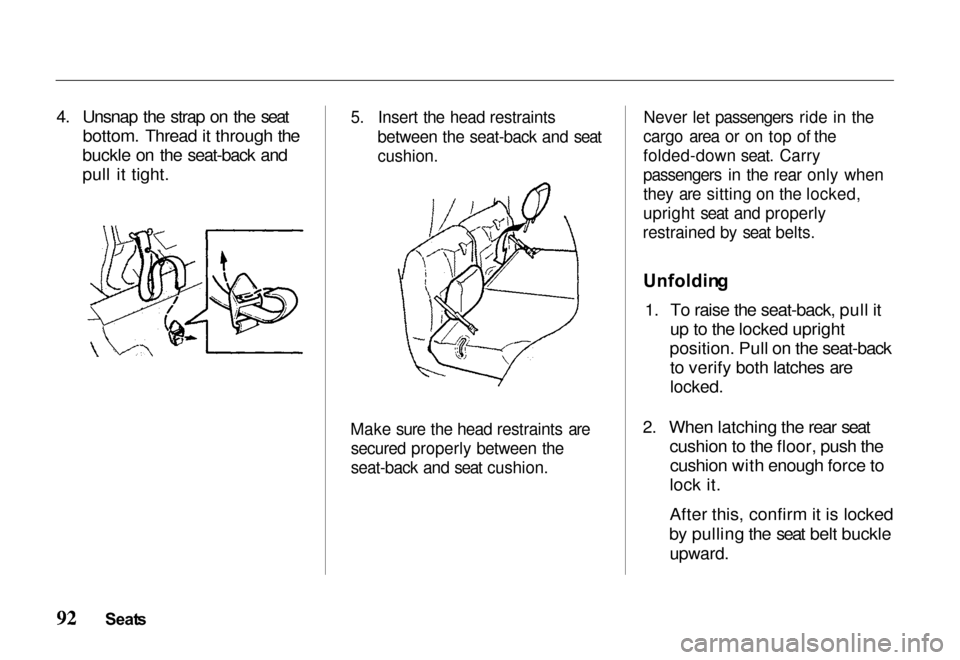
4. Unsnap the strap on the seat
bottom. Thread it through the
buckle on the seat-back and
pull it tight.
5. Insert the head restraints
between the seat-back and seat
cushion.
Make sure the head restraints are secured properly between the
seat-back and seat cushion. Never let passengers ride in the
cargo area or on top of the
folded-down seat. Carry
passengers in the rear only when
they are sitting on the locked,
upright seat and properly
restrained by seat belts.
Unfoldin g
1. To raise the seat-back, pull it up to the locked upright
position. Pull on the seat-back to verify both latches are
locked.
2. When latching the rear seat cushion to the floor, push thecushion with enough force to
lock it.
After this, confirm it is locked
by pulling the seat belt buckle
upward.
Seat s
Page 96 of 267
3. Make sure that the head
restraints are properly
reinstalled on the top of the
seat-backs.
4. Verify that the seat belts are routed properly and nottwisted.
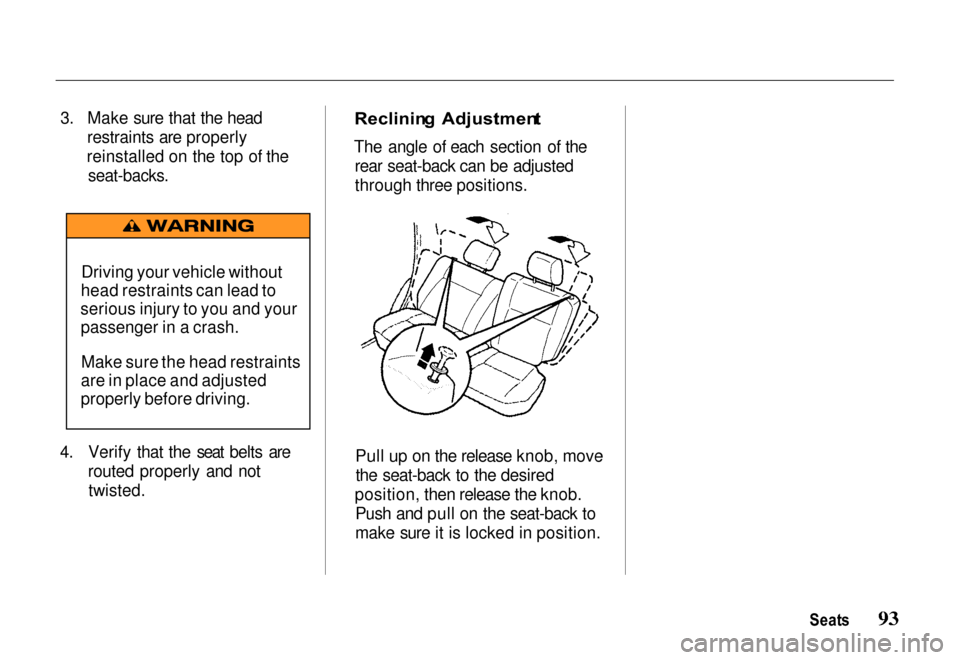
Reclinin
g Adjustmen t
The angle of each section of the rear seat-back can be adjusted
through three positions.
Pull up on the release knob, movethe seat-back to the desired
position, then release the knob. Push and pull on the seat-back to
make sure it is locked in position.
Seats
Driving your vehicle without
head restraints can lead to
serious injury to you and your passenger in a crash.
Make sure the head restraints
are in place and adjusted
properly before driving.
Page 98 of 267
Interio
r Feature s
Keys and Ignition .......... 97
Steering Column Lock/
Ignition Switch ........ 97 LOCK .............. 97
ACC ................ 97
ON ................. 97START .............. 97
Key Removal ........... 98
Key Reminder .......... 98
Guard Against Theft ..... 98
Locks ................... 99 Power Door Locks ...... 100
Child-Safe Door Locks .. 101
Mirrors ................. 101 Interior Mirror ......... 101Power Mirrors ......... 101Vanity Mirror .......... 102 Power Windows .......... 103
Checking the CircuitBreaker ............. 104
Tailgate ................ 104 Operation ............. 104
Hood Release ............ 105
Interior Lights ........... 107 Luggage Light ......... 107Dome Light ........... 107
Courtesy Lights ........ 108
Map Lights............ 108
Moonroof ............... 108 Conveniences ............ 109
Beverage Holder ....... 109
Sun Visor ............. 110Glove Box ............ 110
Assist Grip ............ 111
Horn Button ........... 11
Tilt Steering Wheel ..... 1
11
1
Cigarette Lighte
r ....... 112
Ashtrays .............. 112
Accessory Power Outlets . 113
Interio r Feature s
Page 99 of 267
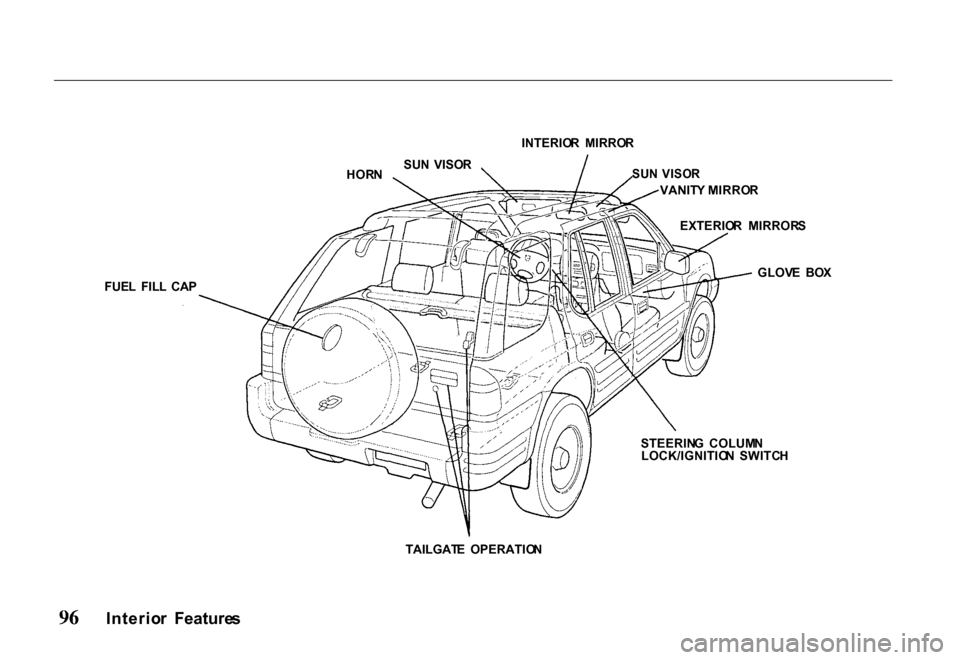
INTERIO
R MIRRO R
FUE L FIL L CA P HOR
N SU
N VISO R
SUN VISO R
EXTERIO R MIRROR S
GLOV E BO X
STEERIN G COLUM N
LOCK/IGNITIO N SWITC H
TAILGAT E OPERATIO N
Interio r Feature s VANIT
Y MIRRO R
Page 100 of 267
Key
s an d Ignitio n
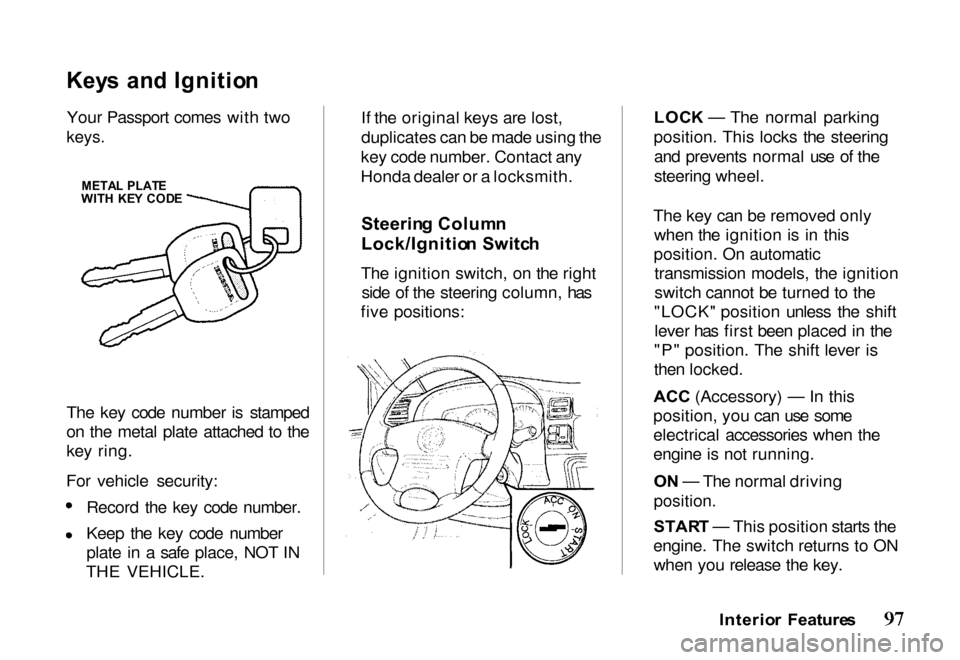
Your Passport comes with two
keys.
The key code number is stamped
on the metal plate attached to the
key ring.
For vehicle security: Record the key code number.
Keep the key code number
plate in a safe place, NOT IN
THE VEHICLE. If the original keys are lost,
duplicates can be made using the
key code number. Contact any
Honda dealer or a locksmith.
Steerin g Colum n
Lock/Ignitio n Switc h
The ignition switch, on the right side of the steering column, has
five positions: LOC
K — The normal parking
position. This locks the steering and prevents normal use of the
steering wheel.
The key can be removed only when the ignition is in this
position. On automatic transmission models, the ignition
switch cannot be turned to the
"LOCK" position unless the shift lever has first been placed in the
"P" position. The shift lever is
then locked.
ACC (Accessory) — In this
position, yo
u can use some
electrical accessories when the
engine is not running.
O N — The normal driving
position.
STAR T — This position starts the
engine. The switch returns to ON when you release the key.
Interior Feature s
META
L PLAT E
WIT H KE Y COD E