light HONDA PASSPORT 2000 2.G Repair Manual
[x] Cancel search | Manufacturer: HONDA, Model Year: 2000, Model line: PASSPORT, Model: HONDA PASSPORT 2000 2.GPages: 267, PDF Size: 3.03 MB
Page 159 of 267
hazard. This is sometimes referred
to as "stomp and steer."
You will feel a pulsation in the
brake pedal when the ABS activates, and you may hear some
noise. This is normal, it is theABS rapidly pumping the brakes.
Activation varies with the amount
of traction your tires have. On dry
pavement, you will need to press on the brake pedal very hard
before you activate the ABS. However, you may feel the ABSactivate immediately if you are
trying to stop on snow or ice.
Important Safety Reminders AB S doe s no t reduc e th e tim e
o r distanc e it take s t o sto p th e
vehicle , it only helps with steering
control during braking. You
should always maintain a safe following distance from other
vehicles.
AB
S wil l no t preven t a ski d tha t
result s fro m changin g directio n
abruptly , such as trying to take a
corner too fast or making a sudden lane change. Always drive
at a safe, prudent speed for the
road and weather conditions.
AB S canno t preven t a los s o f
stability . Always steer moderately
when you are braking hard. Severe or sharp steering wheel
movement can still cause your
vehicle to veer into oncoming traffic or off the road.
A vehicl e wit h AB S ma y requir e
a longe r distanc e t o sto p o n
loose or uneven surfaces, such as
gravel or snow, than a vehicle
without anti-lock. Slow down and allow a greater distance between
vehicles under those conditions.
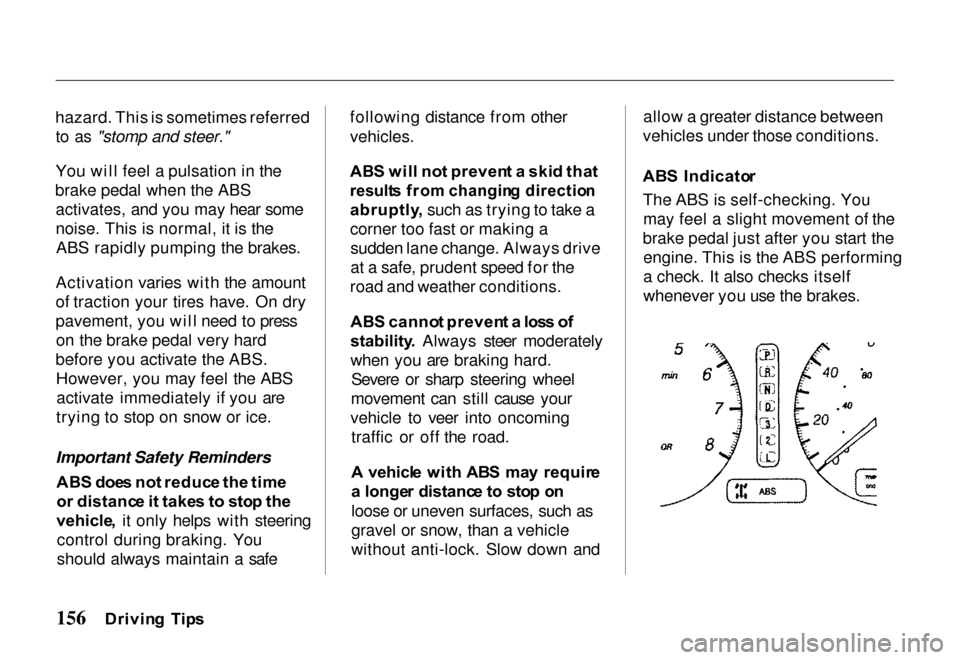
AB S Indicato r
The ABS is self-checking. You may feel a slight movement of the
brake pedal just after you start the engine. This is the ABS performing
a check. It also checks itself
whenever you use the brakes.
Drivin g Tip s
Page 160 of 267
If anything goes wrong, the ABS
indicator on the instrument panel
comes on (see page 65). This
means th
e anti-lock function of
the braking system has shut down.
The brakes still work like a conventional system without
anti-lock, providing normal stopping ability. You should have
the dealer inspect your vehicle as soon as possible if this light stays
on after you start the engine, or
comes on while driving. Drivin
g Wit h We t Brake s
Driving through deep water may get the brakes wet and reduce
their effectiveness. As a result, the
vehicle may not slow down
normally or may pull in one direction or the other.
If you drive through deep water,apply the brakes lightly to see if
the water has affected them. To
dry the brakes quickly, press
lightly on the brake pedal while
maintaining the same speed with the accelerator pedal. Continue
this until the brakes operate
normally.
Powe
r Brake s
The braking system uses engine vacuum to provide power assist. If
the power assist fails because of astalled engine or other reason, the
reserve vacuum in the system will usually allow you to apply the
brakes at least one time.
The reserve vacuum is partly used up each time the brake pedal isapplied and released. Do not
pump the brakes when the power assist has been lost, except when
needed to maintain steering
control on slippery surfaces.
You can still stop the vehicle
without the power assist by pushing
harder on the brake pedal.
However, the stopping distance
may be longer, even though the
brakes themselves remain fully
operational.
Driving Tip s
Page 161 of 267
Self-Adjustin
g Brake s
The brakes on this vehicle are self-adjusting. They have been
designed so that periodic brake
adjustment is not needed.
The brakes adjust themselves each time you firmly apply them.
Thus, if the brake pedal goes down
farther than normal due to a lack of adjustment, drive backward and
forward a few times. Apply the
brakes intermittently.
See your Honda dealer if the
brake pedal height does not return
to normal or if there is a rapidincrease in pedal travel. Either is a
sign of other brake trouble. Also,
see your Honda dealer if the
parking brake needs adjustment.
Brakin
g Tip s
Control your vehicle's speed on a steep or long downhill grade by
shifting the transmission to a
lower gear. Constantly using the
brakes can cause them to overheat
and lose effectiveness.
Resting your foot on the brake
pedal when you are not intending to brake ("riding the brakes") can
cause them to overheat. This
reduces their effectiveness, wears them out faster, and can reduce
fuel mileage. It also causes your
brake lights to stay on all the time, confusing drivers behind you.
Brak e Wea r Indicator s
The front and rear brakes have built-in wear indicators. These make a high-pitched squealing or
cricket-like warning sound when the brake pads or linings are worn
to the point of replacement. Thesound may come and go or be
heard all the time when the vehicle is moving, but may stop when the
brake pedal is pushed down firmly.
Expensive damage can result if
pads or linings are not replaced immediately when needed.
Drivin g o n Slipper y Surface s
Driving, steering, and braking
traction are reduced when the
road is coated with water, snow, ice, gravel, or other materials.
Slow down and adjust your
driving to such conditions. It is important to slow down when it is
slippery because stopping
Drivin g Tip s
Page 168 of 267

Whee
l Replacemen t
Consideration s
Damaged wheels must be
replaced. For example, replace
wheels if they are bent, cracked or
heavily rusted, or if wheel nuts
often become loose. Also replace
wheels that leak air (except some
aluminum wheels that can be
repaired). See your Honda dealer.
Do not use bent wheels that have
been straightened, and do not use
tubes in leaking wheels designed
for tubeless tires. Such wheels
may have structural damage and
could fail without warning.
Maximum loads, maximum
inflation pressures, wheel
identification codes, and wheel
sizes are stamped on each wheel.
Service-tested and approved
wheels are available from your
Honda dealer.
When obtaining wheels for any
reason from any other source, the
replacement wheels should be
equal in load capacity, inflation
pressure capacity, diameter, width, offset and mounting configuration
to those originally installed on
your vehicle. A wheel of the
wrong size or type may adversely
affect load carrying capacity, wheel
and bearing life, brake cooling,
speedometer/odometer calibration,
stopping ability, headlight aim,
bumper height, vehicle ground clearance, and tire or tire chain
clearance to the body and chassis.
Replacement with used wheels is
not advised: They may have been subjected to harsh treatment or very high mileage and could fail
without warning.
Installing wheels and/or tires that
have a higher load carrying limit
than those that originally came on
your vehicle does not increase the
GAWR or GVWR of the vehicle.
Driving Tip s
Page 169 of 267
Drivin
g fo r Bes t Fue l
Econom y
How, where, and when you drive all affect how many miles/
kilometers you can get from a
gallon/liter of fuel. The careful attention you give your vehicle as
far as maintenance and repairs will also help fuel economy.
Fuel Selection Use only unleaded gasolinemeeting federal government
regulations. The federal
government specifies the
minimum octane rating number of
unleaded gasoline. Unleaded
gasoline must be used for proper
emissions control system
operation. It will also minimize spark plug fouling. The use of
leaded gasoline can damage the
emissions control system and could result in loss of warranty
coverage.
"Jackrabbit" Starts
You can save fuel (and prolong
engine and tire life) by avoiding fast starts away from lights andstop signs.
Stop-and-Go Driving Frequent stop-and-go driving
during a trip will cut down on
your miles per gallon (kilometers
per liter). Plan even your short shopping trips to take advantage
of through streets to avoid traffic
lights. Pace your driving to avoid
unplanned stops.
Excessive Idling
An idling engine uses fuel, too. If
you're faced with more than a few
minutes wait and you're not in traffic, it is better to turn off the
key and start the engine again
later.
Repetitive Harsh Stopping Harsh stops can also waste fuel;instead of moving the vehicle, the
energy is wasted as heat in
braking. Energy in the form of
fuel is also needed to accelerate
back to driving speed.
Lubricants A well-lubricated vehicle meansless friction between moving
parts. This manual lists the proper
lubrication intervals in the "Care
and Maintenance" section.
Air Cleaner Your vehicle gets its power from a
mixture of fuel and air. The air is
taken into the engine through the
Drivin g Tip s
Fue
l Econom y
Page 173 of 267
systems, such as the SRS and
anti-lock brake system.
However, if electronic accessories
are improperly installed, or
exceed your vehicle's electrical
system capacity, they can interfere with the operation of your vehicle,
or even cause the airbags to
deploy.
Before installing any accessory: Make sure the accessory does
not obscure any lights, or interfere with proper vehicle
operation or performance. Be sure electronic accessories
do not overload electrical
circuits (see page 236). Have the installer contact your
Honda dealer for assistance
before installing any electronic
accessory.
If possible, have your dealer
inspect the final installation.
Modification s
Do not remove any original
equipment or modify your vehicle in any way that would alter its
design or operation. This could
make your vehicle unsafe and illegal to drive.
For example, do not make any modifications that would change
the ride height of your vehicle, or
install wheels and tires with a
different overall diameter.
Such modifications can adversely
affect handling, and interfere with
the operation of the vehicle's
anti-lock brakes and other
systems.
In addition, any modifications that
decrease ground clearance increase the chance of
undercarriage parts striking a
curb, speed bump, or other raised object, which could cause your
airbags to deploy.
Do not modify your steering wheel or any other part of your
Supplemental Restraint System.Modifications could make the
system ineffective.
Additiona l Safet y Precautio n
Do not attach or place objects on
the airbag covers. Any object
attached to, or placed on, the
covers marked "SRS," in the
center of the steering wheel and on top of the dashboard, could
interfere with the proper operation
of the airbags. Or, if the airbags
inflate, the objects could be
propelled inside the vehicle and hurt someone.
Drivin g Tip s
Page 174 of 267
Carryin
g Carg o
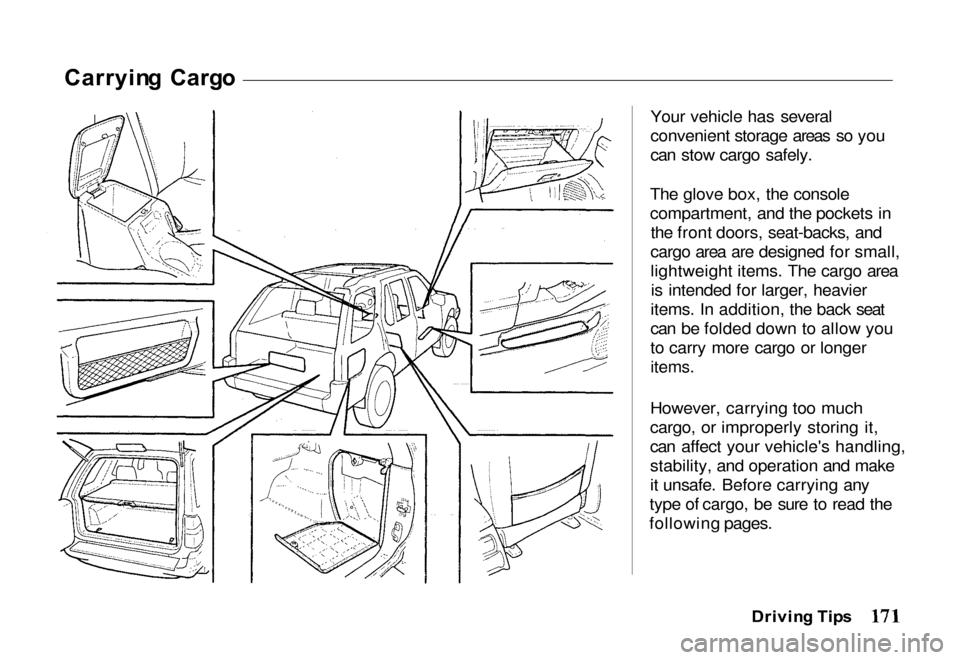
Your vehicle has several
convenient storage areas so you
can stow cargo safely.
The glove box, the console
compartment, and the pockets in the front doors, seat-backs, and
cargo area are designed for small,
lightweight items. The cargo area is intended for larger, heavier
items. In addition, the back seat
can be folded down to allow you
to carry more cargo or longer
items.
However, carrying too much
cargo, or improperly storing it,
can affect your vehicle's handling,
stability, and operation and make
it unsafe. Before carrying any
type of cargo, be sure to read the
following pages.
Drivin g Tip s
Page 180 of 267

Safet
y Chai n
Always use a suitable safety chain
between your vehicle and the
trailer.
Check with your trailer
manufacturer for the required
equipment. Cross the safety
chains under the hitch and attach
them to the trailer hitch hardware.
This will prevent the trailer from
dropping to the ground in the
event the hitch disengages. For
proper use and installation,
consult your trailer manufacturer.
Traile r Light s
Trailer lights and equipment must
comply with federal, state and local regulations. Check with your
local recreational vehicle dealer
for the requirements in your area. Use only equipment designed for
your vehicle.
Improper equipment or installation can cause damage to
your vehicle's electrical system and affect your vehicle warranty.
Consult your Honda dealer for installation.
Tire s
Always check the condition of
your vehicle's tires and trailer's
tires before operation. Replace
worn or damaged tires before
operation.
Inflate tire pressure to the
recommended cold tire pressure indicated in the tire
manufacturer's warranty booklet in the glove box packet.
Check the tire manufacturer's
requirements when replacement
tires are installed on your vehicle.
Trailer tire condition, size, load
rating, and proper inflation
pressure should be in accordance
with the tire manufacturer's
specifications. Improper tire size
and inflation can cause tire
failure, possibly resulting in
vehicle damage and personal
injury.
Traile r Brake s
Trailers with a total weight of
1,000 pounds or more require trailer brakes. If your trailer is
equipped with a braking system,
make sure it conforms to federal,state, and local equipment
regulations.
Driving Tip s
Page 181 of 267
There are no provisions in your
vehicle to tap into its hydraulic
braking system. Any attempt toattach the trailer's brakes to your
vehicle's hydraulic braking system, no matter how successfulit may seem, will lower braking
effectiveness and create a
potential hazard.
Equipmen t Chec k
Before operating your vehicle,
check all safety equipment to
ensure safe operation. Be sure
your vehicle is properly serviced
to avoid mechanical failure.
Check that your vehicle remains
level when the loaded or unloadedtrailer is hitched. Do not drive if
the rear end of your vehicle is abnormally higher or lower.
Check for proper tongue weight,
overload, improper weight
distribution, worn suspension, or
other possible causes.
Make sure the trailer load is
properly positione
d and secured
so its does not shift around whil
e
driving.
Chec k
if your rearview mirrors
comply with federal, state and
local regulations. If not, confirm
the proper mirrors required for
towing and have them installed.
Perform an equipment check of
all braking, lighting and safety
equipment to ensure they are working properly.
Your safety depends on proper
operation and installation of
equipment. Never operate a
vehicle with faulty equipment.
Limite
d Sli p Differentia l
Standard on 4WD models
The limited slip differential is
designed to improve traction by limiting wheelspin. If one rear
wheel begins to spin on a slipperysurface, the limited slip
differential will automatically
transmit driving force to the other
rear wheel.
Drivin g Tip s
Page 183 of 267
Jum
p Startin g
Do not push or tow your vehicle to start it. Under some conditions
this may damage the three-way catalytic converter or other parts
of the vehicle.
If your vehicle has a discharged
battery, it can be started by using the battery in another vehicle; a
procedure called "jump starting." To jump start your vehicle:
1. Position the vehicle with the good (charged) battery so that
the jump-starting cables will
reach. Do not allow the vehiclesto touch. Check to see that the
bumpers do not touch.
2. Turn off all electric motors and accessories in both
vehicles. Turn off all lights
except hazard flashers and
lights needed to light up the
work area. Turn off theignition, apply the parking
brake firmly, and shift an automatic transmission to
"P" (Park) and a manual
transmission to "N" (Neutral)
in both vehicles.
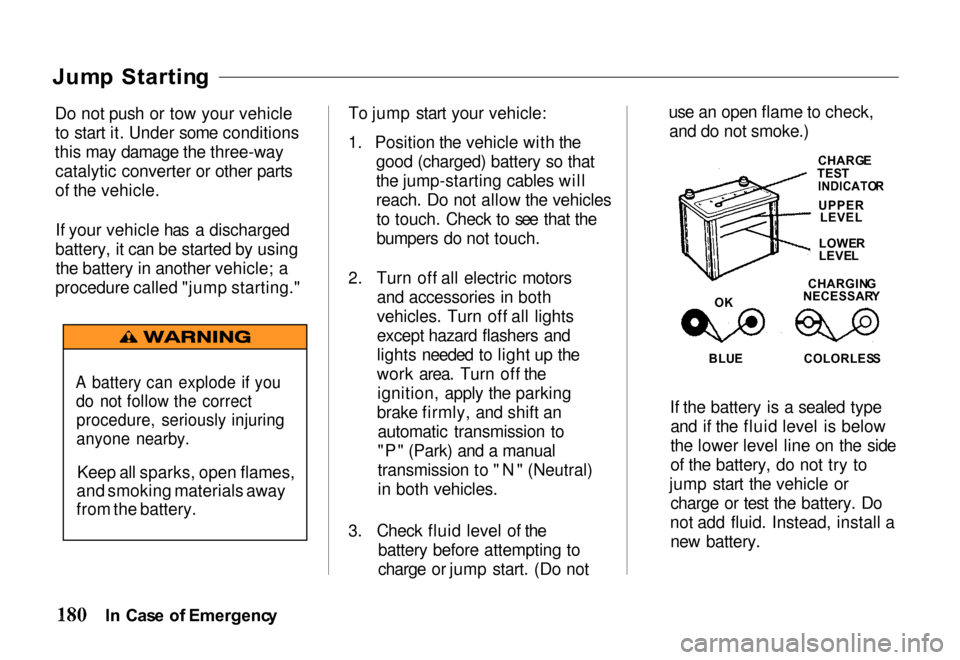
3. Check fluid level of the battery before attempting to
charge or jump start. (Do not use an open flame to check,
and do not smoke.)CHARG ETEST
INDICATO R
BLUE
COLORLES S
If the battery is a sealed type
and if the fluid level is below
the lower level line on the side
of the battery, do not try to
jump start the vehicle or charge or test the battery. Do
not add fluid. Instead, install a new battery.
I n Cas e o f Emergenc y
A battery can explode if you
do not follow the correct
procedure, seriously injuring
anyone nearby.
Keep all sparks, open flames,
and smoking materials away
from the battery.
CHARGIN G
NECESSAR Y
LOWE
R
LEVE L
O K
UPPERLEVEL