radio HONDA PASSPORT 2000 2.G Owners Manual
[x] Cancel search | Manufacturer: HONDA, Model Year: 2000, Model line: PASSPORT, Model: HONDA PASSPORT 2000 2.GPages: 267, PDF Size: 3.03 MB
Page 118 of 267
Comfor
t an d Convenienc e Feature s
The heating and air conditioning system in your vehicle provides a
comfortable driving environmentin all weather conditions.
The audio system has many
features. This section describes
those features and how to use
them.
Heating and Cooling ...... 116
Ventilation .............. 118
Audio System ............ 121 AM/FM/Cassette StereoAudio System (LX, EX) 121 Operating the Radio .. 121
Adjusting the Sound .. 123
Operating the
Cassette Player ..... 124
Caring for the
Cassette Player ..... 126
Operating the Optional CD Changer ........ 127
AM/FM/Cassette/ CD Changer StereoAudio System (EX-L) . 129 Operating the Radio . . 129
Adjusting the Sound . . 131
Radio Frequencies ... 132Operating the Cassette Player ..... 134
Caring for the Cassette Player ..... 137 Operating the
CD Changer ........ 138
Protecting
Compact Discs ...... 142
Cruise Control ........... 143
Keyless Entry ........... 147
Anti-Theft System ........ 148
Digital Clock ............ 149
Comfor t an d Convenienc e Feature s
Page 124 of 267
Audi
o Syste m
AM/FM/Cassett e Stere o
Audi o Syste m
For LX and EX models
Your Honda's audio system
provides clear reception on both AM and FM bands, while the
preset buttons allow you to easily select your favorite stations.
The cassette system features Dolby B* noise reduction,
automatic sensing of chromium-
dioxide (CrC2) tape, and autoreverse for continuous play.
* Dolby noise reduction manufactured under
license from Dolby Laboratories Licensing Corporation. "DOLBY" and the symbol
are trademarks of Dolby Laboratories
Licensing Corporation. Operatin
g th e Radi o
The ignition switch must be in
ACCESSORY or ON. Turn the system on by pressing the PWR/
VOL knob. Adjust the volume by
turning the PWR/VOL knob.
The band and frequency that the
radio was last tuned to is
displayed. To change bands, press the AM or FM button. On the FM
band, ST will be displayed if the station is broadcasting in stereo.
Stereo reproduction on AM is not
available.
You can use any of three methods
to find radio stations on the selected band: TUNE , SEEK , or
the Preset buttons.
TUN E — Use the TUNE bar to tune
the radio to a desired frequency. Press the right side ( ) to tune to
a higher frequency, or the left side ( ) to tune to a lower frequency.
The frequency numbers will start to change rapidly. Release the bar
when the display reaches the
desired frequency. To change the
frequency in small increments,
press and release the TUNE bar quickly.
SEE K — The SEEK function
searches the band for a station
with a strong signal. To activate it,
press and release the SEEK/SCAN
button. The system scans upward
from the current frequency. It stops when it finds a station with
a strong signal.
Preset — You can store the
frequencies of your favorite radio stations in the six preset buttons.
Each button will store one
frequency on the AM band, and two on the FM band (FM1 and
FM2).
Comfor t an d Convenienc e Feature s
Page 127 of 267
Operatin
g th e Cassett e Playe r
The ignition switch must be in
ACCESSORY or ON. Make sure the tape opening on the cassette is
facing to the right, then insert the
cassette most of the way into the slot. The system will pull it in the
rest of the way, and begin to play.
The tape direction indicator will light to show you which side of the cassette is playing. The
indicates the side you inserted
facing upward is now playing. If
you want to play the other side, press the (preset 2) button.
If the cassette was recorded using
Dolby noise reduction, turn it on
by pressing the (preset 5)
button. You will see in the
display.
You can switch between the
cassette and the radio by pressing the FM/AM and TAPE buttons.
When you press the FM/AM
button with a cassette playing, the
radio begins to play and the cassette stops but does not eject.
To begin playing the cassette at the same point, press the TAPE
button.
When the system reaches the end
of the tape, it will automatically
reverse direction and play the
other side. If you want to remove
the cassette from the drive, press
the EJECT button.
When you turn off the ignitionswitch, the system stops the tape
but does not eject the cassette. It
will begin to play when you turn
the ignition switch back on. To
eject the tape, even with the ignition switch off, press the
EJECT button.
Tap
e Searc h Function s
With a cassette playing, you can use the FF, REW, or APS function
to find a desired program.
FF/RE W — Fast Forward and
Rewind move the tape rapidly. Press and release the button
(preset 1) to rewind, or the
button (preset 3) to fast forward.
You will see REW or FF in the display. Press the button to
return to PLAY mode. If the system reaches the end of the tape
while in fast forward or rewind, it
automatically stops that function,
reverses direction, and begins to
play.
Comfor t an d Convenienc e Feature s
Page 130 of 267
Operatin
g th e Optiona l C D
Change r
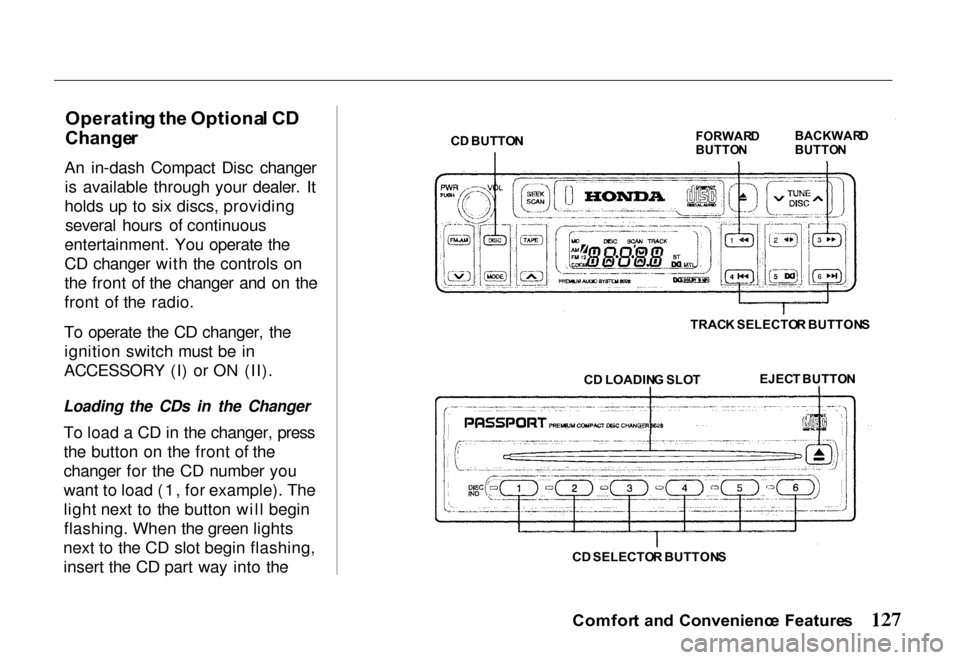
An in-dash Compact Disc changer is available through your dealer. It
holds up to six discs, providing several hours of continuous
entertainment. You operate the
CD changer with the controls on
the front of the changer and on the
front of the radio.
To operate the CD changer, the ignition switch must be in
ACCESSORY (I) or ON (II).
Loading the CDs in the Changer
To load a CD in the changer, press
the button on the front of the
changer for the CD number you
want to load (1, for example). The
light next to the button will beginflashing. When the green lights
next to the CD slot begin flashing, insert the CD part way into the
Comfort an d Convenienc e Feature s
C
D BUTTO N
FORWAR
D
BUTTO N BACKWAR
D
BUTTO N
TRAC K SELECTO R BUTTON S
C D LOADIN G SLO T
EJEC
T BUTTO N
C D SELECTO R BUTTON S
Page 131 of 267
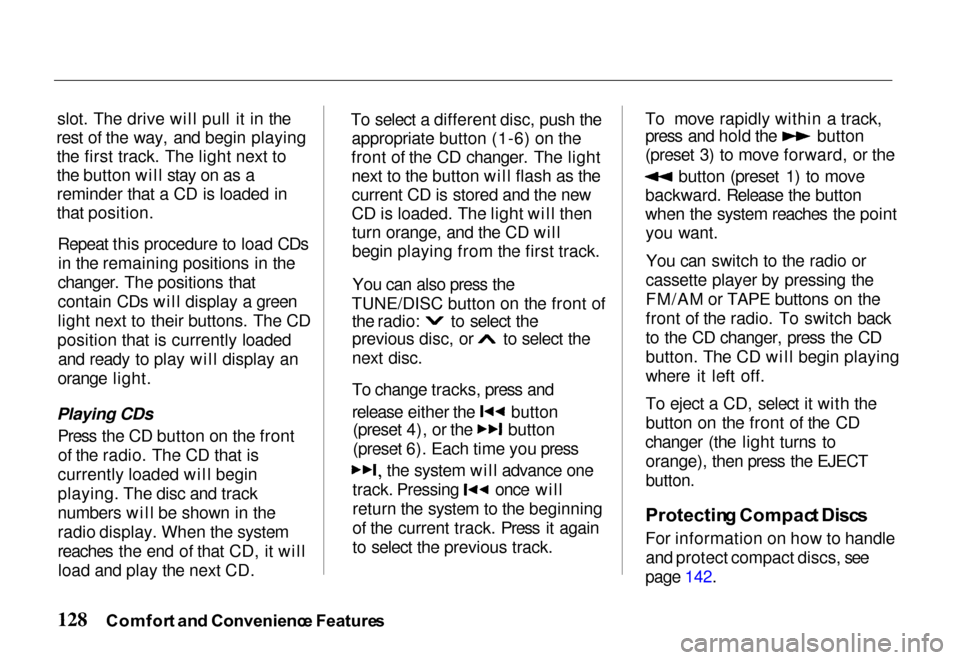
slot. The drive will pull it in the
rest of the way, and begin playing the first track. The light next to
the button will stay on as a
reminder that a CD is loaded in
that position.
Repeat this procedure to load CDsin the remaining positions in the
changer. The positions that
contain CDs will display a green
light next to their buttons. The CD
position that is currently loaded and ready to play will display an
orange light.
Playing CDs Press the CD button on the frontof the radio. The CD that is
currently loaded will begin
playing. The disc and track
numbers will be shown in the
radio display. When the system
reaches the end of that CD, it will load and play the next CD. To select a different disc, push the
appropriate button (1-6) on the
front of the CD changer. The light next to the button will flash as the
current CD is stored and the new
CD is loaded. The light will thenturn orange, and the CD will
begin playing from the first track.
You can also press the
TUNE/DISC button on the front of
the radio:
to select the
previous disc, or to select the
next disc.
To change tracks, press and
release either the button
(preset 4), or the button
(preset 6). Each time you press
the system will advance one
track. Pressing once will
return the system to the beginning
of the current track. Press it again
to select the previous track.To move rapidly within a track, press and hold the button
(preset 3) to move forward, or the
button (preset 1) to move
backward. Release the button
when the system reaches the point you want.
You can switch to the radio or
cassette player by pressing the
FM/AM or TAPE buttons on the
front of the radio. To switch back
to the CD changer, press the CD
button. The CD will begin playing
where it left off.
To eject a CD, select it with the
button on the front of the CD
changer (the light turns to orange), then press the EJECT
button.
Protectin g Compac t Disc s
For information on how to handle and protect compact discs, see
page 142.
Comfor t an d Convenienc e Feature s
Page 132 of 267
AM/FM/Cassette/C
D
Change r Stere o
Audi o Syste m
For EX-L model
Your Honda's audio system
provides clear reception on both AM and FM bands, while the
preset buttons allow you to easily select your favorite stations.
The CD changer holds up to six
discs, providing several hours of
continuous entertainment.
The cassette system features
Dolby B* noise reduction, automatic sensing of chromium-
dioxide (CrO 2) tape, and
autoreverse for continuous play.
* Dolby noise reduction manufactured under license from Dolby Laboratories Licensing Corporation. "DOLBY" and the symbol
are trademarks of Dolby Laboratories
Licensing Corporation. Operatin
g th e Radi o
The ignition switch must be in ACCESSORY or ON. Turn the
system on by pressing the
PWR/VOL knob. Adjust the
volume by turning the PWR/VOL
knob.
The band and frequency that the
radio was last tuned to is
displayed. To change bands, press the AM or FM button. Press the
FM button again to switch between FM1 and FM2. On the
FM band, ST will be displayed if the station is broadcasting in
stereo. Stereo reproduction on
AM is not available.
You can use any of four methods
to find radio stations on the
selected band: TUNE , SEEK ,
SCAN , or the Prese t buttons.
TUN E — Use the TUNE bar to
tune the radio to a desired frequency. Press the right side to tune to a higher frequency,
or the left side to tune to a
lower frequency. The frequency
numbers will start to change
rapidly. Release the bar when the display reaches the desired
frequency. To change the frequency in small increments,
press and release the TUNE bar quickly.
SEE K — The SEEK function
searches the band for a station
with a strong signal. To activate it,
press and release the SEEK/SCAN button. The systemscans up the band from the current
frequency. It stops when it finds a station with a strong signal.
SCA N — The SCAN function
samples all the stations with
strong signals on the selected
band. To activate it, press and
hold the SEEK/SCAN button until
Comfor t an d Convenienc e Feature s
Page 133 of 267
you hear a beep, then release it.
SCAN shows in the display. The
system scans up the band for a
station with a strong signal. When
it finds one, it stops and plays that
station for approximately five
seconds. If you do nothing, the
system scans for the next strong
station and plays that for five
seconds. When it finds a station
that you want to continue
listening to, press the SEEK/SCAN button again.
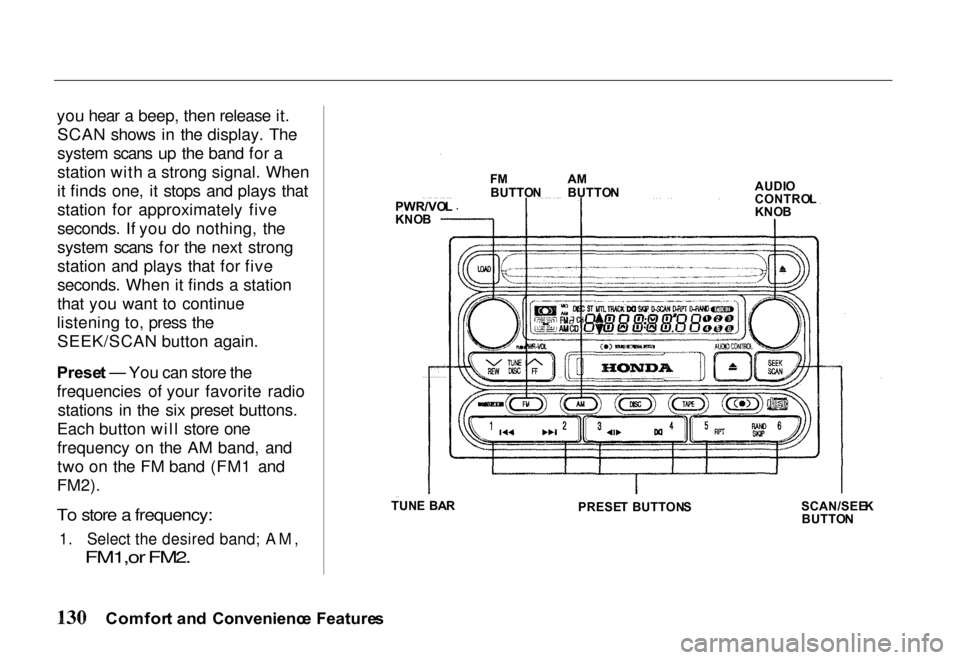
Prese t — You can store the
frequencies of your favorite radio stations in the six preset buttons.
Each button will store one frequency on the AM band, and
two on the FM band (FM1 and
FM2).
To store a frequency:
1. Select the desired band; AM,
FM1,or FM2.
Comfor t an d Convenienc e Feature s
PWR/VO
L
KNO B F
M
BUTTO NA
M
BUTTO N AUDI
O
CONTRO L
KNO B
SCAN/SEE K
BUTTO N
PRESE
T BUTTON S
TUN
E BA R
Page 135 of 267
Radi
o Frequencie s
Your Honda's radio can receive
the complete AM and FM bands.
Those bands cover these
frequencies:
AM band: 530 to 1,710 kilohertz
FM band: 87.7 to 107.9 megahertz
Radio stations on the AM band are assigned frequencies at least 10
kilohertz apart (530, 540, 550).
Stations on the FM band are
assigned frequencies at least 0.2
megahertz apart (87.9, 88.1, 88.3).
Stations must use these exact
frequencies. It is fairly common
for stations to round-off the
frequency in their advertising, so
your radio could show a
frequency of 100.9 even though
the announcer may call the station
"FM 101." Radi
o Receptio n
How well your Honda's radio
receives stations is dependent on many factors, such as the distance
from the station's transmitter,
nearby large objects, and
atmospheric conditions.
A radio station's signal gets weaker as you get farther away
from its transmitter. If you are
listening to an AM station, you
will notice the sound volume
becoming weaker, and the station
drifting in and out. If you are
listening to an FM station, you
will see the stereo indicator
flickering off and on as the signal
weakens. Eventually, the stereo indicator will go off and the sound
will fade completely as you get
out of range of the station's
signal.
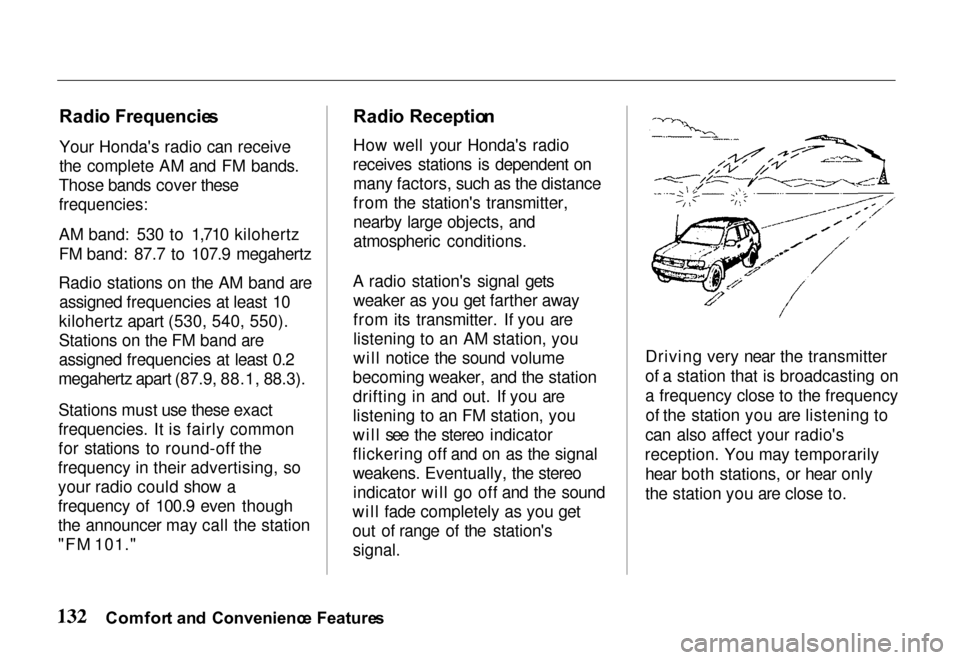
Driving very near the transmitter
of a station that is broadcasting on
a frequency close to the frequency
of the station you are listening to
can also affect your radio's
reception. You may temporarily hear both stations, or hear only
the station you are close to.
Comfor t an d Convenienc e Feature s
Page 136 of 267
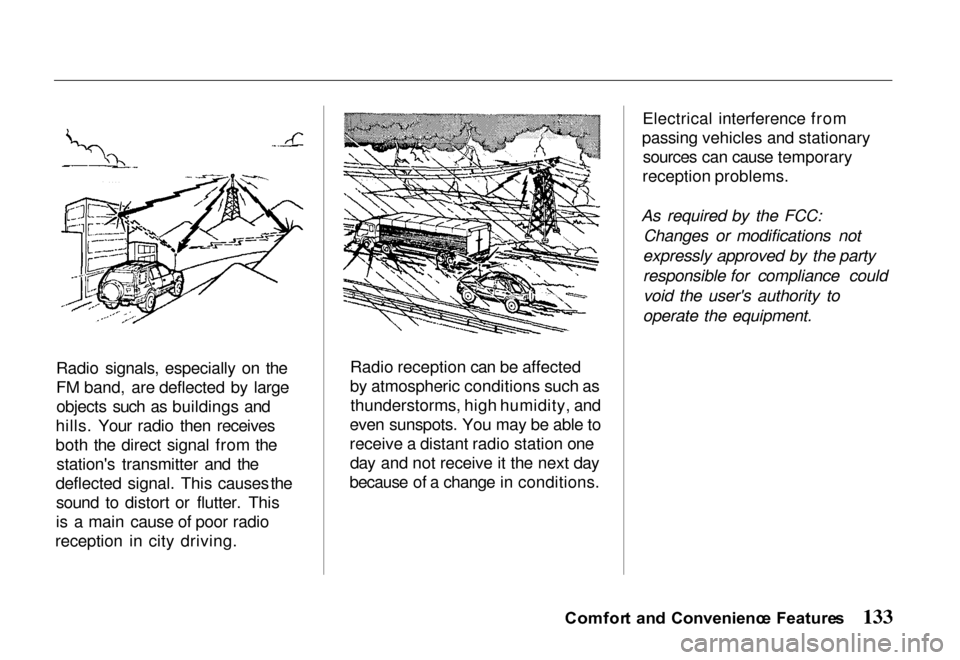
Radio signals, especially on the
FM band, are deflected by large
objects such as buildings and
hills. Your radio then receives
both the direct signal from the station's transmitter and the
deflected signal. This causes the
sound to distort or flutter. This
is a main cause of poor radi o
reception i
n city driving. Radio reception can be affected
by atmospheric conditions such as
thunderstorms, high humidity, and
even sunspots. You may be able to
receive a distant radio station one day and not receive it the next day
because of a change in conditions. Electrical interference from
passing vehicles and stationary sources can cause temporary
reception problems.
As required by the FCC: Changes or modifications not
expressly approved by the party
responsible for compliance could void the user's authority to
operate the equipment.
Comfor t an d Convenienc e Feature s
Page 137 of 267
Operatin
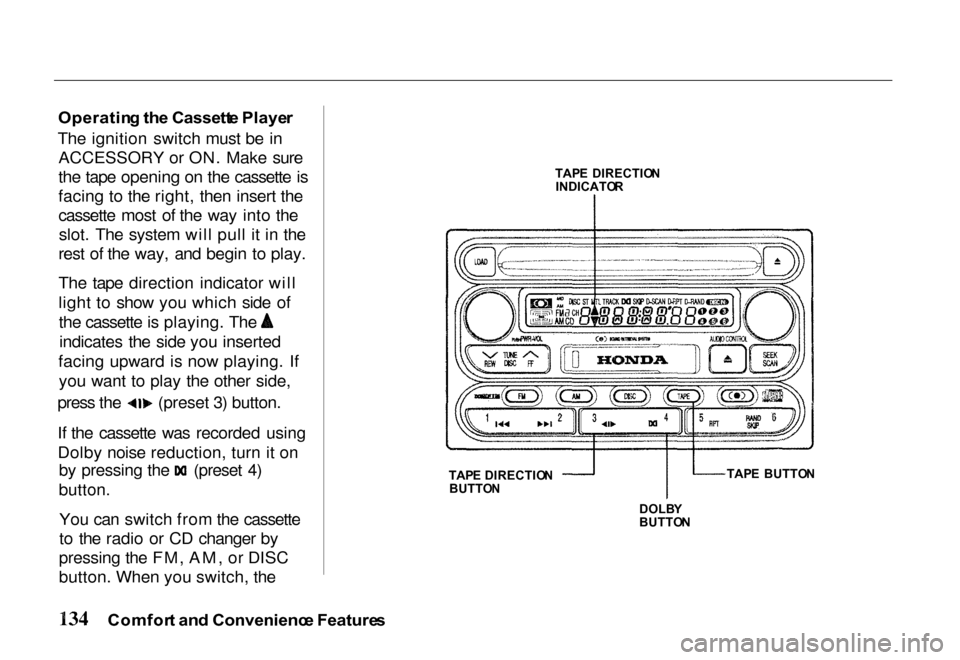
g th e Cassett e Playe r
The ignition switch must be in ACCESSORY or ON. Make sure
the tape opening on the cassette is
facing to the right, then insert the
cassette most of the way into theslot. The system will pull it in the
rest of the way, and begin to play.
The tape direction indicator will
light to show you which side of the cassette is playing. The
indicates the side you inserted
facing upward is now playing. If you want to play the other side, press the (preset 3) button.
If the cassette was recorded using
Dolby noise reduction, turn it on
by pressing the (preset 4)
button.
You can switch from the cassette
to the radio or CD changer by
pressing the FM, AM, or DISC
button. When you switch, the
Comfor t an d Convenienc e Feature s
TAP
E DIRECTIO N
INDICATO R
TAP E DIRECTIO N
BUTTO N
DOLBY
BUTTO N TAP
E BUTTO N