key HONDA PASSPORT 2002 2.G User Guide
[x] Cancel search | Manufacturer: HONDA, Model Year: 2002, Model line: PASSPORT, Model: HONDA PASSPORT 2002 2.GPages: 294, PDF Size: 3.97 MB
Page 80 of 294
77Instruments and Controls
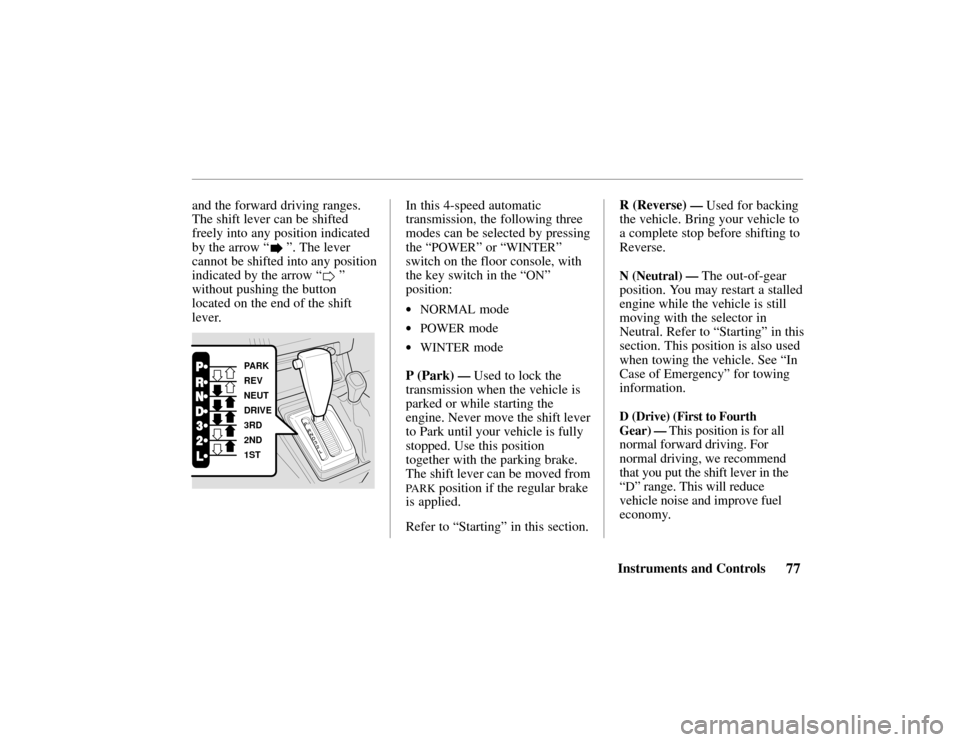
and the forward driving ranges.
The shift lever can be shifted
freely into any position indicated
by the arrow “
”. The lever
cannot be shifted into any position
indicated by the arrow “
”
without pushing the button
located on the end of the shift
lever.
PARK
REV
NEUT
DRIVE
3RD
2ND
1ST
In this 4-speed automatic
transmission, the following three
modes can be selected by pressing
the “
POWER” or “WINTER”
switch on the floor console, with
the key switch in the “
ON”
position:
•NORMAL mode
•POWER mode
•WINTER mode
P (Park)
— Used to lock the
transmission when the vehicle is
parked or while starting the
engine. Never move the shift lever
to Park until your vehicle is fully
stopped. Use this position
together with the parking brake.
The shift lever can be moved from
PARK position if the regular brake
is applied.
Refer to “Starting” in this section. R (Reverse)
— Used for backing
the vehicle. Bring your vehicle to
a complete stop before shifting to
Reverse.
N (Neutral) — The out-of-gear
position. You may restart a stalled
engine while the vehicle is still
moving with the selector in
Neutral. Refer to “Starting” in this
section. This position is also used
when towing the vehicle. See “In
Case of Emergency ” for towing
information.
D (Drive) (First to Fourth
Gear)
— This position is for all
normal forward driving. For
normal driving, we recommend
that you put the shift lever in the
“
D” range. This will reduce
vehicle noise and improve fuel
economy.
Page 81 of 294

78Instruments and Controls
3 (Third) — When operating your
vehicle on slippery roads, on a
long descending slope, or on a
road with many sharp curves, you
will want to use engine braking.
At this time, put the shift lever
into this range.
2 (Second) — You may choose this
position when traveling down a
moderate grade where you want to
slow down a little without using
the brake itself. Change back to
the “
D” position to return to
normal driving. With the shift
lever in “2, ” the vehicle will start
in first gear and automatically shift
to second gear.
L (First) — This position may be
selected for maximum braking
down severe grades. Return the
selector lever to the “
D” position
to resume normal driving. It is
possible to move the lever into first gear at any speed. However,
the transmission will not actually
shift to first gear until vehicle
speed is below 35 mph (Power
Mode) or 25 mph (Normal Mode).
When starting out in “L,” the
transmission will not upshift.
Starting — Start the engine with
the lever in the “P” or “N”
position. It will not start in any
other position. If it does, have
your vehicle checked by your
Honda dealer.
Always apply the foot brake
before shifting into any driving
position. This prevents the vehicle
from creeping.
Do not press the accelerator pedal
while shifting from “
P” or “N” to
any driving position.
Shift Lock — As a safety measure
for vehicles with an automatic
transmission, you cannot shift
from “
P” (Park) position into any
other position unless the brake
pedal is depressed when the key
switch is in the “
ON” position or
the engine is running.
The shift lever may not move if
the pushbutton on the shift lever is
pressed before the brake pedal is
depressed. In this case, release
the pushbutton, press the brake
pedal and try again.
If the shift lever won’ t move from
the “
P” position even when these
instructions are followed, perform
the following steps:
Page 82 of 294

79Instruments and Controls
1. Check that the parking brake
is fully applied.
2. Turn the key switch to “
ACC”
position.
3. Move the shift lever from “P”
to “
N” position, depress the
brake pedal, and start the
engine again.
4. Operate the shift lever.
Have the transmission checked by
your Honda dealer as soon as
possible.
Driving Tips
Before going down a steep or long
grade, reduce speed and shift the
transmission into a lower gear or
range to control the vehicle ’s
speed. This will provide engine
braking to help slow the vehicle.
Try not to hold the brake pedal
down too long or too often. This
could cause the brakes to get hot
and not work properly.
Downshifting to a lower gear is
especially important when towing
a trailer in mountainous terrain.
Do not hold the vehicle on a hill
by pressing on the accelerator. Do
not press on the accelerator pedal
and brake pedal at the same time.
Either of these actions can
overheat the automatic
transmission and cause damage. Always keep your foot off the
accelerator pedal when shifting
from “P” or “N” to another gear.
Do not shift to “P” (Park) when
the vehicle is moving; you could
damage the automatic
transmission. Always come to a
complete stop.
Be careful that you do not exceed
the following maximum allowable
speeds when accelerating. mph (km/h)
RangeAutomatic TransmissionRange“L”“2”“3”
“2H”35 (56)65
(105)–
“4H”35 (56)65
(105)65
(105)
“4L”15 (24)30 (48)50 (81)
Page 85 of 294
82Instruments and Controls
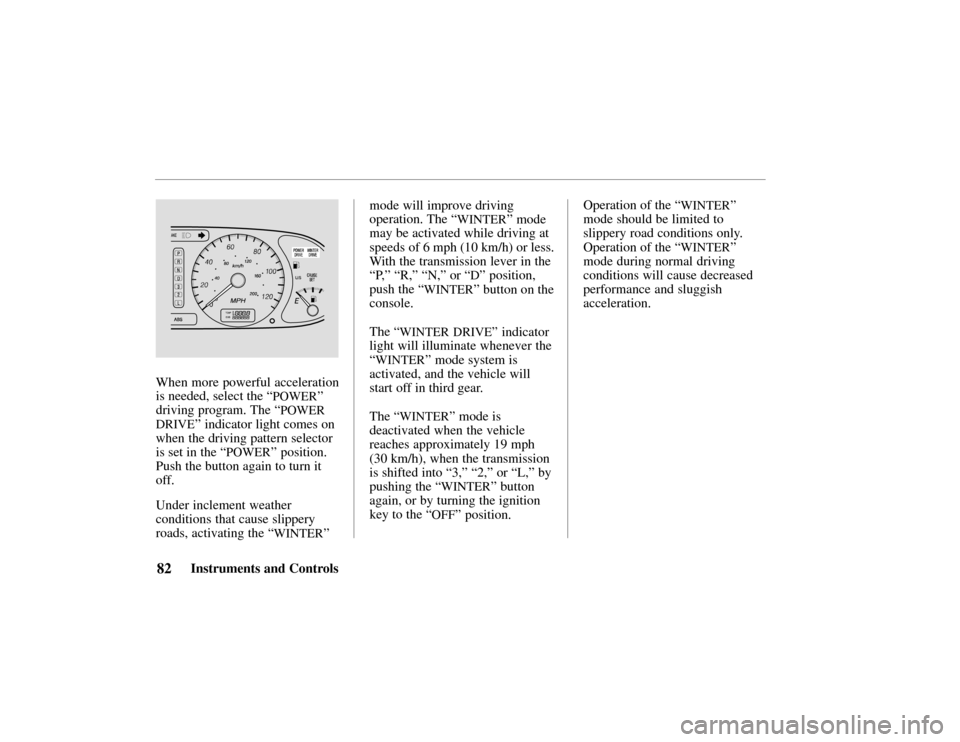
When more powerful acceleration
is needed, select the “
POWER”
driving program. The “
POWER
DRIVE
” indicator light comes on
when the driving pattern selector
is set in the “
POWER” position.
Push the button again to turn it
off.
Under inclement weather
conditions that cause slippery
roads, activating the “
WINTER”mode will improve driving
operation. The
“
WINTER” mode
may be activated while driving at
speeds of 6 mph (10 km/h) or less.
With the transmission lever in the
“P, ” “R,” “N,” or “
D” position,
push the “
WINTER” button on the
console.
The “
WINTER DRIVE” indicator
light will illuminate whenever the
“
WINTER” mode system is
activated, and the vehicle will
start off in third gear.
The “
WINTER” mode is
deactivated when the vehicle
reaches approximately 19 mph
(30 km/h), when the transmission
is shifted into “3,” “2,” or “L,” by
pushing the “
WINTER” button
again, or by turning the ignition
key to the “
OFF” position. Operation of the
“
WINTER”
mode should be limited to
slippery road conditions only.
Operation of the “
WINTER”
mode during normal driving
conditions will cause decreased
performance and sluggish
acceleration.
Page 89 of 294
86Instruments and Controls
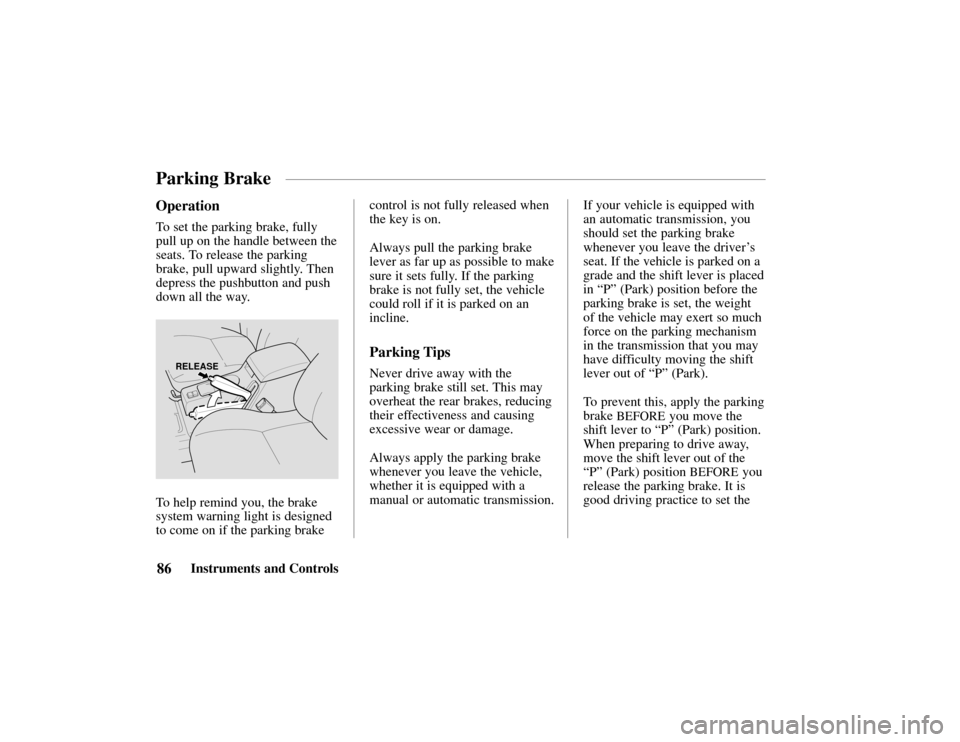
Operation
To set the parking brake, fully
pull up on the handle between the
seats. To release the parking
brake, pull upward slightly. Then
depress the pushbutton and push
down all the way.
RELEASE
To help remind you, the brake
system warning light is designed
to come on if the parking brakecontrol is not fully released when
the key is on.
Always pull the parking brake
lever as far up as possible to make
sure it sets fully. If the parking
brake is not fully set, the vehicle
could roll if it is parked on an
incline.
Parking Tips
Never drive away with the
parking brake still set. This may
overheat the rear brakes, reducing
their effectiveness and causing
excessive wear or damage.
Always apply the parking brake
whenever you leave the vehicle,
whether it is equipped with a
manual or automatic transmission.
If your vehicle is equipped with
an automatic transmission, you
should set the parking brake
whenever you leave the driver
’s
seat. If the vehicle is parked on a
grade and the shift lever is placed
in “P” (Park) position before the
parking brake is set, the weight
of the vehicle may exert so much
force on the parking mechanism
in the transmission that you may
have difficulty moving the shift
lever out of “P” (Park).
To prevent this, apply the parking
brake
BEFORE you move the
shift lever to “P” (Park) position.
When preparing to drive away,
move the shift lever out of the
“P” (Park) position
BEFORE you
release the parking brake. It is
good driving practice to set the
Parking Brake
Page 102 of 294
99Interior Features
Keys and Ignition
100
. . . . . . . . .
Steering Column Lock/
Ignition Switch101 . . . . . . .
LOCK101
. . . . . . . . . . . . .
ACC101
. . . . . . . . . . . . . . .
ON101
. . . . . . . . . . . . . . . .
START101
. . . . . . . . . . . . .
Key Removal102 . . . . . . . . . .
Key Reminder102 . . . . . . . . .
Guard Against Theft102 . . . .
Locks103 . . . . . . . . . . . . . . . . . .
Power Door Locks104 . . . . . .
Child-Safe Door Locks105 . .
Mirrors105 . . . . . . . . . . . . . . . . .
Interior Mirror105 . . . . . . . . .
Power Mirrors105 . . . . . . . . .
Vanity Mirrors106 . . . . . . . . . Power Windows107
. . . . . . . . . .
Checking the Circuit
Breaker108 . . . . . . . . . . . . .
Tailgate 108 . . . . . . . . . . . . . . . .
Operation108 . . . . . . . . . . . . .
Hood Release109 . . . . . . . . . . . .
Interior Lights110 . . . . . . . . . . .
Luggage Light110 . . . . . . . . .
Dome Light111 . . . . . . . . . . .
Courtesy Lights112 . . . . . . . .
Map Lights112 . . . . . . . . . . . .
Moonroof112 . . . . . . . . . . . . . . . Conveniences113
. . . . . . . . . . . .
Beverage Holder 113 . . . . . . .
Sun Visor114 . . . . . . . . . . . . .
Glove Box114 . . . . . . . . . . . .
Assist Grip115 . . . . . . . . . . . .
Horn Button115 . . . . . . . . . . .
Tilt Steering Wheel 115 . . . . .
Cigarette Lighter116 . . . . . . .
Ashtrays116 . . . . . . . . . . . . . .
Accessory Power Outlets117 .
Interior Features
Page 104 of 294
101Interior Features
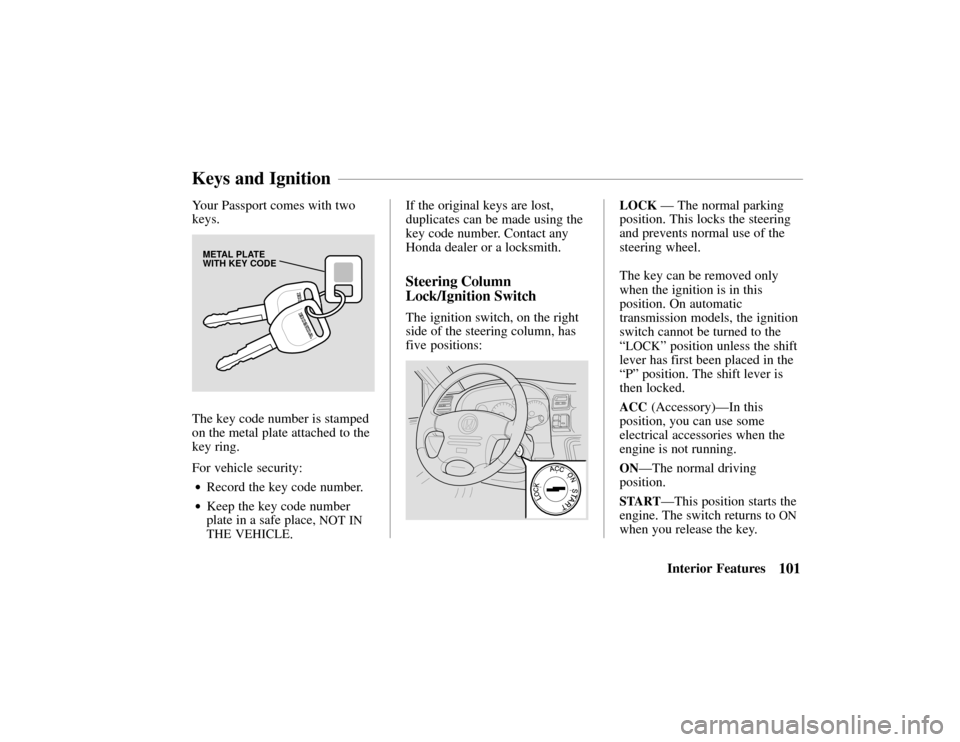
Your Passport comes with two
keys.
METAL PLATE
WITH KEY CODE
The key code number is stamped
on the metal plate attached to the
key ring.
For vehicle security:
•Record the key code number.
•Keep the key code number
plate in a safe place,
NOT IN
THE VEHICLE
. If the original keys are lost,
duplicates can be made using the
key code number. Contact any
Honda dealer or a locksmith.
Steering Column
Lock/Ignition Switch
The ignition switch, on the right
side of the steering column, has
five positions:
LOCK
— The normal parking
position. This locks the steering
and prevents normal use of the
steering wheel.
The key can be removed only
when the ignition is in this
position. On automatic
transmission models, the ignition
switch cannot be turned to the
“
LOCK” position unless the shift
lever has first been placed in the
“P” position. The shift lever is
then locked.
ACC (Accessory)—In this
position, you can use some
electrical accessories when the
engine is not running.
ON—The normal driving
position.
START—This position starts the
engine. The switch returns to
ON
when you release the key.
Keys and Ignition
Page 105 of 294

102Interior Features
The anti-theft steering column
lock is not interconnected with the
parking brake. You must always
set the parking brake when
leaving the vehicle.
To prevent discharging the battery,
avoid use of electrical accessories
with the engine shut off.
For easier key operation when
unlocking, rotate the steering
wheel slightly to relieve pressure
on the steering lock.
Key Removal
Manual Transmission
With the vehicle fully stopped,
remove the key from the switch
by turning it to the “
LOCK”
position and removing it.
Removing the key from the
ignition switch while driving
locks the steering. This can
cause you to lose control.
Remove the key from the
ignition switch only when
parked.
Automatic Transmission
With the vehicle fully stopped, place
the automatic transmission shift
lever in “P” (Park) position. Turn
the key to the “
LOCK” position.
Key Reminder
The key reminder circuit causes a
beeper to sound when the door is
held open with the key left in the
ignition switch. This is to help
prevent accidentally locking the
key inside the vehicle. The beeper stops when the door is
closed or when the key is removed.
Guard Against Theft
Your new Passport has features to
help prevent theft of the vehicle,
its equipment, and its contents.
These anti-theft features work
depending on how well you use
them.
•Park in a well-lighted area
whenever possible.
•Lock the steering column and
take the key with you.
–
Turn the ignition switch to
“
LOCK” and remove the key.
This locks both the ignition
switch and steering control.
Page 107 of 294
104Interior Features
Power Door Locks
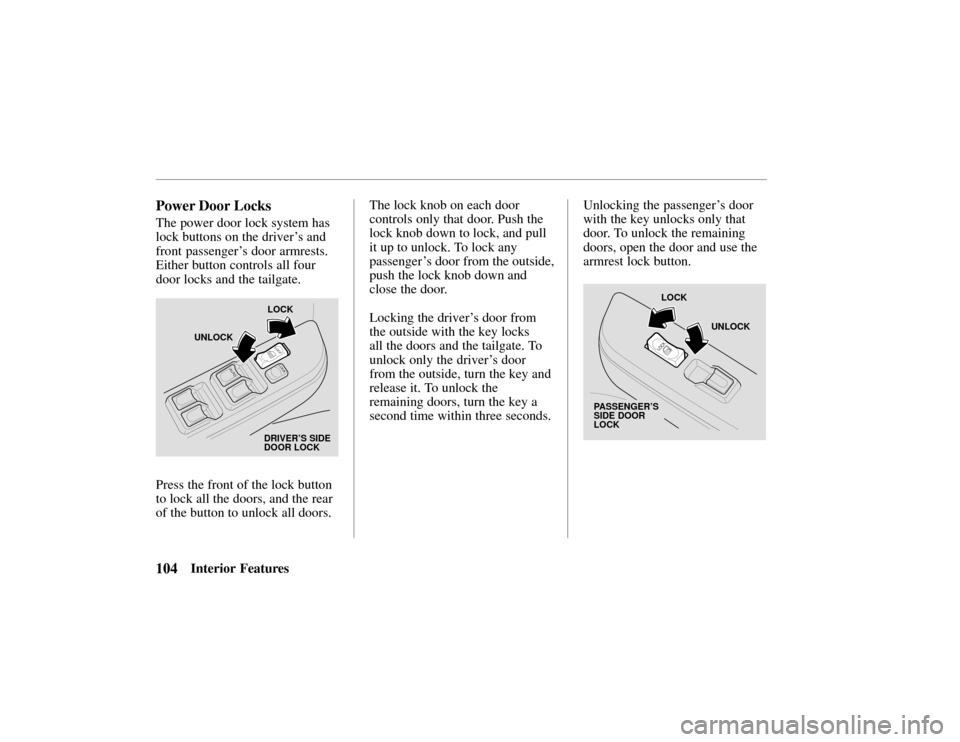
The power door lock system has
lock buttons on the driver’s and
front passenger ’s door armrests.
Either button controls all four
door locks and the tailgate.
LOCK
UNLOCK
DRIVER’S SIDE
DOOR LOCK
Press the front of the lock button
to lock all the doors, and the rear
of the button to unlock all doors. The lock knob on each door
controls only that door. Push the
lock knob down to lock, and pull
it up to unlock. To lock any
passenger ’
s door from the outside,
push the lock knob down and
close the door.
Locking the driver ’s door from
the outside with the key locks
all the doors and the tailgate. To
unlock only the driver ’s door
from the outside, turn the key and
release it. To unlock the
remaining doors, turn the key a
second time within three seconds. Unlocking the passenger
’s door
with the key unlocks only that
door. To unlock the remaining
doors, open the door and use the
armrest lock button.
PASSENGER’S
SIDE DOOR
LOCK
LOCK
UNLOCK
Page 110 of 294
Closing a power window on
someone’s hands or fingers can
cause serious injury.
Make sure your passengers are
away from the windows before
closing them.
107Interior Features
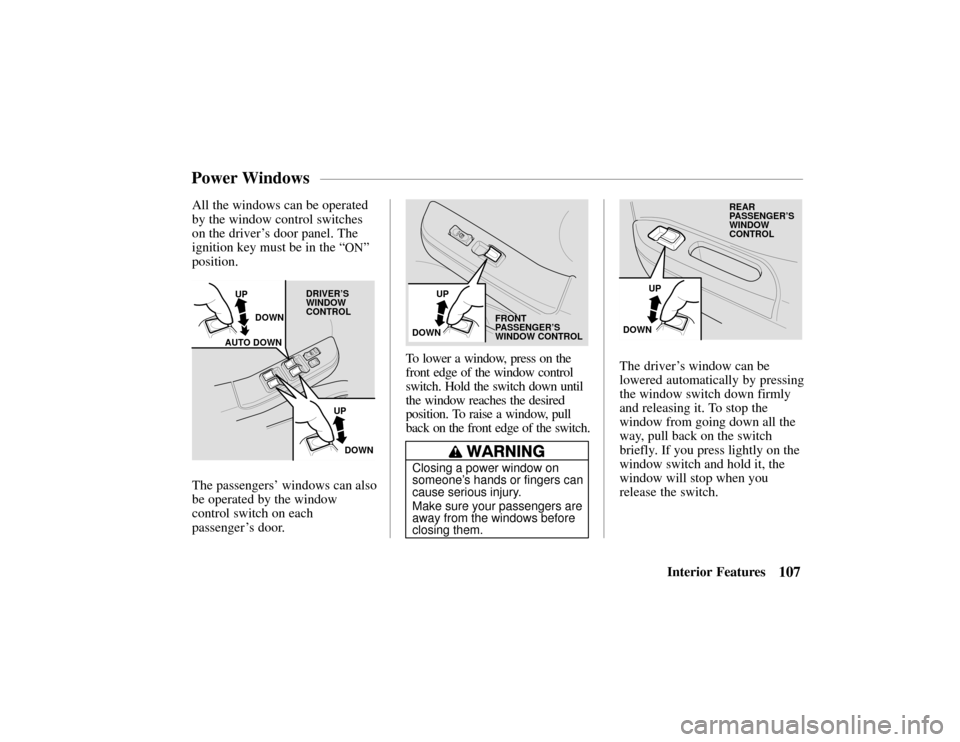
All the windows can be operated
by the window control switches
on the driver
’s door panel. The
ignition key must be in the “
ON”
position.
UP
DOWN
AUTO DOWN
UP
DOWN
DRIVER’S
WINDOW
CONTROL
The passengers’ windows can also
be operated by the window
control switch on each
passenger ’ s door.
UP
DOWN
FRONT
PASSENGER’S
WINDOW CONTROL
To lower a window, press on the
front edge of the window control
switch. Hold the switch down until
the window reaches the desired
position. To raise a window, pull
back on the front edge of the switch.
UP
DOWN REAR
PASSENGER’S
WINDOW
CONTROL
The driver
’s window can be
lowered automatically by pressing
the window switch down firmly
and releasing it. To stop the
window from going down all the
way, pull back on the switch
briefly. If you press lightly on the
window switch and hold it, the
window will stop when you
release the switch.
Power Windows