audio HONDA PASSPORT 2023 Owners Manual
[x] Cancel search | Manufacturer: HONDA, Model Year: 2023, Model line: PASSPORT, Model: HONDA PASSPORT 2023Pages: 610, PDF Size: 20.93 MB
Page 347 of 610
346
uuCustomized Features u
Features
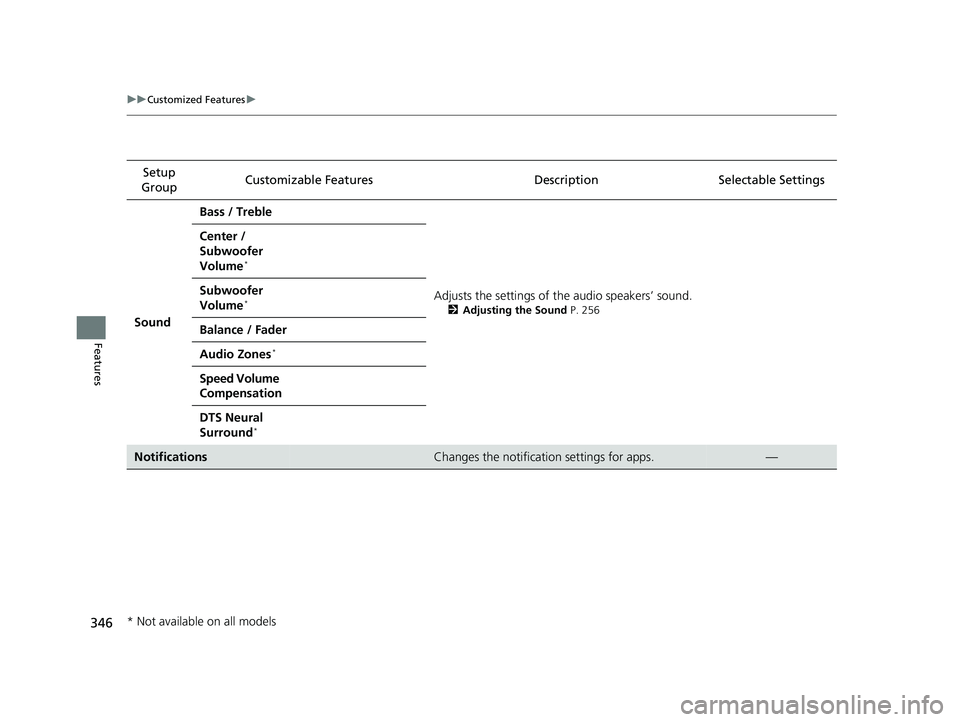
Setup
Group Customizable Features
Description Selectable Settings
Sound Bass / Treble
Adjusts the settings of the audio speakers’ sound.
2Adjusting the Sound P. 256
Center /
Subwoofer
Volume
*
Subwoofer
Volume*
Balance / Fader
Audio Zones
*
Speed Volume
Compensation
DTS Neural
Surround
*
NotificationsChanges the notification settings for apps.—
* Not available on all models
23 PASSPORT-31TGS6400.book 346 ページ 2022年8月5日 金曜日 午後9時2分
Page 352 of 610
351Continued
Features
Bluetooth® HandsFreeLink ®
Bluetooth® HandsFreeLink ® (HFL) allows you to place and receive phone calls using
your vehicle’s audio system, without handling your cell phone.
Using HFL
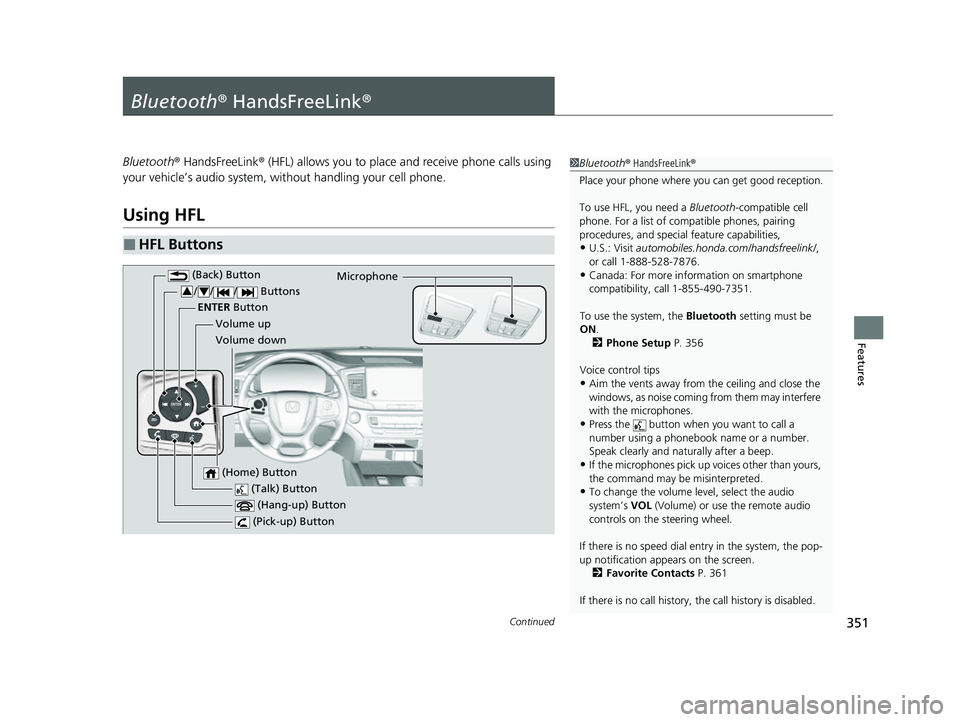
■HFL Buttons
1 Bluetooth ® HandsFreeLink ®
Place your phone where y ou can get good reception.
To use HFL, you need a Bluetooth-compatible cell
phone. For a list of compatible phones, pairing
procedures, and special feature capabilities,
•U.S.: Visit automobiles.honda.com /handsfreelink/,
or call 1-888-528-7876.
•Canada: For more info rmation on smartphone
compatibility, call 1-855-490-7351.
To use the system, the Bluetooth setting must be
ON .
2 Phone Setup P. 356
Voice control tips
•Aim the vents away from the ceiling and close the
windows, as noise coming from them may interfere
with the microphones.
•Press the button when you want to call a
number using a phonebook name or a number.
Speak clearly and naturally after a beep.
•If the microphones pick up vo ices other than yours,
the command may be misinterpreted.
•To change the volume level, select the audio
system’s VOL (Volume) or use the remote audio
controls on the steering wheel.
If there is no speed dial entry in the system, the pop-
up notification appe ars on the screen.
2 Favorite Contacts P. 361
If there is no call history, the call history is disabled. (Talk) Button
Volume up Microphone
(Hang-up) Button
(Pick-up) Button
Volume down
ENTER
Button
(Back) Button
/// Buttons34
(Home) Button
23 PASSPORT-31TGS6400.book 351 ページ 2022年8月5日 金曜日 午後9時2分
Page 353 of 610
uuBluetooth ® HandsFreeLink ®u Using HFL
352
Features
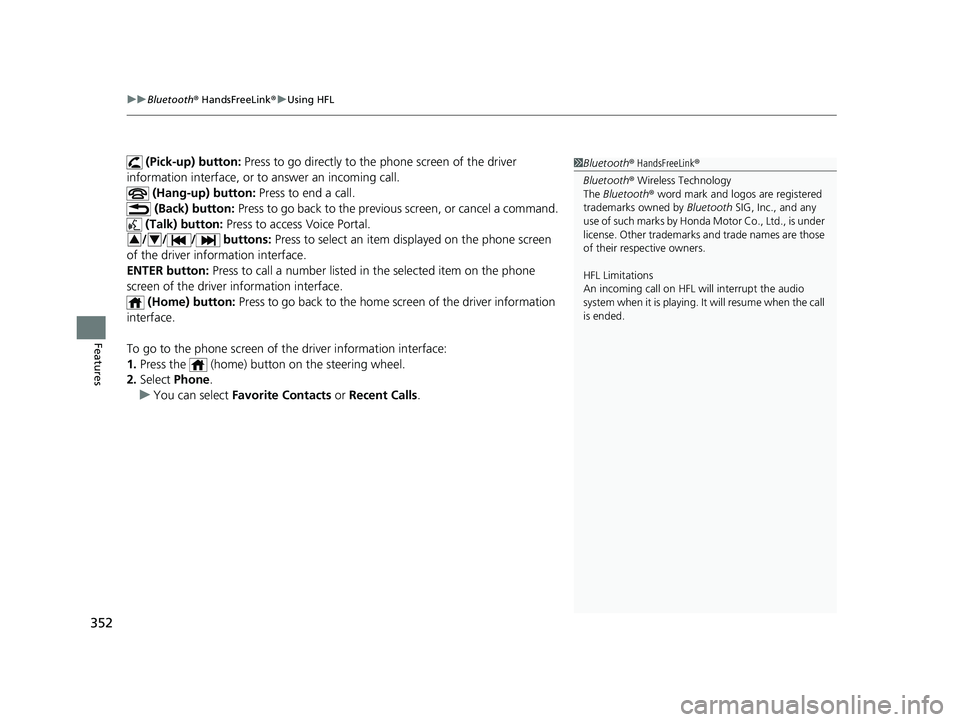
(Pick-up) button: Press to go directly to the phone screen of the driver
information interface, or to answer an incoming call.
(Hang-up) button: Press to end a call.
(Back) button: Press to go back to the previo us screen, or cancel a command.
(Talk) button: Press to access Voice Portal.
// / buttons: Press to select an item displayed on the phone screen
of the driver information interface.
ENTER button: Press to call a number listed in the selected item on the phone
screen of the driver information interface.
(Home) button: Press to go back to the home sc reen of the driver information
interface.
To go to the phone screen of the driver information interface:
1. Press the (home) button on the steering wheel.
2. Select Phone .
u You can select Favorite Contacts or Recent Calls .1Bluetooth ® HandsFreeLink ®
Bluetooth ® Wireless Technology
The Bluetooth ® word mark and logos are registered
trademarks owned by Bluetooth SIG, Inc., and any
use of such marks by Honda Motor Co., Ltd., is under
license. Other trademarks and trade names are those
of their respective owners.
HFL Limitations
An incoming call on HFL will interrupt the audio
s y s t e m wh e n it is p la y i n g . It wi ll r e s u m e w h en t h e c a l l
is ended.
34
23 PASSPORT-31TGS6400.book 352 ページ 2022年8月5日 金曜日 午後9時2分
Page 354 of 610
353
uuBluetooth ® HandsFreeLink ®u Using HFL
Features
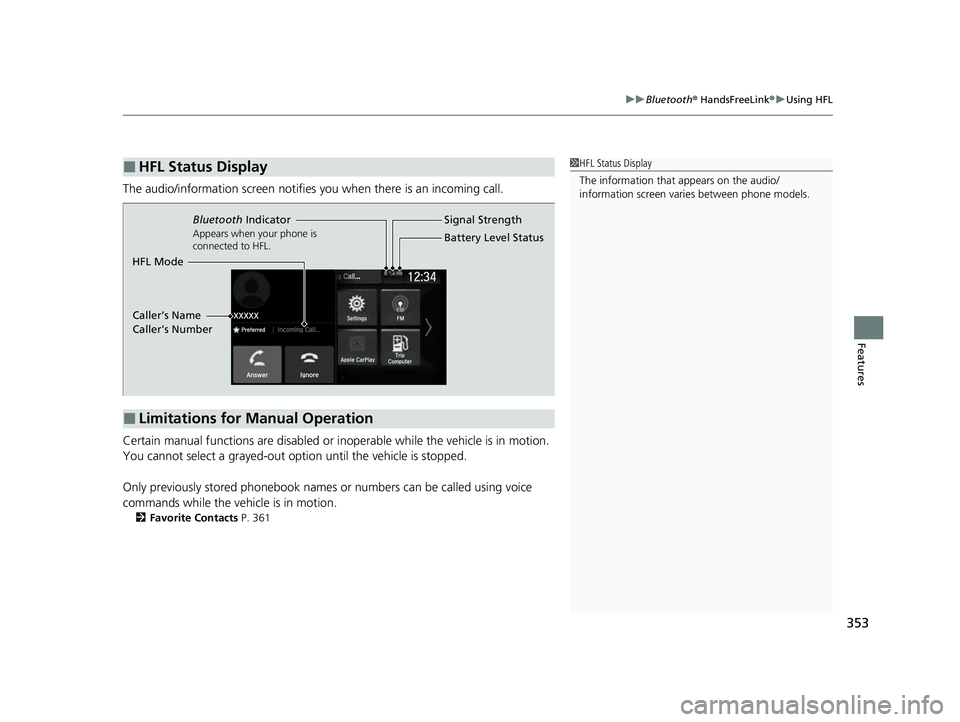
The audio/information scr een notifies you when there is an incoming call.
Certain manual functions are disabled or inoperable while the vehicle is in motion.
You cannot select a grayed-out option until the vehicle is stopped.
Only previously stored phonebook names or numbers can be called using voice
commands while the vehicle is in motion.
2 Favorite Contacts P. 361
■HFL Status Display1HFL Status Display
The information that appears on the audio/
information screen vari es between phone models.
■Limitations for Manual Operation
Bluetooth Indicator
Appears when your phone is
connected to HFL.
Signal Strength
HFL Mode Battery Level Status
Caller’s Name
Caller’s Number
23 PASSPORT-31TGS6400.book 353 ページ 2022年8月5日 金曜日 午後9時2分
Page 358 of 610
Continued357
uuBluetooth ® HandsFreeLink ®u HFL Menus
Features
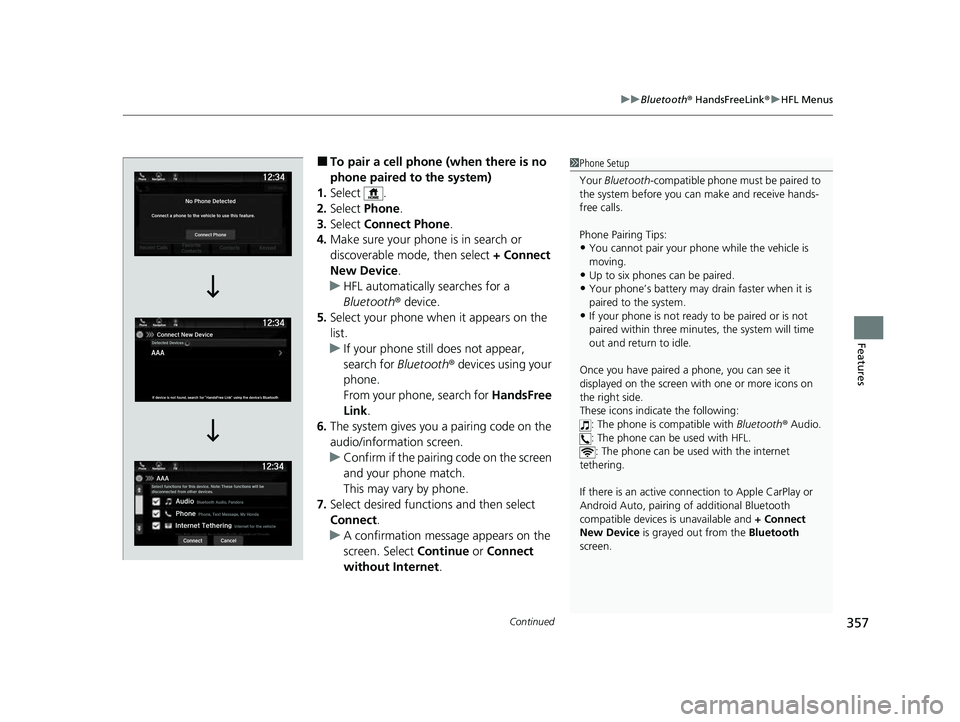
■To pair a cell phone (when there is no
phone paired to the system)
1. Select .
2. Select Phone.
3. Select Connect Phone .
4. Make sure your phone is in search or
discoverable mode, then select + Connect
New Device .
u HFL automatically searches for a
Bluetooth ® device.
5. Select your phone when it appears on the
list.
u If your phone still does not appear,
search for Bluetooth® devices using your
phone.
From your phone, search for HandsFree
Link .
6. The system gives you a pairing code on the
audio/information screen.
u Confirm if the pairing code on the screen
and your phone match.
This may vary by phone.
7. Select desired functions and then select
Connect .
u A confirmation message appears on the
screen. Select Continue or Connect
without Internet .1Phone Setup
Your Bluetooth -compatible phone must be paired to
the system before you ca n make and receive hands-
free calls.
Phone Pairing Tips:
•You cannot pair your phone while the vehicle is
moving.
•Up to six phones can be paired.
•Your phone’s battery may dr ain faster when it is
paired to the system.
•If your phone is not ready to be paired or is not
paired within three minutes, the system will time
out and return to idle.
Once you have paired a phone, you can see it
displayed on the screen with one or more icons on
the right side.
These icons indicate the following: : The phone is compatible with Bluetooth ® Audio.
: The phone can be used with HFL. : The phone can be used with the internet
tethering.
If there is an active connection to Appl e CarPlay or
Android Auto, pairing of additional Bluetooth
compatible devices is unavailable and + Connect
New Device is grayed out from the Bluetooth
screen.
23 PASSPORT-31TGS6400.book 357 ページ 2022年8月5日 金曜日 午後9時2分
Page 364 of 610
Continued363
uuBluetooth ® HandsFreeLink ®u HFL Menus
Features
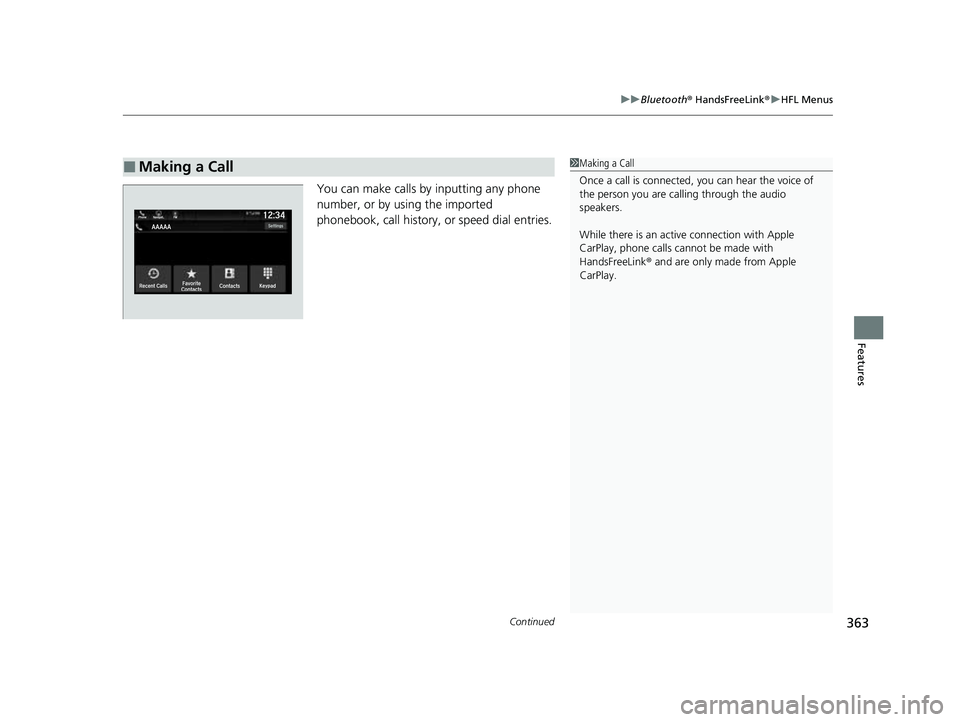
You can make calls by inputting any phone
number, or by using the imported
phonebook, call history, or speed dial entries.
■Making a Call1Making a Call
Once a call is connected, you can hear the voice of
the person you are call ing through the audio
speakers.
While there is an active connection with Apple
CarPlay, phone calls ca nnot be made with
HandsFreeLink ® and are only made from Apple
CarPlay.
23 PASSPORT-31TGS6400.book 363 ページ 2022年8月5日 金曜日 午後9時2分
Page 367 of 610
uuBluetooth ® HandsFreeLink ®u HFL Menus
366
Features
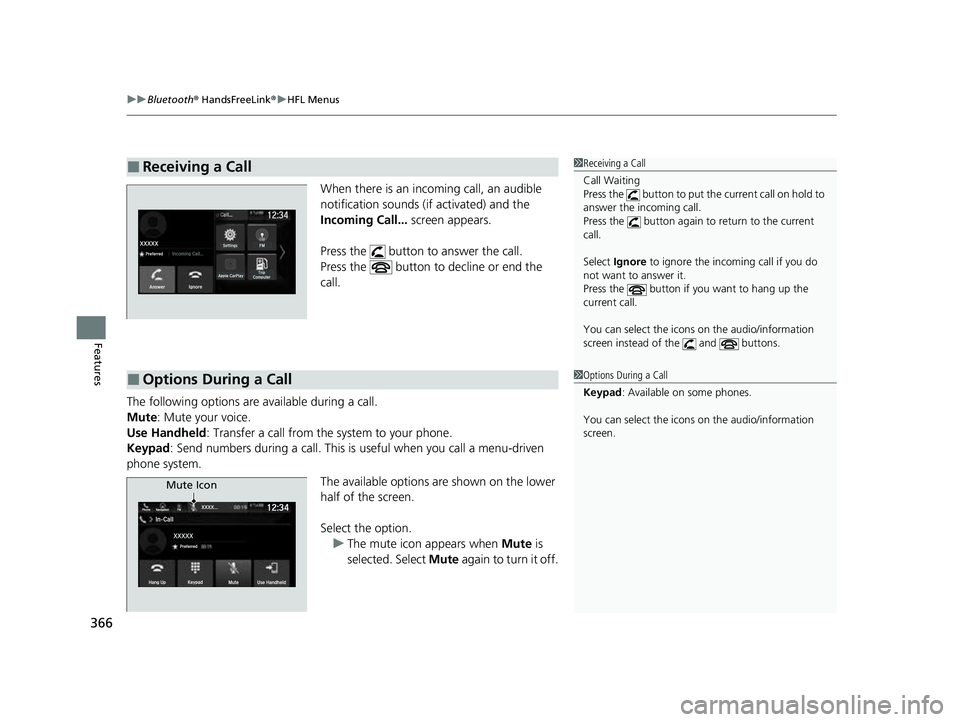
When there is an incoming call, an audible
notification sounds (i f activated) and the
Incoming Call... screen appears.
Press the button to answer the call.
Press the button to decline or end the
call.
The following options are available during a call.
Mute: Mute your voice.
Use Handheld : Transfer a call from the system to your phone.
Keypad : Send numbers during a call. This is useful when you call a menu-driven
phone system.
The available options are shown on the lower
half of the screen.
Select the option.u The mute icon appears when Mute is
selected. Select Mute again to turn it off.
■Receiving a Call1Receiving a Call
Call Waiting
Press the button to put th e current call on hold to
answer the incoming call.
Press the button again to return to the current
call.
Select Ignore to ignore the incoming call if you do
not want to answer it.
Press the button if you want to hang up the
current call.
You can select the icons on the audio/information
screen instead of the and buttons.
■Options During a Call1 Options During a Call
Keypad : Available on some phones.
You can select the icons on the audio/information
screen.
Mute Icon
23 PASSPORT-31TGS6400.book 366 ページ 2022年8月5日 金曜日 午後9時2分
Page 409 of 610
uuWhen Driving uShifting
408
Driving
In freezing or sub-freezing conditions, the electronic gear selector response may be
slow.
Always depress the brake pedal before changing the gear position to
(P, and
confirm that
(P is shown on the gear position in dicator before releasing the brake.
■When opening the driver’s door
If you open the driver’s door under the following conditions, the gear position
automatically changes to
(P.
• The vehicle is stationary with the engine running, or moving at 1 mph (2 km/h) or
slower.
• The transmission is in other than
(P.
• You have unfastened the driver side seat belt.
u If you manually change the gear position from
(P with the brake pedal
depressed, the gear position will automatically return to
(P once you release
the brake pedal.
■When turning o ff the power mode
If you turn the engine off wh ile the vehicle is stationary, and the transmission is in
other than
(P, the gear position automatically changes to (P.
1 Shift Operation
From the audio/information screen, you can choose
to have the system activate a beeper when you
change to
(R.
2 Customized Features P. 329
1When opening the driver’s door
You should always select
(P before opening the
driver’s door.
Make sure to park the vehicle in a safe place. 2 When Stopped P. 481
If you want to drive the ve hicle after the gear position
has automatically changed to
( P under the described
conditions, close the door, fasten the seat belt,
depress the brake pedal, then change the gear
position.
If you leave the vehicle, tu rn off the engine and lock
the doors.
23 PASSPORT-31TGS6400.book 408 ページ 2022年8月5日 金曜日 午後9時2分
Page 426 of 610
Continued425
uuWhen Driving uBlind spot information System*
Driving
■When the system detects a vehicle
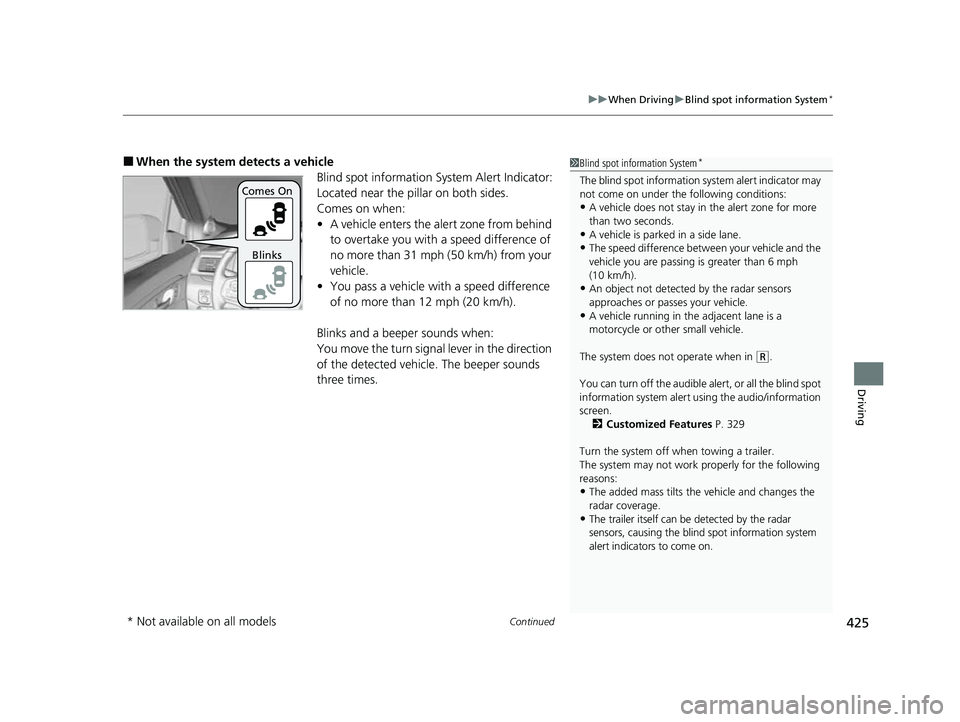
Blind spot information System Alert Indicator:
Located near the pillar on both sides.
Comes on when:
•A vehicle enters the alert zone from behind
to overtake you with a speed difference of
no more than 31 mph (50 km/h) from your
vehicle.
• You pass a vehicle with a speed difference
of no more than 12 mph (20 km/h).
Blinks and a beeper sounds when:
You move the turn signal lever in the direction
of the detected vehicle. The beeper sounds
three times.1 Blind spot information System*
The blind spot information system alert indicator may
not come on under the following conditions:
•A vehicle does not stay in the alert zone for more
than two seconds.
•A vehicle is parked in a side lane.
•The speed difference betw een your vehicle and the
vehicle you are passing is greater than 6 mph
(10 km/h).
•An object not detected by the radar sensors
approaches or passes your vehicle.
•A vehicle running in the adjacent lane is a
motorcycle or other small vehicle.
The system does not operate when in
( R.
You can turn off the audible al ert, or all the blind spot
information system alert using the audio/information
screen.
2 Customized Features P. 329
Turn the system off when towing a trailer.
The system may not work properly for the following
reasons:
•The added mass tilts the vehicle and changes the
radar coverage.
•The trailer itself can be detected by the radar
sensors, causing the blind spot information system
alert indicators to come on.
Comes On
Blinks
* Not available on all models
23 PASSPORT-31TGS6400.book 425 ページ 2022年8月5日 金曜日 午後9時2分
Page 437 of 610
uuHonda Sensing ®u Collision Mitigation Braking SystemTM (CMBSTM)
436
Driving
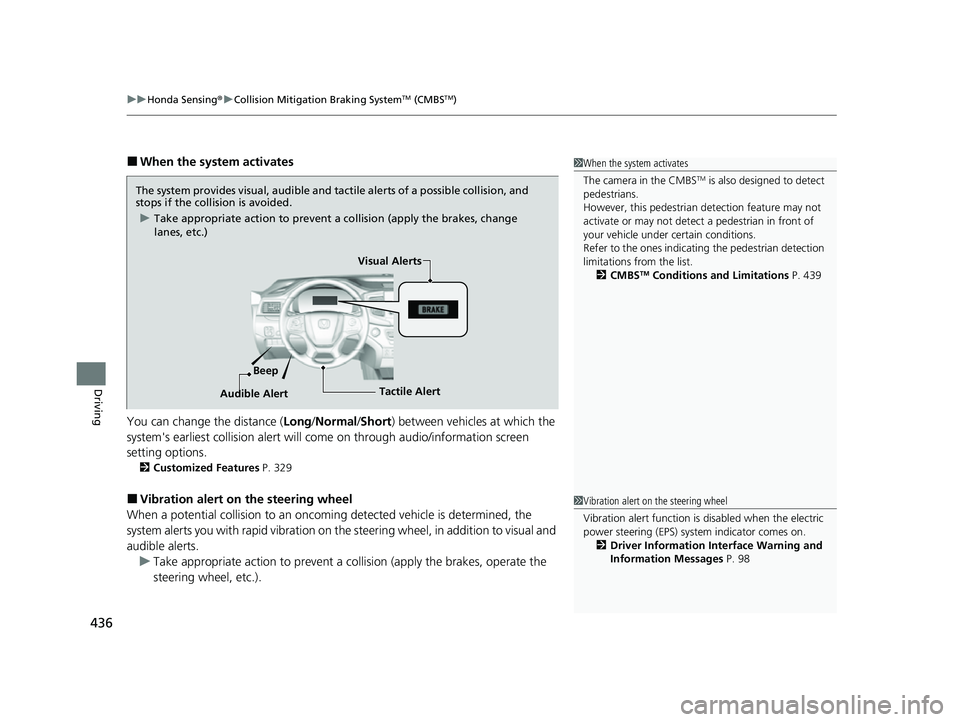
■When the system activates
You can change the distance ( Long/Normal /Short ) between vehicles at which the
system's earliest collision alert will co me on through audio/information screen
setting options.
2 Customized Features P. 329
■Vibration alert on the steering wheel
When a potential collision to an oncoming detected vehicle is determined, the
system alerts you with rapid vibration on the steering wheel, in addition to visual and
audible alerts. u Take appropriate action to prevent a co llision (apply the brakes, operate the
steering wheel, etc.).
1 When the system activates
The camera in the CMBS
TM is also designed to detect
pedestrians.
However, this pedestrian detection feature may not
activate or may not detect a pedestrian in front of
your vehicle under certain conditions.
Refer to the ones indicating the pedestrian detection
limitations from the list. 2 CMBS
TM Conditions and Limitations P. 439
The system provides visual, audible and tactile alerts of a possible collision, and
stops if the collision is avoided.
u Take appropriate action to prevent a collision (apply the brakes, change
lanes, etc.)
Beep Visual Alerts
Audible Alert
Tactile Alert
1 Vibration alert on the steering wheel
Vibration alert function is disabled when the electric
power steering (EPS) system indicator comes on. 2 Driver Information Interface Warning and
Information Messages P. 98
23 PASSPORT-31TGS6400.book 436 ページ 2022年8月5日 金曜日 午後9時2分