ECU HONDA PILOT 2003 1.G Owner's Manual
[x] Cancel search | Manufacturer: HONDA, Model Year: 2003, Model line: PILOT, Model: HONDA PILOT 2003 1.GPages: 392, PDF Size: 5.06 MB
Page 101 of 392
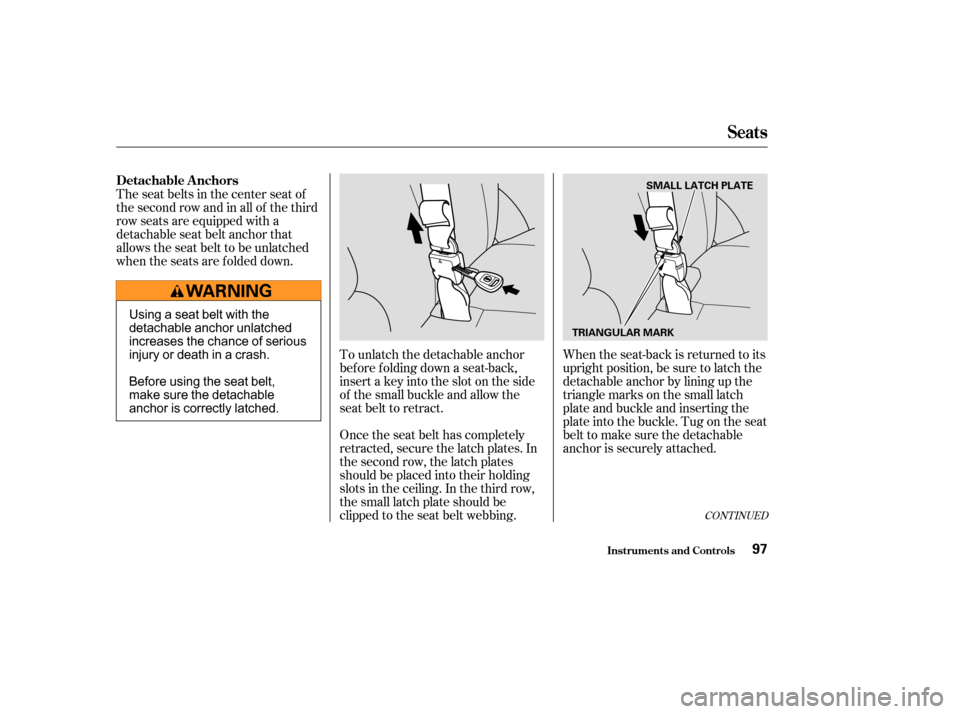
When the seat-back is returned to its
upright position, be sure to latch the
detachable anchor by lining up the
triangle marks on the small latch
plate and buckle and inserting the
plate into the buckle. Tug on the seat
belt to make sure the detachable
anchor is securely attached.
To unlatch the detachable anchor
before folding down a seat-back,
insert a key into the slot on the side
of the small buckle and allow the
seat belt to retract.
Once the seat belt has completely
retracted, secure the latch plates. In
the second row, the latch plates
should be placed into their holding
slots in the ceiling. In the third row,
the small latch plate should be
clipped to the seat belt webbing.
The seat belts in the center seat of
thesecondrowandinallof thethird
row seats are equipped with a
detachable seat belt anchor that
allows the seat belt to be unlatched
when the seats are f olded down.
CONT INUED
Detachable A nchors
Seats
Inst rument s and Cont rols97
SMALL LATCH PLATE
TRIANGULAR MARK
Using a seat belt with the
detachable anchor unlatched
increases the chance of serious
injury or death in a crash.
Before using the seat belt,
make sure the detachable
anchor is correctly latched.
Page 111 of 392
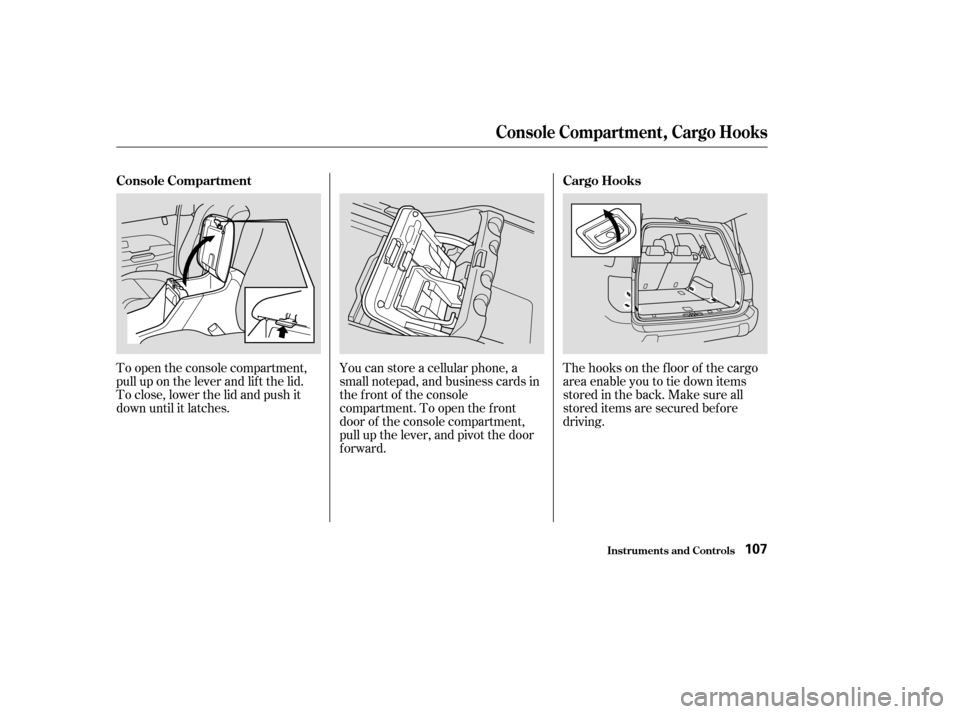
The hooks on the f loor of the cargo
area enable you to tie down items
stored in the back. Make sure all
stored items are secured bef ore
driving.
To open the console compartment,
pull up on the lever and lif t the lid.
To close, lower the lid and push it
down until it latches.
You can store a cellular phone, a
small notepad, and business cards in
the front of the console
compartment. To open the f ront
door of the console compartment,
pull up the lever, and pivot the door
forward.
Console Compartment
Cargo Hooks
Console Compart ment , Cargo Hooks
Inst rument s and Cont rols107
Page 121 of 392
.....................
Heating and Cooling .118
.........
What Each Control Does . 118
............
How to Use the System . 122
..........
To Turn Everything Of f . 127
...............
Climate Control System . 128
(EX model) .......
Fully-automatic Operation . 130
.......
Semi-automatic Operation . 131
Sunlight Sensor/ ............
Temperature Sensor . 134
...........................
Rear A/C Unit .135
.......................
Audio System (LX) .137
AM/FM/CD ........................
Audio System .137
.................
Operating the Radio . 137
.................
Adjusting the Sound . 141
..............................
Digital Clock .142
............
Audio System Lighting . 143
.........
Operating the CD Player . 143
.....
Operating the CD Changer . 145
....
CD Player Error Indications . 147
CD Changer Error .............................
Indications .148
Operating the Cassette .....................................
Player .149
............
Tape Search Functions . 151.......................
Audio System (EX) .153
AM/FM/Cassette/CD Audio ....................................
System .153
.................
Operating the Radio . 154
.................
Adjusting the Sound . 158
..............................
Digital Clock .159
............
Audio System Lighting . 159
Operating the Cassette .....................................
Player .160
............
Tape Search Functions . 162
.........
Operating the CD Player . 163
.....
Operating the CD Changer . 165
....
CD Player Error Indications . 166
CD Changer Error .............................
Indications .167
Audio System (Optional on U.S. ..............................
EX model) .168
AM/FM/Cassette/CD/DVD ........................
Audio System .168
.................
Operating the Radio . 170
.................
Adjusting the Sound . 174
..............................
Digital Clock .175
............
Audio System Lighting . 175
....................
Radio Frequencies . 176
........................
Radio Reception .176 Operating the Cassette
.....................................
Player .178
Caring f or the Cassette .....................................
Player .181
.........
Operating the CD Player . 182
.....
Operating the CD Changer . 184
.......
Protecting Compact Discs . 185
....
CD Player Error Indications . 186
CD Changer Error .............................
Indications .187
...........
Remote Audio Controls . 188
.......................
Thef t Protection .189
........
Rear Entertainment System . 190
............................
Security System .206
...............................
Cruise Control .207
HomeLink Universal ................................
Transceiver .210
Comf ort and Convenience Features
Comf ort and Convenience Feat ures117
Page 210 of 392
Once the security system is set,
opening any door (without using the
key or the remote transmitter), or
the hood, will cause it to alarm. It
also alarms if the radio is removed
f rom the dashboard or the wiring is
cut.Do not attempt to alter this system
or add other devices to it. The security system will not set if
the hood, tailgate, or any door is not
f ully closed. If the system will not set,
check the Door and Tailgate Open
Monitor on the instrument panel
(see page ) to see if the doors and
tailgate are f ully closed. Since it is
notpartofthemonitordisplay,
manually check the hood.
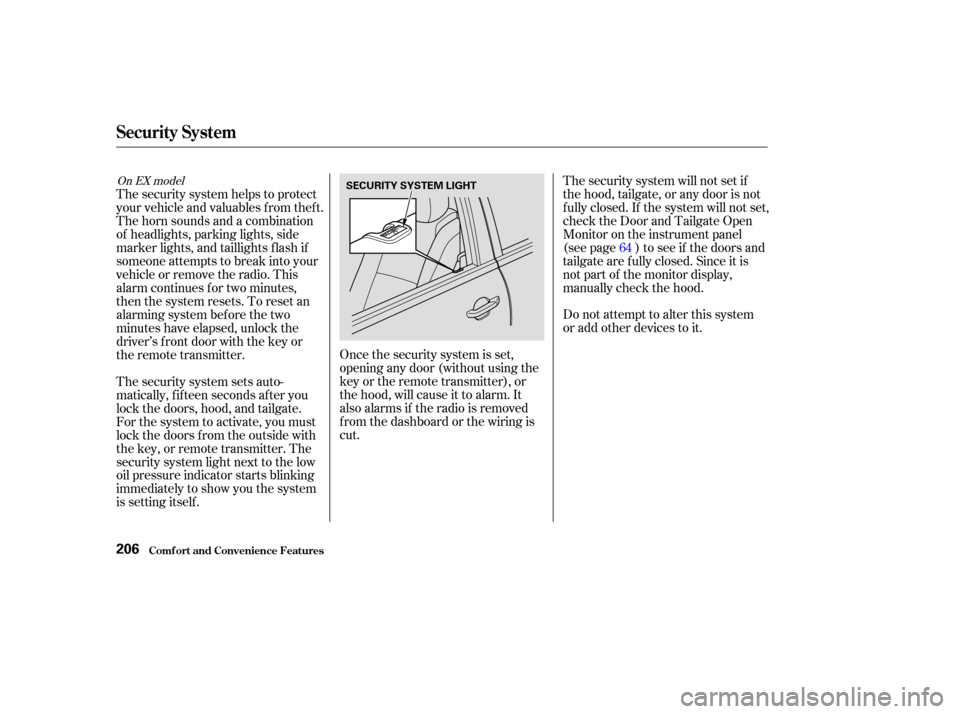
The security system helps to protect
your vehicle and valuables f rom thef t.
The horn sounds and a combination
of headlights, parking lights, side
marker lights, and taillights f lash if
someone attempts to break into your
vehicleorremovetheradio.This
alarm continues f or two minutes,
then the system resets. To reset an
alarming system before the two
minutes have elapsed, unlock the
driver’s f ront door with the key or
the remote transmitter.
The security system sets auto-
matically, f if teen seconds af ter you
lock the doors, hood, and tailgate.
For the system to activate, you must
lock the doors f rom the outside with
the key, or remote transmitter. The
security system light next to the low
oil pressure indicator starts blinking
immediately to show you the system
is setting itself . 64
On EX model
Security System
Comf ort and Convenience Feat ures206
SECURITY SYSTEM LIGHT
Page 214 of 392

Always ref er to the operating
instructions and saf ety inf ormation
that came with your garage door
opener or other equipment you
intend to operate with the HomeLink
Universal Transceiver. If you do not
have this inf ormation, you should
contact the manuf acturer of the
equipment.
While training or using HomeLink,
make sure you have a clear view of
the garage door or gate, and that no
one will be injured by its movement.The HomeLink transceiver stores
the code in a permanent memory.
There should be no need to retrain
HomeLink if your car’s battery goes
dead or is disconnected.
If your garage door opener was
manuf actured bef ore April 1982, you
may not be able to program
HomeLink to operate it. Garage door
openers manuf actured bef ore that
date do not have a safety feature that
causes them to stop and reverse if an
obstacle is detected during closing,
increasing the risk of injury. If you
have questions, call (800) 355-3515.
If you are training HomeLink to
operate a garage door or gate, it is
recommended that you unplug the
motor f or that device during training.
Repeatedly pressing the remote
control button could burn out the
motor.
The HomeLink Universal
Transceiver built into your vehicle
canbeprogrammedtooperate
remotely-controlled devices around
your home, such as garage doors,
lighting, or home security systems. It
can replace up to three remote
transmitters.
If you have problems with training
the HomeLink Universal Transceiver,
or would like inf ormation on home
products that can be operated by the
transmitter, call (800) 355-3515. On
the Internet, go to www.homelink.
com.
On EX modelImportant Saf ety Precautions
General Inf ormation
Customer Assistance
HomeL ink Universal T ransceiver
Comf ort and Convenience Feat ures210
Page 216 of 392

Canadian Owners:
The remote control you are training
from may stop transmitting after two
seconds. This is not long enough f or
HomeLink to learn the code. Release
and press the button on the remote
control every two seconds until
HomeLink has learned the code.For security purposes, newer garage
door opening systems use a ‘‘rolling’’
or variable code. Inf ormation f rom
the remote control and the garage
door opener are needed bef ore
HomeLink can operate the garage
door opener.
The ‘‘Training HomeLink’’
procedure trains HomeLink to the
proper garage door opener code.
The f ollowing procedure
synchronizes HomeLink to the
garage door opener so they send and
receive the correct codes.
The red light in HomeLink should
begin f lashing. It will f lash slowly
at first, then rapidly.
When the red light f lashes rapidly,
release both buttons. HomeLink
should have learned the code from
the remote control.
Plug in the garage door opener
motor, then test the HomeLink
transceiver button by pushing it. It
should operate the garage door.
If the button does not work, repeat
this procedure to train it again. If it
still does not work, you may have a variable or rolling code garage
door opener. Test this by pressing
and holding the HomeLink
transceiver button you just trained.
If the red light blinks f or two
seconds,thenstayson,youhavea
rolling code garage door opener.
You may be able to verify this with
the manufacturer’s documentation.
Go to ‘‘Training With a Rolling
Code System.’’
Repeat these steps to train the
other two HomeLink buttons to
operate any other remotely-
controlled devices around your
home (lighting, automatic gate,
security system, etc.).
5.
6.
8.
7. T raining With a Rolling Code
System
HomeL ink Universal T ransceiver
Comf ort and Convenience Feat ures212
Page 223 of 392
CONT INUED
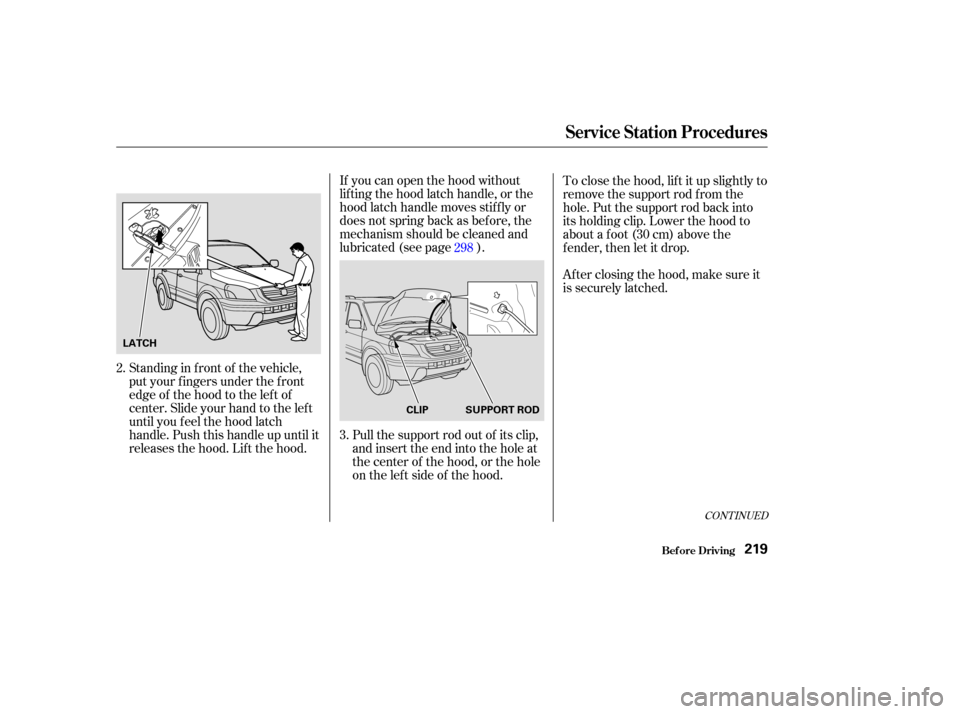
If you can open the hood without
lifting the hood latch handle, or the
hood latch handle moves stif f ly or
does not spring back as bef ore, the
mechanism should be cleaned and
lubricated (see page ).
Standing in f ront of the vehicle,
put your f ingers under the f ront
edge of the hood to the left of
center. Slide your hand to the lef t
until you f eel the hood latch
handle. Push this handle up until it
releases the hood. Lif t the hood. Pull the support rod out of its clip,
and insert the end into the hole at
the center of the hood, or the hole
on the lef t side of the hood.To close the hood, lif t it up slightly to
remove the support rod f rom the
hole. Put the support rod back into
its holding clip. Lower the hood to
about a f oot (30 cm) above the
fender,thenletitdrop.
After closing the hood, make sure it
is securely latched.
3.
2. 298
Service Station Procedures
Bef ore Driving219
LATCH
SUPPORT ROD
CLIP
Page 230 of 392

Store or secure all items that could
be thrown around and hurt
someone during a crash.
Be sure items placed on the f loor
behind the f ront seats cannot roll
under the seats and interf ere with
the driver’s ability to operate the
pedals, or with the proper
operation of the seats.
Keep the glove box closed while
driving. If the lid is open, a
passenger could injure their knees
during a crash or sudden stop.
This f igure includes the total weight
of all occupants, cargo, accessories,
and the tongue weight if you are
towing a trailer.
The f inal number is the total weight
of cargo you can carry.
If you are towing a trailer, add the
tongue weight to the number
above. Add up the weight of all occupants.
To f igure out how much cargo you
can carry: When you load luggage, the total
weight of the vehicle, all passengers,
cargo, and trailer tongue load must
not exceed the Gross Vehicle
Weight Rating (GVWR). The load
for the front and rear axles also must
not exceed the Gross Axle Weight
Rating (GAWR). The GVWR and
GAWRareprintedonthetire
information label attached to the
driver’s doorjamb (see page ).
The maximum load f or your vehicle
is 1,323 lbs (600 kg).
Subtract the total f rom 1,323 lbs
(600 kg). 360Carrying Items in the Passenger
Compartment
Load Limit
Carrying Cargo
Bef ore Driving226
Overloading or improper
loading can affect handling and
stability and cause a crash in
which you can be hurt or killed.
Follow all load limits and other
loading guidelines in this
manual.
Page 232 of 392
The cargo cover can be used to
cover the cargo area behind the third
row seats. When the third row seats
are folded down, the cargo cover can
be installed in a f orward position and
extended over the larger cargo area.
Do not install the cargo cover in the
f orward position if the third row
seats are not f olded down. Theseparationnetcanbeusedto
hold back sof t, lightweight items
stored in the cargo area. Heavy
items should be properly secured on
the f loor of the cargo area. The net
may not prevent heavy items f rom
being thrown f orward in a crash or a
sudden stop.
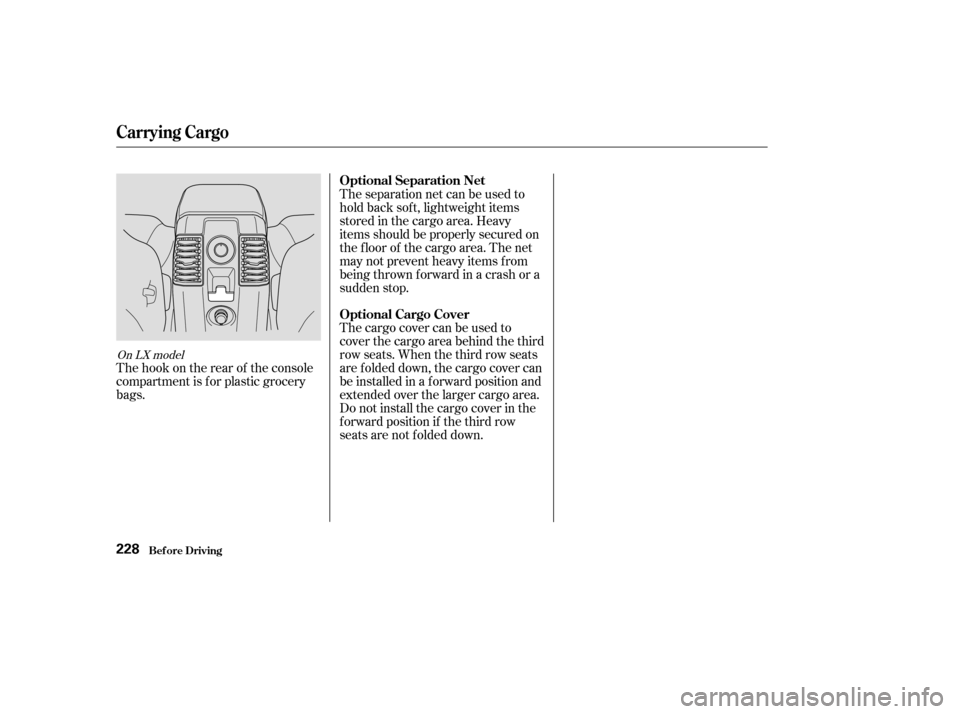
The hook on the rear of the console
compartment is f or plastic grocery
bags.
On LX model
Carrying Cargo
Bef ore Driving
Optional Separation Net
Optional Cargo Cover
228
Page 235 of 392

Youshoulddothefollowingchecks
and adjustments every day bef ore
you drive your vehicle.Make sure all windows, mirrors,
and outside lights are clean and
unobstructed. Remove f rost, snow,
or ice. Check the adjustment of the seat
(see page ).
Check the adjustment of the
inside and outside mirrors (see
page ).
Check the adjustment of the
steering wheel (see page ).
Fasten your seat belt. Check that
your passengers have f astened
their seat belts (see page ).Turn the ignition switch ON (II).
Check the indicator lights in the
instrument panel.
Start the engine (see page ).
Check the gauges and indicator
lights in the instrument panel (see
page ).
Check that any items you may be
carrying with you inside are stored
properly or f astened down
securely. Visually check the tires. If a tire
looks low, use a gauge to check its
pressure. Check that the hood and tailgate
arefullyclosed. Makesurethedoorsandtailgate
are securely closed and locked.
3. 2.
1.
4. 5.
6.
7.
8.
9. 11.
12. 10.
15
78
61
102
232
89
Preparing to Drive
Driving231