flat tire HONDA PILOT 2011 2.G User Guide
[x] Cancel search | Manufacturer: HONDA, Model Year: 2011, Model line: PILOT, Model: HONDA PILOT 2011 2.GPages: 574, PDF Size: 14.02 MB
Page 512 of 574
Check the air pressure of the
compact spare tire every time you
check the other tires. It should be
inf lated to:
Follow these precautions:Never exceed 50 mph (80 km/h).
Do not mount snow chains on a
compact spare.
Do not use your compact spare
tire on another vehicle unless it is
thesamemakeandmodel.
Use the compact spare tire as a
temporary replacement only. Get
your regular tire repaired or replaced,
and put it back on your vehicle as
soon as you can.
This tire gives a harsher ride and
less traction on some road
surf aces. Use greater caution
while driving. If you store a f ull size tire on the
hoist, remove the spacer.
Otherwise the hoist will not f ully
return to its original position.
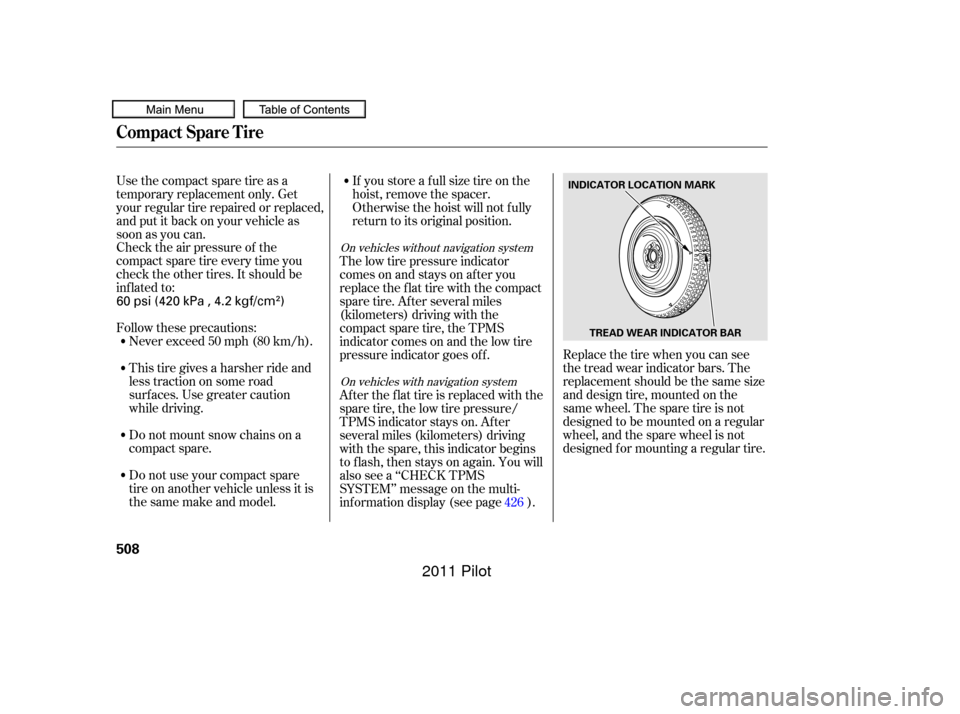
Replace the tire when you can see
the tread wear indicator bars. The
replacement should be the same size
and design tire, mounted on the
same wheel. The spare tire is not
designed to be mounted on a regular
wheel, and the spare wheel is not
designed f or mounting a regular tire.
The low tire pressure indicator
comes on and stays on af ter you
replace the flat tire with the compact
spare tire. Af ter several miles
(kilometers) driving with the
compact spare tire, the TPMS
indicator comes on and the low tire
pressure indicator goes of f .
After the flat tire is replaced with the
spare tire, the low tire pressure/
TPMS indicator stays on. After
several miles (kilometers) driving
with the spare, this indicator begins
to f lash, then stays on again. You will
also see a ‘‘CHECK TPMS
SYSTEM’’ message on the multi-
inf ormation display (see page ).
426On vehicles without navigation system
On vehicles with navigation system
Compact Spare Tire
508
INDICATOR LOCATION MARK
TREAD WEAR INDICATOR BAR
60 psi (420 kPa , 4.2 kgf/cm)
10/01/26 19:51:10 31SZA620_513
2011 Pilot
Page 513 of 574
If you have a f lat tire while driving,
stop in a saf e place to change it.
Drive slowly along the shoulder until
you get to an exit or an area to stop
that is far away from the traffic lanes.Park the vehicle on f irm, level, and
non-slippery ground. Put the
transmission in Park. Apply the
parking brake. Turn on the hazard warning lights,
and turn the ignition switch to the
LOCK (0) position. Have all
passengers get out of the vehicle
while you change the tire.
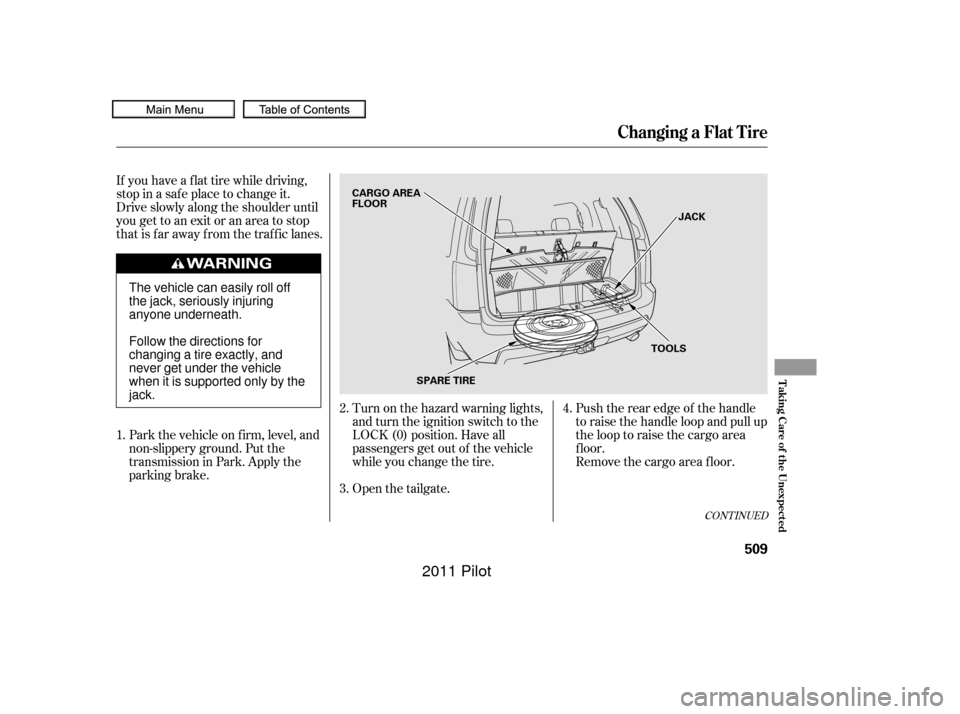
Open the tailgate.Push the rear edge of the handle
to raise the handle loop and pull up
the loop to raise the cargo area
f loor.
Remove the cargo area floor.
2.
1.
3.4.
CONT INUED
Changing a Flat Tire
T aking Care of t he Unexpect ed
509
JACK
TOOLS
SPARE TIRE
CARGO AREA
FLOOR
The vehicle can easily roll off
the jack, seriously injuring
anyone underneath.
Follow the directions for
changing a tire exactly, and
never get under the vehicle
when it is supported only by the
jack.
10/01/26 19:51:21 31SZA620_514
2011 Pilot
Page 514 of 574
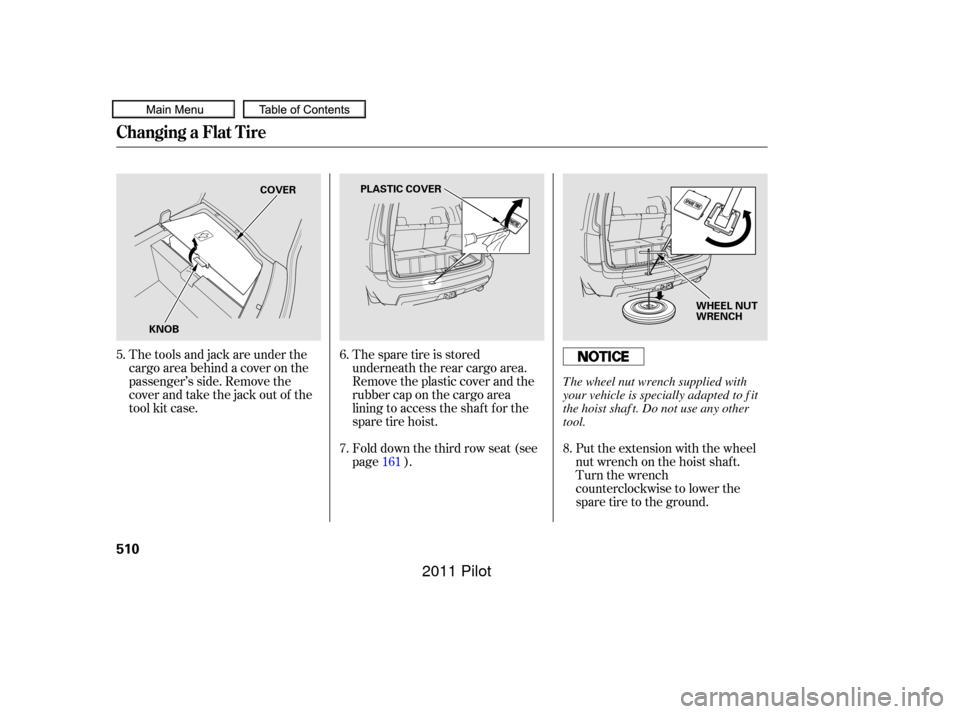
The spare tire is stored
underneath the rear cargo area.
Remove the plastic cover and the
rubber cap on the cargo area
lining to access the shaf t f or the
sparetirehoist.Put the extension with the wheel
nut wrench on the hoist shaf t.
Turn the wrench
counterclockwise to lower the
spare tire to the ground.
The tools and jack are under the
cargo area behind a cover on the
passenger’s side. Remove the
cover and take the jack out of the
tool kit case.
Fold down the third row seat (see
page ).
5.
6.
7.8.
161
Changing a Flat Tire
510
COVER
KNOB PLASTIC COVER
WHEEL NUT
WRENCH
The wheel nut wrench supplied with
your vehicle is specially adapted to f it
the hoist shaf t. Do not use any other
tool.
10/01/26 19:51:30 31SZA620_515
2011 Pilot
Page 515 of 574
CONT INUED
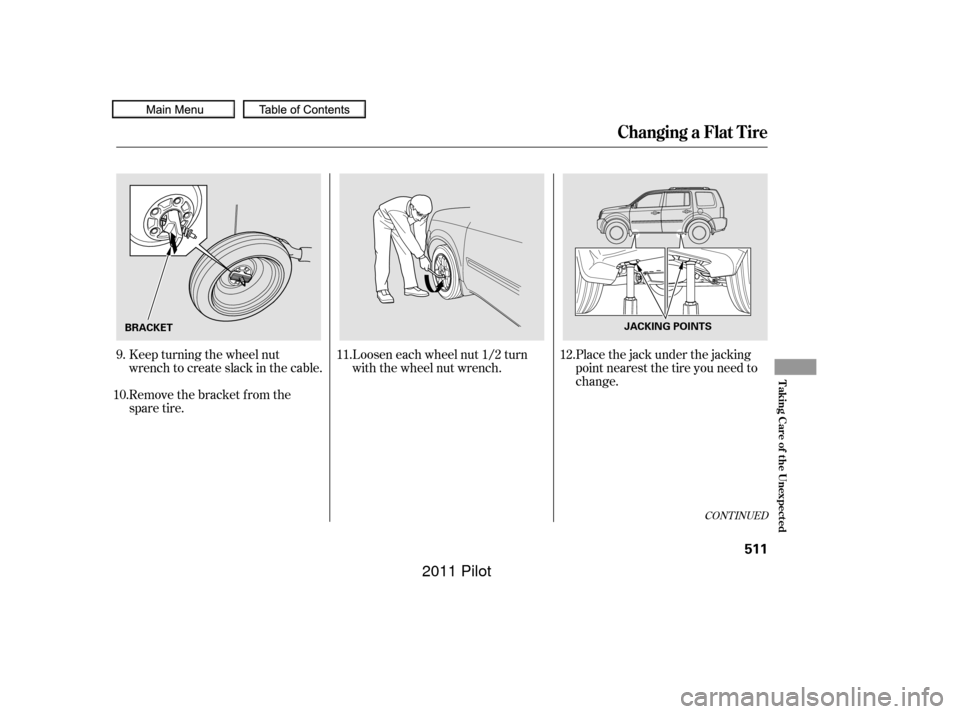
Remove the bracket from the
spare tire. Keep turning the wheel nut
wrench to create slack in the cable.Loosen each wheel nut 1/2 turn
with the wheel nut wrench.Placethejackunderthejacking
point nearest the tire you need to
change.
9.
10. 12.
11.
Changing a Flat Tire
T aking Care of t he Unexpect ed
511
BRACKET JACKING POINTS
10/01/26 19:51:39 31SZA620_516
2011 Pilot
Page 516 of 574
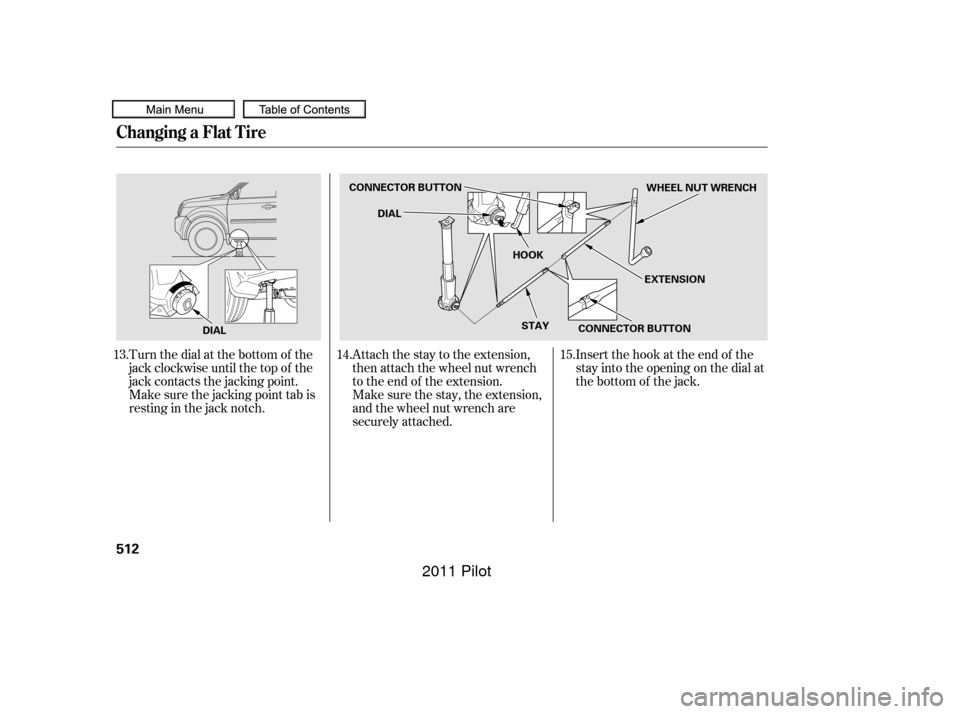
Turn the dial at the bottom of the
jack clockwise until the top of the
jack contacts the jacking point.
Make sure the jacking point tab is
restinginthejacknotch.Attach the stay to the extension,
then attach the wheel nut wrench
to the end of the extension.
Insert the hook at the end of the
stay into the opening on the dial at
the bottom of the jack.
Make sure the stay, the extension,
and the wheel nut wrench are
securely attached.
13.
14.15.
Changing a Flat Tire
512
DIALCONNECTOR BUTTON
DIAL
HOOK
STAY CONNECTOR BUTTON EXTENSIONWHEEL NUT WRENCH
10/01/26 19:51:47 31SZA620_517
2011 Pilot
Page 517 of 574
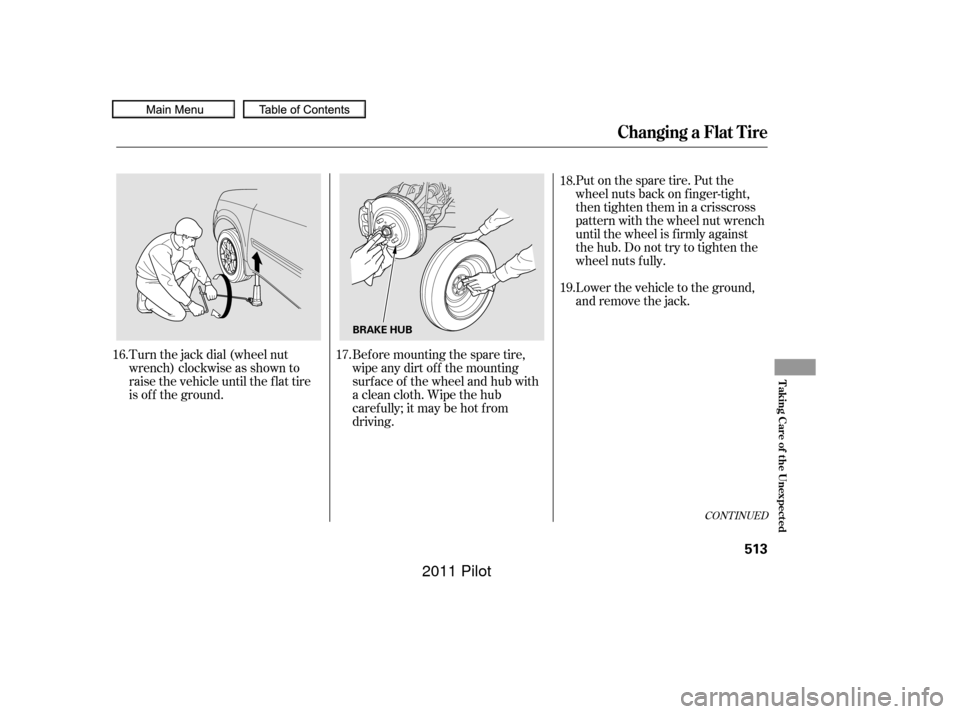
Turn the jack dial (wheel nut
wrench) clockwise as shown to
raise the vehicle until the f lat tire
is of f the ground.Put on the spare tire. Put the
wheel nuts back on f inger-tight,
then tighten them in a crisscross
pattern with the wheel nut wrench
until the wheel is f irmly against
the hub. Do not try to tighten the
wheel nuts f ully.
Lower the vehicle to the ground,
and remove the jack.
Bef ore mounting the spare tire,
wipeanydirtoff themounting
surface of the wheel and hub with
a clean cloth. Wipe the hub
carefully;itmaybehotfrom
driving.
16.
17. 18.
19.
CONT INUED
Changing a Flat Tire
T aking Care of t he Unexpect ed
513
BRAKE HUB
10/01/26 19:51:56 31SZA620_518
2011 Pilot
Page 518 of 574
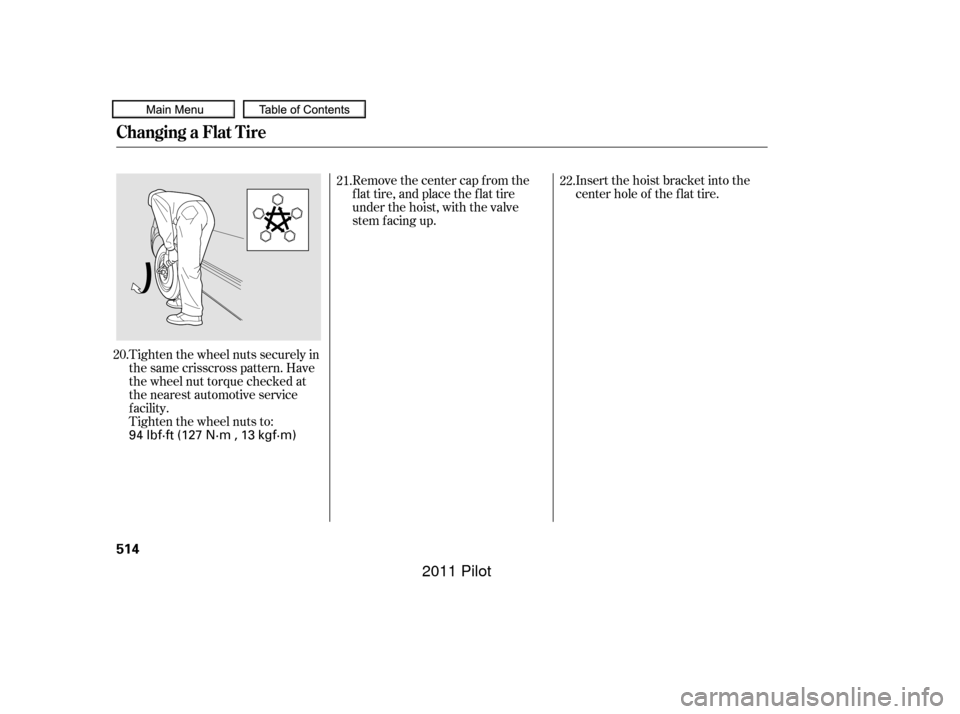
Tighten the wheel nuts securely in
the same crisscross pattern. Have
the wheel nut torque checked at
the nearest automotive service
f acility.
Tighten the wheel nuts to:Insert the hoist bracket into the
center hole of the f lat tire.
Remove the center cap from the
flat tire, and place the flat tire
under the hoist, with the valve
stem f acing up.
20. 21.
22.
Changing a Flat Tire
514
94 lbf·ft (127 N·m , 13 kgf·m)
10/01/26 19:52:02 31SZA620_519
2011 Pilot
Page 519 of 574
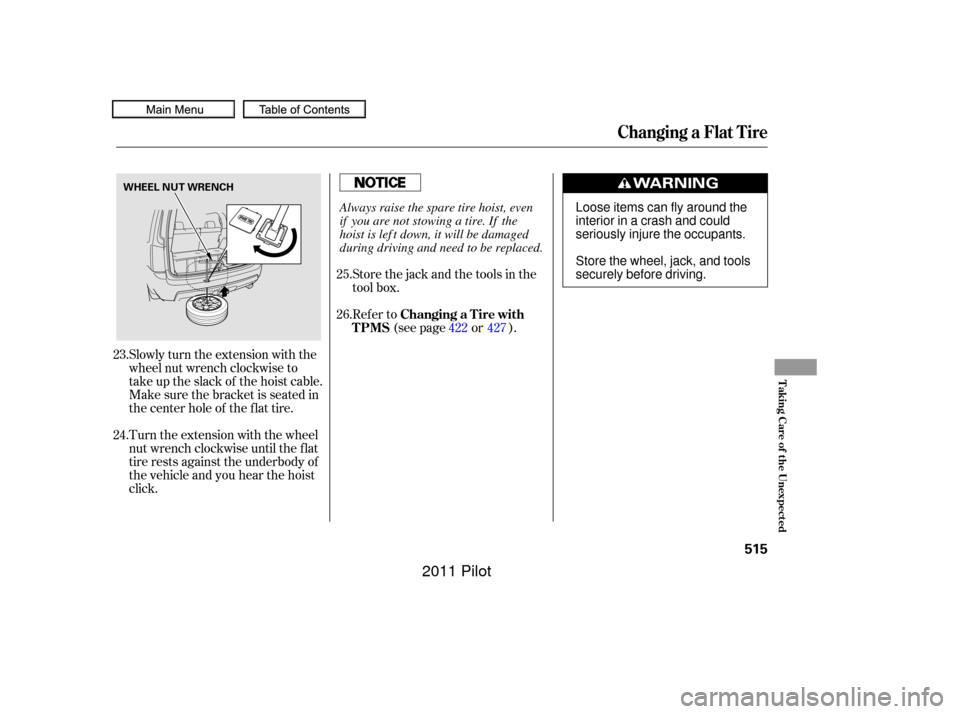
Slowly turn the extension with the
wheel nut wrench clockwise to
take up the slack of the hoist cable.
Make sure the bracket is seated in
the center hole of the flat tire.
Turn the extension with the wheel
nut wrench clockwise until the f lat
tire rests against the underbody of
the vehicle and you hear the hoist
click.Store the jack and the tools in the
tool box.
Refer to
(see page or ).
23.
24. 25.
26.
422 427
Changing a Flat Tire
Changing a T ire with
TPMS
T aking Care of t he Unexpect ed
515
WHEEL NUT WRENCH
Loose items can fly around the
interiorinacrashandcould
seriously injure the occupants.
Store the wheel, jack, and tools
securely before driving.
Always raise the spare tire hoist, even
if you are not stowing a tire. If the
hoist is lef t down, it will be damaged
during driving and need to be replaced.
10/01/26 19:52:11 31SZA620_520
2011 Pilot
Page 563 of 574
...............
DANGER, Explanation of . iii
Bulb Replacement
..........................
Back-up Lights .486
..............................
Brake Lights .486
.................................
Fog Lights .485
................
Front Parking Lights . 484
........
Front Side Marker Lights . 484
.................................
Headlights .483
.................................
Rear Bulbs .486
............................
Specif ications .539
....................
Turn Signal Lights . 484
..............................
Bulbs, Halogen .483
................................
Cancel Button .352
............................
Capacities Chart .538
.............
Carbon Monoxide Hazard . 61
..........................
Cargo Area Light .178
...................................
Cargo Hook .408
....................
Cargo, How to Carry .404
.............
CAUTION, Explanation of . iii
........................
Certif ication Label .536
.................................
Chains, Tires .503
....................
Changing a Flat Tire .509
Changing Oil ........................................
How to .473 ......................................
When to .455
...
Charging System Indicator . 70,521
............
Checklist, Bef ore Driving . 410
................
Childproof Door Locks . 144
.....................................
Child Saf ety .39
..............................
Booster Seats .58
.............................
Child Seats .44, 47
.....
Important Saf ety Reminders . 39
..........................................
Inf ants .44
..........................
Larger Children .57
.........................................
LATCH .49
......................
Risks with Airbags .40
.............................
Small Children .45
..........................................
Tether .54
...........................
Warning Labels .62
.........
Where Should a Child Sit? . 40
.......................................
Child Seats .47
........
LATCH Anchorage Points . 49
....
Tether Anchorage Points . 55,56
.......................
Cleaning Seat Belts .490
...............
Climate Control System . 199
..............................................
Clock .314
....................................
Coat Hooks .185
.....................
Code, Audio System .313
........................
CO in the Exhaust .547
......................
Compact Spare Tire .508 .........................................
Compass .353
.................
Console Compartment . 180
.................
Consumer Inf ormation . 554
.............
Controls, Instruments and . 65
....................
Conversation Mirror .184
Coolant ........................................
Adding .475
....................................
Checking .398
.........................
Proper Solution .475
...................
Temperature Gauge . 82
Crankcase Emissions Control ........................................
System .547
................
Cruise Control Indicator . 78
............
Cruise Control Operation . 350
...................................
Cup Holders .181
.............
Customer Service Of f ice . 554
.........................
Customize Settings .97
................
Door/Window Setup . 115
...........................
Lighting Setup .110
...............................
Meter Setup .103
...........................
Position Setup .108
......................
Setting to Def ault .100
Index
D
C
II
10/01/26 19:59:20 31SZA620_565
2011 Pilot
Page 564 of 574
CONT INUED
..............................
Economy, Fuel .399
Electronic Stability Control (ESC) ........................................
System .431
..................................
Emergencies .507
.............
Battery, Jump Starting . 517
...........
Brake System Indicator . 523
................
Changing a Flat Tire . 509
.....
Charging System Indicator . 521
..................
Checking the Fuses . 525
...........
Driving with a Flat Tire . 508
.......
Hazard Warning Flashers . 130
............................
Jump Starting .517
.....
Low Oil Pressure Indicator . 521
...
Malf unction Indicator Lamp . 522
..................
Overheated Engine . 519.......................................
Towing .531
.........................
Emergency Brake .169
....................
Emergency Flashers .130
......................
Emergency Towing .531
.......................
Emissions Controls .547
........................
Emissions Testing .550
Engine ..............
Check Starter System . 412
....
Coolant Temperature Gauge . 82
.........................
If it Won’t Start .516
Malf unction Indicator ................................
Lamp .70, 522
.......................................
Oil Lif e .455
........
Oil Pressure Indicator . 70,521
..............
Oil, What Kind to Use . 472
...............................
Overheating .519
............................
Specif ications .539
............................
Speed Limiter .416
.......................................
Starting .411
.
Evaporative Emissions Controls . 547
...............................
Exhaust Fumes .61
Exhaust Gas Recirculation ........................................
System .548
...................................
Dashboard .3, 66
..............
Daytime Running Lights . 128
.................................
Dead Battery .517
............
Def ects, Reporting Saf ety . 556
..............
Def ogger, Rear Window . 130
......
Def rosting the Windows . 194,203
..........................
Dif f erential Fluid .538
....................................
Dimensions .538
.............
Dimming the Headlights . 126
Dipstick ..........
Automatic Transmission . 478
..................................
Engine Oil .398
..........................
Directional Signals .73
........
Disc Brake Wear Indicators . 429
.......................................
Disc Care .285
........................
Disc Changer .242, 274
Disc Changer Error ...........................
Messages .251, 284
....................
Disc Player .218, 242,274
.....................
Disposal of Used Oil .474
Doors .................................
Indicator .13, 95
............
Locking and Unlocking . 138
..................
Lockout Prevention . 144
....................
Power Door Locks . 138
..........
DOT Tire Quality Grading . 540 ...........
Driver and Passenger Safety . 5
...........................................
Driving .409
....................................
Economy .399
Driving Position Memory ........................................
System .173
..................
Dust and Pollen Filter . 490
......
DVD Player Error Messages . 345
...................................
DVD Player .320
Index
E
INDEX
III
10/01/26 19:59:26 31SZA620_566
2011 Pilot