clock HONDA PILOT 2012 2.G User Guide
[x] Cancel search | Manufacturer: HONDA, Model Year: 2012, Model line: PILOT, Model: HONDA PILOT 2012 2.GPages: 681, PDF Size: 15.06 MB
Page 595 of 681
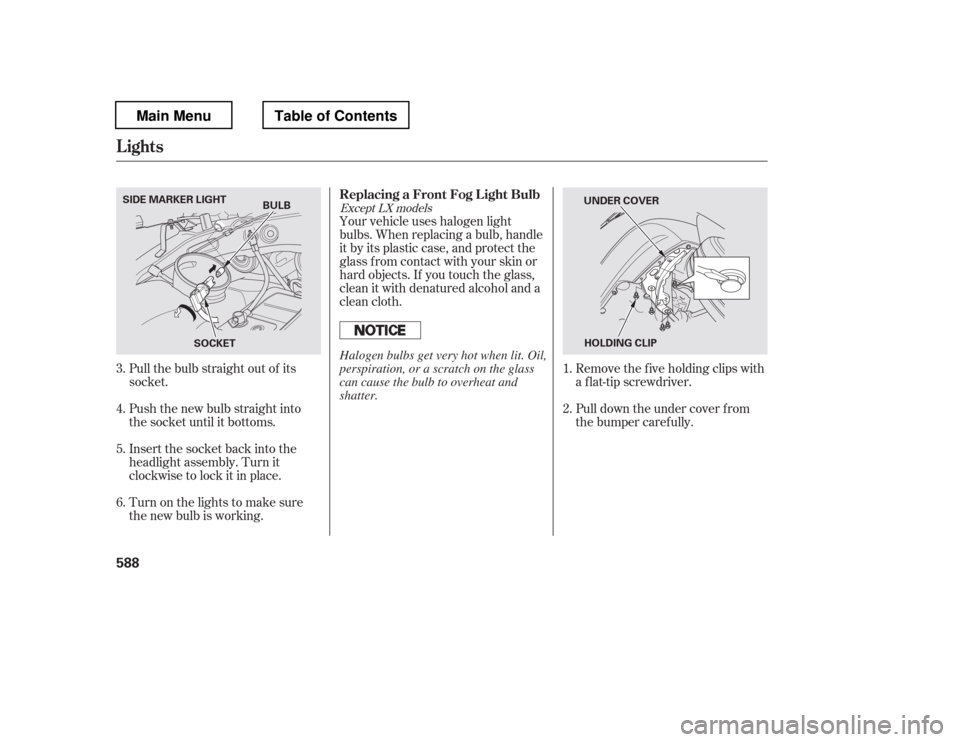
Push the new bulb straight into
the socket until it bottoms.
Insert the socket back into the
headlight assembly. Turn it
clockwise to lock it in place.
Turn on the lights to make sure
the new bulb is working.Your vehicle uses halogen light
bulbs. When replacing a bulb, handle
it by its plastic case, and protect the
glass from contact with your skin or
hard objects. If you touch the glass,
clean it with denatured alcohol and a
clean cloth.
Pull down the under cover f rom
the bumper caref ully.
Remove the f ive holding clips with
a f lat-tip screwdriver.
Pull the bulb straight out of its
socket. 1.
4. 5. 6. 2.
3.
Except LX models
Replacing a Front Fog L ight Bulb
Lights
588
BULB
SOCKET
SIDE MARKER LIGHT
UNDER COVER
HOLDING CLIP
Halogen bulbs get very hot when lit. Oil,
perspiration, or a scratch on the glass
can cause the bulb to overheat and
shatter.
Main MenuTable of Contents
Page 596 of 681
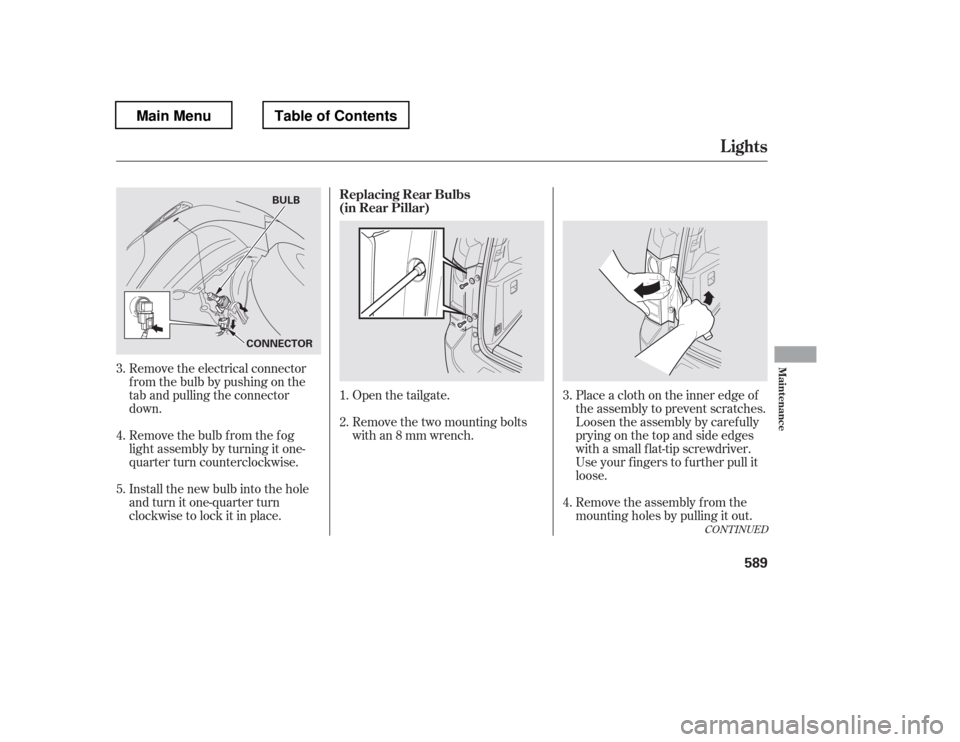
Open the tailgate.
Remove the two mounting bolts
with an 8 mm wrench.Place a cloth on the inner edge of
theassemblytopreventscratches.
Loosen the assembly by caref ully
prying on the top and side edges
with a small f lat-tip screwdriver.
Use your f ingers to f urther pull it
loose.
Remove the assembly f rom the
mounting holes by pulling it out.
Remove the electrical connector
f rom the bulb by pushing on the
tab and pulling the connector
down.
Remove the bulb f rom the f og
light assembly by turning it one-
quarter turn counterclockwise.
Install the new bulb into the hole
and turn it one-quarter turn
clockwise to lock it in place.
1.
3.
3. 4.
2.
4.
5.
CONT INUED
Replacing Rear Bulbs
(in Rear Pillar)
Lights
Maint enance
589
CONNECTOR BULB
Main MenuTable of Contents
Page 597 of 681
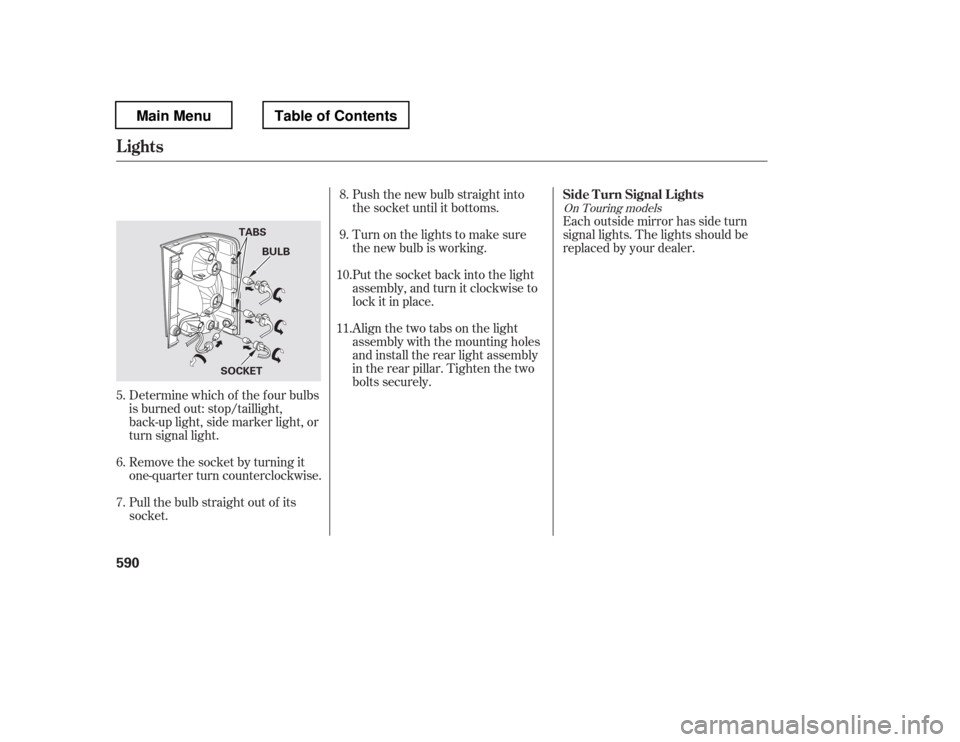
Push the new bulb straight into
the socket until it bottoms.
Turn on the lights to make sure
the new bulb is working.
Put the socket back into the light
assembly, and turn it clockwise to
lock it in place.Each outside mirror has side turn
signal lights. The lights should be
replaced by your dealer.
Align the two tabs on the light
assembly with the mounting holes
and install the rear light assembly
in the rear pillar. Tighten the two
bolts securely.
Pull the bulb straight out of its
socket.
Remove the socket by turning it
one-quarter turn counterclockwise.
Determine which of the f our bulbs
is burned out: stop/taillight,
back-up light, side marker light, or
turn signal light.
6. 7. 8.9.
10. 11.
5.
On Touring models
Side T urn Signal L ights
Lights
590
BULB
TABS
SOCKET
Main MenuTable of Contents
Page 621 of 681
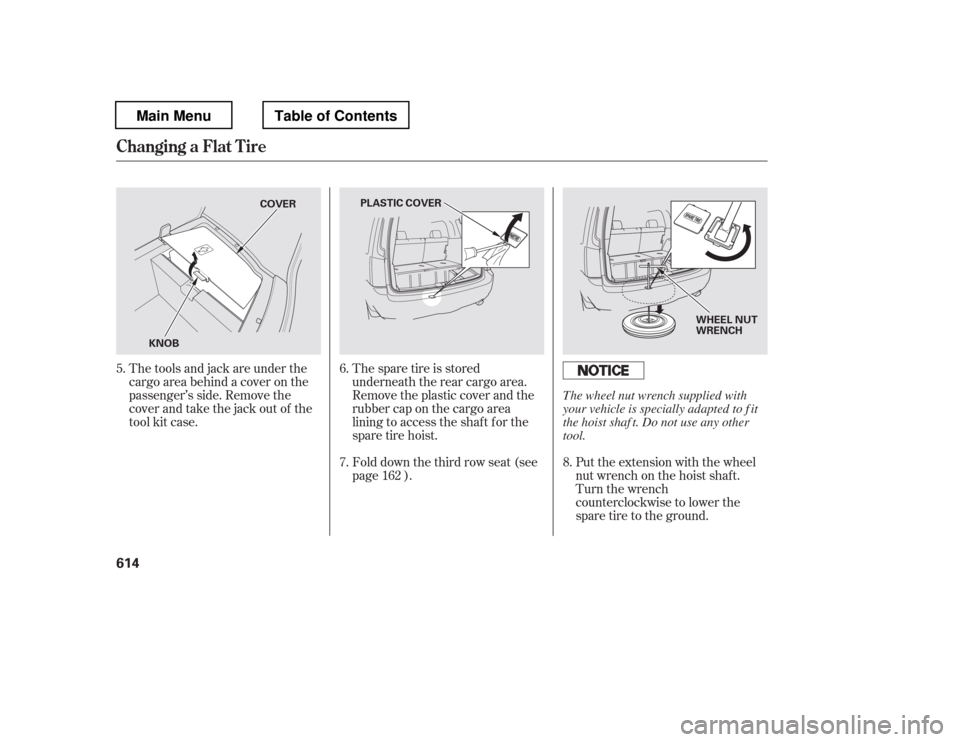
The spare tire is stored
underneath the rear cargo area.
Remove the plastic cover and the
rubber cap on the cargo area
lining to access the shaf t f or the
sparetirehoist.Put the extension with the wheel
nut wrench on the hoist shaf t.
Turn the wrench
counterclockwise to lower the
spare tire to the ground.
The tools and jack are under the
cargo area behind a cover on the
passenger
Page 623 of 681
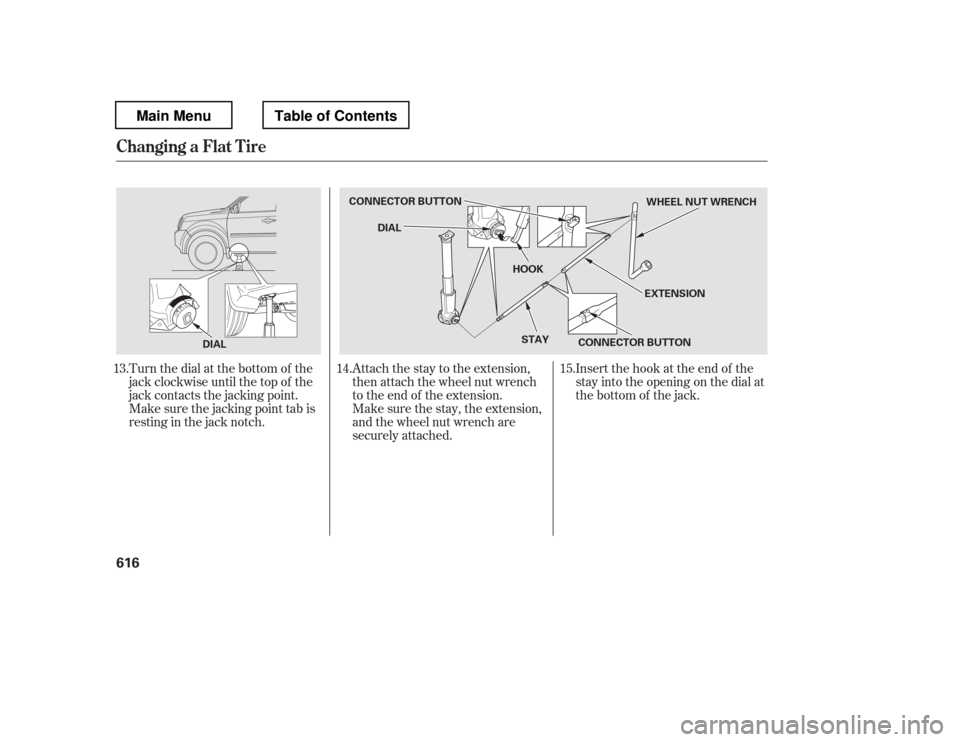
Turn the dial at the bottom of the
jack clockwise until the top of the
jack contacts the jacking point.
Make sure the jacking point tab is
restinginthejacknotch.Attach the stay to the extension,
then attach the wheel nut wrench
to the end of the extension.
Insert the hook at the end of the
stay into the opening on the dial at
the bottom of the jack.
Make sure the stay, the extension,
and the wheel nut wrench are
securely attached.
13. 14. 15.
Changing a Flat T ire
616
DIAL CONNECTOR BUTTON
DIAL
HOOK
STAY CONNECTOR BUTTON EXTENSIONWHEEL NUT WRENCH
Main MenuTable of Contents
Page 624 of 681
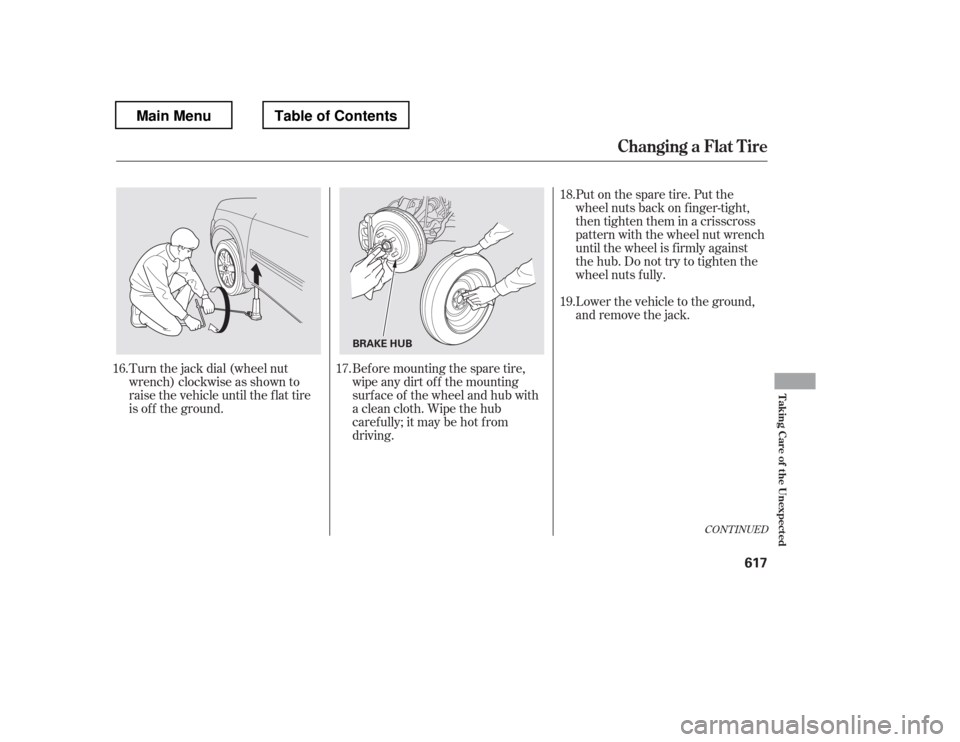
Turn the jack dial (wheel nut
wrench) clockwise as shown to
raise the vehicle until the f lat tire
is of f the ground.Put on the spare tire. Put the
wheel nuts back on f inger-tight,
then tighten them in a crisscross
pattern with the wheel nut wrench
until the wheel is f irmly against
the hub. Do not try to tighten the
wheel nuts f ully.
Lower the vehicle to the ground,
and remove the jack.
Bef ore mounting the spare tire,
wipeanydirtoff themounting
surface of the wheel and hub with
a clean cloth. Wipe the hub
carefully;itmaybehotfrom
driving.
16. 17. 18. 19.
CONT INUED
Changing a Flat T ire
T aking Care of the Unexpected
617
BRAKE HUB
Main MenuTable of Contents
Page 626 of 681
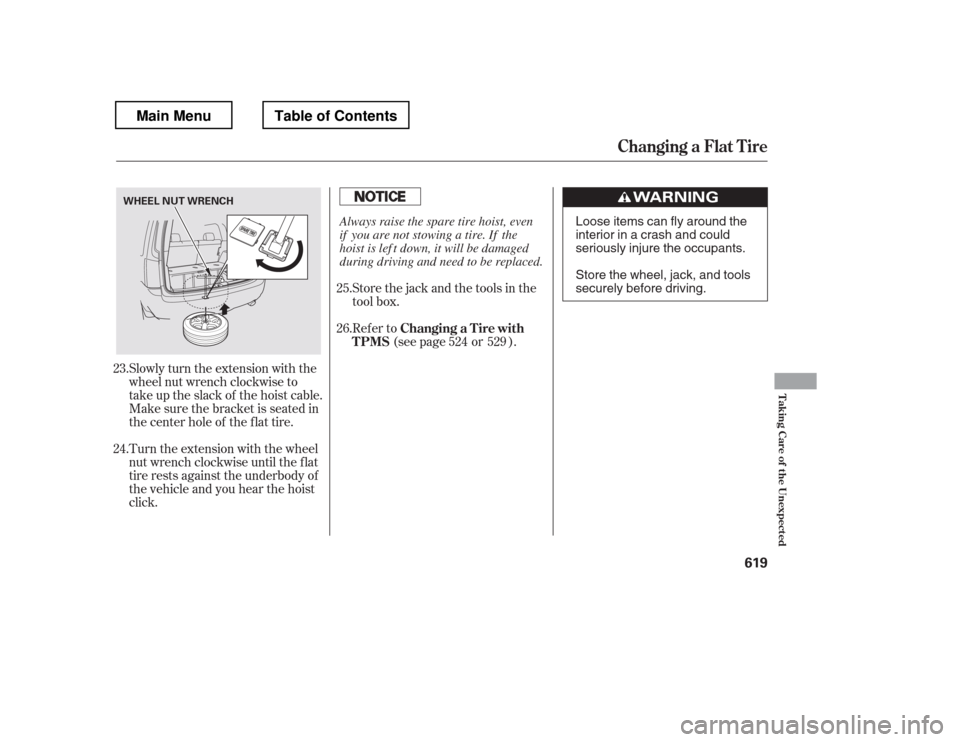
Slowly turn the extension with the
wheel nut wrench clockwise to
take up the slack of the hoist cable.
Make sure the bracket is seated in
the center hole of the flat tire.
Turn the extension with the wheel
nut wrench clockwise until the f lat
tire rests against the underbody of
the vehicle and you hear the hoist
click.Store the jack and the tools in the
tool box.
Refer to
(see page or ).
23. 24. 25. 26.
524 529
Changing a Flat T ire
Changing a T ire with
TPMS
T aking Care of the Unexpected
619
WHEEL NUT WRENCH
Loose items can fly around the
interiorinacrashandcould
seriously injure the occupants.
Store the wheel, jack, and tools
securely before driving.
Always raise the spare tire hoist, even
if you are not stowing a tire. If the
hoist is lef t down, it will be damaged
during driving and need to be replaced.
Main MenuTable of Contents
Page 631 of 681
If the temperature gauge stays at
the red mark, turn of f the engine.
Look f or any obvious coolant leaks,
such as a split radiator hose.
Everything is still extremely hot,
so use caution. If you f ind a leak, it
must be repaired bef ore you
continue driving (seeon page ).
If you do not f ind an obvious leak,
check the coolant level in the
radiator reserve tank. Add coolant
if the level is below the MIN mark.
If there was no coolant in the
reserve tank, you may need to add
coolant to the radiator. Let the
engine cool down until the pointer
reaches the middle of the tempera-
ture gauge, or lower, bef ore check-
ing the radiator. Using gloves or a large heavy
cloth, turn the radiator cap
counterclockwise, without pushing
down, to the f irst stop. Af ter the
pressure releases, push down on
the cap, and turn it until it comes
off.Start the engine, and set the
temperature to maximum heat
(climate control to AUTO at
‘‘
Page 671 of 681
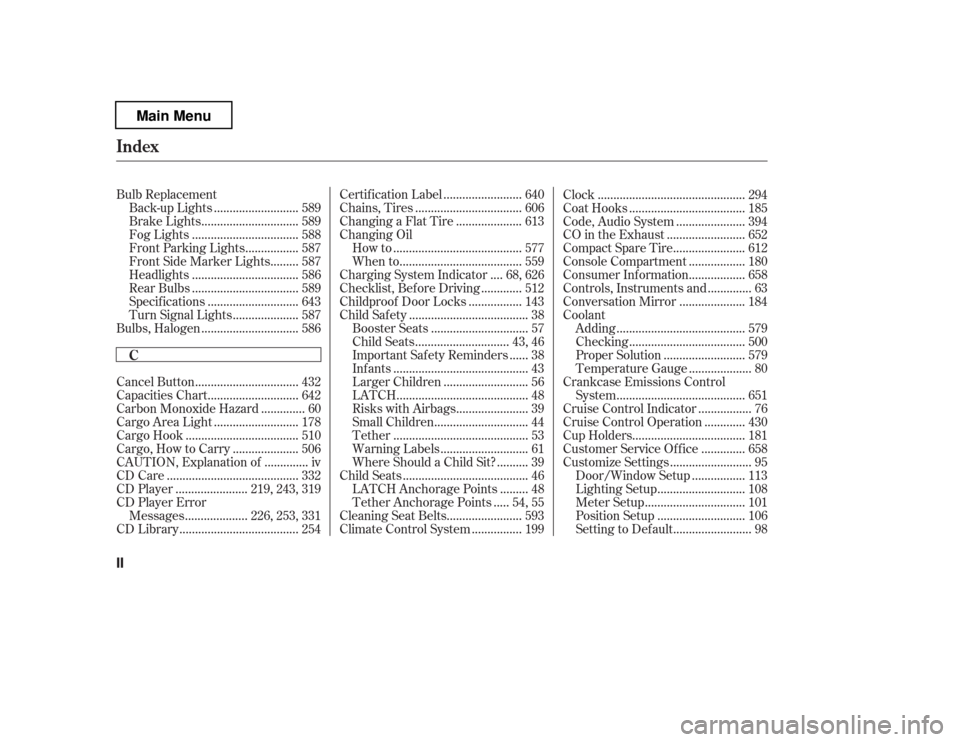
Bulb Replacement..........................
Back-up Lights . 589
..............................
Brake Lights . 589
.................................
Fog Lights . 588
................
Front Parking Lights . 587
........
Front Side Marker Lights . 587
.................................
Headlights . 586
.................................
Rear Bulbs . 589
............................
Specif ications . 643
....................
Turn Signal Lights . 587
..............................
Bulbs, Halogen . 586
................................
Cancel Button . 432
............................
Capacities Chart . 642
.............
Carbon Monoxide Hazard . 60
..........................
Cargo Area Light . 178
...................................
Cargo Hook . 510
....................
Cargo, How to Carry . 506
.............
CAUTION, Explanation of . iv
.........................................
CD Care . 332
......................
CD Player . 219, 243, 319
CD Player Error
...................
Messages . 226, 253, 331
.....................................
CD Library . 254 ........................
Certif ication Label . 640
.................................
Chains, Tires . 606
....................
Changing a Flat Tire . 613
Changing Oil
........................................
How to . 577
......................................
When to . 559
...
Charging System Indicator . 68, 626
............
Checklist, Bef ore Driving . 512
................
Childproof Door Locks . 143
.....................................
Child Saf ety . 38
..............................
Booster Seats . 57
.............................
Child Seats . 43, 46
.....
Important Saf ety Reminders . 38
..........................................
Inf ants . 43
..........................
Larger Children . 56
.........................................
LATCH . 48
......................
Risks with Airbags . 39
.............................
Small Children . 44
..........................................
Tether . 53
...........................
Warning Labels . 61
.........
Where Should a Child Sit? . 39
.......................................
Child Seats . 46
........
LATCH Anchorage Points . 48
....
Tether Anchorage Points . 54, 55
.......................
Cleaning Seat Belts . 593
...............
Climate Control System . 199 ..............................................
Clock . 294
....................................
Coat Hooks . 185
.....................
Code, Audio System . 394
........................
CO in the Exhaust . 652
......................
Compact Spare Tire . 612
.................
Console Compartment . 180
.................
Consumer Inf ormation . 658
.............
Controls, Instruments and . 63
....................
Conversation Mirror . 184
Coolant
........................................
Adding . 579
....................................
Checking . 500
.........................
Proper Solution . 579
...................
Temperature Gauge . 80
Crankcase Emissions Control ........................................
System . 651
................
Cruise Control Indicator . 76
............
Cruise Control Operation . 430
...................................
Cup Holders . 181
.............
Customer Service Of f ice . 658
.........................
Customize Settings . 95
................
Door/Window Setup . 113
...........................
Lighting Setup . 108
...............................
Meter Setup . 101
...........................
Position Setup . 106
........................
Setting to Def ault . 98
Index
C
II
Main Menu