buttons HONDA PILOT 2013 2.G User Guide
[x] Cancel search | Manufacturer: HONDA, Model Year: 2013, Model line: PILOT, Model: HONDA PILOT 2013 2.GPages: 488, PDF Size: 10.18 MB
Page 188 of 488
187
uuAudio System Basic OperationuPlaying the AM/FM Radio
Continued
Features
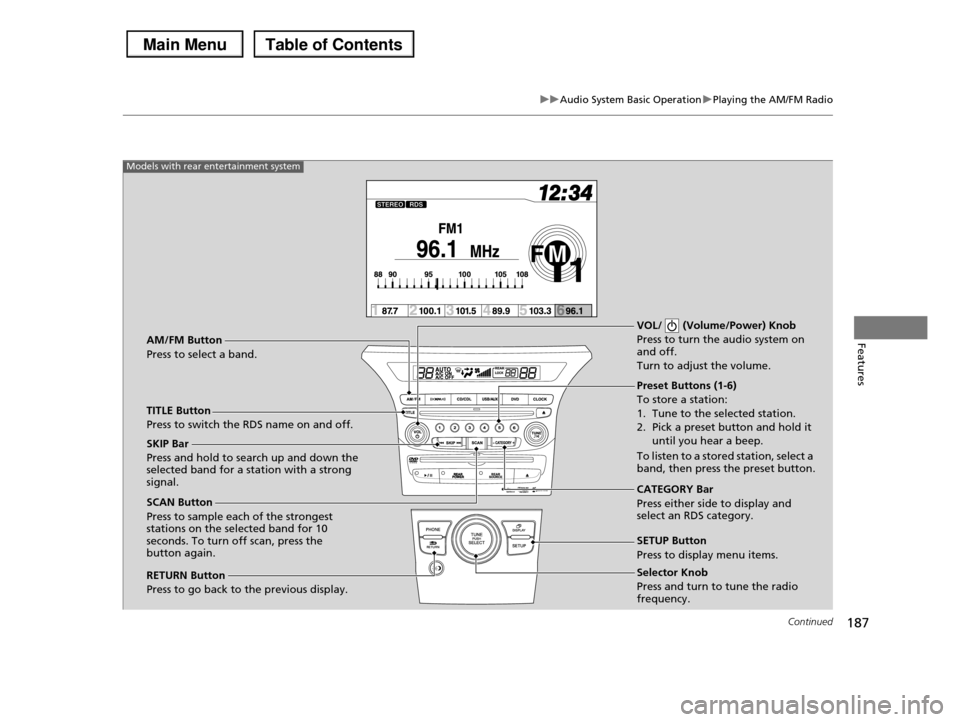
Selector Knob
Press and turn to tune the radio frequency.
SCAN Button
Press to sample each of the strongest stations on the selected band for 10 seconds. To turn off scan, press the button again.
VOL/ (Volume/Power) Knob
Press to turn the audio system on and off.
Turn to adjust the volume.
Preset Buttons (1-6)
To store a station:
1. Tune to the selected station.
2. Pick a preset button and hold it until you hear a beep.
To listen to a stored station, select a band, then press the preset button.
SKIP Bar
Press and hold to search up and down the selected band for a station with a strong signal.CATEGORY Bar
Press either side to display and select an RDS category.
TITLE Button
Press to switch the RDS name on and off.
AM/FM Button
Press to select a band.
RETURN Button
Press to go back to the previous display.
SETUP Button
Press to display menu items.
Models with rear entertainment system
Page 191 of 488
190
uuAudio System Basic OperationuPlaying the XM® Radio*
Features
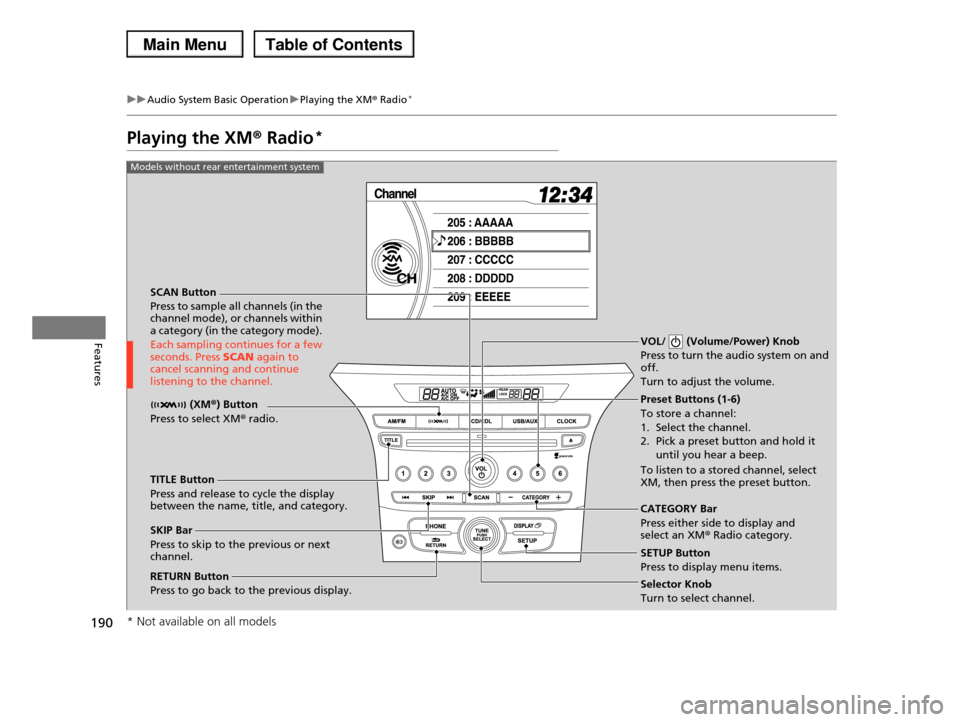
Playing the XM® Radio*
SCAN Button
Press to sample all channels (in the channel mode), or channels within a category (in the category mode).
Each sampling continues for a few seconds. Press SCAN again to cancel scanning and continue listening to the channel.
VOL/ (Volume/Power) Knob
Press to turn the audio system on and off.
Turn to adjust the volume.
Preset Buttons (1-6)
To store a channel:
1. Select the channel.
2. Pick a preset button and hold it
until you hear a beep.
To listen to a stored channel, select XM, then press the preset button.
SKIP Bar
Press to skip to the previous or next channel.
CATEGORY Bar
Press either side to display and select an XM® Radio category.
TITLE Button
Press and release to cycle the display between the name, title, and category.
(XM®) Button
Press to select XM® radio.
RETURN Button
Press to go back to the previous display.Selector Knob
Turn to select channel.
SETUP Button
Press to display menu items.
Models without rear entertainment system
* Not available on all models
Page 192 of 488
191
uuAudio System Basic OperationuPlaying the XM® Radio*
Continued
Features
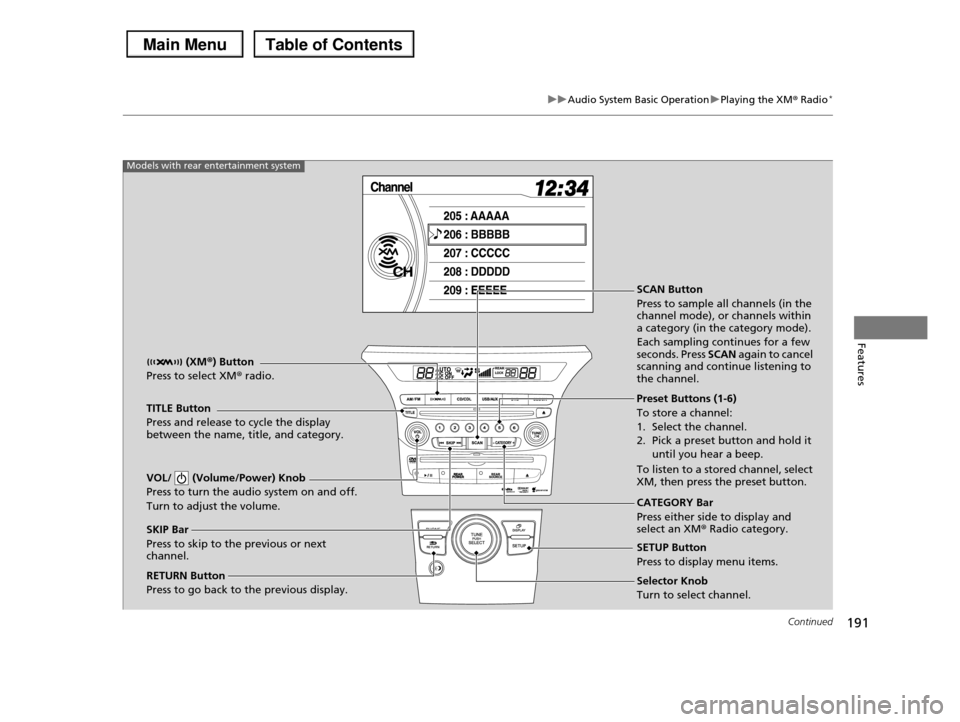
SCAN Button
Press to sample all channels (in the channel mode), or channels within a category (in the category mode).
Each sampling continues for a few seconds. Press SCAN again to cancel scanning and continue listening to the channel.
VOL/ (Volume/Power) Knob
Press to turn the audio system on and off.
Turn to adjust the volume.
Preset Buttons (1-6)
To store a channel:
1. Select the channel.
2. Pick a preset button and hold it
until you hear a beep.
To listen to a stored channel, select XM, then press the preset button.
SKIP Bar
Press to skip to the previous or next channel.
CATEGORY Bar
Press either side to display and select an XM® Radio category.
TITLE Button
Press and release to cycle the display between the name, title, and category.
(XM®) Button
Press to select XM® radio.
RETURN Button
Press to go back to the previous display.Selector Knob
Turn to select channel.
SETUP Button
Press to display menu items.
Models with rear entertainment system
Page 193 of 488
uuAudio System Basic OperationuPlaying the XM® Radio*
192
Features
1.Press the button to select the XM® radio band (XM1 or XM2).
2.Press and hold the TITLE button to switch between the channel mode and
category mode.
If you press the SETUP button, rotate to select XM Mode, and press . You
can select channel mode or category mode by turning and pressing the selector
knob.
3.Select a channel using the TUNE ( ), SKIP, CATEGORY, SCAN, or preset
buttons.
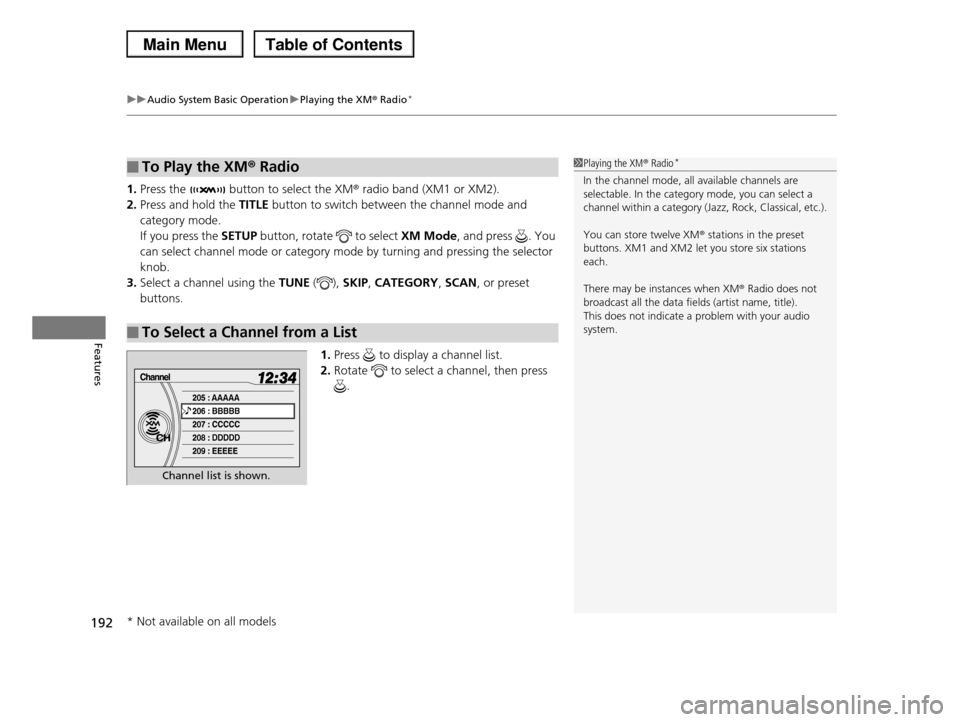
1.Press to display a channel list.
2.Rotate to select a channel, then press
.
■To Play the XM® Radio
■To Select a Channel from a List
1Playing the XM® Radio*
In the channel mode, all available channels are selectable. In the category mode, you can select a
channel within a category (Jazz, Rock, Classical, etc.).
You can store twelve XM® stations in the preset
buttons. XM1 and XM2 let you store six stations
each.
There may be instances when XM® Radio does not
broadcast all the data fields (artist name, title). This does not indicate a problem with your audio
system.
Channel list is shown.
* Not available on all models
Page 220 of 488
219
uuAudio System Basic OperationuPlaying the AM/FM Radio
Continued
Features
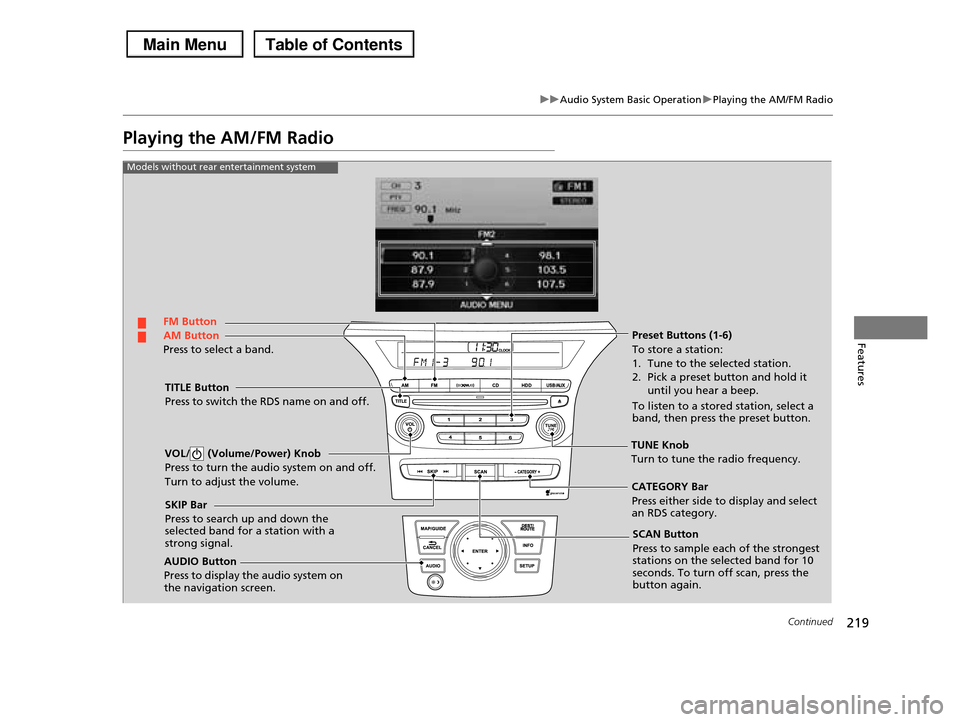
Playing the AM/FM Radio
FM Button
TITLE Button
Press to switch the RDS name on and off.
SCAN Button
Press to sample each of the strongest stations on the selected band for 10 seconds. To turn off scan, press the button again.
VOL/ (Volume/Power) Knob
Press to turn the audio system on and off.
Turn to adjust the volume.
Preset Buttons (1-6)
To store a station:
1. Tune to the selected station.
2. Pick a preset button and hold it
until you hear a beep.
To listen to a stored station, select a band, then press the preset button.
SKIP Bar
Press to search up and down the selected band for a station with a strong signal.
AUDIO Button
Press to display the audio system on the navigation screen.
AM Button
Press to select a band.
CATEGORY Bar
Press either side to display and select an RDS category.
Models without rear entertainment system
TUNE Knob
Turn to tune the radio frequency.
Page 221 of 488
220
uuAudio System Basic OperationuPlaying the AM/FM Radio
Features
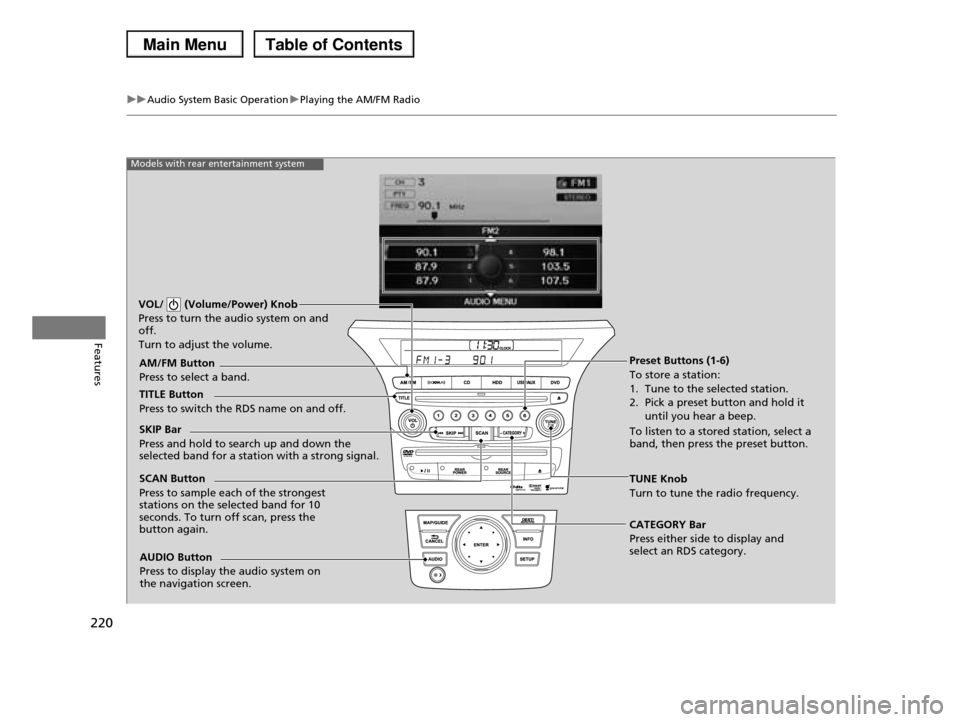
Models with rear entertainment system
TUNE Knob
Turn to tune the radio frequency.
SCAN Button
Press to sample each of the strongest stations on the selected band for 10 seconds. To turn off scan, press the button again.
VOL/ (Volume/Power) Knob
Press to turn the audio system on and off.
Turn to adjust the volume.
Preset Buttons (1-6)
To store a station:
1. Tune to the selected station.
2. Pick a preset button and hold it
until you hear a beep.
To listen to a stored station, select a band, then press the preset button.
SKIP Bar
Press and hold to search up and down the selected band for a station with a strong signal.
CATEGORY Bar
Press either side to display and select an RDS category.
TITLE Button
Press to switch the RDS name on and off.
AM/FM Button
Press to select a band.
AUDIO Button
Press to display the audio system on the navigation screen.
Page 224 of 488
223
uuAudio System Basic OperationuPlaying the XM® Radio
Continued
Features
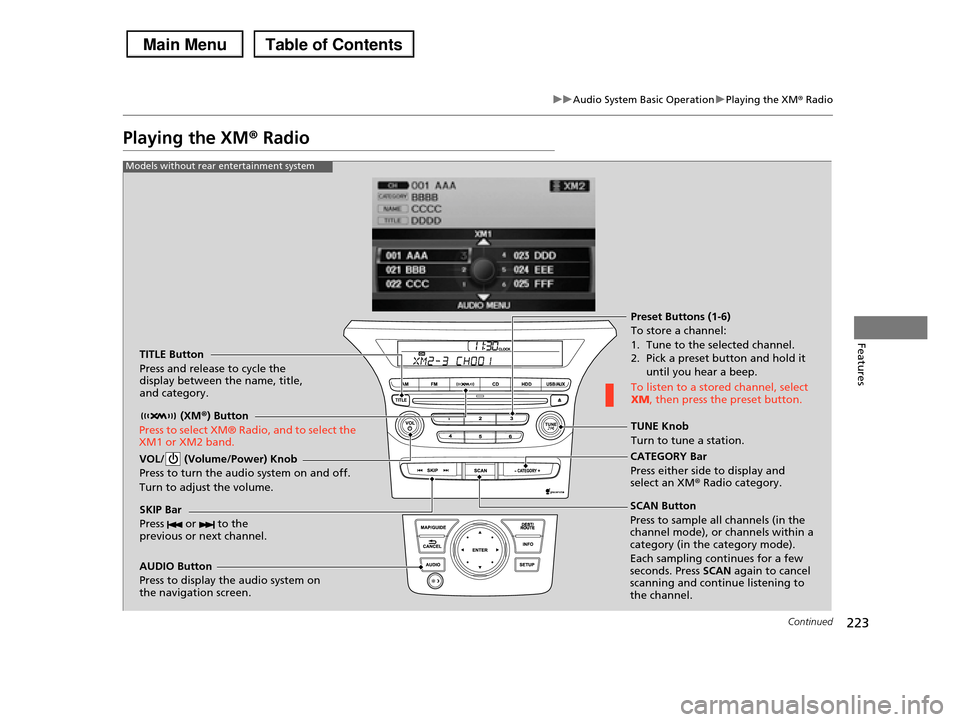
Playing the XM® Radio
TITLE Button
Press and release to cycle the display between the name, title, and category.
(XM®) Button
Press to select XM® Radio, and to select the XM1 or XM2 band.
VOL/ (Volume/Power) Knob
Press to turn the audio system on and off.
Turn to adjust the volume.
SKIP Bar
Press or to the previous or next channel.
CATEGORY Bar
Press either side to display and select an XMr Radio category.
TUNE Knob
Turn to tune a station.
Preset Buttons (1-6)
To store a channel:
1. Tune to the selected channel. 2. Pick a preset button and hold it
until you hear a beep.
To listen to a stored channel, select XM, then press the preset button.
SCAN Button
Press to sample all channels (in the channel mode), or channels within a category (in the category mode).
Each sampling continues for a few seconds. Press SCAN again to cancel scanning and continue listening to the channel.
Models without rear entertainment system
AUDIO Button
Press to display the audio system on the navigation screen.
Page 225 of 488
224
uuAudio System Basic OperationuPlaying the XM® Radio
Features
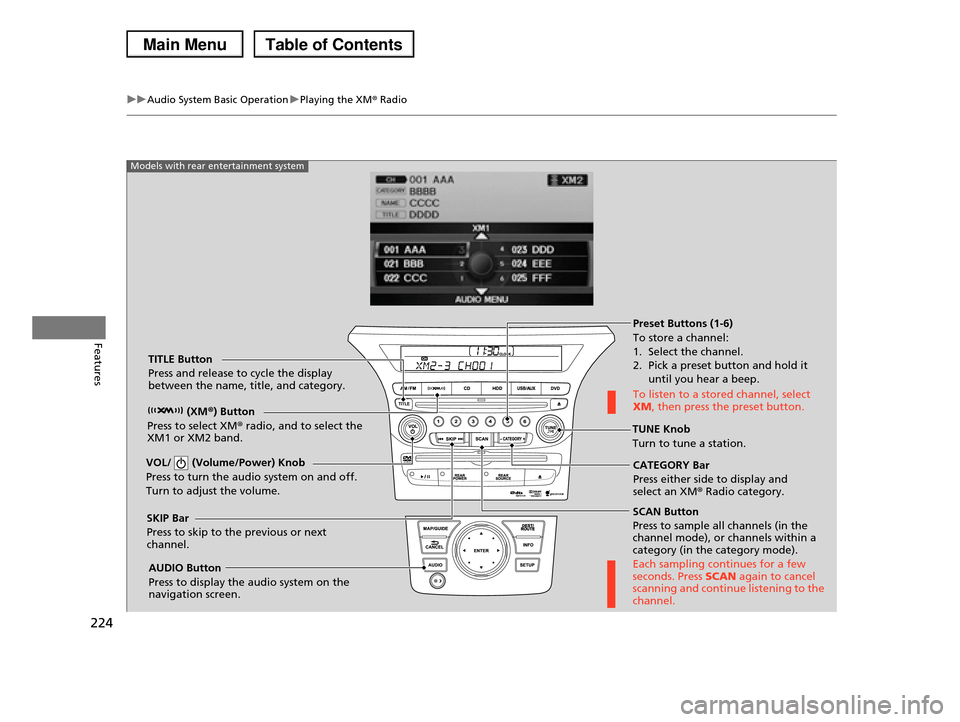
SCAN Button
Press to sample all channels (in the channel mode), or channels within a category (in the category mode).
Each sampling continues for a few seconds. Press SCAN again to cancel scanning and continue listening to the channel.
VOL/ (Volume/Power) Knob
Press to turn the audio system on and off.
Turn to adjust the volume.
Preset Buttons (1-6)
To store a channel:
1. Select the channel. 2. Pick a preset button and hold it
until you hear a beep.
To listen to a stored channel, select XM, then press the preset button.
SKIP Bar
Press to skip to the previous or next channel.
CATEGORY Bar
Press either side to display and select an XM® Radio category.
TITLE Button
Press and release to cycle the display between the name, title, and category.
(XM®) Button
Press to select XM® radio, and to select the XM1 or XM2 band.TUNE Knob
Turn to tune a station.
AUDIO Button
Press to display the audio system on the navigation screen.
Models with rear entertainment system
Page 226 of 488
225
uuAudio System Basic OperationuPlaying the XM® Radio
Features
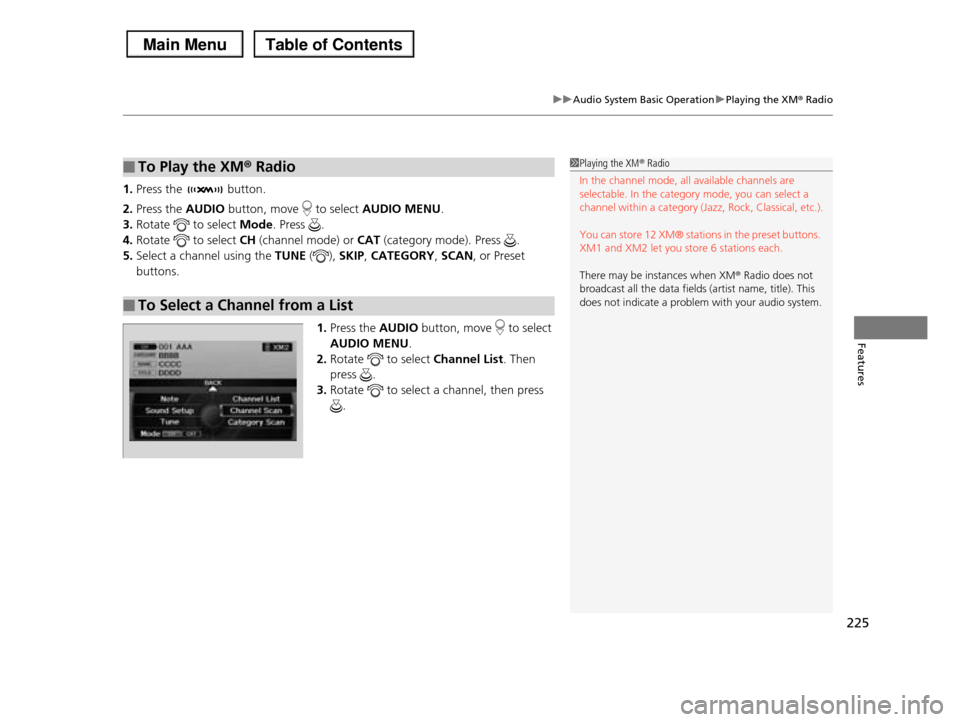
1.Press the button.
2.Press the AUDIO button, move to select AUDIO MENU.
3.Rotate to select Mode. Press .
4.Rotate to select CH (channel mode) or CAT (category mode). Press .
5.Select a channel using the TUNE (), SKIP, CATEGORY, SCAN, or Preset
buttons.
1.Press the AUDIO button, move to select
AUDIO MENU.
2.Rotate to select Channel List. Then
press .
3.Rotate to select a channel, then press
.
■To Play the XM® Radio
■To Select a Channel from a List
1Playing the XM® Radio
In the channel mode, all available channels are selectable. In the category mode, you can select a
channel within a category (Jazz, Rock, Classical, etc.).
You can store 12 XM® stations in the preset buttons.
XM1 and XM2 let you store 6 stations each.
There may be instances when XM® Radio does not
broadcast all the data fields (artist name, title). This
does not indicate a problem with your audio system.
Page 254 of 488
253
uuRear Entertainment System*uOperating the System
Continued
Features
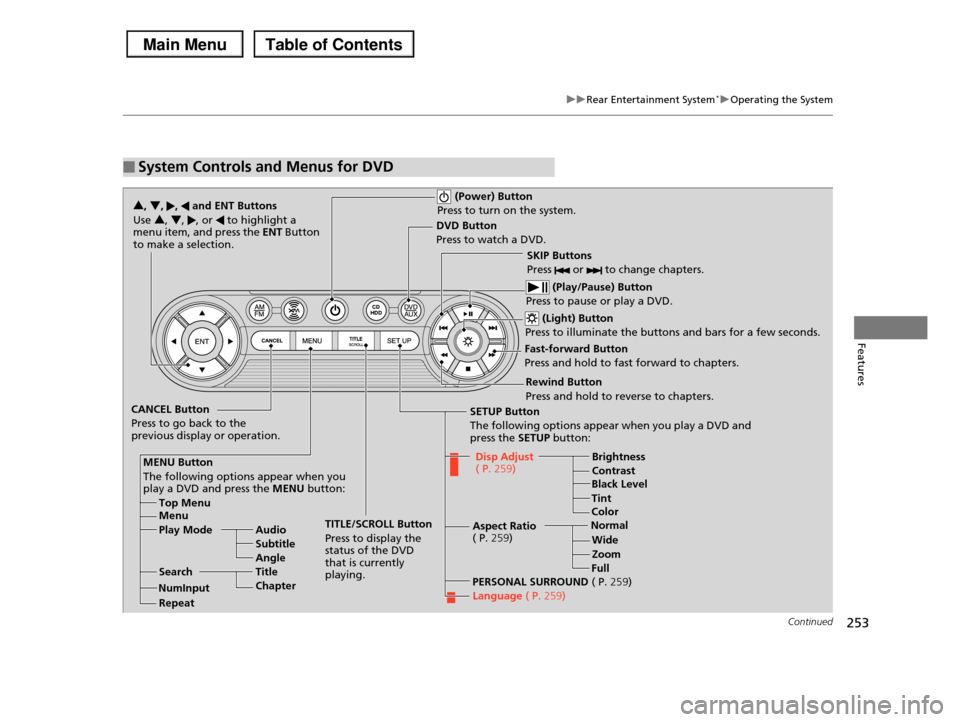
■System Controls and Menus for DVD
(Power) Button
Press to turn on the system.
DVD Button
Press to watch a DVD.
(Light) Button
Press to illuminate the buttons and bars for a few seconds.
SKIP Buttons
Press or to change chapters.
(Play/Pause) Button
Press to pause or play a DVD.
TITLE/SCROLL Button
Press to display the status of the DVD that is currently playing.
MENU Button
The following options appear when you play a DVD and press the MENU button:
Top Menu Menu
Play Mode Audio
Subtitle
Angle
SearchTitle
Chapter
Repeat
SETUP Button
The following options appear when you play a DVD and press the SETUP button:
Disp Adjust ( P.259)Brightness
ContrastBlack Level
Color
CANCEL Button
Press to go back to the previous display or operation.
3, 4, , and ENT Buttons
Use 3, 4, , or to highlight a menu item, and press the ENT Button to make a selection.
Tint
Normal
Wide
Zoom
Full
Aspect Ratio ( P.259)
PERSONAL SURROUND ( P.259)
Language ( P.259)
Rewind Button
Press and hold to reverse to chapters.
Fast-forward Button
Press and hold to fast forward to chapters.
NumInput