remote control HONDA PILOT 2013 2.G Owner's Manual
[x] Cancel search | Manufacturer: HONDA, Model Year: 2013, Model line: PILOT, Model: HONDA PILOT 2013 2.GPages: 488, PDF Size: 10.18 MB
Page 217 of 488
216
Features
Audio System Basic Operation
To use the audio system function, the ignition switch must be in ACCESSORY (q or
ON (w.
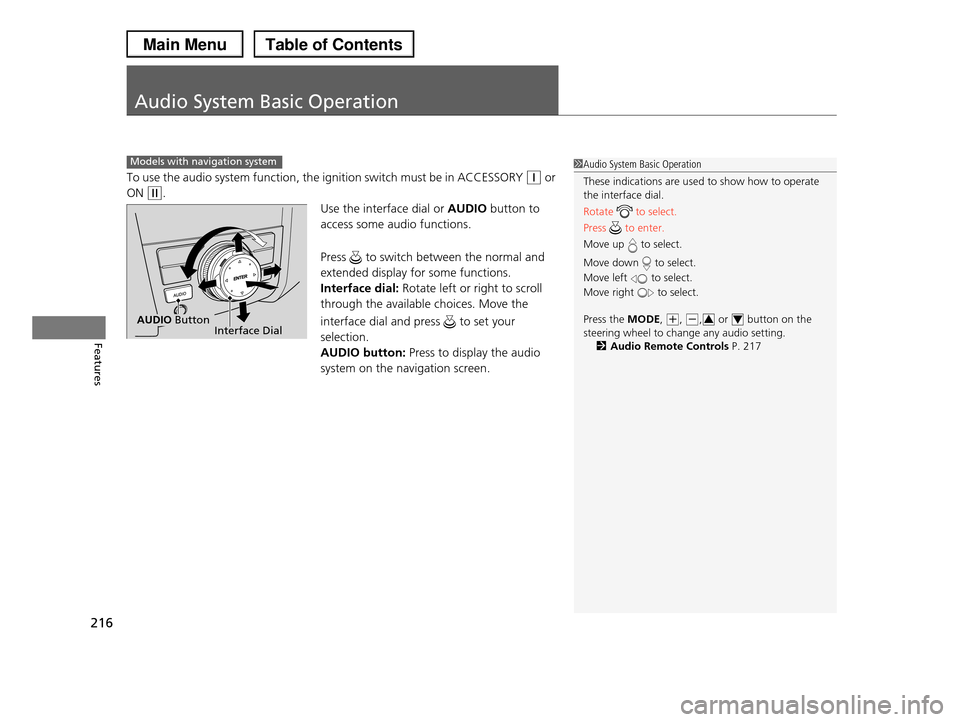
Use the interface dial or AUDIO button to
access some audio functions.
Press to switch between the normal and
extended display for some functions.
Interface dial: Rotate left or right to scroll
through the available choices. Move the
interface dial and press to set your
selection.
AUDIO button: Press to display the audio
system on the navigation screen.
Models with navigation system1Audio System Basic Operation
These indications are used to show how to operate the interface dial.
Rotate to select.
Press to enter.
Move up to select.
Move down to select.
Move left to select.
Move right to select.
Press the MODE, (+, (-, or button on the
steering wheel to change any audio setting.2Audio Remote Controls P. 217
34Interface DialAUDIO Button
Page 218 of 488
217
uuAudio System Basic OperationuAudio Remote Controls
Features
Audio Remote Controls
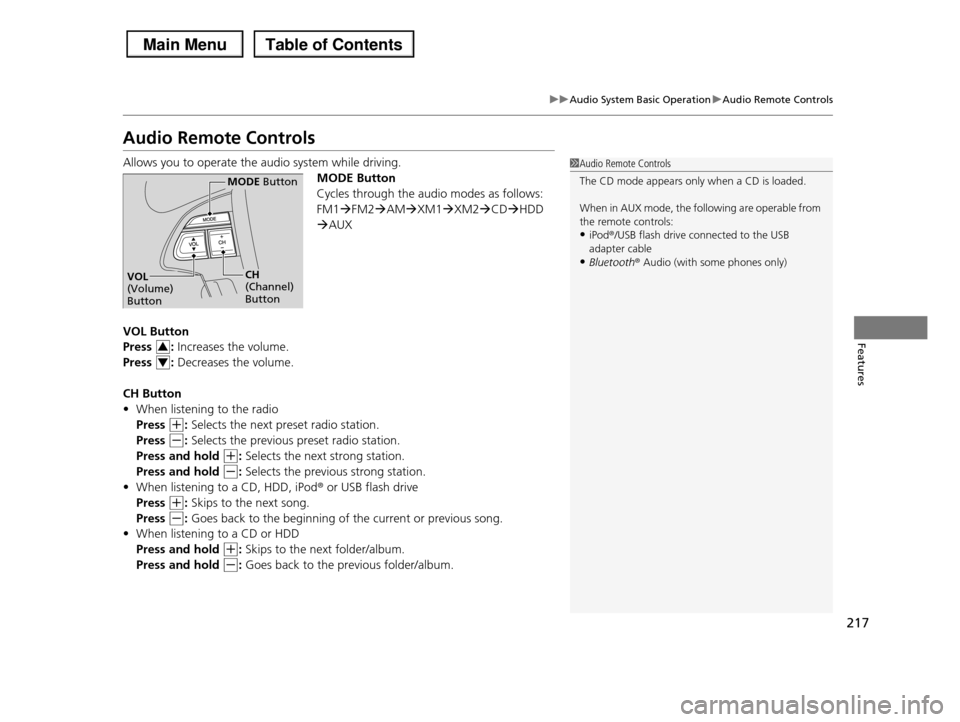
Allows you to operate the audio system while driving.
MODE Button
Cycles through the audio modes as follows:
FM1FM2AMXM1XM2CDHDD
AUX
VOL Button
Press : Increases the volume.
Press : Decreases the volume.
CH Button
•When listening to the radio
Press (+: Selects the next preset radio station.
Press (-: Selects the previous preset radio station.
Press and hold (+: Selects the next strong station.
Press and hold (-: Selects the previous strong station.
•When listening to a CD, HDD, iPod® or USB flash drive
Press (+: Skips to the next song.
Press (-: Goes back to the beginning of the current or previous song.
•When listening to a CD or HDD
Press and hold (+: Skips to the next folder/album.
Press and hold (-: Goes back to the previous folder/album.
1Audio Remote Controls
The CD mode appears only when a CD is loaded.
When in AUX mode, the following are operable from
the remote controls:•iPod®/USB flash drive connected to the USB
adapter cable
•Bluetooth® Audio (with some phones only)
MODE Button
CH (Channel) Button
VOL (Volume) Button
3
4
Page 222 of 488
Continued221
uuAudio System Basic OperationuPlaying the AM/FM Radio
Features
Use the auto select feature to scan both bands and store the strongest station in
each preset.
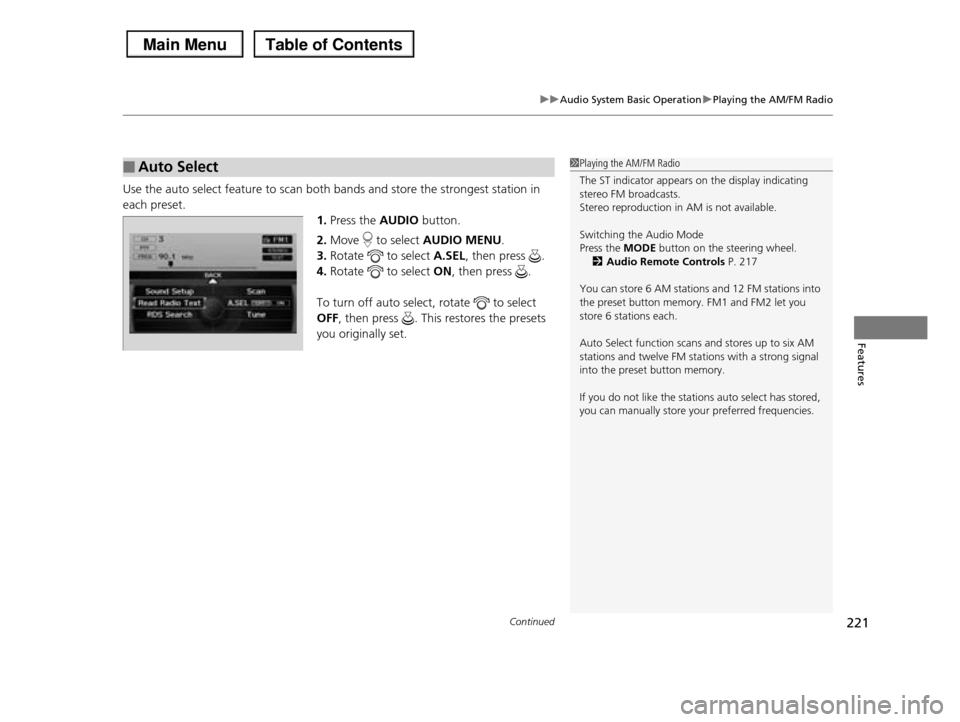
1.Press the AUDIO button.
2.Move to select AUDIO MENU.
3.Rotate to select A.SEL, then press .
4.Rotate to select ON, then press .
To turn off auto select, rotate to select
OFF, then press . This restores the presets
you originally set.
■Auto Select1Playing the AM/FM Radio
The ST indicator appears on the display indicating stereo FM broadcasts.
Stereo reproduction in AM is not available.
Switching the Audio Mode
Press the MODE button on the steering wheel.
2Audio Remote Controls P. 217
You can store 6 AM stations and 12 FM stations into
the preset button memory. FM1 and FM2 let you store 6 stations each.
Auto Select function scans and stores up to six AM stations and twelve FM stations with a strong signal
into the preset button memory.
If you do not like the stations auto select has stored,
you can manually store your preferred frequencies.
Page 253 of 488
uuRear Entertainment System*uOperating the System
252
Features
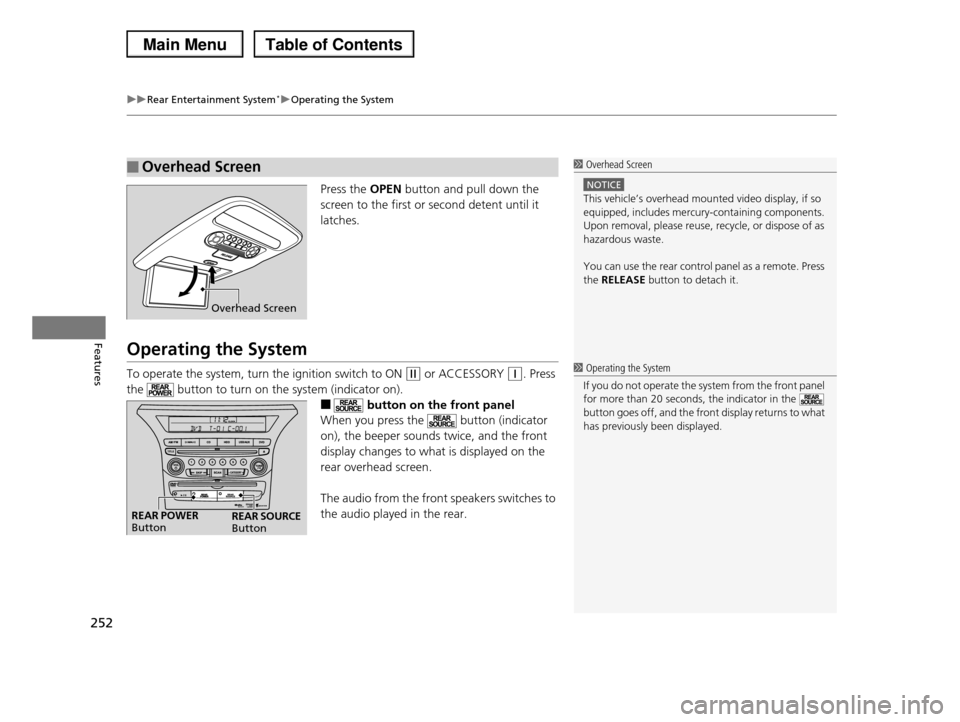
Press the OPEN button and pull down the
screen to the first or second detent until it
latches.
Operating the System
To operate the system, turn the ignition switch to ON (w or ACCESSORY (q. Press
the button to turn on the system (indicator on).
■ button on the front panel
When you press the button (indicator
on), the beeper sounds twice, and the front
display changes to what is displayed on the
rear overhead screen.
The audio from the front speakers switches to
the audio played in the rear.
■Overhead Screen1 Overhead Screen
NOTICE
This vehicle’s overhead mounted video display, if so
equipped, includes mercury-containing components. Upon removal, please reuse, recycle, or dispose of as
hazardous waste.
You can use the rear control panel as a remote. Press
the RELEASE button to detach it.
Overhead Screen
1 Operating the System
If you do not operate the system from the front panel
for more than 20 seconds, the indicator in the button goes off, and the front display returns to what
has previously been displayed.
REAR POWER ButtonREAR SOURCE Button
Page 262 of 488
261
uuRear Entertainment System*uOperating the System
Continued
Features
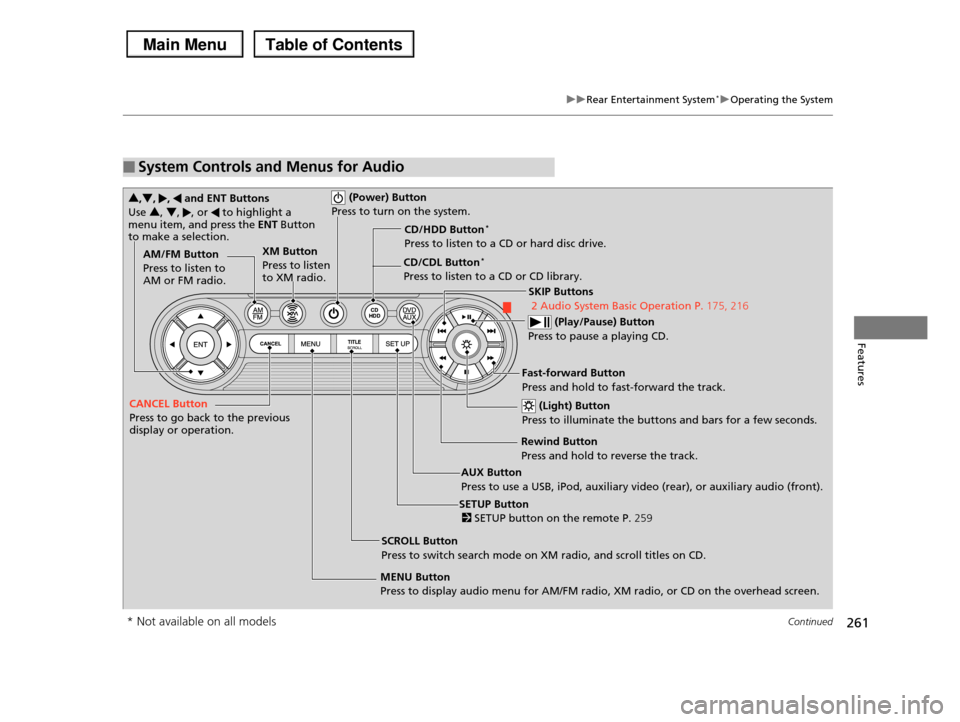
■System Controls and Menus for Audio
(Power) Button
Press to turn on the system.
AUX Button
Press to use a USB, iPod, auxiliary video (rear), or auxiliary audio (front).
(Light) Button
Press to illuminate the buttons and bars for a few seconds.
SKIP Buttons
2 Audio System Basic Operation P.175, 216
(Play/Pause) Button
Press to pause a playing CD.
SCROLL Button
Press to switch search mode on XM radio, and scroll titles on CD.
CANCEL Button
Press to go back to the previous display or operation.
3,4, , and ENT Buttons
Use 3, 4, , or to highlight a menu item, and press the ENT Button to make a selection.
CD/CDL Button*
Press to listen to a CD or CD library.
AM/FM Button
Press to listen to AM or FM radio.
SETUP Button
2 SETUP button on the remote P.259
XM Button
Press to listen to XM radio.
MENU Button
Press to display audio menu for AM/FM radio, XM radio, or CD on the overhead screen.
CD/HDD Button*
Press to listen to a CD or hard disc drive.
Rewind Button
Press and hold to reverse the track.
Fast-forward Button
Press and hold to fast-forward the track.
* Not available on all models
Page 277 of 488
276
Features
HomeLink® Universal Transceiver*
The HomeLink® Universal Transceiver can be programmed to operate up to three
remote controlled devices around your home, such as garage doors, lighting, or
home security systems.
Refer to the safety information that comes with your garage door opener to test that
the safety features are functioning properly. If you do not have the safety
information, contact the manufacturer.
Before programming HomeLink, make sure that people and objects are out of the
way of the garage or gate to prevent potential injury or damage.
When programming a garage door opener, park just outside the garage door’s
path.
Training HomeLink
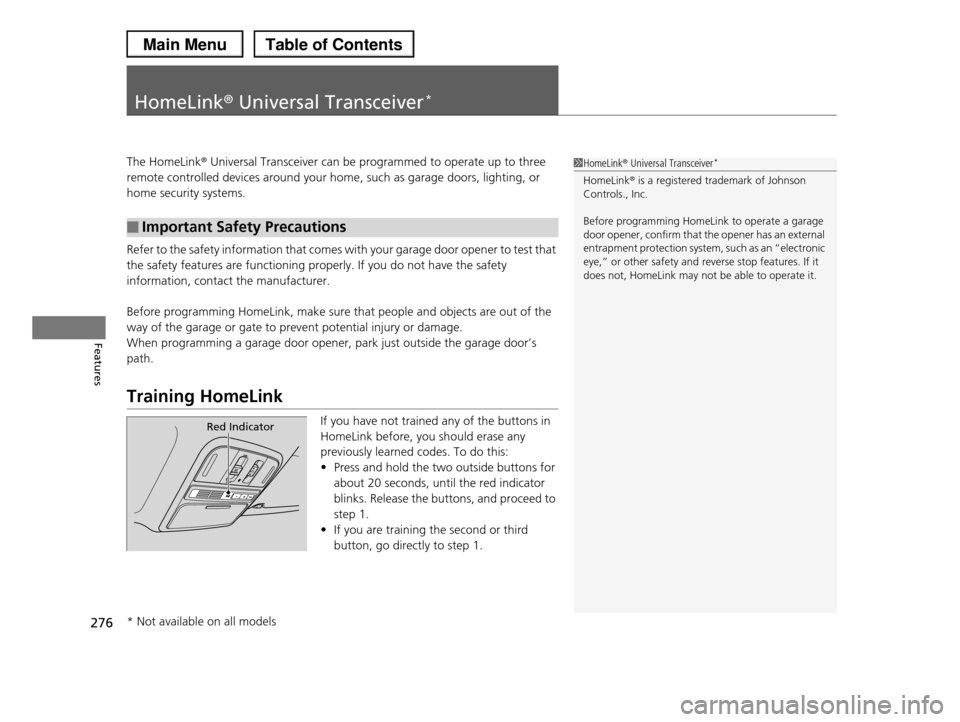
If you have not trained any of the buttons in
HomeLink before, you should erase any
previously learned codes. To do this:
•Press and hold the two outside buttons for
about 20 seconds, until the red indicator
blinks. Release the buttons, and proceed to
step 1.
•If you are training the second or third
button, go directly to step 1.
■Important Safety Precautions
1HomeLink® Universal Transceiver*
HomeLink® is a registered trademark of Johnson Controls., Inc.
Before programming HomeLink to operate a garage door opener, confirm that the opener has an external
entrapment protection system, such as an “electronic
eye,” or other safety and reverse stop features. If it does not, HomeLink may not be able to operate it.
Red Indicator
* Not available on all models
Page 278 of 488
277
uuHomeLink® Universal Transceiver*uTraining HomeLink
Features
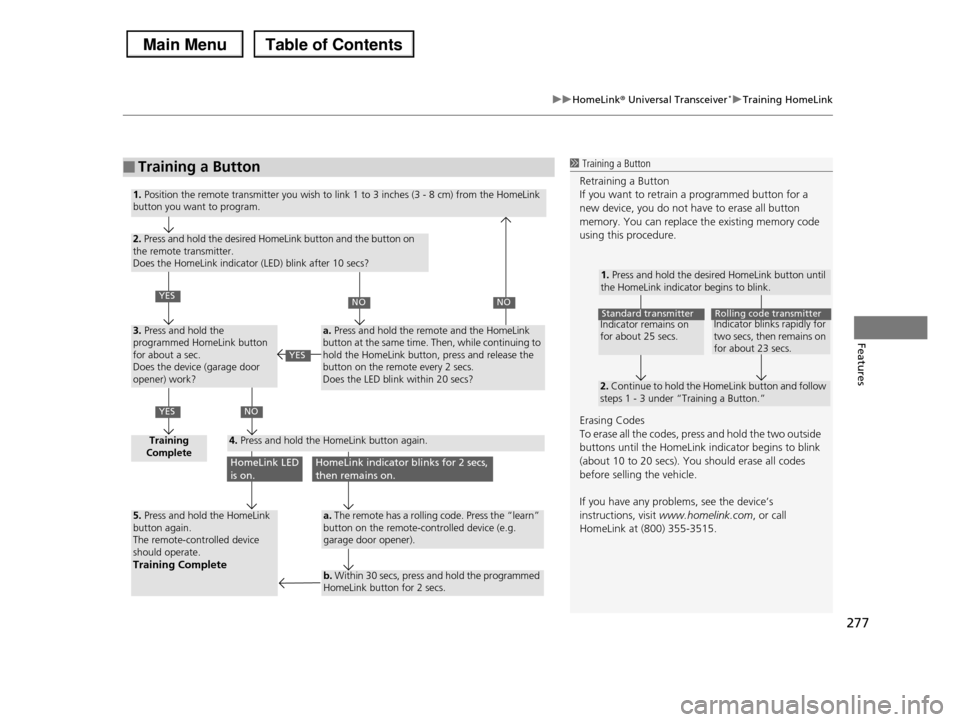
■Training a Button1 Training a Button
Retraining a Button
If you want to retrain a programmed button for a new device, you do not have to erase all button
memory. You can replace the existing memory code
using this procedure.
Erasing Codes
To erase all the codes, press and hold the two outside
buttons until the HomeLink indicator begins to blink (about 10 to 20 secs). You should erase all codes
before selling the vehicle.
If you have any problems, see the device’s
instructions, visit www.homelink.com, or call
HomeLink at (800) 355-3515.
1. Press and hold the desired HomeLink button until the HomeLink indicator begins to blink.
2. Continue to hold the HomeLink button and follow steps 1 - 3 under “Training a Button.”
Indicator remains on for about 25 secs.
Standard transmitterIndicator blinks rapidly for two secs, then remains on for about 23 secs.
Rolling code transmitter
1. Position the remote transmitter you wish to link 1 to 3 inches (3 - 8 cm) from the HomeLink button you want to program.
2. Press and hold the desired HomeLink button and the button on the remote transmitter. Does the HomeLink indicator (LED) blink after 10 secs?
3. Press and hold the programmed HomeLink button for about a sec. Does the device (garage door opener) work?
Training Complete4. Press and hold the HomeLink button again.
5. Press and hold the HomeLink button again.The remote-controlled device should operate.Training Complete
a. Press and hold the remote and the HomeLink button at the same time. Then, while continuing to hold the HomeLink button, press and release the button on the remote every 2 secs.Does the LED blink within 20 secs?
a. The remote has a rolling code. Press the “learn” button on the remote-controlled device (e.g. garage door opener).
b. Within 30 secs, press and hold the programmed HomeLink button for 2 secs.
YES
YES
NONO
NO
HomeLink LED is on.HomeLink indicator blinks for 2 secs, then remains on.
YES
Page 279 of 488
278
Features
Bluetooth® HandsFreeLink®
Bluetooth® HandsFreeLink® (HFL) allows you to place and receive phone calls using your vehicle's audio system, without handling your cell phone.
Using HFL
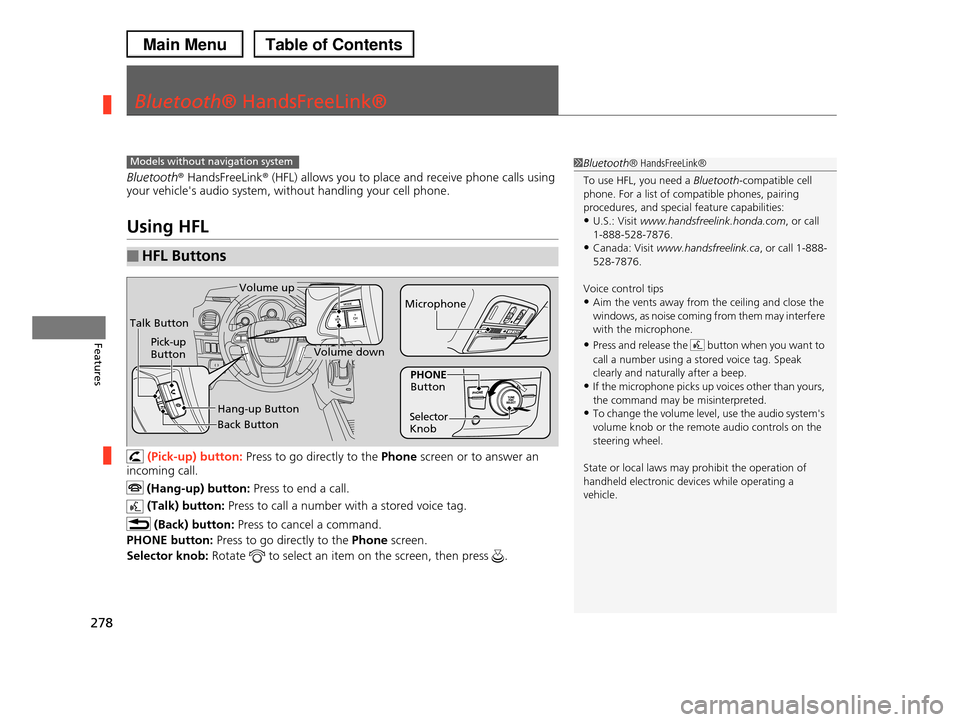
(Pick-up) button: Press to go directly to the Phone screen or to answer an
incoming call.
(Hang-up) button: Press to end a call.
(Talk) button: Press to call a number with a stored voice tag.
(Back) button: Press to cancel a command.
PHONE button: Press to go directly to the Phone screen.
Selector knob: Rotate to select an item on the screen, then press .
■HFL Buttons
1Bluetooth® HandsFreeLink®
To use HFL, you need a Bluetooth-compatible cell phone. For a list of compatible phones, pairing
procedures, and special feature capabilities:
•U.S.: Visit www.handsfreelink.honda.com, or call 1-888-528-7876.
•Canada: Visit www.handsfreelink.ca, or call 1-888-
528-7876.
Voice control tips
•Aim the vents away from the ceiling and close the windows, as noise coming from them may interfere
with the microphone.
•Press and release the button when you want to
call a number using a stored voice tag. Speak clearly and naturally after a beep.
•If the microphone picks up voices other than yours,
the command may be misinterpreted.•To change the volume level, use the audio system's
volume knob or the remote audio controls on the
steering wheel.
State or local laws may prohibit the operation of
handheld electronic devices while operating a vehicle.
Models without navigation system
Talk Button
Volume up
Microphone
Hang-up Button
Pick-up ButtonVolume down
Selector Knob
PHONE Button
Back Button
Page 302 of 488
301Continued
Features
Bluetooth® HandsFreeLink®
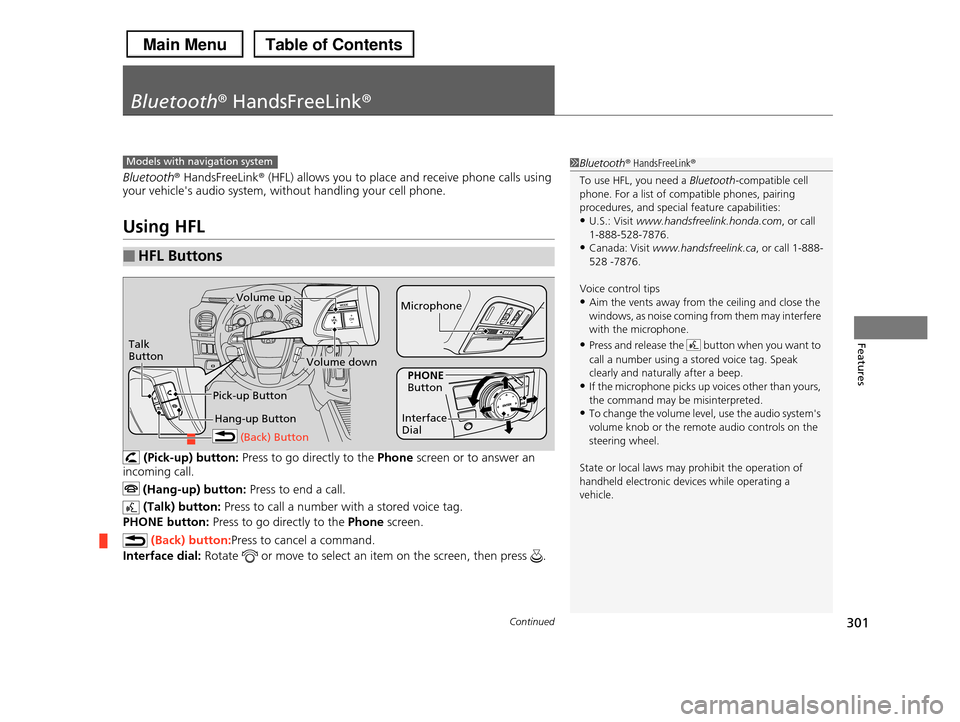
Bluetooth® HandsFreeLink® (HFL) allows you to place and receive phone calls using your vehicle's audio system, without handling your cell phone.
Using HFL
(Pick-up) button: Press to go directly to the Phone screen or to answer an
incoming call.
(Hang-up) button: Press to end a call.
(Talk) button: Press to call a number with a stored voice tag.
PHONE button: Press to go directly to the Phone screen.
(Back) button:Press to cancel a command.
Interface dial: Rotate or move to select an item on the screen, then press .
■HFL Buttons
1Bluetooth® HandsFreeLink®
To use HFL, you need a Bluetooth-compatible cell phone. For a list of compatible phones, pairing
procedures, and special feature capabilities:
•U.S.: Visit www.handsfreelink.honda.com, or call 1-888-528-7876.
•Canada: Visit www.handsfreelink.ca, or call 1-888-
528 -7876.
Voice control tips
•Aim the vents away from the ceiling and close the windows, as noise coming from them may interfere
with the microphone.
•Press and release the button when you want to
call a number using a stored voice tag. Speak clearly and naturally after a beep.
•If the microphone picks up voices other than yours,
the command may be misinterpreted.•To change the volume level, use the audio system's
volume knob or the remote audio controls on the
steering wheel.
State or local laws may prohibit the operation of
handheld electronic devices while operating a vehicle.
Models with navigation system
Talk Button
Volume upMicrophone
Hang-up Button
Pick-up Button
Volume down
Interface Dial
PHONE Button
(Back) Button
Page 378 of 488
377
Maintenance
This chapter discusses basic maintenance.
Before Performing MaintenanceInspection and Maintenance ............ 378Safety When Performing Maintenance..... 379Parts and Fluids Used in Maintenance Service ........................................... 380Maintenance Minder™.................... 381Maintenance Under the HoodMaintenance Items Under the Hood ..... 389Opening the Hood ........................... 390 Recommended Engine Oil ................ 392 Oil Check ......................................... 393Adding Engine Oil ............................ 394Changing the Engine Oil and Oil Filter ..... 395
Engine Coolant ................................ 397Transmission Fluid ............................ 399Brake Fluid ....................................... 400 Power Steering Fluid ........................ 400 Refilling Window Washer Fluid......... 401Replacing Light Bulbs....................... 402Checking and Maintaining Wiper Blades.... 410Checking and Maintaining TiresChecking Tires ................................. 414Tire and Loading Information Label ...... 415Tire Labeling .................................... 415DOT Tire Quality Grading (U.S. Vehicles)....... 417Wear Indicators................................ 419
Tire Service Life ................................ 419Tire and Wheel Replacement ........... 420Tire Rotation .................................... 421 Winter Tires ..................................... 422Battery............................................... 423Remote Transmitter CareReplacing the Button Battery ........... 424Remote Control and Wireless Headphone Care*........................... 425Climate Control System Maintenance..... 427Cleaning
Interior Care .................................... 428 Exterior Care.................................... 430
* Not available on all models