oil level HONDA PILOT 2014 2.G Owners Manual
[x] Cancel search | Manufacturer: HONDA, Model Year: 2014, Model line: PILOT, Model: HONDA PILOT 2014 2.GPages: 488, PDF Size: 12.11 MB
Page 9 of 488
8
Quick Reference Guide
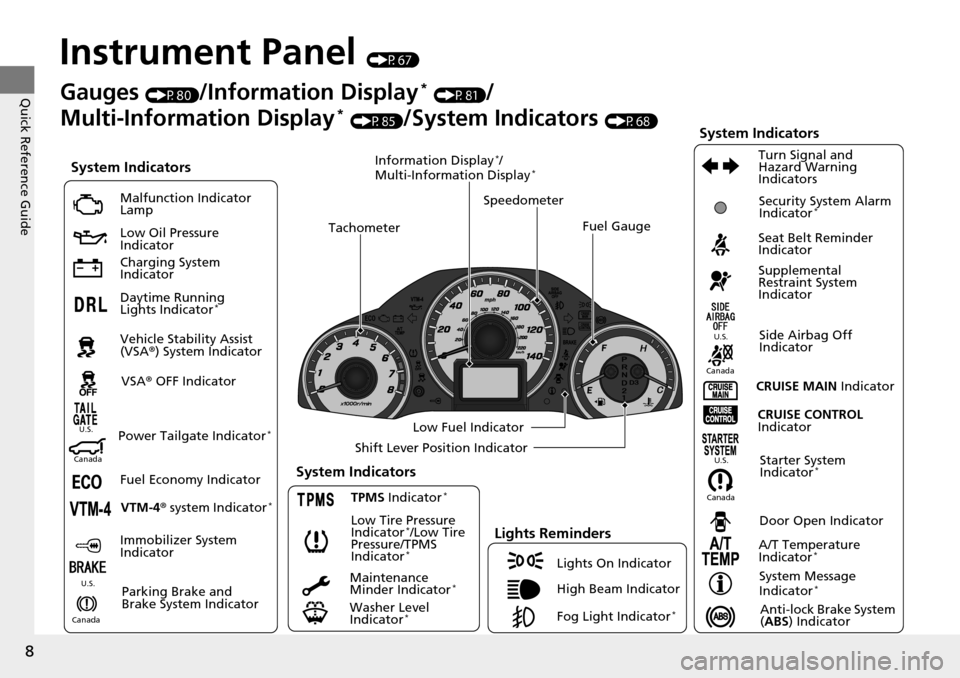
Instrument Panel (P67)
System Indicators
Malfunction Indicator
Lamp
Low Oil Pressure
Indicator
Charging System
Indicator
Daytime Running
Lights Indicator
*
Vehicle Stability Assist
(VSA® ) System Indicator
VSA ® OFF Indicator
Low Tire Pressure
Indicator
*/Low Tire
Pressure/TPMS
Indicator
*
Lights Reminders
Lights On Indicator
High Beam Indicator
Fog Light Indicator
*
Immobilizer System
Indicator Seat Belt Reminder
Indicator
System Indicators
CRUISE CONTROL
Indicator
Parking Brake and
Brake System Indicator Supplemental
Restraint System
Indicator
Side Airbag Off
Indicator
Door Open Indicator
CRUISE MAIN
Indicator
Tachometer
Speedometer
Fuel Gauge
Low Fuel Indicator
Shift Lever Position Indicator
System Message
Indicator
*
Gauges (P80)/Information Display * (P81)/
Multi-Information Display
* (P85)/System Indicators (P68)
Fuel Economy Indicator VTM-4 r system Indicator
*TPMS Indicator *
Maintenance
Minder Indicator *
Washer Level
Indicator *
A/T Temperature
Indicator *
Turn Signal and
Hazard Warning
Indicators
Starter System
Indicator *System Indicators
CanadaU.S.
Canada
U.S.
Anti-lock Brake System
(
ABS ) Indicator
Power Tailgate Indicator *
Security System Alarm
Indicator *
Information Display */
Multi-Information Display *
Canada U.S.
CanadaU.S.
Page 69 of 488
68
Instrument Panel
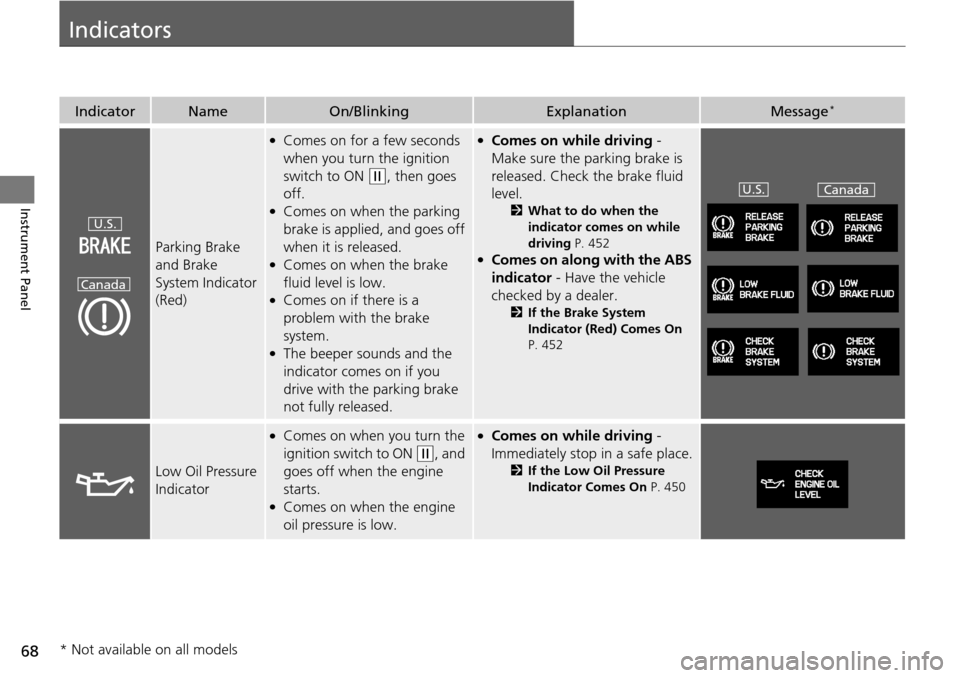
Indicators
IndicatorNameOn/BlinkingExplanationMessage *
Parking Brake
and Brake
System Indicator
(Red)
●Comes on for a few seconds
when you turn the ignition
switch to ON
(w
, then goes
off.
●Comes on when the parking
brake is applied, and goes off
when it is released.
●Comes on when the brake
fluid level is low.
●Comes on if there is a
problem with the brake
system.
●The beeper sounds and the
indicator comes on if you
drive with the parking brake
not fully released.
●Comes on while driving -
Make sure the
parking brake is
released. Check the brake fluid
level.
2 What to do when the
indicator comes on while
driving P. 452
●Comes on along with the ABS
indicator - Have the vehicle
checked by
a dealer.
2 If the Brake System
Indicator (Red) Comes On
P. 452
Low Oil Pressure
Indicator
●Comes on when you turn the
ignition switch to ON
(w
, and
goes off when the engine
starts.
●Comes on when the engine
oil pressure is low.
●Comes on while driving -
Im
mediately stop in a safe place.
2 If the Low Oil Pressure
Indicator Comes On P. 450
U.S.
Canada
U.S.Canada
* Not available on all models
Page 379 of 488
378
Maintenance
Before Performing Maintenance
Inspection and Maintenance
For your safety, perform all listed inspections and maintenance to keep your vehicle
in good condition. If you become aware of any abnormality (noise, smell, insufficient
brake fluid, oil residue on the ground, etc.), have your vehicle inspected by a dealer.
(Note, however, that service at a dealer is not mandatory to keep your warranties in
effect.) Refer to the separate maintena nce booklet for detailed maintenance and
inspection information.
■Daily inspections
Perform inspections before long distance tri ps
, when washing the vehicle, or when
refueling.
■Periodic inspections
• Che
ck the automatic transmi ssion fluid level monthly.
2Automatic Transmission Fluid P. 399
• Check the brake fluid level monthly.
2 Checking the Brake Fluid P. 400
• Check the tire pressure monthly. Examin e the tread for wear and foreign objects.
2Checking and Maintaining Tires P. 414
• Check the operation of the exterior lights monthly.
2 Replacing Light Bulbs P. 402
• Check the condition of the wiper bl ades at least every six months.
2Checking and Maintaining Wiper Blades P. 410
■Types of Inspection and Maintenance
1Inspection and Maintenance
Maintenance, replacement, or repair of
emissions control devices and systems may be
done by any automotive repair establishment or
individuals using parts that are “certified” to
EPA standards.
According to state and fede ral regulations, failure to
perform maintenance on the maintenance main
items marked with # will not void your emissions
warranties. However, all ma intenance services should
be performed in accordan ce with the intervals
indicated by the information display
*/multi-
information display *.
2 Maintenance Service Items P. 383
If you want to perform complex maintenance tasks
that require more skills and tools, purchase the
service manual.
2 Authorized Manuals P. 474
If you want to perform ma intenance yourself, make
sure that you have the necessary tools and skills first.
After performing ma intenance, update the records in
the separate maintenance booklet.
U.S. models
* Not available on all models
Page 384 of 488
383
uu Maintenance Minder™ u To Use Maintenance MinderTM
Continued
Maintenance
■Maintenance Service Items1Maintenance Service Items
•Independent of the Maintenance Minder
information, replace the brake fluid every 3 years.
•Inspect idle speed every 160,000 miles (256,000
km).
•Adjust the valves during services A, B, 1, 2, or 3 if
they are noisy.
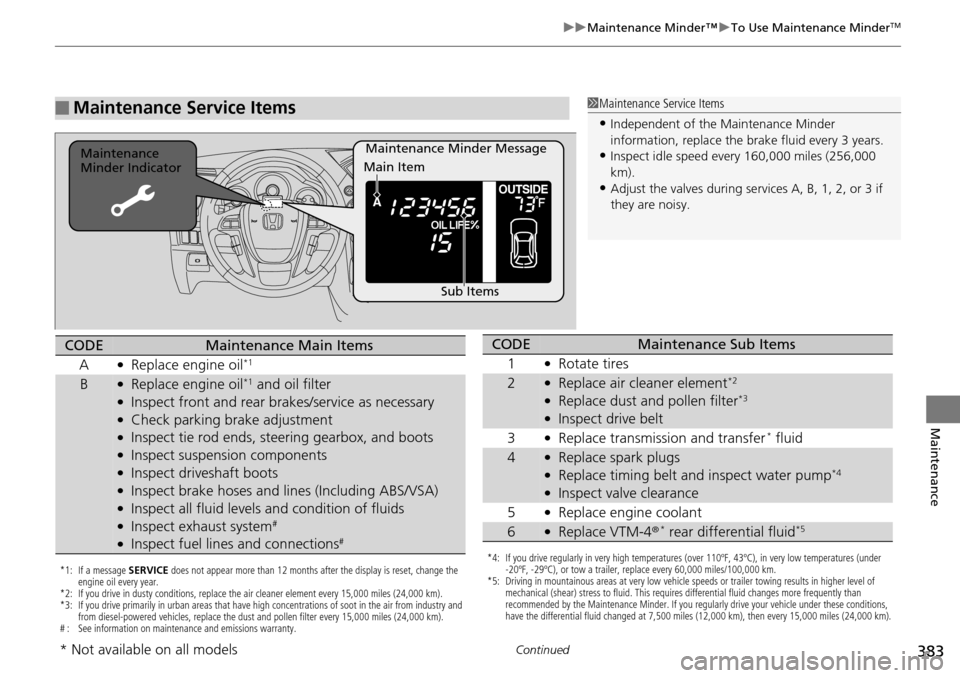
Maintenance Minder Message
Maintenance
Minder Indicator
Sub Items
Main Item
*1: If a message
SERVICE does not appear more than 12 months after the display is reset, change the
engine oil every year.
*2: If you drive in dusty conditions, replace the air cleaner element every 15,000 miles (24,000 km).
*3: If you drive primarily in urban areas that have high concentrations of soot in the air from industry and from diesel-powered vehicles, replace the dust and pollen filter every 15,000 miles (24,000 km).
# : See information on maintenance and emissions warranty.
CODEMaintenance Main Items
A
●Replace engine oil*1
B●Replace engine oil*1 and oil filter●Inspect front and rear bra kes/service as necessary●Check parking brake adjustment●Inspect tie rod ends, steering gearbox, and boots●Inspect suspension components●Inspect driveshaft boots●Inspect brake hoses and li nes (Including ABS/VSA)●Inspect all fluid levels and condition of fluids●Inspect exhaust system#
●Inspect fuel lines and connections#
*4: If you drive regularly in very high temperatures (over 110ºF, 43ºC), in very low temperatures (under
-20ºF, -29ºC), or tow a trailer, replace every 60,000 miles/100,000 km.
*5: Driving in mountainous areas at very low vehicle speeds or trailer towing results in higher level of mechanical (shear) stress to fluid. This requires differential fluid changes more frequently than
recommended by the Maintenance Minder. If you regularly drive your vehicle under these conditions,
have the differential fluid changed at 7,500 miles (12,000 km), then every 15,000 miles (24,000 km).
CODEMaintenance Sub Items
1
●Rotate tires
2●Replace air cleaner element*2
●Replace dust and pollen filter*3
●Inspect drive belt
3
●Replace transmission and transfer * fluid
4●Replace spark plugs●Replace timing belt and inspect water pump*4
●Inspect valve clearance
5
●Replace engine coolant
6●Replace VTM-4 r * rear differential fluid*5
* Not available on all models
Page 388 of 488
387
uu Maintenance Minder™ u To Use Maintenance MinderTM
Continued
Maintenance
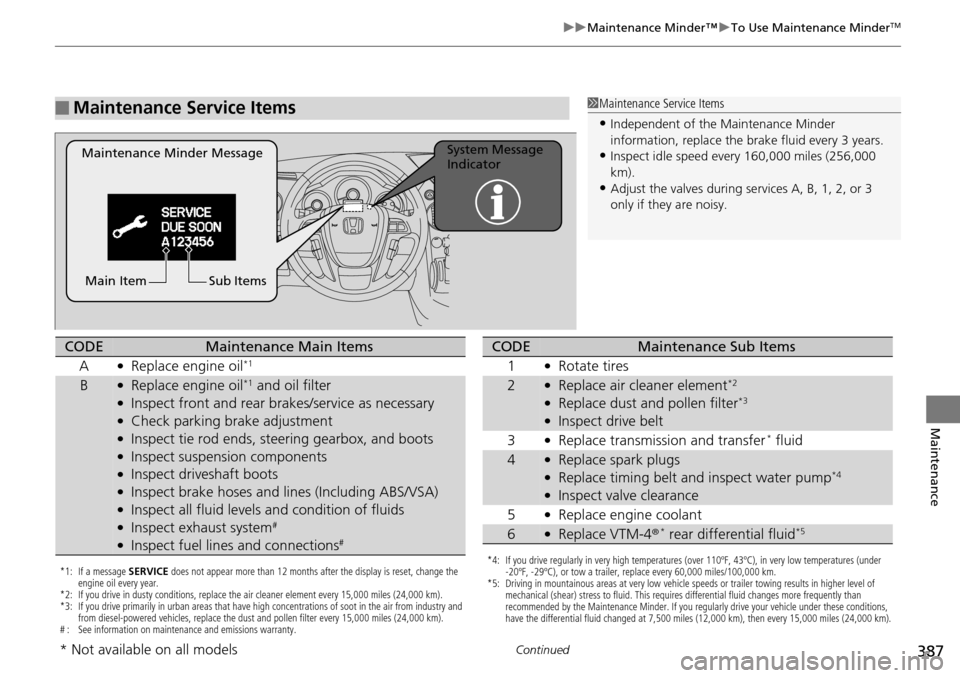
■Maintenance Service Items1Maintenance Service Items
•Independent of the Maintenance Minder
information, replace the brake fluid every 3 years.
•Inspect idle speed every 160,000 miles (256,000
km).
•Adjust the valves during services A, B, 1, 2, or 3
only if they are noisy.
Maintenance Minder Message System Message
Indicator
Sub Items
Main Item
*1: If a message SERVICE does not appear more than 12 months after the display is reset, change the
engine oil every year.
*2: If you drive in dusty conditions, replace the air cleaner element every 15,000 miles (24,000 km).
*3: If you drive primarily in urban areas that have high concentrations of soot in the air from industry and from diesel-powered vehicles, replace the dust and pollen filter every 15,000 miles (24,000 km).
# : See information on maintenance and emissions warranty.
CODEMaintenance Main Items
A
●Replace engine oil*1
B●Replace engine oil*1 and oil filter●Inspect front and rear bra kes/service as necessary●Check parking brake adjustment●Inspect tie rod ends, steering gearbox, and boots●Inspect suspension components●Inspect driveshaft boots●Inspect brake hoses and li nes (Including ABS/VSA)●Inspect all fluid levels and condition of fluids●Inspect exhaust system#
●Inspect fuel lines and connections#
*4: If you drive regularly in very high temperatures (over 110ºF, 43ºC), in very low temperatures (under
-20ºF, -29ºC), or tow a trailer, replace every 60,000 miles/100,000 km.
*5: Driving in mountainous areas at very low vehicle speeds or trailer towing results in higher level of mechanical (shear) stress to fluid. This requires differential fluid changes more frequently than
recommended by the Maintenance Minder. If you regularly drive your vehicle under these conditions,
have the differential fluid changed at 7,500 miles (12,000 km), then every 15,000 miles (24,000 km).
CODEMaintenance Sub Items
1
●Rotate tires
2●Replace air cleaner element*2
●Replace dust and pollen filter*3
●Inspect drive belt
3
●Replace transmission and transfer * fluid
4●Replace spark plugs●Replace timing belt and inspect water pump*4
●Inspect valve clearance
5
●Replace engine coolant
6●Replace VTM-4 r * rear differential fluid*5
* Not available on all models
Page 394 of 488
393
uu Maintenance Under the Hood u Oil Check
Maintenance
Oil Check
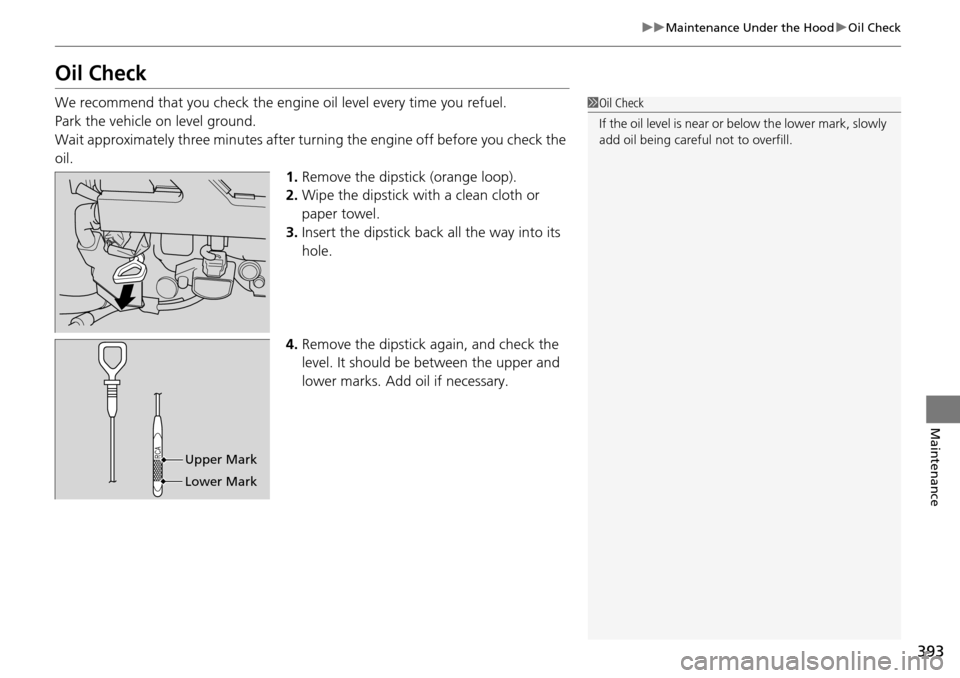
We recommend that you check the engine oil level every time you refuel.
Park the vehicle on level ground.
Wait approximately three minutes after turn ing the e
ngine off before you check the
oil. 1.Remov
e the dipstick (orange loop).
2.Wi
pe the dipstick with a clean cloth or
paper towel.
3. Insert
the dipstick back all the way into its
hole.
4. Remove the
dipstick again, and check the
level. It should be between the upper and
lower marks. Add oil if necessary.
1 Oil Check
If the oil level is near or below the lower mark, slowly
add oil being careful not to overfill.
Upper Mark
Lower Mark
Page 397 of 488
uu Maintenance Under the Hood u Changing the Engine Oil and Oil Filter
396
Maintenance
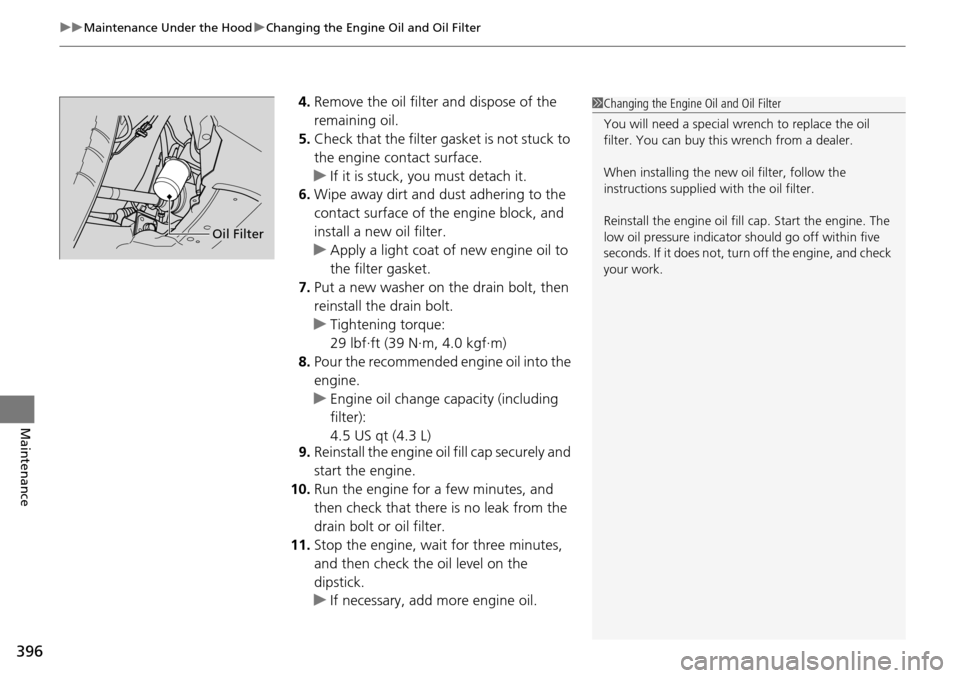
4. Remove the oil filter and dispose of the
remaining oil.
5.Check that the filter ga sket is not stuck to
the engine contact surface.
u If it
is stuck, you must detach it.
6. Wipe away
dirt and dust adhering to the
contact surface of the engine block, and
install a new oil filter.
u Appl
y a light coat of new engine oil to
the filter gasket.
7. Pu
t a new washer on the drain bolt, then
reinstall the drain bolt.
u Tighte
ning torque:
29 lbf∙ft (39 N∙m, 4.0 kgf∙m)
8. P
our the recommended engine oil into the
engine.
u Engi
ne oil change capacity (including
filter):
4.5 US qt (4.3 L)
9. Reins
tall the engine oil fill cap securely and
start the engine.
10. Run the engin
e for a few minutes, and
then check that there is no leak from the
drain bolt or oil filter.
11. S
top the engine, wait for three minutes,
and then check the oil level on the
dipstick.
u If neces
sary, add more engine oil.
1Changing the Engine Oil and Oil Filter
You will need a special wrench to replace the oil
filter. You can buy this wrench from a dealer.
When installing the new oil filter, follow the
instructions supplied with the oil filter.
Reinstall the engine oil fill cap. Start the engine. The
low oil pressure indicator should go off within five
seconds. If it does not, turn off the engine, and check
your work.
Oil Filter
Page 451 of 488
450
Handling the Unexpected
Indicator, Coming On/Blinking
If the Low Oil Pressure Indicator Comes On
■Reasons for the indicator to come on
Comes on when the engine oil pressure is low.
■What to do as soon as the indicator comes on
1. Immediately park the
vehicle on level ground in a safe place.
2. If
necessary, turn the ha zard warning lights on.
■What to do after parking the vehicle
1. Stop the e
ngine and let it sit for about three minutes.
2. Open the hoo
d and check the oil level.
2Oil Check P. 393
3. Start the engine and check th e low oil pressure indicator.
u The light
goes out: Start driving again.
u The l
ight does not go out within 10 seconds: Stop the engine and
contact a dealer for repairs immediately.
If the Charging System Indicator Comes On
■Reasons for the indicator to come on
Comes on when the battery is not being charged.
■What to do when the indicator comes on
Turn off the climate con trol system, rear
defogger, and other electrical
systems, and immediately contact a dealer for repairs.
1 If the Low Oil Pressure Indicator Comes On
NOTICE
Running the engine with low oil pressure can cause
serious mechanical damage almost immediately.
1If the Charging System Indicator Comes On
If you need to stop temporarily, do not turn off the
engine. Restarting the engi ne may rapidly discharge
the battery.
Page 455 of 488
454
Handling the Unexpected
Fuses
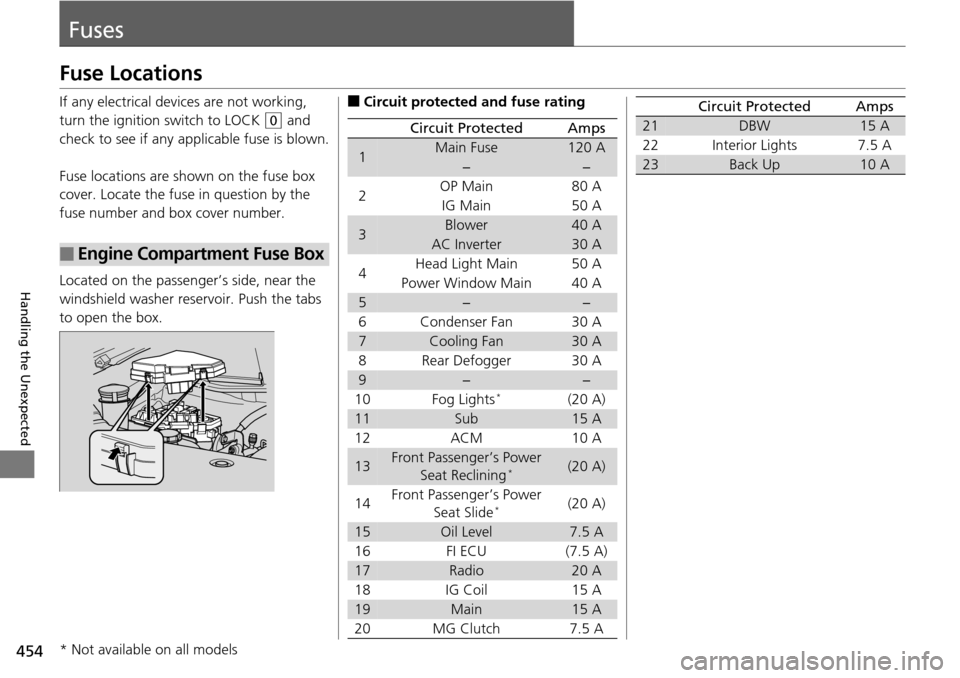
Fuse Locations
If any electrical devices are not working,
turn the ignition switch to LOCK
(0
and
check to see if any appl icable fuse is blown.
Fuse locations are shown on the fuse box
co
ver. Locate the fuse in question by the
fuse number and box cover number.
Located on the passenger’s side, near the
wi
ndshield washer reservoir. Push the tabs
to open the box.
■Engine Compartment Fuse Box
■Circuit protected and fuse rating
Circuit ProtectedAmps
1Main Fuse120 A
−−
2OP Main80 A
IG Main50 A
3Blower40 A
AC Inverter30 A
4 Head Light Main
50 A
Power Window Main 40
A
5−−
6 Condenser Fan 30
A
7Cooling Fan30 A
8 Rear Defogger 30
A
9−−
10 Fog Lights *(20 A)
11Sub15 A
12 ACM 10
A
13Front Passenger’s Power
Seat Reclining *(20 A)
14 Front Passenger’s Power
S
eat Slide *(20 A)
15Oil Level7.5 A
16 FI ECU (7.5
A)
17Radio20 A
18 IG Coil 15
A
19Main15 A
20 MG Clutch 7.5 A
21DBW15 A
22 Interior Lights 7.5
A
23Back Up10 A
Circuit ProtectedAmps
* Not available on all models
Page 482 of 488
481
Index
Glass (care)............................................... 431
Glove Box................................................. 152
H
Halogen Bulbs .................................. 402, 403
Handling the Unexpected ....................
... 433
HandsFreeLink ® (H
FL)...................... 278, 301
Automatic Answering ............................. 289
Automatic Import of Ce llular Ph
onebook and
Call History ................................... 291, 312
Automatic Transferring ................... 289, 311
HFL Buttons .................................... 278, 301
HFL Menus...................................... 280, 303
HFL Status Display ........................... 279, 302
Making a Call ................................. 295, 316
Options During a Call...................... 300, 319
Phone Setup ................................... 283, 305
Receiving a Call............................... 299, 319
Speed Dial ...................................... 292, 313
To Clear the System ........................ 290, 312
To Create a Security PIN .................. 288, 310
Hazard Warning Button ..
............................ 2
Head Restraints ................
........................ 141
Headlights ...
............................................. 125
Aiming.................................................... 402
Automatic Operation .............................. 126
Dimming......................................... 125, 127
Operating ............................................... 125
Heaters (Seat) ...................
........................ 162
HFL (HandsFreeLink ®) ......
................ 278, 301High Beam Indicator
...........
....................... 75
Hill Start Assist System ........
..................... 343
I
Identification Numbers............................ 466
Engine and Transmission ......................... 466
Vehicle Identification ............................... 466
Ignition Switch .....................
..................... 124
Illumination Control ............
..................... 130
Knob ....................................................... 130
Immobilizer System .............
..................... 118
Indicator .................................................... 76
Indicators ........
............................................ 68
A/T Temperature ....................................... 73
ABS (Anti-lock Brake System) ..................... 71
Charging System ............................... 69, 450
CRUISE CONTROL .............................. 77, 349
CRUISE MAIN .................................... 77, 348
Door Open .......................................... 28, 72
Fog Light ................................................... 75
Fuel Economy ............................................ 76
High Beam ................................................ 75
Immobilizer System .................................... 76
Lights On ................................................... 75
Low Fuel .................................................... 70
Low Oil Pressure ................................ 68, 450
Low Tire Pressure ....................... 74, 355, 357
Low Tire Pressure/TPMS ..................... 74, 355
Maintenance Minder ......................... 77, 381
Malfunction Indicator Lamp ............... 69, 451 Parking Brake and Brake System ........
68, 452
Power Tailgate .......................................... 77
Seat Belt Reminder .............................. 30, 70
Security System Alarm ............................... 76
Shift Lever Position .................................... 69
Side Airbag Off ................................... 50, 75
Starter System ........................................... 76
Supplemental Restraint System ............ 48, 71
System Message ........................................ 73
Tailgate Open............................................ 72
TPMS ................................................ 74, 358
Transmission ............................................. 70
Turn Signal ................................................ 75
VSA ® (Ve
hicle Stability Assist)
System ............................................ 72, 352
VSA ® OFF
.......................................... 72, 353
VTM-4 ® Sy
stem ................................. 71, 354
Washer Level ............................................. 77
Information .......
....................................... 463
Information Display ...............
.................... 81
Instant Fuel Economy .............
.............. 82, 88
Instrument Panel ....................
.................... 67
Brightness Control................................... 130
Integrated Sunshades ............
.................. 164
Interior Lights ....
....................................... 150
Interior Rearview Mirror ........
.................. 135
iPod ®..................
....................................... 240