ignition HONDA PILOT 2015 2.G Owner's Manual
[x] Cancel search | Manufacturer: HONDA, Model Year: 2015, Model line: PILOT, Model: HONDA PILOT 2015 2.GPages: 488, PDF Size: 11.34 MB
Page 85 of 488
uuGauges and Displays uInformation Display*
84
Instrument Panel
Shows the outside temperature in Fahr enheit (U.S.) or Celsius (Canada).
■Adjusting the outside temperature indicator
Adjust the temperature reading up to ±5ºF or ±3ºC if the temperature reading
seems incorrect.
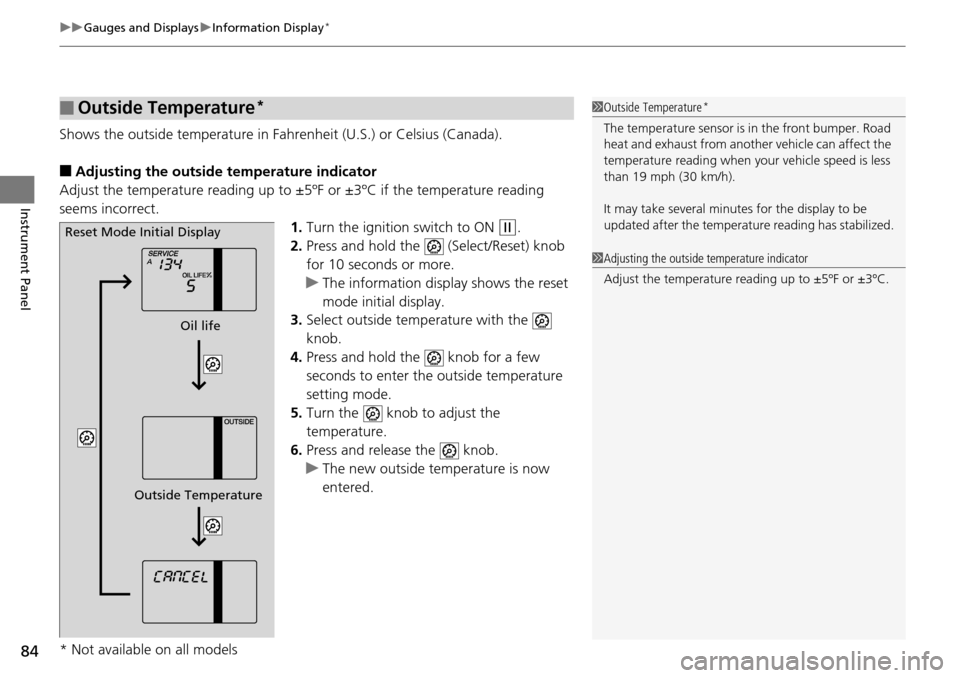
1.Turn the ignition switch to ON
(w.
2. Press and hold the (Select/Reset) knob
for 10 seconds or more.
u The information display shows the reset
mode initial display.
3. Select outside temperature with the
knob.
4. Press and hold the knob for a few
seconds to enter the outside temperature
setting mode.
5. Turn the knob to adjust the
temperature.
6. Press and release the knob.
u The new outside temperature is now
entered.
■Outside Temperature*1Outside Temperature*
The temperature sensor is in the front bumper. Road
heat and exhaust from anothe r vehicle can affect the
temperature reading when your vehicle speed is less
than 19 mph (30 km/h).
It may take several minutes for the display to be
updated after the temperature reading has stabilized.
1 Adjusting the outside temperature indicator
Adjust the temperature reading up to ±5ºF or ±3ºC.
Reset Mode Initial Display
Oil life
Outside Temperature
* Not available on all models
Page 91 of 488
uuGauges and Displays uMulti-Information Display*
90
Instrument Panel
Use the multi-information display to customize certain features.
■How to customize
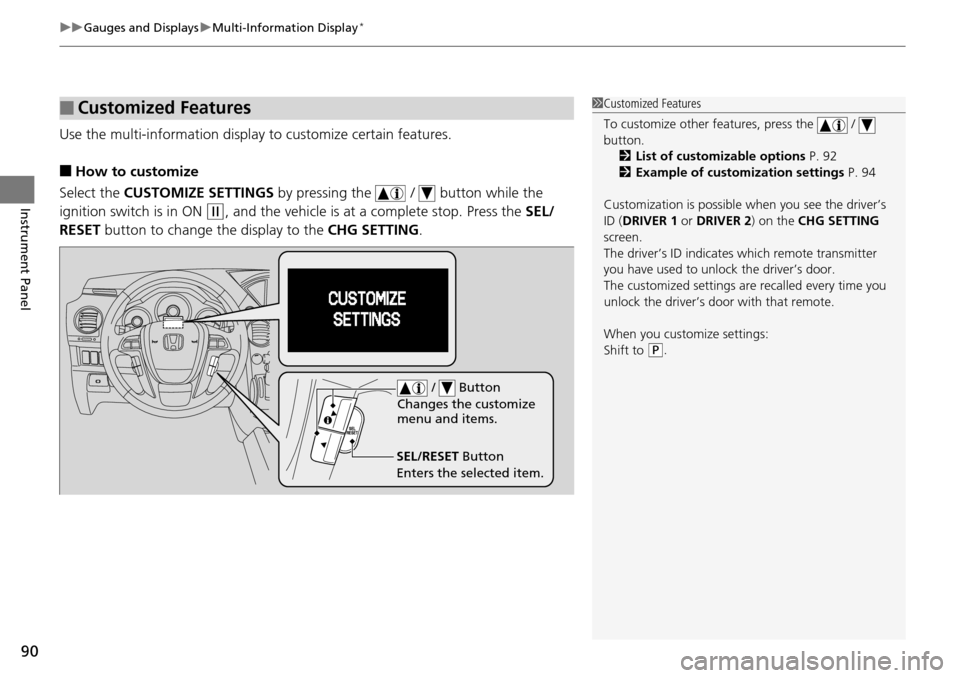
Select the CUSTOMIZE SETTINGS by pressing the / button while the
ignition switch is in ON
(w, and the vehicle is at a complete stop. Press the SEL/
RESET button to change the display to the CHG SETTING.
■Customized Features1Customized Features
To customize other features, press the /
button.
2 List of customizable options P. 92
2 Example of customization settings P. 94
Customization is possible when you see the driver’s
ID ( DRIVER 1 or DRIVER 2) on the CHG SETTING
screen.
The driver’s ID indicates which remote transmitter
you have used to unlock the driver’s door.
The customized settings are recalled every time you
unlock the driver’s door with that remote.
When you customize settings:
Shift to
( P.
SEL/RESET Button
Enters the selected item. / Button
Changes the customize
menu and items.
Page 98 of 488
97
Controls
This chapter explains how to operate the various controls necessary for driving.
Setting the Clock................................ 98
Locking and Unlocking the Doors
Key Types and Functions .................... 99
Locking/Unlocking the Doors from the Outside .......................................... 101
Locking/Unlocking the Doors from the Inside ............................................. 103
Childproof Door Locks ..................... 104
Auto Door Locking/Unlocking .......... 105
Opening and Closing the Tailgate ... 110
Security System ................................ 118
Immobilizer System .......................... 118
Security System Alarm
*.................... 118Opening and Closing the Windows ..... 120
Opening and Closing the Moonroof*...... 123Operating the Switches Around the
Steering Wheel Ignition Switch ................................. 124
Turn Signals ..................................... 125
Light Switches.................................. 125
Fog Lights
*...................................... 127
Daytime Running Lights ................... 127
Wipers and Washers ........................ 128
Brightness Control ........................... 130
Rear Defogger/Heat ed Door Mirror
*
Button ........................................... 131
Driving Position Memory System
*.... 132
Adjusting the Steering Wheel........... 134 Adjusting the Mirrors
....................... 135
Interior Rearview Mirror ................... 135
Power Door Mirrors ......................... 136
Adjusting the Seats .......................... 137
Adjusting the Seat Positions ............. 137
Interior Lights/Interior Convenience Items ................................................ 150
Interior Lights .................................. 150
Interior Convenience Items .............. 152
Climate Control System ................... 165
Using Automatic Climate Control .... 165Automatic Climate Control Sensors ...... 170
* Not available on all models
Page 99 of 488
98
Controls
Setting the Clock
Clock
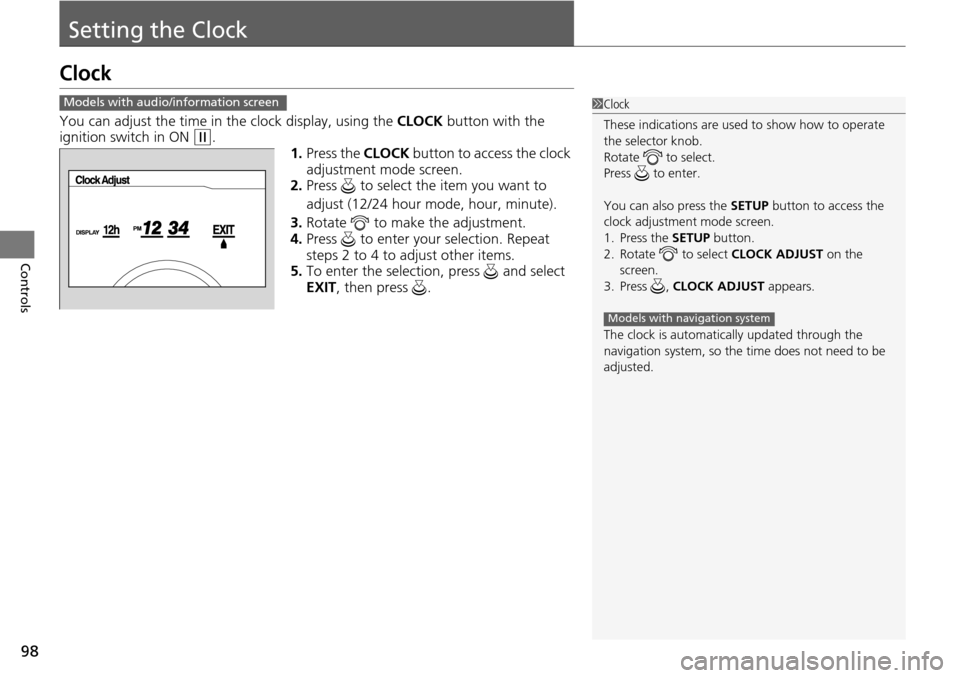
You can adjust the time in the clock display, using the CLOCK button with the
ignition switch in ON (w.
1.Press the CLOCK button to access the clock
adjustment mode screen.
2. Press to select the item you want to
adjust (12/24 hour mode, hour, minute).
3. Rotate to make the adjustment.
4. Press to enter your selection. Repeat
steps 2 to 4 to adjust other items.
5. To enter the selection, press and select
EXIT , then press .
Models with audio/information screen1Clock
These indications are used to show how to operate
the selector knob.
Rotate to select.
Press to enter.
You can also press the SETUP button to access the
clock adjustment mode screen.
1. Press the SETUP button.
2. Rotate to select CLOCK ADJUST on the
screen.
3. Press , CLOCK ADJUST appears.
The clock is automatica lly updated through the
navigation system, so the ti me does not need to be
adjusted.
Models with navigation system
Page 103 of 488
uuLocking and Unlocking the Doors uLocking/Unlocking the Doors from the Outside
102
Controls
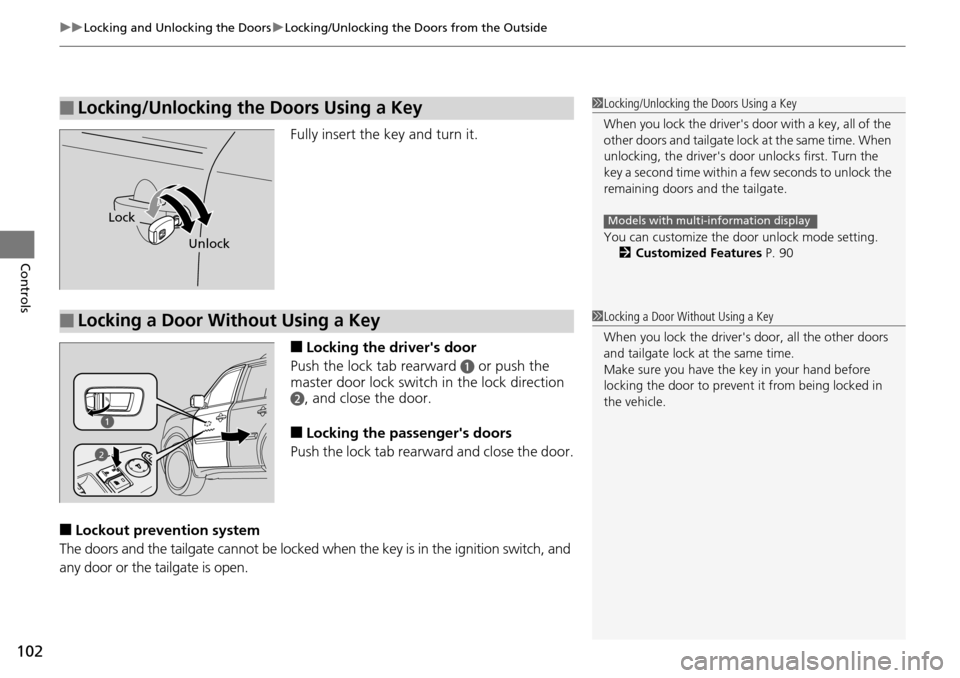
Fully insert the key and turn it.
■Locking the driver's door
Push the lock tab rearward
a or push the
master door lock switch in the lock direction
b, and close the door.
■Locking the passenger's doors
Push the lock tab rear ward and close the door.
■Lockout prevention system
The doors and the tailgate cannot be locked when the key is in the ignition switch, and
any door or the tailgate is open.
■Locking/Unlocking the Doors Using a Key1 Locking/Unlocking the Doors Using a Key
When you lock the driver's door with a key, all of the
other doors and tail gate lock at the same time. When
unlocking, the driver's door unlocks first. Turn the
key a second time within a few seconds to unlock the
remaining doors a nd the tailgate.
You can customize the door unlock mode setting. 2 Customized Features P. 90
Models with multi-information displayLock
Unlock
■Locking a Door Without Using a Key1Locking a Door Without Using a Key
When you lock the driver's door, all the other doors
and tailgate lock at the same time.
Make sure you have the key in your hand before
locking the door to prevent it from being locked in
the vehicle.
2
Page 107 of 488
106
uuLocking and Unlocking the Doors uCustomizing the Auto Door Locking/Unlocking Setting*
Controls
Customizing the Auto Door Locking/Unlocking Setting*
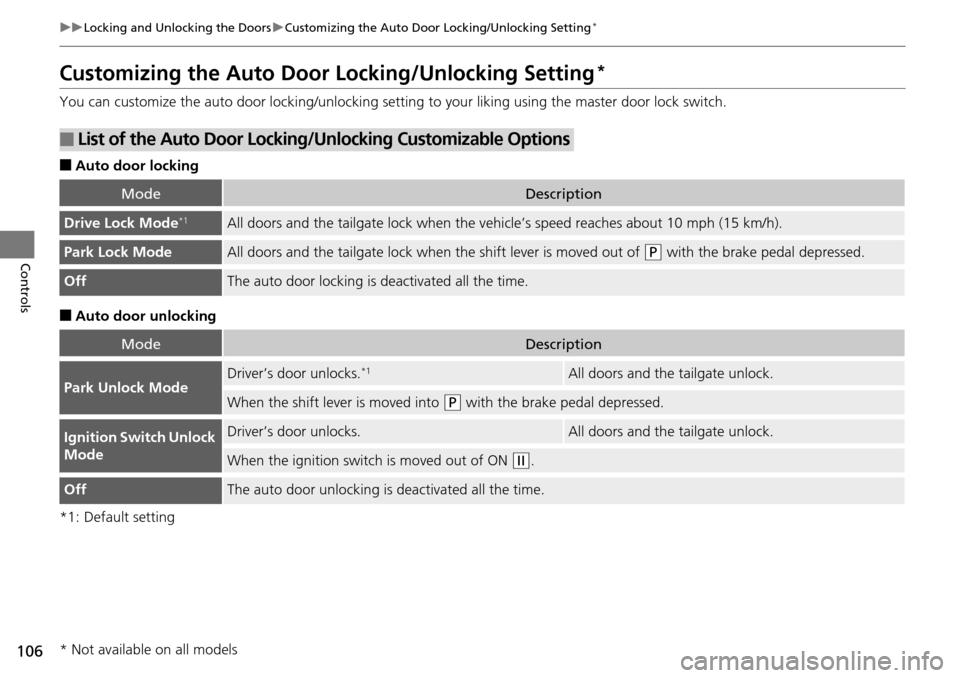
You can customize the auto door locking/unlocking setting to your liking using the master door lock switch.
■Auto door locking
■Auto door unlocking
*1: Default setting
■List of the Auto Door Locking/Unlocking Customizable Options
ModeDescription
Drive Lock Mode*1All doors and the tailgate lock when the ve hicle’s speed reaches about 10 mph (15 km/h).
Park Lock ModeAll doors and the tailgate lock when the shift lever is moved out of (P with the brake pedal depressed.
OffThe auto door locking is deactivated all the time.
ModeDescription
Park Unlock ModeDriver’s door unlocks.*1All doors and the tailgate unlock.
When the shift leve r is moved into (P with the brake pedal depressed.
Ignition Switch Unlock
ModeDriver’s door unlocks.All doors and the tailgate unlock.
When the ignition switch is moved out of ON (w.
OffThe auto door unlocking is deactivated all the time.
* Not available on all models
Page 108 of 488
107
uuLocking and Unlocking the Doors uCustomizing the Auto Door Locking/Unlocking Setting*
Continued
Controls
*1: Default setting
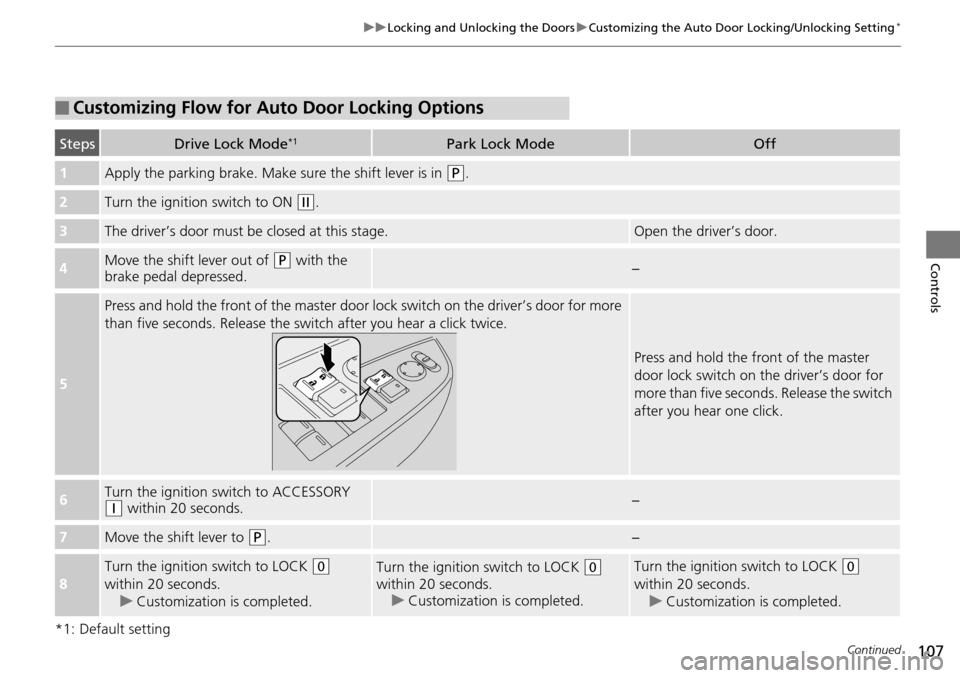
■Customizing Flow for Auto Door Locking Options
StepsDrive Lock Mode*1Park Lock ModeOff
1Apply the parking brake. Make sure the shift lever is in (P.
2Turn the ignition switch to ON (w.
3The driver’s door must be closed at this stage.Open the driver’s door.
4Move the shift lever out of (P with the
brake pedal depressed.−
5
Press and hold the front of the master door lo ck switch on the driver’s door for more
than five seconds. Release the switch after you hear a click twice.
Press and hold the front of the master
door lock switch on the driver’s door for
more than five seconds. Release the switch
after you hear one click.
6Turn the ignition sw itch to ACCESSORY (q within 20 seconds.−
7Move the shift lever to (P.−
8
Turn the ignition switch to LOCK (0
within 20 seconds. u Customization is completed.Turn the ignition switch to LOCK (0
within 20 seconds. u Customization is completed.Turn the ignition switch to LOCK (0
within 20 seconds. u Customization is completed.
Page 109 of 488
108
uuLocking and Unlocking the Doors uCustomizing the Auto Door Locking/Unlocking Setting*
Controls
*1: Default setting
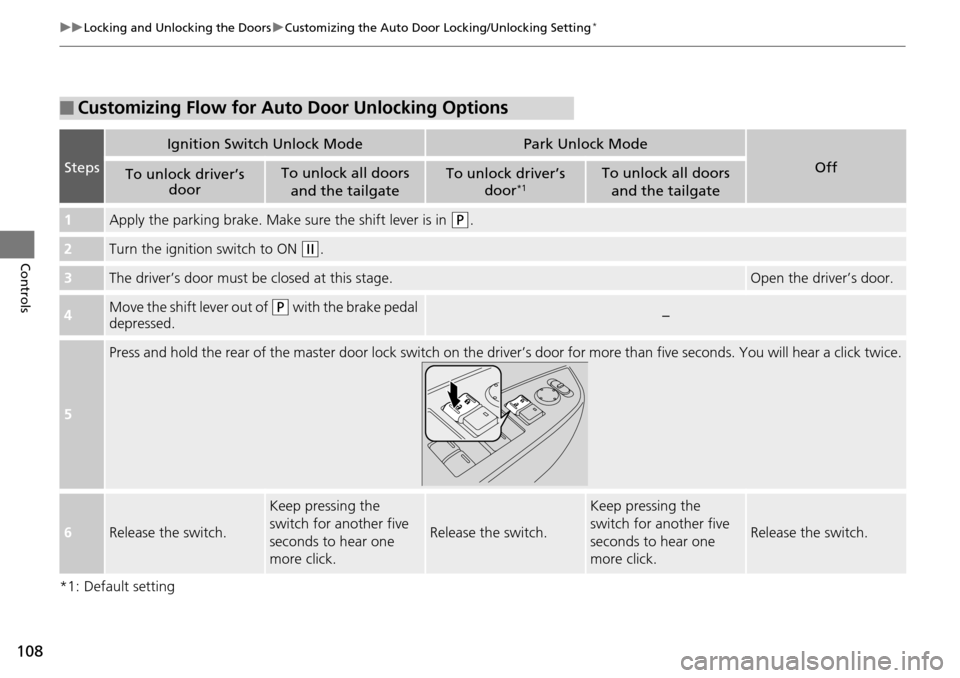
■Customizing Flow for Auto Door Unlocking Options
Steps
Ignition Switch Unlock ModePark Unlock Mode
OffTo unlock driver’s
doorTo unlock all doors
and the tailgateTo unlock driver’s door*1To unlock all doors
and the tailgate
1Apply the parking brake. Make sure the shift lever is in (P.
2Turn the ignition switch to ON (w.
3The driver’s door must be closed at this stage.Open the driver’s door.
4Move the shift lever out of (P with the brake pedal
depressed.−
5
Press and hold the rear of the master door lock switch on the dr iver’s door for more than five seconds. You will hear a click twice.
6Release the switch.
Keep pressing the
switch for another five
seconds to hear one
more click.
Release the switch.
Keep pressing the
switch for another five
seconds to hear one
more click.
Release the switch.
Page 110 of 488
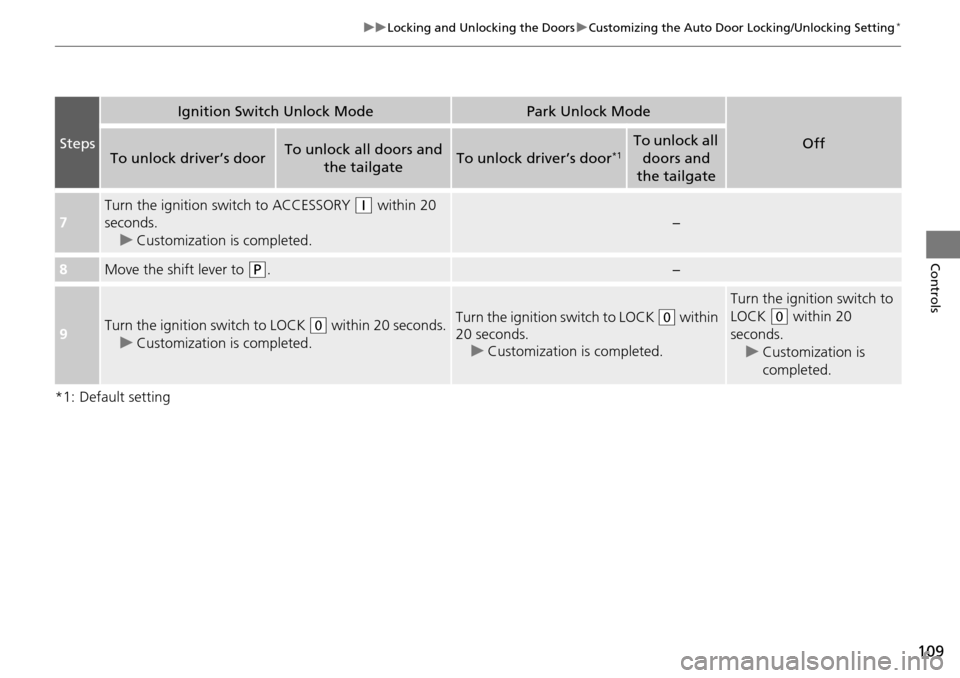
109
uuLocking and Unlocking the Doors uCustomizing the Auto Door Locking/Unlocking Setting*
Controls
*1: Default setting
Steps
Ignition Switch Unlock ModePark Unlock Mode
OffTo unlock driver’s doorTo unlock all doors and
the tailgateTo unlock driver’s door*1To unlock all doors and
the tailgate
7
Turn the ignition sw itch to ACCESSORY (q within 20
seconds. u Customization is completed.
−
8Move the shift lever to (P.−
9Turn the ignition switch to LOCK (0 within 20 seconds.
u Customization is completed.Turn the ignition switch to LOCK (0 within
20 seconds. u Customization is completed.
Turn the ignition switch to
LOCK
(0 within 20
seconds. u Customization is
completed.
Page 113 of 488
112
uuOpening and Closing the Tailgate uOpening/Closing the Power Tailgate*
Controls
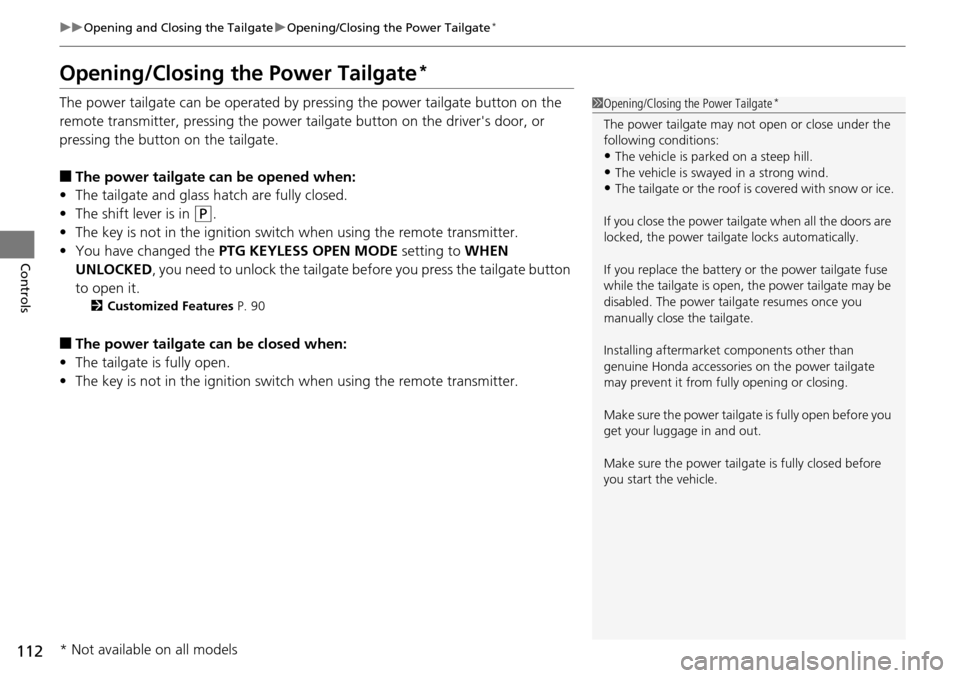
Opening/Closing the Power Tailgate*
The power tailgate can be operated by pressing the power tailgate button on the
remote transmitter, pressing the power tailgate button on the driver's door, or
pressing the button on the tailgate.
■The power tailgate can be opened when:
• The tailgate and glass hatch are fully closed.
• The shift lever is in
(P.
• The key is not in the ignition switch when using the remote transmitter.
• You have changed the PTG KEYLESS OPEN MODE setting to WHEN
UNLOCKED, you need to unlock the tailgate before you press the tailgate button
to open it.
2 Customized Features P. 90
■The power tailgate can be closed when:
• The tailgate is fully open.
• The key is not in the ignition switch when using the remote transmitter.
1Opening/Closing the Power Tailgate*
The power tailgate may not open or close under the
following conditions:
•The vehicle is park ed on a steep hill.
•The vehicle is swayed in a strong wind.•The tailgate or the roof is covered with snow or ice.
If you close the power tail gate when all the doors are
locked, the power tailgate locks automatically.
If you replace the battery or the power tailgate fuse
while the tailgate is open, the power tailgate may be
disabled. The power tail gate resumes once you
manually close the tailgate.
Installing aftermarket components other than
genuine Honda a ccessories on the power tailgate
may prevent it from fully opening or closing.
Make sure the power tailgate is fully open before you
get your luggage in and out.
Make sure the power tailgate is fully closed before
you start the vehicle.
* Not available on all models