ignition HONDA PILOT 2015 2.G Repair Manual
[x] Cancel search | Manufacturer: HONDA, Model Year: 2015, Model line: PILOT, Model: HONDA PILOT 2015 2.GPages: 488, PDF Size: 11.34 MB
Page 355 of 488
354
uuWhen Driving uVTM (Variable Torque Management)-4 r System*
Driving
VTM (Variable Torque Management)-4 r System*
Senses a traction loss caused by a road condition change, and automatically
transfers some power to the rear wheels.
Use the VTM-4 r LOCK to increase more to rque to the rear wheels.
1. Stop your vehicle with the engine running.
2. Move the shift lever to
(1, (2, or (R.
3. Press the VTM-4r LOCK button.
u The indicator in the button comes on.
Any of the following disengages the VTM-4 r LOCK:
• Pressing the VTM-4r LOCK button again.
• Moving the shift lever to
(D or (d.
• Turning the ignition switch to the LOCK
(0 position.
■To Engage the VTM-4 r LOCK
■To Disengage the VTM-4 r LOCK
1 VTM (Variable Torque Management)-4 r System*
NOTICE
Do not continuously spin the front tires of your
vehicle. Continuously spinning the front tires can
cause transmission or re ar differential damage.
1To Engage the VTM-4 r LOCK
Do not use the VTM-4r LOCK button on dry, paved
roads. Driving on dry, paved roads with VTM-4 r
LOCK on may damage the r ear differential when
making a turn. Strange noise and vibration can also
result.
The VTM-4 r LOCK can be used to help free your
vehicle from being stuck in mud, sand, or gravel.
When the lock is engaged, apply light pressure to the
accelerator pedal.
When more torque is applied, the rear tires are not
likely to spin. This is normal.
If you are not able to fr ee the vehicle, stop and
reverse direction.
As soon as this featur e is no longer needed,
disengage the VTM-4 r LOCK.
1 To Disengage the VTM-4 r LOCK
The VTM-4 r LOCK temporarily disengages when the
vehicle speed exceeds 18 mph (30 km/h). The
indicator in the button remains on.
* Not available on all models
Page 357 of 488
uuWhen Driving uTPMS (Tire Pressure Monitoring System)
356
Driving
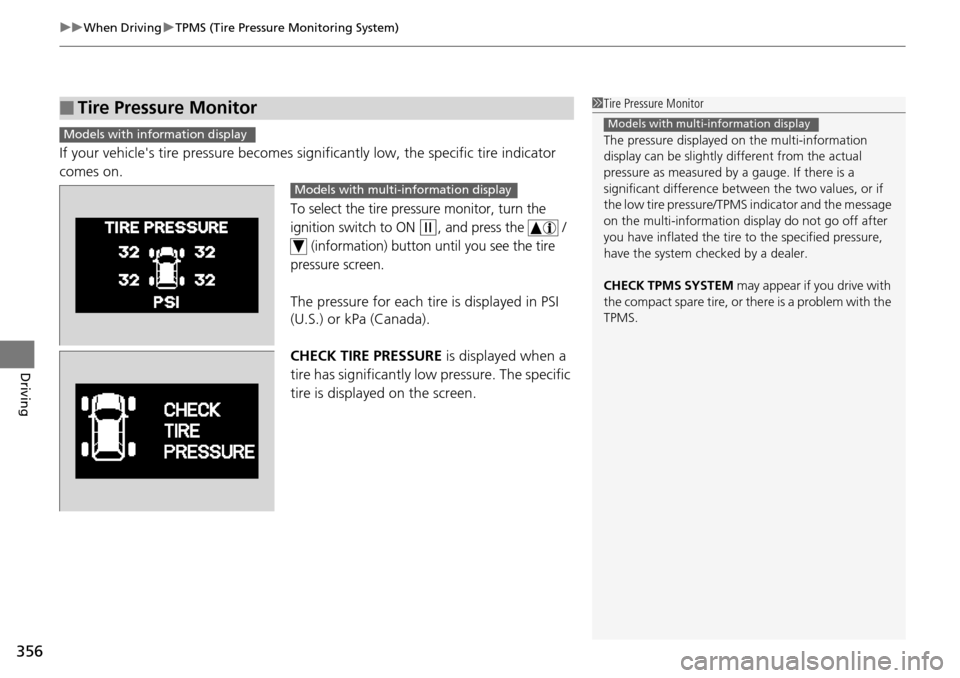
If your vehicle's tire pressure becomes sign ificantly low, the specific tire indicator
comes on.
To select the tire pressure monitor, turn the
ignition switch to ON
(w, and press the /
(information) button until you see the tire
pressure screen.
The pressure for each tire is displayed in PSI
(U.S.) or kPa (Canada).
CHECK TIRE PRESSURE is displayed when a
tire has significantly lo w pressure. The specific
tire is displayed on the screen.
■Tire Pressure Monitor1 Tire Pressure Monitor
The pressure displayed on the multi-information
display can be slightly different from the actual
pressure as measured by a gauge. If there is a
significant di fference between the two values, or if
the low tire pressure/TPMS indicator and the message
on the multi-information di splay do not go off after
you have inflated the tire to the specified pressure,
have the system checked by a dealer.
CHECK TPMS SYSTEM may appear if you drive with
the compact spare tire, or there is a problem with the
TPMS.
Models with multi-information displayModels with info rmation display
Models with multi- information display
Page 367 of 488
uuParking Your Vehicle uParking Sensor System*
366
Driving
■When you activate the system
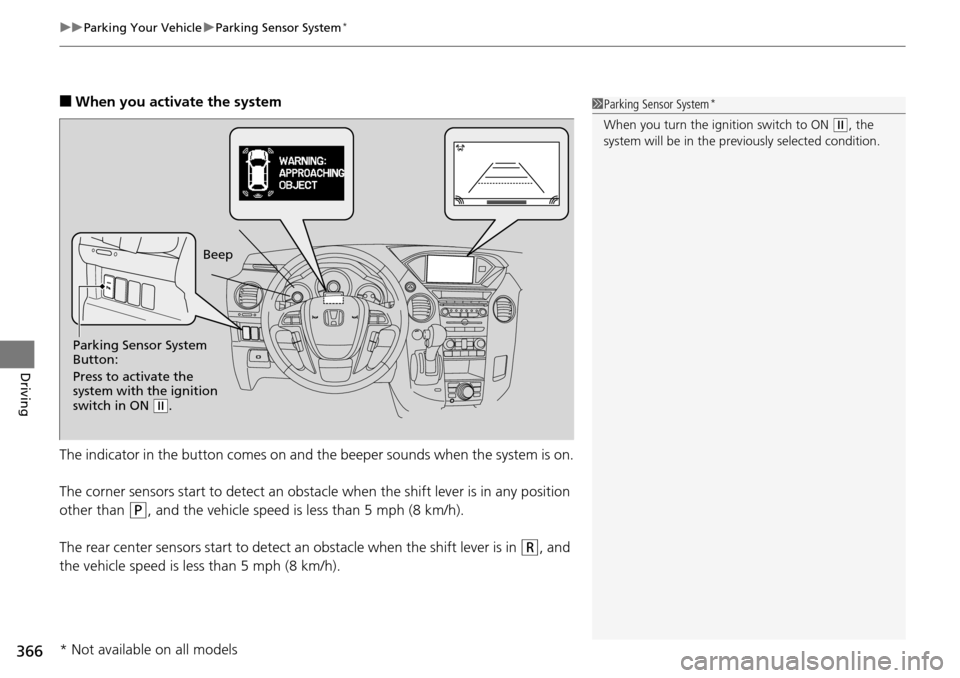
The indicator in the button comes on and th e beeper sounds when the system is on.
The corner sensors start to detect an obstac le when the shift lever is in any position
other than
(P, and the vehicle speed is less than 5 mph (8 km/h).
The rear center sensors start to detect an obstacle when the shift lever is in
(R, and
the vehicle speed is le ss than 5 mph (8 km/h).
1Parking Sensor System*
When you turn the ignition switch to ON (w, the
system will be in the pr eviously selected condition.
Parking Sensor System
Button:
Press to activate the
system with the ignition
switch in ON
(w. Beep
* Not available on all models
Page 369 of 488
uuParking Your Vehicle uParking Sensor System*
368
Driving
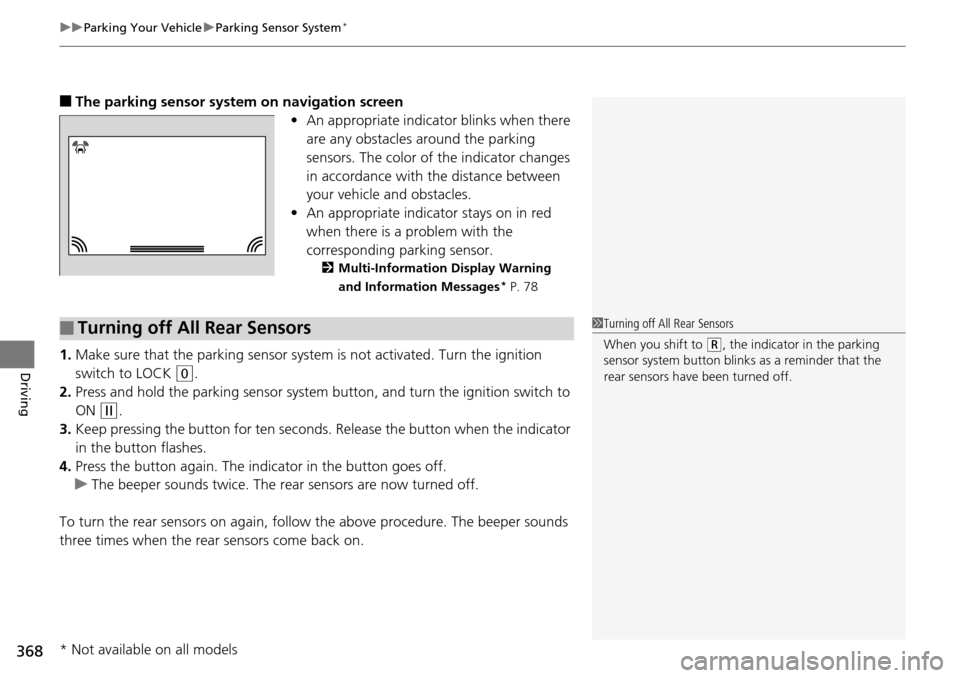
■The parking sensor system on navigation screen
•An appropriate indicato r blinks when there
are any obstacles around the parking
sensors. The color of the indicator changes
in accordance with the distance between
your vehicle and obstacles.
• An appropriate indica tor stays on in red
when there is a problem with the
corresponding parking sensor.
2 Multi-Information Display Warning
and Information Messages* P. 78
1.Make sure that the parking sensor system is not activated. Turn the ignition
switch to LOCK
(0.
2. Press and hold the parking sensor system button, and turn the ignition switch to
ON
(w.
3. Keep pressing the button for ten seconds. Release the button when the indicator
in the button flashes.
4. Press the button again. The indi cator in the button goes off.
u The beeper sounds twice. The re ar sensors are now turned off.
To turn the rear sensors on again, follo w the above procedure. The beeper sounds
three times when the rear sensors come back on.
■Turning off All Rear Sensors1 Turning off All Rear Sensors
When you shift to
(R, the indicator in the parking
sensor system button blinks as a reminder that the
rear sensors have been turned off.
* Not available on all models
Page 382 of 488
381Continued
Maintenance
Maintenance Minder™
If the engine oil life is less than 15%, you will see the Maintenance Minder messages
appear on the information display* or the multi-information display* every time you
turn the ignition switch to ON
(w. The messages notify you when to change the
engine oil, or when to bring your vehicle to a dealer for indicated maintenance
services.
To Use Maintenance MinderTM
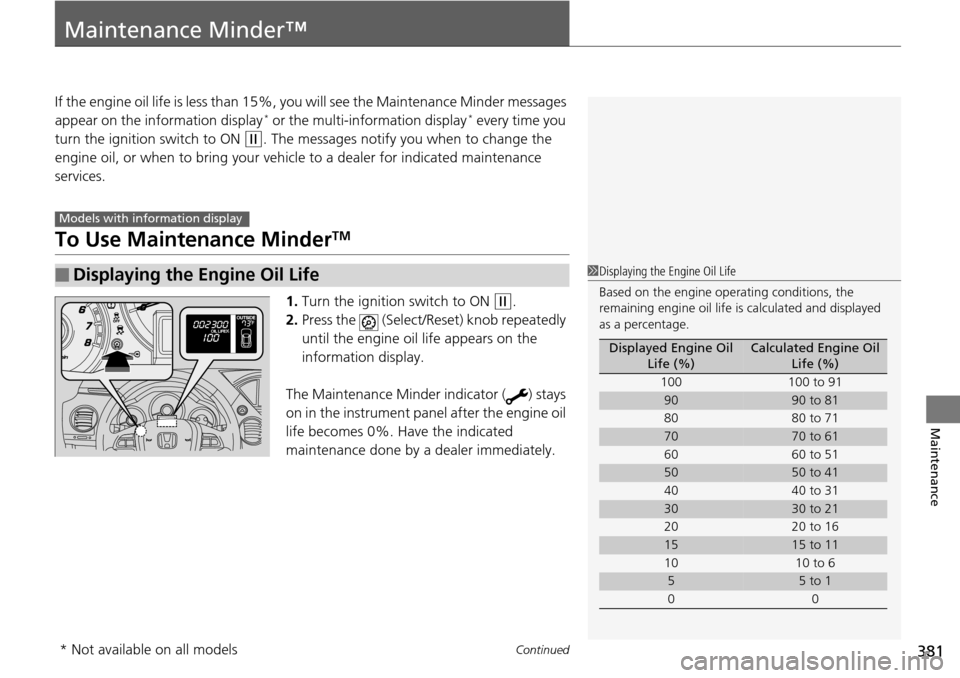
1. Turn the ignition switch to ON (w.
2. Press the (Select/Rese t) knob repeatedly
until the engine oil life appears on the
information display.
The Maintenance Minder indicator ( ) stays
on in the instrument panel after the engine oil
life becomes 0%. Have the indicated
maintenance done by a dealer immediately.
■Displaying the Engine Oil Life
Models with info rmation display
1Displaying the Engine Oil Life
Based on the engine ope rating conditions, the
remaining engine oi l life is calculated and displayed
as a percentage.
Displayed Engine Oil Life (%)Calculated Engine Oil Life (%)
100 100 to 91
9090 to 81
80 80 to 71
7070 to 61
60 60 to 51
5050 to 41
40 40 to 31
3030 to 21
20 20 to 16
1515 to 11
10 10 to 6
55 to 1
00
* Not available on all models
Page 385 of 488
uuMaintenance Minder™ uTo Use Maintenance MinderTM
384
Maintenance
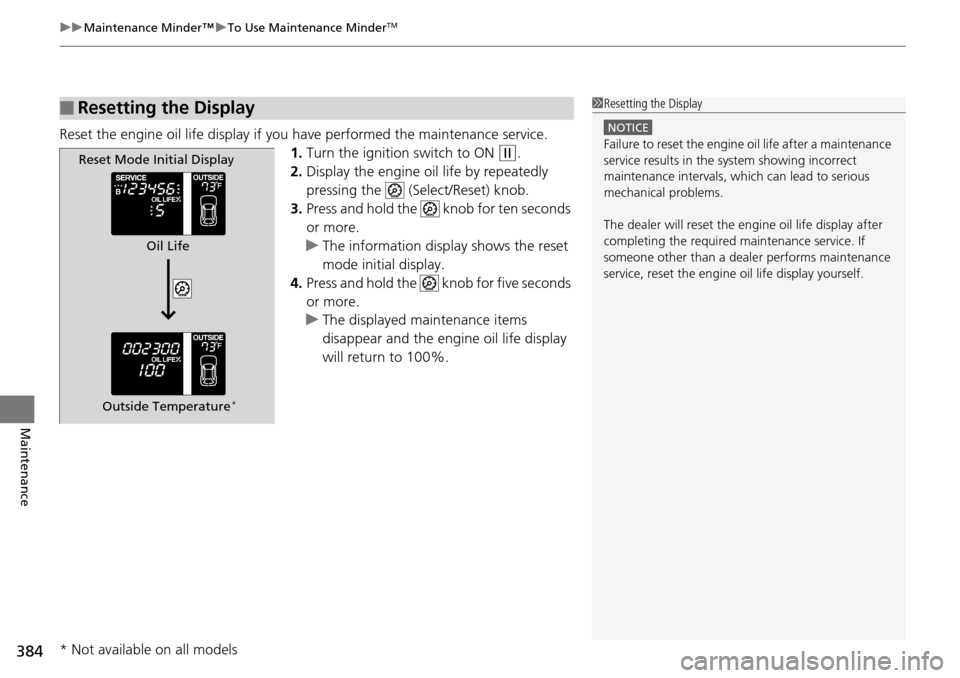
Reset the engine oil life display if you have performed the maintenance service.
1. Turn the ignition switch to ON
(w.
2. Display the engine oil life by repeatedly
pressing the (Select/Reset) knob.
3. Press and hold the knob for ten seconds
or more.
u The information display shows the reset
mode initial display.
4. Press and hold the knob for five seconds
or more.
u The displayed maintenance items
disappear and the engine oil life display
will return to 100%.
■Resetting the Display1Resetting the Display
NOTICE
Failure to reset the engine oil life after a maintenance
service results in the sy stem showing incorrect
maintenance intervals, which can lead to serious
mechanical problems.
The dealer will reset the en gine oil life display after
completing the required ma intenance service. If
someone other than a deal er performs maintenance
service, reset the engine oil life display yourself.Reset Mode Initial Display
Oil Life
Outside Temperature
*
* Not available on all models
Page 386 of 488
385
uuMaintenance Minder™ uTo Use Maintenance MinderTM
Continued
Maintenance
To Use Maintenance MinderTM
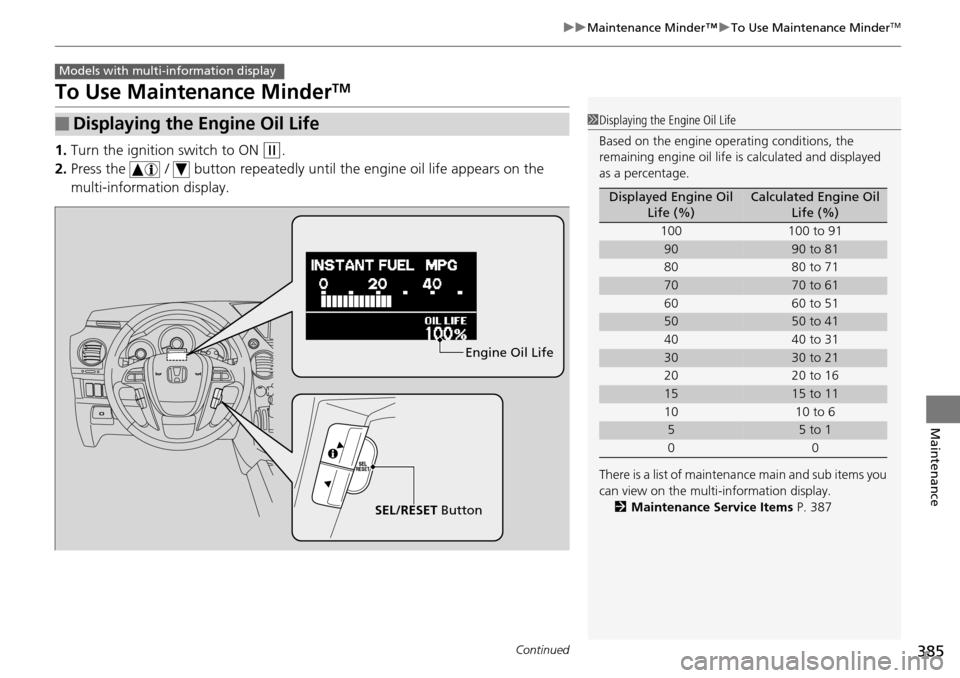
1. Turn the ignition switch to ON (w.
2. Press the / button repeatedly until the engine oil life appears on the
multi-information display.
■Displaying the Engine Oil Life
Models with multi- information display
1Displaying the Engine Oil Life
Based on the engine ope rating conditions, the
remaining engine oi l life is calculated and displayed
as a percentage.
There is a list of maintena nce main and sub items you
can view on the multi-information display. 2 Maintenance Service Items P. 387
Displayed Engine Oil
Life (%)Calculated Engine Oil Life (%)
100 100 to 91
9090 to 81
80 80 to 71
7070 to 61
60 60 to 51
5050 to 41
40 40 to 31
3030 to 21
20 20 to 16
1515 to 11
10 10 to 6
55 to 1
00
SEL/RESET ButtonEngine Oil Life
Page 389 of 488
uuMaintenance Minder™ uTo Use Maintenance MinderTM
388
Maintenance
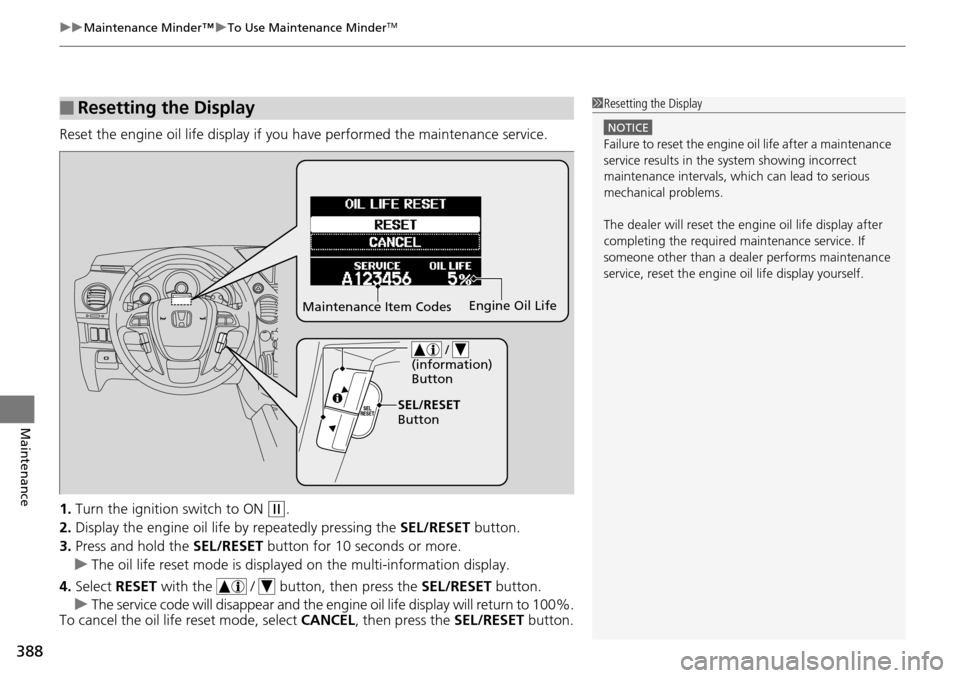
Reset the engine oil life display if you have performed the maintenance service.
1. Turn the ignition switch to ON
(w.
2. Display the engine oil life by repeatedly pressing the SEL/RESET button.
3. Press and hold the SEL/RESET button for 10 seconds or more.
u The oil life reset mode is displayed on the multi-information display.
4. Select RESET with the / butto n, then press the SEL/RESET button.
u The service code will disappear and the engi ne oil life display will return to 100%.
To cancel the oil life reset mode, select CANCEL, then press the SEL/RESET button.
■Resetting the Display1Resetting the Display
NOTICE
Failure to reset the engine oil life after a maintenance
service results in the sy stem showing incorrect
maintenance intervals, which can lead to serious
mechanical problems.
The dealer will reset the en gine oil life display after
completing the required ma intenance service. If
someone other than a deal er performs maintenance
service, reset the engine oil life display yourself.
Maintenance Item Codes Engine Oil Life
/
(information)
Button
SEL/RESET
Button
Page 436 of 488
435Continued
Handling the Unexpected
If a Tire Goes Flat
Changing a Flat Tire
If a tire goes flat while driving, grasp the steering wheel firmly, and brake gradually
to reduce speed. Then, stop in a safe plac e. Replace the flat tire with a compact
spare tire. Go to a dealer as soon as possib le to have the full-size tire repaired or
replaced.
1. Park the vehicle on firm, level, and non-slippery surface and apply the parking
brake.
2. Move the shift lever to
(P.
3. Turn on the hazard warning lights an d turn the ignition switch to LOCK
(0.
1Changing a Flat Tire
Periodically check the tire pressure of the compact
spare. It should be set to the specified pressure.
Specified Pressure: 60 psi (420 kPa, 4.2 kgf/cm
2)
When driving with the compact spare tire, keep the
vehicle speed under 50 mph (80 km/h). Replace with
a full-size tire as soon as possible.
The compact spare tire and wheel in your vehicle are
specifically for this model.
Do not use them with another vehicle.
Do not use another type of compact spare tire or
wheel with your vehicle.
Do not mount tire chains on a compact spare tire.
If a chain-mounted front tire goes flat, remove one of
the full-size rear tires and replace it with the compact
spare tire. Remove the flat front tire and replace it
with the full-size tire that was removed from the rear.
Mount the tire chains on the front tire.
Do not use a puncture-repairi ng agent on a flat tire,
as it can damage the tire pressure sensor.
Page 448 of 488
447
Handling the Unexpected
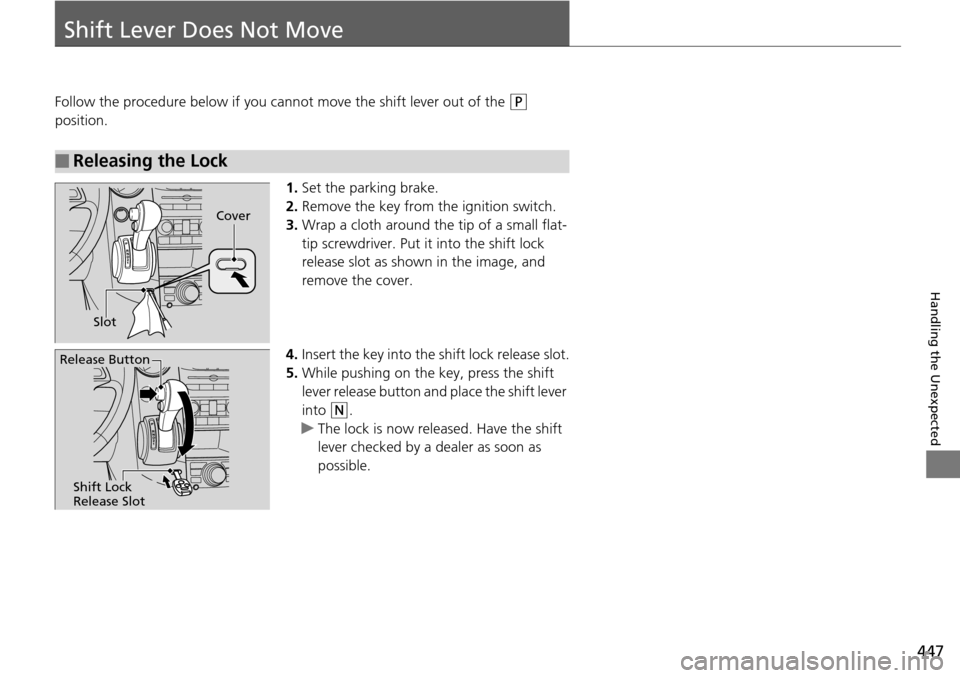
Shift Lever Does Not Move
Follow the procedure below if you cannot move the shift lever out of the (P
position.
1.Set the parking brake.
2. Remove the key from th e ignition switch.
3. Wrap a cloth around the tip of a small flat-
tip screwdriver. Put it into the shift lock
release slot as shown in the image, and
remove the cover.
4. Insert the key into the shift lock release slot.
5. While pushing on the key, press the shift
lever release button and place the shift lever
into
(N.
u The lock is now released. Have the shift
lever checked by a de aler as soon as
possible.
■Releasing the Lock
Slot Cover
Release Button
Shift Lock
Release Slot