ignition HONDA PILOT 2015 2.G Workshop Manual
[x] Cancel search | Manufacturer: HONDA, Model Year: 2015, Model line: PILOT, Model: HONDA PILOT 2015 2.GPages: 488, PDF Size: 11.34 MB
Page 200 of 488
Continued199
uuAudio System Basic Operation uPlaying CD Library
Features
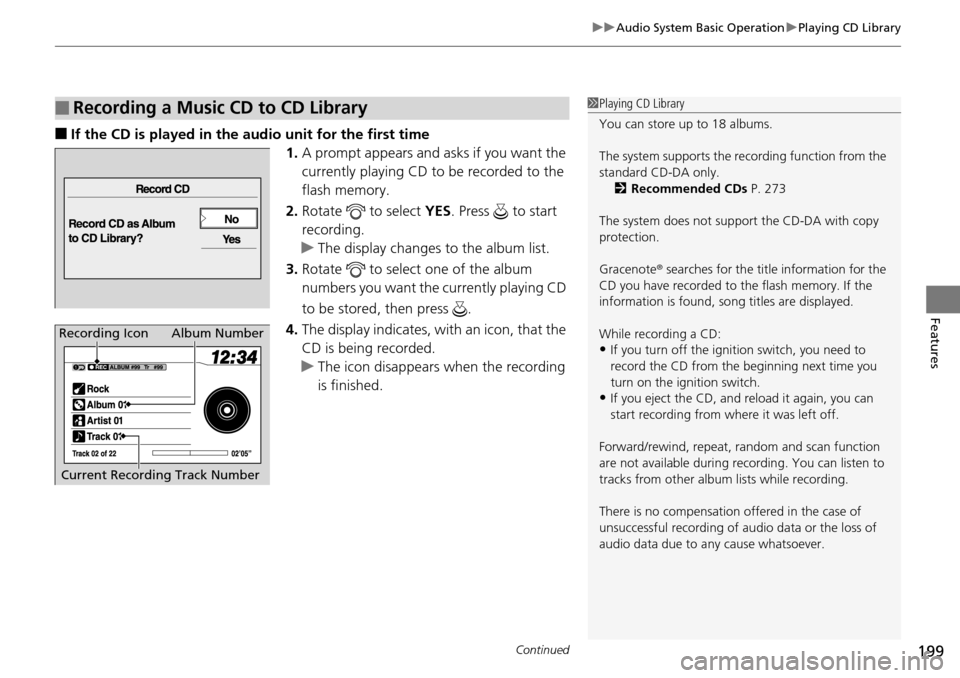
■If the CD is played in the audio unit for the first time
1.A prompt appears and as ks if you want the
currently playing CD to be recorded to the
flash memory.
2. Rotate to select YES. Press to start
recording.
u The display changes to the album list.
3. Rotate to select one of the album
numbers you want the currently playing CD
to be stored, then press .
4. The display indicates, with an icon, that the
CD is being recorded.
u The icon disappears when the recording
is finished.
■Recording a Music CD to CD Library1Playing CD Library
You can store up to 18 albums.
The system supports the re cording function from the
standard CD-DA only. 2 Recommended CDs P. 273
The system does not support the CD-DA with copy
protection.
Gracenote ® searches for the title information for the
CD you have recorded to the flash memory. If the
information is found, so ng titles are displayed.
While recording a CD:
•If you turn off the ignition switch, you need to
record the CD from the beginning next time you
turn on the ignition switch.
•If you eject the CD, and reload it again, you can
start recording from wh ere it was left off.
Forward/rewind, repeat, ra ndom and scan function
are not available during recording. You can listen to
tracks from other album lists while recording.
There is no compensation offered in the case of
unsuccessful recording of audio data or the loss of
audio data due to any cause whatsoever.
Album Number
Current Recording Track NumberRecording Icon
Page 217 of 488
216
Features
Audio System Basic Operation
To use the audio system function, the ignition switch must be in ACCESSORY (q or
ON
(w.
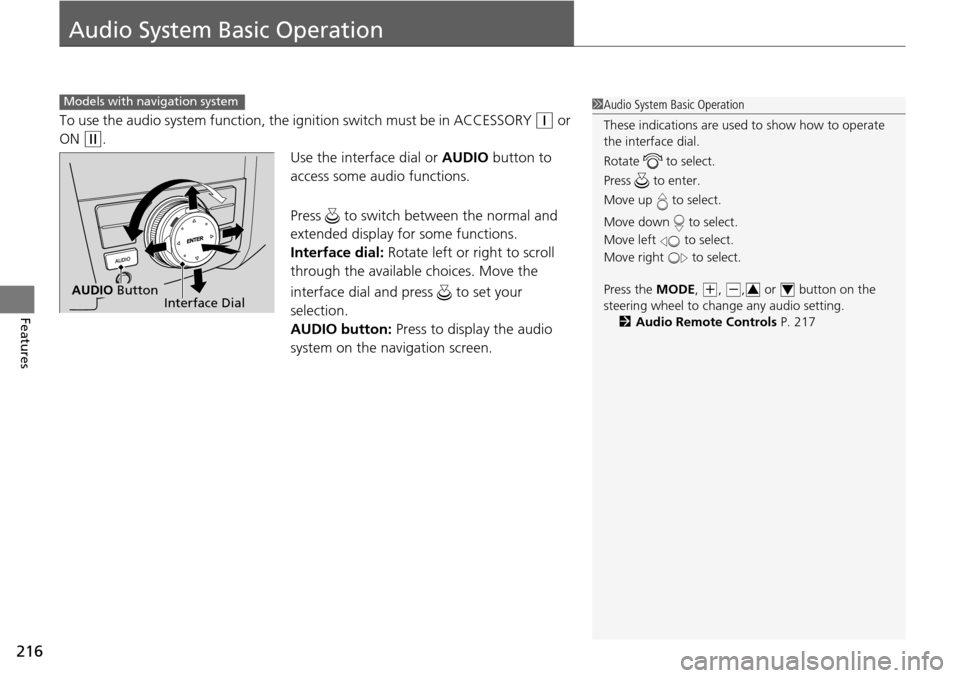
Use the interface dial or AUDIO button to
access some audio functions.
Press to switch between the normal and
extended display fo r some functions.
Interface dial: Rotate left or right to scroll
through the available choices. Move the
interface dial and press to set your
selection.
AUDIO button: Press to display the audio
system on the navigation screen.
Models with navigation system1 Audio System Basic Operation
These indications are used to show how to operate
the interface dial.
Rotate to select.
Press to enter.
Move up to select.
Move down to select.
Move left to select.
Move right to select.
Press the MODE,
(+, (-, or button on the
steering wheel to cha nge any audio setting.
2 Audio Remote Controls P. 21734Interface DialAUDIO Button
Page 253 of 488
uuRear Entertainment System*uOperating the System
252
Features
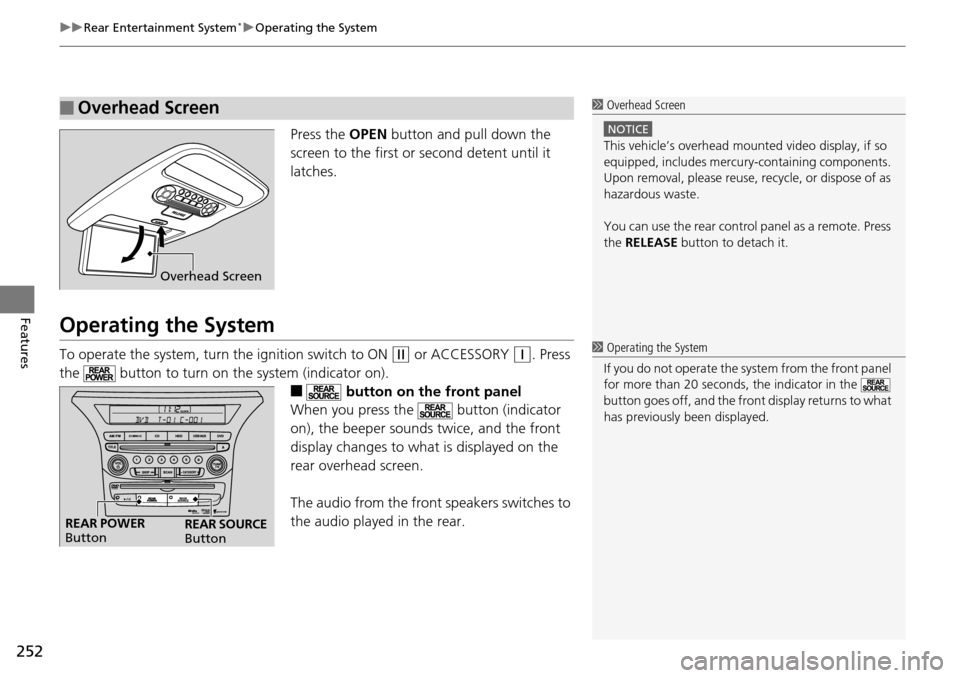
Press the OPEN button and pull down the
screen to the first or second detent until it
latches.
Operating the System
To operate the system, turn the ignition switch to ON (w or ACCESSORY (q. Press
the button to turn on the system (indicator on).
■ button on the front panel
When you press the button (indicator
on), the beeper sounds twice, and the front
display changes to what is displayed on the
rear overhead screen.
The audio from the front speakers switches to
the audio played in the rear.
■Overhead Screen1 Overhead Screen
NOTICE
This vehicle’s overhead mount ed video display, if so
equipped, includes mercur y-containing components.
Upon removal, please reuse, recycle, or dispose of as
hazardous waste.
You can use the rear control panel as a remote. Press
the RELEASE button to detach it.
Overhead Screen
1 Operating the System
If you do not operate the sy stem from the front panel
for more than 20 seconds, the indicator in the
button goes off, and the front display returns to what
has previously been displayed.
REAR POWER
Button REAR SOURCE
Button
Page 281 of 488
280
uuBluetooth ® HandsFreeLink ®u HFL Menus
Features
HFL Menus
The ignition switch must be in ACCESSORY (q or ON (w to use HFL.
or
*1: Appears only when a phone is connected to HFL.1 HFL Menus
To use HFL, you must first pair your Bluetooth-
compatible cell phone to th e system while the vehicle
is parked.
PHONE
PHONE
Speed Dial
Call History*1
Dialed Calls
Dial
Phonebook*1
Received Calls
Missed Calls
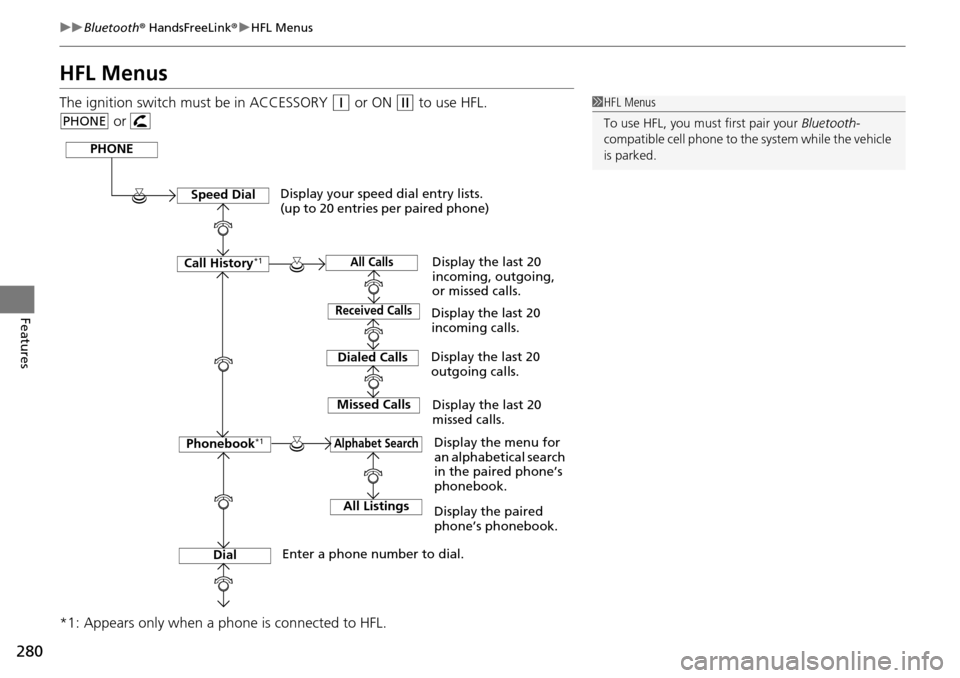
Display your speed dial entry lists.
(up to 20 entries per paired phone)
Display the menu for
an alphabetical search
in the paired phone’s
phonebook.
Enter a phone number to dial. Display the last 20
incoming calls.
Display the last 20
outgoing calls.
Display the last 20
missed calls.
All CallsDisplay the last 20
incoming, outgoing,
or missed calls.
Alphabet Search
All ListingsDisplay the paired
phone’s phonebook.
Page 304 of 488
303
uuBluetooth ® HandsFreeLink ®u HFL Menus
Continued
Features
HFL Menus
The ignition switch mu st be in ACCESSORY (q or ON (w to use HFL.
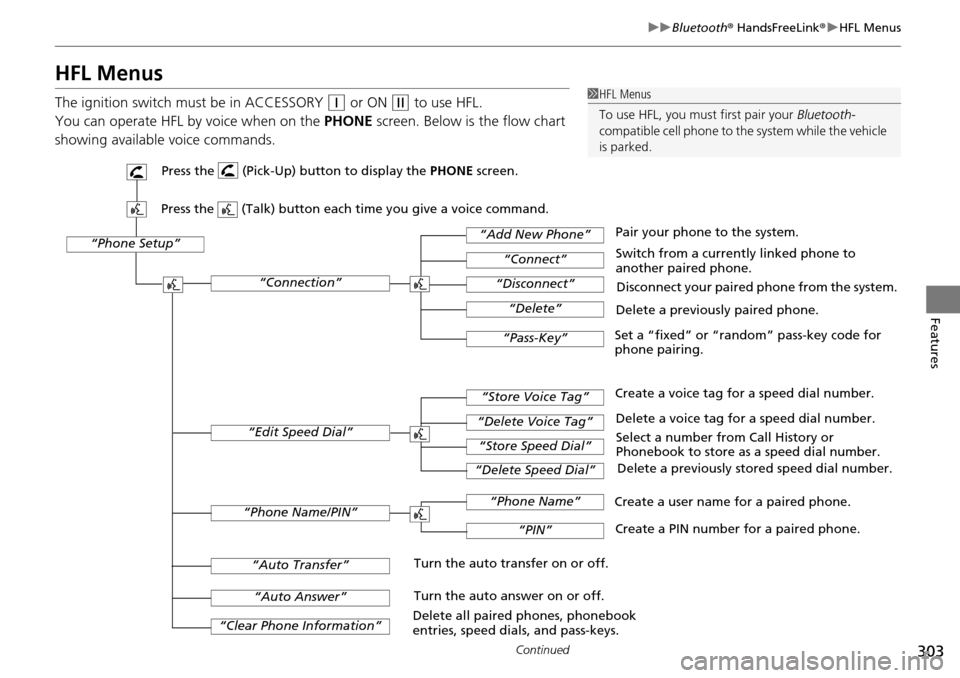
You can operate HFL by voice when on the PHONE screen. Below is the flow chart
showing available voice commands.1 HFL Menus
To use HFL, you must first pair your Bluetooth-
compatible cell phone to th e system while the vehicle
is parked.
“Phone Setup”
Delete a previously paired phone.
Switch from a currently linked phone to
another paired phone.
Pair your phone to the system.
Disconnect your paired phone from the system.
Set a “fixed” or “random” pass-key code for
phone pairing.
“Connection”
“Add New Phone”
“Connect”
“Disconnect”
“Delete”
“Pass-Key”
Delete a voice tag for a speed dial number.
Create a voice tag for a speed dial number.
Select a number from Call History or
Phonebook to store as a speed dial number. Delete a previously stored speed dial number.
“Edit Speed Dial”
“Store Voice Tag”
“Delete Voice Tag”
“Store Speed Dial”
“Delete Speed Dial”
Create a PIN number for a paired phone.
Create a user name for a paired phone.
“Phone Name/PIN”
“Phone Name”
“PIN”
“Clear Phone Information”
“Auto Answer”
“Auto Transfer”Turn the auto transfer on or off.
Turn the auto answer on or off.
Delete all paired phones, phonebook
entries, speed dials, and pass-keys.
Press the (Pick-Up) button to display the PHONE screen.
Press the (Talk) button each time you give a voice command.
Page 321 of 488
320
Features
Compass*
When you turn the ignition switch to ON (w, the compass self-calibrates, and the
compass display appears.
Compass Calibration
If the compass indicates the wrong direct ion, or the compass display blinks, you
need to manually calibrate the system.
1.Turn the ignition switch to ON
(w.
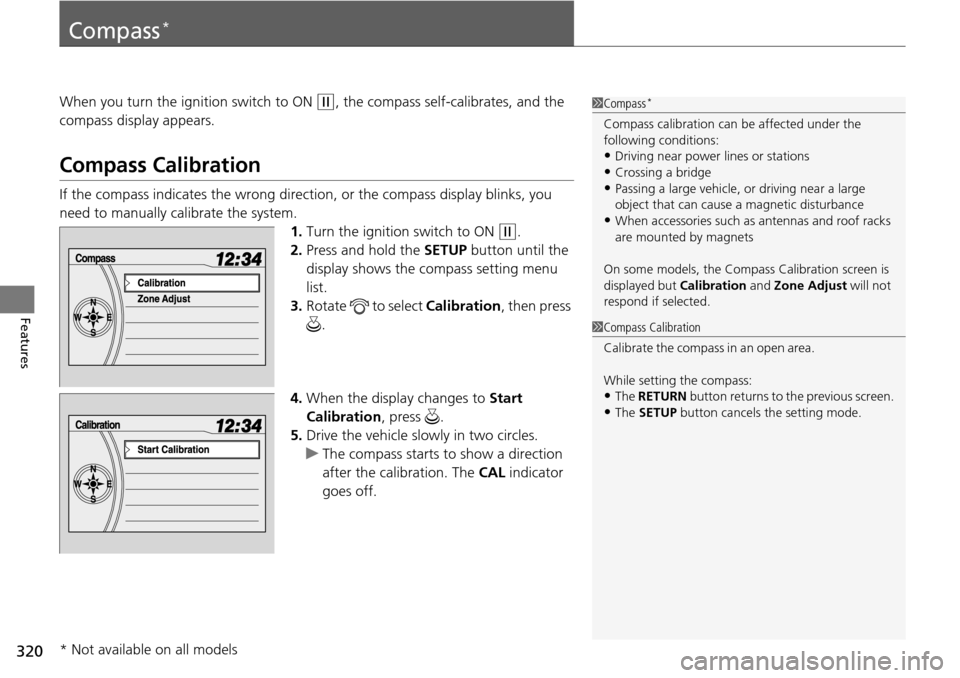
2. Press and hold the SETUP button until the
display shows the compass setting menu
list.
3. Rotate to select Calibration, then press
.
4. When the display changes to Start
Calibration , press .
5. Drive the vehicle slowly in two circles.
u The compass starts to show a direction
after the calibration. The CAL indicator
goes off.
1 Compass*
Compass calibration can be affected under the
following conditions:
•Driving near power lines or stations
•Crossing a bridge•Passing a large vehicle, or driving near a large
object that can cause a magnetic disturbance
•When accessories such as antennas and roof racks
are mounted by magnets
On some models, the Compass Calibration screen is
displayed but Calibration and Zone Adjust will not
respond if selected.
1 Compass Calibration
C al i b r a t e t h e c o m p as s i n a n o p en ar ea .
While setting the compass:
•The RETURN button returns to the previous screen.
•The SETUP button cancels the setting mode.
* Not available on all models
Page 322 of 488
321
uuCompass*uCompass Zone Selection
Features
Compass Zone Selection
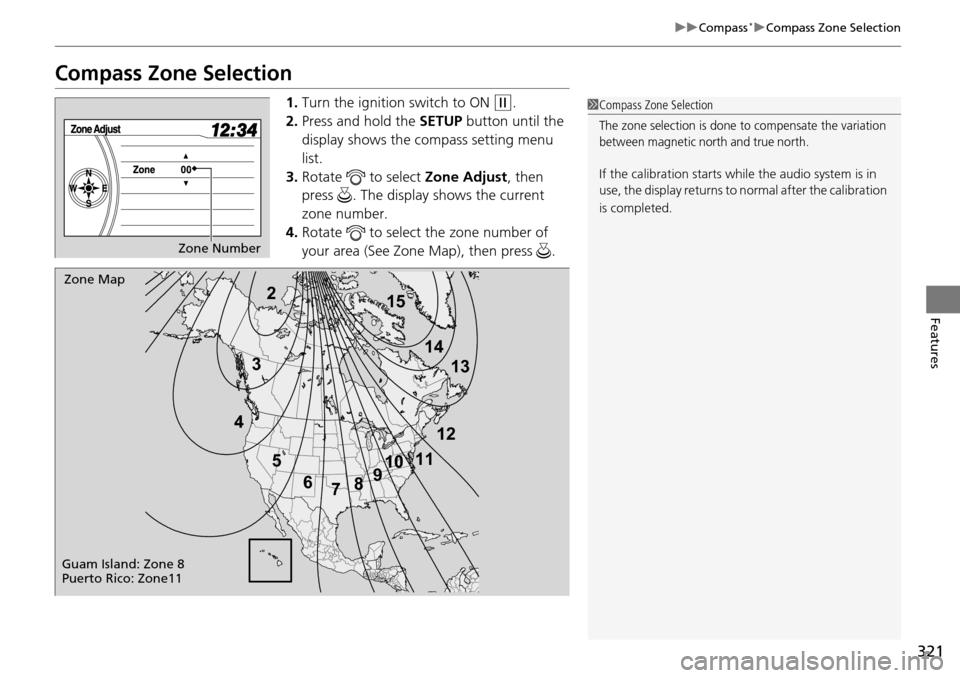
1. Turn the ignition switch to ON (w.
2. Press and hold the SETUP button until the
display shows the compass setting menu
list.
3. Rotate to select Zone Adjust, then
press . The display shows the current
zone number.
4. Rotate to select the zone number of
your area (See Zone Map), then press .1Compass Zone Selection
The zone selection is done to compensate the variation
between magnetic north and true north.
If the calibration starts while the audio system is in
use, the display returns to normal after the calibration
is completed.
Zone Number
2
3
4 5678910
111213
14
15Zone Map
Guam Island: Zone 8
Puerto Rico: Zone11
Page 343 of 488
342
Driving
When Driving
Starting the Engine
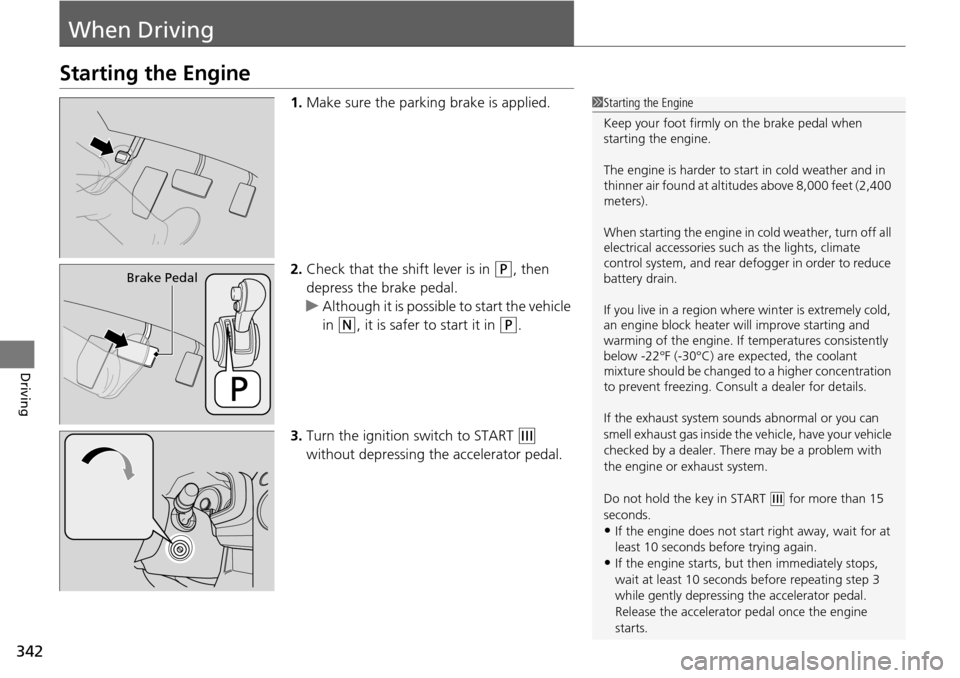
1.Make sure the parking brake is applied.
2. Check that the shift lever is in
(P, then
depress the brake pedal.
u Although it is possible to start the vehicle
in
(N, it is safer to start it in (P.
3. Turn the ignition switch to START
(e
without depressing the accelerator pedal.
1 Starting the Engine
Keep your foot firmly on the brake pedal when
starting the engine.
The engine is harder to st art in cold weather and in
thinner air found at altitudes above 8,000 feet (2,400
meters).
When starting the engine in cold weather, turn off all
electrical accessories such as the lights, climate
control system, and rear de fogger in order to reduce
battery drain.
If you live in a region where winter is extremely cold,
an engine block heater will improve starting and
warming of the engine. If temperatures consistently
below -22°F (-30°C) are expected, the coolant
mixture should be changed to a higher concentration
to prevent freezing. Cons ult a dealer for details.
If the exhaust system sounds abnormal or you can
smell exhaust gas inside the vehicle, have your vehicle
checked by a dealer. There may be a problem with
the engine or exhaust system.
Do not hold the key in START
( e for more than 15
seconds.
•If the engine does not sta rt right away, wait for at
least 10 seconds before trying again.
•If the engine starts, but then immediately stops,
wait at least 10 seconds before repeating step 3
while gently depressing the accelerator pedal.
Release the accelerator pedal once the engine
starts.
Brake Pedal
Page 345 of 488
344
uuWhen Driving uPrecautions While Driving
Driving
Precautions While Driving
Utility vehicles have a significantly higher ro llover rate than other types of vehicles.
To prevent rollovers or loss of control:
• Take corners at slower speeds than yo u would with a passenger vehicle.
• Avoid sharp turns and abrupt maneuvers whenever possible.
• Do not modify your vehicle in any way that you would raise the center of gravity.
• Never carry more than 165 lbs (75 kg ) of cargo on the roof rack (Honda
accessory).
Avoid driving in deep water and on flooded roads. This can damage the engine,
driveline, or cause electrical component failure.
If there is a strong impact with something un der the vehicle, stop in a safe location.
Check the underside of the vehicle for damage or any fluid leaks.
■Driving Guidelines for Your Utility Vehicle
■In Rain
■Other Precautions
1 Driving Guidelines for Your Utility Vehicle
Failure to operate your vehi cle correctly might result
in a crash or a rollover. 2 Important Handling Information P. 26
2 Precautions While Driving P. 344
1Precautions While Driving
NOTICE
Do not operate the shift lever while pressing the
accelerator pedal. You could damage the
transmission.
If the ignition switch is turned to ACCESSORY
( q or
LOCK ( 0 while driving, the e ngine will shut down
and all steering and brake pow er assist functions will
stop, making it difficult to control the vehicle.
Do not put the shift lever in
( N, as you will lose
engine braking (and acce leration) performance.
During the first 600 miles (1,000 km) of operation,
avoid sudden acceleration or full throttle operation so
as not to damage the engine or powertrain.
Avoid hard braking for the first 200 miles (300 km).
You should also follow this when the brake pads are
replaced.
Page 347 of 488
346
uuWhen Driving uShifting
Driving
Shifting
Change the shift positi on in accordance with your driving needs.
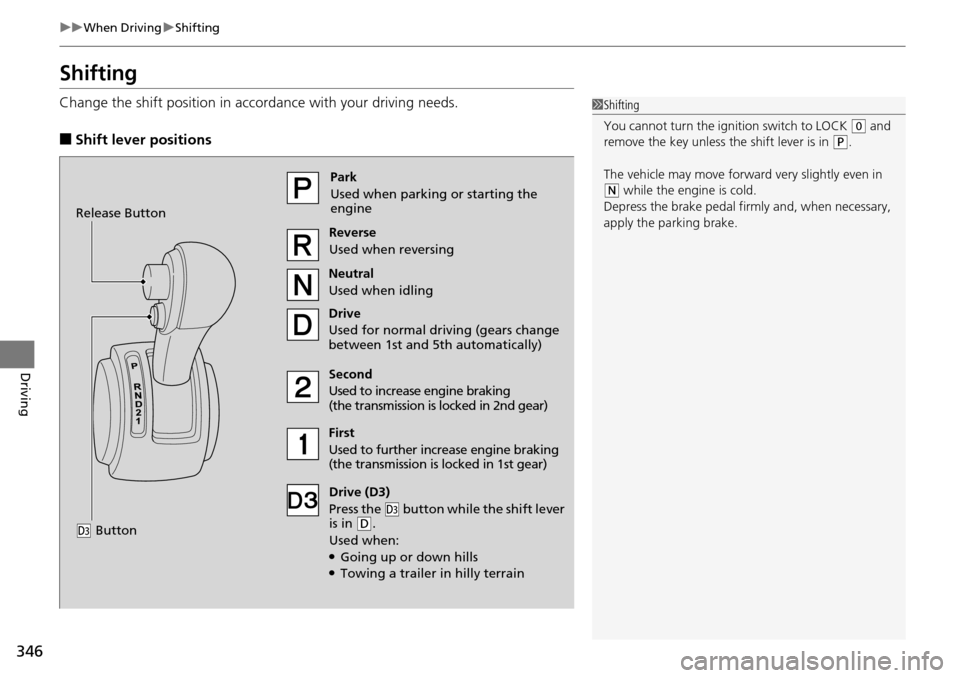
■Shift lever positions
1Shifting
You cannot turn the ignition switch to LOCK
(0 and
remove the key unless the shift lever is in ( P.
The vehicle may move forward very slightly even in
(N while the engine is cold.
Depress the brake pe dal firmly and, when necessary,
apply the parking brake.Park
Used when parking or starting the
engine
Reverse
Used when reversing
Neutral
Used when idling
Drive
Used for normal driving (gears change
between 1st and 5th automatically)
Drive (D3)
Press the
( d button while the shift lever
is in ( D.
Used when:
●Going up or down hills●Towing a trailer in hilly terrain
Second
Used to increase engine braking
(the transmission is locked in 2nd gear)
First
Used to further increase engine braking
(the transmission is locked in 1st gear)
Release Button
(
d Button