instrument panel HONDA PILOT 2015 2.G Owner's Manual
[x] Cancel search | Manufacturer: HONDA, Model Year: 2015, Model line: PILOT, Model: HONDA PILOT 2015 2.GPages: 488, PDF Size: 11.34 MB
Page 84 of 488
83
uuGauges and Displays uInformation Display*
Continued
Instrument Panel
Appears when the fuel fill cap is loose or is not installed.
2 Check/Tighten Fuel Cap Message P. 451
Shows each tire’s pressure.
2TPMS (Tire Pressure Monitoring System) P. 355
■Check Fuel Cap
■Tire Pressure Monitor
Page 85 of 488
uuGauges and Displays uInformation Display*
84
Instrument Panel
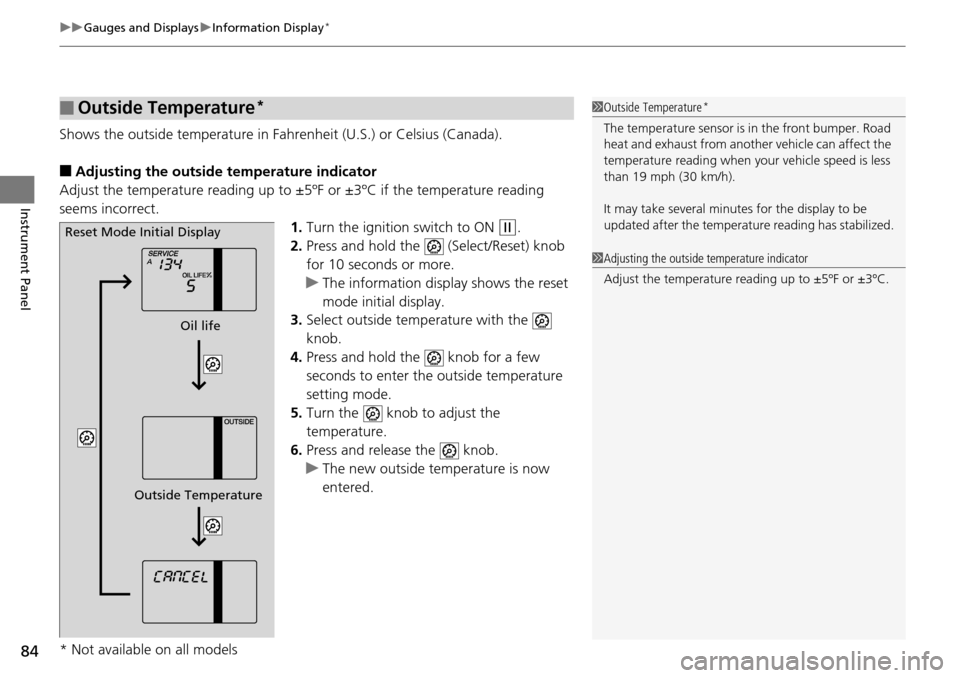
Shows the outside temperature in Fahr enheit (U.S.) or Celsius (Canada).
■Adjusting the outside temperature indicator
Adjust the temperature reading up to ±5ºF or ±3ºC if the temperature reading
seems incorrect.
1.Turn the ignition switch to ON
(w.
2. Press and hold the (Select/Reset) knob
for 10 seconds or more.
u The information display shows the reset
mode initial display.
3. Select outside temperature with the
knob.
4. Press and hold the knob for a few
seconds to enter the outside temperature
setting mode.
5. Turn the knob to adjust the
temperature.
6. Press and release the knob.
u The new outside temperature is now
entered.
■Outside Temperature*1Outside Temperature*
The temperature sensor is in the front bumper. Road
heat and exhaust from anothe r vehicle can affect the
temperature reading when your vehicle speed is less
than 19 mph (30 km/h).
It may take several minutes for the display to be
updated after the temperature reading has stabilized.
1 Adjusting the outside temperature indicator
Adjust the temperature reading up to ±5ºF or ±3ºC.
Reset Mode Initial Display
Oil life
Outside Temperature
* Not available on all models
Page 86 of 488
85
uuGauges and Displays uMulti-Information Display*
Continued
Instrument Panel
Multi-Information Display*
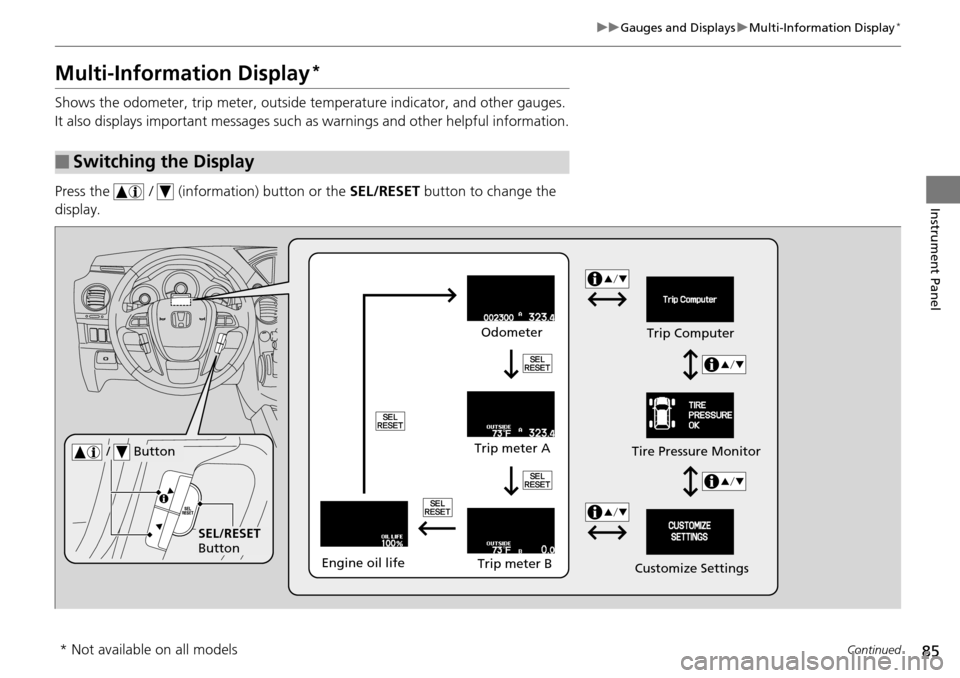
Shows the odometer, trip meter, outside te mperature indicator, and other gauges.
It also displays important messages such as warnings and other helpful information.
Press the / (information) button or the SEL/RESET button to change the
display.
■Switching the Display
SEL/RESET
Button Tire Pressure Monitor
/ Button
Engine oil life
Trip meter B
Trip meter A Odometer
Customize SettingsTrip Computer
* Not available on all models
Page 87 of 488
86
uuGauges and Displays uMulti-Information Display*
Instrument Panel
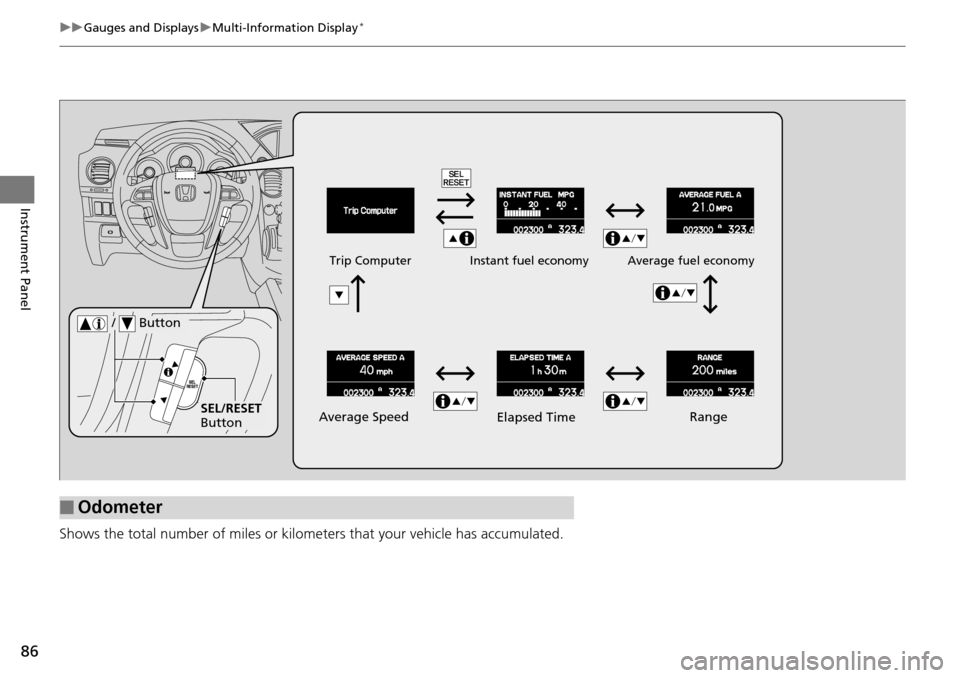
Shows the total number of miles or kilome ters that your vehicle has accumulated.
■Odometer
Average Speed
Average fuel economy
Trip Computer
Instant fuel economy
SEL/RESET
Button
/ Button
Range
Elapsed Time
Page 88 of 488
Continued87
uuGauges and Displays uMulti-Information Display*
Instrument Panel
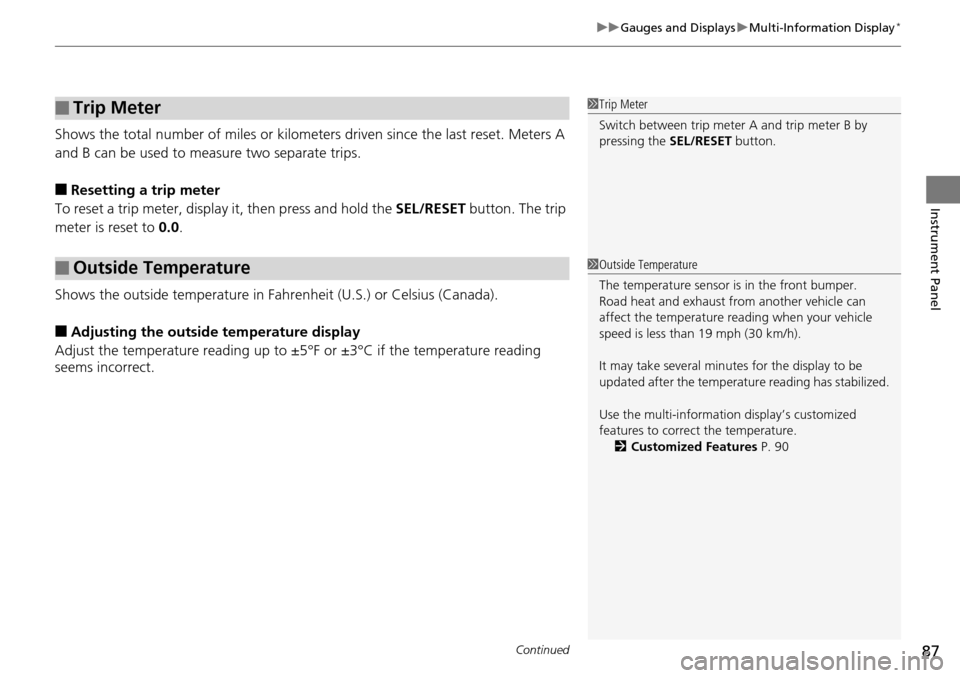
Shows the total number of miles or kilomete rs driven since the last reset. Meters A
and B can be used to measure two separate trips.
■Resetting a trip meter
To reset a trip meter, display it, then press and hold the SEL/RESET button. The trip
meter is reset to 0.0.
Shows the outside temperature in Fahr enheit (U.S.) or Celsius (Canada).
■Adjusting the outside temperature display
Adjust the temperature reading up to ±5°F or ±3°C if the temperature reading
seems incorrect.
■Trip Meter
■Outside Temperature
1 Trip Meter
Switch between trip meter A and trip meter B by
pressing the SEL/RESET button.
1Outside Temperature
The temperature sensor is in the front bumper.
Road heat and exhaust fr om another vehicle can
affect the temperature reading when your vehicle
speed is less than 19 mph (30 km/h).
It may take several minutes for the display to be
updated after the temperature reading has stabilized.
Use the multi-information display’s customized
features to correct the temperature. 2 Customized Features P. 90
Page 89 of 488
uuGauges and Displays uMulti-Information Display*
88
Instrument Panel
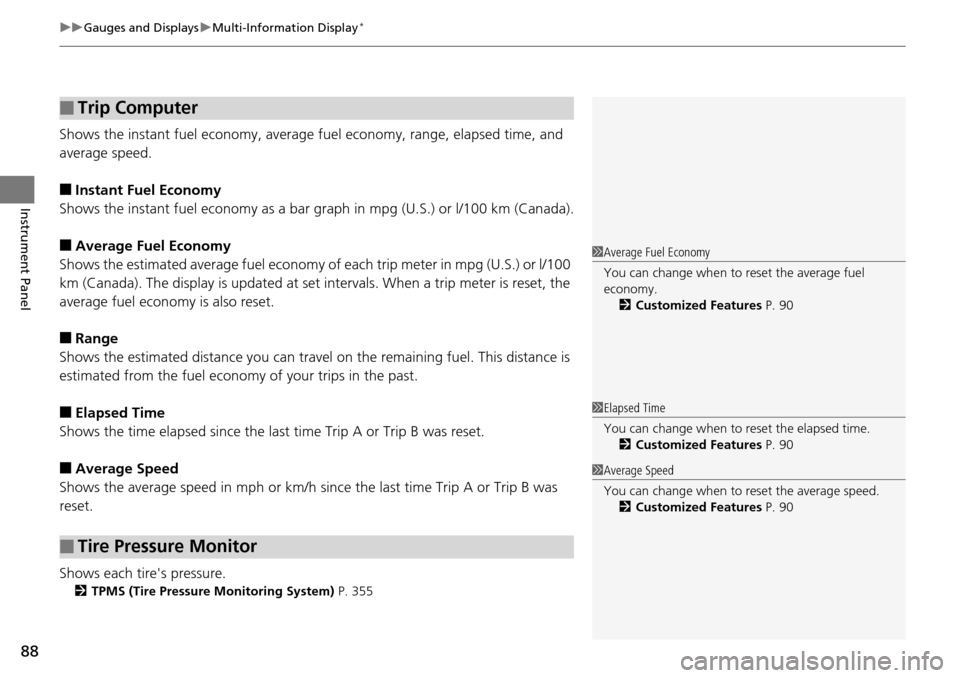
Shows the instant fuel eco nomy, average fuel economy, range, elapsed time, and
average speed.
■Instant Fuel Economy
Shows the instant fuel economy as a bar gr aph in mpg (U.S.) or l/100 km (Canada).
■Average Fuel Economy
Shows the estimated average fuel economy of each trip meter in mpg (U.S.) or l/100
km (Canada). The display is updated at set intervals. When a trip meter is reset, the
average fuel economy is also reset.
■Range
Shows the estimated distance you can travel on the remaining fuel. This distance is
estimated from the fuel econom y of your trips in the past.
■Elapsed Time
Shows the time elapsed since the last time Trip A or Trip B was reset.
■Average Speed
Shows the average speed in mph or km/h si nce the last time Trip A or Trip B was
reset.
Shows each tire's pressure.
2 TPMS (Tire Pressure Monitoring System) P. 355
■Trip Computer
■Tire Pressure Monitor
1Average Fuel Economy
You can change when to reset the average fuel
economy.
2 Customized Features P. 90
1Elapsed Time
You can change when to reset the elapsed time.
2 Customized Features P. 90
1Average Speed
You can change when to reset the average speed.
2 Customized Features P. 90
Page 90 of 488
89
uuGauges and Displays uMulti-Information Display*
Continued
Instrument Panel
Shows the remaining oil life and Maintenance MinderTM.
2 Maintenance Minder™ P. 381
■Engine Oil Life
Page 91 of 488
uuGauges and Displays uMulti-Information Display*
90
Instrument Panel
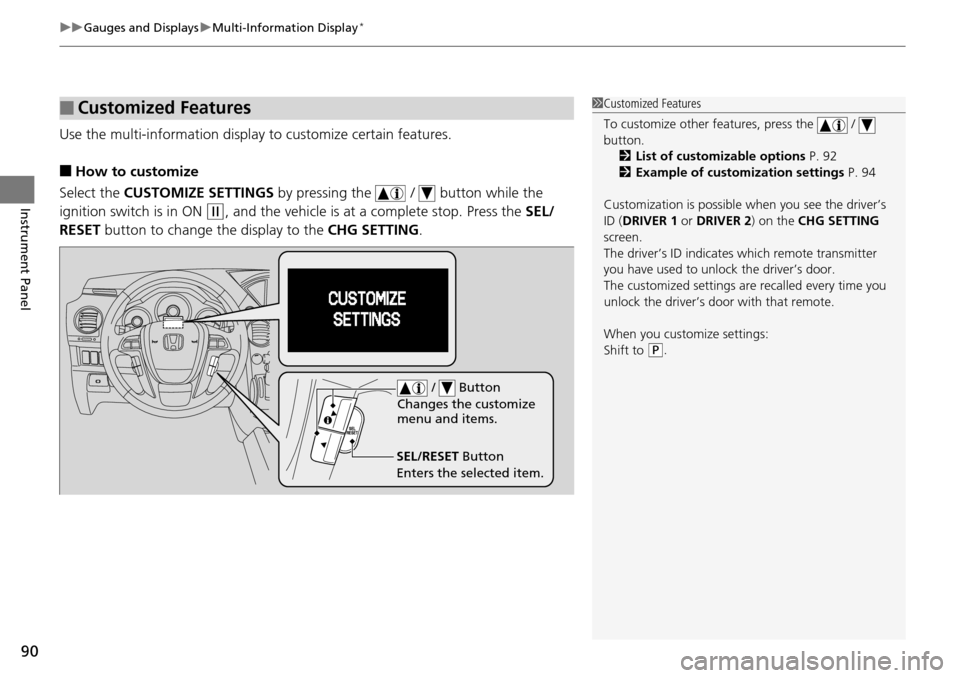
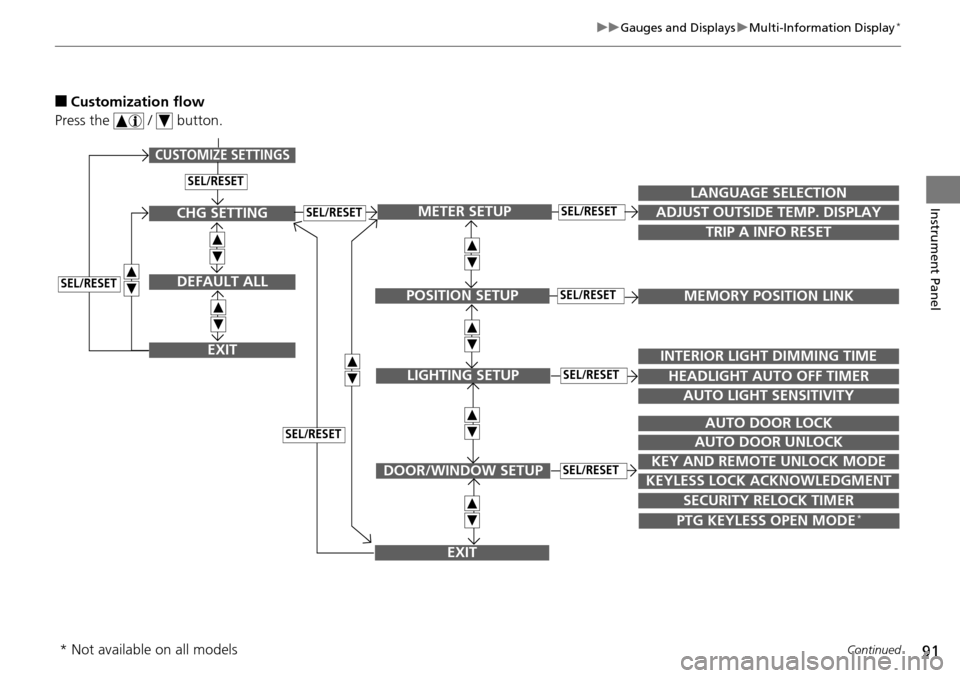
Use the multi-information display to customize certain features.
■How to customize
Select the CUSTOMIZE SETTINGS by pressing the / button while the
ignition switch is in ON
(w, and the vehicle is at a complete stop. Press the SEL/
RESET button to change the display to the CHG SETTING.
■Customized Features1Customized Features
To customize other features, press the /
button.
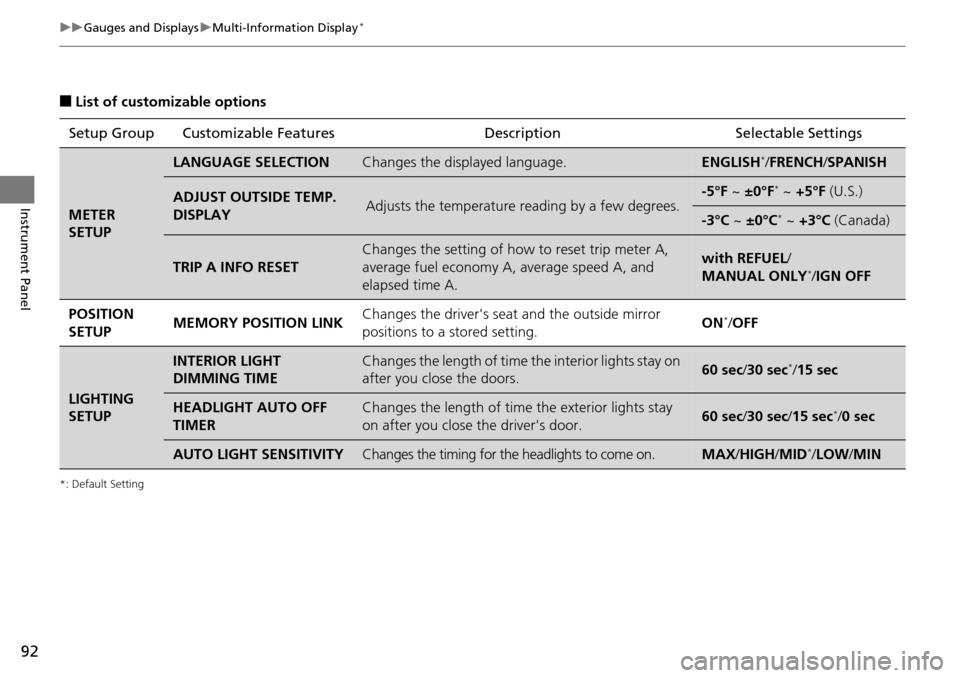
2 List of customizable options P. 92
2 Example of customization settings P. 94
Customization is possible when you see the driver’s
ID ( DRIVER 1 or DRIVER 2) on the CHG SETTING
screen.
The driver’s ID indicates which remote transmitter
you have used to unlock the driver’s door.
The customized settings are recalled every time you
unlock the driver’s door with that remote.
When you customize settings:
Shift to
( P.
SEL/RESET Button
Enters the selected item. / Button
Changes the customize
menu and items.
Page 92 of 488
91
uuGauges and Displays uMulti-Information Display*
Continued
Instrument Panel
■Customization flow
Press the / button.
SEL/RESET
CUSTOMIZE SETTINGS
SECURITY RELOCK TIMER
TRIP A INFO RESET
LANGUAGE SELECTION
ADJUST OUTSIDE TEMP. DISPLAY
MEMORY POSITION LINK
INTERIOR LIGHT DIMMING TIME
HEADLIGHT AUTO OFF TIMER
AUTO LIGHT SENSITIVITY
AUTO DOOR LOCK
AUTO DOOR UNLOCK
KEY AND REMOTE UNLOCK MODE
KEYLESS LOCK ACKNOWLEDGMENT
METER SETUP
POSITION SETUP
LIGHTING SETUP
DOOR/WINDOW SETUP
SEL/RESET
SEL/RESET
SEL/RESET
SEL/RESET
PTG KEYLESS OPEN MODE*
EXIT
CHG SETTING
DEFAULT ALL
EXIT
SEL/RESET
SEL/RESET
SEL/RESET
* Not available on all models
Page 93 of 488
92
uuGauges and Displays uMulti-Information Display*
Instrument Panel
■List of customizable options
*: Default Setting
Setup Group Customizable Features DescriptionSelectable Settings
METER
SETUP
LANGUAGE SELECTIONChanges the displayed language.ENGLISH*/FRENCH /SPANISH
ADJUST OUTSIDE TEMP.
DISPLAYAdjusts the temperature reading by a few degrees.-5°F ~ ±0°F* ~ +5°F (U.S.)
-3°C ~ ±0°C* ~ +3°C (Canada)
TRIP A INFO RESET
Changes the setting of how to reset trip meter A,
average fuel economy A, average speed A, and
elapsed time A.with REFUEL /
MANUAL ONLY*/ IGN OFF
POSITION
SETUP MEMORY POSITION LINK
Changes the driver's seat
and the outside mirror
positions to a stored setting. ON
*/
OFF
LIGHTING
SETUP
INTERIOR LIGHT
DIMMING TIMEChanges the length of time the interior lights stay on
after you close the doors.60 sec/ 30 sec*/15 sec
HEADLIGHT AUTO OFF
TIMERChanges the length of time the exterior lights stay
on after you close the driver's door.60 sec/ 30 sec/15 sec*/0 sec
AUTO LIGHT SENSITIVITYChanges the timing for the headlights to come on.MAX /HIGH /MID*/ LOW /MIN