Cal e HONDA PILOT 2015 2.G Workshop Manual
[x] Cancel search | Manufacturer: HONDA, Model Year: 2015, Model line: PILOT, Model: HONDA PILOT 2015 2.GPages: 488, PDF Size: 11.34 MB
Page 256 of 488
255
uuRear Entertainment System*uOperating the System
Continued
Features
Auto Play On:
1. Rotate to select Auto Play On, then press .
2. The check mark disappears, and th e auto play feature turns off.
u With this feature off, the DVD does no t automatically start playing when the
disc is inserted. Pres s button to play.
Title/Chapter Search:
1. Rotate to select Title Search or Chapter Search , then press .
2. Rotate to select a title or chapter number, then press .
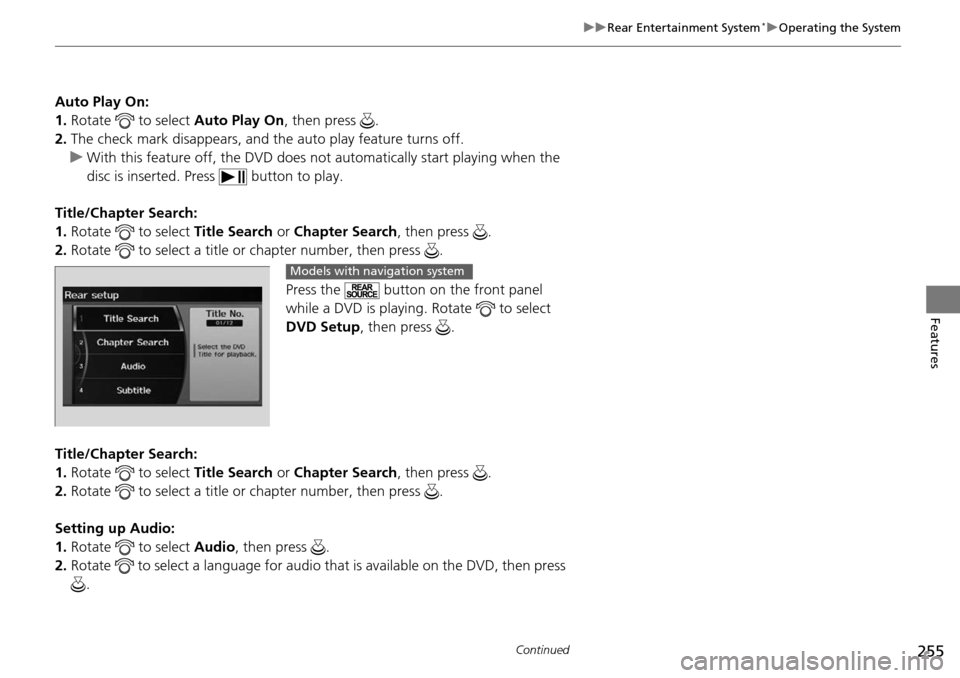
Press the button on the front panel
while a DVD is playing. Rotate to select
DVD Setup, then press .
Title/Chapter Search:
1. Rotate to select Title Search or Chapter Search , then press .
2. Rotate to select a title or chapter number, then press .
Setting up Audio:
1. Rotate to select Audio, then press .
2. Rotate to select a language for audio th at is available on the DVD, then press
.
Models with navigation system
Page 257 of 488
uuRear Entertainment System*uOperating the System
256
Features
Setting up Subtitle:
1. Rotate to select Subtitle, then press .
2. Rotate to select a subtitle langu age that is available on the DVD.
Setting up Repeat:
1. Rotate to select Repeat, then press .
2. Rotate to select the icon in the center to repeat the current chapter, the icon
on the right to repeat the current title, or OFF to turn off repeat.
Auto Play:
1. Rotate to select Auto Play, then press .
2. Rotate to select OFF or ON , then press .
u With this feature off, the DVD does no t automatically start playing when the
disc is inserted. Press button to play.
■TITLE/SCROLL button on the remote
Press the TITLE/SCROLL button while the DVD is playing to see the current status of
title, chapter, elapsed time, angle, su btitle, audio, and sound characteristics.1TITLE/SCROLL button on the remote
Press the TITLE/SCROLL button again to return.
Page 259 of 488
258
uuRear Entertainment System*uOperating the System
Features
Search:
You can search for a DVD segmen t from the following methods.
Title Search - Select the title you want to play.
Chapter Search - Select the chapter you want to play.
NumInput:
Enter a two digit number, if issued to the DV D, to find the segment you want to start
to play.
1. Select NumInput to go to the number input screen.
2. Use the 3, 4 , , and buttons to input numbers.
u If you want to delete a number, select DEL.
3. The cursor automatically goes to ENT after you input two digits. Press the ENT
button to enter.
Repeat:
Highlight this option and press the ENT button to change the repeat mode from
chapter repeat and title repeat, to repeat off.
Page 261 of 488
uuRear Entertainment System*uOperating the System
260
Features
Initial Settings -
Press the SETUP button to configure the initial Language, Dynamic Range, and
Angle Mark settings before playing a DVD.
Language Settings:
Select the language for the DVD’s displayed menus ( Menu Language), the DVD’s
audio ( Audio Language ), and the DVD’s subtitle ( Subtitle Language).
1. Select the language setting.
2. Select the language from English, French, Spanish, Arabic, German, Italian,
Dutch, Chinese, Korean, Thai, Japanese, and other.
3. If you select other, you need to enter the four di git language code to configure
the language that is not listed. Select Yes to go to the numb er input screen.
u To return to the Language Settings screen, select No.
4. Press the ENT button each time you input a digit.
u If you want to delete a number, select DEL.
5. The cursor automatically goes to ENT after you input four digits. Press the ENT
button to command.
Dynamic Range:
This feature reduces the difference between the loud and quiet sound levels. Select
ON or OFF .
Angle Mark:
You can select whether to display the angle mark appearing in the upper right
corner of the screen when you change the view angle while the DVD is playing.
Select ON or OFF .
When the DVD is not playing1SETUP button on the remote
Initial Settings:
The prior language varies by disc. You may not be
able to configure your selected language setting.
Page 267 of 488
266
Features
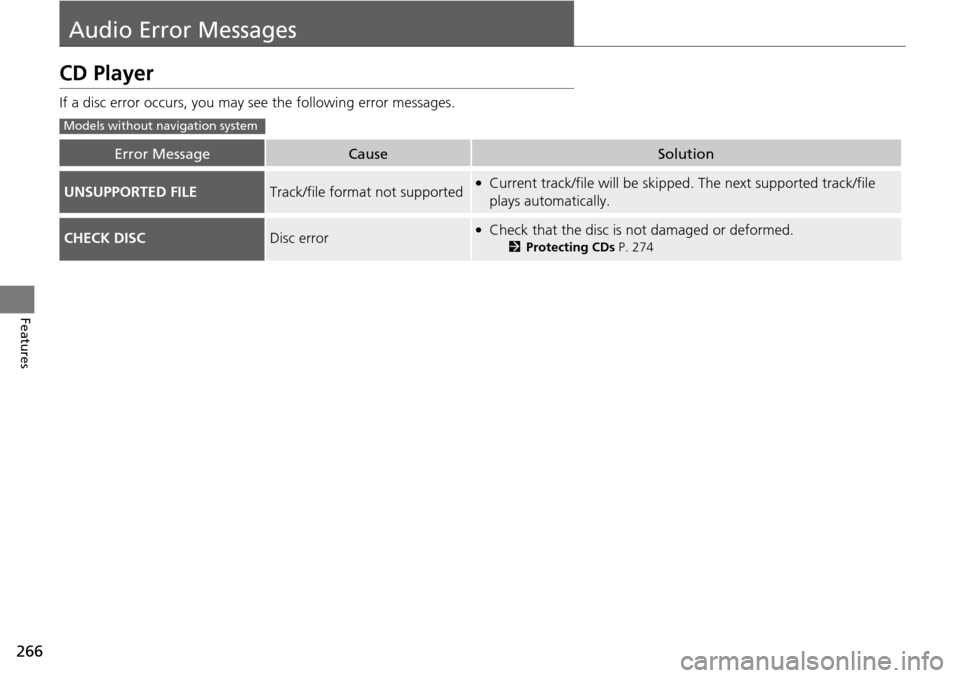
Audio Error Messages
CD Player
If a disc error occurs, you may see the following error messages.
Error MessageCauseSolution
UNSUPPORTED FILETrack/file format not supported●Current track/file will be skippe d. The next supported track/file
plays automatically.
CHECK DISCDisc error●Check that the disc is not damaged or deformed.
2 Protecting CDs P. 274
Models without navigation system
Page 268 of 488
267
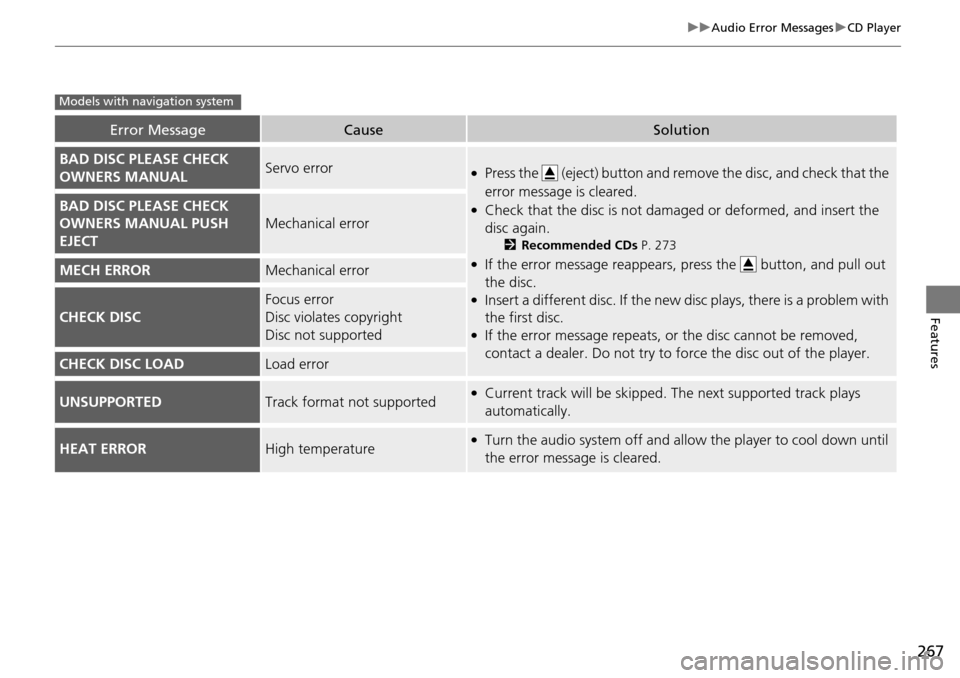
uuAudio Error Messages uCD Player
Features
Error MessageCauseSolution
BAD DISC PLEASE CHECK
OWNERS MANUALServo error●Press the (eject) button and remo ve the disc, and check that the
error message is cleared.
●Check that the disc is not dama ged or deformed, and insert the
disc again.
2 Recommended CDs P. 273
●If the error message reappears, press the button, and pull out
the disc.
●Insert a different disc. If the new di sc plays, there is a problem with
the first disc.
●If the error message repeats, or the disc cannot be removed,
contact a dealer. Do not try to fo rce the disc out of the player.
BAD DISC PLEASE CHECK
OWNERS MANUAL PUSH
EJECT
Mechanical error
MECH ERRORMechanical error
CHECK DISC
Focus error
Disc violates copyright
Disc not supported
CHECK DISC LOADLoad error
UNSUPPORTEDTrack format not supported●Current track will be skipped. The next supported track plays
automatically.
HEAT ERRORHigh temperature●Turn the audio system off and allo w the player to cool down until
the error message is cleared.
Models with navigation system
Page 272 of 488
271
uuAudio Error Messages uDVD Player Error Messages
Features
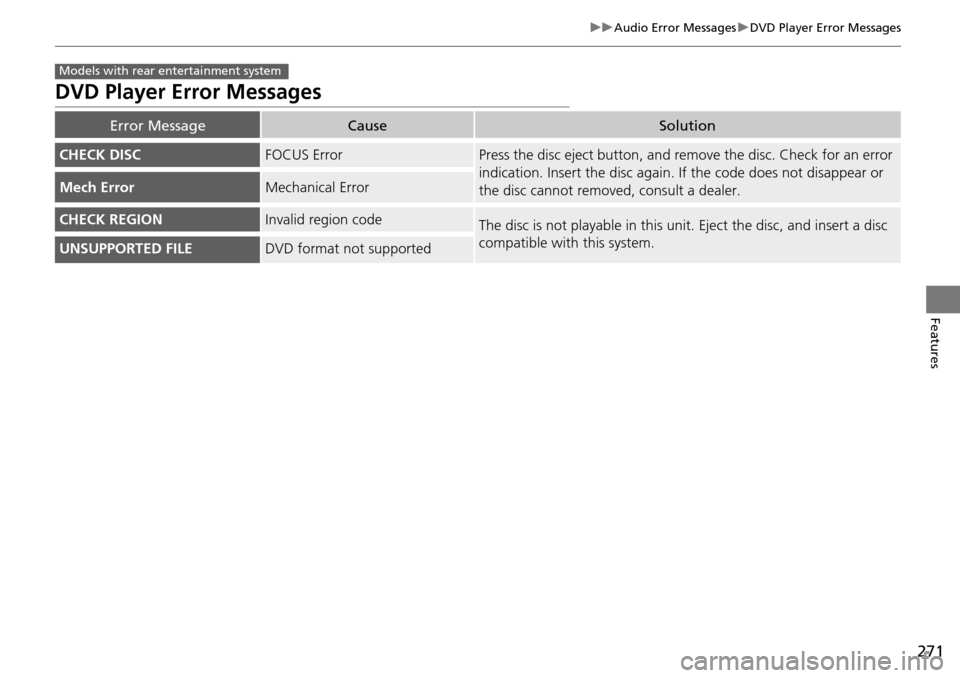
DVD Player Error Messages
Error MessageCauseSolution
CHECK DISCFOCUS ErrorPress the disc eject button, and re move the disc. Check for an error
indication. Insert the disc again. If the code does not disappear or
the disc cannot removed, consult a dealer.
Mech ErrorMechanical Error
CHECK REGIONInvalid region codeThe disc is not playable in this unit. Eject the disc, and insert a disc
compatible with this system.
UNSUPPORTED FILEDVD format not supported
Models with rear entertainment system
Page 273 of 488
272
Features
General Information on the Audio System
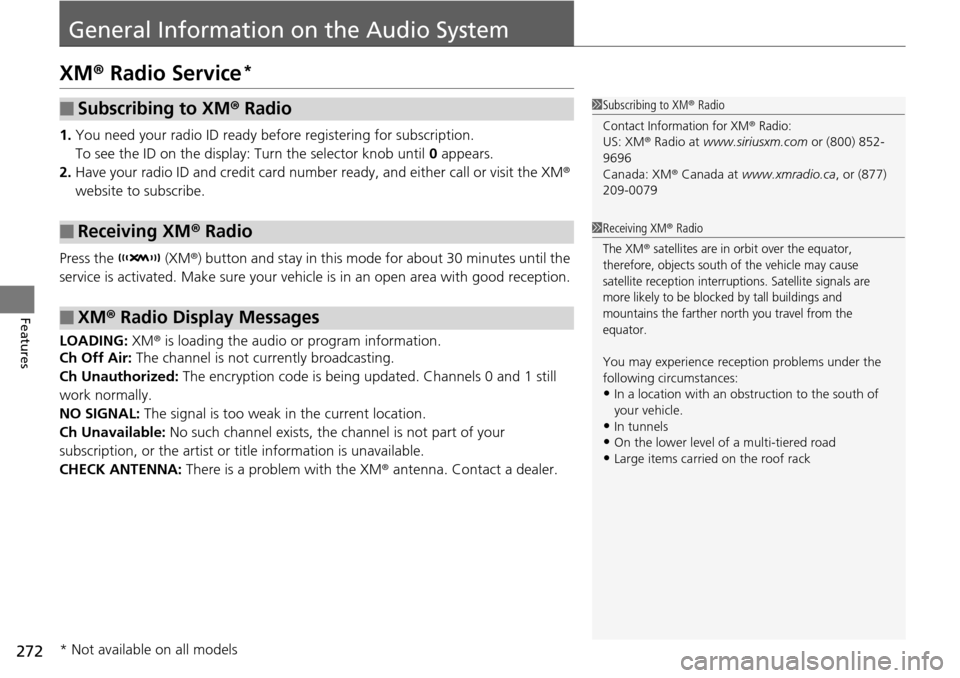
XM® Radio Service*
1. You need your radio ID ready befo re registering for subscription.
To see the ID on the display: Turn the selector knob until 0 appears.
2. Have your radio ID and credit card number ready, and either call or visit the XM®
website to subscribe.
Press the (XM®) button and stay in this mode for about 30 minutes until the
service is activated. Make sure your vehicl e is in an open area with good reception.
LOADING: XM® is loading the audio or program information.
Ch Off Air: The channel is not currently broadcasting.
Ch Unauthorized: The encryption code is being updated. Channels 0 and 1 still
work normally.
NO SIGNAL: The signal is too weak in the current location.
Ch Unavailable: No such channel exists, the channel is not part of your
subscription, or the artist or title information is unavailable.
CHECK ANTENNA: There is a problem with the XM ® antenna. Contact a dealer.
■Subscribing to XM® Radio
■Receiving XM ® Radio
■XM ® Radio Display Messages
1 Subscribing to XM ® Radio
Contact Information for XM® Radio:US: XM ® Radio at www.siriusxm.com or (800) 852-
9696
Canada: XM ® Canada at www.xmradio.ca , or (877)
209-0079
1 Receiving XM ® Radio
The XM® satellites are in orbit over the equator,
therefore, objects south of the vehicle may cause
satellite reception interruptions. Satellite signals are
more likely to be blocked by tall buildings and
mountains the farther north you travel from the
equator.
You may experience rece ption problems under the
following circumstances:
•In a location with an obstruction to the south of
your vehicle.
•In tunnels
•On the lower level of a multi-tiered road•Large items carried on the roof rack
* Not available on all models
Page 278 of 488
277
uuHomeLink ® Universal Transceiver*u Training HomeLink
Features
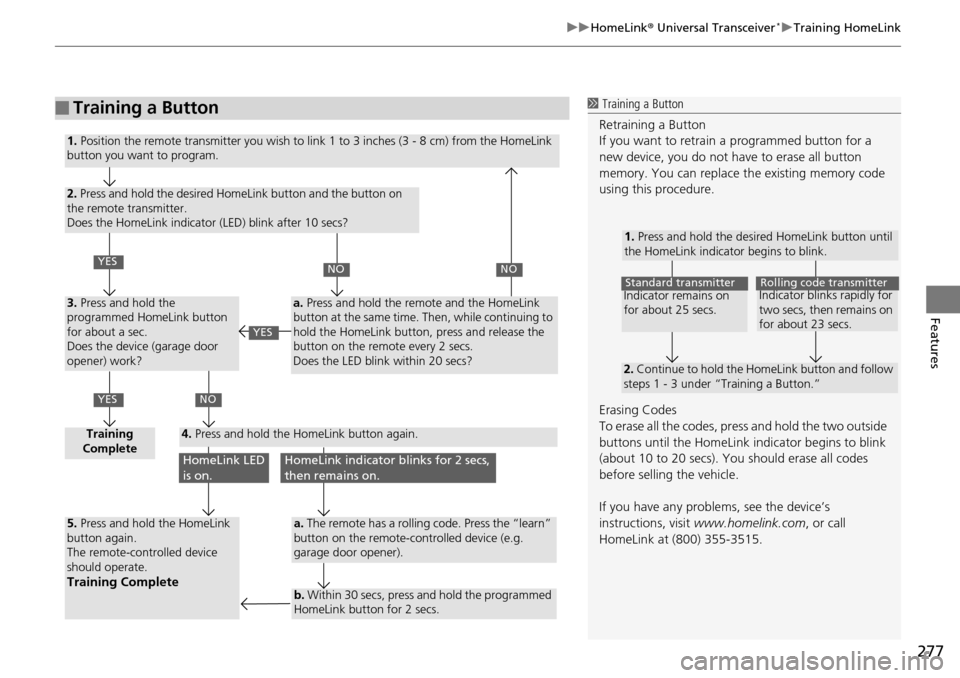
■Training a Button1 Training a Button
Retraining a Button
If you want to retrain a programmed button for a
new device, you do not ha ve to erase all button
memory. You can replace the existing memory code
using this procedure.
Erasing Codes
To erase all the codes, press and hold the two outside
buttons until the HomeLink i ndicator begins to blink
(about 10 to 20 secs). You should erase all codes
before selling the vehicle.
If you have any problems, see the device’s
instructions, visit www.homelink.com , or call
HomeLink at (800) 355-3515.
1. Press and hold the desired HomeLink button until
the HomeLink indicator begins to blink.
2. Continue to hold the HomeLink button and follow
steps 1 - 3 under “Training a Button.”
Indicator remains on
for about 25 secs.Standard transmitterIndicator blinks rapidly for
two secs, then remains on
for about 23 secs.Rolling code transmitter
1. Position the remote transmitter you wish to link 1 to 3 inches (3 - 8 cm) from the HomeLink
button you want to program.
2. Press and hold the desired HomeLink button and the button on
the remote transmitter.
Does the HomeLink indicator (LED) blink after 10 secs?
3. Press and hold the
programmed HomeLink button
for about a sec.
Does the device (garage door
opener) work?
Training
Complete4. Press and hold the HomeLink button again.
5. Press and hold the HomeLink
button again.
The remote-controlled device
should operate.
Training Complete
a. Press and hold the remote and the HomeLink
button at the same time. Then, while continuing to
hold the HomeLink button, press and release the
button on the remote every 2 secs.
Does the LED blink within 20 secs?
a. The remote has a rolling code. Press the “learn”
button on the remote-controlled device (e.g.
garage door opener).
b. Within 30 secs, press and hold the programmed
HomeLink button for 2 secs.
YES
YES
NONO
NO
HomeLink LED
is on.HomeLink indicator blinks for 2 secs,
then remains on.
YES
Page 279 of 488
278
Features
Bluetooth® HandsFreeLink ®
Bluetooth® HandsFreeLink ® (HFL) allows you to place and receive phone calls using
your vehicle's audio system, without handling your cell phone.
Using HFL
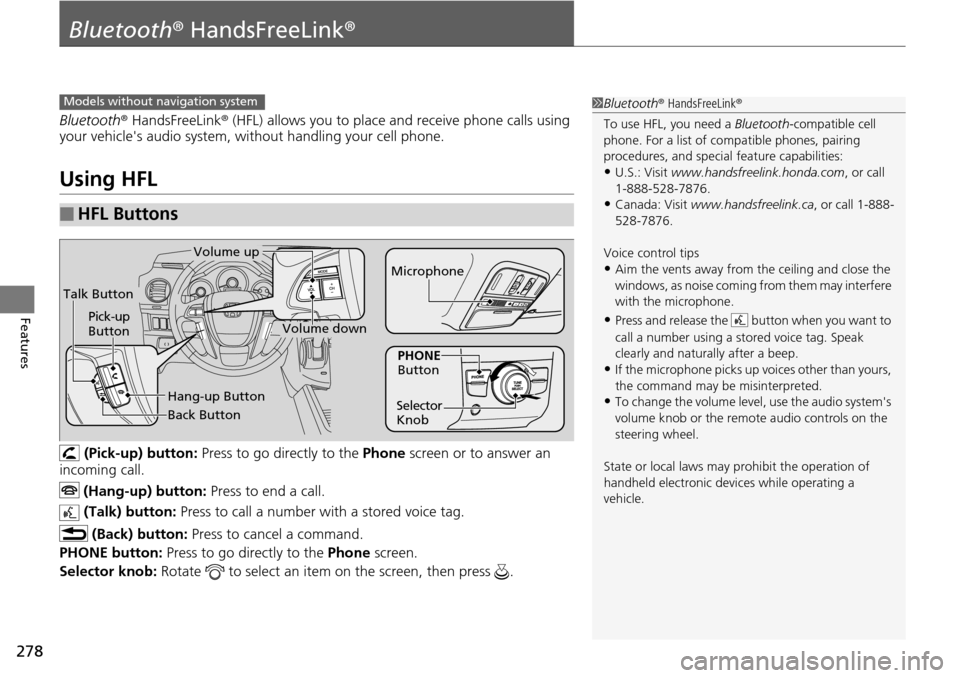
(Pick-up) button: Press to go directly to the Phone screen or to answer an
incoming call.
(Hang-up) button: Press to end a call.
(Talk) button: Press to call a number with a stored voice tag.
(Back) button: Press to cancel a command.
PHONE button: Press to go directly to the Phone screen.
Selector knob: Rotate to select an item on the screen, then press .
■HFL Buttons
1Bluetooth ® HandsFreeLink ®
To use HFL, you need a Bluetooth-compatible cell
phone. For a list of compatible phones, pairing
procedures, and special feature capabilities:
•U.S.: Visit www.handsfreelink.honda.com , or call
1-888-528-7876.
•Canada: Visit www.handsfreelink.ca , or call 1-888-
528-7876.
Voice control tips
•Aim the vents away from the ceiling and close the
windows, as noise coming fr om them may interfere
with the microphone.
•Press and release the button when you want to
call a number using a st ored voice tag. Speak
clearly and naturally after a beep.
•If the microphone picks up vo ices other than yours,
the command may be misinterpreted.
•To change the volume level, use the audio system's
volume knob or the remote audio controls on the
steering wheel.
State or local laws may pr ohibit the operation of
handheld electronic devi ces while operating a
vehicle.
Models without navigation system
Talk Button
Volume up
Microphone
Hang-up Button
Pick-up
Button
Volume down
Selector
KnobPHONE
Button
Back Button