Cal e HONDA PILOT 2015 2.G User Guide
[x] Cancel search | Manufacturer: HONDA, Model Year: 2015, Model line: PILOT, Model: HONDA PILOT 2015 2.GPages: 488, PDF Size: 11.34 MB
Page 44 of 488
43
uuAirbags uFront Airbags (SRS)
Safe DrivingYour front airbags have advanced features to help reduce the likelihood of airbag
related injuries to smaller occupants.
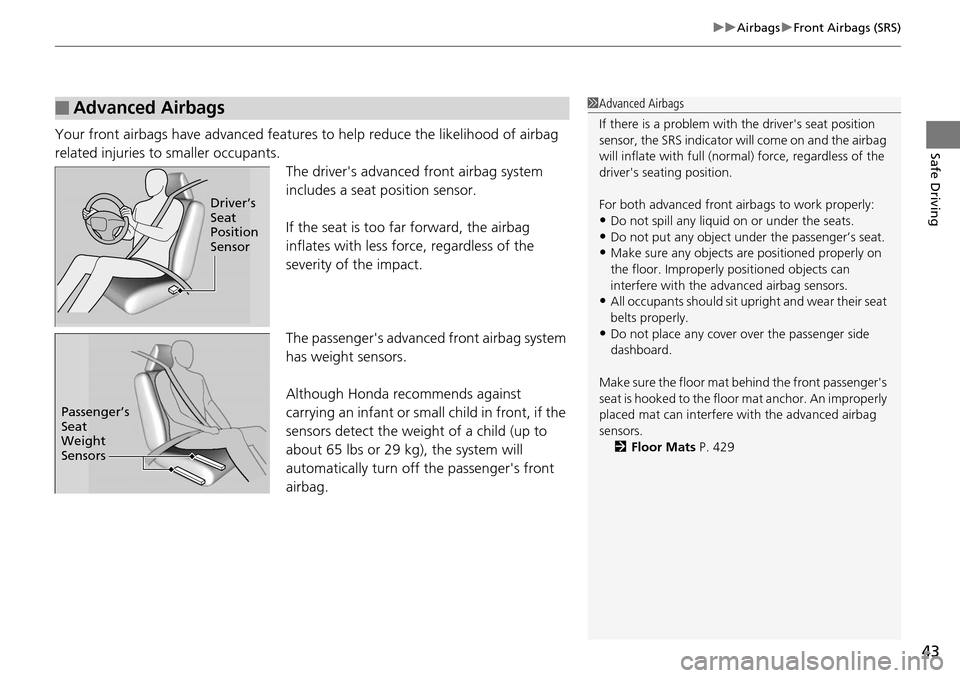
The driver's advanced front airbag system
includes a seat position sensor.
If the seat is too far forward, the airbag
inflates with less force, regardless of the
severity of the impact.
The passenger's advanced front airbag system
has weight sensors.
Although Honda recommends against
carrying an infant or small child in front, if the
sensors detect the weight of a child (up to
about 65 lbs or 29 kg), the system will
automatically turn off the passenger's front
airbag.
■Advanced Airbags1 Advanced Airbags
If there is a problem with the driver's seat position
sensor, the SRS indicator wi ll come on and the airbag
will inflate with full (normal) force, regardless of the
driver's seating position.
For both advanced front airbags to work properly:
•Do not spill any liquid on or under the seats.•Do not put any object under the passenger’s seat.
•Make sure any objects are positioned properly on
the floor. Improperly pos itioned objects can
interfere with the advanced airbag sensors.
•All occupants should sit upri ght and wear their seat
belts properly.
•Do not place any cover over the passenger side
dashboard.
Make sure the floor mat behind the front passenger's
seat is hooked to the floor mat anchor. An improperly
placed mat can interfere with the advanced airbag
sensors. 2 Floor Mats P. 429
Driver’s
Seat
Position
Sensor
Passenger’s
Seat
Weight
Sensors
Page 47 of 488
uuAirbags uSide Airbags
46
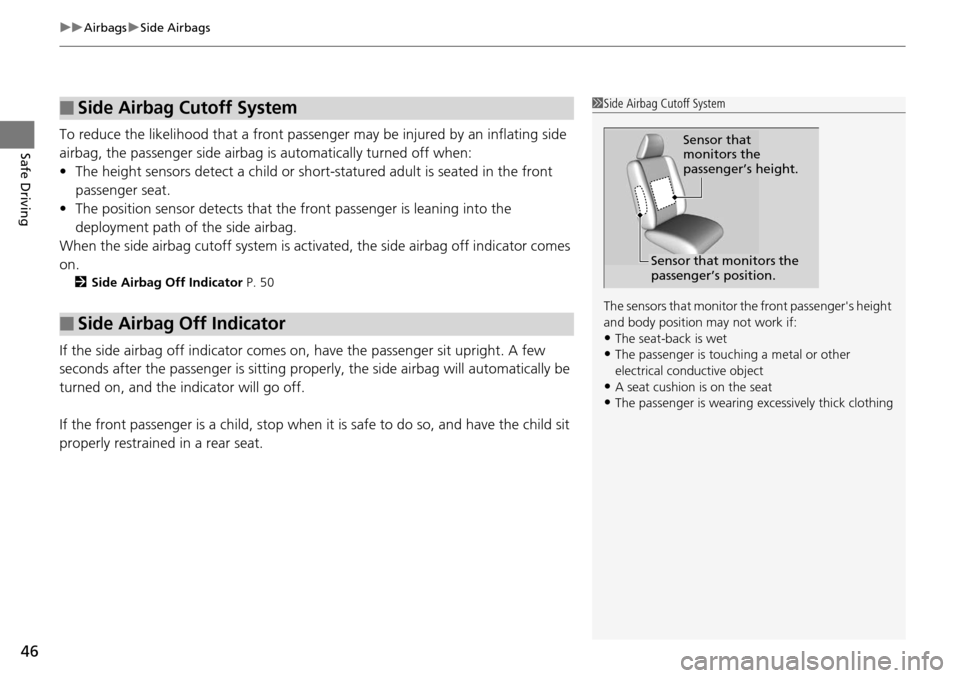
Safe DrivingTo reduce the likelihood that a front passeng er may be injured by an inflating side
airbag, the passenger side airbag is automatically turned off when:
• The height sensors detect a child or sho rt-statured adult is seated in the front
passenger seat.
• The position sensor detects that the front passenger is leaning into the
deployment path of the side airbag.
When the side airbag cutoff system is acti vated, the side airbag off indicator comes
on.
2 Side Airbag Off Indicator P. 50
If the side airbag off indicator comes on, have the passenger sit upright. A few
seconds after the passenger is sitting properly, the side airbag will automatically be
turned on, and the indicator will go off.
If the front passenger is a child, stop when it is safe to do so, and have the child sit
properly restrained in a rear seat.
■Side Airbag Cutoff System
■Side Airbag Off Indicator
1 Side Airbag Cutoff System
The sensors that monitor th e front passenger's height
and body position may not work if:
•The seat-back is wet•The passenger is touc hing a metal or other
electrical conductive object
•A seat cushion is on the seat•The passenger is wearing excessively thick clothing
Sensor that
monitors the
passenger’s height.
Sensor that monitors the
passenger’s position.
Page 56 of 488
Continued55
uuChild Safety uSafety of Infants and Small Children
Safe DrivingIf a child is at least one year old and within the weight range indicated by the child
seat manufacturer, the child should be pr operly restrained in a firmly secured
forward-facing child seat.
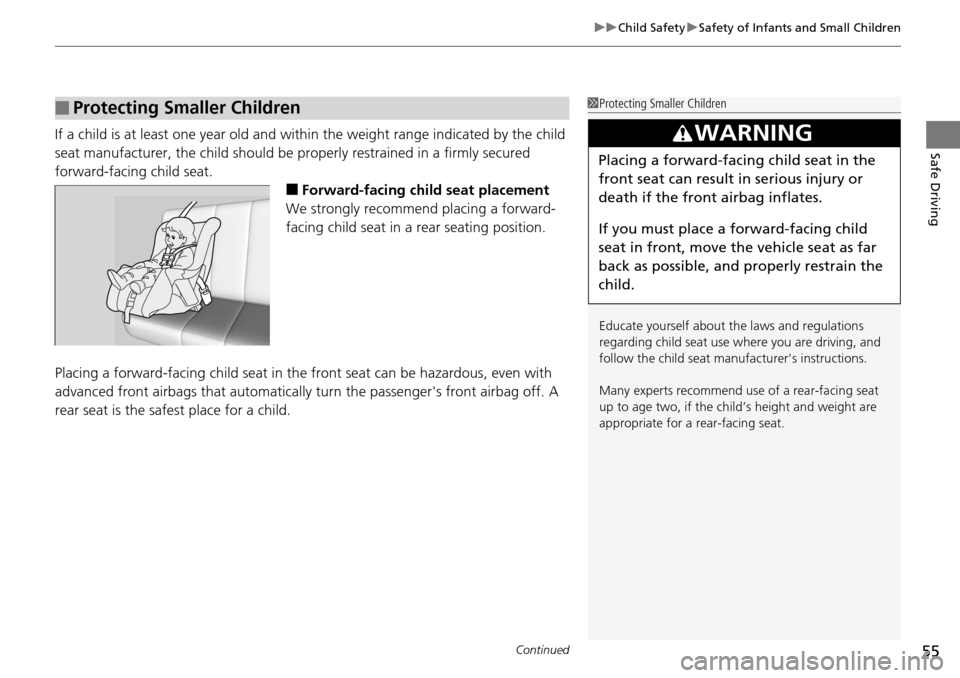
■Forward-facing child seat placement
We strongly recommend placing a forward-
facing child seat in a rear seating position.
Placing a forward-facing child seat in th e front seat can be hazardous, even with
advanced front airbags that automatically turn the passeng er's front airbag off. A
rear seat is the safest place for a child.
■Protecting Smaller Children1 Protecting Smaller Children
Educate yourself about th e laws and regulations
regarding child seat use wh ere you are driving, and
follow the child seat manufacturer's instructions.
Many experts recommend us e of a rear-facing seat
up to age two, if the chil d’s height and weight are
appropriate for a rear-facing seat.
3WARNING
Placing a forward-facing child seat in the
front seat can result in serious injury or
death if the front airbag inflates.
If you must place a forward-facing child
seat in front, move the vehicle seat as far
back as possible, and properly restrain the
child.
Page 76 of 488
75
uuIndicators u
Continued
Instrument Panel
IndicatorNameOn/BlinkingExplanationMessage*
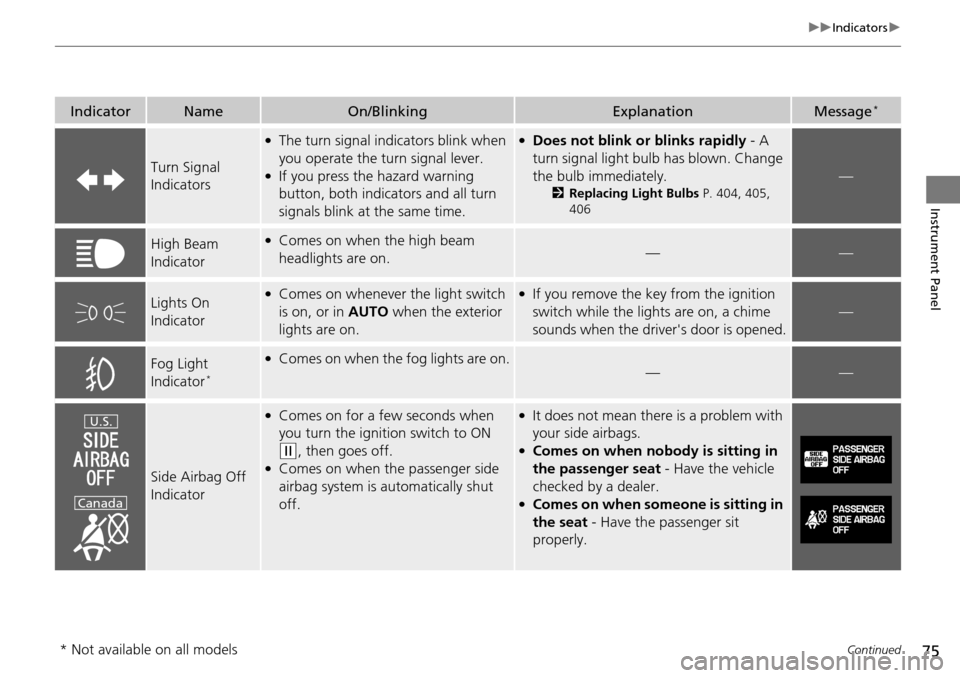
Turn Signal
Indicators
●The turn signal indi cators blink when
you operate the turn signal lever.
●If you press the hazard warning
button, both indica tors and all turn
signals blink at the same time.
●Does not blink or blinks rapidly - A
turn signal light bulb has blown. Change
the bulb immediately.
2 Replacing Light Bulbs P. 404, 405,
406
—
High Beam
Indicator●Comes on when the high beam
headlights are on.——
Lights On
Indicator●Comes on whenever the light switch
is on, or in AUTO when the exterior
lights are on.●If you remove the key from the ignition
switch while the lights are on, a chime
sounds when the driver's door is opened.
—
Fog Light
Indicator*
●Comes on when the fog lights are on.——
Side Airbag Off
Indicator
●Comes on for a few seconds when
you turn the igniti on switch to ON
(w, then goes off.●Comes on when the passenger side
airbag system is automatically shut
off.
●It does not mean there is a problem with
your side airbags.
●Comes on when nobody is sitting in
the passenger seat - Have the vehicle
checked by a dealer.
●Comes on when some one is sitting in
the seat - Have the passenger sit
properly.
U.S.
Canada
* Not available on all models
Page 77 of 488
76
uuIndicators u
Instrument Panel
IndicatorNameOn/BlinkingExplanationMessage*
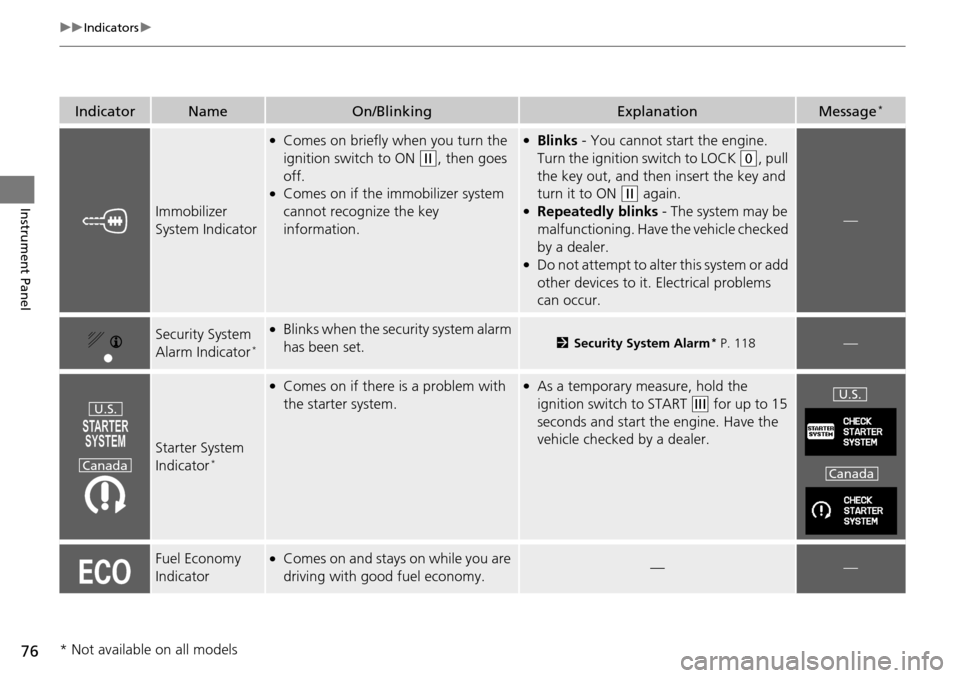
Immobilizer
System Indicator
●Comes on briefly when you turn the
ignition switch to ON
(w, then goes
off.
●Comes on if the immobilizer system
cannot recognize the key
information.
●Blinks - You cannot start the engine.
Turn the ignition switch to LOCK
(0, pull
the key out, and then insert the key and
turn it to ON
(w again.●Repeatedly blinks - The system may be
malfunctioning. Have the vehicle checked
by a dealer.
●Do not attempt to alter this system or add
other devices to it. Electrical problems
can occur.
—
Security System
Alarm Indicator*
●Blinks when the secu rity system alarm
has been set.2 Security System Alarm* P. 118—
Starter System
Indicator*
●Comes on if there is a problem with
the starter system.●As a temporary measure, hold the
ignition switch to START
(e for up to 15
seconds and start the engine. Have the
vehicle checked by a dealer.
Fuel Economy
Indicator●Comes on and stays on while you are
driving with good fuel economy.——
U.S.
CanadaU.S.
Canada
* Not available on all models
Page 91 of 488
uuGauges and Displays uMulti-Information Display*
90
Instrument Panel
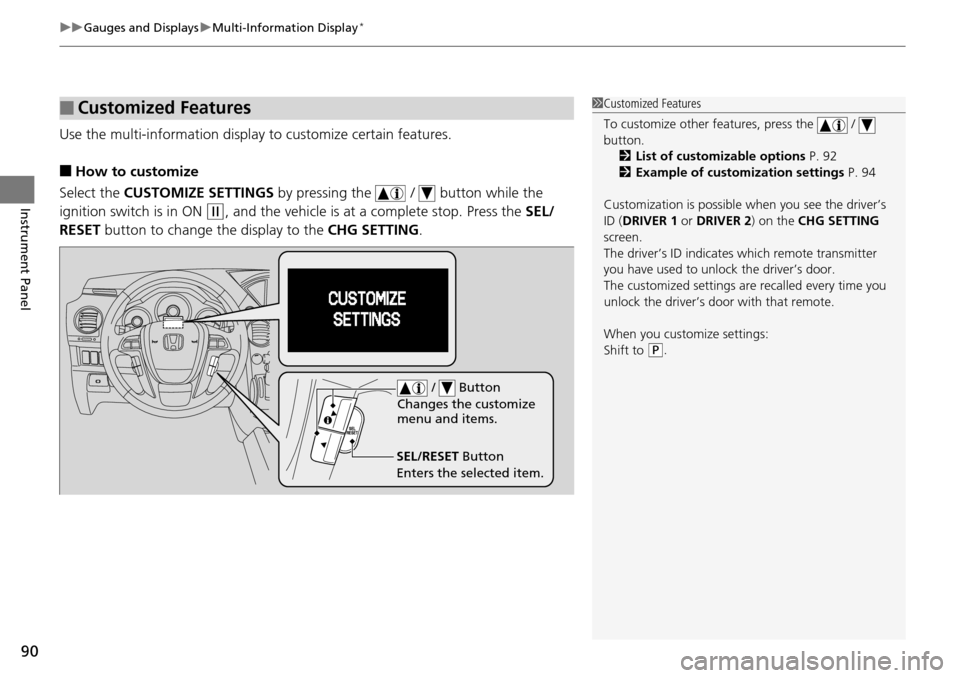
Use the multi-information display to customize certain features.
■How to customize
Select the CUSTOMIZE SETTINGS by pressing the / button while the
ignition switch is in ON
(w, and the vehicle is at a complete stop. Press the SEL/
RESET button to change the display to the CHG SETTING.
■Customized Features1Customized Features
To customize other features, press the /
button.
2 List of customizable options P. 92
2 Example of customization settings P. 94
Customization is possible when you see the driver’s
ID ( DRIVER 1 or DRIVER 2) on the CHG SETTING
screen.
The driver’s ID indicates which remote transmitter
you have used to unlock the driver’s door.
The customized settings are recalled every time you
unlock the driver’s door with that remote.
When you customize settings:
Shift to
( P.
SEL/RESET Button
Enters the selected item. / Button
Changes the customize
menu and items.
Page 94 of 488
93
uuGauges and Displays uMulti-Information Display*
Continued
Instrument Panel
*1:Not available on all models
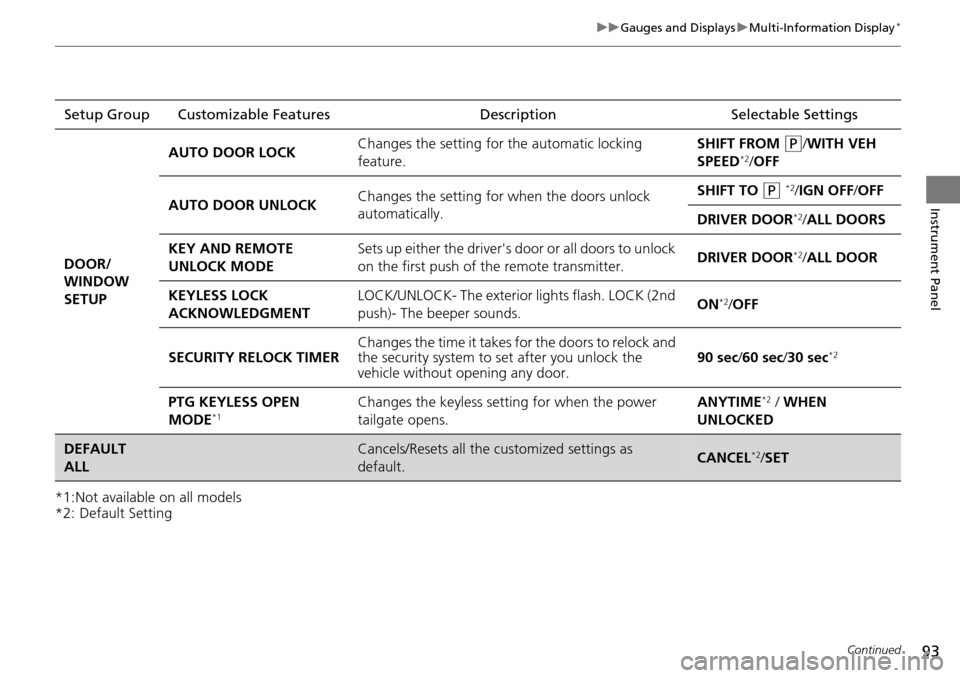
*2: Default SettingSetup Group Customizable Features
Description Selectable Settings
DOOR/
WINDOW
SETUP AUTO DOOR LOCK
Changes the setting for
the automatic locking
feature. SHIFT FROM
(P/WITH VEH
SPEED*2/ OFF
AUTO DOOR UNLOCK Changes the setting for
when the doors unlock
automatically. SHIFT TO
(P *2/IGN OFF /OFF
DRIVER DOOR
*2/ ALL DOORS
KEY AND REMOTE
UNLOCK MODE Sets up either the driver's door or all doors to unlock
on the first push of the remote transmitter.
DRIVER DOOR
*2/
ALL DOOR
KEYLESS LOCK
ACKNOWLEDGMENT LOCK/UNLOCK- The exterior
lights flash. LOCK (2nd
push)- The beeper sounds. ON
*2/
OFF
SECURITY RELOCK TIMER Changes the time it takes for the doors to relock and
the security system to set after you unlock the
vehicle without op
ening any door. 90 sec
/60 sec/ 30 sec
*2
PTG KEYLESS OPEN
MODE*1Changes the keyless setting for when the power
tailgate opens. ANYTIME*2 / WHEN
UNLOCKED
DEFAULT
ALLCancels/Resets all the customized settings as
default.CANCEL*2/ SET
Page 102 of 488
101
uuLocking and Unlocking the Doors uLocking/Unlocking the Doors from the Outside
Continued
Controls
Locking/Unlocking the Doors from the Outside
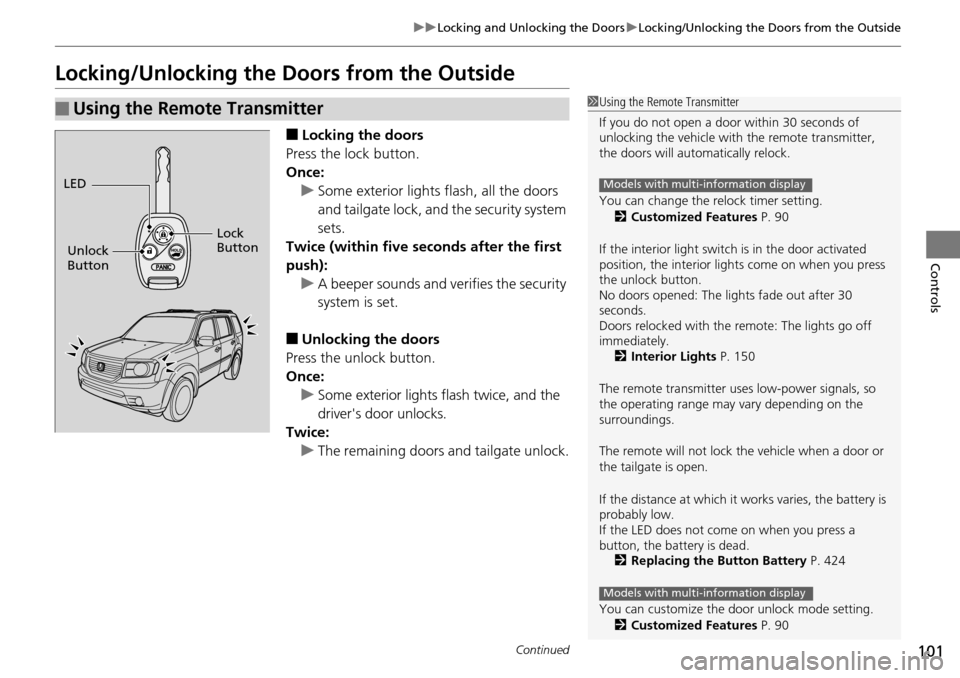
■Locking the doors
Press the lock button.
Once: u Some exterior lights flash, all the doors
and tailgate lock, and the security system
sets.
Twice (within five se conds after the first
push): u A beeper sounds and verifies the security
system is set.
■Unlocking the doors
Press the unlock button.
Once: u Some exterior lights flash twice, and the
driver's door unlocks.
Twice:
u The remaining doors and tailgate unlock.
■Using the Remote Transmitter1Using the Remote Transmitter
If you do not open a door within 30 seconds of
unlocking the vehicle with the remote transmitter,
the doors will auto matically relock.
You can change the relock timer setting. 2 Customized Features P. 90
If the interior light switch is in the door activated
position, the interior light s come on when you press
the unlock button.
No doors opened: The li ghts fade out after 30
seconds.
Doors relocked with the remote: The lights go off
immediately. 2 Interior Lights P. 150
The remote transmitter us es low-power signals, so
the operating range may vary depending on the
surroundings.
The remote will not lock th e vehicle when a door or
the tailgate is open.
If the distance at which it works varies, the battery is
probably low.
If the LED does not come on when you press a
button, the battery is dead. 2 Replacing the Button Battery P. 424
You can customize the door unlock mode setting. 2 Customized Features P. 90
Models with multi-information display
Models with multi-information display
LED
Unlock
Button Lock
Button
Page 106 of 488
105
uuLocking and Unlocking the Doors uAuto Door Locking/Unlocking
Controls
Auto Door Locking/Unlocking
Your vehicle locks all doors and unlocks the driver’s door automatically when a
certain condition is met.
■Drive lock mode
All doors and the tailgate lo ck when the vehicle’s speed reaches about 10 mph (15
km/h).
■Park unlock mode
The driver’s door unlocks when the shift lever is moved into
(P with the brake pedal
depressed.
■Auto Door Locking
■Auto Door Unlocking
1 Auto Door Locking/Unlocking
You can turn off or cha nge to another auto door
locking/unlocking setting us ing the master door lock
switch. 2 Customizing the Auto Door Locking/
Unlocking Setting
* P. 106
You can turn off or cha nge to another auto door
locking/unlocking setting us ing the multi-information
display.
2 Customized Features P. 90
Models without multi-information display
Models with multi-information display
* Not available on all models
Page 113 of 488
112
uuOpening and Closing the Tailgate uOpening/Closing the Power Tailgate*
Controls
Opening/Closing the Power Tailgate*
The power tailgate can be operated by pressing the power tailgate button on the
remote transmitter, pressing the power tailgate button on the driver's door, or
pressing the button on the tailgate.
■The power tailgate can be opened when:
• The tailgate and glass hatch are fully closed.
• The shift lever is in
(P.
• The key is not in the ignition switch when using the remote transmitter.
• You have changed the PTG KEYLESS OPEN MODE setting to WHEN
UNLOCKED, you need to unlock the tailgate before you press the tailgate button
to open it.
2 Customized Features P. 90
■The power tailgate can be closed when:
• The tailgate is fully open.
• The key is not in the ignition switch when using the remote transmitter.
1Opening/Closing the Power Tailgate*
The power tailgate may not open or close under the
following conditions:
•The vehicle is park ed on a steep hill.
•The vehicle is swayed in a strong wind.•The tailgate or the roof is covered with snow or ice.
If you close the power tail gate when all the doors are
locked, the power tailgate locks automatically.
If you replace the battery or the power tailgate fuse
while the tailgate is open, the power tailgate may be
disabled. The power tail gate resumes once you
manually close the tailgate.
Installing aftermarket components other than
genuine Honda a ccessories on the power tailgate
may prevent it from fully opening or closing.
Make sure the power tailgate is fully open before you
get your luggage in and out.
Make sure the power tailgate is fully closed before
you start the vehicle.
* Not available on all models