ECO mode HONDA PILOT 2015 2.G Workshop Manual
[x] Cancel search | Manufacturer: HONDA, Model Year: 2015, Model line: PILOT, Model: HONDA PILOT 2015 2.GPages: 488, PDF Size: 11.34 MB
Page 225 of 488
224
uuAudio System Basic Operation uPlaying the XM ® Radio
Features
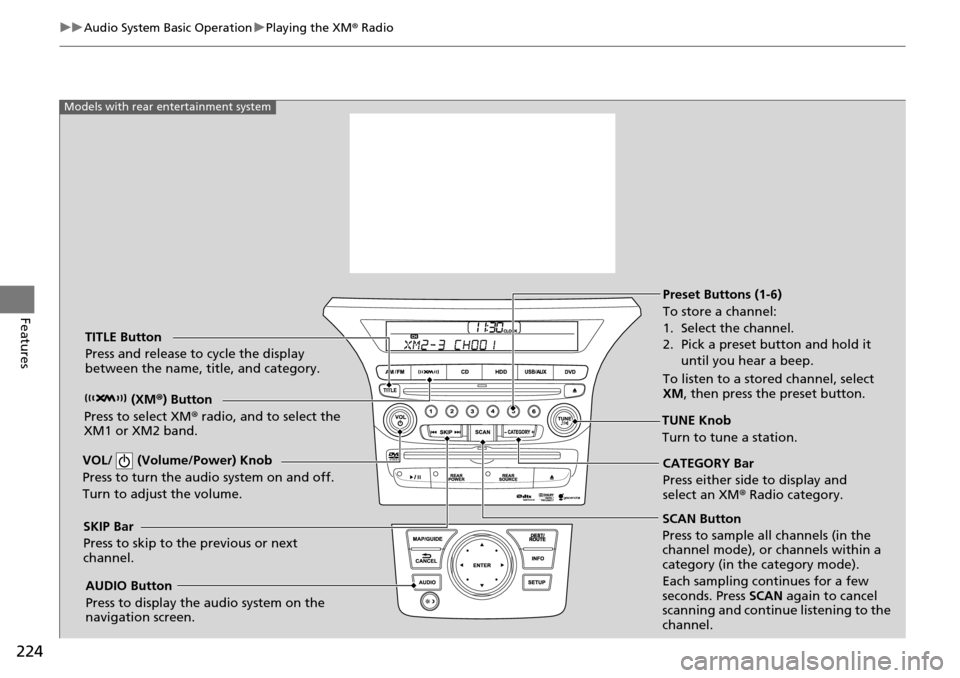
SCAN Button
Press to sample all channels (in the
channel mode), or channels within a
category (in the category mode).
Each sampling continues for a few
seconds. Press SCAN again to cancel
scanning and continue listening to the
channel.
VOL/ (Volume/Power) Knob
Press to turn the a
udio system on and off.
Turn to adjust the volume.
Preset Buttons (1-6)
To store a channel:
1. Select the channel.
2. Pick a preset button and hold it until you hear a beep.
To listen to a stored channel, select
XM , then press the preset button.
SKIP Bar
Press to skip to the previous or next
channel. CATEGORY Bar
Press either side to display and
select an XM
® Radio category.
TITLE Button
Press and release to cycle the display
between the name, title, and category.
(XM®) Button
Press to select XM ® radio, and to select the
XM1 or XM2 band.
TUNE Knob
Turn to tune a station.
AUDIO Button
Press to display the audio system on the
navigation screen.
Models with rear entertainment system
Page 227 of 488
226
uuAudio System Basic Operation uPlaying a CD
Features
Playing a CD
Your audio system supports audio CDs, CD-Rs and CD-RWs in either MP3 or WMA
format. With the CD loaded, press the CD button.
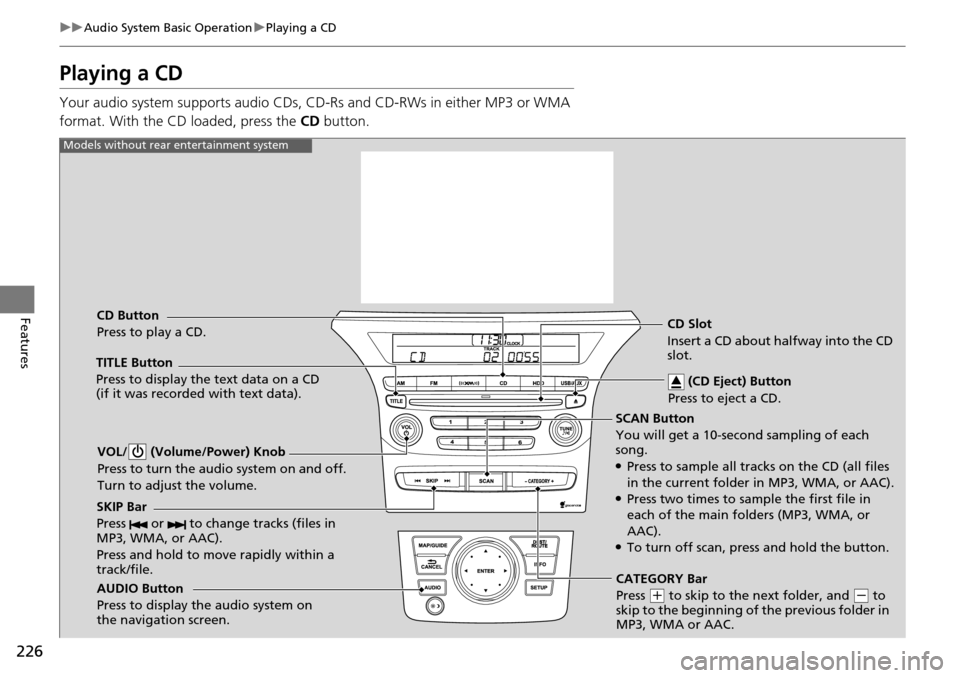
SCAN Button
You will get a 10-second sampling of each
song.
●Press to sample all tracks on the CD (all files
in the current folder in MP3, WMA, or AAC).
●Press two times to sample the first file in
each of the main folders (MP3, WMA, or
AAC).
●To turn off scan, press and hold the button.
VOL/ (Volume/Power) Knob
Press to turn the audio system on and off.
Turn to adjust the volume.
CD Slot
Insert a CD about halfway into the CD
slot.
AUDIO Button
Press to display the audio system on
the navigation screen. CD Button
Press to play a CD. (CD Eject) Button
Press to eject a CD.
Models without rear entertainment system
TITLE Button
Press to display the text data on a CD
(if it was recorded with text data).
SKIP Bar
Press or to change tracks (files in
MP3, WMA, or AAC).
Press and hold to mo ve rapidly within a
track/file.
CATEGORY Bar
Press
( + to skip to the next folder, and ( - to
skip to the beginning of the previous folder in
MP3, WMA or AAC.
Page 228 of 488
227
uuAudio System Basic Operation uPlaying a CD
Continued
Features
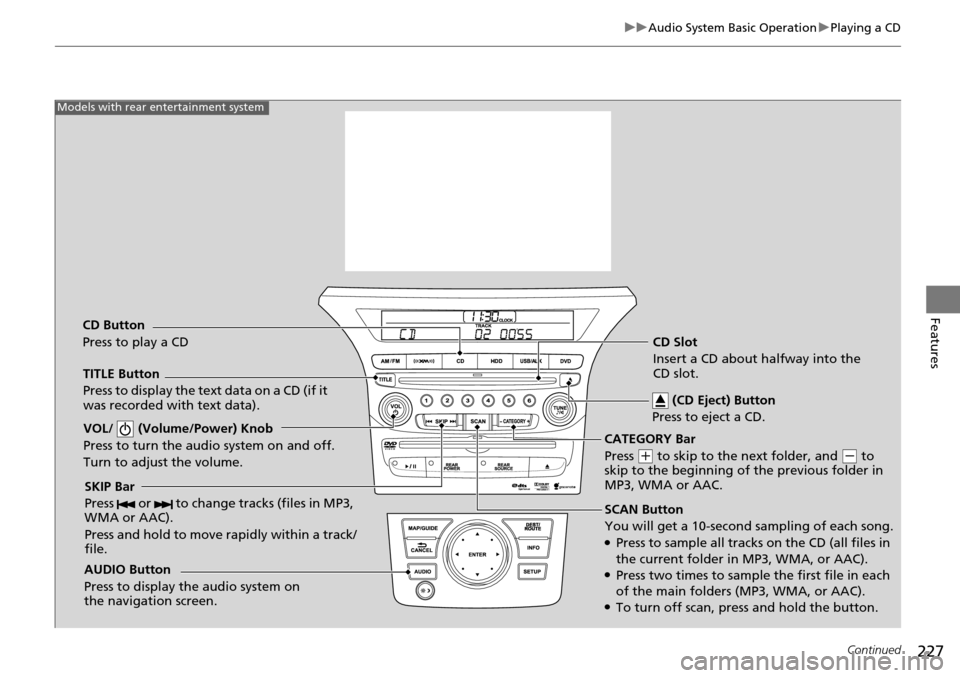
SCAN Button
You will get a 10-second sampling of each song.
●Press to sample all tracks on the CD (all files in
the current folder in MP3, WMA, or AAC).
●Press two times to sample the first file in each
of the main folders (MP3, WMA, or AAC).
●To turn off scan, pre ss and hold the button.
VOL/ (Volume/Power) Knob
Press to turn the audi
o system on and off.
Turn to adjust the volume.
SKIP Bar
Press or to change tracks (files in MP3,
WMA or AAC).
Press and hold to move rapidly within a track/
file.
TITLE Button
Press to display the text data on a CD (if it
was recorded with text data).
AUDIO Button
Press to display the audio system on
the navigation screen.
Models with rear entertainment system
CD Button
Press to play a CD CD Slot
Insert a CD about halfway into the
CD slot.
(CD Eject) Button
Press to eject a CD.
CATEGORY Bar
Press
( + to skip to the next folder, and (- to
skip to the beginning of the previous folder in
MP3, WMA or AAC.
Page 229 of 488
uuAudio System Basic Operation uPlaying a CD
228
Features
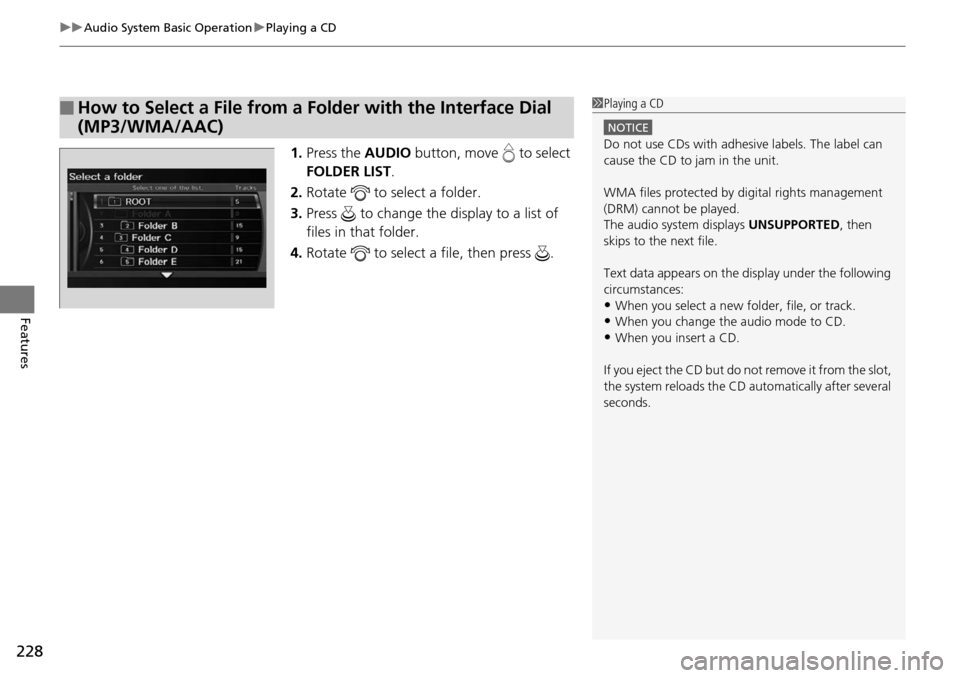
1. Press the AUDIO button, move to select
FOLDER LIST .
2. Rotate to select a folder.
3. Press to change the display to a list of
files in that folder.
4. Rotate to select a file, then press .
■How to Select a File from a Folder with the Interface Dial
(MP3/WMA/AAC)1Playing a CD
NOTICE
Do not use CDs with adhesive labels. The label can
cause the CD to jam in the unit.
WMA files protected by di gital rights management
(DRM) cannot be played.
The audio system displays UNSUPPORTED, then
skips to the next file.
Text data appears on the di splay under the following
circumstances:
•When you select a new folder, file, or track.
•When you change the audio mode to CD.
•When you insert a CD.
If you eject the CD but do not remove it from the slot,
the system reloads the CD automatically after several
seconds.
Page 231 of 488
230
uuAudio System Basic Operation uPlaying Hard Disc Drive (HDD) Audio
Features
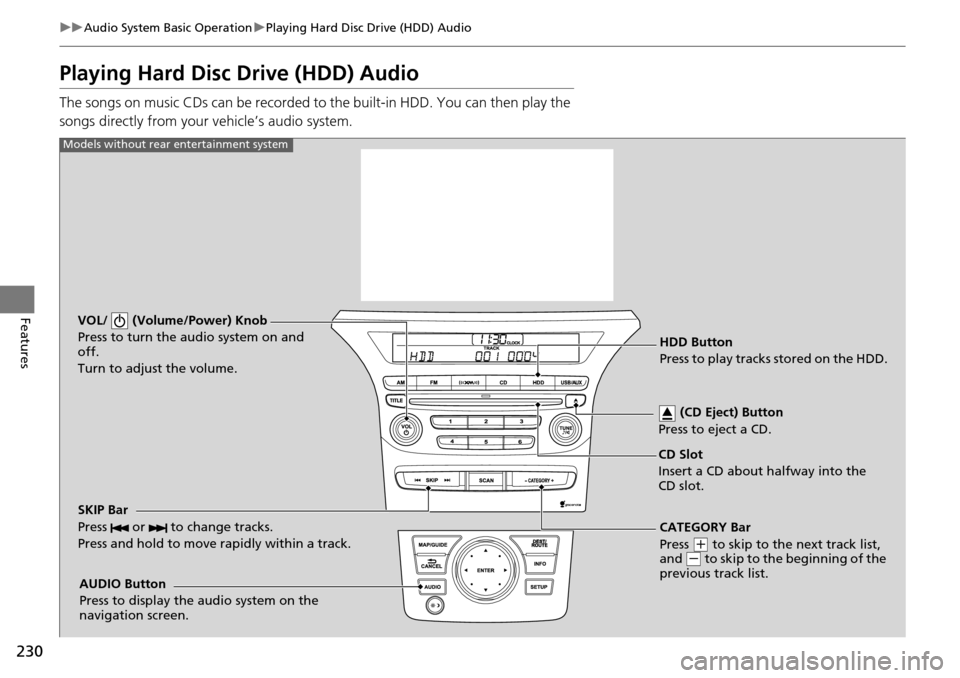
Playing Hard Disc Drive (HDD) Audio
The songs on music CDs can be recorded to the built-in HDD. You can then play the
songs directly from your vehicle’s audio system.
VOL/ (Volume/Power) Knob
Press to turn the audio system on and
off.
Turn to adjust the volume.
HDD Button
Press to play tracks stored on the HDD.
AUDIO Button
Press to display the audio system on the
navigation screen.
Models without rear entertainment system
CD Slot
Insert a CD about halfway into the
CD slot. (CD Eject) Button
Press to eject a CD.
SKIP Bar
Press or to change tracks.
Press and hold to move rapidly within a track.
CATEGORY Bar
Press
( + to skip to the next track list,
and ( - to skip to the beginning of the
previous track list.
Page 245 of 488
244
uuAudio System Basic Operation uPlaying a USB Flash Drive
Features
Playing a USB Flash Drive
Your audio system reads and plays sound files on a USB flash drive in either MP3,
WMA or AAC*1 format.
Connect your USB flash drive to the USB adapter cable, then press the USB/AUX
button.
2 USB Adapter Cable P. 173
*1:Only AAC format files recorded with iTunes ® are playable on this unit.
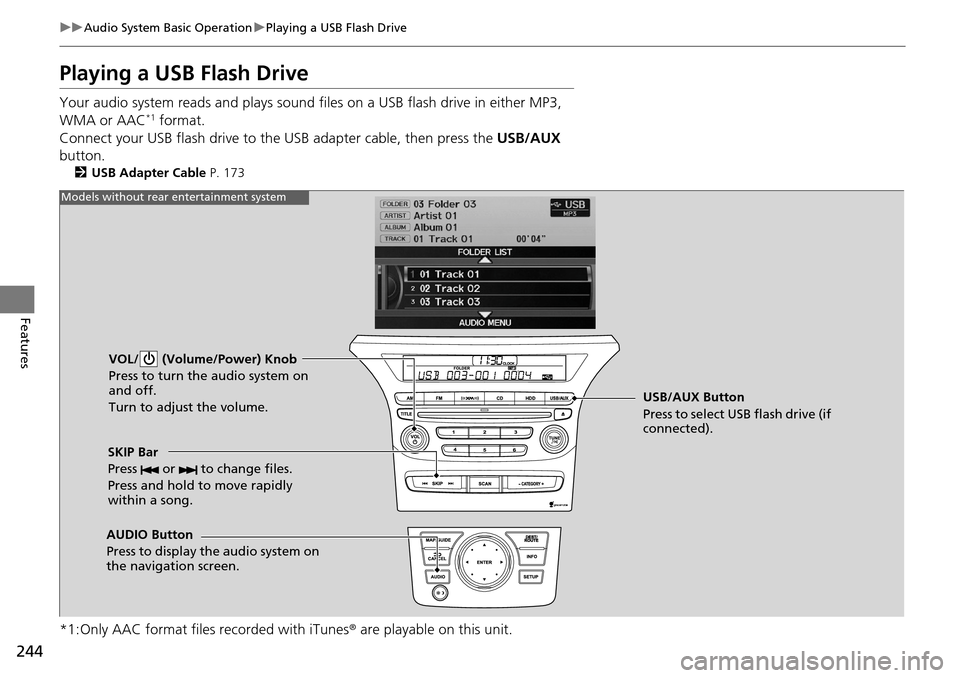
VOL/ (Volume/Power) Knob
Press to turn the audio system on
and off.
Turn to adjust the volume.
SKIP Bar
Press or to change files.
Press and hold to move rapidly
within a song.
AUDIO Button
Press to display the audio system on
the navigation screen. USB/AUX Button
Press to select USB flash drive (if
connected).
Models without rear entertainment system
Page 254 of 488
253
uuRear Entertainment System*uOperating the System
Continued
Features
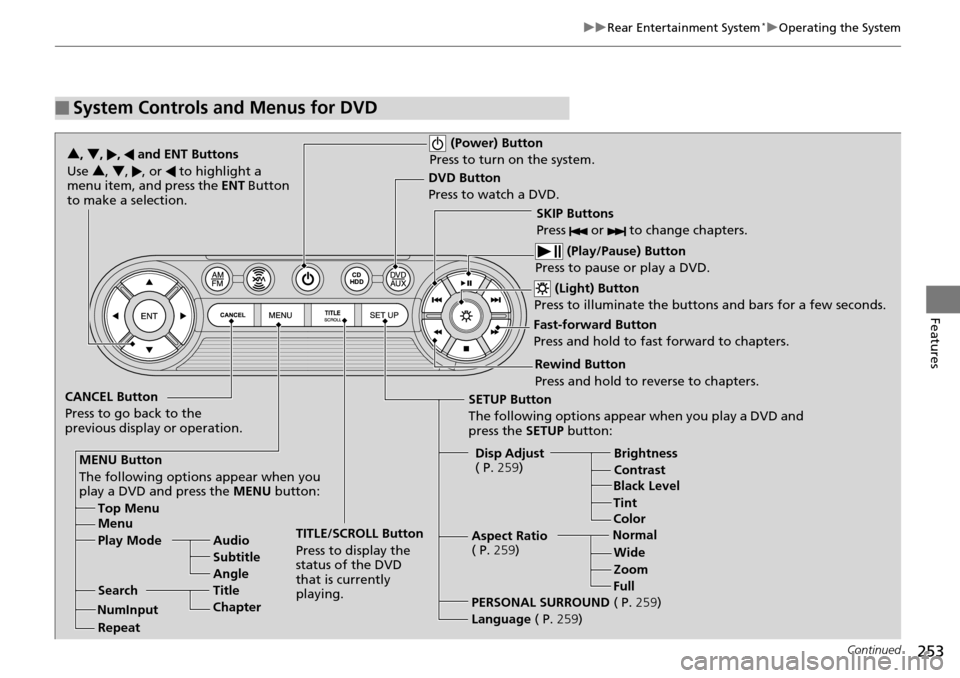
■System Controls and Menus for DVD
(Power) Button
Press to turn on the system.
DVD Button
Press to watch a DVD.
(Light) Button
Press to illuminate the buttons and bars for a few seconds.
SKIP Buttons
Press or to change chapters.
(Play/Pause) Button
Press to pause or play a DVD.
TITLE/SCROLL Button
Press to display the
status of the DVD
that is currently
playing.
MENU Button
The following options appear when you
play a DVD and press the MENU button:
Top Menu
Menu
Play Mode Audio Subtitle
Angle
Search Title
Chapter
Repeat SETUP Button
The following options appear when you play a DVD and
press the
SETUP button:
Disp Adjust
( P. 259) Brightness
Contrast
Black Level
Color
CANCEL Button
Press to go back to the
previous display or operation. 3
, 4 , , and ENT Buttons
Use 3 , 4, , or to highlight a
menu item, and press the ENT Button
to make a selection.
Tint
Normal WideZoom
Full
Aspect Ratio
( P.
259)
PERSONAL SURROUND ( P.259)
Language ( P.259)
Rewind Button
Press and hold to reverse to chapters.
Fast-forward Button
Press and hold to fast forward to chapters.
NumInput
Page 260 of 488
Continued259
uuRear Entertainment System*uOperating the System
Features
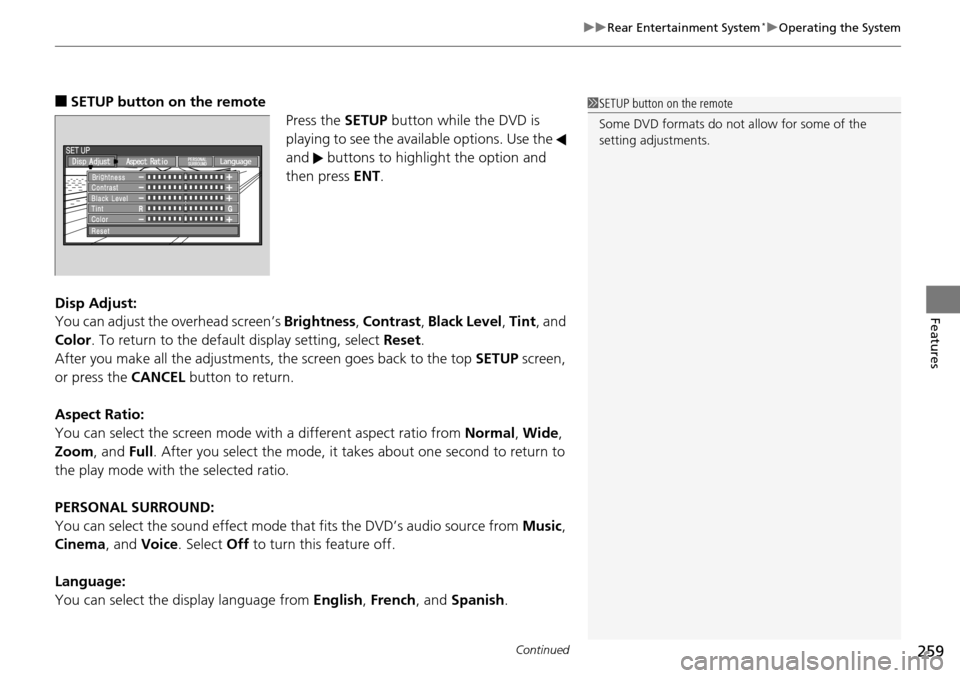
■SETUP button on the remote
Press the SETUP button while the DVD is
playing to see the availa ble options. Use the
and buttons to highlight the option and
then press ENT.
Disp Adjust:
You can adjust the overhead screen’s Brightness, Contrast , Black Level , Tint , and
Color . To return to the default display setting, select Reset.
After you make all the adjustments, the screen goes back to the top SETUP screen,
or press the CANCEL button to return.
Aspect Ratio:
You can select the screen mode wi th a different aspect ratio from Normal, Wide ,
Zoom , and Full. After you select the mode, it take s about one second to return to
the play mode with the selected ratio.
PERSONAL SURROUND:
You can select the sound effect mode th at fits the DVD’s audio source from Music,
Cinema , and Voice . Select Off to turn this feature off.
Language:
You can select the display language from English, French , and Spanish .1SETUP button on the remote
Some DVD formats do not allow for some of the
setting adjustments.
Page 262 of 488
261
uuRear Entertainment System*uOperating the System
Continued
Features
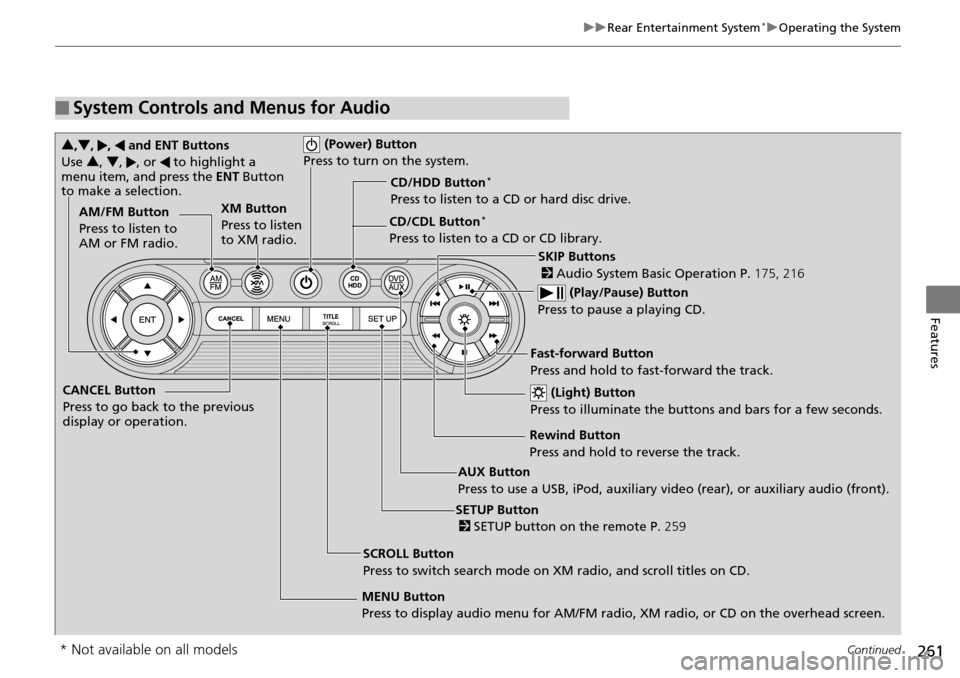
■System Controls and Menus for Audio
(Power) Button
Press to turn on the system.
AUX Button
Press to use a USB, iPod, auxiliary video (rear), or auxiliary audio (front). (Light) Button
Press to illuminate the buttons and bars for a few seconds.
SKIP Buttons
2 Audio System Basic Operation P. 175, 216
(Play/Pause) Button
Press to pause a playing CD.
SCROLL Button
Press to switch search mode on XM radio, and scroll titles on CD.
CANCEL Button
Press to go back to the previous
display or operation.
3
,4 , , and ENT Buttons
Use 3, 4 , , or to highlight a
menu item, and press the ENT Button
to make a selection.
CD/CDL Button*
Press to listen to a CD or CD library.
AM/FM Button
Press to listen to
AM or FM radio.
SETUP Button
2 SETUP button on the remote P. 259
XM Button
Press to listen
to XM radio.
MENU Button
Press to display audio menu for AM/FM radio, XM radio, or CD on the overhead screen.CD/HDD Button
*
Press to listen to a CD or hard disc drive.
Rewind Button
Press and hold to reverse the track.Fast-forward Button
Press and hold to fast-forward the track.
* Not available on all models
Page 263 of 488
uuRear Entertainment System*uOperating the System
262
Features
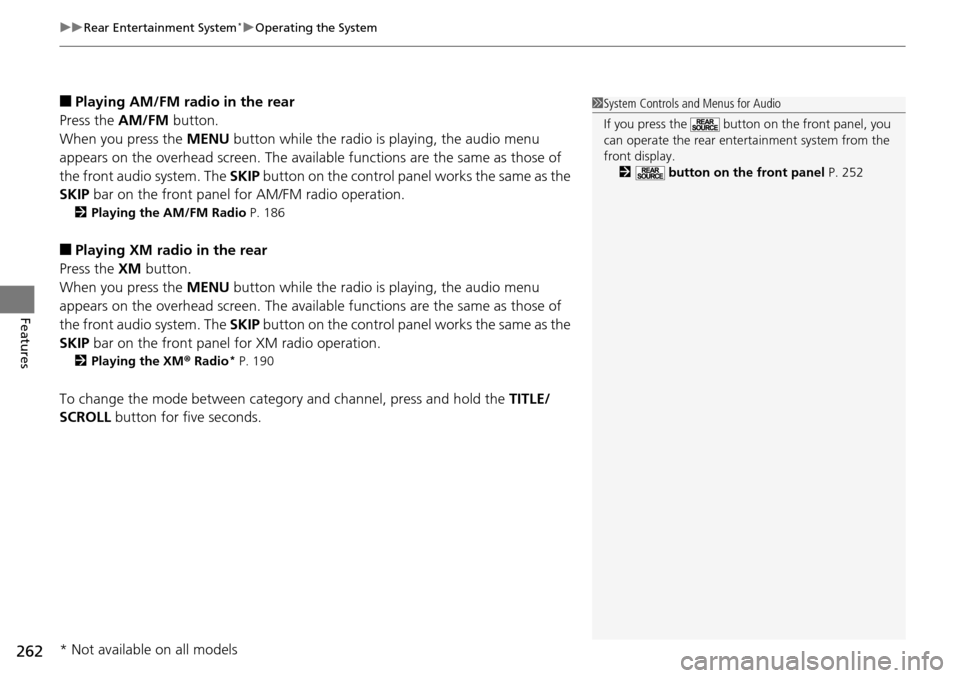
■Playing AM/FM radio in the rear
Press the AM/FM button.
When you press the MENU button while the radio is playing, the audio menu
appears on the overhead screen. The availa ble functions are the same as those of
the front audio system. The SKIP button on the control panel works the same as the
SKIP bar on the front panel for AM/FM radio operation.
2Playing the AM/FM Radio P. 186
■Playing XM radio in the rear
Press the XM button.
When you press the MENU button while the radio is playing, the audio menu
appears on the overhead screen. The availa ble functions are the same as those of
the front audio system. The SKIP button on the control panel works the same as the
SKIP bar on the front panel for XM radio operation.
2Playing the XM ® Radio* P. 190
To change the mode between category and channel, press and hold the TITLE/
SCROLL button for five seconds.
1System Controls and Menus for Audio
If you press the button on the front panel, you
can operate the rear entertainment system from the
front display.
2 button on the front panel P. 252
* Not available on all models