ECO mode HONDA PILOT 2015 2.G Owner's Guide
[x] Cancel search | Manufacturer: HONDA, Model Year: 2015, Model line: PILOT, Model: HONDA PILOT 2015 2.GPages: 488, PDF Size: 11.34 MB
Page 138 of 488
137Continued
Controls
Adjusting the Seats
Adjusting the Seat Positions
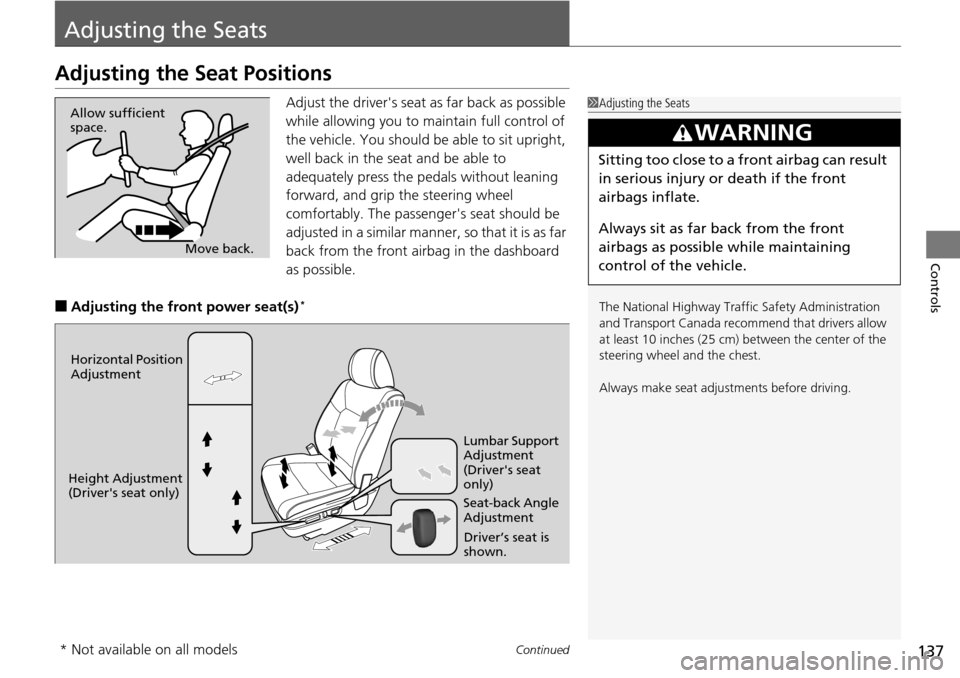
Adjust the driver's seat as far back as possible
while allowing you to ma intain full control of
the vehicle. You should be able to sit upright,
well back in the seat and be able to
adequately press the pedals without leaning
forward, and grip the steering wheel
comfortably. The passenger's seat should be
adjusted in a similar manner, so that it is as far
back from the front airbag in the dashboard
as possible.
■Adjusting th e front power seat(s)*
1Adjusting the Seats
The National Highway Traffic Safety Administration
and Transport Cana da recommend that drivers allow
at least 10 inches (25 cm) between the center of the
steering wheel and the chest.
Always make seat adjustments before driving.
3WARNING
Sitting too close to a front airbag can result
in serious injury or death if the front
airbags inflate.
Always sit as far back from the front
airbags as possible while maintaining
control of the vehicle.
Move back.
Allow sufficient
space.
Horizontal Position
Adjustment
Height Adjustment
(Driver's seat only) Seat-back Angle
Adjustment Lumbar Support
Adjustment
(Driver's seat
only)
Driver’s seat is
shown.
* Not available on all models
Page 151 of 488
150
Controls
Interior Lights/Interior Convenience Items
Interior Lights
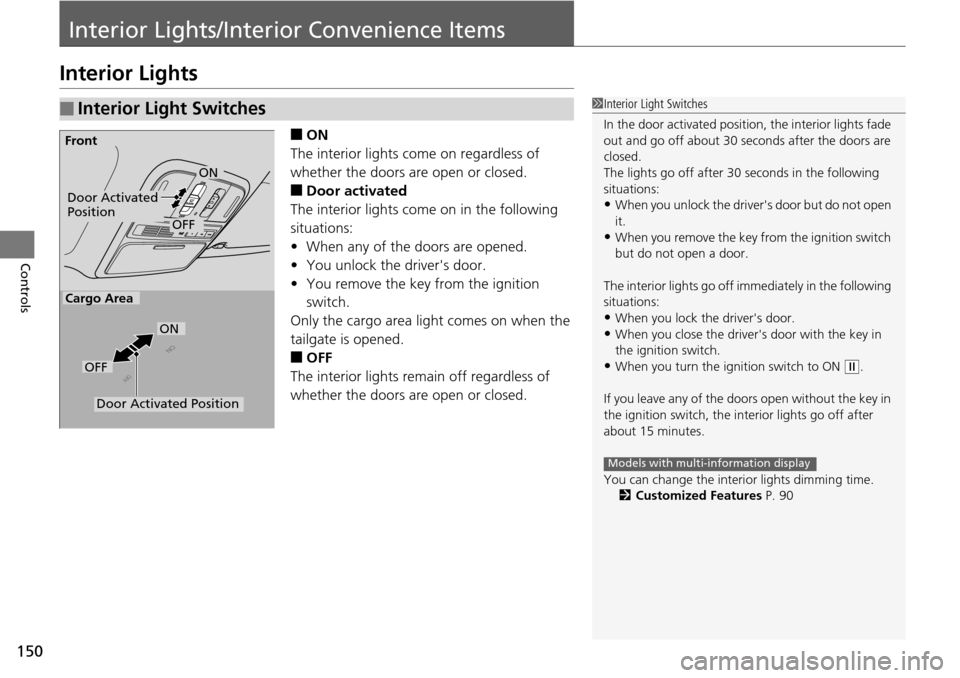
■ON
The interior lights come on regardless of
whether the doors are open or closed.
■Door activated
The interior lights come on in the following
situations:
• When any of the doors are opened.
• You unlock the driver's door.
• You remove the key from the ignition
switch.
Only the cargo area light comes on when the
tailgate is opened.
■OFF
The interior lights remain off regardless of
whether the doors are open or closed.
■Interior Light Switches1 Interior Light Switches
In the door activated position, the interior lights fade
out and go off about 30 se conds after the doors are
closed.
The lights go off after 30 seconds in the following
situations:
•When you unlock the driver's door but do not open
it.
•When you remove the key from the ignition switch
but do not open a door.
The interior lights go off i mmediately in the following
situations:
•When you lock the driver's door.
•When you close the driver's door with the key in
the ignition switch.
•When you turn the ignition switch to ON ( w.
If you leave any of the doors open without the key in
the ignition switch, the interior lights go off after
about 15 minutes.
You can change the interi or lights dimming time.
2 Customized Features P. 90
Models with multi-information display
Door Activated
Position
OFF
Front
Door Activated Position
ON
OFF
Cargo Area
ON
Page 164 of 488
163
uuInterior Lights/Interior Convenience Items uInterior Convenience Items
Continued
Controls
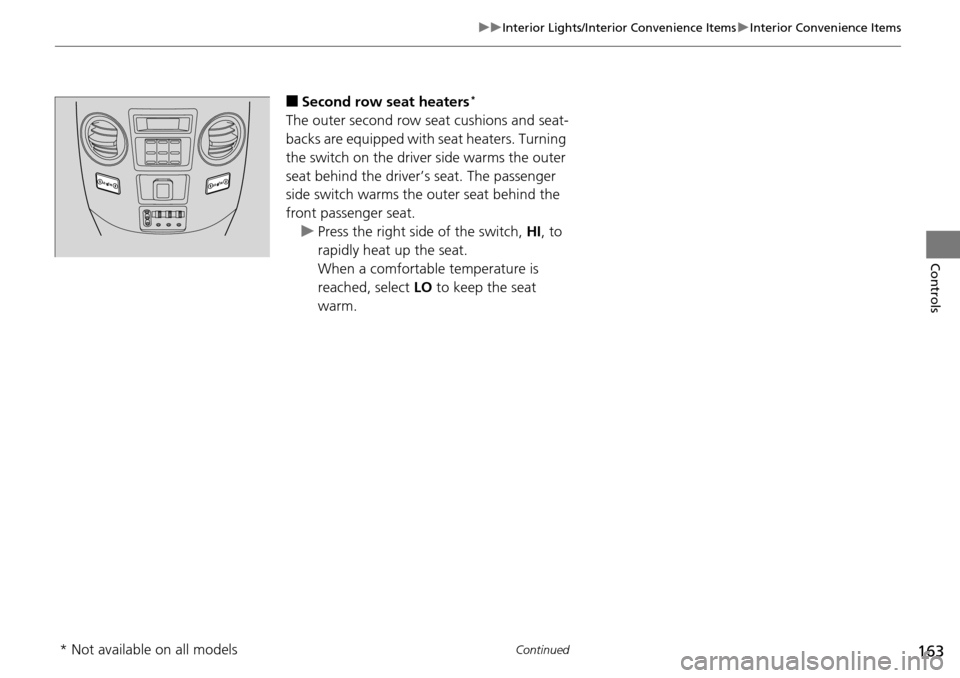
■Second row seat heaters*
The outer second row seat cushions and seat-
backs are equipped with seat heaters. Turning
the switch on the driver side warms the outer
seat behind the driver’s seat. The passenger
side switch warms the outer seat behind the
front passenger seat. u Press the right side of the switch, HI, to
rapidly heat up the seat.
When a comfortable temperature is
reached, select LO to keep the seat
warm.
* Not available on all models
Page 169 of 488
168
uuClimate Control System uRear Climate Control System
Controls
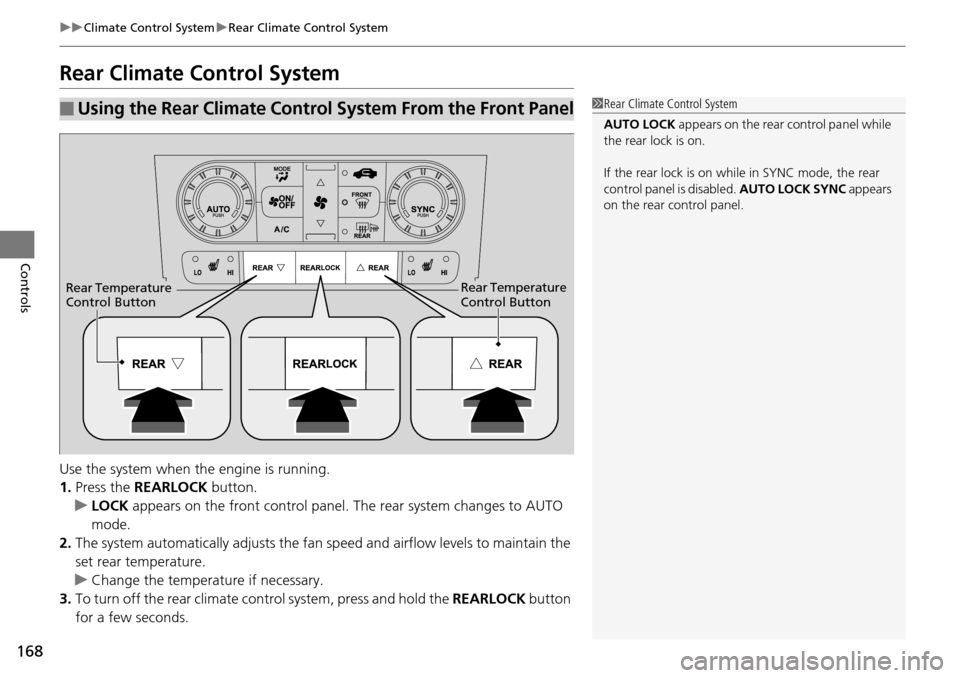
Rear Climate Control System
Use the system when the engine is running.
1. Press the REARLOCK button.
u LOCK appears on the front co ntrol panel. The rear system changes to AUTO
mode.
2. The system automatically adjusts the fan sp eed and airflow levels to maintain the
set rear temperature.
u Change the temperature if necessary.
3. To turn off the rear climate control system, press and hold the REARLOCK button
for a few seconds.
■Using the Rear Climate Control System From the Front Panel1 Rear Climate Control System
AUTO LOCK appears on the rear control panel while
the rear lock is on.
If the rear lock is on while in SYNC mode, the rear
control panel is disabled. AUTO LOCK SYNC appears
on the rear control panel.
Rear Temperature
Control ButtonRear Temperature
Control Button
Page 174 of 488
173
uuAudio System uUSB Adapter Cable
Features
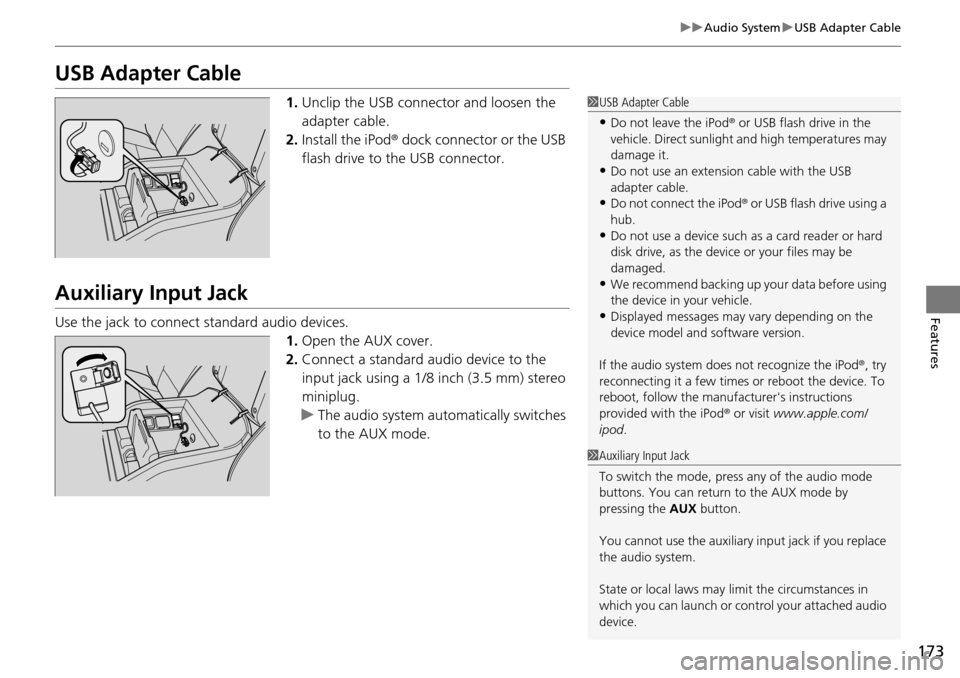
USB Adapter Cable
1. Unclip the USB connec tor and loosen the
adapter cable.
2. Install the iPod® dock connector or the USB
flash drive to the USB connector.
Auxiliary Input Jack
Use the jack to connect standard audio devices.
1.Open the AUX cover.
2. Connect a standard au dio device to the
input jack using a 1/8 inch (3.5 mm) stereo
miniplug.
u The audio system auto matically switches
to the AUX mode.
1 USB Adapter Cable
•Do not leave the iPod ® or USB flash drive in the
vehicle. Direct sunlight and high temperatures may
damage it.
•Do not use an extension cable with the USB
adapter cable.
•Do not connect the iPod ® or USB flash drive using a
hub.
•Do not use a device such as a card reader or hard
disk drive, as the device or your files may be
damaged.
•We recommend backing up yo ur data before using
the device in your vehicle.
•Displayed messages may vary depending on the
device model and software version.
If the audio system does not recognize the iPod®, try
reconnecting it a few times or reboot the device. To
reboot, follow the manufac turer's instructions
provided with the iPod ® or visit www.apple.com/
ipod .
1Auxiliary Input Jack
To switch the mode, pres s any of the audio mode
buttons. You can return to the AUX mode by
pressing the AUX button.
You cannot use the auxiliary input jack if you replace
the audio system.
State or local laws may li mit the circumstances in
which you can launch or cont rol your attached audio
device.
Page 175 of 488
174
uuAudio System uAudio System Theft Protection*
Features
Audio System Theft Protection*
The audio system is disabled when it is di sconnected from the power source, such as
when the battery is disconnected or goes dead. In certain conditions, the system
may display “enter code”. If this occurs, reactivate the audio system.
■Reactivate the audio system
1. Turn the ignition switch to ON
(w.
2. Turn on the audio system.
3. Press and hold the audio system power button for more than two seconds.
u The audio system is reac tivated when the audio co ntrol unit establishes a
connection with the vehicle control unit. If the control unit fails to recognize
the audio unit, you must go to a deal er and have the audio unit checked.
* Not available on all models
Page 187 of 488
186
uuAudio System Basic Operation uPlaying the AM/FM Radio
Features
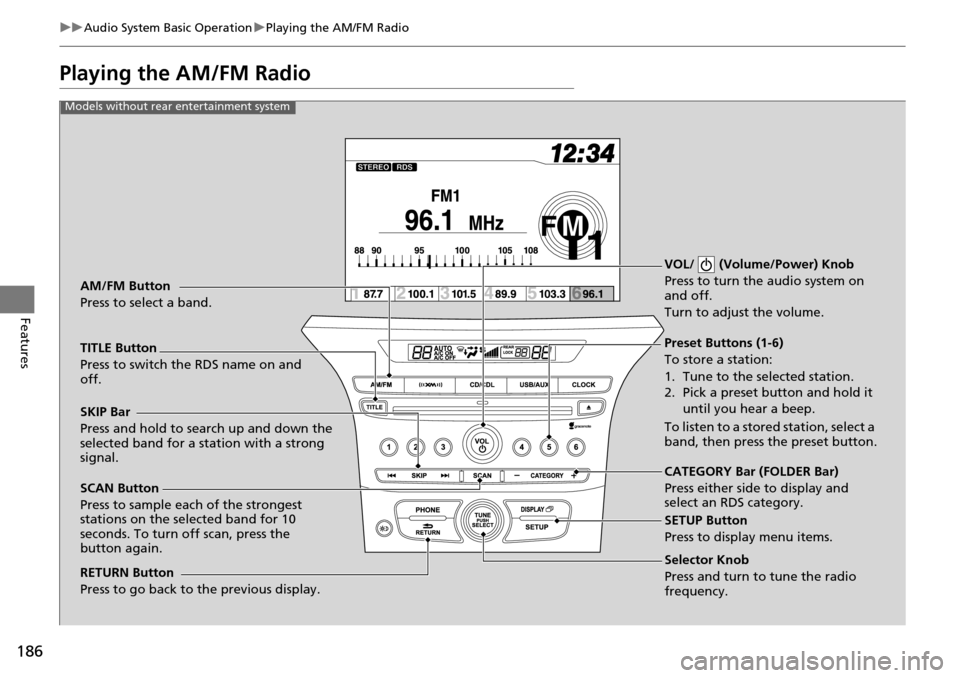
Playing the AM/FM Radio
Selector Knob
Press and turn to tune the radio
frequency.
SCAN Button
Press to sample each of the strongest
stations on the selected band for 10
seconds. To turn off scan, press the
button again. VOL/ (Volume/Power) Knob
Press to turn the
audio system on
and off.
Turn to adjust the volume.
Preset Buttons (1-6)
To store a station:
1. Tune to the selected station.
2. Pick a preset button and hold it
until you hear a beep.
To listen to a stored station, select a
band, then press the preset button.
SKIP Bar
Press and hold to search up and down the
selected band for a station with a strong
signal.
CATEGORY Bar (FOLDER Bar)
Press either side to display and
select an RDS category.
TITLE Button
Press to switch the RDS name on and
off. AM/FM Button
Press to select a band.
RETURN Button
Press to go back to the previous display.
SETUP Button
Press to display menu items.
Models without rear entertainment system
Page 188 of 488
187
uuAudio System Basic Operation uPlaying the AM/FM Radio
Continued
Features
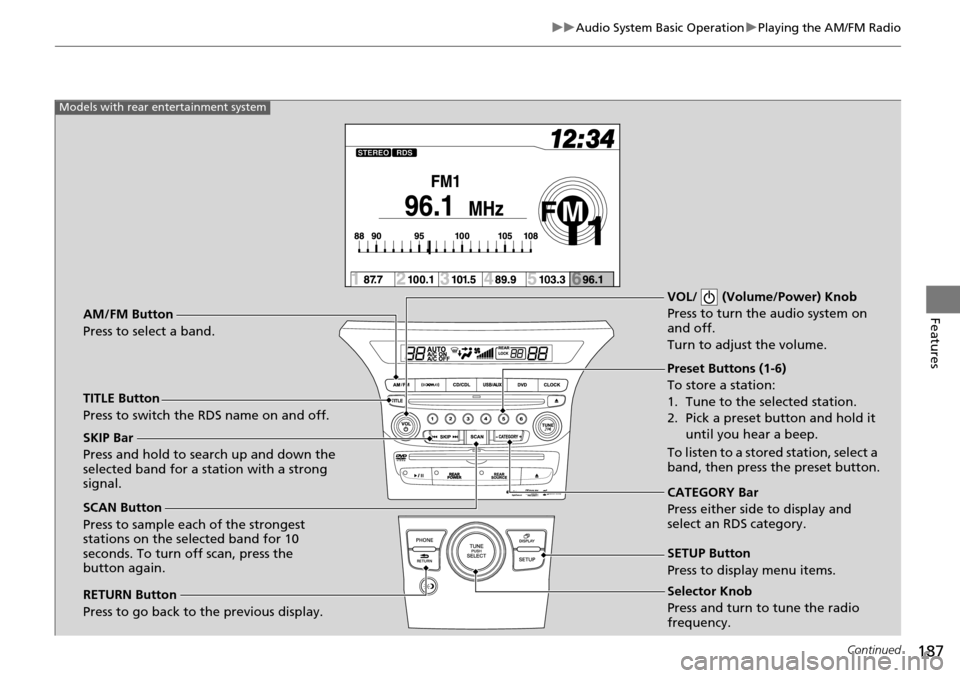
Selector Knob
Press and turn to tune the radio
frequency.
SCAN Button
Press to sample each of the strongest
stations on the selected band for 10
seconds. To turn off scan, press the
button again. VOL/ (Volume/Power) Knob
Press to turn the audio system on
and off.
Turn to adjust the volume.
Preset Buttons (1-6)
To store a station:
1. Tune to the selected station.
2. Pick a preset button and hold it
until you hear a beep.
To listen to a stored station, select a
band, then press the preset button.
SKIP Bar
Press and hold to search up and down the
selected band for a station with a strong
signal.
CATEGORY Bar
Press either side to display and
select an RDS category.
TITLE Button
Press to switch the RDS name on and off. AM/FM Button
Press to select a band.
RETURN Button
Press to go back to the previous display.
SETUP Button
Press to display menu items.
Models with rear entertainment system
Page 191 of 488
190
uuAudio System Basic Operation uPlaying the XM ® Radio*
Features
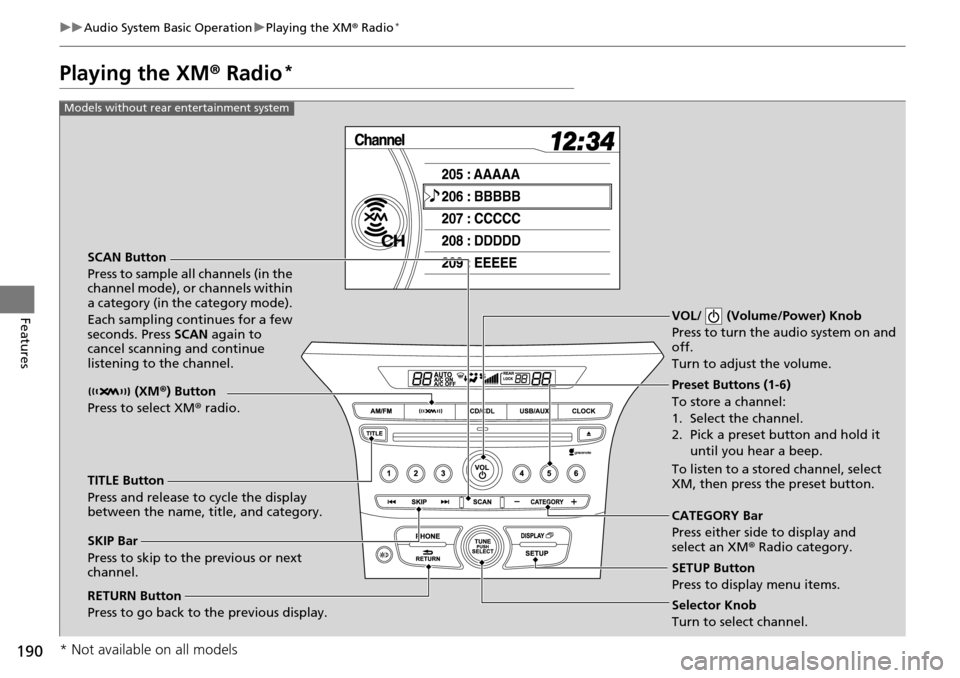
Playing the XM ® Radio*
SCAN Button
Press to sample all channels (in the
channel mode), or channels within
a category (in the category mode).
Each sampling continues for a few
seconds. Press SCAN again to
cancel scanning and continue
listening to the channel. VOL/ (Volume/Power) Knob
Press to turn the audio system on and
off.
Turn to adjust the volume.
Preset Buttons (1-6)
To store a channel:
1. Select the channel.
2. Pick a preset button and hold it
until you hear a beep.
To listen to a stored channel, select
XM, then press the preset button.
SKIP Bar
Press to skip to the previous or next
channel. CATEGORY Bar
Press either side to display and
select an XM
® Radio category.
TITLE Button
Press and release to cycle the display
between the name, title, and category. (XM
®) Button
Press to select XM ® radio.
RETURN Button
Press to go back to the previous display.Selector Knob
Turn to select channel. SETUP Button
Press to display menu items.
Models without rear entertainment system
* Not available on all models
Page 192 of 488
191
uuAudio System Basic Operation uPlaying the XM ® Radio*
Continued
Features
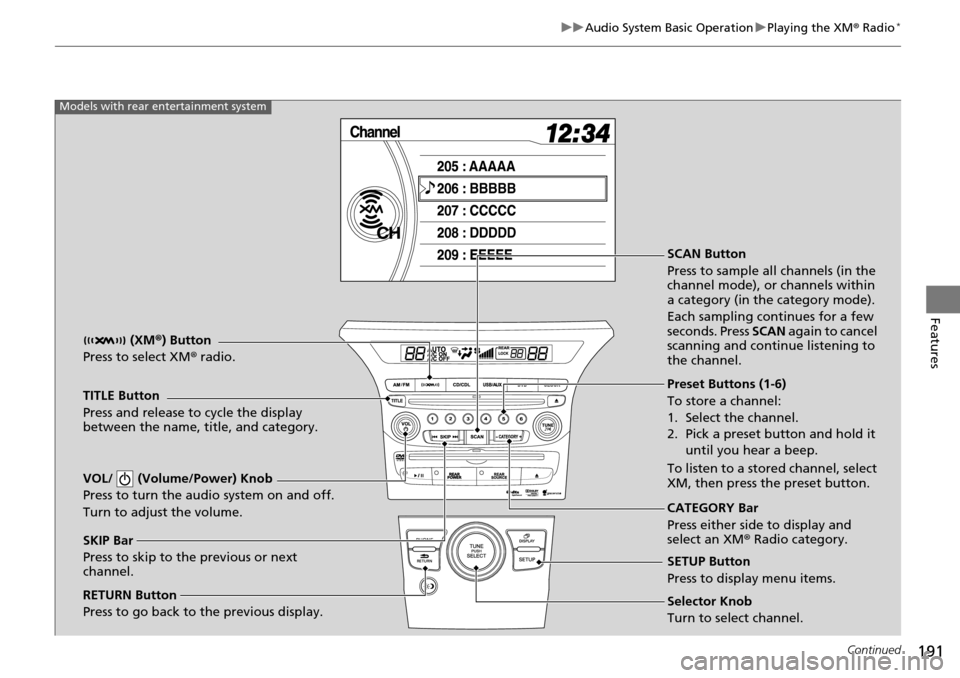
SCAN Button
Press to sample all channels (in the
channel mode), or channels within
a category (in the category mode).
Each sampling continues for a few
seconds. Press SCAN again to cancel
scanning and continue listening to
the channel.
VOL/ (Volume/Power) Knob
Press to turn the audio system on and off.
Turn to adjust the volume.
Preset Buttons (1-6)
To store a channel:
1. Select the channel.
2. Pick a preset button and hold it until you hear a beep.
To listen to a stored channel, select
XM, then press the preset button.
SKIP Bar
Press to skip to the previous or next
channel. CATEGORY Bar
Press either side to display and
select an XM
® Radio category.
TITLE Button
Press and release to cycle the display
between the name, title, and category.
(XM
®) Button
Press to select XM ® radio.
RETURN Button
Press to go back to the previous display.Selector Knob
Turn to select channel. SETUP Button
Press to display menu items.
Models with rear entertainment system