phone HONDA PILOT 2017 3.G Owners Manual
[x] Cancel search | Manufacturer: HONDA, Model Year: 2017, Model line: PILOT, Model: HONDA PILOT 2017 3.GPages: 673
Page 444 of 673
443
uuBluetooth ® HandsFreeLink ®u HFL Menus
Continued
Features
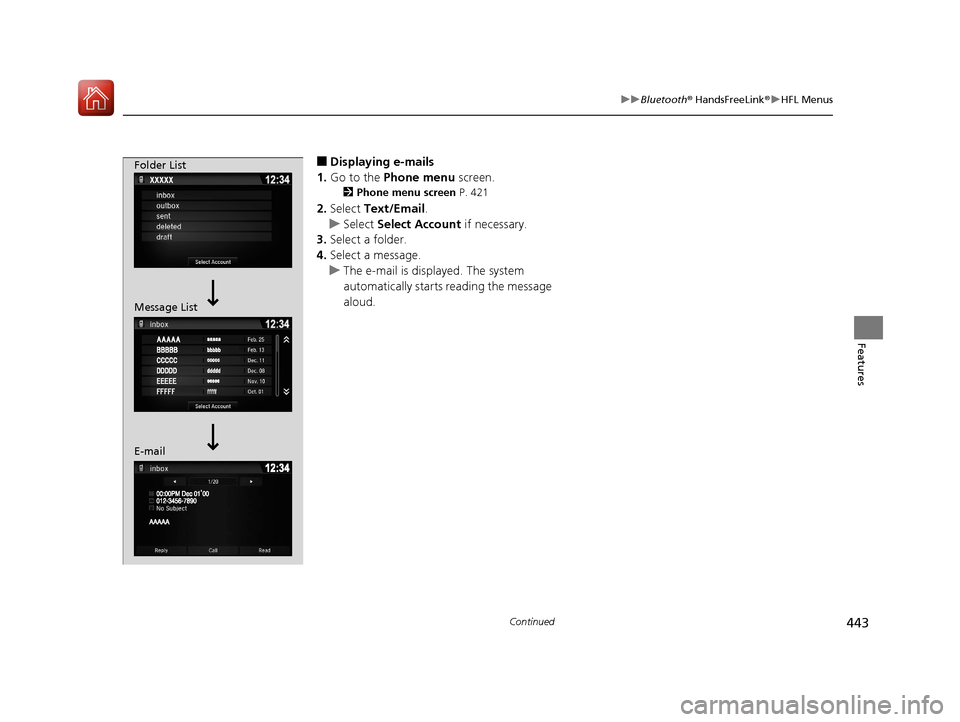
■Displaying e-mails
1. Go to the Phone menu screen.
2Phone menu screen P. 421
2.Select Text/Email .
u Select Select Account if necessary.
3. Select a folder.
4. Select a message.
u The e-mail is displayed. The system
automatically starts reading the message
aloud.
Folder List
Message List
E-mail
17 PILOT-31TG76100.book 443 ページ 2016年9月20日 火曜日 午後4時9分
Page 445 of 673
uuBluetooth ® HandsFreeLink ®u HFL Menus
444
Features
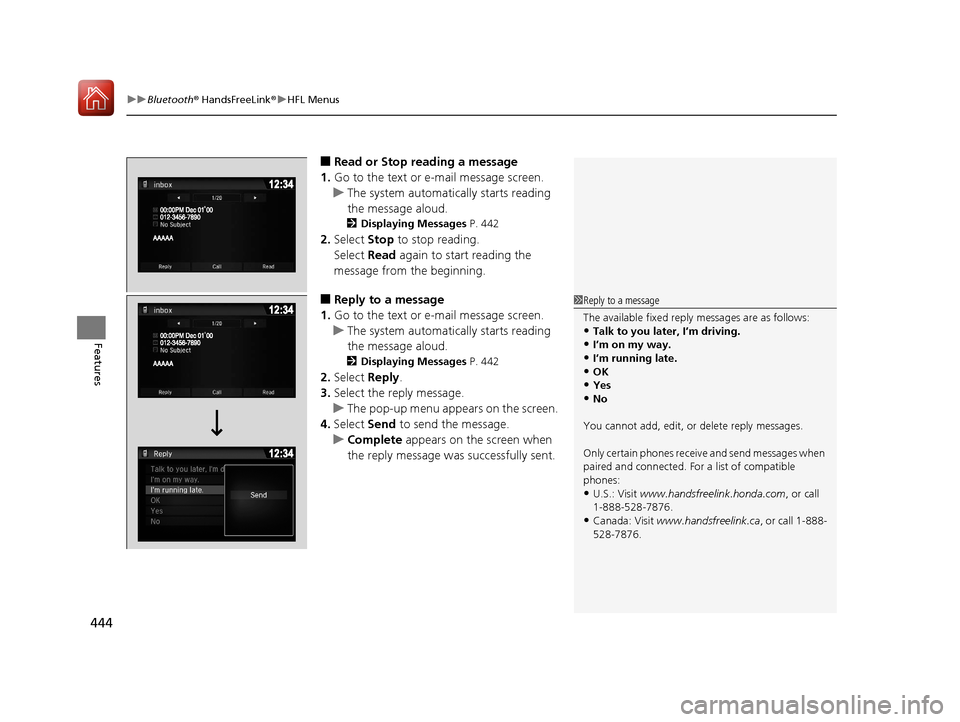
■Read or Stop reading a message
1. Go to the text or e-mail message screen.
u The system automatically starts reading
the message aloud.
2 Displaying Messages P. 442
2.Select Stop to stop reading.
Select Read again to start reading the
message from the beginning.
■Reply to a message
1. Go to the text or e-mail message screen.
u The system automatically starts reading
the message aloud.
2 Displaying Messages P. 442
2.Select Reply.
3. Select the reply message.
u The pop-up menu appears on the screen.
4. Select Send to send the message.
u Complete appears on the screen when
the reply message was successfully sent.
1 Reply to a message
The available fixed reply messages are as follows:
•Talk to you later, I’m driving.•I’m on my way.
•I’m running late.
•OK•Yes
•No
You cannot add, edit, or delete reply messages.
Only certain phones receiv e and send messages when
paired and connected. For a list of compatible
phones:
•U.S.: Visit www.handsfreelink.honda.com , or call
1-888-528-7876.
•Canada: Visit www.handsfreelink.ca , or call 1-888-
528-7876.
17 PILOT-31TG76100.book 444 ページ 2016年9月20日 火曜日 午後4時9分
Page 447 of 673
uuBluetooth ® HandsFreeLink ®u HFL Menus
446
Features
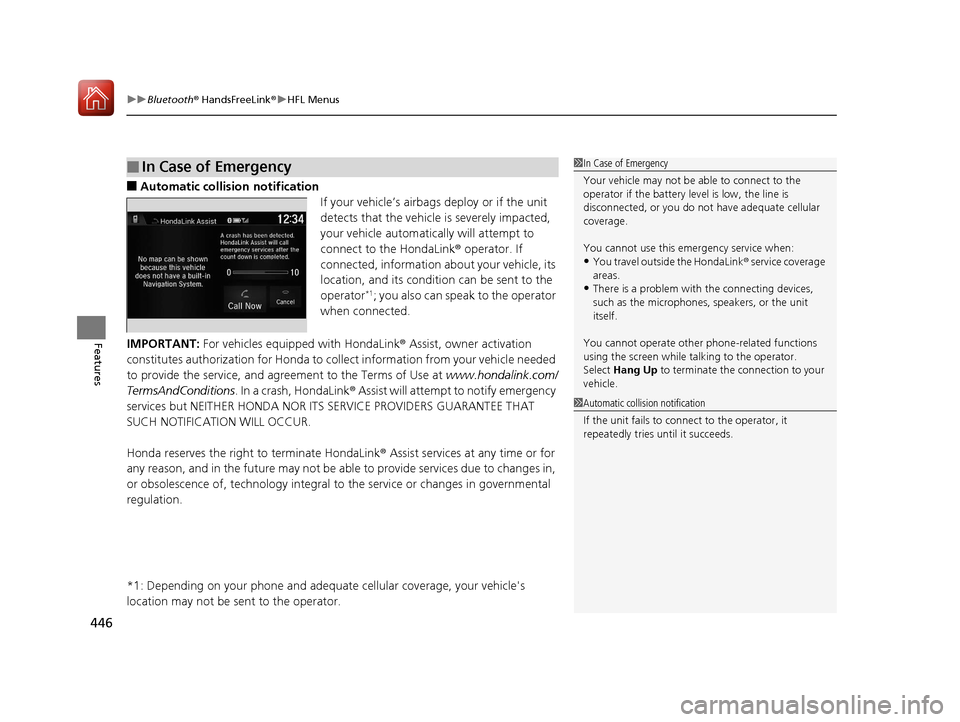
■Automatic collisi on notification
If your vehicle’s airbags deploy or if the unit
detects that the vehicle is severely impacted,
your vehicle automatically will attempt to
connect to the HondaLink ® operator. If
connected, information about your vehicle, its
location, and its condition can be sent to the
operator
*1; you also can speak to the operator
when connected.
IMPORTANT: For vehicles equipp ed with HondaLink® Assist, owner activation
constitutes authorization for Honda to collect information from your vehicle needed
to provide the service, and agr eement to the Terms of Use at www.hondalink.com/
TermsAndConditions . In a crash, HondaLink ® Assist will attempt to notify emergency
services but NEITHER HONDA NOR ITS SERVICE PROVIDERS GUARANTEE THAT
SUCH NOTIFICATION WILL OCCUR.
Honda reserves the right to terminate HondaLink ® Assist services at any time or for
any reason, and in the future may not be ab le to provide services due to changes in,
or obsolescence of, technology integral to the service or changes in governmental
regulation.
*1: Depending on your phone and adequa te cellular coverage, your vehicle's
location may not be sent to the operator.
■In Case of Emergency1 In Case of Emergency
Your vehicle may not be able to connect to the
operator if the battery level is low, the line is
disconnected, or you do not have adequate cellular
coverage.
You cannot use this emergency service when:
•You travel outside the HondaLink ® service coverage
areas.
•There is a problem with the connecting devices,
such as the microphones, speakers, or the unit
itself.
You cannot operate othe r phone-related functions
using the screen while talking to the operator.
Select Hang Up to terminate the connection to your
vehicle.
1 Automatic collision notification
If the unit fails to connect to the operator, it
repeatedly tries until it succeeds.
17 PILOT-31TG76100.book 446 ページ 2016年9月20日 火曜日 午後4時9分
Page 448 of 673
447
uuBluetooth ® HandsFreeLink ®u HFL Menus
Features
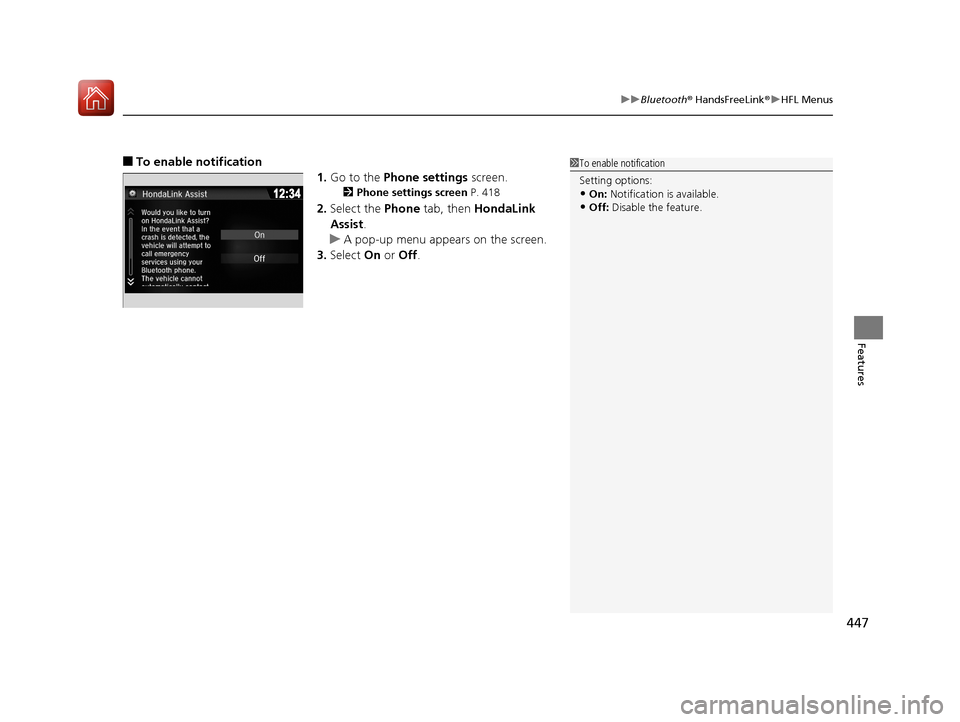
■To enable notification
1.Go to the Phone settings screen.
2Phone settings screen P. 418
2.Select the Phone tab, then HondaLink
Assist .
u A pop-up menu appears on the screen.
3. Select On or Off .
1To enable notification
Setting options:
•On: Notification is available.
•Off: Disable the feature.
17 PILOT-31TG76100.book 447 ページ 2016年9月20日 火曜日 午後4時9分
Page 568 of 673
567
Maintenance
This chapter discusses basic maintenance.
Before Performing MaintenanceInspection and Maintenance ............ 568
Safety When Performing Maintenance ..569
Parts and Fluids Used in Maintenance Service ........................................... 570
Maintenance Minder
TM..................... 571
Maintenance Under the Hood Maintenance Items Under the Hood .. 575
Opening the Hood ........................... 576
Engine Compartment Cover ............. 577
Recommended Engine Oil ................ 578
Oil Check ......................................... 579
Adding Engine Oil ............................ 580
Changing the Engine Oil and Oil Filter ...581 Engine Coolant ................................ 583
Transmission Fluid ............................ 585
Brake Fluid ....................................... 586
Refilling Window Washer Fluid......... 586
Replacing Light Bulbs ....................... 587Checking and Maintaining Wiper Blades... 593Checking and Maintaining Tires
Checking Tires ................................. 597
Tire and Loading Information Label .. 598
Tire Labeling .................................... 598
DOT Tire Quality Grading (U.S. Vehicles).. 600Wear Indicators................................ 602
Tire Service Life ................................ 602 Tire and Wheel Replacement ........... 603
Tire Rotation .................................... 604
Winter Tires ..................................... 605
Battery ............................................... 606
Remote Transmitter Care ................. 608
Remote Control and Wireless Headphone Care
*........................... 609Heating and Cooling System*/Climate
Control System* Maintenance............. 611Cleaning Interior Care .................................... 613
Exterior Care.................................... 615
Accessories and Modifications ........ 618
* Not available on all models
17 PILOT-31TG76100.book 567 ページ 2016年9月20日 火曜日 午後4時9分
Page 610 of 673
609Continued
Maintenance
Remote Control and Wireless Headphone Care*
Replacing the Battery
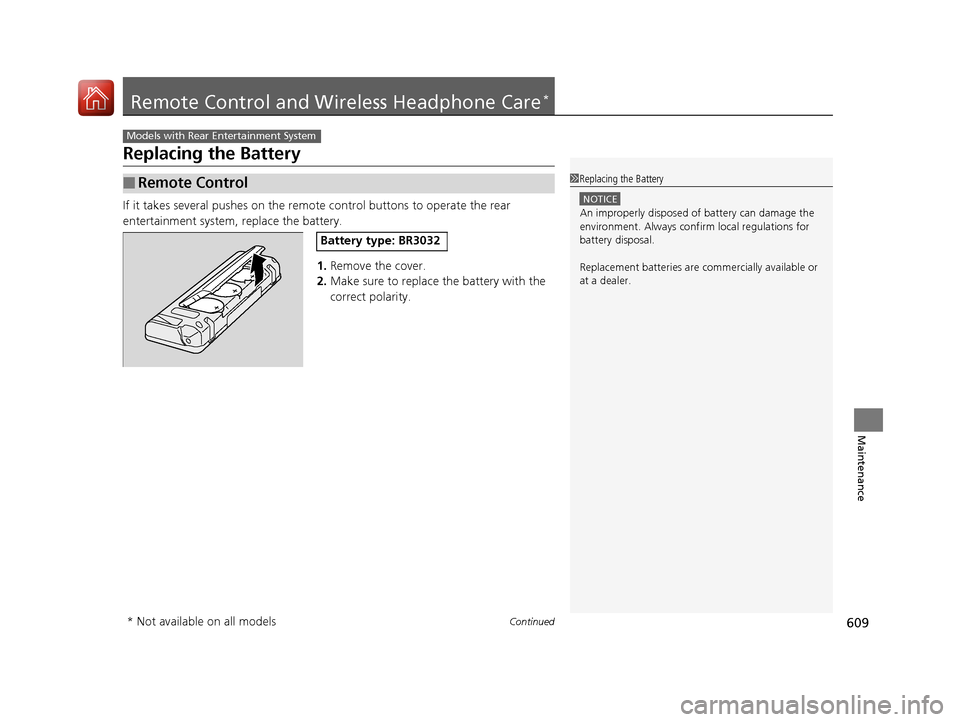
If it takes several pushes on the remo te control buttons to operate the rear
entertainment system, replace the battery.
1.Remove the cover.
2. Make sure to replace the battery with the
correct polarity.
■Remote Control
Models with Rear Entertainment System
1Replacing the Battery
NOTICE
An improperly disposed of battery can damage the
environment. Always conf irm local regulations for
battery disposal.
Replacement batteries are commercially available or
at a dealer.
Battery type: BR3032
* Not available on all models
17 PILOT-31TG76100.book 609 ページ 2016年9月20日 火曜日 午後4時9分
Page 611 of 673
610
uuRemote Control and Wireless Headphone Care*uReplacing the Battery
Maintenance
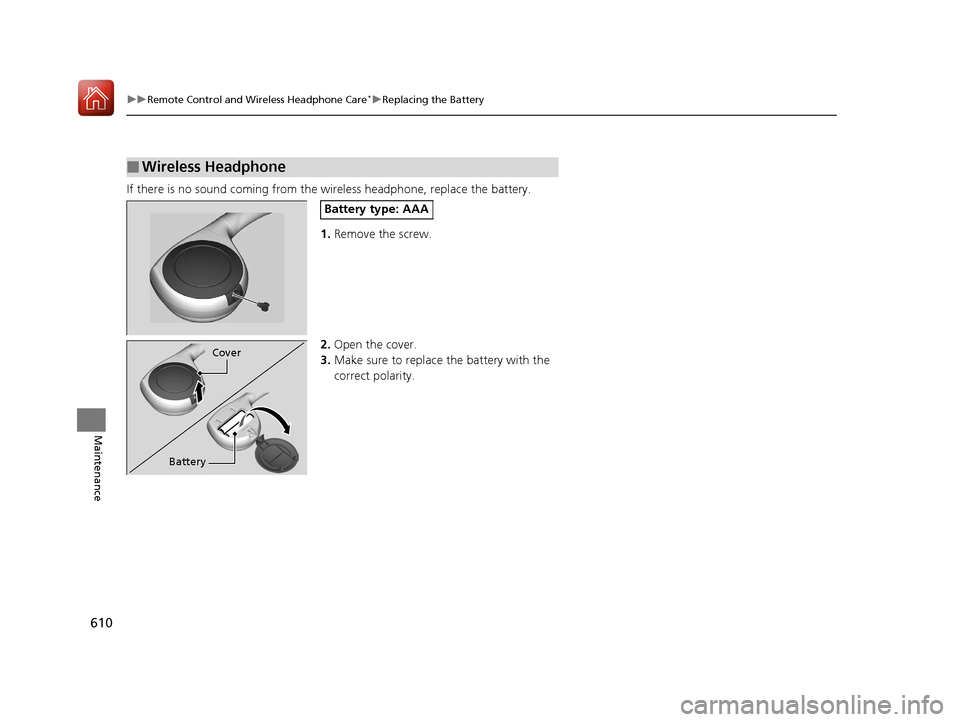
If there is no sound coming from th e wireless headphone, replace the battery.
1. Remove the screw.
2. Open the cover.
3. Make sure to replace the battery with the
correct polarity.
■Wireless Headphone
Battery type: AAA
Cover
Battery
17 PILOT-31TG76100.book 610 ページ 2016年9月20日 火曜日 午後4時9分
Page 662 of 673
661
Information
Authorized Manuals
■Service Express
For electronic copies of service publications, you can purchase a subscription to
Service Express. Visit www.techinfo.honda.com for pricing and options.
■For U.S. Owners
Manuals be purchased from Helm Incorpor ated. You can order a manual by phone
at (800) 782-4356 (credit card orders only), or online at www.helminc.com.
■For Canadian Owners
Please contact a dealer to order any manuals that you may require.
17 PILOT-31TG76100.book 661 ページ 2016年9月20日 火曜日 午後4時9分
Page 663 of 673
662
Information
Customer Service Information
Honda dealership personnel are trained professionals.
They should be able to answer all your questions. If you encounter a problem that
your dealership does not solve to your satisfaction, please discuss it with the
dealership’s service manager or general manager. If you are dissatisfied with the
decision made by the dealership’s mana gement, contact Honda Customer Services.
U.S. Owners
American Honda Motor Co., Inc.
Honda Automobile Customer Services
Mail Stop 500-2N-7A
1919 Torrance Blvd.
Torrance, CA 90501-2746
Tel: 1 (800) 999-1009 Canadian Owners
Canadian Owners:
Honda Canada Inc.
Customer Relations
180 Honda Boulevard
Markham, ON
L6C 0H9
Tel: 1-888-9-HONDA-9
Fax: 1-877-939-0909
E-mail: [email protected]
In Puerto Rico and the U.S. Virgin
Islands
Bella International
P.O. Box 190816
San Juan, PR 00919-0816
Tel: 1 (787) 620-75461 Customer Service Information
When you call or write, pl ease give us the following
information:
•Vehicle Identification Number
2Vehicle Identification Number (VIN),
Engine Number, and Transmission
Number P. 654
•Date of purchase•Odometer reading of your vehicle
•Your name, address, and telephone number
•A detailed description of the problem•Name of the dealer who sold the vehicle to you
17 PILOT-31TG76100.book 662 ページ 2016年9月20日 火曜日 午後4時9分
Page 665 of 673
664
Index
USB Port .................................................. 219
Voice Operation....................................... 263
Wallpaper Setup .............................. 227, 248
Wi-Fi Connection ..................................... 300
Audio/Information Screen ................ 225, 243
Authorized Manuals ................................. 661
Auto Door Locking/Unlocking ................. 134
Customize ............................................... 376
Auto High-Beam System .......................... 160
Auto high-beam system Indicator ............. 87
Auto Idle-stop ........................................... 489
OFF Button .............................................. 490
Auto Idle-stop Indicator (Green) ............... 90
Auto Idle-stop System Indicator (Amber) .. 90
Automatic Intermittent Wipers ............... 165
Automatic Lighting .................................. 157
Automatic Transmission ........................... 478
Creeping ................................................. 478
Fluid ........................................................ 585
Kickdown ................................................ 478
Operating the Shift Button....................... 483
Shift Lever Does Not Move....................... 632
Shift Lever Operation ............................... 480
Shifting............................................ 479, 481
Auxiliary Input Jack .................................. 220
Average Fuel Economy ............................. 116B
Back-Up Light........................................... 592
Battery ...................................................... 606
Charging System Indicator................. 79, 638
Jump Starting .......................................... 633
Maintenance (Checking the Battery) ........ 606
Belts (Seat) .................................................. 37
Beverage Holders ..................................... 194
Blind spot information (BSI) System ........ 530
Indicator.................................................... 94
Bluetooth® Audio............................. 239, 293
Bluetooth® HandsFreeLink ®............. 390, 415
Blu-ray/DVD Rear Entertainment System ..................................................... 322
Audio Sources for Front and Rear Seats ... 343
Auxiliary Console Panel ........................... 323
DVD or Blu-ray
TM Player Error Messages ... 350
Front Control Panel Operation ................. 336
HDMI
TM Port ............................................ 324
Initial Settings.......................................... 334
Operating the Blu-ray/DVD rear entertainment system ............................ 336
Operating the System .............................. 325
Overhead Screen ..................................... 325
Playable Disc Region Codes ..................... 348
Playable Disc Types .................................. 348
Playable Discs .......................................... 344
Playing a Disc in the Rear......................... 342
Playing a DVD/Blu-ray
TM........................... 326
Playing AM/FM Radio in the Rear............. 341 Playing an iPod and a USB Flash Drive in
the Rear ................................................ 342
Playing Audio.......................................... 340
Playing SiriusXM ® Radio in the Rear ........ 341
Rear DVD or Blu-ray
TM Menu ................... 327
Rear System Setup .................................. 337
Recommended Discs ............................... 349
Screen and Surround Settings ................. 330
Selecting the Audio S ource using Front
Control Panel ........................................ 336
Setting the DVD or Blu-ray
TM Menu ......... 338
System Controls .............................. 326, 340
USB Ports ................................................ 324
Wireless Headphones .............................. 322
Booster Seats (For Children) ...................... 73
Brake System ............................................ 539
Anti-lock Brake System (ABS) .................. 541
Brake Assist System................................. 542
Brake System Indicator .............................. 78
Fluid ....................................................... 586
Foot Brake .............................................. 540
Indicator ........................................... 78, 640
Parking Brake.......................................... 539
Brake System (Amber) Indicator ................................................... 78
Brake System (Red) Indicator ........................................... 78, 640
Brightness Control (Instrument Panel) ... 167
Bulb Replacement .................................... 587
Back-Up Light ......................................... 592
Brake Light and Turn Signal Light ............ 591
17 PILOT-31TG76100.book 664 ページ 2016年9月20日 火曜日 午後4時9分