reset HONDA PILOT 2017 3.G Owner's Manual
[x] Cancel search | Manufacturer: HONDA, Model Year: 2017, Model line: PILOT, Model: HONDA PILOT 2017 3.GPages: 673
Page 278 of 673
277
uuAudio System Basic Operation uPlaying SiriusXM ® Radio*
Features
■To set up a alert beep
1. Select .
2. Select Settings .
3. Select Audio.
4. Select the SXM tab.
5. Select SportFlash Setup(Interrupt Beep) .
6. Select On.
■Traffic and Weather Information
You can receive traffic and weather information.
1. Select .
2. Select Settings .
3. Select Audio .
4. Select the SXM tab.
5. Select Traffic & Weather Setup.
6. Select the region.
u When you do not want to receive the information, select Unset.
Sample each channel on the selected mode for 10 seconds.
1. Select Scan.
2. Select Scan Channels.
u You can select the desired channel by songs using Scan Songs in Presets.
To turn off scan, select Cancel.
■Scan
1To set up a alert beep
You can also set up a alert beep by the following
procedure.
1. Select Audio .
2. Select .
3. Select Settings .
4. Select the SXM tab.
1Traffic and Weather Information
The traffic and weather information function at
SiriusXM ® mode only.
You can also set up th e traffic and weather
information by the following procedure.
1. Select Audio .
2. Select .
3. Select Settings .
4. Select the SXM tab.
1Scan
The “Scan Songs in Presets” function is based on
TuneScan
TM technology of SiriusXM ®.
The “Featured Channels” function is based on
Featured Favorites
TM technology of SiriusXM ®.
TuneScan
TM and Featured FavoritesTM are registered
trademarks of SiriusXM ® Radio, Inc.
17 PILOT-31TG76100.book 277 ページ 2016年9月20日 火曜日 午後4時9分
Page 314 of 673
313
uuAudio Error Messages uAndroid/Apps*
Features
Android/Apps*
If an error occurs while using the audio system or apps, you may see the following
error messages. If you cannot clear the error message, contact a dealer.
*1:****part is variable characters, and will change depending upon where an error
occurs.
Error MessageSolution
Unfortunately, **** has
stopped.Error has occurred within app, select OK on the screen to close the app.
**** is not responding.
Would you like to close it?
App is not responding.
Select Wait if you can wait for a response from app a little longer. If it does not respond even if you keep
waiting, select OK to close the app and start it up. If the error message continues, perform Factory Data
Reset .
2Defaulting All the Settings P. 386
* Not available on all models
17 PILOT-31TG76100.book 313 ページ 2016年9月20日 火曜日 午後4時9分
Page 332 of 673
331
uuBlu-ray/DVD Rear Entertainment System*uPlaying a DVD/Blu-rayTM*
Continued
Features
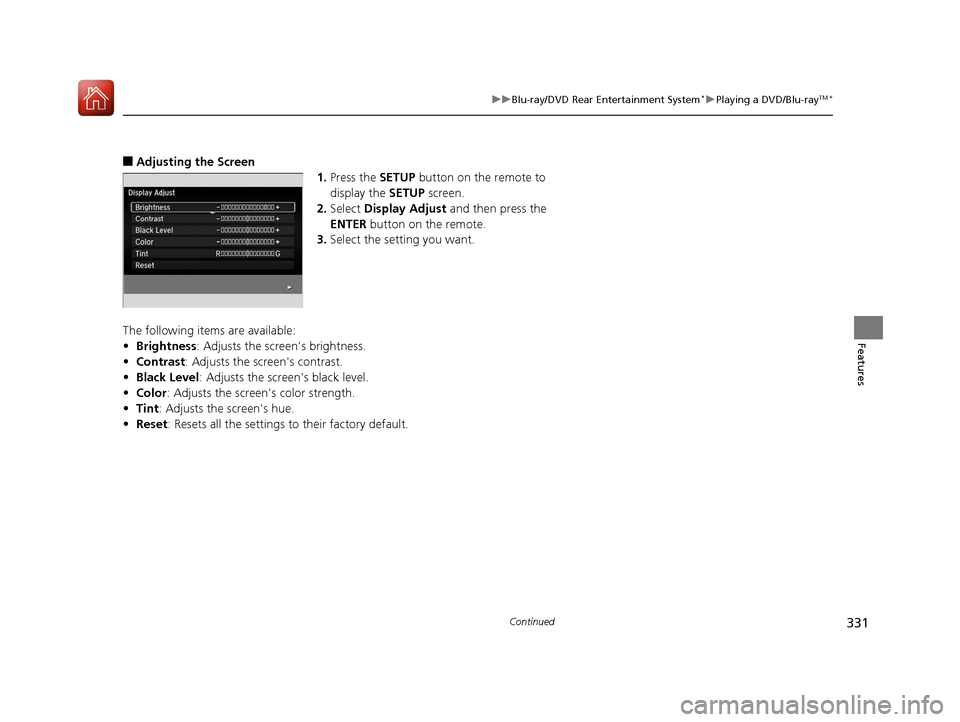
■Adjusting the Screen
1.Press the SETUP button on the remote to
display the SETUP screen.
2. Select Display Adjust and then press the
ENTER button on the remote.
3. Select the setting you want.
The following items are available:
• Brightness: Adjusts the screen's brightness.
• Contrast : Adjusts the screen's contrast.
• Black Level : Adjusts the screen's black level.
• Color : Adjusts the screen 's color strength.
• Tint : Adjusts the screen's hue.
• Reset : Resets all the settings to their factory default.
17 PILOT-31TG76100.book 331 ページ 2016年9月20日 火曜日 午後4時9分
Page 358 of 673
357
uuCustomized Features u
Continued
Features
*1:Default Setting
Setup
GroupCustomizable FeaturesDescriptionSelectable Settings
Phone
Setup
Bluetooth
Setup
Add New DevicePairs a new phone to HFL.
2 Phone Setup P. 396—
Connect a Phone
Pairs a new phone or connects a paired phone
to HFL.
2Phone Setup P. 396
—
Connect an Audio
DeviceConnects a Bluetooth® Audio device to HFL.—
Disconnect All DevicesDisconnects a paired phone from HFL.—
Delete DeviceDeletes a paired phone.—
Pass-KeyChanges a pairing code.—
Speed DialEdits, adds or deletes a speed dial entry.
2Speed Dial P. 405—
RingtoneSelects the ring tone.Fixed*1/Mobile Phone
Caller ID InfoPrioritizes the caller’s name or phone number
as the caller ID.Name Priority*1/Number
Priority
System ClearCancels/Resets all customized items in the
Phone Setup group as default.—
17 PILOT-31TG76100.book 357 ページ 2016年9月20日 火曜日 午後4時9分
Page 361 of 673
360
uuCustomized Features u
Features
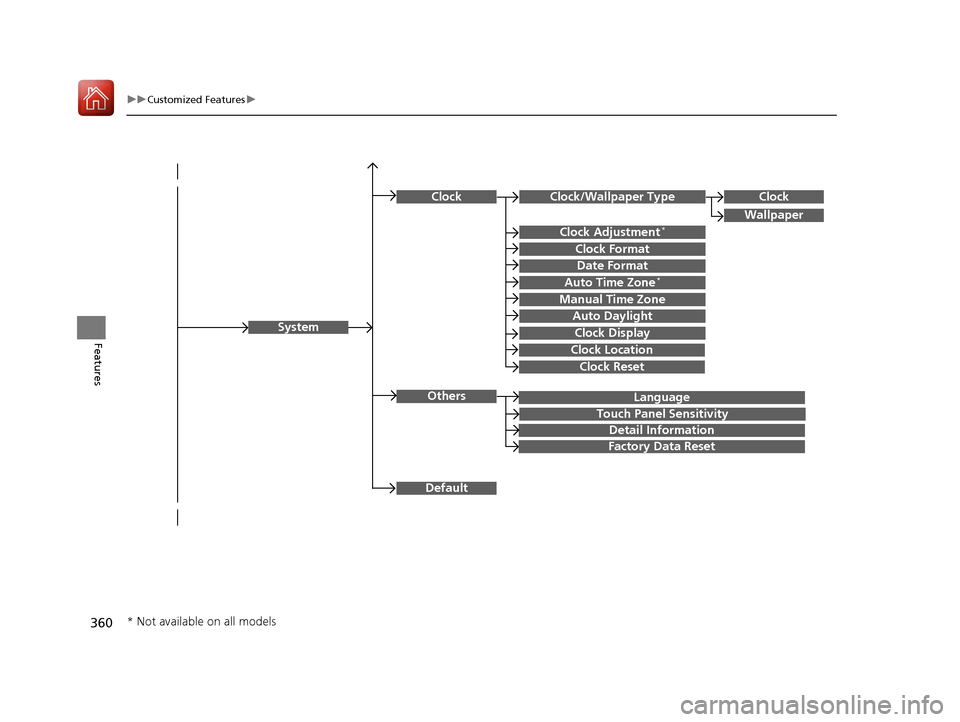
Language
Default
System
Others
Clock/Wallpaper Type
Date Format
Clock Adjustment*
ClockClock
Wallpaper
Manual Time Zone
Auto Daylight
Clock Display
Touch Panel Sensitivity
Clock Format
Auto Time Zone*
Detail Information
Factory Data Reset
Clock Reset
Clock Location
* Not available on all models
17 PILOT-31TG76100.book 360 ページ 2016年9月20日 火曜日 午後4時9分
Page 362 of 673
361
uuCustomized Features u
Continued
Features
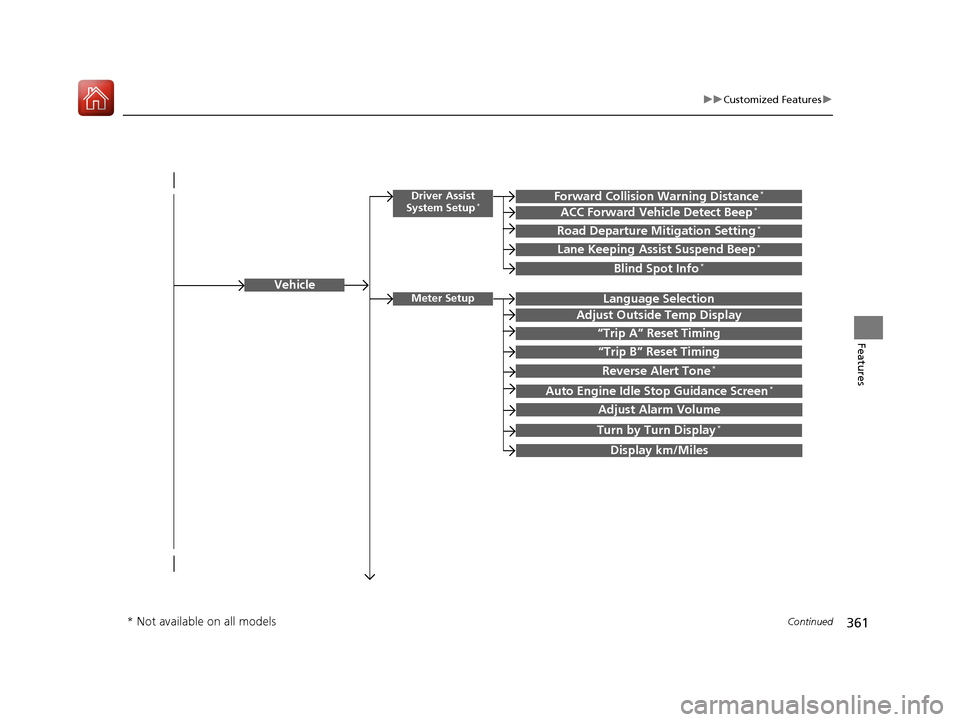
Vehicle
Driver Assist
System Setup*Forward Collision Warning Distance*
ACC Forward Vehicle Detect Beep*
Road Departure Mitigation Setting*
Lane Keeping Assist Suspend Beep*
Blind Spot Info*
Meter SetupLanguage Selection
Adjust Outside Temp Display
“Trip A” Reset Timing
“Trip B” Reset Timing
Reverse Alert Tone*
Auto Engine Idle Stop Guidance Screen*
Adjust Alarm Volume
Turn by Turn Display*
Display km/Miles
* Not available on all models
17 PILOT-31TG76100.book 361 ページ 2016年9月20日 火曜日 午後4時9分
Page 364 of 673
363
uuCustomized Features u
Continued
Features
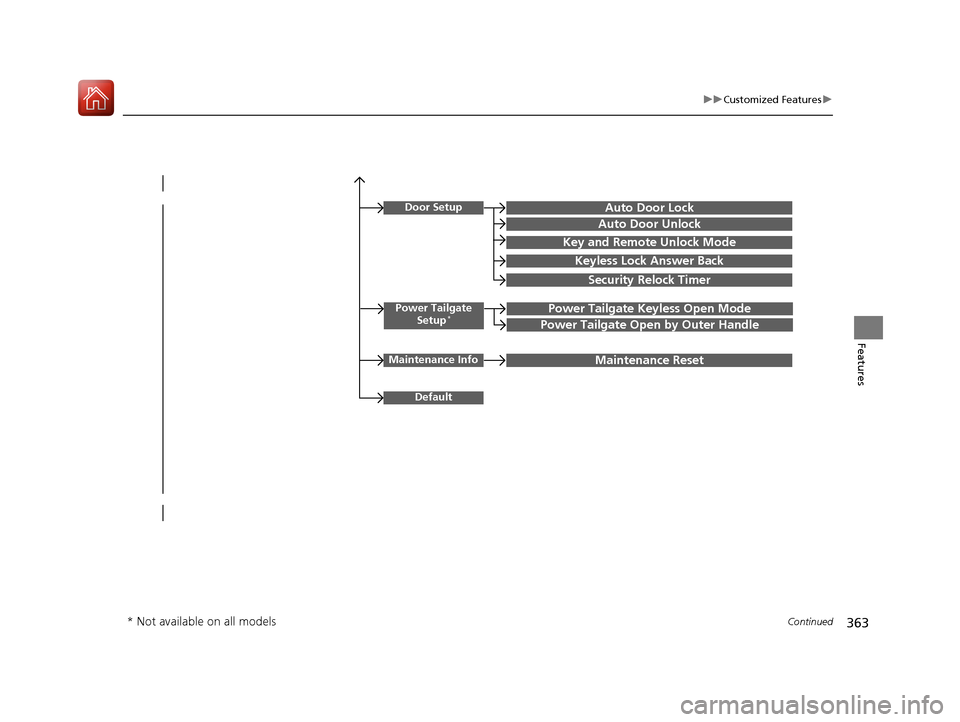
Power Tailgate
Setup*Power Tailgate Keyless Open Mode
Power Tailgate Open by Outer Handle
Door SetupAuto Door Lock
Auto Door Unlock
Key and Remote Unlock Mode
Keyless Lock Answer Back
Security Relock Timer
Maintenance InfoMaintenance Reset
Default
* Not available on all models
17 PILOT-31TG76100.book 363 ページ 2016年9月20日 火曜日 午後4時9分
Page 366 of 673
365
uuCustomized Features u
Continued
Features
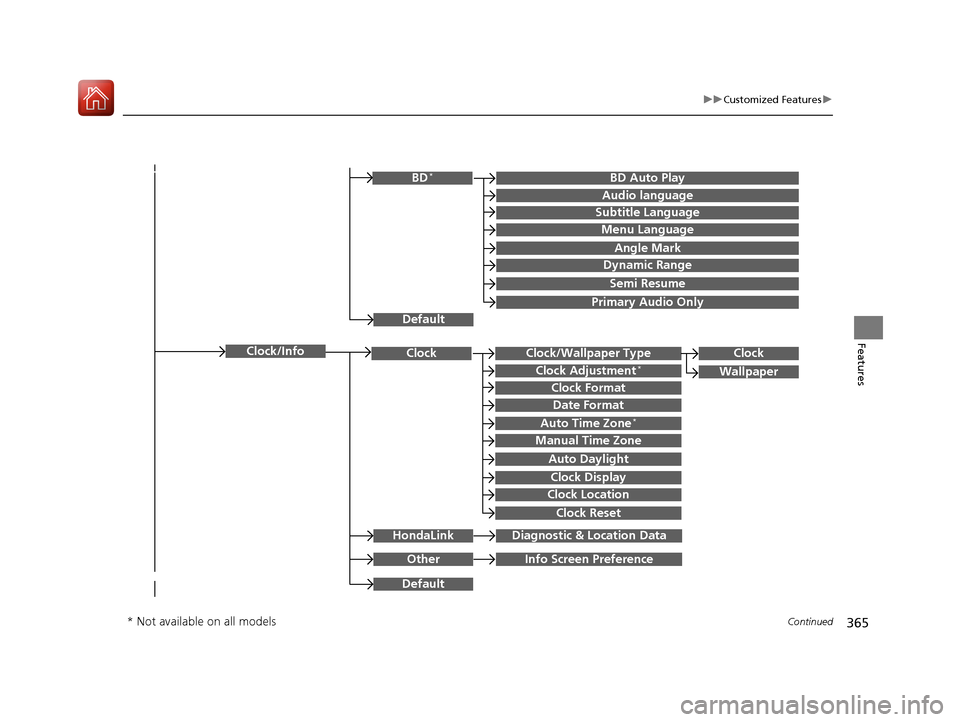
Clock/Wallpaper TypeClockClock
WallpaperClock Adjustment*
Clock Format
Date Format
Auto Time Zone*
Manual Time Zone
Auto Daylight
Clock Display
Clock Location
Clock Reset
OtherInfo Screen Preference
Default
Clock/Info
BD Auto PlayBD*
Audio language
Subtitle Language
Menu Language
Angle Mark
Dynamic Range
Semi Resume
Primary Audio Only
Default
HondaLinkDiagnostic & Location Data
* Not available on all models
17 PILOT-31TG76100.book 365 ページ 2016年9月20日 火曜日 午後4時9分
Page 372 of 673
371
uuCustomized Features u
Continued
Features
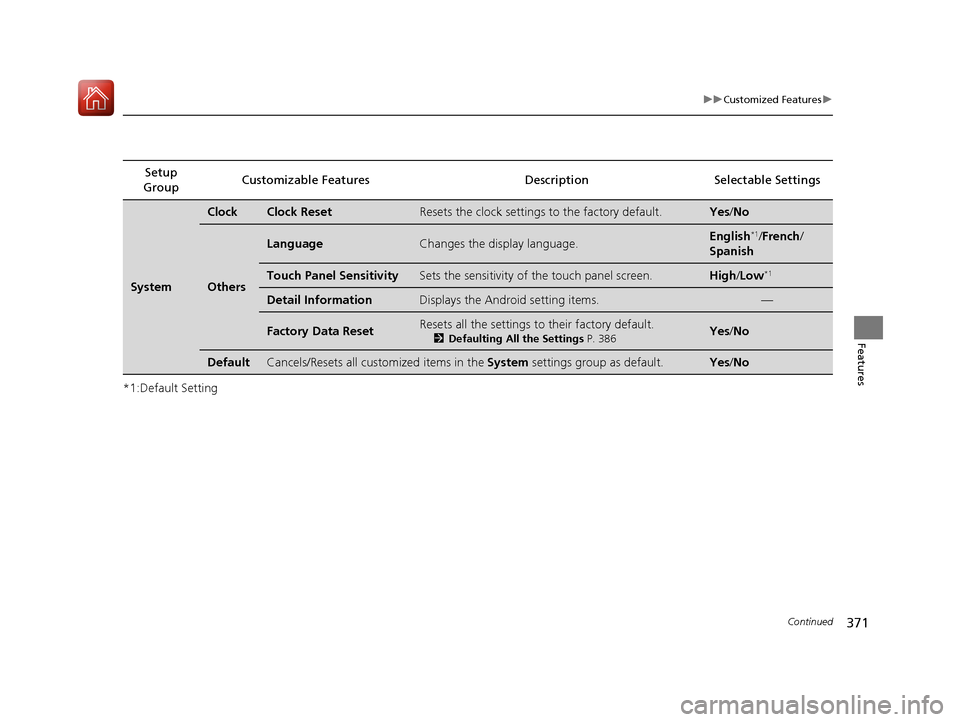
*1:Default SettingSetup
Group Customizable Features Description Selectable Settings
System
ClockClock ResetResets the clock settings to the factory default.Yes
/No
Others
LanguageChanges the display language.English*1/French /
Spanish
Touch Panel SensitivitySets the sensitivity of the touch panel screen.High/Low*1
Detail InformationDisplays the Android setting items.—
Factory Data ResetResets all the settings to their factory default.
2 Defaulting All the Settings P. 386Yes /No
DefaultCancels/Resets all customized items in the System settings group as default.Yes/No
17 PILOT-31TG76100.book 371 ページ 2016年9月20日 火曜日 午後4時9分
Page 374 of 673
373
uuCustomized Features u
Continued
Features
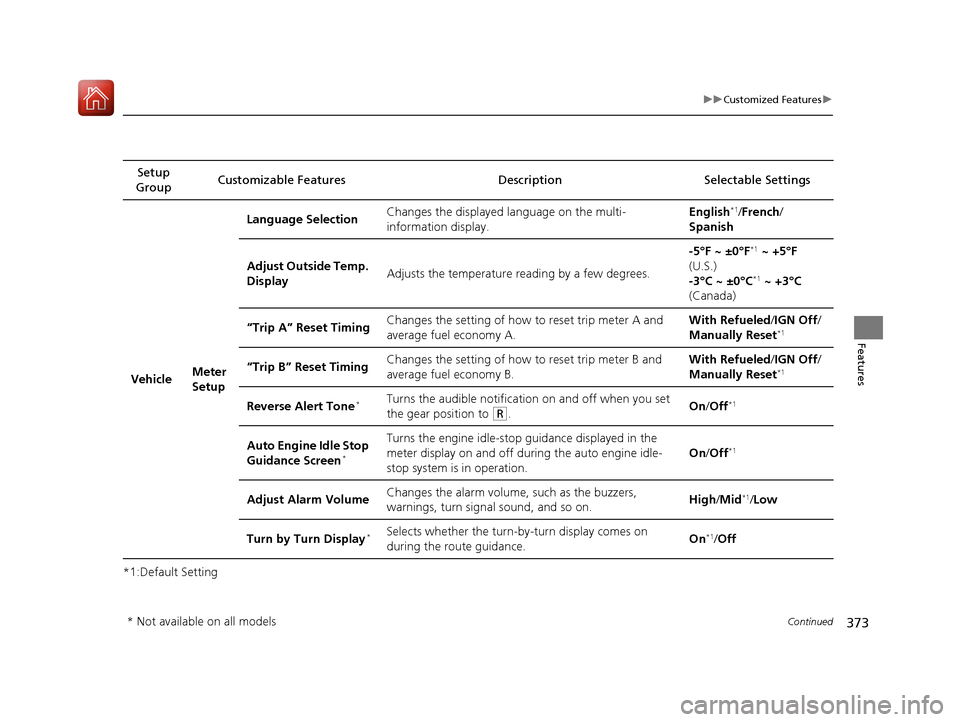
*1:Default SettingSetup
Group Customizable Features Description Selectable Settings
Vehicle Meter
SetupLanguage Selection
Changes the displayed language on the multi-
information display. English
*1/
French /
Spanish
Adjust Outside Temp.
Display Adjusts the temperature reading by a few degrees. -5°F ~ ±0°F
*1
~ +5°F
(U.S.)
-3°C ~ ±0°C
*1 ~ +3°C
(Canada)
“Trip A” Reset Timing Changes the setting of how to reset trip meter A and
average fuel economy A. With Refueled
/IGN Off /
Manually Reset
*1
“Trip B” Reset Timing Changes the setting of how to reset trip meter B and
average fuel economy B. With Refueled
/IGN Off /
Manually Reset*1
Reverse Alert Tone*Turns the audible notification on and off when you set
the gear position to
(R. On
/Off*1
Auto Engine Idle Stop
Guidance Screen*
Turns the engine idle-stop guidance displayed in the
meter display on and off during the auto engine idle-
stop system is in operation. On
/Off*1
Adjust Alarm Volume Changes the alarm volume, such as the buzzers,
warnings, turn signal sound, and so on. High
/Mid*1/Low
Turn by Turn Display
*Selects whether the turn-by-turn display comes on
during the route guidance. On*1/
Off
* Not available on all models
17 PILOT-31TG76100.book 373 ページ 2016年9月20日 火曜日 午後4時9分