reset HONDA PILOT 2017 3.G Owner's Guide
[x] Cancel search | Manufacturer: HONDA, Model Year: 2017, Model line: PILOT, Model: HONDA PILOT 2017 3.GPages: 673
Page 378 of 673
377
uuCustomized Features u
Continued
Features
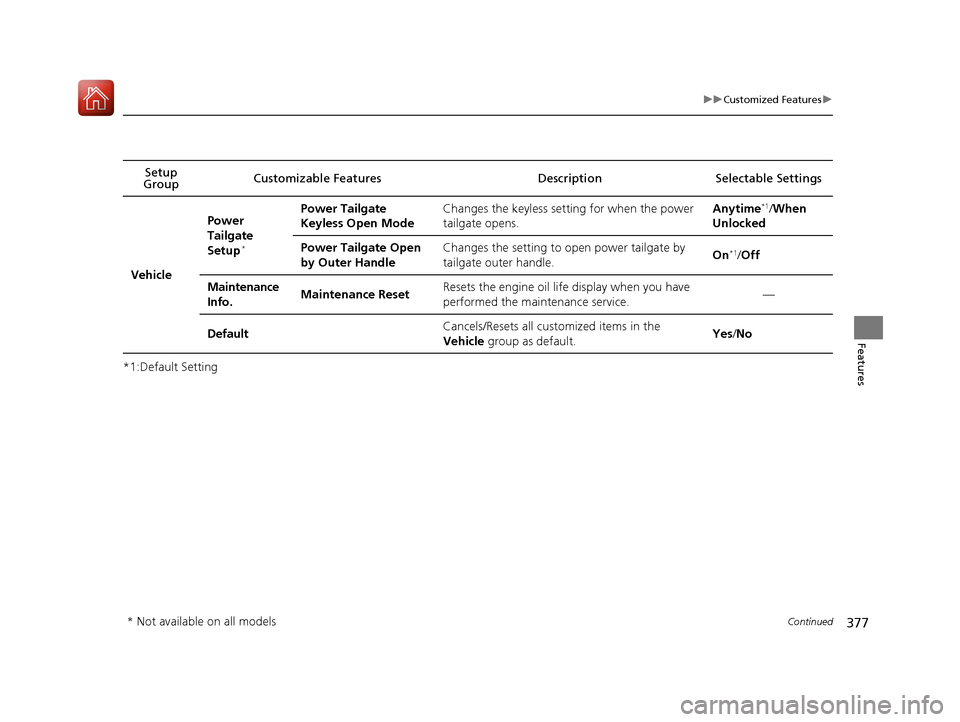
*1:Default SettingSetup
Group Customizable Features Description Selectable Settings
Vehicle
Power
Tailgate
Setup
*
Power Tailgate
Keyless Open ModeChanges the keyless setting for when the power
tailgate opens.Anytime*1/
When
Unlocked
Power Tailgate Open
by Outer HandleChanges the setting to open power tailgate by
tailgate outer handle.On*1/ Off
Maintenance
Info.Maintenance ResetResets the engine oil life display when you have
performed the maintenance service.—
DefaultCancels/Resets all cust omized items in the
Vehicle group as default.Yes/No
* Not available on all models
17 PILOT-31TG76100.book 377 ページ 2016年9月20日 火曜日 午後4時9分
Page 380 of 673
379
uuCustomized Features u
Continued
Features
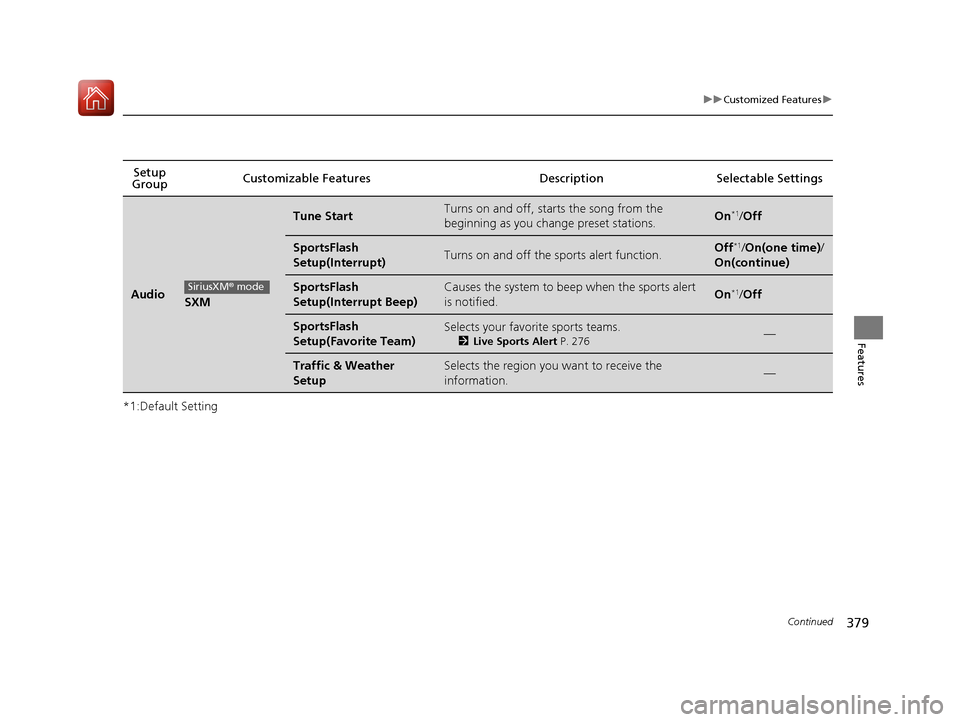
*1:Default SettingSetup
Group Customizable Features Description Selectable Settings
AudioSXM
Tune StartTurns on and off, sta
rts the song from the
beginning as you change preset stations.On*1/ Off
SportsFlash
Setup(Interrupt)Turns on and off the sp orts alert function.Off*1/On(one time) /
On(continue)
SportsFlash
Setup(Interrupt Beep)Causes the system to beep when the sports alert
is notified.On*1/ Off
SportsFlash
Setup(Favorite Team)Selects your favorite sports teams.
2 Live Sports Alert P. 276—
Traffic & Weather
SetupSelects the region you want to receive the
information.—
SiriusXM® mode
17 PILOT-31TG76100.book 379 ページ 2016年9月20日 火曜日 午後4時9分
Page 382 of 673
381
uuCustomized Features u
Continued
Features
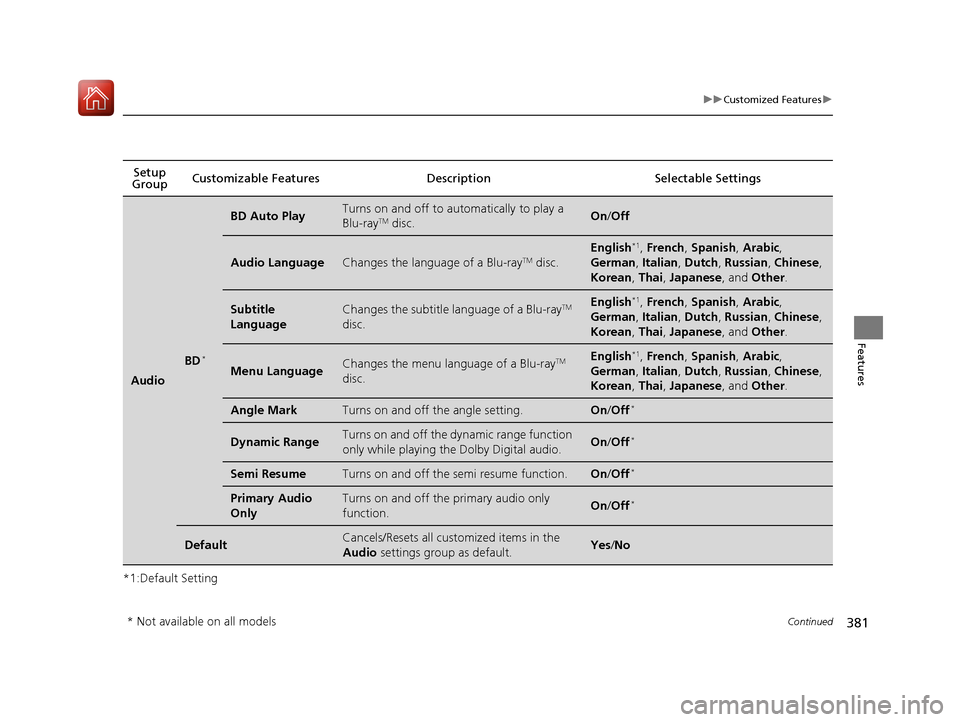
*1:Default SettingSetup
Group Customizable Features Descri
ption Selectable Settings
Audio
BD*
BD Auto PlayTurns on and off to automatically to play a
Blu-rayTM disc.On/Off
Audio LanguageChanges the language of a Blu-rayTM disc.
English*1, French , Spanish , Arabic,
German , Italian , Dutch , Russian , Chinese ,
Korean , Thai , Japanese , and Other .
Subtitle
LanguageChanges the subtitle language of a Blu-rayTM
disc.English*1, French , Spanish , Arabic,
German , Italian , Dutch , Russian , Chinese ,
Korean , Thai , Japanese , and Other .
Menu LanguageChanges the menu language of a Blu-rayTM
disc.English*1, French , Spanish , Arabic,
German , Italian , Dutch , Russian , Chinese ,
Korean , Thai , Japanese , and Other .
Angle MarkTurns on and off the angle setting.On/Off*
Dynamic RangeTurns on and off the dy namic range function
only while playing the Dolby Digital audio.On /Off*
Semi ResumeTurns on and off the semi resume function.On /Off*
Primary Audio
OnlyTurns on and off the primary audio only
function.On /Off*
DefaultCancels/Resets all cust omized items in the
Audio settings group as default.Yes/No
* Not available on all models
17 PILOT-31TG76100.book 381 ページ 2016年9月20日 火曜日 午後4時9分
Page 383 of 673
382
uuCustomized Features u
Features
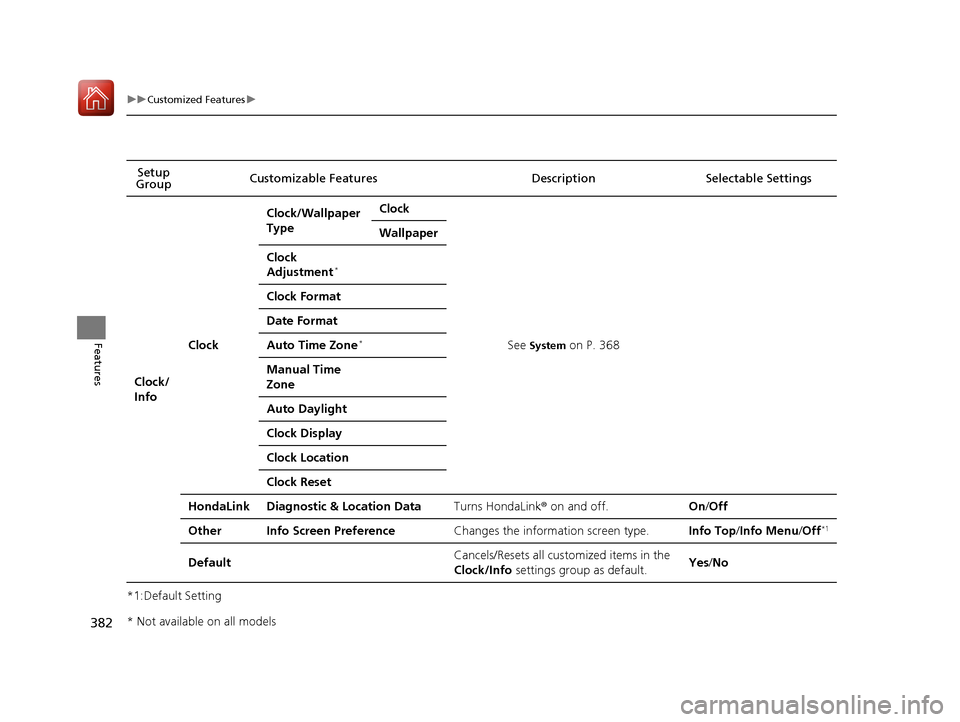
*1:Default SettingSetup
Group Customizable Features Descri
ption Selectable Settings
Clock/
Info
Clock
Clock/Wallpaper
TypeClock
See System on P. 368
Wallpaper
Clock
Adjustment*
Clock Format
Date Format
Auto Time Zone*
Manual Time
Zone
Auto Daylight
Clock Display
Clock Location
Clock Reset
HondaLinkDiagnostic & Location DataTurns HondaLink® on and off.On/Off
OtherInfo Screen PreferenceChanges the information screen type.Info Top /Info Menu /Off*1
DefaultCancels/Resets all cust omized items in the
Clock/Info settings group as default.Yes/No
* Not available on all models
17 PILOT-31TG76100.book 382 ページ 2016年9月20日 火曜日 午後4時9分
Page 384 of 673
383
uuCustomized Features u
Continued
Features
*1:Default SettingSetup
Group Customizable Features Desc
ription Selectable Settings
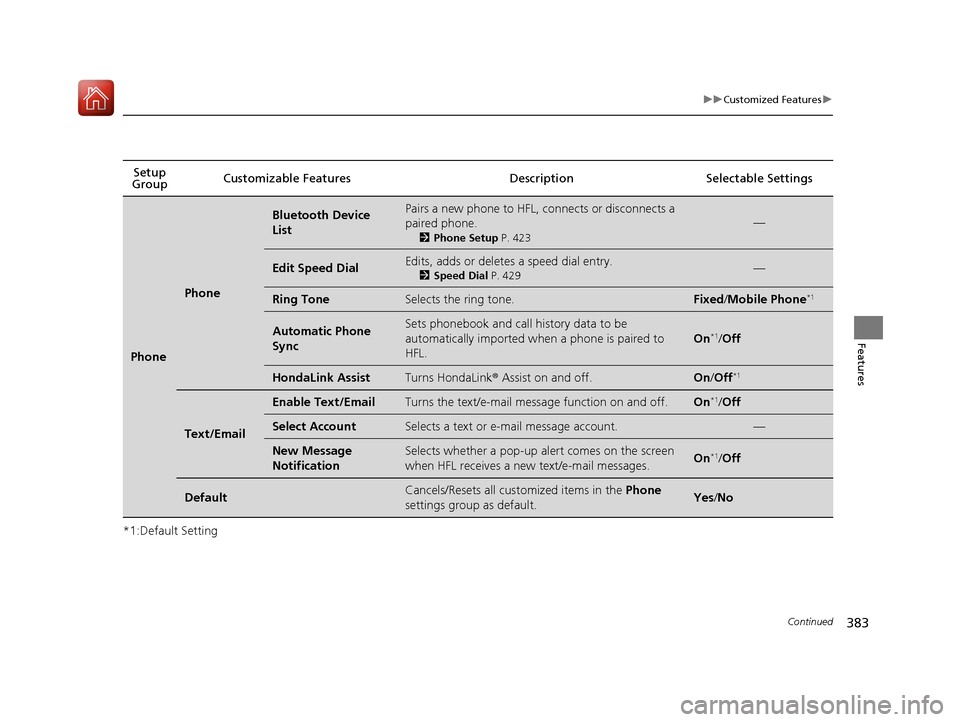
Phone
Phone
Bluetooth Device
ListPairs a new phone to HFL, connects or disconnects a
paired phone.
2Phone Setup P. 423
—
Edit Speed DialEdits, adds or deletes a speed dial entry.
2Speed Dial P. 429—
Ring ToneSelects the ring tone.Fixed/Mobile Phone*1
Automatic Phone
SyncSets phonebook and call history data to be
automatically imported when a phone is paired to
HFL.
On*1/Off
HondaLink AssistTurns HondaLink ® Assist on and off.On /Off*1
Text/Email
Enable Text/EmailTurns the text/e-mail message function on and off.On*1/Off
Select AccountSelects a text or e-mail message account.—
New Message
NotificationSelects whether a pop-up alert comes on the screen
when HFL receives a new text/e-mail messages.On*1/Off
DefaultCancels/Resets all customized items in the Phone
settings group as default.Yes /No
17 PILOT-31TG76100.book 383 ページ 2016年9月20日 火曜日 午後4時9分
Page 385 of 673
384
uuCustomized Features u
Features
*1:Default SettingSetup
Group Customizable Features Desc
ription Selectable Settings
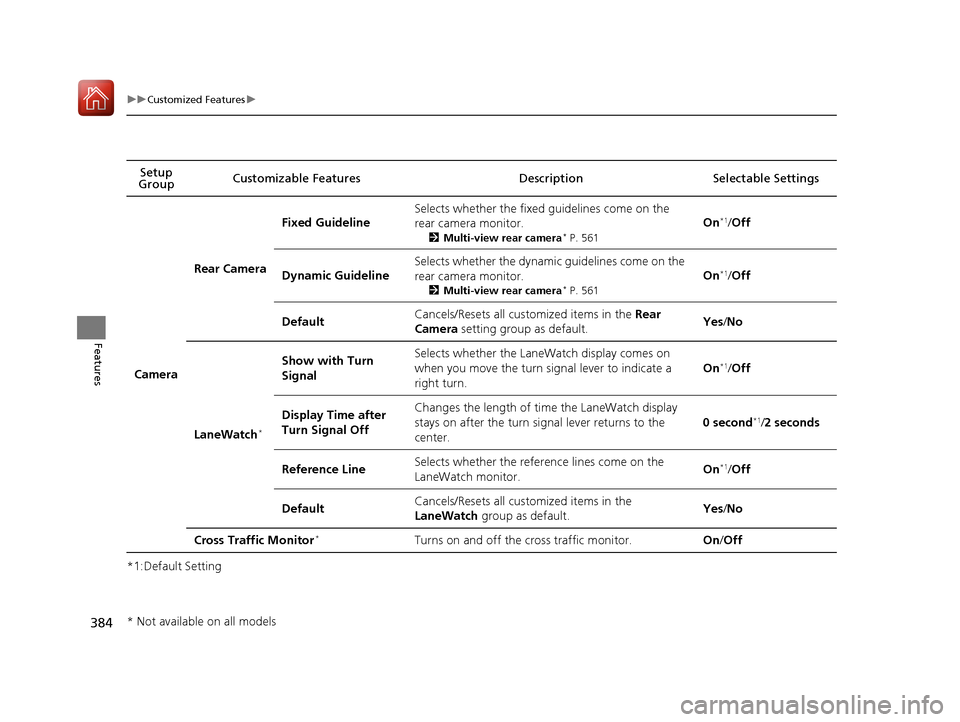
Camera
Rear Camera
Fixed Guideline
Selects whether the fixed guidelines come on the
rear camera monitor.
2Multi-view rear camera* P. 561
On*1/Off
Dynamic Guideline
Selects whether the dynamic guidelines come on the
rear camera monitor.
2 Multi-view rear camera* P. 561
On*1/Off
DefaultCancels/Resets all cust omized items in the Rear
Camera setting group as default.Yes/No
LaneWatch*
Show with Turn
SignalSelects whether the LaneWatch display comes on
when you move the turn signal lever to indicate a
right turn.
On*1/Off
Display Time after
Turn Signal OffChanges the length of time the LaneWatch display
stays on after the turn si gnal lever returns to the
center.
0 second*1/ 2 seconds
Reference LineSelects whether the reference lines come on the
LaneWatch monitor.On*1/ Off
DefaultCancels/Resets all cust omized items in the
LaneWatch group as default.Yes/No
Cross Traffic Monitor*Turns on and off the cross traffic monitor.On/Off
* Not available on all models
17 PILOT-31TG76100.book 384 ページ 2016年9月20日 火曜日 午後4時9分
Page 386 of 673
385
uuCustomized Features u
Features
*1:Default SettingSetup Group Customizable Features
Description Selectable Settings
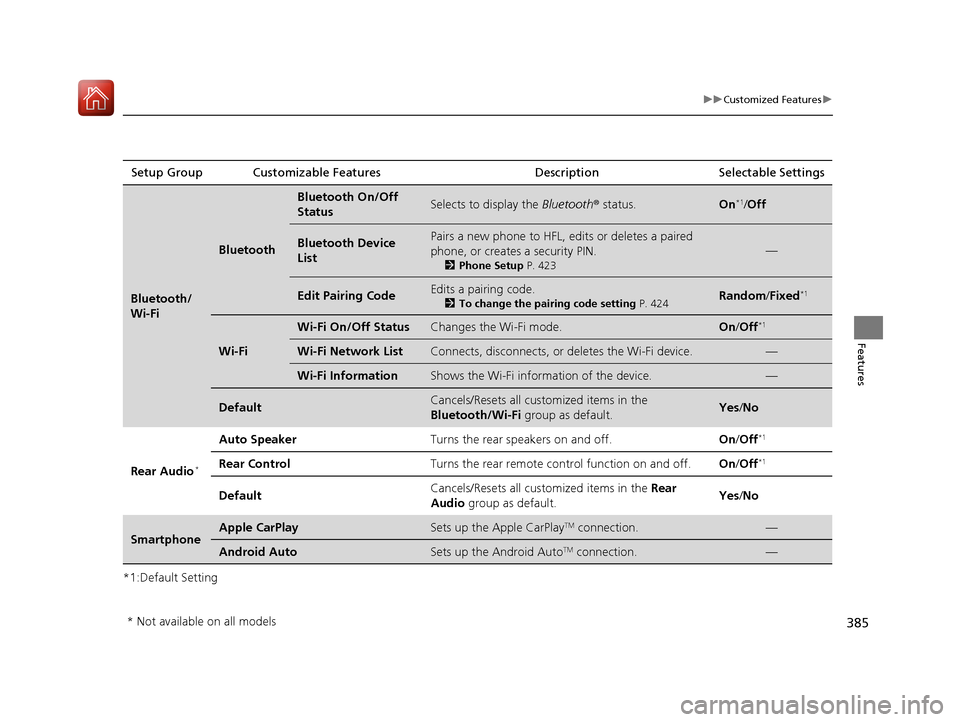
Bluetooth/
Wi-Fi
Bluetooth
Bluetooth On/Off
StatusSelects to display the Bluetooth® status.On*1/Off
Bluetooth Device
ListPairs a new phone to HFL, edits or deletes a paired
phone, or creates a security PIN.
2 Phone Setup P. 423
—
Edit Pairing CodeEdits a pairing code.
2To change the pairing code setting P. 424Random/Fixed*1
Wi-Fi
Wi-Fi On/Off StatusChanges the Wi-Fi mode.On /Off*1
Wi-Fi Network ListConnects, disconnects, or deletes the Wi-Fi device.—
Wi-Fi InformationShows the Wi-Fi information of the device.—
DefaultCancels/Resets all customized items in the
Bluetooth/Wi-Fi group as default.Yes/No
Rear Audio*
Auto SpeakerTurns the rear speakers on and off.On /Off*1
Rear ControlTurns the rear remote co ntrol function on and off.On/Off*1
DefaultCancels/Resets all customized items in the Rear
Audio group as default.Yes/No
SmartphoneApple CarPlaySets up the Apple CarPlayTM connection.—
Android AutoSets up the Android AutoTM connection.—
* Not available on all models
17 PILOT-31TG76100.book 385 ページ 2016年9月20日 火曜日 午後4時9分
Page 387 of 673
386
uuCustomized Features uDefaulting All the Settings
Features
Defaulting All the Settings
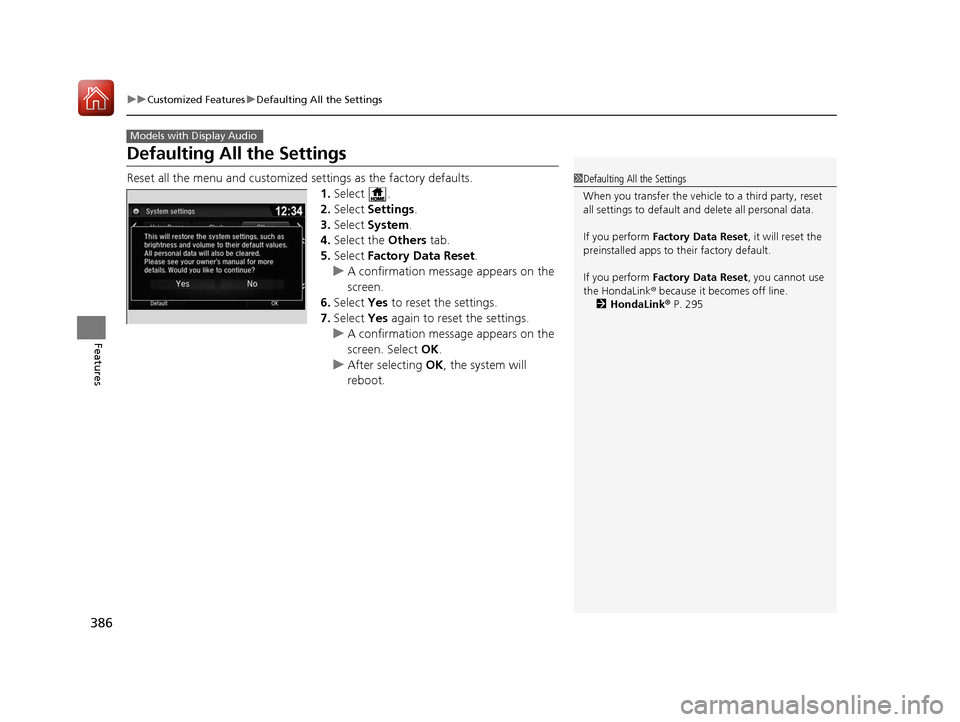
Reset all the menu and customized settings as the factory defaults.
1. Select .
2. Select Settings .
3. Select System .
4. Select the Others tab.
5. Select Factory Data Reset .
u A confirmation message appears on the
screen.
6. Select Yes to reset the settings.
7. Select Yes again to reset the settings.
u A confirmation message appears on the
screen. Select OK.
u After selecting OK, the system will
reboot.
Models with Display Audio
1 Defaulting All the Settings
When you transfer the vehicle to a third party, reset
all settings to default a nd delete all personal data.
If you perform Factory Data Reset , it will reset the
preinstalled apps to their factory default.
If you perform Factory Data Reset , you cannot use
the HondaLink ® because it becomes off line.
2 HondaLink ® P. 295
17 PILOT-31TG76100.book 386 ページ 2016年9月20日 火曜日 午後4時9分
Page 404 of 673
403
uuBluetooth ® HandsFreeLink ®u HFL Menus
Continued
Features
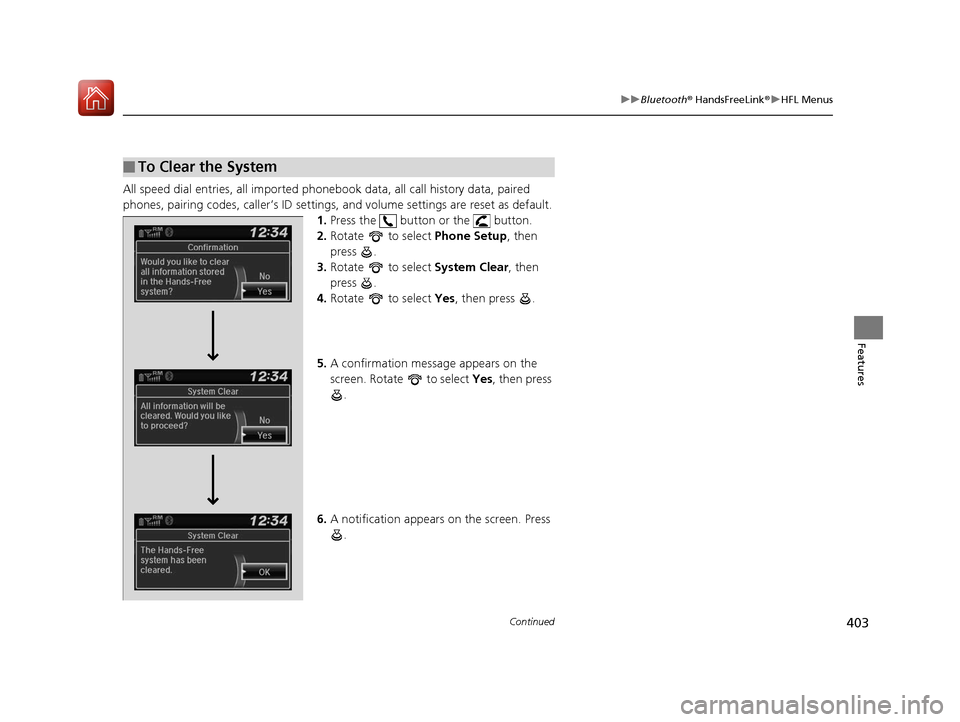
All speed dial entries, all imported phone book data, all call history data, paired
phones, pairing codes, caller’s ID settings , and volume settings are reset as default.
1. Press the button or the button.
2. Rotate to select Phone Setup, then
press .
3. Rotate to select System Clear, then
press .
4. Rotate to select Yes, then press .
5. A confirmation message appears on the
screen. Rotate to select Yes, then press
.
6. A notification appears on the screen. Press
.
■To Clear the System
17 PILOT-31TG76100.book 403 ページ 2016年9月20日 火曜日 午後4時9分
Page 421 of 673
420
uuBluetooth ® HandsFreeLink ®u HFL Menus
Features
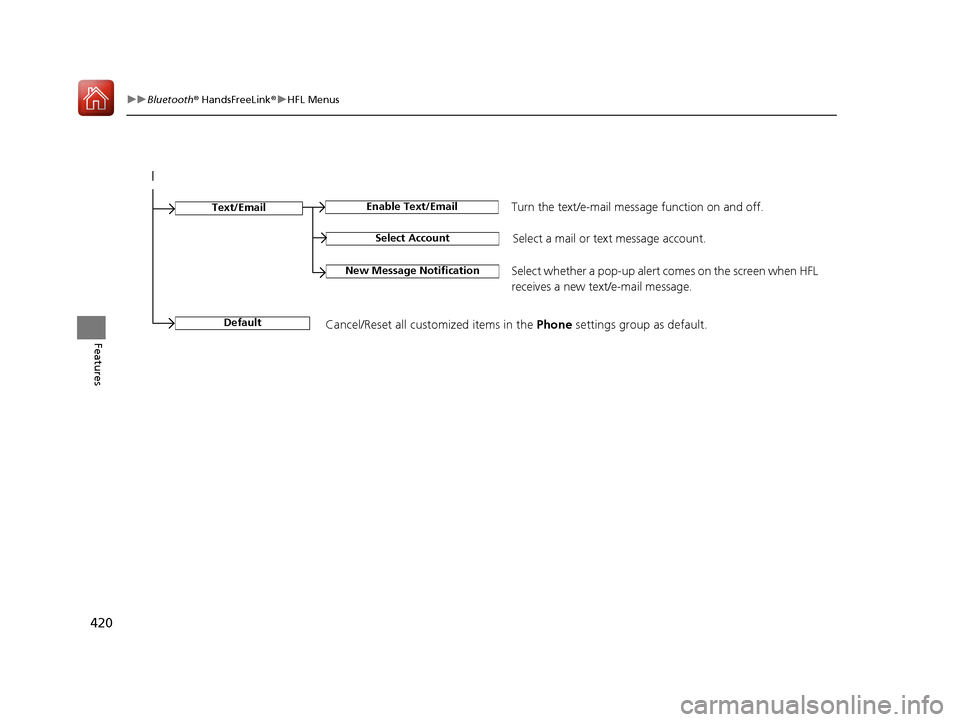
Select Account
Enable Text/EmailText/Email
New Message NotificationSelect whether a pop-up alert co mes on the screen when HFL
receives a new text/e-mail message.
Turn the text/e-mail message function on and off.
Select a mail or te xt message account.
DefaultCancel/Reset all customized items in the Phone settings group as default.
17 PILOT-31TG76100.book 420 ページ 2016年9月20日 火曜日 午後4時9分