service HONDA PILOT 2017 3.G Owner's Manual
[x] Cancel search | Manufacturer: HONDA, Model Year: 2017, Model line: PILOT, Model: HONDA PILOT 2017 3.GPages: 673
Page 564 of 673
563
uuRefueling uHow to Refuel
Continued
Driving
How to Refuel
Your fuel tank is not equipped with a fuel filler cap. You can insert the filler nozzle
directly into the filler neck. The tank seals itself again when you pull out the filler
nozzle. 1.Stop your vehicle with the service station
pump on the left side of the vehicle in the
rear.
2. Turn off the engine.
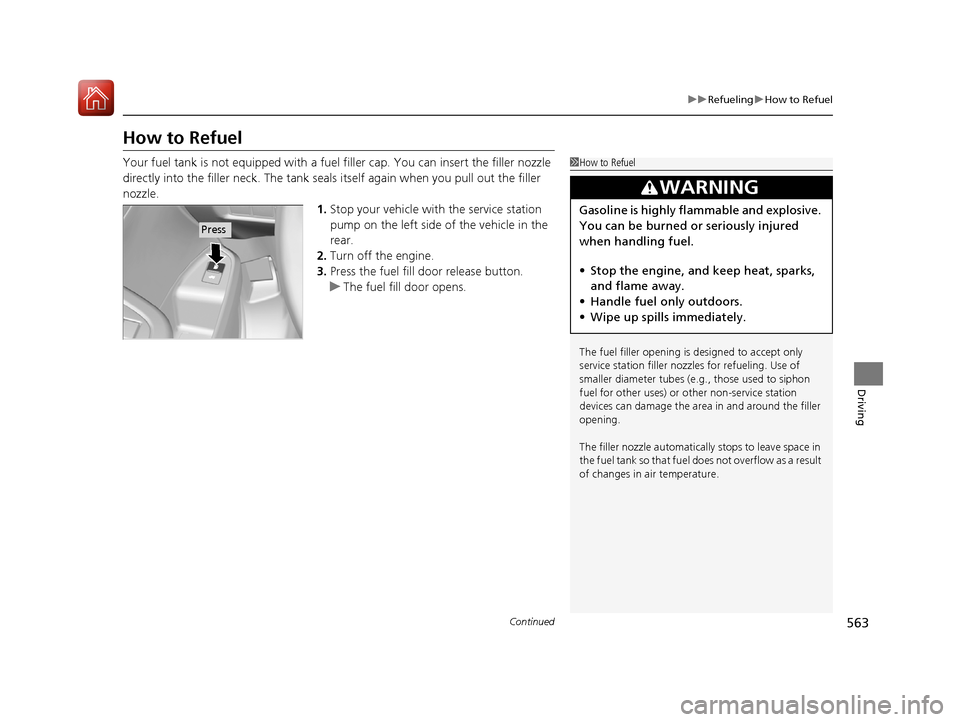
3. Press the fuel fill door release button.
u The fuel fill door opens.1How to Refuel
The fuel filler opening is designed to accept only
service station filler nozzles for refueling. Use of
smaller diamet er tubes (e.g., those used to siphon
fuel for other uses) or other non-service station
devices can damage the area in and around the filler
opening.
The filler nozzle automatically stops to leave space in
the fuel tank so that fuel does not overflow as a result
of changes in air temperature.
3WARNING
Gasoline is highly flammable and explosive.
You can be burned or seriously injured
when handling fuel.
• Stop the engine, and keep heat, sparks,
and flame away.
• Handle fuel only outdoors.
• Wipe up spills immediately.
Press
17 PILOT-31TG76100.book 563 ページ 2016年9月20日 火曜日 午後4時9分
Page 568 of 673
567
Maintenance
This chapter discusses basic maintenance.
Before Performing MaintenanceInspection and Maintenance ............ 568
Safety When Performing Maintenance ..569
Parts and Fluids Used in Maintenance Service ........................................... 570
Maintenance Minder
TM..................... 571
Maintenance Under the Hood Maintenance Items Under the Hood .. 575
Opening the Hood ........................... 576
Engine Compartment Cover ............. 577
Recommended Engine Oil ................ 578
Oil Check ......................................... 579
Adding Engine Oil ............................ 580
Changing the Engine Oil and Oil Filter ...581 Engine Coolant ................................ 583
Transmission Fluid ............................ 585
Brake Fluid ....................................... 586
Refilling Window Washer Fluid......... 586
Replacing Light Bulbs ....................... 587Checking and Maintaining Wiper Blades... 593Checking and Maintaining Tires
Checking Tires ................................. 597
Tire and Loading Information Label .. 598
Tire Labeling .................................... 598
DOT Tire Quality Grading (U.S. Vehicles).. 600Wear Indicators................................ 602
Tire Service Life ................................ 602 Tire and Wheel Replacement ........... 603
Tire Rotation .................................... 604
Winter Tires ..................................... 605
Battery ............................................... 606
Remote Transmitter Care ................. 608
Remote Control and Wireless Headphone Care
*........................... 609Heating and Cooling System*/Climate
Control System* Maintenance............. 611Cleaning Interior Care .................................... 613
Exterior Care.................................... 615
Accessories and Modifications ........ 618
* Not available on all models
17 PILOT-31TG76100.book 567 ページ 2016年9月20日 火曜日 午後4時9分
Page 569 of 673
568
Maintenance
Before Performing Maintenance
Inspection and Maintenance
For your safety, perform all listed inspections and maintenance to keep your vehicle
in good condition. If you become aware of any abnormality (noise, smell, insufficient
brake fluid, oil residue on the ground, etc.), have your vehicle inspected by a dealer.
(Note, however, that service at a dealer is not mandatory to keep your warranties in
effect.)
■Daily inspections
Perform inspections before long distance trips, when washing the vehicle, or when
refueling.
■Periodic inspections
• Check the automatic transmi ssion fluid level monthly.
2Automatic Transmission Fluid P. 585
•Check the brake fluid level monthly.
2 Checking the Brake Fluid P. 586
•Check the tire pressure monthly. Examin e the tread for wear and foreign objects.
2Checking and Maintaining Tires P. 597
•Check the operation of the exterior lights monthly.
2 Replacing Light Bulbs P. 587
•Check the condition of the wiper bl ades at least every six months.
2Checking and Maintaining Wiper Blades P. 593
■Types of Inspection and Maintenance
1Inspection and Maintenance
Maintenance, replacement, or repair of
emissions control devices and systems may be
done by any automotive repair establishment or
individuals using parts that are “certified” to
EPA standards.
According to state and fede ral regulations, failure to
perform maintenance on the maintenance main
items marked with # will not void your emissions
warranties. However, all maintenance services should
be performed in accordan ce with the intervals
indicated by the multi-information display (MID).
2 Maintenance Service Items P. 573
If you want to perform complex maintenance tasks
that require more skills a nd tools, you can purchase a
subscription to the Service Express website at
www.techinfo.honda.com .
2 Authorized Manuals P. 661
If you want to perform ma intenance yourself, make
sure that you have the necessary tools and skills first.
After performing ma intenance, update the records in
the separate maintenance booklet.
U.S. models
Automatic transmission models with shift lever
All models
17 PILOT-31TG76100.book 568 ページ 2016年9月20日 火曜日 午後4時9分
Page 571 of 673
570
uuBefore Performing Maintenance uParts and Fluids Used in Maintenance Service
Maintenance
Parts and Fluids Used in Maintenance Service
The use of Honda genuine parts and fluids is recommended when maintaining and
servicing your vehicle. Honda genuine parts are manufactured according to the
same high quality standards used in Honda vehicles.1Parts and Fluids Used in Maintenance Service
Do not press the engine cover forcibly. This may
damage the engine cover and component parts.
17 PILOT-31TG76100.book 570 ページ 2016年9月20日 火曜日 午後4時9分
Page 572 of 673
571Continued
Maintenance
Maintenance MinderTM
Maintenance items, which should be serviced at the same time that you replace the
engine oil, app ear on the MID.
You can view them on the engine oil life screen at any time.
To Use Maintenance MinderTM
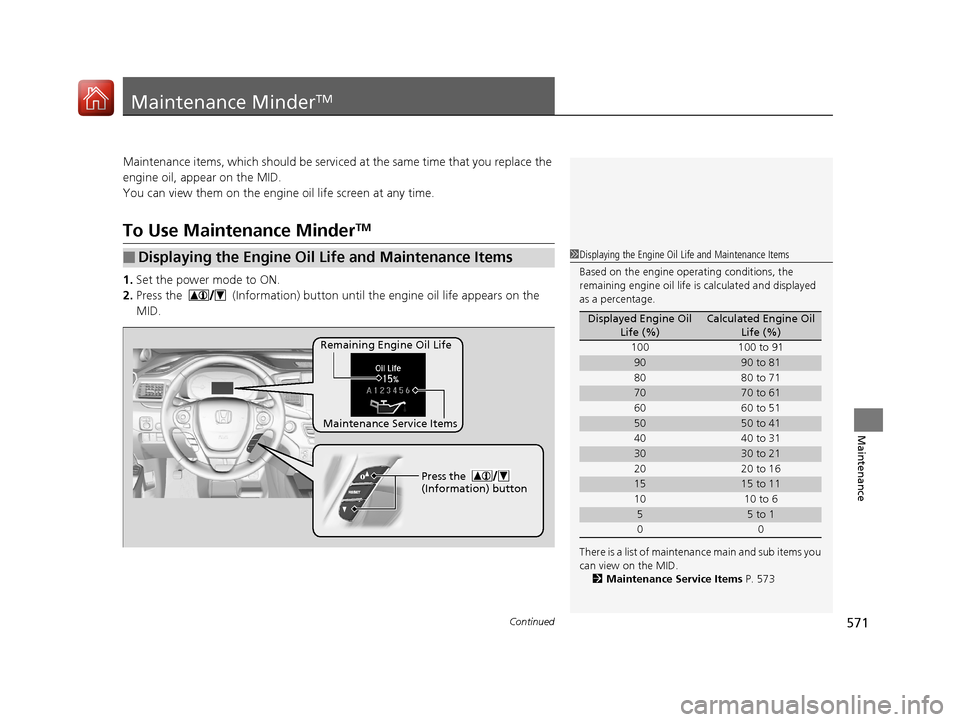
1. Set the power mode to ON.
2. Press the (Information) button until the engine oil life appears on the
MID.
■Displaying the Engine Oil Life and Maintenance Items1 Displaying the Engine Oil Life and Maintenance Items
Based on the engine ope rating conditions, the
remaining engine oi l life is calculated and displayed
as a percentage.
There is a list of maintena nce main and sub items you
can view on the MID. 2 Maintenance Service Items P. 573
Displayed Engine Oil
Life (%)Calculated Engine Oil Life (%)
100 100 to 91
9090 to 81
80 80 to 71
7070 to 61
60 60 to 51
5050 to 41
40 40 to 31
3030 to 21
20 20 to 16
1515 to 11
10 10 to 6
55 to 1
00
Remaining Engine Oil Life
Maintenance Service Items Press the
(Information) button
17 PILOT-31TG76100.book 571 ページ 2016年9月20日 火曜日 午後4時9分
Page 573 of 673
572
uuMaintenance MinderTMuTo Use Maintenance MinderTM
Maintenance
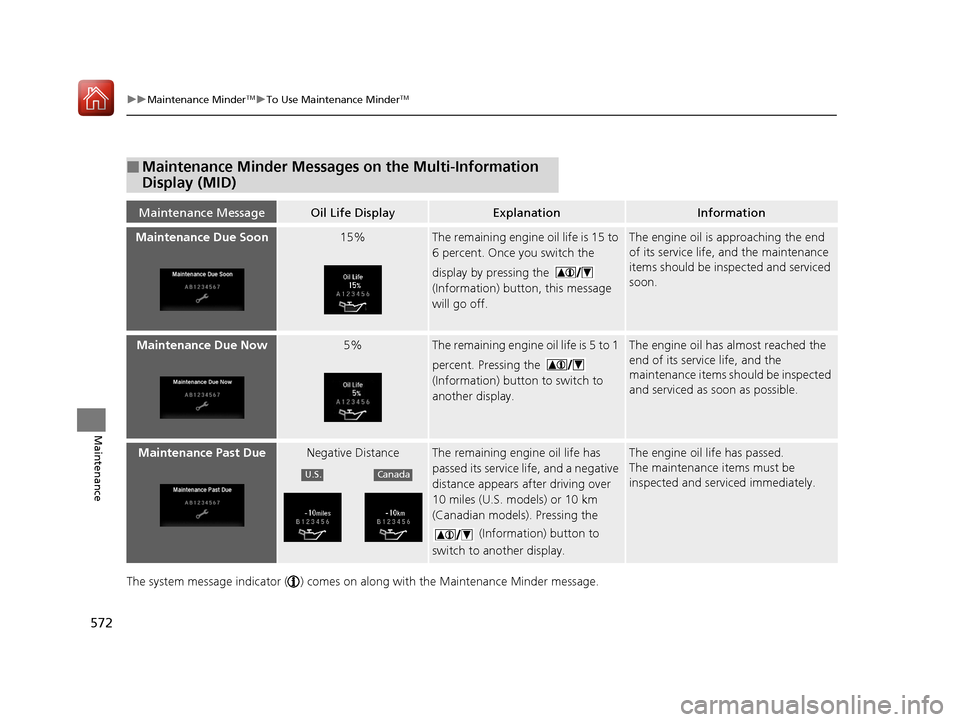
The system message indicator ( ) comes on along with the Maintenance Minder message.
■Maintenance Minder Messages on the Multi-Information
Display (MID)
Maintenance MessageOil Life DisplayExplanationInformation
Maintenance Due Soon15%The remaining engine oil life is 15 to
6 percent. Once you switch the
display by pressing the
(Information) button, this message
will go off.The engine oil is approaching the end
of its service life, and the maintenance
items should be inspected and serviced
soon.
Maintenance Due Now5%The remaining engine oil life is 5 to 1
percent. Pressing the
(Information) button to switch to
another display.The engine oil has almost reached the
end of its service life, and the
maintenance items should be inspected
and serviced as soon as possible.
Maintenance Past DueNegative DistanceThe remaining engi ne oil life has
passed its service life, and a negative
distance appears after driving over
10 miles (U.S. models) or 10 km
(Canadian models). Pressing the
(Information) button to
switch to another display.The engine oil life has passed.
The maintenance items must be
inspected and serviced immediately.
U.S.Canada
17 PILOT-31TG76100.book 572 ページ 2016年9月20日 火曜日 午後4時9分
Page 574 of 673
573
uuMaintenance MinderTMuTo Use Maintenance MinderTM
Continued
Maintenance
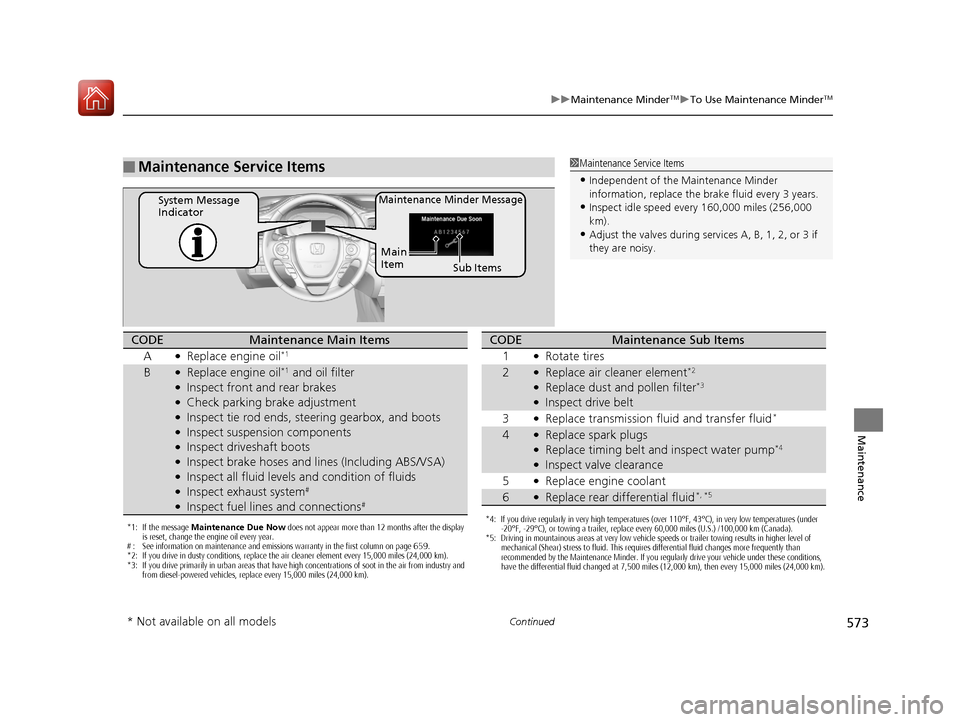
■Maintenance Service Items1Maintenance Service Items
•Independent of the Maintenance Minder
information, replace the brake fluid every 3 years.
•Inspect idle speed every 160,000 miles (256,000
km).
•Adjust the valves during services A, B, 1, 2, or 3 if
they are noisy.
Maintenance Minder MessageSystem Message
Indicator
Sub Items
Main
Item
*1: If the message
Maintenance Due Now does not appear more than 12 months after the display
is reset, change the engine oil every year.
# : See information on maintenance and emissions warranty in the first column on page 659.
*2: If you drive in dusty conditions, replace the air cleaner element every 15,000 miles (24,000 km).
*3: If you drive primarily in urban areas that have high concentrations of soot in the air from industry and from diesel-powered vehicles, replace every 15,000 miles (24,000 km).
CODEMaintenance Main Items
A
●Replace engine oil*1
B●Replace engine oil*1 and oil filter●Inspect front and rear brakes●Check parking brake adjustment●Inspect tie rod ends, steering gearbox, and boots●Inspect suspension components●Inspect driveshaft boots●Inspect brake hoses and li nes (Including ABS/VSA)●Inspect all fluid levels and condition of fluids●Inspect exhaust system#
●Inspect fuel lines and connections#
*4: If you drive regularly in very high temperatures (over 110°F, 43°C), in very low temperatures (under
-20°F, -29°C), or towing a trailer, replace every 60,000 miles (U.S.) /100,000 km (Canada).
*5: Driving in mountainous areas at very low vehicle speeds or trailer towing results in higher level of mechanical (Shear) stress to fluid. This requires differential fluid changes more frequently than
recommended by the Maintenance Minder. If you regularly drive your vehicle under these conditions,
have the differential fluid changed at 7,500 miles (12,000 km), then every 15,000 miles (24,000 km).
CODEMaintenance Sub Items
1
●Rotate tires
2●Replace air cleaner element*2
●Replace dust and pollen filter*3
●Inspect drive belt
3
●Replace transmission fl uid and transfer fluid*
4●Replace spark plugs●Replace timing belt and inspect water pump*4
●Inspect valve clearance
5
●Replace engine coolant
6●Replace rear differential fluid*, *5
* Not available on all models
17 PILOT-31TG76100.book 573 ページ 2016年9月20日 火曜日 午後4時9分
Page 575 of 673
uuMaintenance MinderTMuTo Use Maintenance MinderTM
574
Maintenance
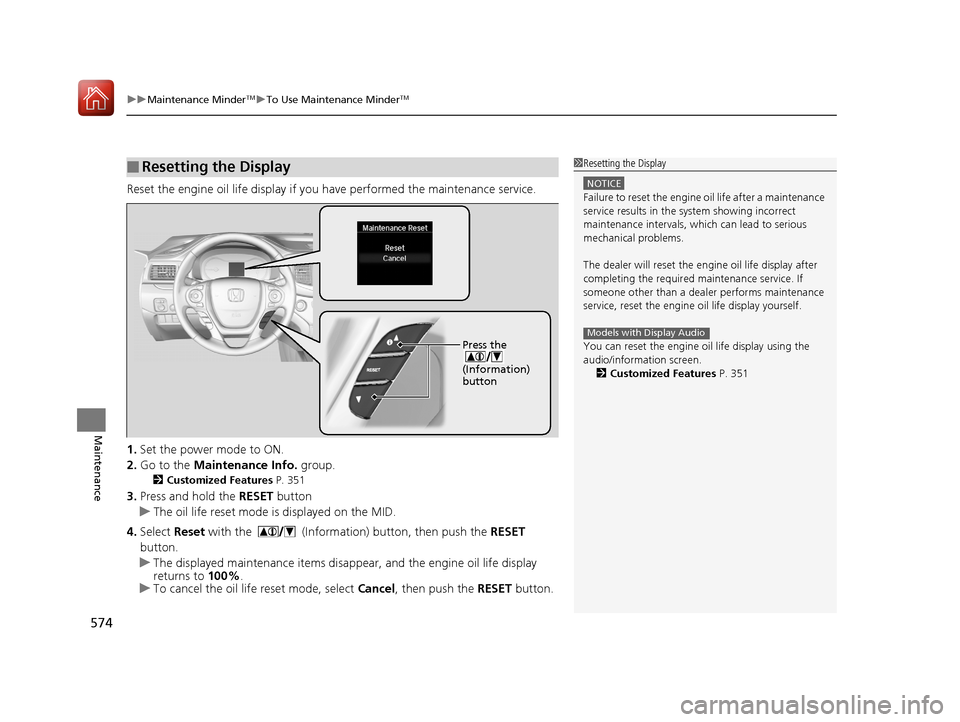
Reset the engine oil life display if you have performed the maintenance service.
1. Set the power mode to ON.
2. Go to the Maintenance Info. group.
2Customized Features P. 351
3.Press and hold the RESET button
u The oil life reset mode is displayed on the MID.
4. Select Reset with the (Information) button, then push the RESET
button.
u The displayed maintenance items disappea r, and the engine oil life display
returns to 100%.
u To cancel the oil life reset mode, select Cancel, then push the RESET button.
■Resetting the Display1Resetting the Display
NOTICE
Failure to reset the engine oil life after a maintenance
service results in the sy stem showing incorrect
maintenance intervals, which can lead to serious
mechanical problems.
The dealer will reset the en gine oil life display after
completing the required ma intenance service. If
someone other than a deal er performs maintenance
service, reset the engine oil life display yourself.
You can reset the engine oi l life display using the
audio/information screen. 2 Customized Features P. 351
Models with Display AudioPress the
(Information)
button
17 PILOT-31TG76100.book 574 ページ 2016年9月20日 火曜日 午後4時9分
Page 601 of 673
600
uuChecking and Maintaining Tires uDOT Tire Quality Grading (U.S. Vehicles)
Maintenance
DOT Tire Quality Grading (U.S. Vehicles)
The tires on your vehicle meet all U.S. Federal Safety
Requirements. All tires are also graded for treadwear, traction,
and temperature performance a ccording to Department of
Transportation (DOT) standards. The following explains these
gradings.
Quality grades can be found where applicable on the tire sidewall
between tread shoulder an d maximum section width.
The treadwear grade is a comparative rating based on the wear
rate of the tire when tested un der controlled conditions on a
specified government test course. For example, a tire graded 150
would wear one and one-half (1 1/2) times as well on the
government course as a tire graded 100. The relative performance
of tires depends upon the actual conditions of their use, however,
and may depart significantly from the norm due to variations in
driving habits, service practices and differences in road
characteristics and climate.
■Uniform Tire Quality Grading
■Treadwear
1 Uniform Tire Quality Grading
For example:
Treadwear 200
Traction AA
Temperature A
All passenger car tires must conform
to Federal Safety Requirements in
addition to these grades.
17 PILOT-31TG76100.book 600 ページ 2016年9月20日 火曜日 午後4時9分
Page 603 of 673
602
uuChecking and Maintaining Tires uWear Indicators
Maintenance
Wear Indicators
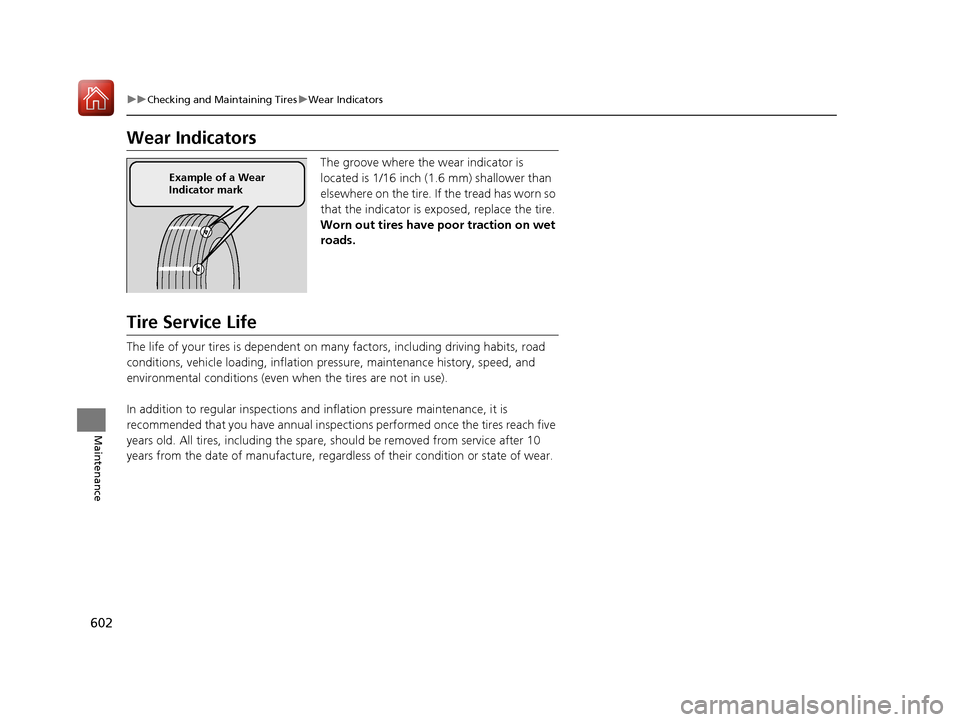
The groove where the wear indicator is
located is 1/16 inch (1.6 mm) shallower than
elsewhere on the tire. If the tread has worn so
that the indicator is ex posed, replace the tire.
Worn out tires have poor traction on wet
roads.
Tire Service Life
The life of your tires is dependent on many factors, including driving habits, road
conditions, vehicle loading, inflation pre ssure, maintenance history, speed, and
environmental conditions (even when the tires are not in use).
In addition to regular in spections and inflation pres sure maintenance, it is
recommended that you have annual inspecti ons performed once the tires reach five
years old. All tires, including the spare, should be removed from service after 10
years from the date of manufacture, regard less of their condition or state of wear.
Example of a Wear
Indicator mark
17 PILOT-31TG76100.book 602 ページ 2016年9月20日 火曜日 午後4時9分