light HONDA PILOT 2017 3.G Repair Manual
[x] Cancel search | Manufacturer: HONDA, Model Year: 2017, Model line: PILOT, Model: HONDA PILOT 2017 3.GPages: 673
Page 205 of 673
uuInterior Lights/Interior Convenience Items uInterior Convenience Items
204
Controls
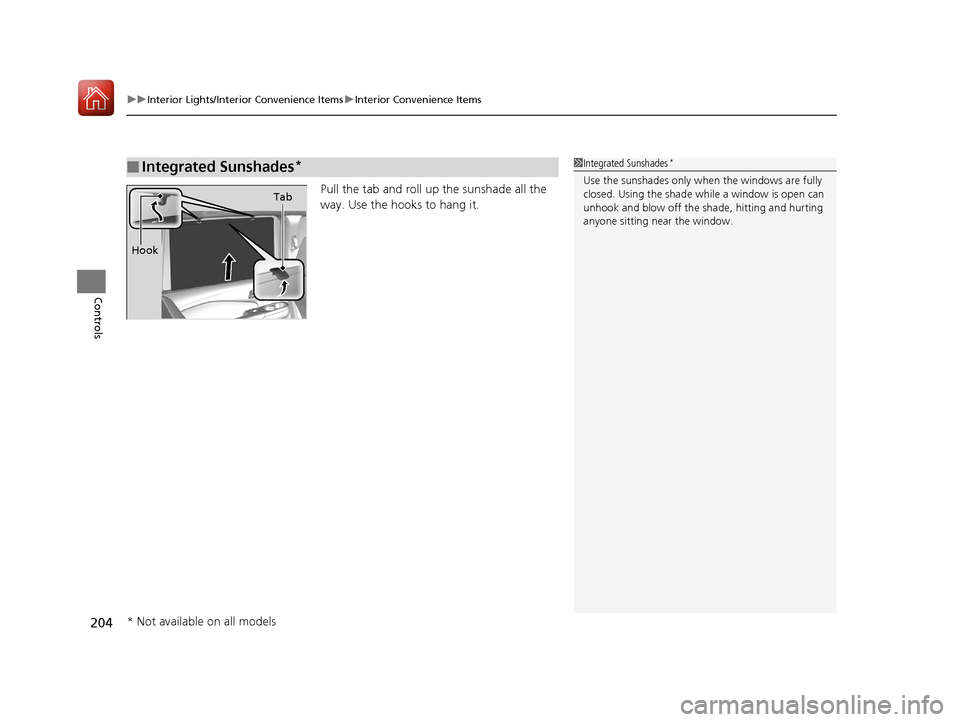
Pull the tab and roll up the sunshade all the
way. Use the hooks to hang it.
■Integrated Sunshades*1Integrated Sunshades*
Use the sunshades only when the windows are fully
closed. Using the shade while a window is open can
unhook and blow off the sh ade, hitting and hurting
anyone sitting near the window.
Tab
Hook
* Not available on all models
17 PILOT-31TG76100.book 204 ページ 2016年9月20日 火曜日 午後4時9分
Page 220 of 673
219
uuAudio System uUSB Port(s)
Continued
Features
USB Port(s)
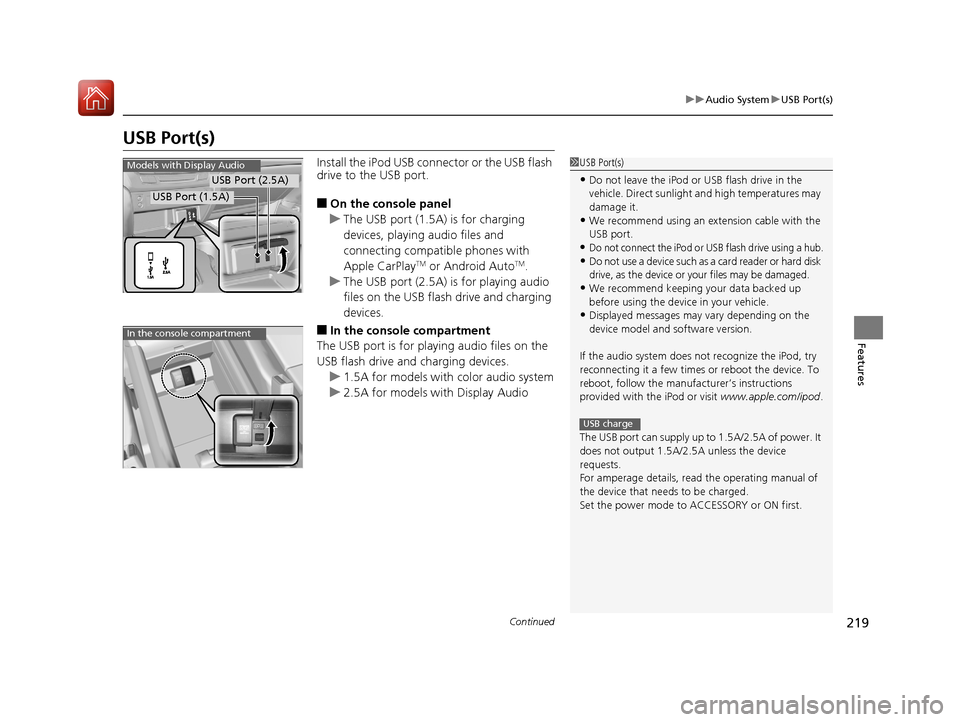
Install the iPod USB connector or the USB flash
drive to the USB port.
■On the console panel
u The USB port (1.5A) is for charging
devices, playing audio files and
connecting compatib le phones with
Apple CarPlay
TM or Android AutoTM.
u The USB port (2.5A) is for playing audio
files on the USB flash drive and charging
devices.
■In the consol e compartment
The USB port is for playing audio files on the
USB flash drive and charging devices.
u 1.5A for models with color audio system
u 2.5A for models with Display Audio
1USB Port(s)
•Do not leave the iPod or USB flash drive in the
vehicle. Direct sunlight and high temperatures may
damage it.
•We recommend using an extension cable with the
USB port.
•Do not connect the iPod or USB flash drive using a hub.
•Do not use a device such as a card reader or hard disk
drive, as the device or your files may be damaged.
•We recommend keeping y our data backed up
before using the device in your vehicle.
•Displayed messages may vary depending on the
device model and software version.
If the audio system does not recognize the iPod, try
reconnecting it a few times or reboot the device. To
reboot, follow the manufac turer’s instructions
provided with the iPod or visit www.apple.com/ipod.
The USB port can supply up to 1.5A/2.5A of power. It
does not output 1.5A/2.5A unless the device
requests.
For amperage details, read the operating manual of
the device that ne eds to be charged.
Set the power mode to ACCESSORY or ON first.
USB charge
Models with Display Audio
USB Port (2.5A)
USB Port (1.5A)
In the console compartment
17 PILOT-31TG76100.book 219 ページ 2016年9月20日 火曜日 午後4時9分
Page 264 of 673
263
uuAudio System Basic Operation uVoice Control Operation
Continued
Features
Voice Control Operation
Your vehicle has a voice control syst em that allows hands-free operation.
The voice control system uses the (Tal k) and (hang-up/back) buttons on the
steering wheel and a microphone near the map lights on the ceiling.
To achieve optimum voice recognition when using the voice control system:
• Make sure the correct screen is displa yed for the voice command that you are
using.
• Close the windows and moonroof
*.
• Adjust the dashboard and side vents so air does not blow onto the microphone
on the ceiling.
• Speak clearly in a clear, natural speaking voice without pausing between words.
• Reduce any background noise if possible. The system may misinterpret your
command if more than one person is speaking at the same time.
■Voice Recognition
1Voice Control Operation
When you press the button, a helpful prompt asks
what you would like to do. Press and release the
button again to bypass th is prompt and give a
command.
1 Voice Recognition
The voice control system can only be used from the
driver’s seat because the microphone unit removes
noises from the front passenger’s side.
* Not available on all models
17 PILOT-31TG76100.book 263 ページ 2016年9月20日 火曜日 午後4時9分
Page 317 of 673
uuGeneral Information on the Audio System uRecommended CD*
316
Features
■Protecting CDs
Follow these precautions when handling or storing CDs:
• Store a CD in its case when it is not being played.
• When wiping a CD, use a soft clean clot h from the center to the outside edge.
• Handle a CD by its edge. Never touch either surface.
• Never insert foreign objects into the CD player.
• Keep CDs out of direct sunlight and extreme heat.
• Do not place stabilizer ri ngs or labels on the CD.
• Avoid fingerprints, liquids, and felt-tip pens on the CD.1Protecting CDs
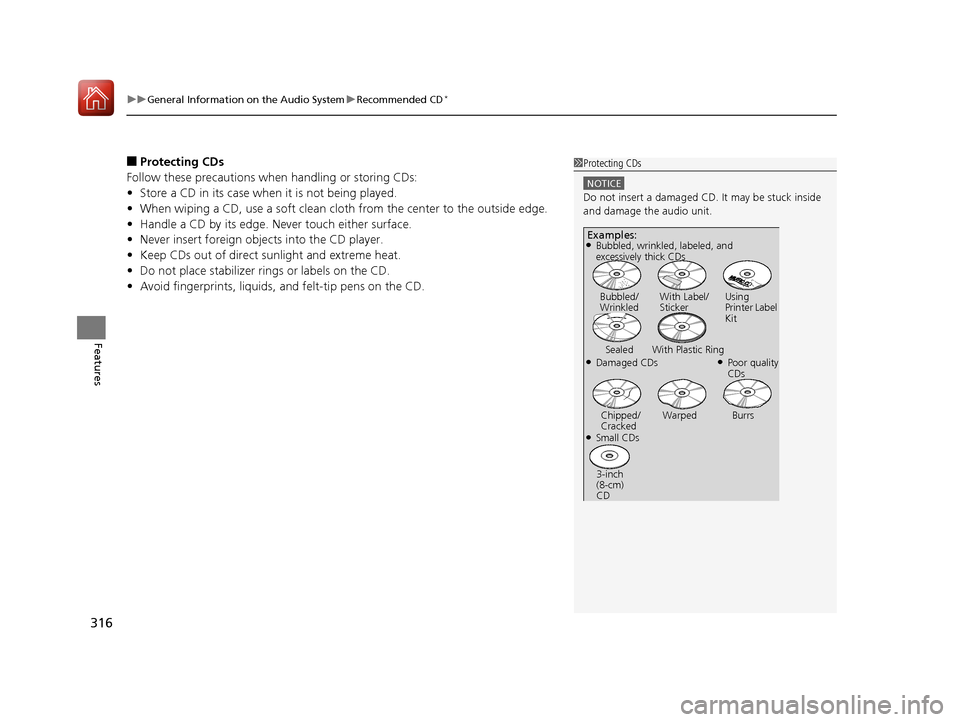
NOTICE
Do not insert a damaged CD. It may be stuck inside
and damage the audio unit.
Examples:
●Damaged CDs Bubbled/
Wrinkled
With Label/
Sticker Using
Printer Label
Kit
Sealed With Plastic Ring●Poor quality
CDs
Chipped/
Cracked Warped Burrs
●Small CDs
3-inch
(8-cm)
CD
●Bubbled, wrinkled, labeled, and
excessively thick CDs
17 PILOT-31TG76100.book 316 ページ 2016年9月20日 火曜日 午後4時9分
Page 327 of 673
326
uuBlu-ray/DVD Rear Entertainment System*uPlaying a DVD/Blu-rayTM*
Features
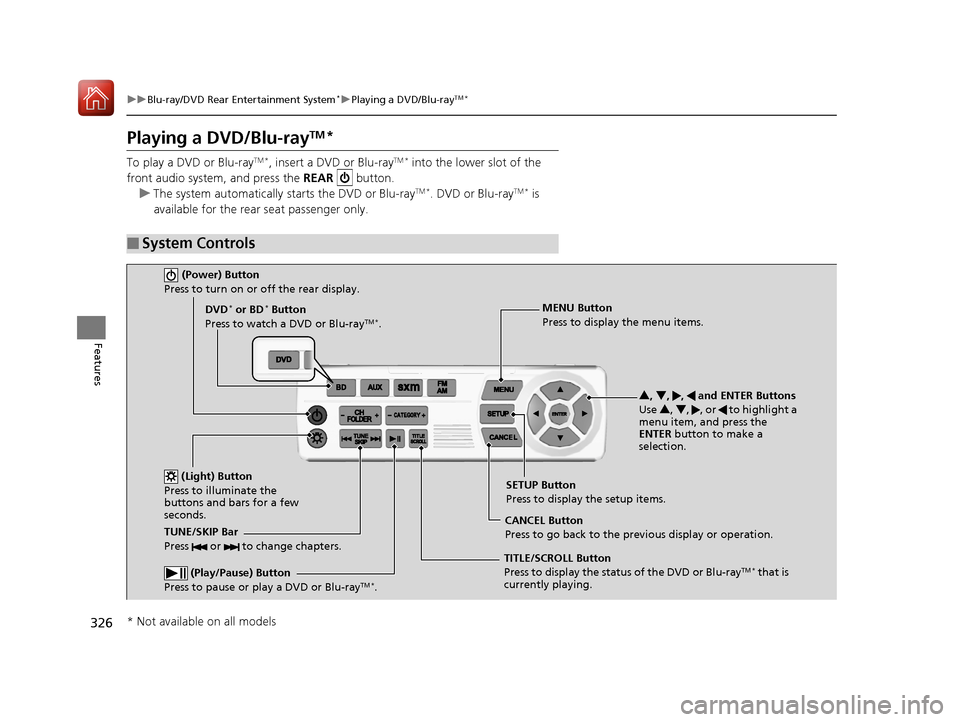
Playing a DVD/Blu-rayTM*
To play a DVD or Blu-rayTM *, insert a DVD or Blu-rayTM * into the lower slot of the
front audio system, and press the REAR button.
u The system automatically starts the DVD or Blu-ray
TM *. DVD or Blu-rayTM * is
available for the rear seat passenger only.
■System Controls
(Power) Button
Press to turn on or off the rear display.
DVD* or BD* Button
Press to watch a DVD or Blu-rayTM *.
(Light) Button
Press to illuminate the
buttons and bars for a few
seconds.
TUNE/SKIP Bar
Press or to change chapters.
(Play/Pause) Button
Press to pause or play a DVD or Blu-rayTM *.
TITLE/SCROLL Button
Press to display the status of the DVD or Blu-rayTM * that is
currently playing. MENU Button
Press to display the menu items.
SETUP Button
Press to display the setup items.
CANCEL Button
Press to go back to the previous display or operation. 3
, 4 , , and ENTER Buttons
Use 3, 4 , , or to highlight a
menu item, and press the
ENTER button to make a
selection.
* Not available on all models
17 PILOT-31TG76100.book 326 ページ 2016年9月20日 火曜日 午後4時9分
Page 341 of 673
340
uuBlu-ray/DVD Rear Entertainment System*uPlaying Audio
Features
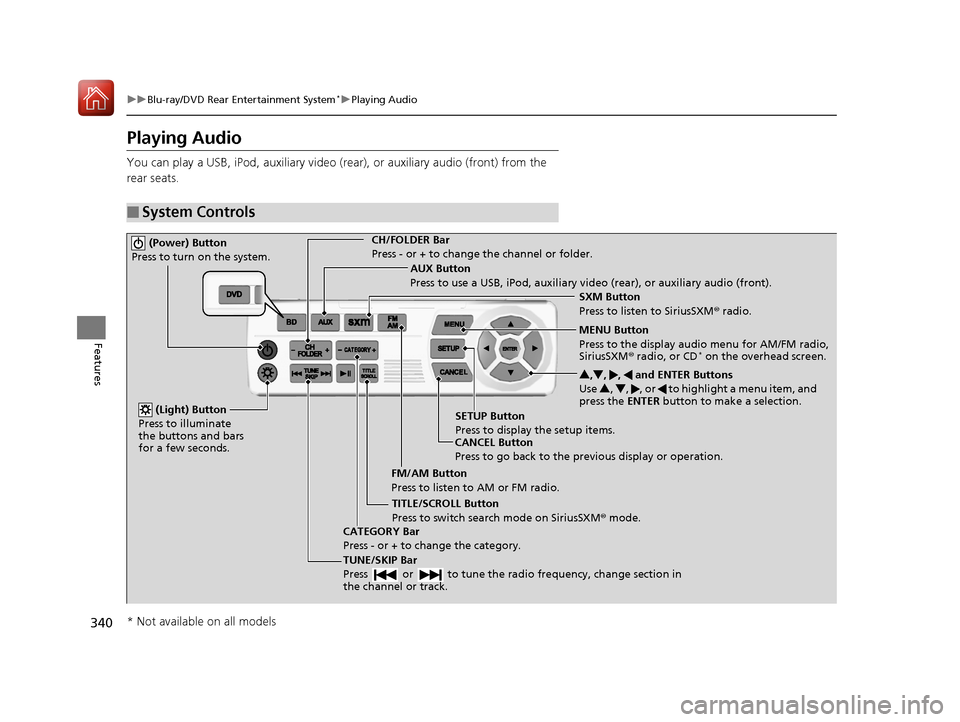
Playing Audio
You can play a USB, iPod, auxiliary video (rear), or auxiliary audio (front) from the
rear seats.
■System Controls
(Power) Button
Press to turn on the system.CH/FOLDER Bar
Press - or + to change the channel or folder.
(Light) Button
Press to illuminate
the buttons and bars
for a few seconds.
TUNE/SKIP Bar
Press or to tune the radi o frequency, change section in
the channel or track.
TITLE/SCROLL Button
Press to switch search mode on SiriusSXM ® mode.
CANCEL Button
Press to go back to the previous display or operation. 3
,4 , , and ENTER Buttons
Use 3, 4 , , or to highlight a menu item, and
press the ENTER button to make a selection.
CATEGORY Bar
Press - or + to change the category. AUX Button
Press to use a USB, iPod, auxiliary video (rear), or auxiliary audio (front).
FM/AM Button
Press to listen to AM or FM radio. SETUP Button
Press to display the setup items. SXM Button
Press to listen to SiriusSXM
® radio.
MENU Button
Press to the display audio menu for AM/FM radio,
SiriusSXM ® radio, or CD
* on the overhead screen.
* Not available on all models
17 PILOT-31TG76100.book 340 ページ 2016年9月20日 火曜日 午後4時9分
Page 361 of 673
360
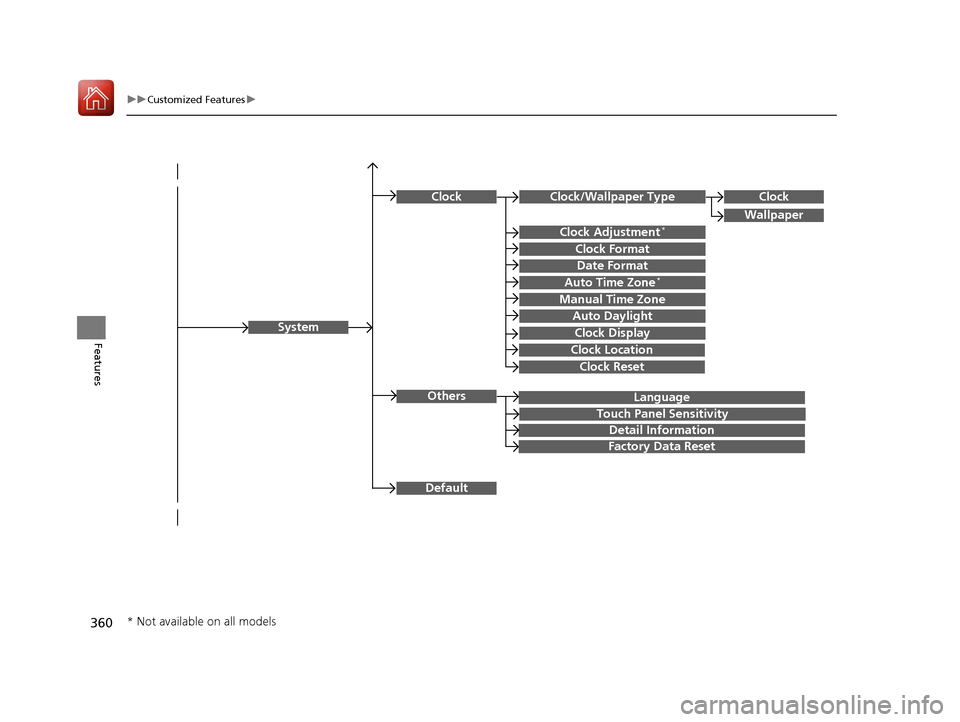
uuCustomized Features u
Features
Language
Default
System
Others
Clock/Wallpaper Type
Date Format
Clock Adjustment*
ClockClock
Wallpaper
Manual Time Zone
Auto Daylight
Clock Display
Touch Panel Sensitivity
Clock Format
Auto Time Zone*
Detail Information
Factory Data Reset
Clock Reset
Clock Location
* Not available on all models
17 PILOT-31TG76100.book 360 ページ 2016年9月20日 火曜日 午後4時9分
Page 363 of 673
362
uuCustomized Features u
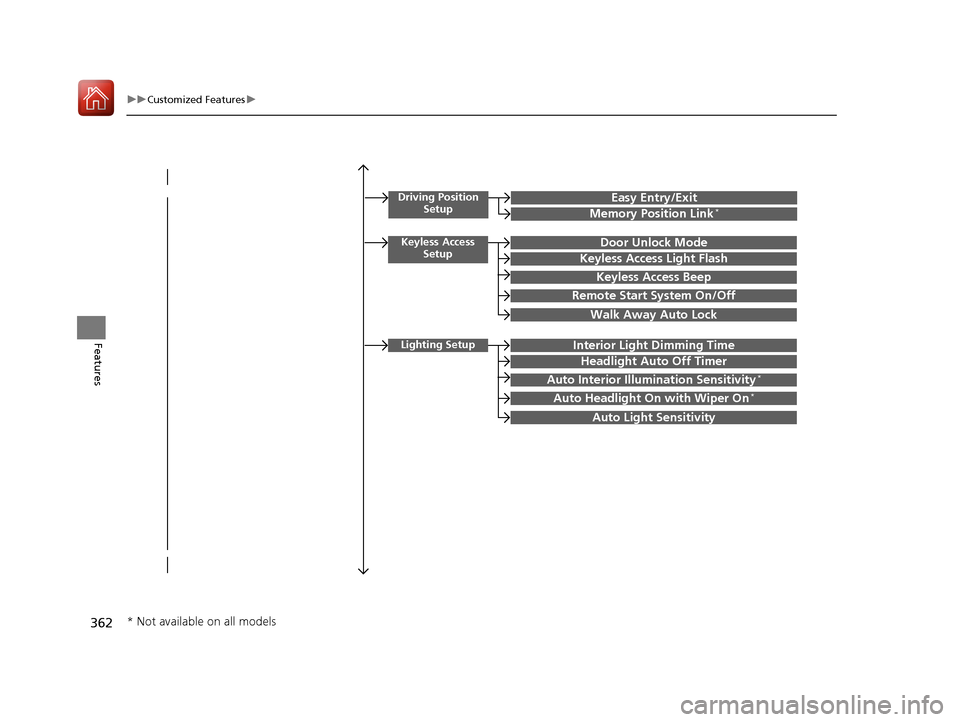
Features
Driving Position
SetupEasy Entry/Exit
Memory Position Link*
Keyless Access SetupDoor Unlock Mode
Keyless Access Light Flash
Keyless Access Beep
Remote Start System On/Off
Walk Away Auto Lock
Lighting SetupInterior Light Dimming Time
Headlight Auto Off Timer
Auto Interior Illumination Sensitivity*
Auto Headlight On with Wiper On*
Auto Light Sensitivity
* Not available on all models
17 PILOT-31TG76100.book 362 ページ 2016年9月20日 火曜日 午後4時9分
Page 366 of 673
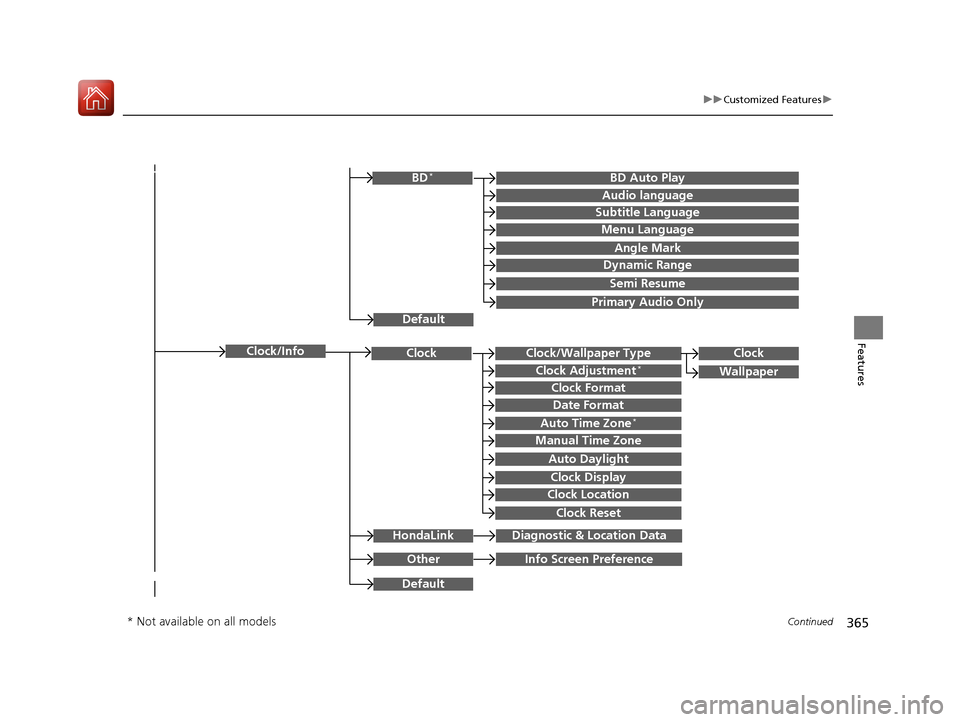
365
uuCustomized Features u
Continued
Features
Clock/Wallpaper TypeClockClock
WallpaperClock Adjustment*
Clock Format
Date Format
Auto Time Zone*
Manual Time Zone
Auto Daylight
Clock Display
Clock Location
Clock Reset
OtherInfo Screen Preference
Default
Clock/Info
BD Auto PlayBD*
Audio language
Subtitle Language
Menu Language
Angle Mark
Dynamic Range
Semi Resume
Primary Audio Only
Default
HondaLinkDiagnostic & Location Data
* Not available on all models
17 PILOT-31TG76100.book 365 ページ 2016年9月20日 火曜日 午後4時9分
Page 371 of 673
370
uuCustomized Features u
Features
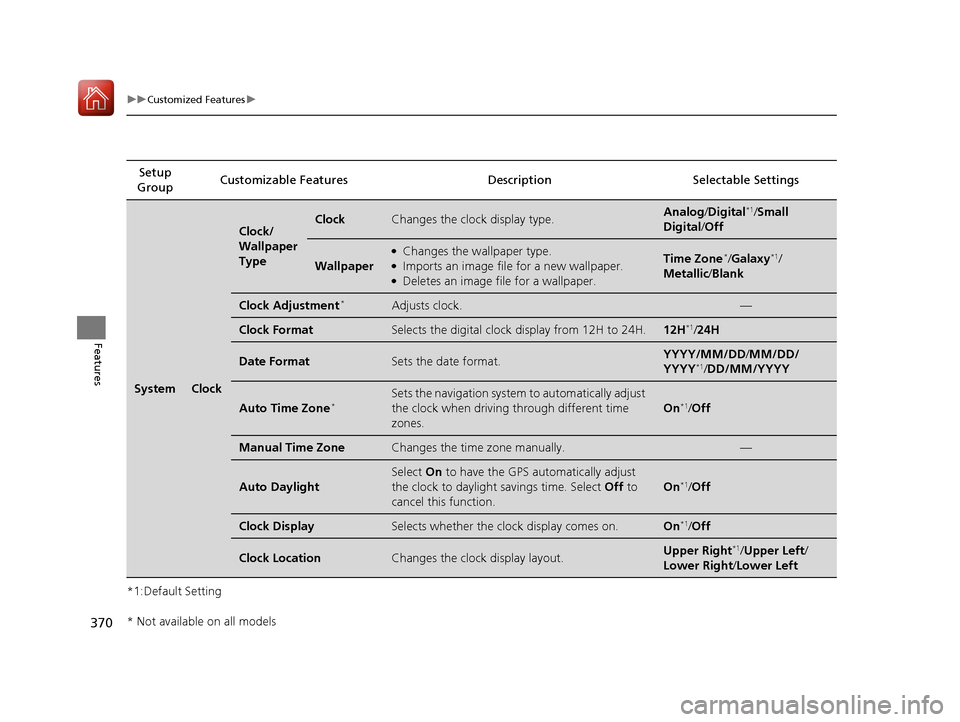
*1:Default SettingSetup
Group Customizable Featur
es Description Selectable Settings
SystemClock
Clock/
Wallpaper
TypeClockChanges the clock display type.Analog/Digital*1/Small
Digital /Off
Wallpaper
●Changes the wallpaper type.●Imports an image file for a new wallpaper.●Deletes an image file for a wallpaper.
Time Zone*/Galaxy*1/
Metallic /Blank
Clock Adjustment*Adjusts clock.—
Clock FormatSelects the digital clock display from 12H to 24H.12H*1/24H
Date FormatSets the date format.YYYY/MM/DD/ MM/DD/
YYYY*1/ DD/MM/YYYY
Auto Time Zone*Sets the navigation system to automatically adjust
the clock when driving through different time
zones.
On*1/ Off
Manual Time ZoneChanges the time zone manually.—
Auto Daylight
Select On to have the GPS automatically adjust
the clock to daylight savings time. Select Off to
cancel this function.
On*1/ Off
Clock DisplaySelects whether the clock display comes on.On*1/Off
Clock LocationChanges the clock display layout.Upper Right*1/Upper Left /
Lower Right /Lower Left
* Not available on all models
17 PILOT-31TG76100.book 370 ページ 2016年9月20日 火曜日 午後4時9分