light HONDA PILOT 2017 3.G Manual PDF
[x] Cancel search | Manufacturer: HONDA, Model Year: 2017, Model line: PILOT, Model: HONDA PILOT 2017 3.GPages: 673
Page 375 of 673
374
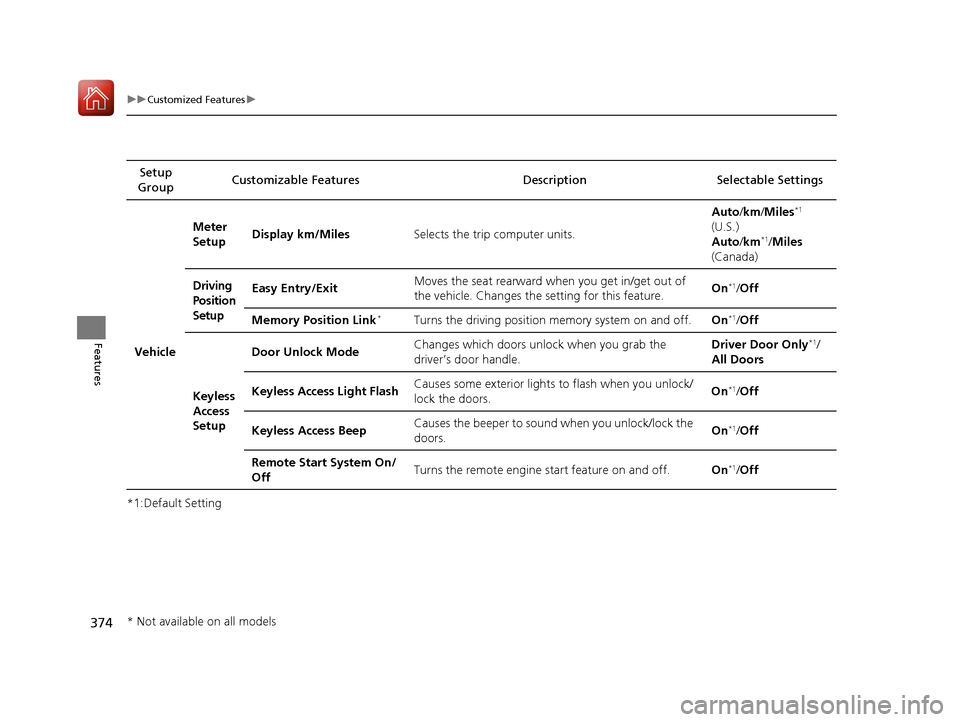
uuCustomized Features u
Features
*1:Default SettingSetup
Group Customizable Features Description Selectable Settings
Vehicle
Meter
Setup
Display km/Miles
Selects the trip computer units. Auto
/km /Miles
*1
(U.S.)
Auto /km*1/Miles
(Canada)
Driving
Position
Setup Easy Entry/Exit
Moves the seat rearward wh
en you get in/get out of
the vehicle. Changes the setting for this feature. On
*1/
Off
Memory Position Link
*Turns the driving position memory system on and off. On*1/Off
Keyless
Access
Setup Door Unlock Mode
Changes which doors unlock when you grab the
driver’s door handle. Driver Door Only
*1/
All Doors
Keyless Access Light Flash Causes some exterior lights to flash when you unlock/
lock the doors. On
*1/
Off
Keyless Access Beep Causes the beeper to sound when you unlock/lock the
doors. On
*1/
Off
Remote Start System On/
Off Turns the remote engine start feature on and off.
On
*1/Off
* Not available on all models
17 PILOT-31TG76100.book 374 ページ 2016年9月20日 火曜日 午後4時9分
Page 376 of 673
375
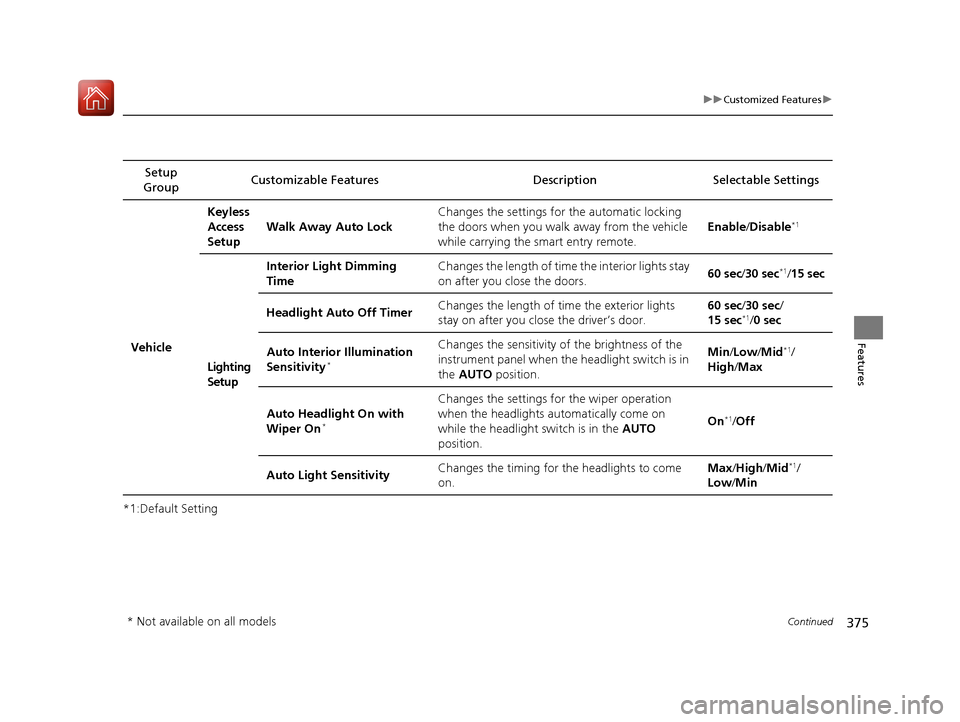
uuCustomized Features u
Continued
Features
*1:Default SettingSetup
Group Customizable Features Description Selectable Settings
VehicleKeyless
Access
Setup
Walk Away Auto Lock Changes the settings for the automatic locking
the doors when you walk
away from the vehicle
while carrying the smart entry remote. Enable
/Disable
*1
Lighting
Setup Interior Light Dimming
Time
Changes the length of time the interior lights stay
on after you close the doors.
60 sec
/30 sec
*1/15 sec
Headlight Auto Off Timer Changes the length of time the exterior lights
stay on after you close the driver’s door. 60 sec/
30 sec/
15 sec
*1/ 0 sec
Auto Interior Illumination
Sensitivity
*
Changes the sensitivity of the brightness of the
instrument panel when the headlight switch is in
the AUTO position. Min
/Low /Mid*1/
High /Max
Auto Headlight On with
Wiper On
*
Changes the settings fo r the wiper operation
when the headlights automatically come on
while the headlight switch is in the AUTO
position. On
*1/
Off
Auto Light Sensitivity Changes the timing for the headlights to come
on. Max
/High /Mid
*1/
Low /Min
* Not available on all models
17 PILOT-31TG76100.book 375 ページ 2016年9月20日 火曜日 午後4時9分
Page 377 of 673
376
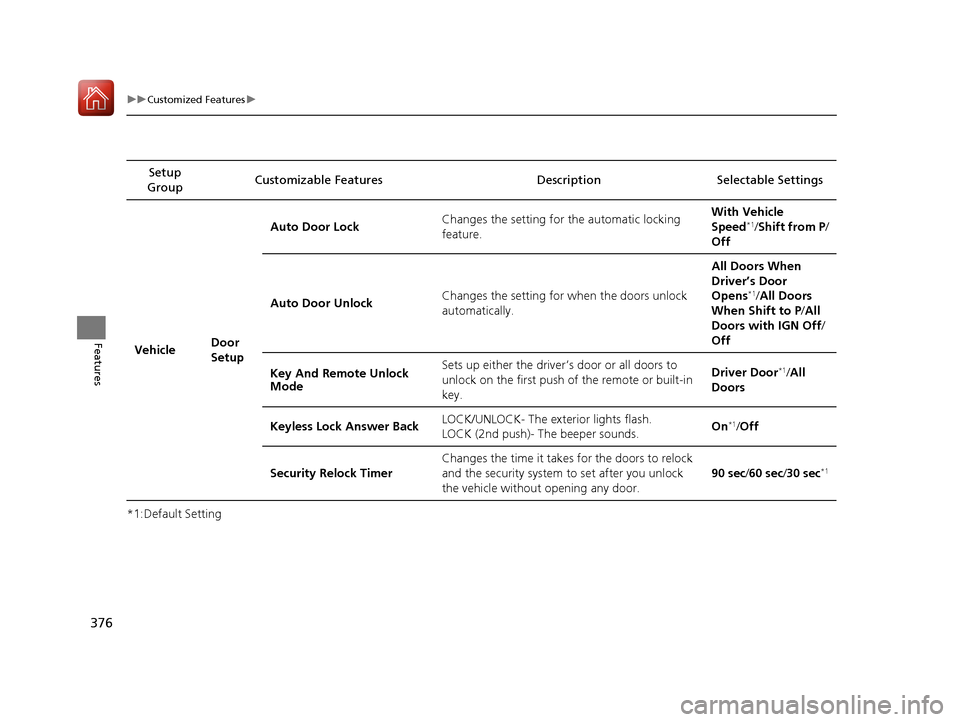
uuCustomized Features u
Features
*1:Default SettingSetup
Group Customizable Features Descri
ption Selectable Settings
Vehicle Door
SetupAuto Door Lock
Changes the setting for the automatic locking
feature. With Vehicle
Speed
*1/
Shift from P/
Off
Auto Door Unlock Changes the setting for when the doors unlock
automatically. All Doors When
Driver’s Door
Opens
*1/
All Doors
When Shift to P /All
Doors with IGN Off /
Off
Key And Remote Unlock
Mode Sets up either the driver
’s door or all doors to
unlock on the first push of the remote or built-in
key. Driver Door
*1/
All
Doors
Keyless Lock Answer Back LOCK/UNLOCK- The exterior lights flash.
LOCK (2nd push)- The beeper sounds. On
*1/
Off
Security Relock Timer Changes the time it takes for the doors to relock
and the security system to set after you unlock
the vehicle without opening any door. 90 sec
/60 sec /30 sec
*1
17 PILOT-31TG76100.book 376 ページ 2016年9月20日 火曜日 午後4時9分
Page 383 of 673
382
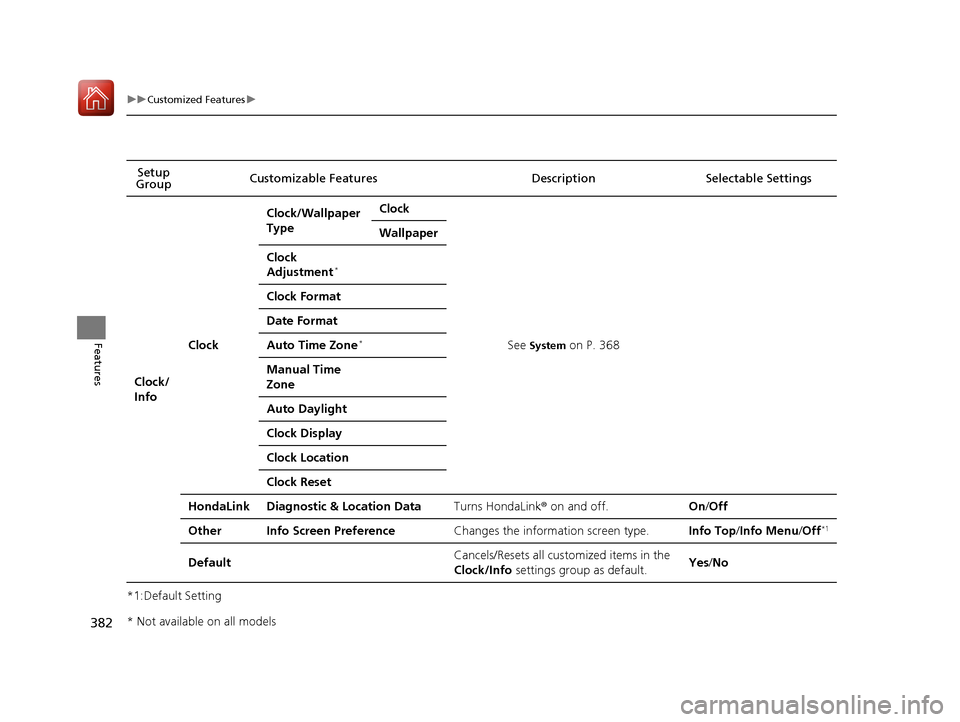
uuCustomized Features u
Features
*1:Default SettingSetup
Group Customizable Features Descri
ption Selectable Settings
Clock/
Info
Clock
Clock/Wallpaper
TypeClock
See System on P. 368
Wallpaper
Clock
Adjustment*
Clock Format
Date Format
Auto Time Zone*
Manual Time
Zone
Auto Daylight
Clock Display
Clock Location
Clock Reset
HondaLinkDiagnostic & Location DataTurns HondaLink® on and off.On/Off
OtherInfo Screen PreferenceChanges the information screen type.Info Top /Info Menu /Off*1
DefaultCancels/Resets all cust omized items in the
Clock/Info settings group as default.Yes/No
* Not available on all models
17 PILOT-31TG76100.book 382 ページ 2016年9月20日 火曜日 午後4時9分
Page 388 of 673
387
Features
HomeLink® Universal Transceiver*
The HomeLink ® Universal Transceiver can be programmed to operate up to three
remote controlled devices around your home, such as garage doors, lighting, or
home security systems.
Refer to the safety information that came wi th your garage door opener to test that
the safety features are functioning properly. If you do not have the safety
information, contact the manufacturer.
Before programming HomeLink, make sure that people and objects are out of the
way of the garage or gate to prevent potential injury or damage.
When programming a garage door opener, pa rk just outside the garage door’s path.
■Important Safety Precautions
1HomeLink ® Universal Transceiver*
Before programming HomeLi nk to operate a garage
door opener, confirm that the opener has an external
entrapment protection system, such as an “electronic
eye,” or other safety and re verse stop features. If it
does not, HomeLink may not be able to operate it.
* Not available on all models
17 PILOT-31TG76100.book 387 ページ 2016年9月20日 火曜日 午後4時9分
Page 453 of 673
452
Driving
Before Driving
Driving Preparation
Check the following items before you start driving.
• Make sure there are no obstructions on th e windows, door mirrors, exterior
lights, or other parts of the vehicle.
u Remove any frost, snow, or ice.
u Remove any snow on the roof, as this can slip down and obstruct your field of
vision while driving. If frozen solid , remove ice once it has softened.
u When removing ice from around the wheel s, be sure not to damage the wheel
or wheel components.
• Make sure the hood is securely closed.
u If the hood opens while driving, your front view will be blocked.
• Make sure the tires are in good condition.
u Check air pressure, check for damage and excessive wear.
2 Checking and Maintaining Tires P. 597
•Make sure there are no people or ob jects behind or around the vehicle.
u There are blind spots from the inside.
■Exterior Checks1Exterior Checks
NOTICE
When doors are frozen s hut, use warm water around
the door edges to melt any ice. Do not try to force
them open, as this can damage the rubber trim
around the doors. When done, wipe dry to avoid
further freezing.
Do not pour warm water into the key cylinder.
You will be unable to insert the key if the water
freezes in the hole.
Heat from the engine and exhaust can ignite
flammable material s left under the hood, causing a
fire. If you’ve parked y our vehicle for an extended
period, inspect and remove any debris that may have
collected, such as dried grass and leaves that have
fallen or have been carried in for use as a nest by a
small animal. Also check under the hood for leftover
flammable materials after you or someone else has
performed maintenance on your vehicle.
17 PILOT-31TG76100.book 452 ページ 2016年9月20日 火曜日 午後4時9分
Page 454 of 673
Continued453
uuBefore Driving uDriving Preparation
Driving
• Store or secure all items on board properly.
u Carrying too much cargo, or improperly storing it, can affect your vehicle’s
handling, stability, sto pping distance, and tires, and make it unsafe.
2Maximum Load Limit P. 455
•Do not pile items higher than the seat height.
u They can block your view and may be thrown forward in the event of sudden
braking.
• Do not place anything in the front seat footwells. Make sure to secure the floor
mat.
u An object or unsecured floor mat can in terfere with your brake and accelerator
pedal operation while driving.
• If you have any animals on board, do not let them move around in the vehicle.
u They may interfere with driv ing and a crash could occur.
• Securely close and lock al l doors and the tailgate.
2Locking/Unlocking the Doors from the Inside P. 131
•Adjust your seating position properly.
u Adjust the head restraint, too.
2Adjusting the Seats P. 174
2 Adjusting the Head Restraints P. 179
•Adjust the mirrors and steering wh eel properly for your driving.
u Adjust them while sitting in the proper driving position.
2 Adjusting the Steering Wheel P. 171
2 Adjusting the Mirrors P. 172
■Interior Checks1Interior Checks
The headlight aim is set by the factory, and does not
need to be adjusted. Howeve r, if you regularly carry
heavy items in the cargo area or tow a trailer, have
the aiming readjusted at a dealer or by a qualified
technician.
17 PILOT-31TG76100.book 453 ページ 2016年9月20日 火曜日 午後4時9分
Page 463 of 673
uuTowing a Trailer uTowing Preparation
462
Driving
Towing generally requires a variety of supplemental equipment.
To ensure the best quality, we recomme nd that you purchase Honda equipment
whenever possible.
■Trailer brakes
Recommended for any trailer with a total weight of 1,000 lbs (450 kg) or more:
There are two common types of trailer brake s: surge and electric. Surge brakes are
common for boat trailers, since the brakes will get wet.
If you choose electric brakes, be sure th ey are electronically actuated. Do not
attempt to attach trailer brakes to your ve hicle’s hydraulic system, as it will lower
braking effectiveness and create a potential hazard.
The 4-pin gray connector installed in your vehicle has all of the circuits required to
install most electric trailer brake controllers.
Have a qualified mechanic install your trailer
brake controller following the trailer brake
controller manufacturer’s instructions. Failure
to properly install the trailer brake controller
may increase the distance it takes for you to
stop your vehicle when towing a trailer.
■Towing Equipment and Accessories1 Towing Equipment and Accessories
Make sure that all equipment is properly installed and
maintained, and that it meets federal, state, province/
territory, and lo cal regulations.
Consult your trai ler maker for prope r installation and
setup of the equipment.
Improper installation and setup can affect the
handling, stability, and br aking performance of your
vehicle.
Consult your traile r sales or rental agency if any other
items are recommended or required for your towing
situation.
The lighting and wiring of tra ilers can vary by type
and brand. If a connector is required, it should only
be installed by a qua lified technician.
Trailer packages and products:
•Ball mount, hitch plug, hitch pin etc.•Wiring harness kit
•Trailer hitch kit (jum per harness included)
2 Trailer brakes P. 462
•Automatic transmission cooler
Are available at a dealer.
1 Trailer brakes
The 4-pin gray connector is located under the
instrument panel near the top of the parking brake
pedal.
Electric Brake
(Brown) (20A)
Ground
(Black) Brake (Light
Green)
Stop
(Violet)
Trailer brake controller
connector’s terminals:
17 PILOT-31TG76100.book 462 ページ 2016年9月20日 火曜日 午後4時9分
Page 464 of 673
463
uuTowing a Trailer uTowing Preparation
Continued
Driving
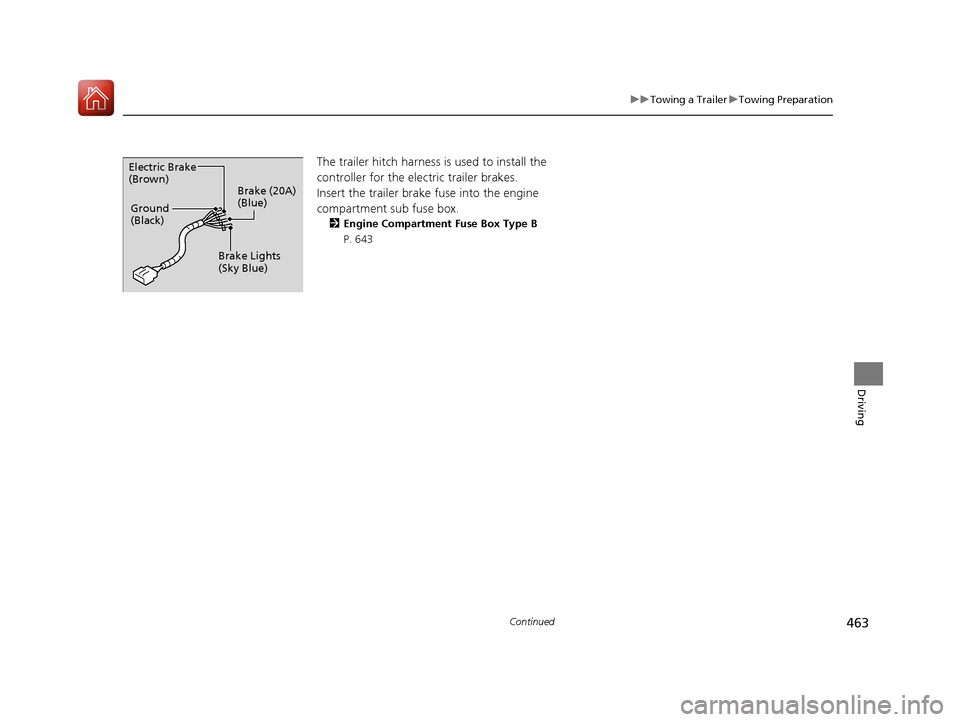
The trailer hitch harness is used to install the
controller for the electric trailer brakes.
Insert the trailer brake fuse into the engine
compartment sub fuse box.
2 Engine Compartment Fuse Box Type B
P. 643
Electric Brake
(Brown) Brake (20A)
(Blue)
Ground
(Black)
Brake Lights
(Sky Blue)
17 PILOT-31TG76100.book 463 ページ 2016年9月20日 火曜日 午後4時9分
Page 465 of 673
uuTowing a Trailer uTowing Preparation
464
Driving
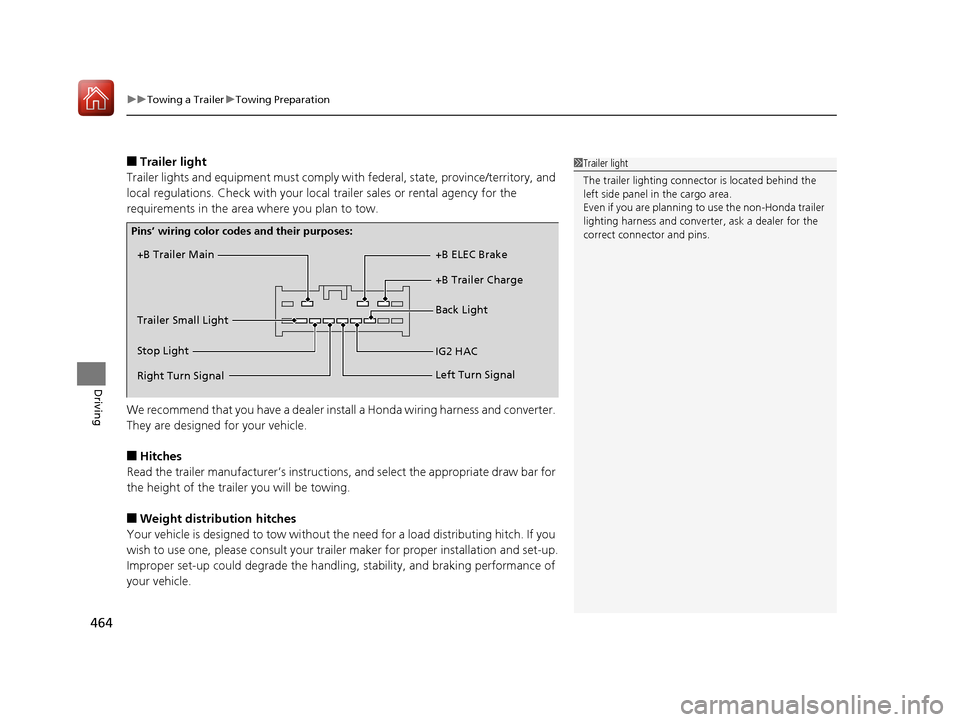
■Trailer light
Trailer lights and equipment must comply with federal, state, province/territory, and
local regulations. Check with your local trailer sales or rental agency for the
requirements in the area where you plan to tow.
We recommend that you have a dealer inst all a Honda wiring harness and converter.
They are designed for your vehicle.
■Hitches
Read the trailer manufacturer’s instructions , and select the appropriate draw bar for
the height of the trailer you will be towing.
■Weight distribution hitches
Your vehicle is designed to tow without the need for a load distributing hitch. If you
wish to use one, please consult your trailer maker for proper installation and set-up.
Improper set-up could degrade the handling , stability, and braking performance of
your vehicle.
1 Trailer light
The trailer lighting connect or is located behind the
left side panel in the cargo area.
Even if you are planning to use the non-Honda trailer
lighting harness and converte r, ask a dealer for the
correct connector and pins.
+B Trailer Main
+B Trailer Charge +B ELEC Brake
IG2 HAC Back Light
Trailer Small Light
Stop Light
Pins’ wiring color codes and their purposes:
Right Turn Signal Left Turn Signal
17 PILOT-31TG76100.book 464 ページ 2016年9月20日 火曜日 午後4時9分