audio off HONDA PILOT 2022 Workshop Manual
[x] Cancel search | Manufacturer: HONDA, Model Year: 2022, Model line: PILOT, Model: HONDA PILOT 2022Pages: 737, PDF Size: 28.84 MB
Page 347 of 737
345
uuAudio Error Messages uCD Player*
Features
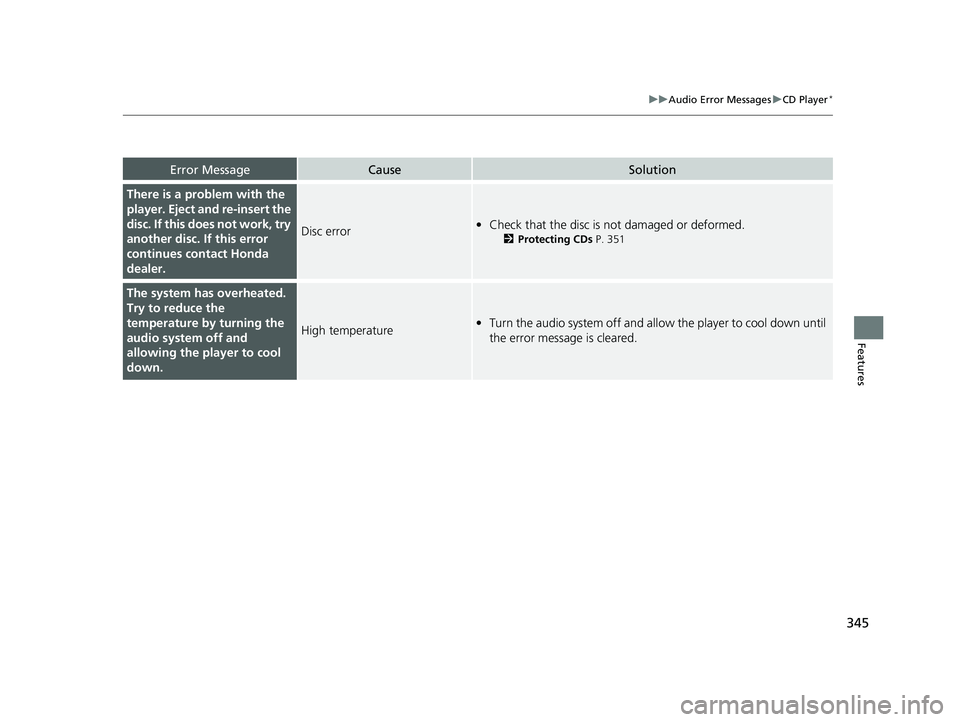
Error MessageCauseSolution
There is a problem with the
player. Eject and re-insert the
disc. If this does not work, try
another disc. If this error
continues contact Honda
dealer.
Disc error• Check that the disc is not damaged or deformed.
2 Protecting CDs P. 351
The system has overheated.
Try to reduce the
temperature by turning the
audio system off and
allowing the player to cool
down.
High temperature•Turn the audio system off and allo w the player to cool down until
the error message is cleared.
22 PILOT-31TG76600.book 345 ページ 2021年6月11日 金曜日 午後4時40分
Page 348 of 737
346
uuAudio Error Messages uiPod/USB Flash Drive
Features
iPod/USB Flash Drive
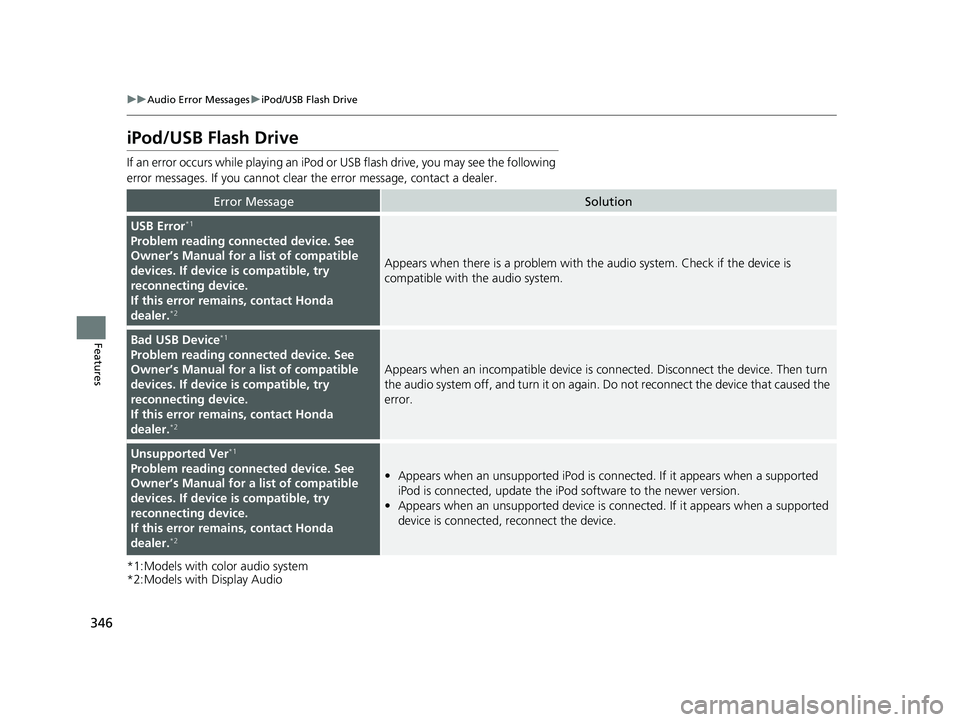
If an error occurs while playing an iPod or USB flash drive, you may see the following
error messages. If you cannot clear the error message, contact a dealer.
*1:Models with color audio system
*2:Models with Display Audio
Error MessageSolution
USB Error*1
Problem reading connected device. See
Owner’s Manual for a list of compatible
devices. If device is compatible, try
reconnecting device.
If this error rema ins, contact Honda
dealer.
*2
Appears when there is a problem with th e audio system. Check if the device is
compatible with the audio system.
Bad USB Device*1
Problem reading connected device. See
Owner’s Manual for a list of compatible
devices. If device is compatible, try
reconnecting device.
If this error rema ins, contact Honda
dealer.
*2
Appears when an incompatible device is connected. Disconnect the device. Then turn
the audio system off, and turn it on again. Do not reconnect the device that caused the
error.
Unsupported Ver*1
Problem reading connected device. See
Owner’s Manual for a list of compatible
devices. If device is compatible, try
reconnecting device.
If this error rema ins, contact Honda
dealer.
*2
• Appears when an unsupported iPod is connected. If it appears when a supported
iPod is connected, update the iP od software to the newer version.
• Appears when an unsupported device is connected. If it appears when a supported
device is connected, reconnect the device.
22 PILOT-31TG76600.book 346 ページ 2021年6月11日 金曜日 午後4時40分
Page 357 of 737
355
uuGeneral Information on the Audio System uHonda App License Agreement
Continued
Features
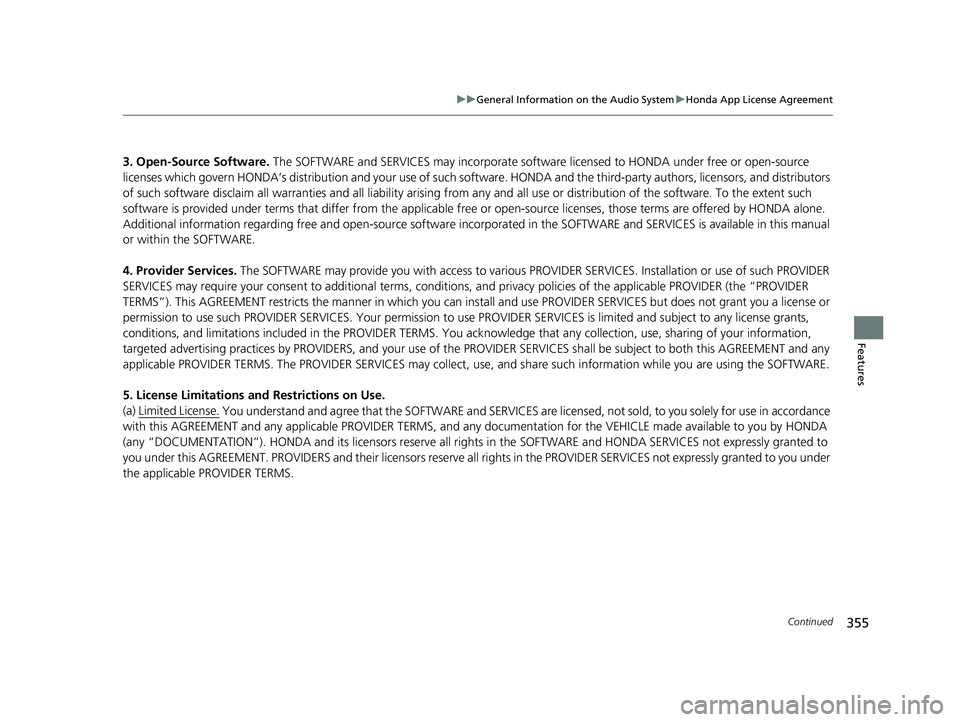
3. Open-Source Software. The SOFTWARE and SERVICES may in corporate software licensed to HONDA under free or open-source
licenses which govern HONDA’s distribution and y our use of such software. HONDA and the third-party authors, licensors, and distributors
of such software disclaim all warranties and all liability arising from any and all use or distribution of the software. To the extent such
software is provided under terms that diffe r from the applicable free or open-source licenses, those terms are offered by HONDA alone.
Additional information regarding fr ee and open-source software incorporated in the SOFTWARE an d SERVICES is available in this manual
or within the SOFTWARE.
4. Provider Services. The SOFTWARE may provide you with access to various PR OVIDER SERVICES. Installation or use of such PROVIDER
SERVICES may require your consent to additi onal terms, conditions, and privacy policies of the applicable PROVIDER (the “PROVIDER
TERMS”). This AGREEMENT restricts the manner in which you can install and use PROVIDER SERVICES but does not grant you a licens e or
permission to use such PROVIDER SERVICES. Your permission to use PROVIDER SERVICES is limited and subject to any license grants,
conditions, and limitations included in the PROVIDER TERMS. You acknowledge that any collection, use, sharing of your information,
targeted advertising practice s by PROVIDERS, and your use of the PROVIDER SERVICES shall be subj ect to both this AGREEMENT and any
applicable PROVIDER TERMS. The PR OVIDER SERVICES may collect, use, and share such information while you are using the SOFTWARE.
5. License Limitations an d Restrictions on Use.
(a) Limited License.
You understand and agree that the SOFTWA RE and SERVICES are licensed, not sold, to you solely for use in accordance
with this AGREEMENT and any a pplicable PROVIDER TERMS, and an y documentation for the VEHICLE made available to you by HONDA
(any “DOCUMENTATION”). HONDA and its licensors reserve all rights in the SOFTWARE and HONDA SERVICES not expressly granted to
you under this AGREEMENT. PROVIDERS and th eir licensors reserve all rights in the PROVIDER SERVICES not expressly granted to yo u under
the applicable PROVIDER TERMS.
22 PILOT-31TG76600.book 355 ページ 2021年6月11日 金曜日 午後4時40分
Page 360 of 737
358
uuGeneral Information on the Audio System uHonda App License Agreement
Features
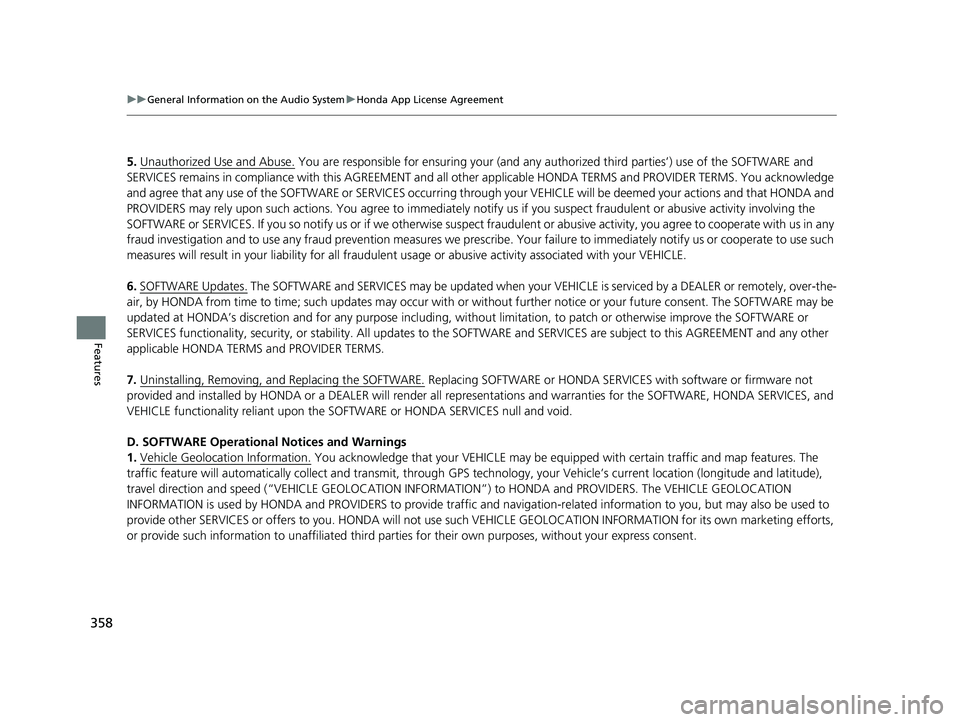
5. Unauthorized Use and Abuse. You are responsible for ensuring your (and any authorized third parties’) use of the SOFTWARE and
SERVICES remains in compliance with this AGREEMENT and all other applicable HONDA TERMS and PROVIDER TERMS. You acknowledge
and agree that any use of the SOFTWARE or SERVICES occurring th rough your VEHICLE will be deemed your actions and that HONDA an d
PROVIDERS may rely upon such actions. You agree to immediately notify us if you suspect fraudulent or abusive activity involvin g the
SOFTWARE or SERVICES. If you so notify us or if we otherwise suspect fraudulent or abusive acti vity, you agree to cooperate with us in any
fraud investigation and to use any fraud prevention measures we pres cribe. Your failure to immediately notify us or cooperate to use such
measures will result in your liability for all fraudulent usage or abusive activity associated with your VEHICLE.
6. SOFTWARE Updates.
The SOFTWARE and SERVICES may be updated when your VEHI CLE is serviced by a DEALER or remotely, over-the-
air, by HONDA from time to time; such update s may occur with or without further notice or your future consent. The SOFTWARE may be
updated at HONDA’s discretion and for any pur pose including, without limitation, to patch or otherwise improve the SOFTWARE or
SERVICES functionality, se curity, or stability. All updates to the SOFTWARE and SERVICES are subject to this AGREEMENT and any other
applicable HONDA TERMS and PROVIDER TERMS.
7. Uninstalling, Removing, and Replacing the SOFTWARE.
Replacing SOFTWARE or HONDA SERVI CES with software or firmware not
provided and installed by HONDA or a DEALER will render all representations and warranties for the SOFTWARE, HONDA SERVICES, an d
VEHICLE functionality reliant upon the SOFTWARE or HONDA SERVICES null and void.
D. SOFTWARE Operationa l Notices and Warnings
1. Vehicle Geolocation Information.
You acknowledge that your VEHICLE may be equi pped with certain traffic and map features. The
traffic feature will automatically collect and transmit, through GPS technology, your Vehicle’s current location (longitude and latitude),
travel direction and speed (“VEHICLE GEOLOCATION INFORMAT ION”) to HONDA and PROVIDERS. The VEHICLE GEOLOCATION
INFORMATION is used by HONDA and PROVIDERS to provide traffic and navigation-related information to you, but may also be used to
provide other SERVICES or offers to you. HONDA will not use such VEHICLE GEOLOCATION INFORMATION for its own marketing efforts,
or provide such information to unaffiliated third parties for their own purposes, without your express consent.
22 PILOT-31TG76600.book 358 ページ 2021年6月11日 金曜日 午後4時40分
Page 364 of 737
362
uuGeneral Information on the Audio System uHonda App License Agreement
Features
2. Limitation on HONDA and PROVIDER liability. Neither HONDA nor PROVIDERS will be liable to you or any other part y for consequential,
indirect, incidental, special, or punitive damages (including wi thout limitation lost profits) in connection with your use of the SOFTWARE
or SERVICES, even if HONDA or PROVIDERS are aware of the possibility of such damages. These limitations apply to all claims, including,
without limitation, claims in contract and tort (such as negligence, product liability and strict liability). To the extent tha t a jurisdiction does
not permit the exclusion or limitation of liability as set forth herein our liability is limited to the maximum extent permitte d by law in such
states. If HONDA or PROVIDERS are found lia ble to you for any reason, you agree that the aggregate liability of all these parties to you for
any claim is limited to ten U.S. dollars (US $10.00). Neither HO NDA nor any PROVIDER would have agreed to provide the SOFTWARE or
SERVICES to you if you did not agree to th is limitation. This amount is the sole and exclusive liability of HONDA and PROVIDERS to you,
and is payable as liquidated damages and not as a penalty. Exce pt where prohibited by law, you may not bring any claim against HONDA
or any third-party beneficiary more than two (2) years after the claim arises. We do not have any liability for SOFTWARE or SERVICES
interruptions of any length.
(a) Release of HONDA and PROVIDERS
For yourself and anyone else claiming under you, you agree to release and discharge HONDA,
PROVIDERS, their respective officers, dire ctors, and employees, and each third-party beneficiary from all claims, liabilities and losses in
connection with the SOFTWARE or SERVICES, including, but not limite d to claims for personal injury or property damage arising from the
total or partial failure of performance of the SOFTWARE or SERVIC ES, even if caused by or based upon the negligence, gross negl igence,
strict products liability, Deceptive Trade Practices Act violations, bad faith, or breach of warranty of us or the malfunction of the SOFTWARE
or SOFTWARE SERVICES. YOU AGREE TO WAIVE TO THE FULL EST EXTENT ALLOWED BY LAW, ANY CLAIM FOR DAMAGES OTHER THAN
DIRECT, COMPENSATORY DAMAGES AS LIMITED IN THIS AG REEMENT. YOU HEREBY RELEASE AND DISCHARGE HONDA AND ITS
LICENSORS AND CONTRACTORS (INCLUDING ANY THIRD PARTIES PROVID ING ALL OR PART OF THE SOFTWARE OR SERVICES) FROM AND
AGAINST ANY CLAIMS, DAMAGES, EXPENSES AND LIABILITY ARISING FROM OR RELATED TO ANY INJURIES, DAMAGES, OR LOSSES TO
ANY PERSON (INCLUDING DEATH) OR PROPERTY OF ANY KIND RESULTING IN WHOL\
E OR PART, DIRECTLY OR I NDIRECTLY, FROM YOUR
USE OF THE SOFTWARE OR SERVICES.
H. Survival. You agree that the limitations of liability and indemnities in this AGREEMENT will survive even after the AGREEMENT has
ended. These limitations of liability apply not only to you, but to anyone using the SOFTWARE or SERVICES via your VEHICLE, to anyone
making a claim on your behalf, and to any claims made by your fa mily, employees, customers, or others arising out of or relating to your
VEHICLE, the SOFTWARE, or SERVICES.
22 PILOT-31TG76600.book 362 ページ 2021年6月11日 金曜日 午後4時40分
Page 381 of 737
379
uuBlu-ray/DVD Rear Entertainment System*uVideo Accessibility
Continued
Features
Video Accessibility
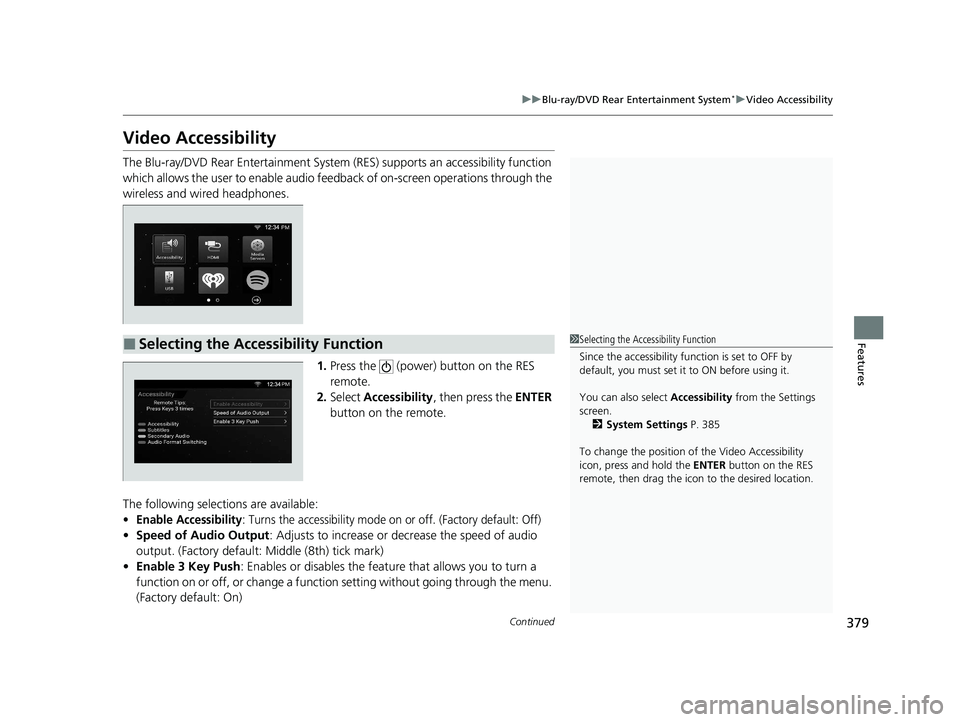
The Blu-ray/DVD Rear Entertainment System (RES) supports an accessibility function
which allows the user to enable audio fe edback of on-screen operations through the
wireless and wired headphones.
1.Press the (power) button on the RES
remote.
2. Select Accessibility , then press the ENTER
button on the remote.
The following selections are available:
•Enable Accessibility: Turns the accessibility mode on or off. (Factory default: Off)
• Speed of Audio Output : Adjusts to increase or decrease the speed of audio
output. (Factory default: Middle (8th) tick mark)
• Enable 3 Key Push : Enables or disables the featur e that allows you to turn a
function on or off, or change a functi on setting without going through the menu.
(Factory default: On)
■Selecting the Accessibility Function1 Selecting the Accessibility Function
Since the accessibility function is set to OFF by
default, you must set it to ON before using it.
You can also select Accessibility from the Settings
screen.
2 System Settings P. 385
To change the position of the Video Accessibility
icon, press and hold the ENTER button on the RES
remote, then drag the icon to the desired location.
22 PILOT-31TG76600.book 379 ページ 2021年6月11日 金曜日 午後4時40分
Page 382 of 737

380
uuBlu-ray/DVD Rear Entertainment System*uVideo Accessibility
Features
Press any of the following colored buttons on the RES remote three times to turn a
function on or off, or to change a function setting.
Red button: Accessibility
Green button: Subtitles
Yellow button: Secondary Audio
Blue button: Audio Format Switching
■Changing Function Status
22 PILOT-31TG76600.book 380 ページ 2021年6月11日 金曜日 午後4時40分
Page 383 of 737
381
uuBlu-ray/DVD Rear Entertainment System*uPlaying a DVD/Blu-rayTM
Continued
Features
Playing a DVD/Blu-rayTM
To play a DVD or Blu-rayTM, insert a DVD or Blu-rayTM into the lower slot of the front
audio system, and select Rear in the audio/information screen.
u The system automatically st arts the DVD or Blu-ray
TM. DVD or Blu-rayTM is
available for the rear seat passenger only.
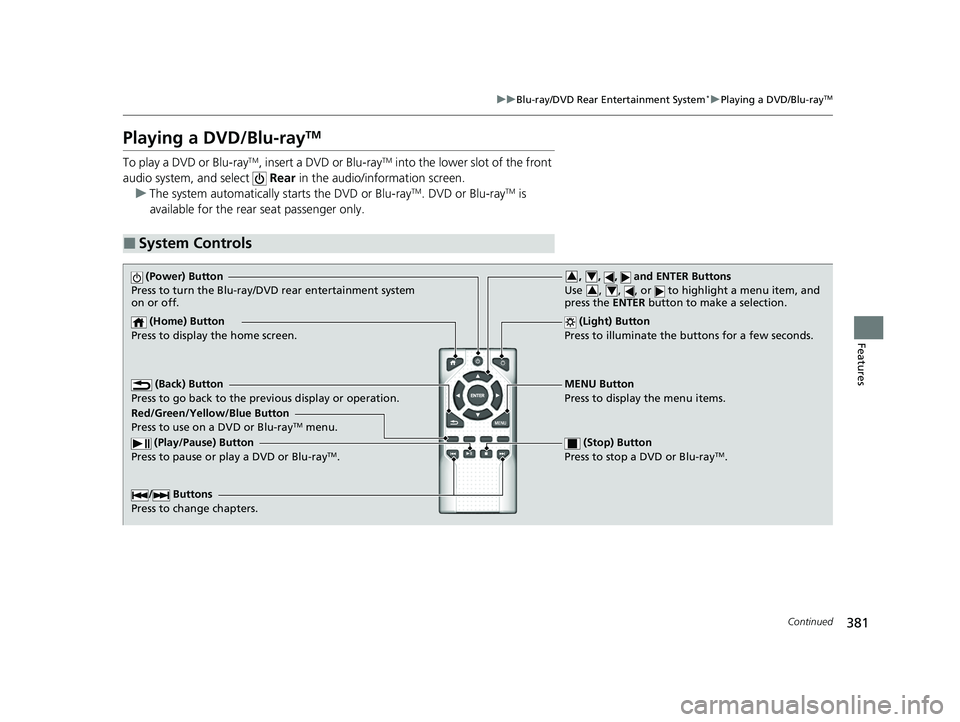
■System Controls
(Power) Button
Press to turn the Blu-ray/DVD rear entertainment system
on or off.
(Home) Button
Press to display the home screen. (Light) Button
Press to illuminate the buttons for a few seconds.
/ Buttons
Press to change chapters.
(Play/Pause) Button
Press to pause or play a DVD or Blu-rayTM.
(Stop) Button
Press to stop a DVD or Blu-rayTM.
MENU Button
Press to display the menu items.
Red/Green/Yellow/Blue Button
Press to use on a DVD or Blu-ray
TM menu.
(Back) Button
Press to go back to the pr evious display or operation.
, , , and ENTER Buttons
Use , , , or to highlight a menu item, and
press the ENTER button to make a selection.34
34
22 PILOT-31TG76600.book 381 ページ 2021年6月11日 金曜日 午後4時40分
Page 384 of 737
uuBlu-ray/DVD Rear Entertainment System*uPlaying a DVD/Blu-rayTM
382
Features
1. Press the MENU button on the remote to display the menu screen.
2. Select an item and then press the ENTER button on the remote.
The following items are available:
• DVD Menu /Blu-ray Menu : Displays the top menu of the DVD or Blu-ray
TM.
• Aspect Ratio : Selects an aspect ratio of the image.
2Setting the Aspect Ratio P. 382
•Brightness: Adjusts the screen’s brightness.
• Contrast : Adjusts the screen’s contrast.
• Root Menu
*1: Displays the disc menu fo r the current playing title.
• Pop-up Menu*2: Displays the menu of the Blu-rayTM.
• Player Options : Displays while a DVD or Blu-rayTM is playing and changes the
DVD or Blu-rayTM preferences.
2 Setting the Player Options P. 383
■Setting the Aspect Ratio
1. Press the MENU button on the remote to display the menu screen.
2. Select Aspect Ratio .
3. Select the setting you want.
u You can select the three opti ons; normal, full, or zoom.
*1: Appears only when you select the DVD source.
*2: Appears only when you select the Blu-rayTM source.
■Rear DVD or Blu-rayTM Menu1Rear DVD or Blu-rayTM Menu
During DVD or Blu-ray
TM operation, when the source
is changed or the audio syst em is turned off, DVD or
Blu-ray
TM operation stops.
Depending on the disc you insert, some items may
not be displayed.
22 PILOT-31TG76600.book 382 ページ 2021年6月11日 金曜日 午後4時40分
Page 385 of 737
383
uuBlu-ray/DVD Rear Entertainment System*uPlaying a DVD/Blu-rayTM
Continued
Features
■Setting the Player Options
1. Press the MENU button on the remote to display the menu screen.
2. Select Player Options .
3. Select an item and then press the ENTER button on the remote.
The following items are available:
• Repeat:
Off : Repeat mode is off.
Title (only for DVD-V, AVCREC and B DAV): Repeats the current title.
Chapter (only for DVD-V, AVCREC and B DAV): Repeats the current chapter.
Program (only for DVD-VR): Repeats the current program if the disc has the
correspondence list.
Playlist (only for DVD-VR): Repeats the cu rrent playlist if the disc has the
correspondence list.
Entry Point (only for DVD-VR): Repeats the curr ent entry point if the disc has the
correspondence list.
• Subtitles and Audio : Selects the language of the DVD subtitle and audio.
• Angle : Selects the angle of the scen e shot with multiple cameras.
• Search : Skips to a title or chapter.
2Searching a title/chapter/program/playlist P. 384
•Change Order (only for DVD-VR, AVCREC and BDAV): Changes the order of
the program or playlist.
• Default Language : Selects the language for the menus, audio, and subtitle of
the DVD or Blu-ray
TM.
• Sound Leveling : Adjusts the range of the loud and soft sound. Select Auto, On
or Off .
• Secondary Audio (only for BDMV): Turns on and o ff the function that plays the
available commentary or narrator audi o along with the main disc track.
• Onscreen Remote : Displays the on-screen buttons for the remote.
22 PILOT-31TG76600.book 383 ページ 2021年6月11日 金曜日 午後4時40分