audio off HONDA PILOT 2022 Manual PDF
[x] Cancel search | Manufacturer: HONDA, Model Year: 2022, Model line: PILOT, Model: HONDA PILOT 2022Pages: 737, PDF Size: 28.84 MB
Page 620 of 737
618
uuParking Your Vehicle uCross Traffic Monitor*
Driving
You can switch on and off the system using the audio/information screen.
1. Select .
2. Select Settings .
3. Select Camera.
4. Select Rear Camera .
5. Select Cross Traffic Monitor .
6. Select ON or OFF .
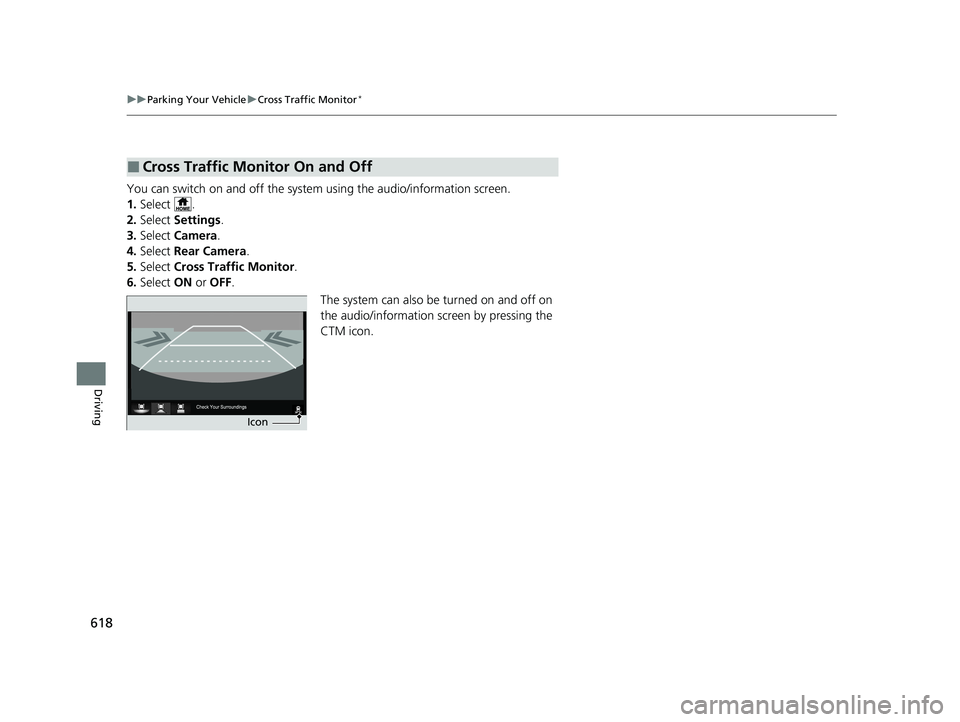
The system can also be turned on and off on
the audio/information screen by pressing the
CTM icon.
■Cross Traffic Monitor On and Off
Icon
22 PILOT-31TG76600.book 618 ページ 2021年6月11日 金曜日 午後4時40分
Page 621 of 737
619Continued
Driving
Multi-View Rear Camera
About Your Multi-View Rear Camera
The audio/information screen can display your vehicle’s rear view. The display
automatically changes to a rear view when the gear position is changed to
(R.
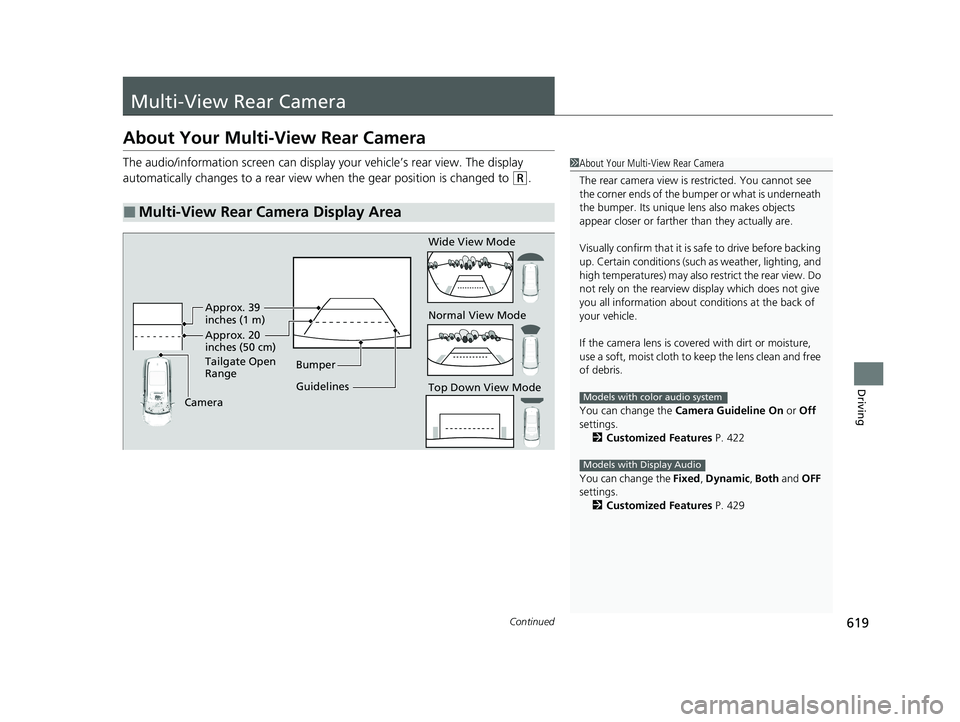
■Multi-View Rear Camera Display Area
1About Your Multi-View Rear Camera
The rear camera view is restricted. You cannot see
the corner ends of the bumper or what is underneath
the bumper. Its unique le ns also makes objects
appear closer or farther than they actually are.
Visually confirm that it is safe to drive before backing
up. Certain conditions (such as weather, lighting, and
high temperatures) may also restrict the rear view. Do
not rely on the rearview display which does not give
you all information about conditions at the back of
your vehicle.
If the camera lens is cove red with dirt or moisture,
use a soft, moist cloth to keep the lens clean and free
of debris.
You can change the Camera Guideline On or Off
settings. 2 Customized Features P. 422
You can change the Fixed, Dynamic , Both and OFF
settings.
2 Customized Features P. 429
Models with color audio system
Models with Display Audio
Guidelines Bumper
Camera Approx. 20
inches (50 cm)
Tailgate Open
Range Approx. 39
inches (1 m) Wide View Mode
Normal View Mode
Top Down View Mode
22 PILOT-31TG76600.book 619 ページ 2021年6月11日 金曜日 午後4時40分
Page 622 of 737
uuMulti-View Rear Camera uAbout Your Multi-View Rear Camera
620
Driving
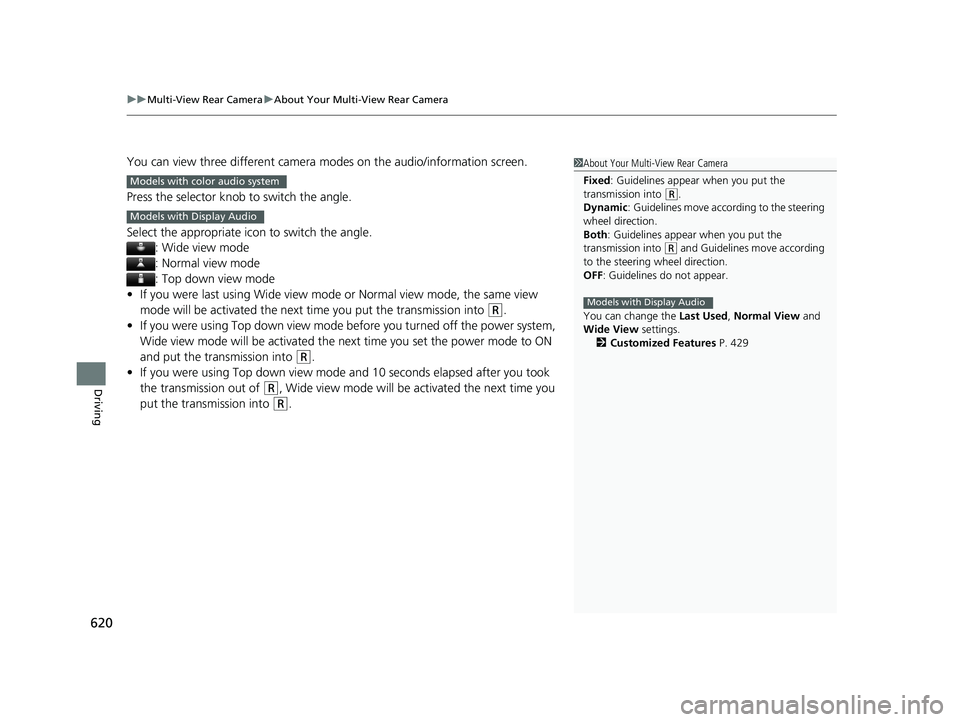
You can view three different camera modes on the audio/information screen.
Press the selector knob to switch the angle.
Select the appropriate ic on to switch the angle.
: Wide view mode
: Normal view mode
: Top down view mode
• If you were last using Wide view mode or Normal view mode, the same view
mode will be activated the next time you put the transmission into
(R.
• If you were using Top down view mode before you turned off the power system,
Wide view mode will be activated the ne xt time you set the power mode to ON
and put the transmission into
(R.
• If you were using Top down view mode and 10 seconds elapsed after you took
the transmission out of
(R, Wide view mode will be activated the next time you
put the transmission into
(R.
1 About Your Multi-View Rear Camera
Fixed: Guidelines appear when you put the
transmission into
(R.
Dynamic : Guidelines move according to the steering
wheel direction.
Both : Guidelines appear when you put the
transmission into
( R and Guidelines move according
to the steering wheel direction.
OFF: Guidelines do not appear.
You can change the Last Used, Normal View and
Wide View settings.
2 Customized Features P. 429
Models with Display Audio
Models with color audio system
Models with Display Audio
22 PILOT-31TG76600.book 620 ページ 2021年6月11日 金曜日 午後4時40分
Page 633 of 737
631
uuMaintenance MinderTMuTo Use Maintenance MinderTM
Continued
Maintenance
*1:Models with color audio system
*2:Models with Display Audio
The system message indicator ( ) comes on along with the Maintenance Minder message.
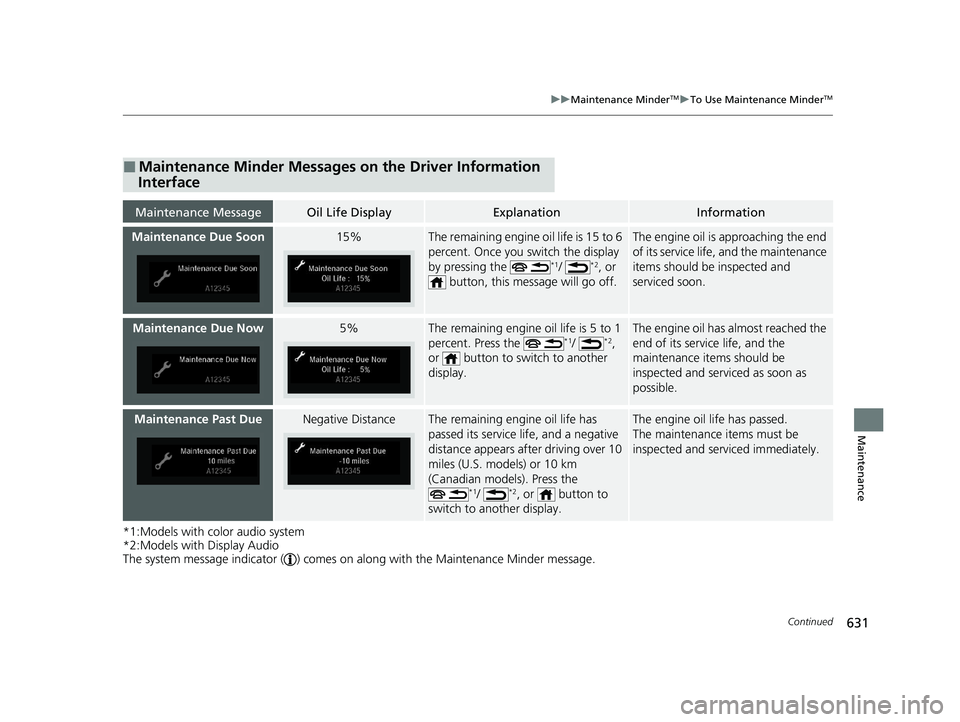
■Maintenance Minder Messages on the Driver Information
Interface
Maintenance MessageOil Life DisplayExplanationInformation
Maintenance Due Soon15%The remaining engine oil life is 15 to 6
percent. Once you switch the display
by pressing the
*1/ *2, or
button, this mess age will go off.
The engine oil is approaching the end
of its service life, and the maintenance
items should be inspected and
serviced soon.
Maintenance Due Now5%The remaining engine oil life is 5 to 1
percent. Press the *1/ *2,
or button to switch to another
display.
The engine oil has almost reached the
end of its service life, and the
maintenance items should be
inspected and servic ed as soon as
possible.
Maintenance Past DueNegative DistanceThe remaining engine oil life has
passed its service life, and a negative
distance appears after driving over 10
miles (U.S. models) or 10 km
(Canadian models). Press the
*1/ *2, or button to
switch to another display.
The engine oil life has passed.
The maintenance items must be
inspected and serviced immediately.
22 PILOT-31TG76600.book 631 ページ 2021年6月11日 金曜日 午後4時40分
Page 667 of 737
665
Maintenance
Battery
Checking the Battery
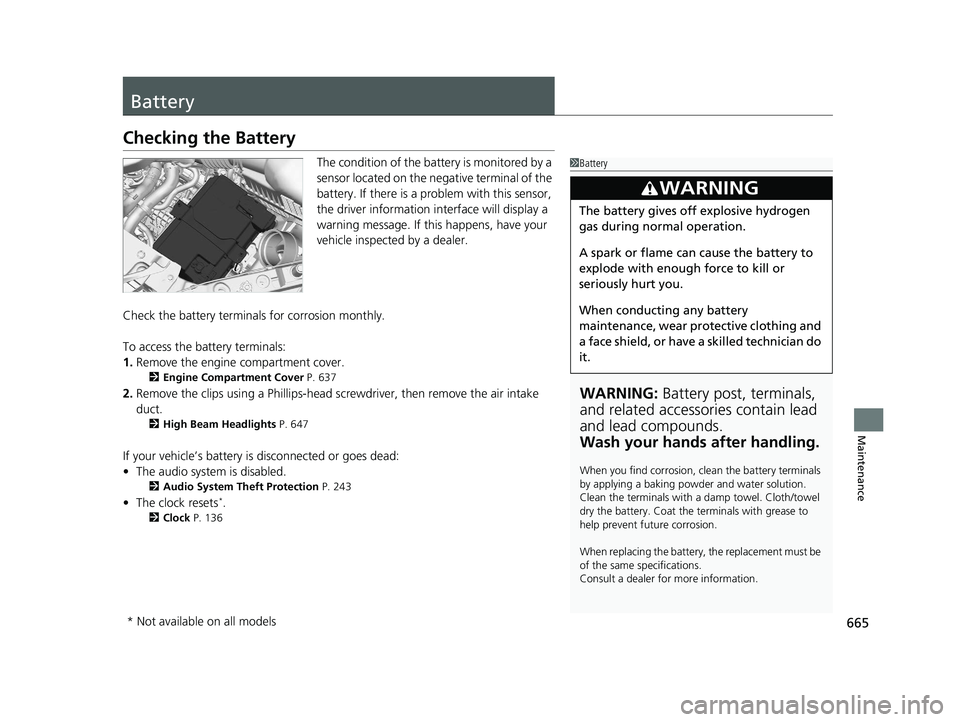
The condition of the battery is monitored by a
sensor located on the negative terminal of the
battery. If there is a problem with this sensor,
the driver information interface will display a
warning message. If this happens, have your
vehicle inspected by a dealer.
Check the battery termina ls for corrosion monthly.
To access the battery terminals:
1. Remove the engine compartment cover.
2 Engine Compartment Cover P. 637
2.Remove the clips using a Ph illips-head screwdriver, then remove the air intake
duct.
2 High Beam Headlights P. 647
If your vehicle’s battery is disconnected or goes dead:
•The audio system is disabled.
2 Audio System Theft Protection P. 243
•The clock resets*.
2 Clock P. 136
1Battery
WARNING: Battery post, terminals,
and related accessories contain lead
and lead compounds.
Wash your hands after handling.
When you find corrosion, cl ean the battery terminals
by applying a baking powder and water solution.
Clean the terminals with a damp towel. Cloth/towel
dry the battery. Coat the terminals with grease to
help prevent future corrosion.
When replacing the battery, the replacement must be
of the same specifications.
Consult a dealer for more information.
3WARNING
The battery gives off explosive hydrogen
gas during normal operation.
A spark or flame can cause the battery to
explode with enough force to kill or
seriously hurt you.
When conducting any battery
maintenance, wear prot ective clothing and
a face shield, or have a skilled technician do
it.
* Not available on all models
22 PILOT-31TG76600.book 665 ページ 2021年6月11日 金曜日 午後4時40分
Page 694 of 737
692
Handling the Unexpected
If the Battery Is Dead
Turn off the power to electric devices, such as audio and lights. Turn off the engine,
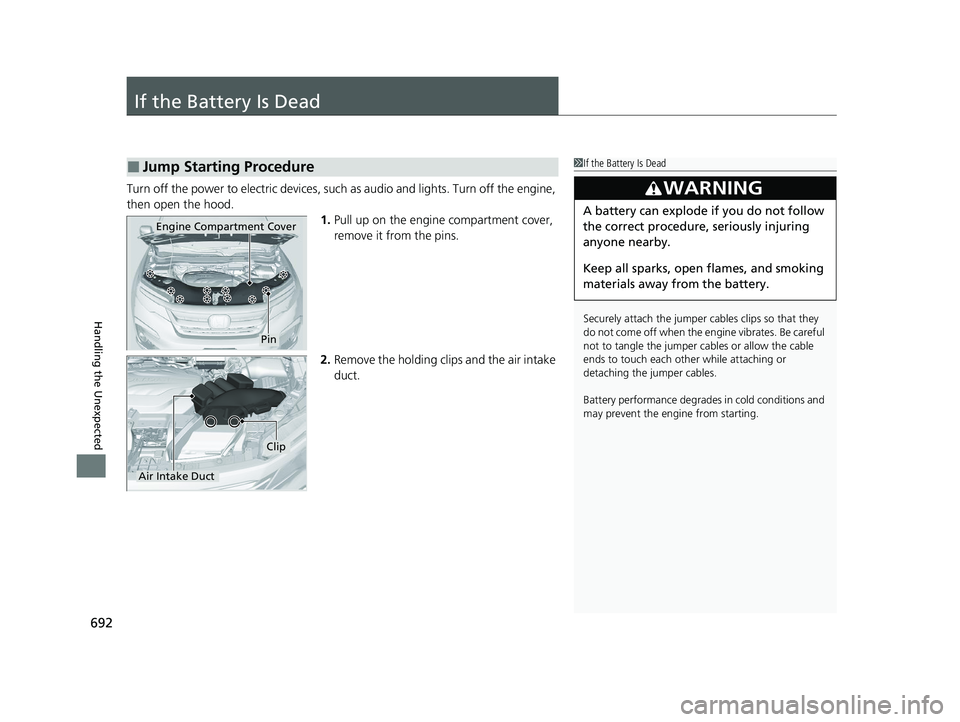
then open the hood. 1.Pull up on the engine compartment cover,
remove it from the pins.
2. Remove the holding clips and the air intake
duct.
■Jump Starting Procedure1If the Battery Is Dead
Securely attach the jumper cables clips so that they
do not come off when the e ngine vibrates. Be careful
not to tangle the jumper cables or allow the cable
ends to touch each other while attaching or
detaching the jumper cables.
Battery performance degrades in cold conditions and
may prevent the engi ne from starting.
3WARNING
A battery can explode if you do not follow
the correct procedure, seriously injuring
anyone nearby.
Keep all sparks, open flames, and smoking
materials away from the battery.
Pin
Engine Compartment Cover
Air Intake Duct
Clip
22 PILOT-31TG76600.book 692 ページ 2021年6月11日 金曜日 午後4時40分
Page 703 of 737
701Continued
Handling the Unexpected
Fuses
Fuse Locations
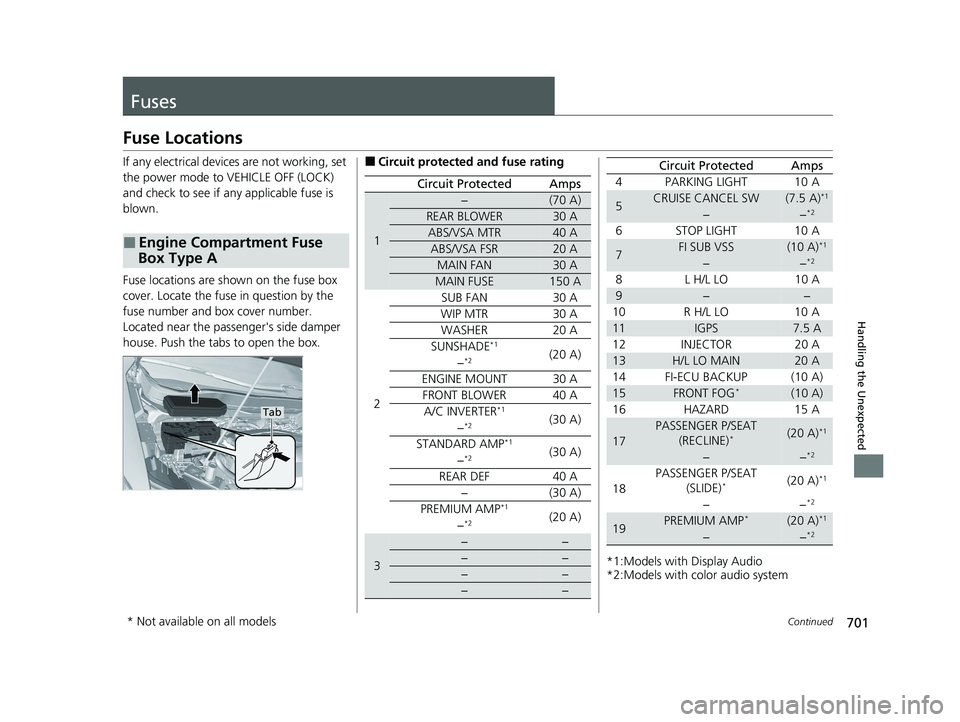
If any electrical devices are not working, set
the power mode to VEHICLE OFF (LOCK)
and check to see if any applicable fuse is
blown.
Fuse locations are shown on the fuse box
cover. Locate the fuse in question by the
fuse number and box cover number.
Located near the passenger's side damper
house. Push the tabs to open the box.
■Engine Compartment Fuse
Box Type A
Tab
■Circuit protected and fuse rating
Circuit ProtectedAmps
1
−(70 A)
REAR BLOWER30 A
ABS/VSA MTR40 A
ABS/VSA FSR20 A
MAIN FAN30 A
MAIN FUSE150 A
2
SUB FAN30 A
WIP MTR30 A
WASHER20 A
SUNSHADE*1(20 A)−*2
ENGINE MOUNT30 A
FRONT BLOWER40 A
A/C INVERTER*1(30 A)−*2
STANDARD AMP*1(30 A)−*2
REAR DEF40 A
−(30 A)
PREMIUM AMP*1(20 A)−*2
3
−−
−−
−−
−−
*1:Models with Display Audio
*2:Models with color audio system 4 PARKING LIGHT 10 A
5CRUISE CANCEL SW(7.5 A)*1
−−*2
6 STOP LIGHT 10 A
7FI SUB VSS(10 A)*1
−−*2
8L
H/L L O 1 0 A
9−−
10 R H/L LO 10 A
11IGPS7.5 A
12 INJECTOR 20 A
13H/L LO MAIN20 A
14 FI-ECU BACKUP (10 A)
15FRONT FOG*(10 A)
16 HAZARD 15 A
17
PASSENGER P/SEAT (RECLINE)*(20 A)*1
−−*2
18 PASSENGER P/SEAT
(SLIDE)*(20 A)*1
−−*2
19PREMIUM AMP*(20 A)*1
−−*2
Circuit ProtectedAmps
* Not available on all models
22 PILOT-31TG76600.book 701 ページ 2021年6月11日 金曜日 午後4時40分
Page 727 of 737
Index
725
Index
Index
A
AAC................................... 259, 312, 318, 321
ABS (Anti-lock Brake System) .................. 606
AC Power Outlet ...................................... 218
Accessories and Modifications ................ 677
Accessory Power Sockets ......................... 217
Adaptive Cruise Control (ACC) ................ 574
Adaptive Cruise Control (ACC) Indicator
(Amber) ..................................................... 94
Adaptive Cruise Control (ACC) Indicator (Green) ...................................................... 94
Additives Coolant .................................................. 643
Engine Oil ............................................... 638
Washer ................................................... 646
Additives, Engine Oil ............................... 638
Adjusting
Armrest .................................................. 207
Front Seats.............................................. 194
Head Restraints ....................... 200, 201, 202
Mirrors.................................................... 192
Rear Seats ............................................... 204
Second Row Seats................................... 198
Steering Wheel ....................................... 191
third row seat ......................................... 199
Agile Handling Assist ............................... 548
Air Conditioning System (Climate Control System) ....................... 231
Changing the Mode................................ 231
Defrosting the Windshield and Windows .............................................. 232 Dust and Pollen Filter ............................... 671
Recirculation/Fresh Air Mode ................... 232
Sensor ..................................................... 237
Synchronization Mode ............................. 234
Using Automatic Climate Control ............ 231
Air Pressure ....................................... 657, 713
Airbags ........................................................ 47
Advanced Airbags ..................................... 53
After a Collision ......................................... 51
Airbag Care ............................................... 61
Event Data Recorder .................................... 0
Front Airbags (SRS) .................................... 50
Indicator .............................................. 58, 86
Passenger Airbag Off Indicator .................. 59
Sensors ...................................................... 47
Side Airbags .............................................. 55
Side Curtain Airbags .................................. 57
All-wheel drive (AWD) Indicator ............... 91
AM/FM Radio .................................... 254, 298
Android Auto ............................................ 340
Anti-lock Brake System (ABS) .................. 606
Indicator .................................................... 85
Apple CarPlay ........................................... 337
Armrest ..................................................... 207
Audio Remote Controls ............................ 244
Audio System ............................ 240, 247, 265
Adjusting the Sound ........................ 252, 292
AM/FM Radio .................................. 254, 298
Android Auto .......................................... 340
Apple CarPlay .......................................... 337
Audio/Information Screen ................ 248, 266 Auxiliary Input Jack.................................. 242
Changing the Screen Brightness .............. 293
Display Setup .................................. 253, 293
Error Messages ........................................ 344
File Manager ........................................... 286
General Information ................................ 349
HD Subchannel ....................................... 301
Home Screen........................................... 272
HondaLink
®........................................... 329
How to Delete a File ................................ 289
How to Transfer a File ............................. 286
How to Update Wirelessly ....................... 280
How to Update with a USB Device........... 284
iPod ................................................ 256, 315
Limitations for Manual Operation ............ 294
MP3/WMA/AAC .............. 259, 312, 318, 321
My Honda Music ..................................... 321
Playing a CD............................................ 312
Playing AM/FM Radio .............................. 298
Playing Bluetooth ® Audio ................ 262, 325
Playing SiriusXM ® Radio .......................... 302
Playing Social Playlist ............................... 327
Reactivating ............................................ 243
Recommended CDs ................................. 350
Remote Controls ..................................... 244
Security Code .......................................... 243
Selecting an Audio Source ....................... 294
Siri Eyes Free ........................................... 336
Status Area ...........................
.................. 277
System Updates....................................... 280
Theft Protection ...................................... 243
22 PILOT-31TG76600.book 725 ページ 2021年6月11日 金曜日 午後4時40分
Page 728 of 737
726
Index
Updating Apps ........................................ 278
USB Flash Drives ...................... 259, 318, 353
USB Port .................................................. 241
Wallpaper Setup .............................. 250, 270
Wi-Fi Connection ..................................... 334
Audio/Information Screen ................ 248, 266
Authorized Manuals ................................. 722
Auto Door Locking/Unlocking ................. 152
Auto High-Beam ....................................... 179
Indicator .................................................... 86
Auto Idle Stop Indicator (Green) ............... 91
Auto Idle Stop System Indicator (Amber) ..................................................... 91
Auto Idle-stop ........................................... 538
OFF Button .............................................. 539
Automatic Intermittent Wipers ............... 184
Automatic Lighting .................................. 176
Automatic Transmission ........................... 529
Creeping ................................................. 529
Fluid ........................................................ 645
Kickdown ................................................ 529
Operating the Shift Button....................... 532
Shifting.................................................... 530
Auxiliary Input Jack .................................. 242
Average Fuel Economy ............................. 116
AWD Torque ............................................. 119
B
Battery....................................................... 665
Charging System Indicator ................. 83, 697 If the Battery Is Dead ............................... 692
Maintenance (Checking the Battery) ........ 665
Belts (Seat) .................................................. 39
Beverage Holders ..................................... 215
Blind spot information System ................ 549
Bluetooth® Audio............................. 262, 325
Bluetooth® HandsFreeLink ®........... 451, 476
Blu-ray/DVD Rear Entertainment
System ..................................................... 374
Audio Sources for Front and Rear Seats ... 395
Auxiliary Console Panels .......................... 376
DVD or Blu-ray
TM Player Error Messages ... 420
Front Control Panel Operation ................. 387
HDMI
TM Port ............................................ 377
How Much Farther?TM............................. 394
Media Servers.......................................... 394
Operating the System .............................. 378
Overhead Screen ..................................... 377
Playable Disc Region Codes ..................... 418
Playable Disc Types .................................. 418
Playable Discs .......................................... 396
Playing a Disc in the Rear......................... 392
Playing a DVD/Blu-ray
TM........................... 381
Playing a Video Using the HDMITM........... 393
Playing an iPod and a USB Flash Drive in
the Rear ................................................ 392
Playing Apps ........................................... 390
Rear DVD or Blu-ray
TM Menu ................... 382
Rear System Setup................................... 388
Recommended Discs ............................... 419 Selecting the App using Front Control
Panel..................................................... 387
Setting the DVD or Blu-ray
TM Menu ......... 389
System Controls .............................. 381, 391
System Settings....................................... 385
Video Accessibility ................................... 379
Wireless Headphones .............................. 375
Booster Seats (For Children) ...................... 77
Brake System ............................................ 604
Anti-lock Brake System (ABS) .................. 606
Brake Assist System................................. 607
Fluid ....................................................... 646
Foot Brake .............................................. 605
Indicator ........................................... 82, 699
Parking Brake.......................................... 604
Brake System (Red) Indicator ................................................. 699
Brightness Control (Instrument Panel) ... 188
Bulb Replacement .................................... 647
Back-Up Lights ........................................ 651
Brake Lights ............................................ 651
Brake/Taillights........................................ 650
Daytime Running Lights .......................... 648
Fog Lights ............................................... 649
Front Side Marker Lights ......................... 648
Front Turn Signal Lights .......................... 649
Headlights .............................................. 647
High-Mount Brake Light.......................... 651
Parking Lights ......................................... 648
Rear License Plate Lights ......................... 651
Rear Side Marker Lights .......................... 650
22 PILOT-31TG76600.book 726 ページ 2021年6月11日 金曜日 午後4時40分
Page 733 of 737
731
Index
Safety ..................................................... 627
Service Items ........................................... 632
Tires........................................................ 656
Transmission Fluid ................................... 645
Under the Hood ...................................... 635
Wireless Headphone ............................... 669
Malfunction Indicator Lamp ............. 83, 698
Map Lights ................................................ 210
Maximum Load Limit ............................... 507
Meters, Gauges ........................................ 110
Mirrors ...................................................... 192
Adjusting ................................................ 192
Door ....................................................... 193
Exterior ................................................... 193
Interior Rearview ..................................... 192
Modifications (and Accessories) .............. 677
Moonroof ................................................. 169
MP3 ................................... 259, 312, 318, 321
MP3/WMA/AAC ................ 259, 312, 318, 321
Multi-View Rear Camera ......................... 619
My Honda Music ...................................... 321
N
Navigation................................................ 117
Now Playing ............................................. 120
Numbers (Identification) ......................... 714
O
Odometer.................................................. 112
Off-Highway Driving Guidelines ............. 520
Oil (Engine) ............................................... 638
Adding .................................................... 640
Checking ................................................. 639
Displaying Maintenance Minder Information ........................................... 630
Low Oil Pressure Warning ........................ 697
Oil Life ..................................................... 118
Recommended Engine Oil ........................ 638
Viscosity .................................................. 638
Open Source Licenses ............................... 368
Opening/Closing
Hood ....................................................... 636
Moonroof ................................................ 169
Power Windows ...................................... 166
Tailgate ................................................... 153
Operating the Switches Around the
Steering Wheel ....................................... 171
Outside Temperature Display .................. 112
Overheating .............................................. 695
P
Paddle Shifters (Sequential Mode) .... 24, 537
Panic Mode ............................................... 165
Panoramic Roof ........................................ 170
Parking ...................................................... 608
Parking Brake ........................................... 604 Parking Brake and Brake System
Indicator .................................................. 699
Parking Brake and Brake System Indicator (Amber) ..................................... 82
Parking Brake and Brake System
Indicator (Red) .......................................... 82
Parking Sensor System ............................. 610
Passenger Airbag Off Indicator ................. 59
Passing Indicators ..................................... 175
Phone ........................................................ 119
Playing Bluetooth ® Audio ................ 262, 325
Power Tailgate ......................................... 155
Hands Free Access ................................... 155
Power Windows ....................................... 166
Precautions While Driving ....................... 528
Driving Guidelines for Your Utility Vehicle .................................................. 528
Rain ........................................................ 528
Pregnant Women ....................................... 45
Puncture (Tire) .......................................... 681
R
Radiator.................................................... 644
Radio (FM/AM) ................................. 254, 298
Radio (SiriusXM ®) ..................................... 302
Radio Data System (RDS) ................. 255, 300
Range ........................................................ 116
RDS (Radio Data System) ................. 255, 300
Readiness Codes (Emissions Testing) ....... 717
22 PILOT-31TG76600.book 731 ページ 2021年6月11日 金曜日 午後4時40分