turn audio on HONDA PILOT 2022 Workshop Manual
[x] Cancel search | Manufacturer: HONDA, Model Year: 2022, Model line: PILOT, Model: HONDA PILOT 2022Pages: 737, PDF Size: 28.84 MB
Page 326 of 737
uuAudio System Basic Operation uPlaying My Honda Music
324
Features
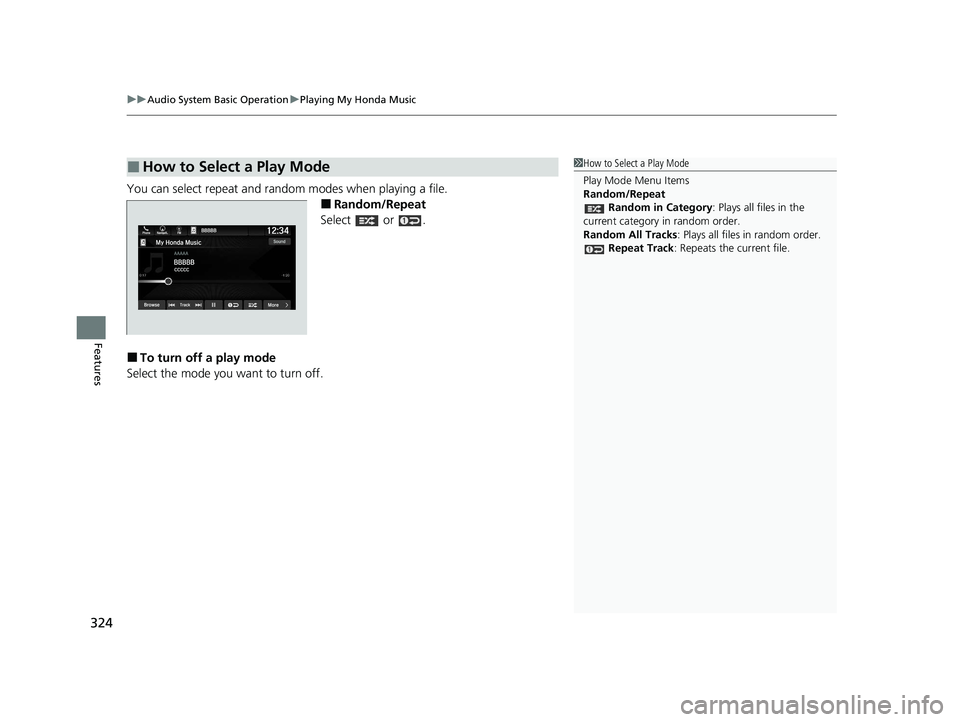
You can select repeat and random modes when playing a file.
■Random/Repeat
Select or .
■To turn off a play mode
Select the mode you want to turn off.
■How to Select a Play Mode1 How to Select a Play Mode
Play Mode Menu Items
Random/Repeat
Random in Category : Plays all files in the
current category in random order.
Random All Tracks : Plays all files in random order.
Repeat Track: Repeats the current file.
22 PILOT-31TG76600.book 324 ページ 2021年6月11日 金曜日 午後4時40分
Page 327 of 737
325
uuAudio System Basic Operation uPlaying Bluetooth ® Audio
Continued
Features
Playing Bluetooth ® Audio
Your audio system allows you to listen to music from your Bluetooth-compatible
phone.
This function is available when the phone is paired and connected to the vehicle’s
Bluetooth ® HandsFreeLink ® (HFL) system.
2Phone Setup P. 481
*1: Depending on the
Bluetooth® device you connect, this function may not be displayed.
1 Playing Bluetooth ® Audio
Not all Bluetooth -enabled phones with streaming
audio capabilities are compatible with the system.
For a list of compatible phones:
•U.S.: Visit automobiles.honda.com/handsfreelink/ ,
or call 1-888-528-7876.
•Canada: For more info rmation on smartphone
compatibility, call 1-855-490-7351.
It may be illegal to perform some data device
functions while driving.
Only one phone can be used with HFL at a time.
When there are more than two paired phones in the
vehicle, the first paired phone the system finds is
automatically connected.
If more than one phone is paired to the HFL system,
there may be a delay before the system begins to
play.
In some cases, the name of the artist, album, or track
may not appear correctly.
Some functions may not be available on some
devices.
If a phone is currently conne cted via Apple CarPlay or
Android Auto, Bluetooth® Audio from that phone
will be unavailable. Howe ver, you can have a second
previously paired phone stream Bluetooth® Audio by
selecting from the Bluetooth® device list.
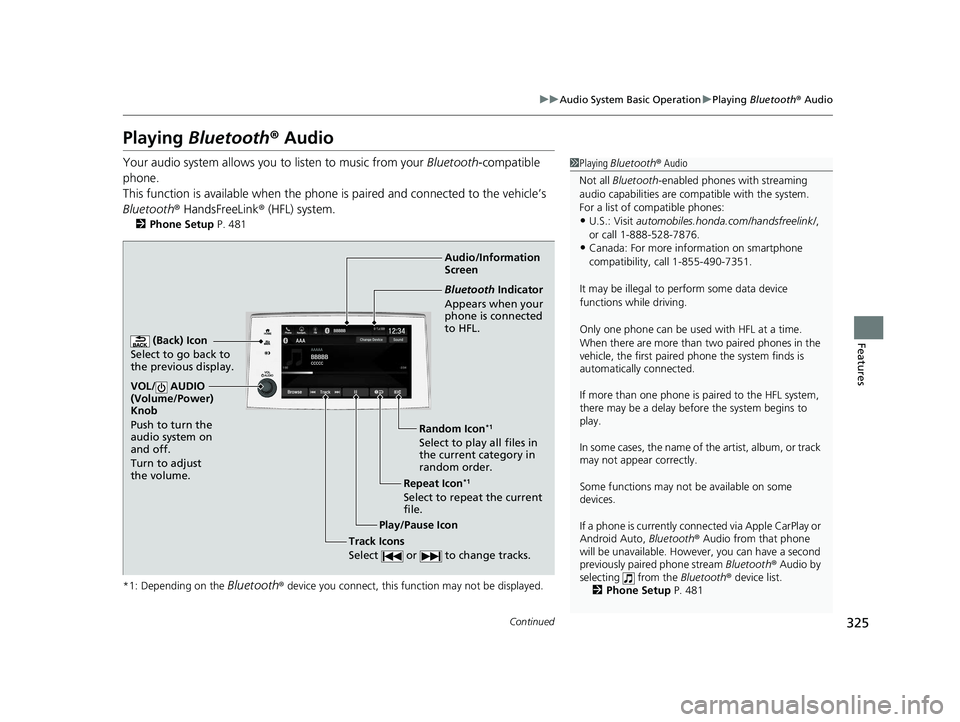
2 Phone Setup P. 481Audio/Information
Screen
(Back) Icon
Select to go b
ack to
the previous display.
VOL/ AUDIO
(Volume/Power)
Knob
Push to turn the
audio system on
and off.
Turn to adjust
the volume.
Repeat Icon*1
Select to repeat the current
file. Random Icon
*1
Select to play all files in
the current category in
random order.
Play/Pause Icon
Bluetooth Indicator
Appears when your
phone is connected
to HFL.
Track Icons
Select or to change tracks.
22 PILOT-31TG76600.book 325 ページ 2021年6月11日 金曜日 午後4時40分
Page 329 of 737
327
uuAudio System Basic Operation uPlaying Social Playlist
Continued
Features
Playing Social Playlist
The Honda CabinControlTM smartphone app allows users to share audio files from
their devices to Social Playlist.
Unfortunately, the driver cannot select th e audio files from the audio/information
screen. The driver can play in order of their choice only if they individually select each
song in the queue. The driver canno t rearrange the order of the playlist.
2Wi-Fi Connection P. 334
1Playing Social Playlist
For more information, check the Honda
CabinControl smartphone app instruction manual.
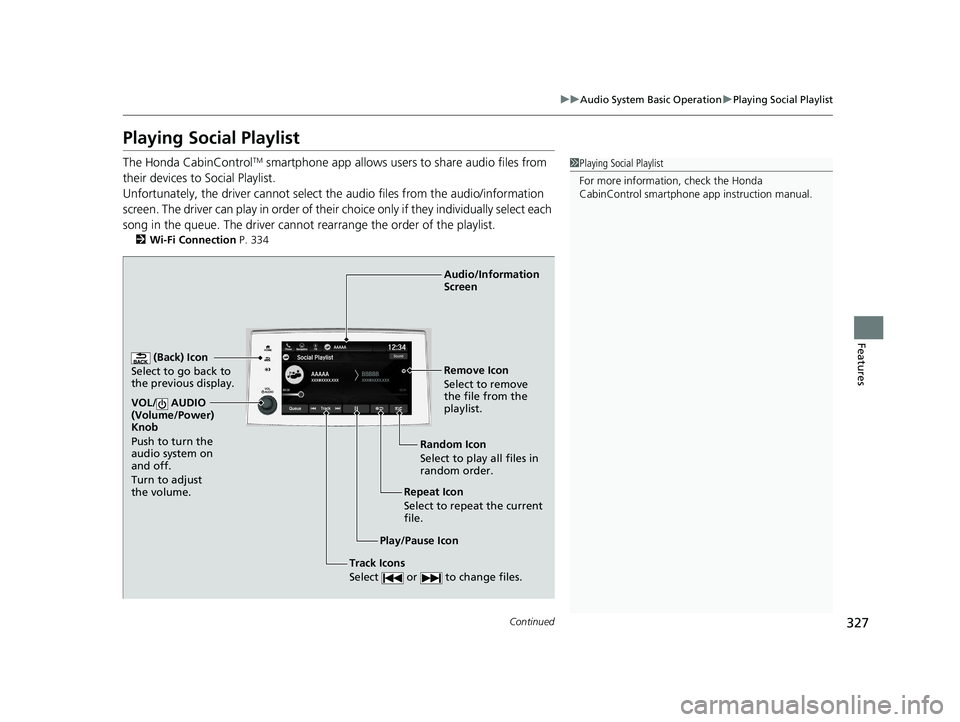
(Back) Icon
Select to go back to
the previous display.
Track Icons
Select or to change files.
VOL/ AUDIO
(Volume/Power)
Knob
Push to turn the
audio system on
and off.
Turn to adjust
the volume.
Audio/Information
Screen
Play/Pause Icon Repeat Icon
Select
to repeat the
current
file. Random Icon
Select to play all files in
random order. Remove Icon
Select to remove
the file from the
playlist.
22 PILOT-31TG76600.book 327 ページ 2021年6月11日 金曜日 午後4時40分
Page 337 of 737
335
uuAudio System Basic Operation uAT&T Hotspot*
Features
AT&T Hotspot*
If you have subscribed to AT&T hotspot services, your vehicle will provide data to
connect your mobile devices to the Internet. You can use the AT&T Hotspot app to
turn on/off vehicle data and monitor da ta usage left on your subscription.
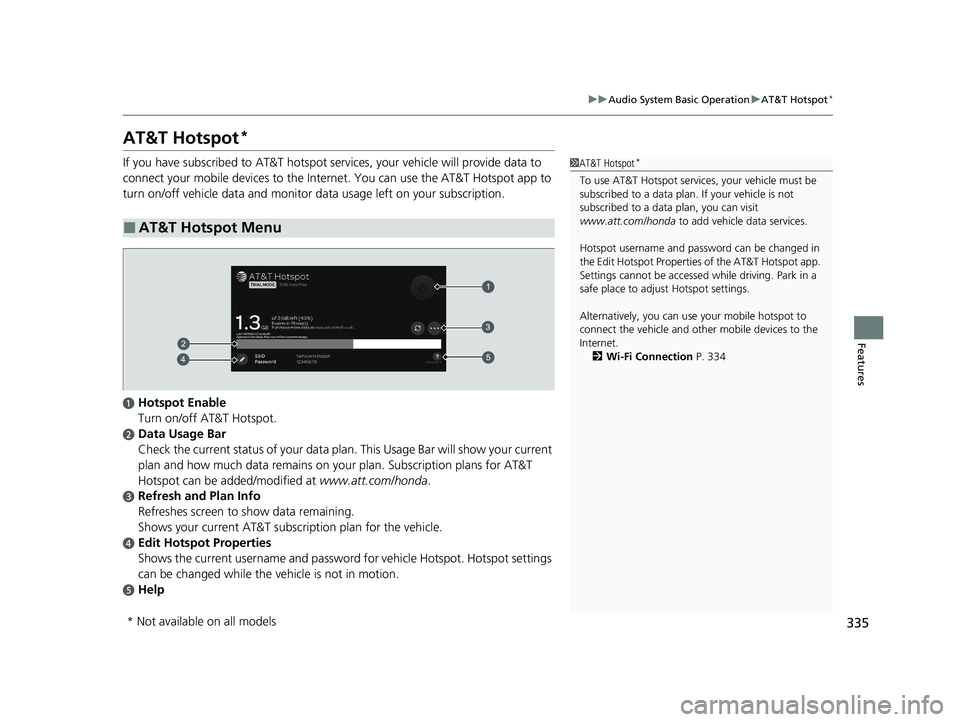
■AT&T Hotspot Menu
1AT&T Hotspot*
To use AT&T Hotspot servic es, your vehicle must be
subscribed to a data plan . If your vehicle is not
subscribed to a data plan, you can visit
www.att.com/honda to add vehicle data services.
Hotspot username and pass word can be changed in
the Edit Hotspot Properties of the AT&T Hotspot app.
Settings cannot be accessed while driving. Park in a
safe place to adjust Hotspot settings.
Alternatively, you can use your mobile hotspot to
connect the vehicle and other mobile devices to the
Internet. 2 Wi-Fi Connection P. 334
aHotspot Enable
Turn on/off AT&T Hotspot.
bData Usage Bar
Check the current status of your data plan . This Usage Bar will show your current
plan and how much data remains on yo ur plan. Subscription plans for AT&T
Hotspot can be added/modified at www.att.com/honda.
cRefresh and Plan Info
Refreshes screen to show data remaining.
Shows your current AT&T subscr iption plan for the vehicle.
dEdit Hotspot Properties
Shows the current username and password for vehicle Hotspot . Hotspot settings
can be changed while the vehicle is not in motion.
eHelp
* Not available on all models
22 PILOT-31TG76600.book 335 ページ 2021年6月11日 金曜日 午後4時40分
Page 343 of 737
Continued341
uuAudio System Basic Operation uAndroid Auto
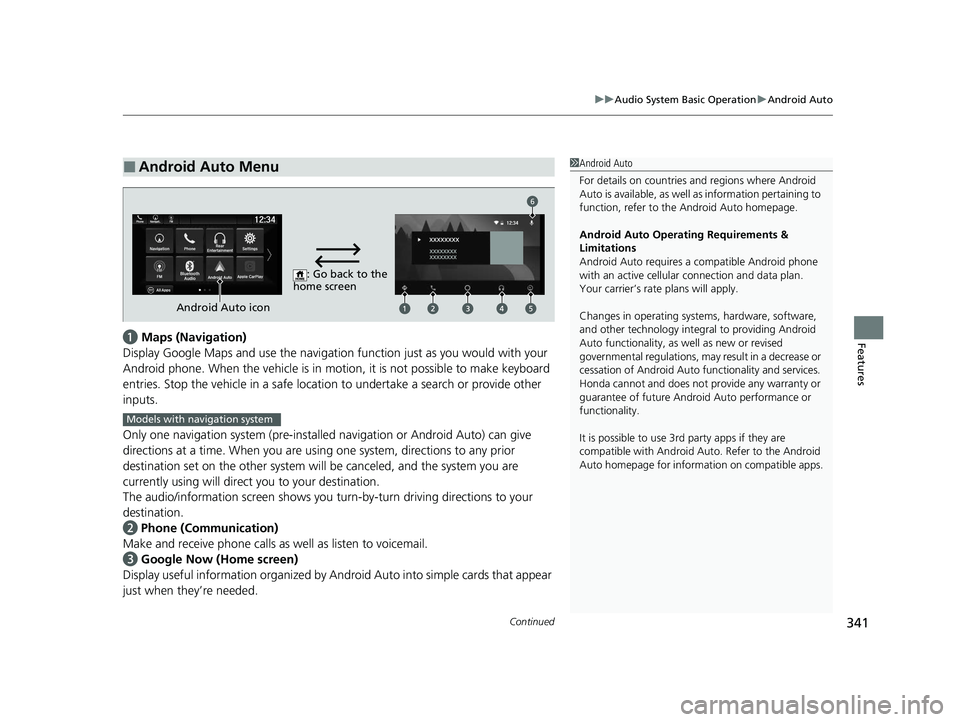
Featuresa Maps (Navigation)
Display Google Maps and use the navigation function just as you would with your
Android phone. When the vehicle is in motion, it is not possible to make keyboard
entries. Stop the vehicle in a safe locati on to undertake a search or provide other
inputs.
Only one navigation system (pre-installed navigation or Android Auto) can give
directions at a time. When you are using one system, directions to any prior
destination set on the other system will be canceled, and the system you are
currently using will direct you to your destination.
The audio/information screen shows you turn-by-turn dr iving directions to your
destination.
b Phone (Communication)
Make and receive phone calls as well as listen to voicemail.
c Google Now (Home screen)
Display useful information organized by Android Auto into simple cards that appear
just when they’re needed.
■Android Auto Menu1 Android Auto
For details on c ountries and regions where Android
Auto is available, as well as information pertaining to
function, refer to the Android Auto homepage.
Android Auto Operating Requirements &
Limitations
Android Auto requires a compatible Android phone
with an active cellular connection and data plan.
Your carrier’s rate plans will apply.
Changes in operating systems, hardware, software,
and other technology integral to providing Android
Auto functionality, as well as new or revised
governmental regulations, may result in a decrease or
cessation of Android Auto functionality and services.
Honda cannot and does not pr ovide any warranty or
guarantee of future Android Auto performance or
functionality.
It is possible to use 3r d party apps if they are
compatible with Android Auto. Refer to the Android
Auto homepage for informat ion on compatible apps.
: Go back to the
home screen
Android Auto icon
6
Models with navigation system
22 PILOT-31TG76600.book 341 ページ 2021年6月11日 金曜日 午後4時40分
Page 346 of 737
344
Features
Audio Error Messages
CD Player*
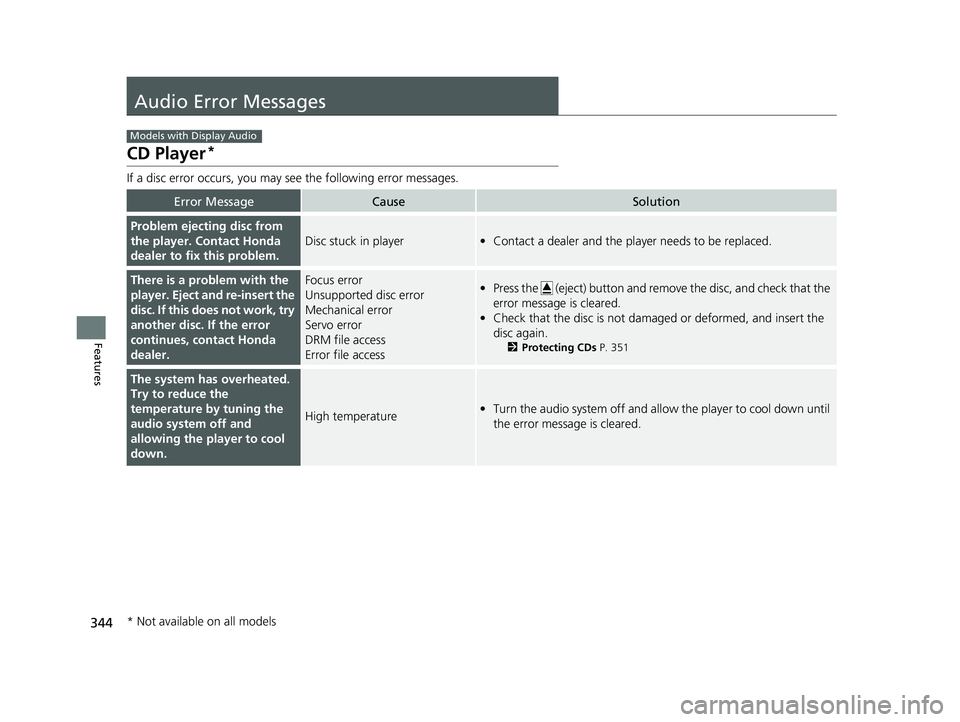
If a disc error occurs, you may see the following error messages.
Error MessageCauseSolution
Problem ejecting disc from
the player. Contact Honda
dealer to fix this problem.
Disc stuck in player•Contact a dealer and the play er needs to be replaced.
There is a problem with the
player. Eject and re-insert the
disc. If this does not work, try
another disc. If the error
continues, contact Honda
dealer.Focus error
Unsupported disc error
Mechanical error
Servo error
DRM file access
Error file access•Press the (eject) button and remove the disc, and check that the
error message is cleared.
• Check that the disc is not dama ged or deformed, and insert the
disc again.
2 Protecting CDs P. 351
The system has overheated.
Try to reduce the
temperature by tuning the
audio system off and
allowing the player to cool
down.
High temperature•Turn the audio system off and allo w the player to cool down until
the error message is cleared.
Models with Display Audio
* Not available on all models
22 PILOT-31TG76600.book 344 ページ 2021年6月11日 金曜日 午後4時40分
Page 347 of 737
345
uuAudio Error Messages uCD Player*
Features
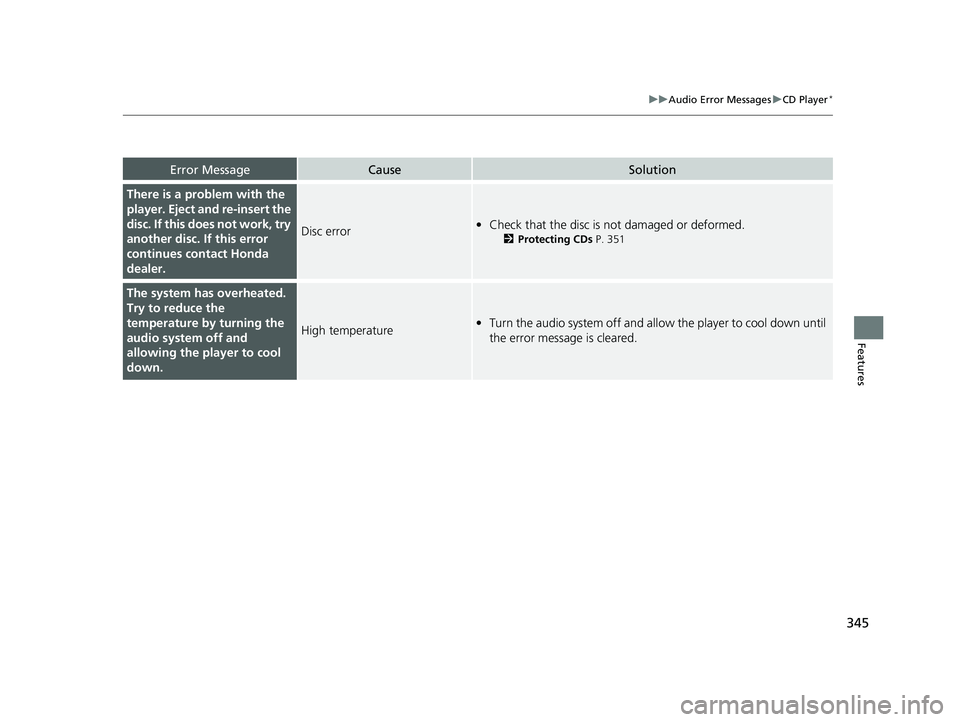
Error MessageCauseSolution
There is a problem with the
player. Eject and re-insert the
disc. If this does not work, try
another disc. If this error
continues contact Honda
dealer.
Disc error• Check that the disc is not damaged or deformed.
2 Protecting CDs P. 351
The system has overheated.
Try to reduce the
temperature by turning the
audio system off and
allowing the player to cool
down.
High temperature•Turn the audio system off and allo w the player to cool down until
the error message is cleared.
22 PILOT-31TG76600.book 345 ページ 2021年6月11日 金曜日 午後4時40分
Page 348 of 737
346
uuAudio Error Messages uiPod/USB Flash Drive
Features
iPod/USB Flash Drive
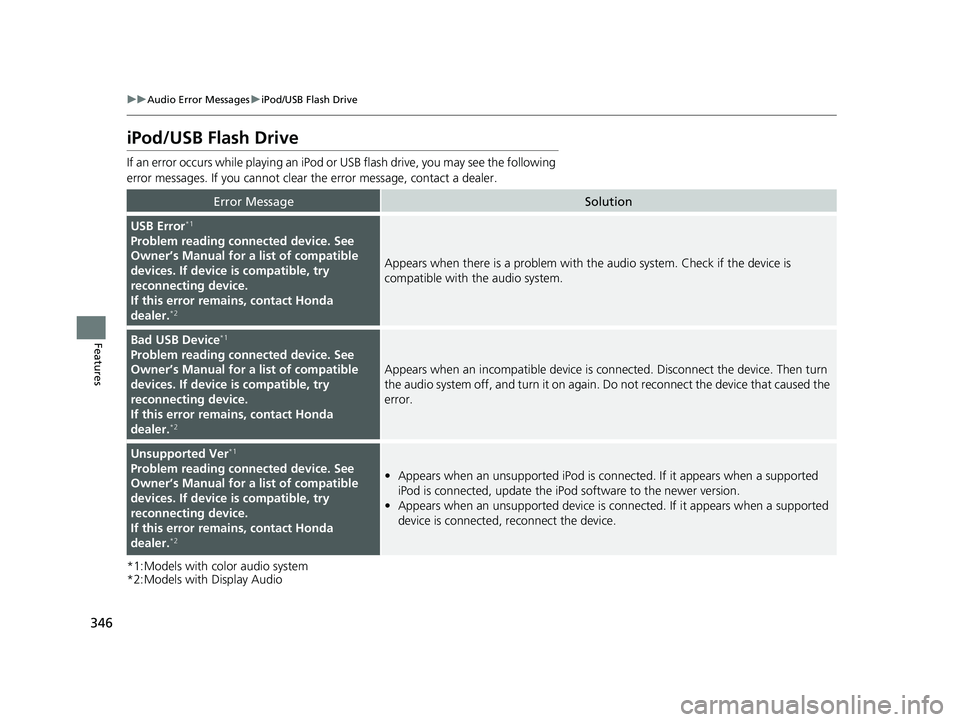
If an error occurs while playing an iPod or USB flash drive, you may see the following
error messages. If you cannot clear the error message, contact a dealer.
*1:Models with color audio system
*2:Models with Display Audio
Error MessageSolution
USB Error*1
Problem reading connected device. See
Owner’s Manual for a list of compatible
devices. If device is compatible, try
reconnecting device.
If this error rema ins, contact Honda
dealer.
*2
Appears when there is a problem with th e audio system. Check if the device is
compatible with the audio system.
Bad USB Device*1
Problem reading connected device. See
Owner’s Manual for a list of compatible
devices. If device is compatible, try
reconnecting device.
If this error rema ins, contact Honda
dealer.
*2
Appears when an incompatible device is connected. Disconnect the device. Then turn
the audio system off, and turn it on again. Do not reconnect the device that caused the
error.
Unsupported Ver*1
Problem reading connected device. See
Owner’s Manual for a list of compatible
devices. If device is compatible, try
reconnecting device.
If this error rema ins, contact Honda
dealer.
*2
• Appears when an unsupported iPod is connected. If it appears when a supported
iPod is connected, update the iP od software to the newer version.
• Appears when an unsupported device is connected. If it appears when a supported
device is connected, reconnect the device.
22 PILOT-31TG76600.book 346 ページ 2021年6月11日 金曜日 午後4時40分
Page 365 of 737
363
uuGeneral Information on the Audio System uHonda App License Agreement
Continued
Features
I. Availability/Interruption. The SOFTWARE and certain SERVICES are made availa ble through your VEHICLE’s compatible multimedia
system when the VEHICLE is turned on. Certain SERVICES may be available only through your compatible mobile device when it is within
the operating range of the VEHICLE and a wireless carrier. The av ailability of the SOFTWARE and SERVICES may be subject to transmission
limitation or interruption, including but no t limited to technical obsolesce or sunsetting of the hardware, software or firmwar e, inside of
or external to the Vehicle, required for data transmission or receipt. HONDA does not guarantee that the SOFTWARE, SERVICES, or any
portion thereof will be available at all times or in all areas. You acknowledge and agree that HONDA is not responsible for per formance
degradation, interruption or dela ys. You acknowledge that HONDA shall not be liable to you if the SOFTWARE or SERVICES in a given
location are not available. If the SOFTWARE or SERVICES are not available within your intended location, you agree that your sole remedy
shall be to cease using the SOFTWARE and SERVICES.
J. PRODUCT SUPPORT: Product support for the SOFTWARE is provided by HONDA. For product support, please refer to HONDA
instructions provided in the DOCUMENTATION. Should you have any questions concerning this AGREEMENT, or if you desire to contact
HONDA for any other reason, please refer to the HONDA contact information provided in the DOCUMENTATION.
K. Termination and Transfer.
1. Termination. This AGREEMENT is effective until te rminated by you or US. WE may terminate this AGREEMENT for any or no reason,
and with or without notice to you. Your rights under this AGR EEMENT will terminate automatically without notice from US if you fail to
comply with any term of this AGREEMENT. U pon termination of this AGREEMENT, you shall cease all use of the SOFTWARE and SERVICE S.
2. Transfer: You may permanently transfer your rights under this AGREEMENT only as part of a sale or transfer of the VEHICLE, provided
you retain no copies, y ou transfer all of the SOFTWARE and HONDA SERVICES (inc luding all component parts, the media and printed
materials, and any upgrades), and the recipient agrees to the terms of this AGREEMENT. You agree to notify HONDA upon the sale or
transfer of the VEHICLE. To contact HO NDA, please refer to the HONDA contact info rmation provided in the DOCUMENTATION.
22 PILOT-31TG76600.book 363 ページ 2021年6月11日 金曜日 午後4時40分
Page 377 of 737
375
uuBlu-ray/DVD Rear Entertainment System*uWireless Headphones
Features
Wireless Headphones
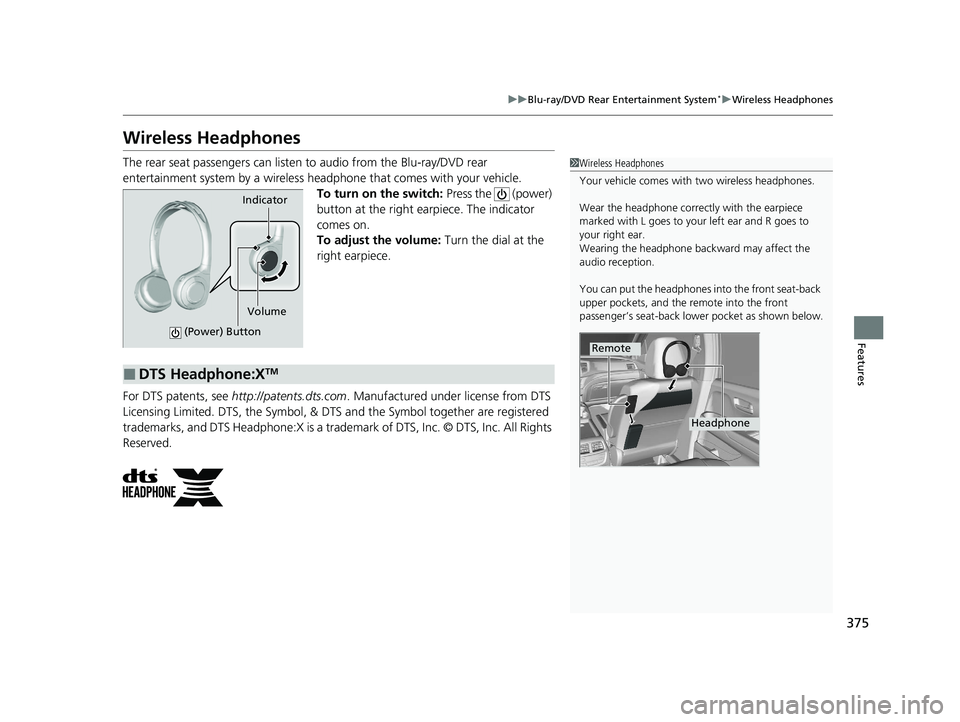
The rear seat passengers can listen to audio from the Blu-ray/DVD rear
entertainment system by a wireless headphone that comes with your vehicle. To turn on the switch: Press the (power)
button at the right earpiece. The indicator
comes on.
To adjust the volume: Turn the dial at the
right earpiece.
For DTS patents, see http://patents.dts.com . Manufactured under license from DTS
Licensing Limited. DTS, the Symbol, & DTS and the Symbol together are registered
trademarks, and DTS Headphone:X is a trademark of DTS, Inc. © DTS, Inc. All Rights
Reserved.1 Wireless Headphones
Your vehicle comes with two wireless headphones.
Wear the headphone correctly with the earpiece
marked with L goes to y our left ear and R goes to
your right ear.
Wearing the headphone back ward may affect the
audio reception.
You can put the headphones into the front seat-back
upper pockets, and the remote into the front
passenger’s seat-back lowe r pocket as shown below.
Remote
Headphone
Indicator
(Power) Button
Volume
■DTS Headphone:XTM
22 PILOT-31TG76600.book 375 ページ 2021年6月11日 金曜日 午後4時40分