turn audio on HONDA PILOT 2022 Owner's Manual
[x] Cancel search | Manufacturer: HONDA, Model Year: 2022, Model line: PILOT, Model: HONDA PILOT 2022Pages: 737, PDF Size: 28.84 MB
Page 263 of 737
261
uuAudio System Basic Operation uPlaying a USB Flash Drive
Features
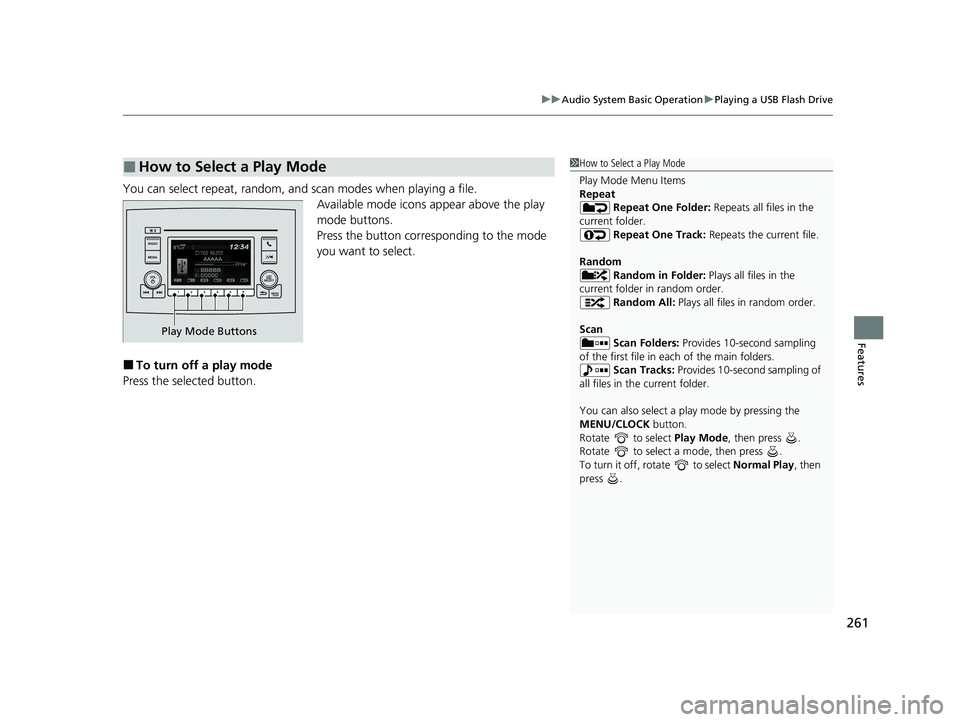
You can select repeat, random, and scan modes when playing a file.
Available mode icons appear above the play
mode buttons.
Press the button corresponding to the mode
you want to select.
■To turn off a play mode
Press the selected button.
■How to Select a Play Mode1 How to Select a Play Mode
Play Mode Menu Items
Repeat
Repeat One Folder: Repeats all files in the
current folder. Repeat One Track: Repeats the current file.
Random Random in Folder: Plays all files in the
current folder in random order. Random All: Plays all files in random order.
Scan Scan Folders: Provides 10-second sampling
of the first file in each of the main folders.
Scan Tracks: Provides 10-second sampling of
all files in the current folder.
You can also select a pl ay mode by pressing the
MENU/CLOCK button.
Rotate to select Play Mode, then press .
Rotate to select a mode, then press .
To turn it off, rotate to select Normal Play, then
press .
Play Mode Buttons
22 PILOT-31TG76600.book 261 ページ 2021年6月11日 金曜日 午後4時40分
Page 264 of 737
262
uuAudio System Basic Operation uPlaying Bluetooth ® Audio
Features
Playing Bluetooth ® Audio
Your audio system allows you to listen to music from your Bluetooth-compatible
phone.
This function is available when the phone is paired and connected to the vehicle’s
Bluetooth ® HandsFreeLink ® (HFL) system.
2 Phone Setup P. 457
1Playing Bluetooth ® Audio
Not all Bluetooth -enabled phones with streaming
audio capabilities are compatible with the system.
For a list of compatible phones, visit
automobiles.honda.com /handsfreelink/, or call 1-
888-528-7876.
In some states, it may be il legal to perform some data
device functions while driving.
Only one phone can be used with HFL at a time.
When there are more than two paired phones in the
vehicle, the first paired phone the system finds is
automatically connected.
If more than one phone is paired to the HFL system,
there may be a delay before the system begins to
play.
In some cases, the name of the artist, album, or track
may not appear correctly.
Some functions may not be available on some
devices.
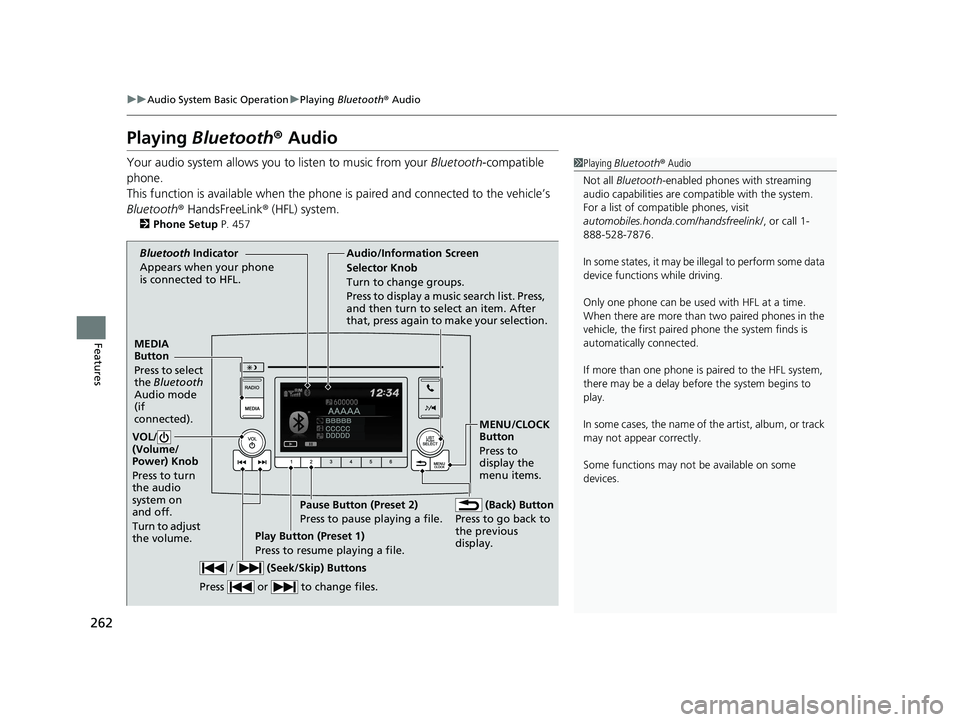
MEDIA
Button
Press to select
the Bluetooth
Audio mode
(if
connected).
VOL/
(Volume/
Power) Knob
Press to turn
the audio
system on
and off.
Turn to adjust
the volume.
MENU/CLOCK
Button
Press to
display the
menu items.
Audio/Information Screen
Bluetooth Ind icator
Ap pears wh
en your phone
is connected to HFL.
/ (Seek/Skip) Buttons
Press or to change files.
Play Button (Preset 1)
Press to resume playing a file. Pause Button (Preset 2)
Press to pause playing a file.
Selector Knob
Turn to change groups.
Press to display a music search list. Press,
and then turn to select an item. After
that, press again to make your selection.
(Back) Button
Press to go back to
the previous
display.
22 PILOT-31TG76600.book 262 ページ 2021年6月11日 金曜日 午後4時40分
Page 272 of 737
uuAudio System Basic Operation uAudio/Information Screen
270
Features
You can change, store, and delete the wallpaper on the audio/information screen.
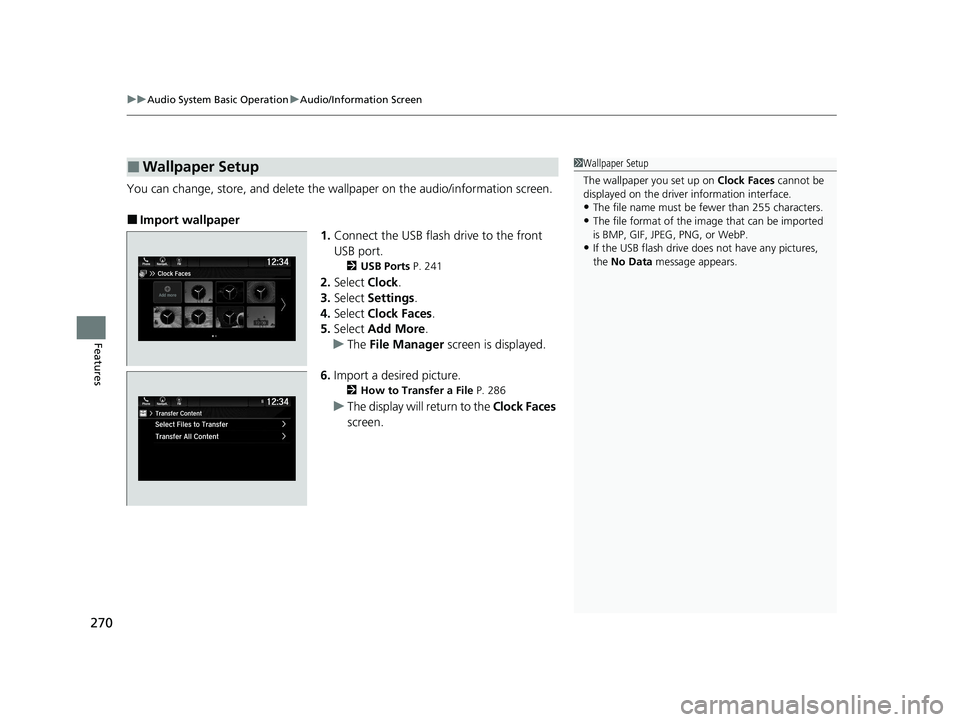
■Import wallpaper
1.Connect the USB flash drive to the front
USB port.
2 USB Ports P. 241
2.Select Clock.
3. Select Settings .
4. Select Clock Faces .
5. Select Add More .
u The File Manager screen is displayed.
6. Import a desired picture.
2 How to Transfer a File P. 286
uThe display will return to the Clock Faces
screen.
■Wallpaper Setup1 Wallpaper Setup
The wallpaper you set up on Clock Faces cannot be
displayed on the driver information interface.
•The file name must be fewer than 255 characters.
•The file format of the im age that can be imported
is BMP, GIF, JPEG, PNG, or WebP.
•If the USB flash drive doe s not have any pictures,
the No Data message appears.
22 PILOT-31TG76600.book 270 ページ 2021年6月11日 金曜日 午後4時40分
Page 273 of 737
271
uuAudio System Basic Operation uAudio/Information Screen
Continued
Features
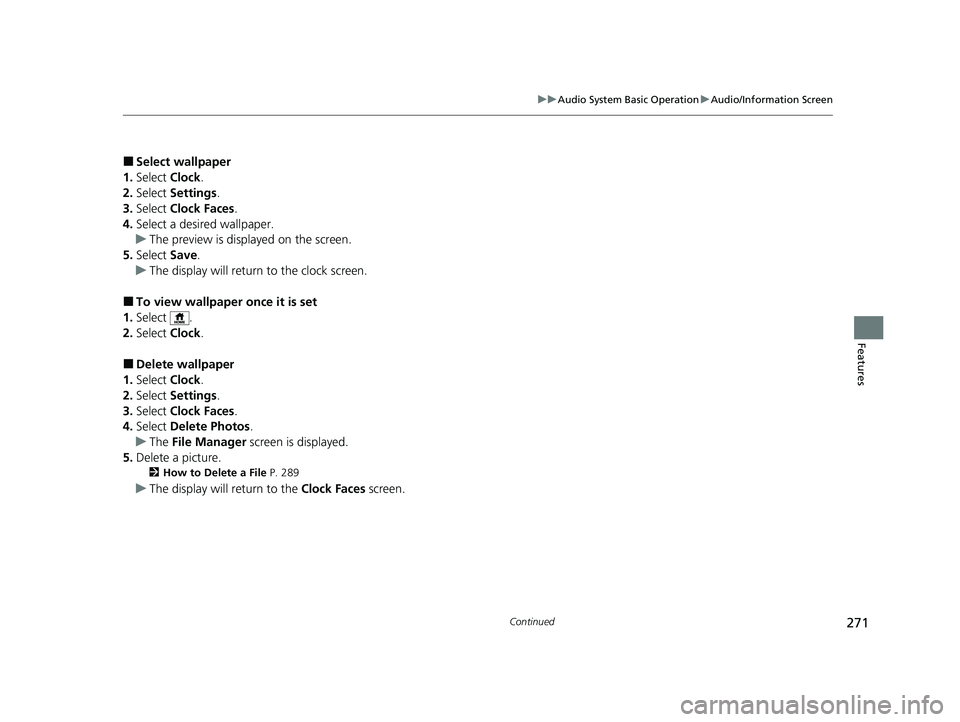
■Select wallpaper
1. Select Clock.
2. Select Settings .
3. Select Clock Faces .
4. Select a desired wallpaper.
u The preview is displayed on the screen.
5. Select Save.
u The display will return to the clock screen.
■To view wallpaper once it is set
1. Select .
2. Select Clock.
■Delete wallpaper
1. Select Clock.
2. Select Settings .
3. Select Clock Faces .
4. Select Delete Photos .
u The File Manager screen is displayed.
5. Delete a picture.
2 How to Delete a File P. 289
uThe display will return to the Clock Faces screen.
22 PILOT-31TG76600.book 271 ページ 2021年6月11日 金曜日 午後4時40分
Page 275 of 737
Continued273
uuAudio System Basic Operation uAudio/Information Screen
Features
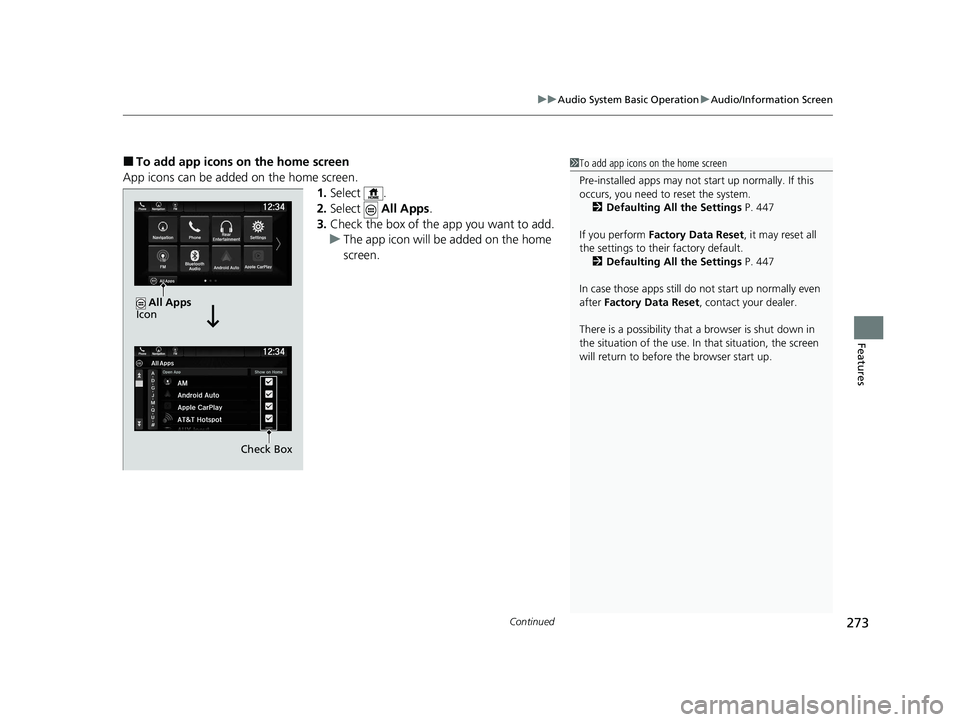
■To add app icons on the home screen
App icons can be added on the home screen. 1.Select .
2. Select All Apps.
3. Check the box of the app you want to add.
u The app icon will be added on the home
screen.1To add app icons on the home screen
Pre-installed apps may not start up normally. If this
occurs, you need to reset the system.
2 Defaulting All the Settings P. 447
If you perform Factory Data Reset , it may reset all
the settings to their factory default. 2 Defaulting All the Settings P. 447
In case those apps still do not start up normally even
after Factory Data Reset , contact your dealer.
There is a possibility that a browser is shut down in
the situation of the use. In that situation, the screen
will return to before the browser start up.
Check Box
All Apps
Icon
22 PILOT-31TG76600.book 273 ページ 2021年6月11日 金曜日 午後4時40分
Page 276 of 737
uuAudio System Basic Operation uAudio/Information Screen
274
Features
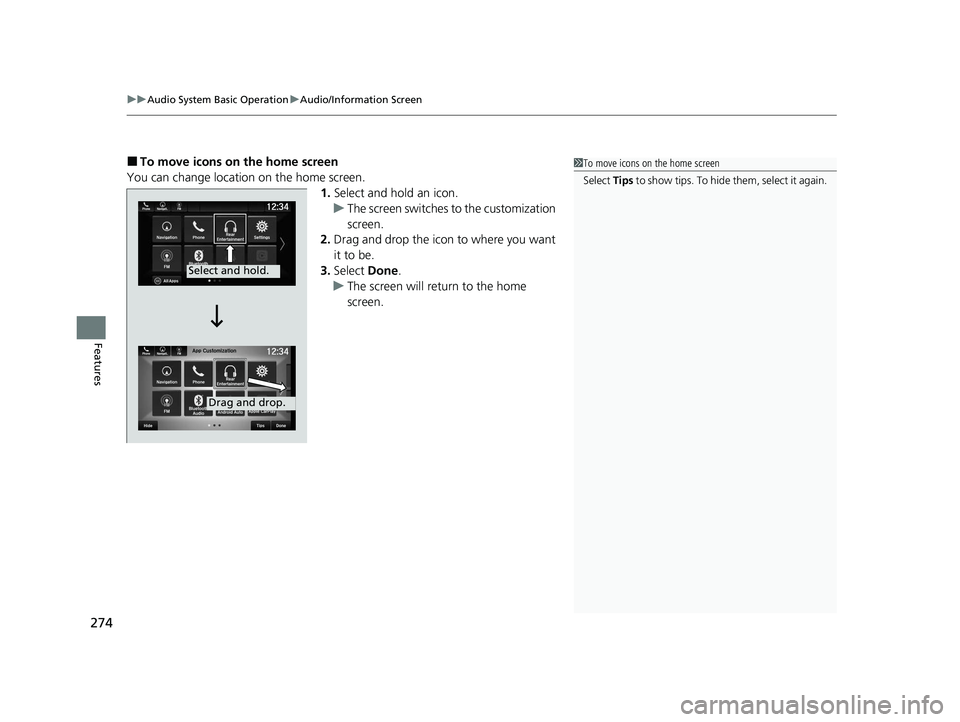
■To move icons on the home screen
You can change location on the home screen. 1.Select and hold an icon.
u The screen switches to the customization
screen.
2. Drag and drop the icon to where you want
it to be.
3. Select Done.
u The screen will return to the home
screen.1To move icons on the home screen
Select Tips to show tips. To hide them, select it again.
Select and hold.
Drag and drop.
22 PILOT-31TG76600.book 274 ページ 2021年6月11日 金曜日 午後4時40分
Page 277 of 737
Continued275
uuAudio System Basic Operation uAudio/Information Screen
Features
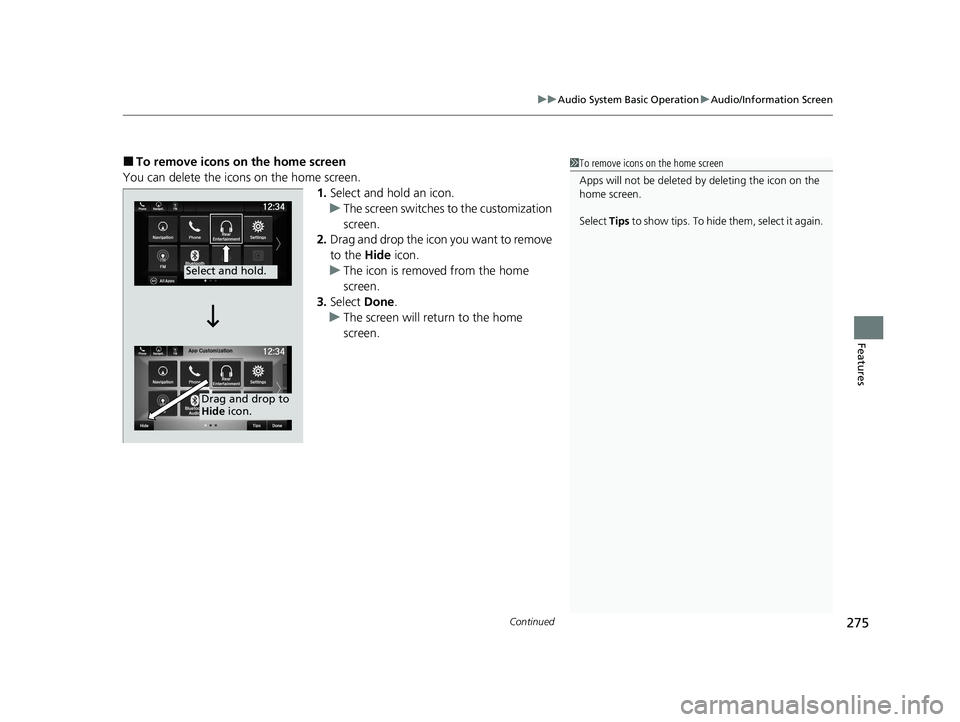
■To remove icons on the home screen
You can delete the icons on the home screen. 1.Select and hold an icon.
u The screen switches to the customization
screen.
2. Drag and drop the icon you want to remove
to the Hide icon.
u The icon is removed from the home
screen.
3. Select Done.
u The screen will return to the home
screen.1To remove icons on the home screen
Apps will not be deleted by deleting the icon on the
home screen.
Select Tips to show tips. To hide them, select it again.
Select and hold.
Drag and drop to
Hide icon.
22 PILOT-31TG76600.book 275 ページ 2021年6月11日 金曜日 午後4時40分
Page 278 of 737
uuAudio System Basic Operation uAudio/Information Screen
276
Features
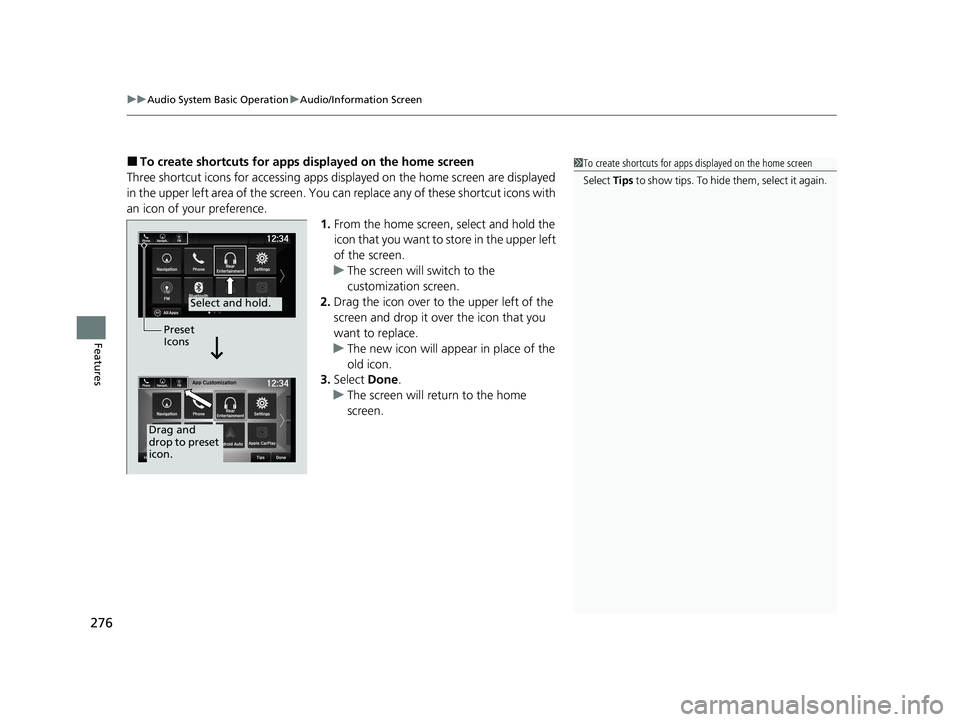
■To create shortcuts for apps displayed on the home screen
Three shortcut icons for accessing apps displayed on the home screen are displayed
in the upper left area of the screen. You can replace any of these shortcut icons with
an icon of your preference. 1.From the home screen, select and hold the
icon that you want to store in the upper left
of the screen.
u The screen will switch to the
customization screen.
2. Drag the icon over to the upper left of the
screen and drop it over the icon that you
want to replace.
u The new icon will appear in place of the
old icon.
3. Select Done.
u The screen will return to the home
screen.1To create shortcuts for apps displayed on the home screen
Select Tips to show tips. To hide them, select it again.
Select and hold.
Drag and
drop to preset
icon.Preset
Icons
22 PILOT-31TG76600.book 276 ページ 2021年6月11日 金曜日 午後4時40分
Page 282 of 737
280
uuAudio System Basic Operation uSystem Updates
Features
System Updates
The audio system’s firmware can be updated with a Wi-Fi connection or with a USB
device.
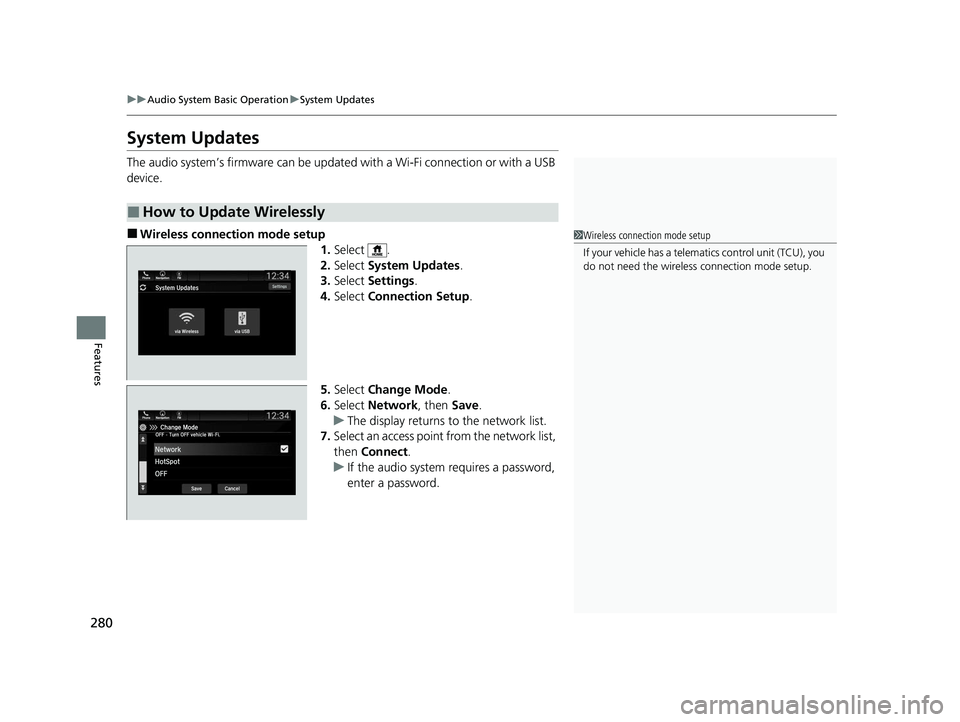
■Wireless connecti on mode setup
1.Select .
2. Select System Updates .
3. Select Settings .
4. Select Connection Setup .
5. Select Change Mode .
6. Select Network, then Save.
u The display returns to the network list.
7. Select an access point from the network list,
then Connect .
u If the audio system requires a password,
enter a password.
■How to Update Wirelessly
1Wireless connection mode setup
If your vehicle has a telema tics control unit (TCU), you
do not need the wireless connection mode setup.
22 PILOT-31TG76600.book 280 ページ 2021年6月11日 金曜日 午後4時40分
Page 284 of 737
uuAudio System Basic Operation uSystem Updates
282
Features
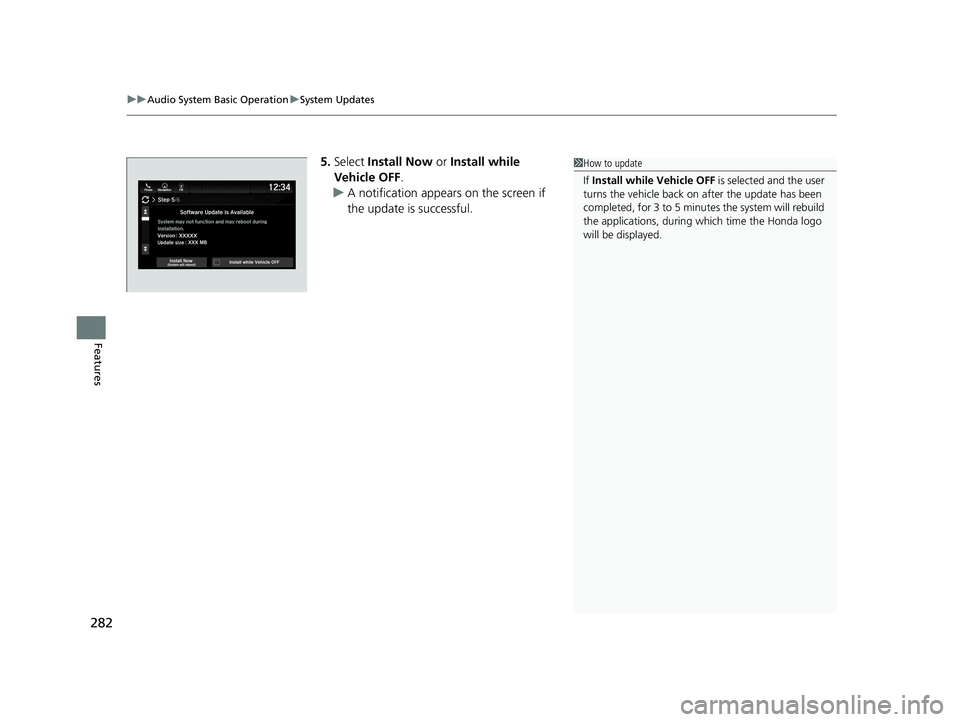
5. Select Install Now or Install while
Vehicle OFF .
u A notification appears on the screen if
the update is successful.1How to update
If Install while Vehicle OFF is selected and the user
turns the vehicle back on after the update has been
completed, for 3 to 5 minutes the system will rebuild
the applications, during wh ich time the Honda logo
will be displayed.
22 PILOT-31TG76600.book 282 ページ 2021年6月11日 金曜日 午後4時40分