warning HONDA PILOT 2023 Owner's Manual
[x] Cancel search | Manufacturer: HONDA, Model Year: 2023, Model line: PILOT, Model: HONDA PILOT 2023Pages: 814, PDF Size: 29.02 MB
Page 110 of 814
109
uuIndicators u
Continued
Instrument Panel
IndicatorNameOn/BlinkingExplanation
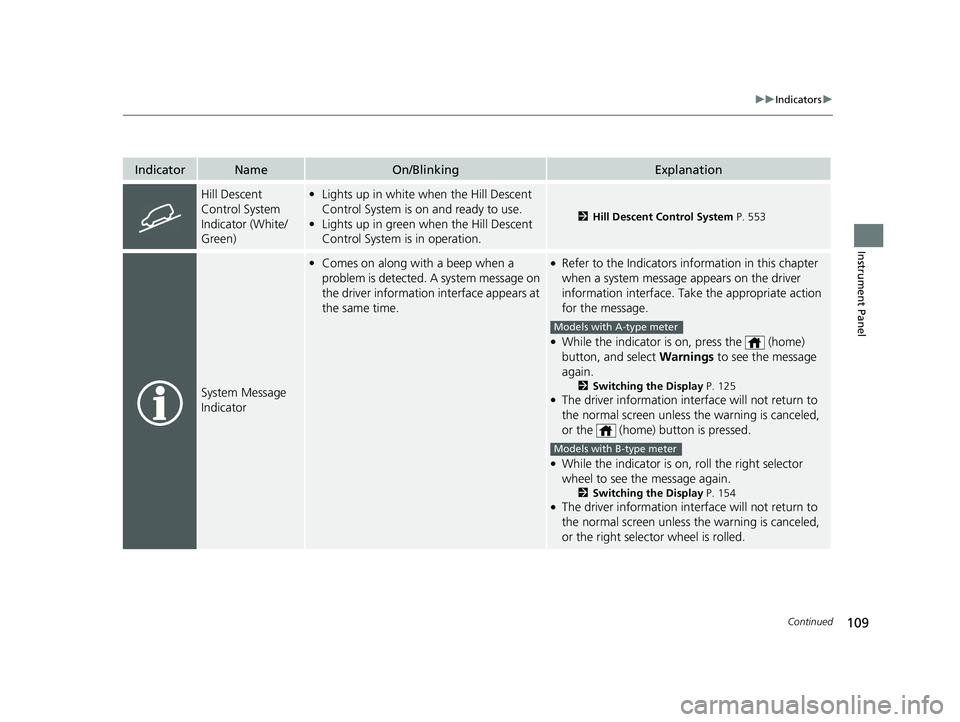
Hill Descent
Control System
Indicator (White/
Green)•Lights up in white when the Hill Descent
Control System is on and ready to use.
• Lights up in green when the Hill Descent
Control System is in operation.
2 Hill Descent Control System P. 553
System Message
Indicator
•Comes on along with a beep when a
problem is detected. A system message on
the driver information interface appears at
the same time.●Refer to the Indicators in formation in this chapter
when a system message appears on the driver
information interface. Take the appropriate action
for the message.
●While the indicator is on, press the (home)
button, and select Warnings to see the message
again.
2 Switching the Display P. 125●The driver information interface will not return to
the normal screen unless the warning is canceled,
or the (home) button is pressed.
●While the indicator is on, roll the right selector
wheel to see the message again.
2Switching the Display P. 154●The driver information interface will not return to
the normal screen unless the warning is canceled,
or the right selector wheel is rolled.
Models with A-type meter
Models with B-type meter
23 PILOT-31T906000_03.book 109 ページ 2022年10月31日 月曜日 午前10時26分
Page 124 of 814
Continued123
uuGauges and Displays uGauges
Instrument Panel
Shows the outside temperature in Fahr enheit (U.S.) or Celsius (Canada).
■Adjusting the outside temperature display
Adjust the temperature reading by up to ±5°F or ±3°C if the temperature reading
seems incorrect.
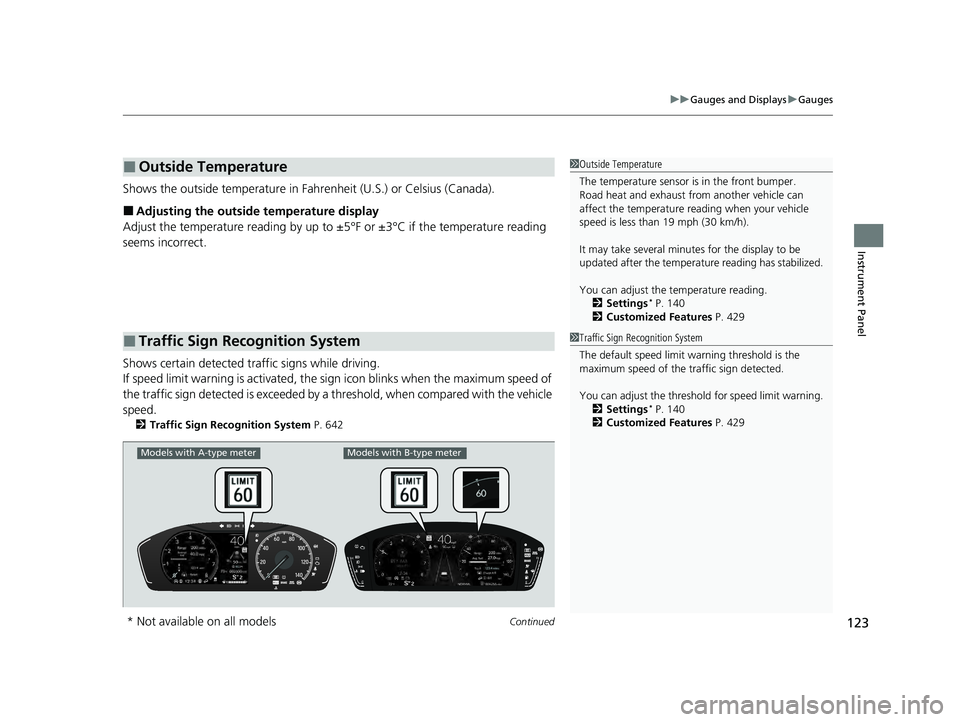
Shows certain detected traffic signs while driving.
If speed limit warning is activated, the si gn icon blinks when the maximum speed of
the traffic sign detected is exceeded by a threshold, when compared with the vehicle
speed.
2 Traffic Sign Recognition System P. 642
■Outside Temperature
■Traffic Sign Recognition System
1Outside Temperature
The temperature sensor is in the front bumper.
Road heat and exhaust from another vehicle can
affect the temperature reading when your vehicle
speed is less than 19 mph (30 km/h).
It may take several minutes for the display to be
updated after the temperature reading has stabilized.
You can adjust the temperature reading.
2 Settings
* P. 140
2 Customized Features P. 429
1Traffic Sign Recognition System
The default speed limit wa rning threshold is the
maximum speed of the traffic sign detected.
You can adjust the threshol d for speed limit warning.
2 Settings
* P. 140
2 Customized Features P. 429
Models with A-type meterModels with B-type meter
* Not available on all models
23 PILOT-31T906000_03.book 123 ページ 2022年10月31日 月曜日 午前10時26分
Page 126 of 814
125
uuGauges and Displays uDriver Information Interface (A-type Meter)
Continued
Instrument Panel
Driver Information In terface (A-type Meter)
The driver information interface shows information such as the estimated travelable
distance and fuel economy of the vehicle. It also displays messages such as warnings
to other helpful information.
When a warning message displays, please check the message and contact a dealer
to have the vehicle inspected if necessary. Please refer to the pages below if the
Engine oil pressure low or Engine temperature too hot message is displayed.
2If the Engine oil pressure low Warning Appears P. 771
2 Overheating P. 769
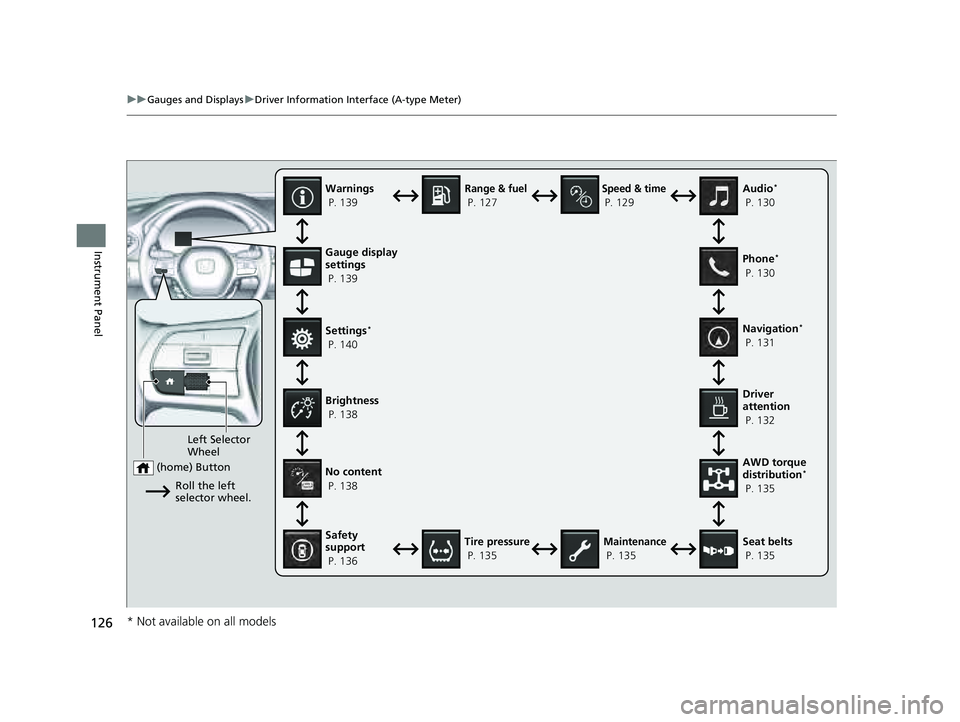
Press the (home) button, th en roll the left selector wheel to scroll to the content
you want to see. Press the left sele ctor wheel to see detailed information.
■Switching the Display1Switching the Display
You can add or delete the meter contents.
2 Gauge Display Settings P. 139
23 PILOT-31T906000_03.book 125 ページ 2022年10月31日 月曜日 午前10時26分
Page 127 of 814
126
uuGauges and Displays uDriver Information Interface (A-type Meter)
Instrument PanelGauge display
settings
P. 139
Left Selector
Wheel
(home) Button
Roll the left
selector wheel.
No content
P. 138
Speed & time
P. 129
Warnings
P. 139
Range & fuel
P. 127
Settings
*
P. 140 Driver
attention
P. 132
Seat belts
P. 135
Safety
support
P. 136
Maintenance
P. 135
Brightness
P. 138
Tire pressure
P. 135 AWD torque
distribution
*
P. 135 Navigation
*
P. 131 Phone
*
P. 130 Audio
*
P. 130
* Not available on all models
23 PILOT-31T906000_03.book 126 ページ 2022年10月31日 月曜日 午前10時26分
Page 140 of 814
Continued139
uuGauges and Displays uDriver Information Interface (A-type Meter)
Instrument Panel
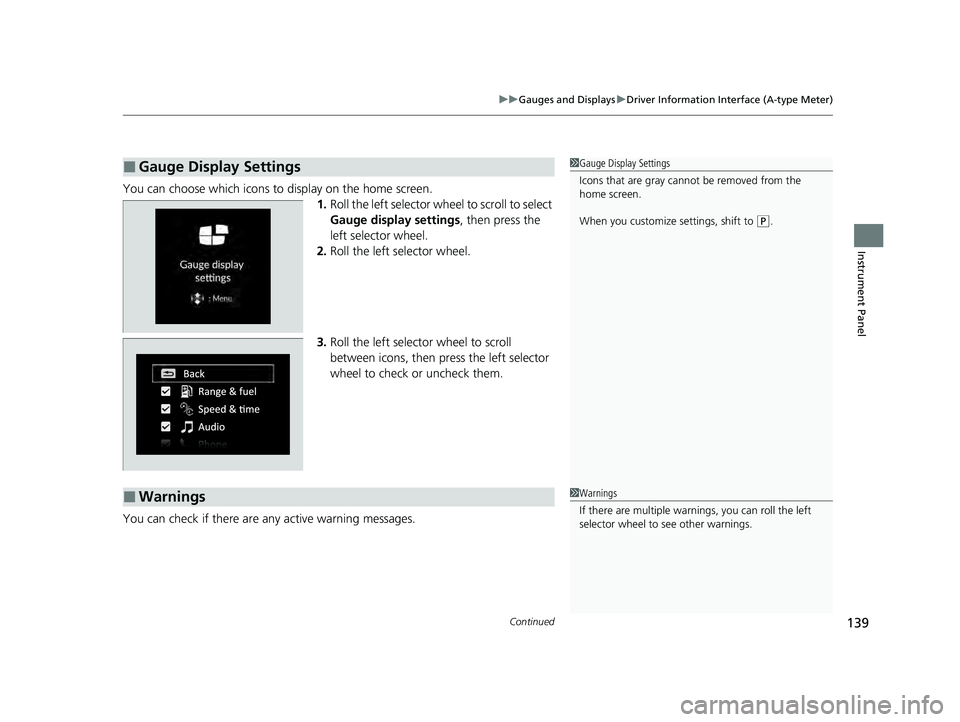
You can choose which icons to display on the home screen.
1.Roll the left selector wheel to scroll to select
Gauge display settings , then press the
left selector wheel.
2. Roll the left selector wheel.
3. Roll the left selector wheel to scroll
between icons, then press the left selector
wheel to check or uncheck them.
You can check if there are any active warning messages.
■Gauge Display Settings1 Gauge Display Settings
Icons that are gray cannot be removed from the
home screen.
When you customize settings, shift to
(P.
■Warnings1 Warnings
If there are multiple warnings, you can roll the left
selector wheel to see other warnings.
23 PILOT-31T906000_03.book 139 ページ 2022年10月31日 月曜日 午前10時26分
Page 142 of 814
141
uuGauges and Displays uDriver Information Interface (A-type Meter)
Continued
Instrument Panel
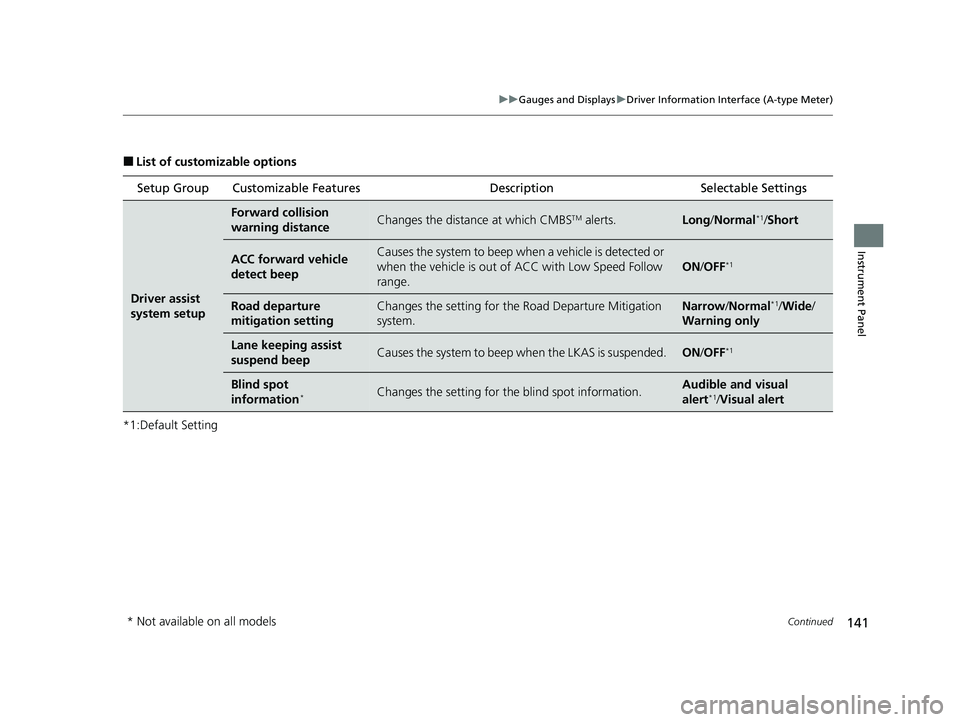
■List of customizable options
*1:Default Setting Setup Group Customizable Features
Description Selectable Settings
Driver assist
system setup
Forward collision
warning distanceChanges the distance at which CMBSTM alerts.Long/Normal*1/Short
ACC forward vehicle
detect beepCauses the system to beep wh en a vehicle is detected or
when the vehicle is out of ACC with Low Speed Follow
range.
ON /OFF*1
Road departure
mitigation settingChanges the setting for th e Road Departure Mitigation
system.Narrow /Normal*1/Wide /
Warning only
Lane keeping assist
suspend beepCauses the system to beep when the LKAS is suspended.ON/OFF*1
Blind spot
information*Changes the setting for th e blind spot information.Audible and visual
alert*1/ Visual alert
* Not available on all models
23 PILOT-31T906000_03.book 141 ページ 2022年10月31日 月曜日 午前10時26分
Page 143 of 814
142
uuGauges and Displays uDriver Information Interface (A-type Meter)
Instrument Panel
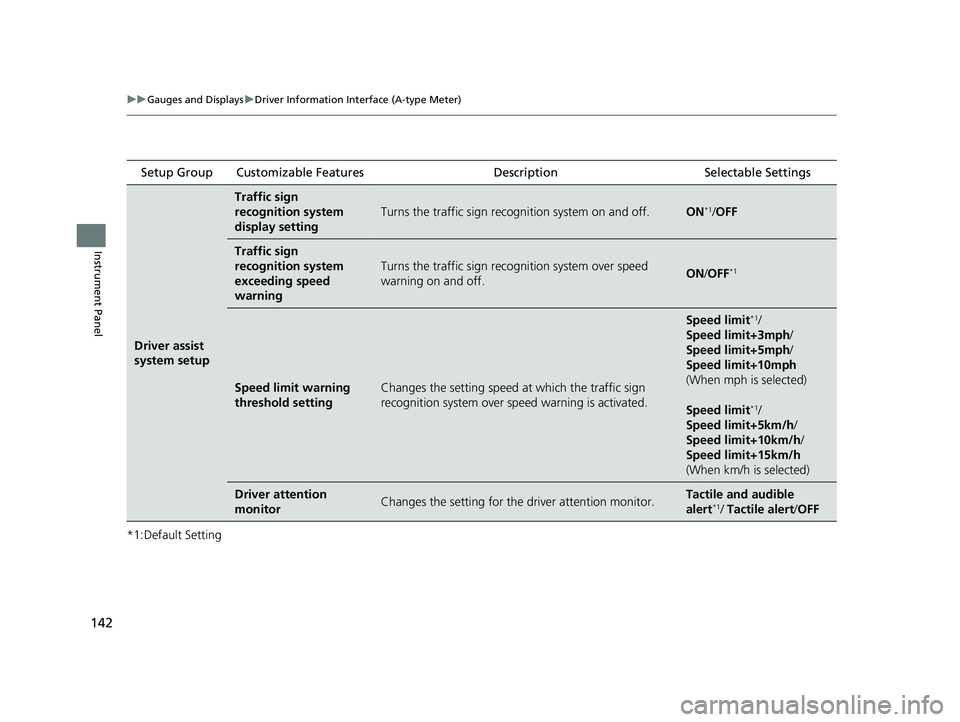
*1:Default Setting Setup Group Customizable Features
Description Selectable Settings
Driver assist
system setup
Traffic sign
recognition system
display setting
Turns the traffic sign recognition system on and off.ON*1/OFF
Traffic sign
recognition system
exceeding speed
warning
Turns the traffic sign recogn ition system over speed
warning on and off.ON /OFF*1
Speed limit warning
threshold settingChanges the setting speed at which the traffic sign
recognition system over speed warning is activated.
Speed limit*1/
Speed limit+3mph /
Speed limit+5mph /
Speed limit+10mph
(When mph is selected)
Speed limit
*1/
Speed limit+5km/h /
Speed limit+10km/h /
Speed limit+15km/h
(When km/h is selected)
Driver attention
monitorChanges the setting for the driver attention monitor.Tactile and audible
alert*1/ Tactile alert /OFF
23 PILOT-31T906000_03.book 142 ページ 2022年10月31日 月曜日 午前10時26分
Page 145 of 814
144
uuGauges and Displays uDriver Information Interface (A-type Meter)
Instrument Panel
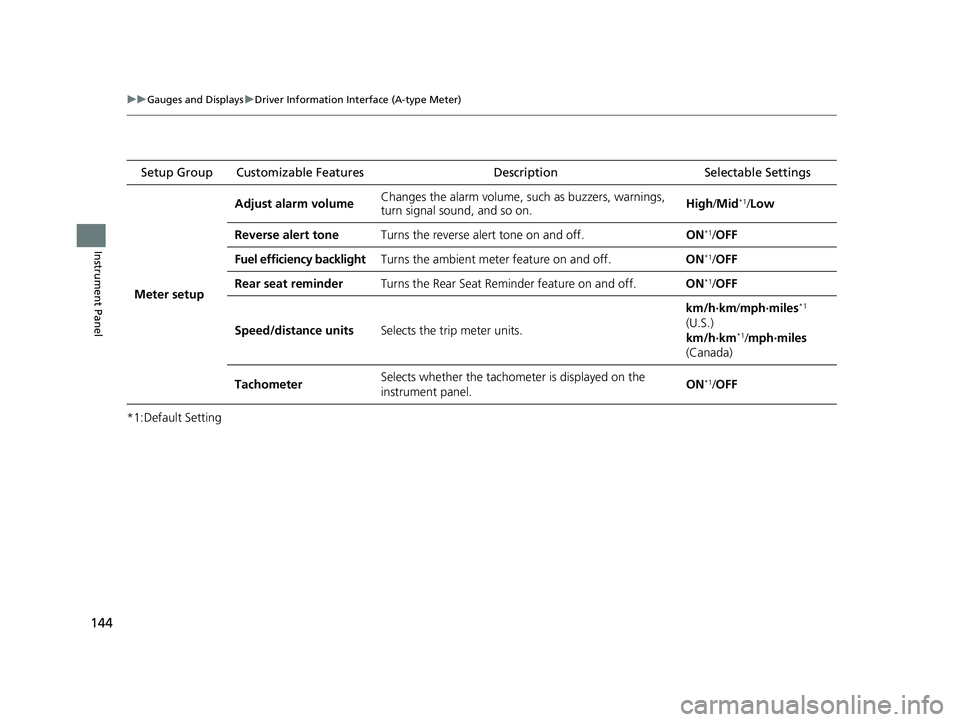
*1:Default Setting Setup Group Customizable Features
Description Selectable Settings
Meter setup Adjust alarm volume
Changes the alarm volume, su
ch as buzzers, warnings,
turn signal sound, and so on. High
/Mid
*1/Low
Reverse alert tone Turns the reverse alert tone on and off. ON
*1/OFF
Fuel efficiency backlight Turns the ambient meter feature on and off. ON
*1/OFF
Rear seat reminder Turns the Rear Seat Reminder feature on and off. ON
*1/OFF
Speed/distance units Selects the trip meter units. km/h∙km/
mph∙miles
*1
(U.S.)
km/h∙km
*1/ mph∙miles
(Canada)
Tachometer Selects whether the tachomet
er is displayed on the
instrument panel. ON
*1/
OFF
23 PILOT-31T906000_03.book 144 ページ 2022年10月31日 月曜日 午前10時26分
Page 155 of 814
154
uuGauges and Displays uDriver Information Interface Ri ght Side Area (B-type-Meter)
Instrument Panel
Driver Information Interface Right Side Area (B-type-
Meter)
The driver information interface shows in formation such as the estimated travelable
distance and fuel economy of the vehicle. It also displays messages such as warnings
and other helpful information.
When a warning message displays, please check the message and contact a dealer
to have the vehicle inspected if necessary . Please refer to the pages below if the
Engine oil pressure low or Engine temperature too hot message is displayed.
2If the Engine oil pressure low Warning Appears P. 771
2 Overheating P. 769
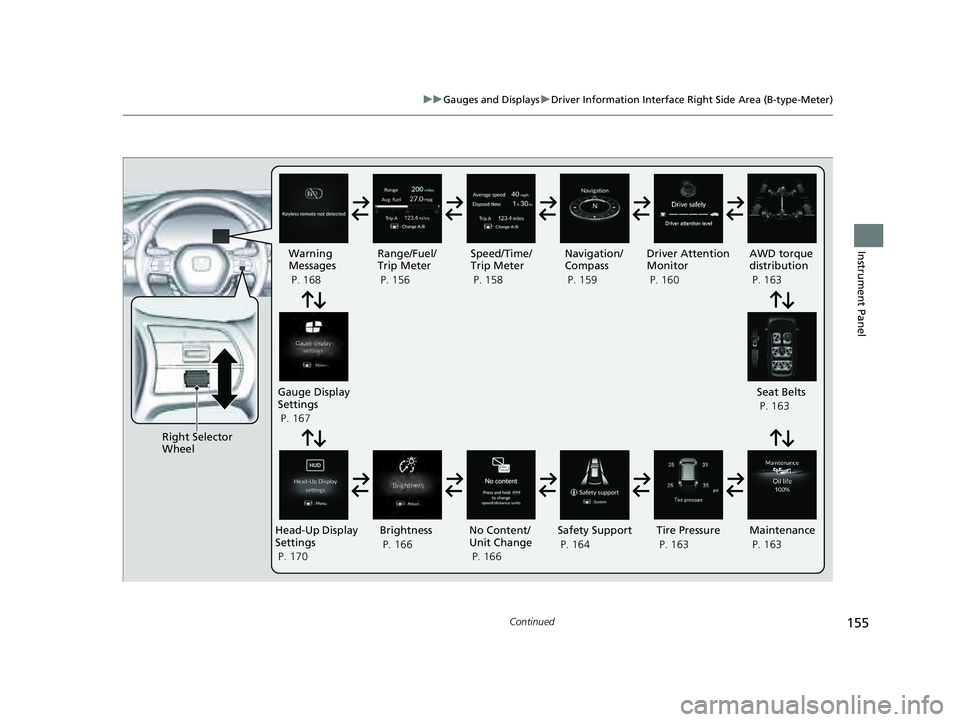
Roll the right selector wheel to view different types of content.
■Switching the Display1Switching the Display
You can add or delete the meter contents.
2 Gauge Display Settings P. 167
23 PILOT-31T906000_03.book 154 ページ 2022年10月31日 月曜日 午前10時26分
Page 156 of 814
155
uuGauges and Displays uDriver Information Interface Right Side Area (B-type-Meter)
Continued
Instrument Panel
Right Selector
Wheel Warning
Messages
P. 168
Range/Fuel/
Trip Meter
P. 156
No Content/
Unit Change
P. 166 Driver Attention
Monitor
P. 160
Navigation/
Compass
P. 159
Speed/Time/
Trip Meter
P. 158
Gauge Display
Settings
P. 167 Maintenance
P. 163
Safety Support
P. 164 Seat Belts
P. 163
Head-Up Display
Settings
P. 170 Brightness
P. 166
Tire Pressure
P. 163
AWD torque
distribution
P. 163
23 PILOT-31T906000_03.book 155 ページ 2022年10月31日 月曜日 午前10時26分