buttons HONDA PILOT 2023 Owners Manual
[x] Cancel search | Manufacturer: HONDA, Model Year: 2023, Model line: PILOT, Model: HONDA PILOT 2023Pages: 814, PDF Size: 29.02 MB
Page 9 of 814
8
Quick Reference Guide
Quick Reference Guide
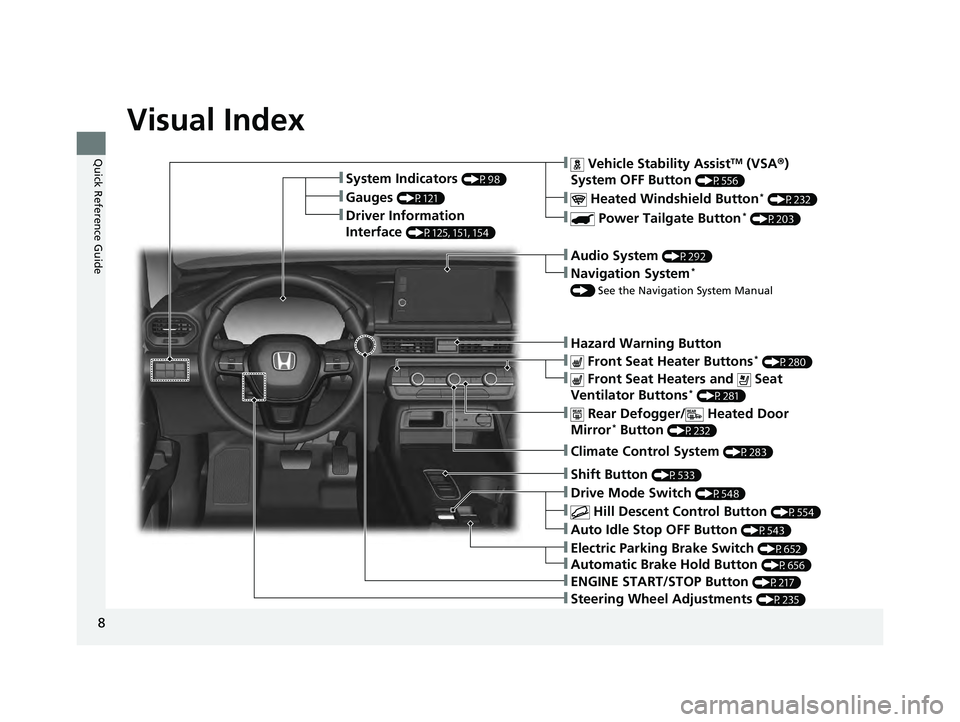
Visual Index
❚Gauges (P121)
❚Driver Information
Interface
(P125, 151, 154)
❚System Indicators (P98)
❚ Vehicle Stability AssistTM (VSA®)
System OFF Button
(P556)
❚ Heated Windshield Button* (P232)
❚ Power Tailgate Button* (P203)
❚Audio System (P292)
❚Navigation System*
() See the Navigation System Manual
❚Hazard Warning Button
❚ Rear Defogger/ Heated Door
Mirror* Button (P232)
❚ Front Seat Heater Buttons* (P280)
❚ Front Seat Heaters and Seat
Ventilator Buttons* (P281)
❚Climate Control System (P283)
❚Shift Button (P533)
❚Auto Idle Stop OFF Button (P543)
❚ Hill Descent Control Button (P554)
❚Drive Mode Switch (P548)
❚ENGINE START/STOP Button (P217)
❚Steering Wheel Adjustments (P235)
❚Electric Parking Brake Switch (P652)
❚Automatic Brake Hold Button (P656)
23 PILOT-31T906000_03.book 8 ページ 2022年10月31日 月曜日 午前10時26分
Page 10 of 814
9
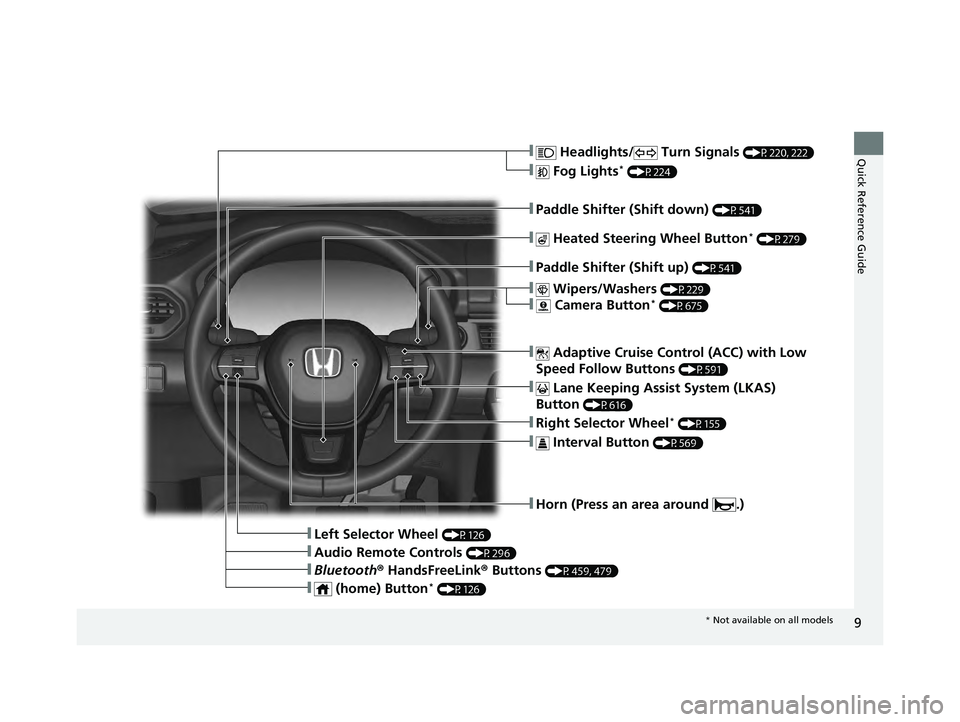
Quick Reference Guide❚ Headlights/ Turn Signals (P220, 222)
❚ Fog Lights* (P224)
❚Paddle Shifter (Shift down) (P541)
❚Paddle Shifter (Shift up) (P541)
❚ Lane Keeping Assist System (LKAS)
Button
(P616)
❚Horn (Press an area around .)
❚Left Selector Wheel (P126)
❚ Adaptive Cruise Control (ACC) with Low
Speed Follow Buttons
(P591)
❚Right Selector Wheel* (P155)
❚ Wipers/Washers (P229)
❚ Camera Button* (P675)
❚ Heated Steering Wheel Button* (P279)
❚ Interval Button (P569)
❚Bluetooth ® HandsFreeLink ® Buttons (P459, 479)
❚Audio Remote Controls (P296)
❚ (home) Button* (P126)
* Not available on all models
23 PILOT-31T906000_03.book 9 ページ 2022年10月31日 月曜日 午前10時26分
Page 11 of 814
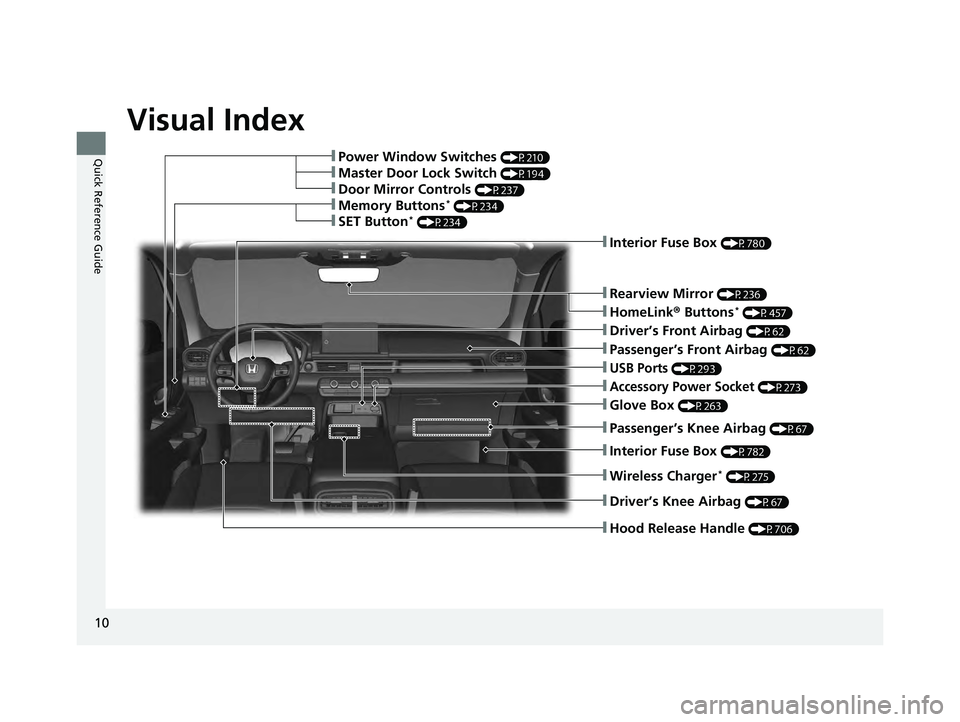
Visual Index
10
Quick Reference Guide❚Power Window Switches (P210)
❚Memory Buttons* (P234)
❚SET Button* (P234)
❚Driver’s Front Airbag (P62)
❚Hood Release Handle (P706)
❚Glove Box (P263)
❚Driver’s Knee Airbag (P67)
❚Accessory Power Socket (P273)
❚Rearview Mirror (P236)
❚HomeLink® Buttons* (P457)
❚Passenger’s Front Airbag (P62)
❚Door Mirror Controls (P237)
❚Master Door Lock Switch (P194)
❚USB Ports (P293)
❚Passenger’s Knee Airbag (P67)
❚Wireless Charger* (P275)
❚Interior Fuse Box (P782)
❚Interior Fuse Box (P780)
23 PILOT-31T906000_03.book 10 ページ 2022年10月31日 月曜日 午前10時26分
Page 12 of 814
11
Quick Reference Guide
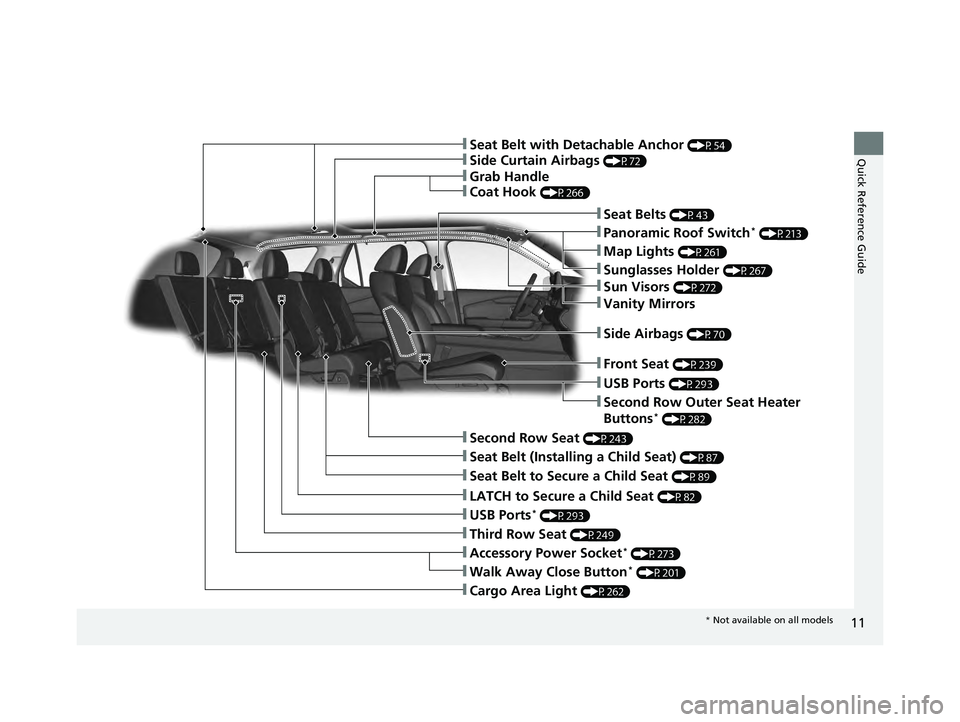
❚Accessory Power Socket* (P273)
❚LATCH to Secure a Child Seat (P82)
❚Seat Belt (Installing a Child Seat) (P87)
❚Third Row Seat (P249)
❚Second Row Seat (P243)
❚Seat Belt to Secure a Child Seat (P89)
❚Side Curtain Airbags (P72)
❚Seat Belts (P43)
❚Grab Handle
❚Coat Hook (P266)
❚Walk Away Close Button* (P201)
❚Panoramic Roof Switch* (P213)
❚Map Lights (P261)
❚Sunglasses Holder (P267)
❚Sun Visors (P272)
❚Vanity Mirrors
❚Front Seat (P239)
❚Side Airbags (P70)
❚USB Ports (P293)
❚Second Row Outer Seat Heater
Buttons* (P282)
❚USB Ports* (P293)
❚Cargo Area Light (P262)
❚Seat Belt with Detachable Anchor (P54)
* Not available on all models
23 PILOT-31T906000_03.book 11 ページ 2022年10月31日 月曜日 午前10時26分
Page 23 of 814
22
Quick Reference Guide
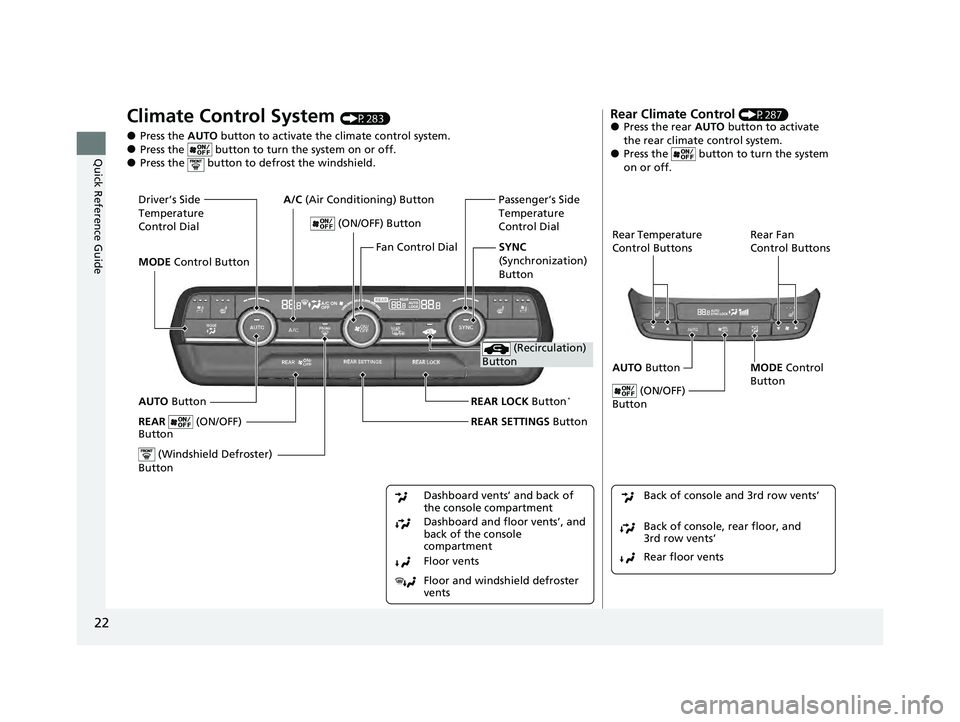
Climate Control System (P283)
●Press the AUTO button to activate the climate control system.●Press the button to turn the system on or off.●Press the button to defrost the windshield.
Floor and windshield defroster
vents Floor vents Dashboard and floor vents’, and
back of the console
compartment Dashboard vents’ and back of
the console compartment
AUTO Button Passenger’s Side
Temperature
Control Dial
(ON/OFF) Button
(Windshield Defroster)
Button
SYNC
(Synchronization)
Button
Fan Control Dial
Driver’s Side
Temperature
Control Dial
MODE
Control Button A/C
(Air Conditioning) Button
(Recirculation)
Button
REAR LOCK Button*
REAR SETTINGS ButtonREAR (ON/OFF)
Button
Rear Climate Control (P287)●Press the rear AUTO button to activate
the rear climate control system.
●Press the button to turn the system
on or off.
Rear Temperature
Control Buttons Rear Fan
Control Buttons
AUTO Button
(ON/OFF)
Button
MODE Control
Button
Rear floor vents Back of console, rear floor, and
3rd row vents’ Back of console and 3rd row vents’
23 PILOT-31T906000_03.book 22 ページ 2022年10月31日 月曜日 午前10時26分
Page 24 of 814
23
Quick Reference Guide
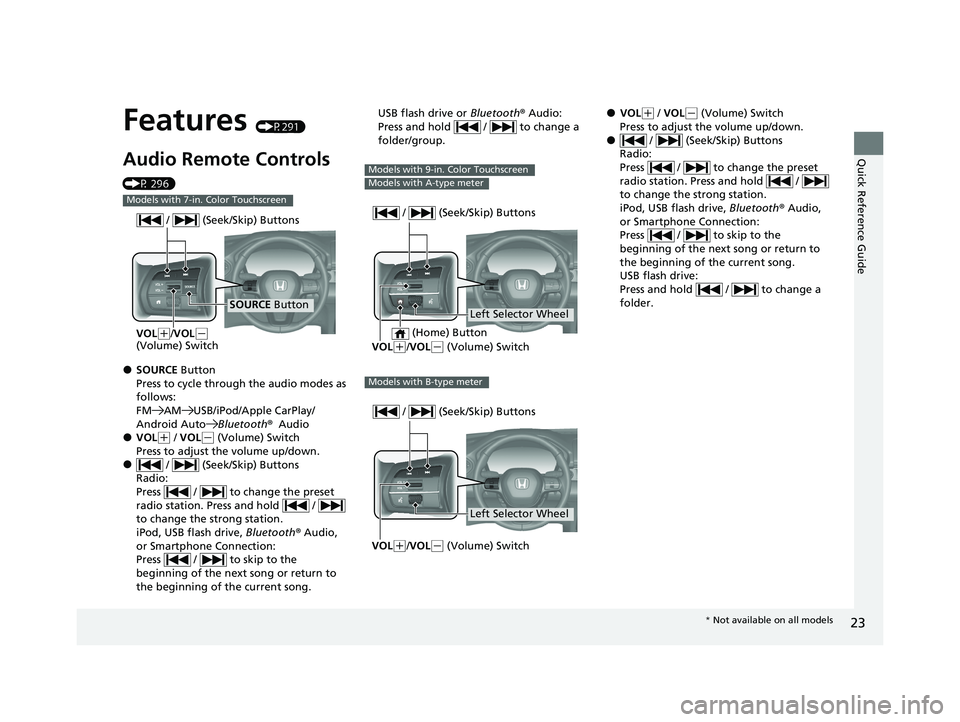
Features (P291)
Audio Remote Controls
(P 296)
●SOURCE Button
Press to cycle through the audio modes as
follows:
FM AM USB/iPod/Apple CarPlay/
Android AutoBluetooth®Audio
●VOL(+ / VOL( - (Volume) Switch
Press to adjust the volume up/down.
● / (Seek/Skip) Buttons
Radio:
Press / to change the preset
radio station. Press and hold /
to change the strong station.
iPod, USB flash drive, Bluetooth® Audio,
or Smartphone Connection:
Press / to skip to the
beginning of the next song or return to
the beginning of the current song.
Models with 7-in. Color Touchscreen
SOURCE Button
/ (Seek/Skip) Buttons
VOL(
+/VOL(-
(Volume) Switch
USB flash drive or Bluetooth® Audio:
Press and hold / to change a
folder/group.
Models with 9-in. Color Touchscreen
Models with A-type meter
Left Selector Wheel
/ (Seek/Skip) Buttons
VOL(
+/VOL( - (Volume) Switch
(Home) Button
Models with B-type meter
Left Selector Wheel
/ (Seek/Skip) Buttons
VOL(
+/VOL( - (Volume) Switch
●VOL(+ / VOL( - (Volume) Switch
Press to adjust the volume up/down.
● / (Seek/Skip) Buttons
Radio:
Press / to change the preset
radio station. Press and hold /
to change the strong station.
iPod, USB flash drive, Bluetooth® Audio,
or Smartphone Connection:
Press / to skip to the
beginning of the next song or return to
the beginning of the current song.
USB flash drive:
Press and hold / to change a
folder.
* Not available on all models
23 PILOT-31T906000_03.book 23 ページ 2022年10月31日 月曜日 午前10時26分
Page 26 of 814
25
Quick Reference Guide
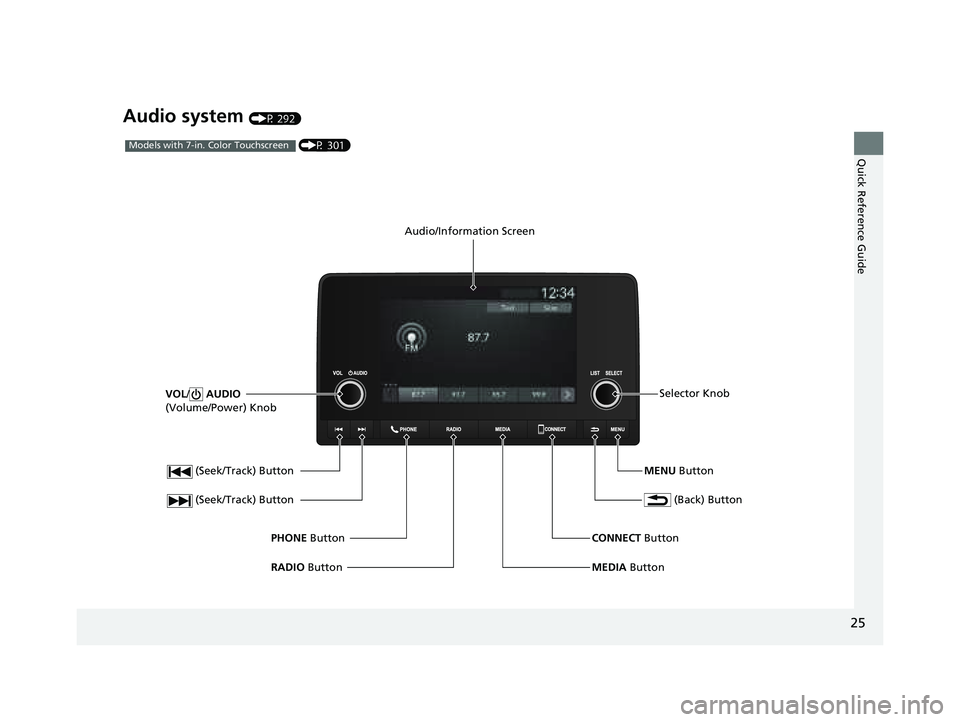
Audio system (P 292)
(Seek/Track) Button
RADIO Button
PHONE
Button
(Seek/Track) Button
VOL
/ AUDIO
(Volume/Power) Knob
Audio/Information Screen
(Back) Button
MENU ButtonSelector Knob
MEDIA Button
CONNECT
Button
(P 301)Models with 7-in. Color Touchscreen
23 PILOT-31T906000_03.book 25 ページ 2022年10月31日 月曜日 午前10時26分
Page 98 of 814
97
Instrument Panel
This chapter describes the buttons, indicators, and gauges that are used while driving.
Indicators............................................ 98
Gauges and Displays Gauges ............................................ 121
Driver Information Interface (A-type Meter) ...125
Driver Information Interface Left Side Area (B-type-Meter) ............................... 151
Driver Information In terface Right Side
Area (B-type-Meter) ....................... 154
Head-Up Display
*............................ 169
* Not available on all models
23 PILOT-31T906000_03.book 97 ページ 2022年10月31日 月曜日 午前10時26分
Page 235 of 814
uuOperating the Switches Around the Steering Wheel uDriving Position Memory System*
234
Controls
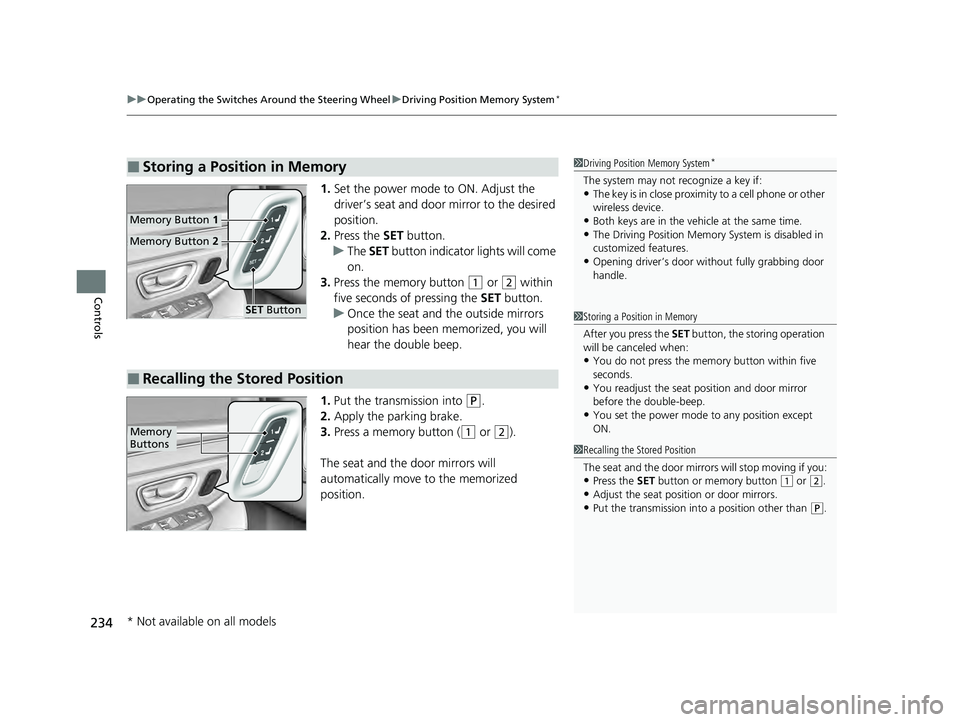
1. Set the power mode to ON. Adjust the
driver’s seat and door mirror to the desired
position.
2. Press the SET button.
u The SET button indicator lights will come
on.
3. Press the memory button
(1 or (2 within
five seconds of pressing the SET button.
u Once the seat and the outside mirrors
position has been memorized, you will
hear the double beep.
1. Put the transmission into
(P.
2. Apply the parking brake.
3. Press a memory button (
(1 or (2).
The seat and the door mirrors will
automatically move to the memorized
position.
■Storing a Position in Memory1 Driving Position Memory System*
The system may not recognize a key if:•The key is in close proximity to a cell phone or other
wireless device.
•Both keys are in the vehicle at the same time.•The Driving Position Memory System is disabled in
customized features.
•Opening driver’s door wi thout fully grabbing door
handle.
Memory Button 1
Memory Button 2
SET Button
■Recalling the Stored Position
1Storing a Position in Memory
After you press the SET button, the storing operation
will be canceled when:
•You do not press the memory button within five
seconds.
•You readjust the seat position and door mirror
before the double-beep.
•You set the power mode to any position except
ON.
1Recalling the Stored Position
The seat and the door mirrors will stop moving if you:
•Press the SET button or memory button (1 or (2.
•Adjust the seat position or door mirrors.•Put the transmission into a position other than (P.
Memory
Buttons
* Not available on all models
23 PILOT-31T906000_03.book 234 ページ 2022年10月31日 月曜日 午前10時26分
Page 257 of 814
uuSeats uHead Restraints
256
Controls
Head restraints can be removed for cleaning or repair.
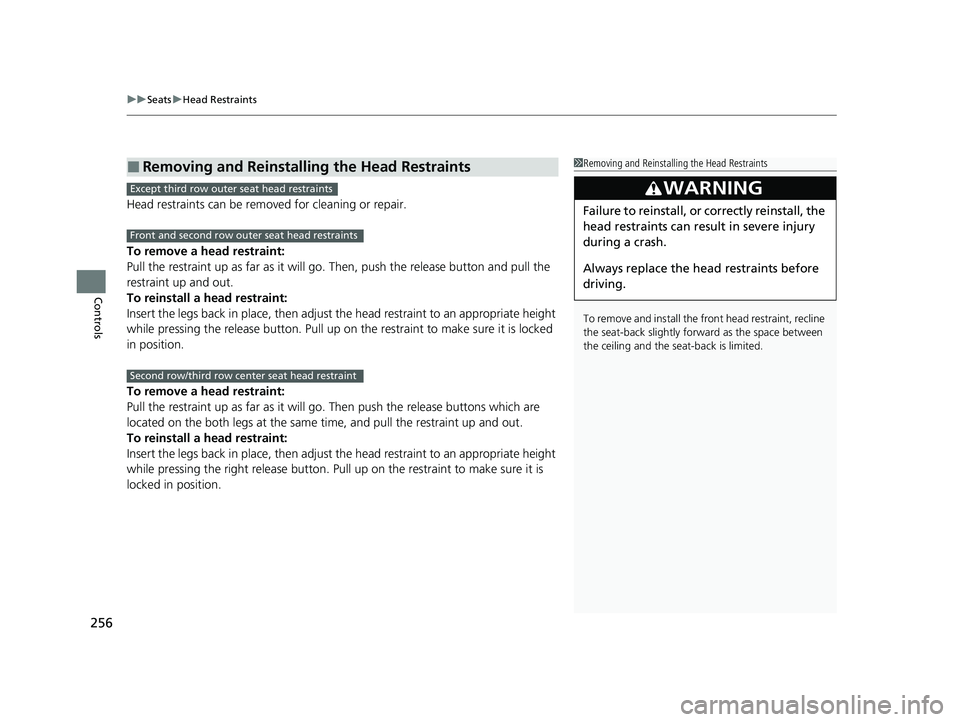
To remove a head restraint:
Pull the restraint up as far as it will go. Then, push the release button and pull the
restraint up and out.
To reinstall a head restraint:
Insert the legs back in place, then adjust the head restraint to an appropriate height
while pressing the release button. Pull up on the restraint to make sure it is locked
in position.
To remove a head restraint:
Pull the restraint up as far as it will go. Then push the release buttons which are
located on the both legs at the same time, and pull the restraint up and out.
To reinstall a head restraint:
Insert the legs back in place, then adjust the head restraint to an appropriate height
while pressing the right release button. Pull up on the restraint to make sure it is
locked in position.
■Removing and Reinstalling the Head Restraints1 Removing and Reinstalling the Head Restraints
To remove and install the front head restraint, recline
the seat-back slightly forward as the space between
the ceiling and the seat-back is limited.
3WARNING
Failure to reinstall, or correctly reinstall, the
head restraints can result in severe injury
during a crash.
Always replace the he ad restraints before
driving.
Except third row outer seat head restraints
Front and second row outer seat head restraints
Second row/third row center seat head restraint
23 PILOT-31T906000_03.book 256 ページ 2022年10月31日 月曜日 午前10時26分