buttons HONDA PILOT 2023 Owner's Guide
[x] Cancel search | Manufacturer: HONDA, Model Year: 2023, Model line: PILOT, Model: HONDA PILOT 2023Pages: 814, PDF Size: 29.02 MB
Page 534 of 814
533
uuWhen Driving uShifting
Continued
Driving
Shifting
Change the gear position in accordance with your driving needs.
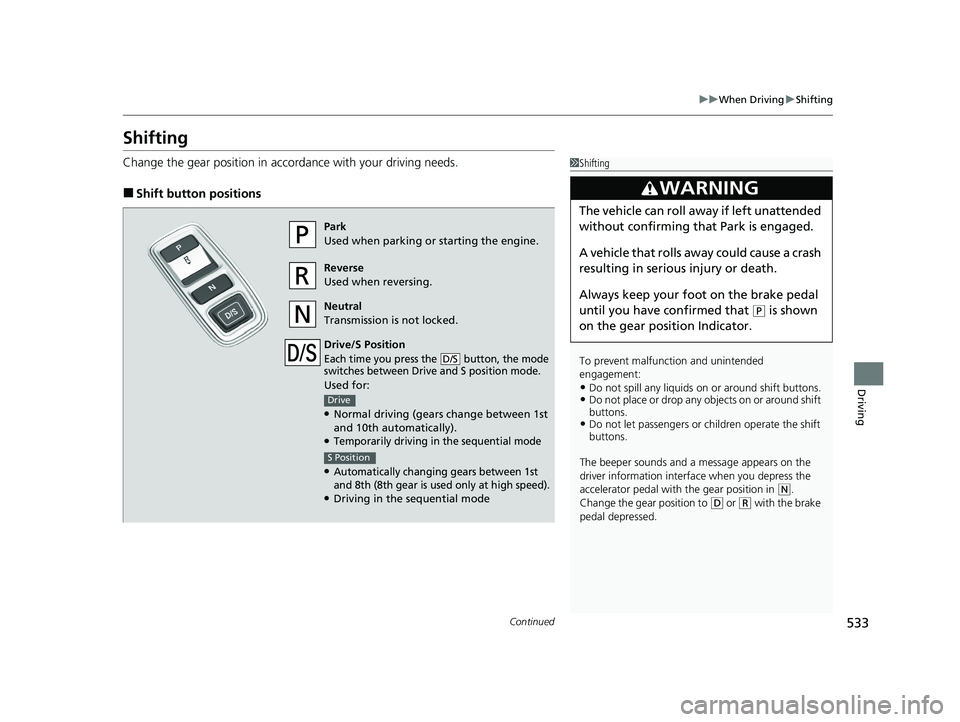
■Shift button positions
1Shifting
To prevent malfunc tion and unintended
engagement:
•Do not spill any liquids on or around shift buttons.•Do not place or drop any objects on or around shift
buttons.
•Do not let passengers or ch ildren operate the shift
buttons.
The beeper sounds and a message appears on the
driver information interf ace when you depress the
accelerator pedal with the gear position in
( N.
Change the gear position to
( D or (R with the brake
pedal depressed.
3WARNING
The vehicle can roll aw ay if left unattended
without confirming that Park is engaged.
A vehicle that rolls away could cause a crash
resulting in seriou s injury or death.
Always keep your foot on the brake pedal
until you have confirmed that
( P is shown
on the gear position Indicator.
Park
Used when parking or starting the engine.
Reverse
Used when reversing.
Neutral
Transmission is not locked.
Drive/S Position
Each time you press the button, the mode
switches between Drive and S position mode.
Used for:
●Normal driving (gears change between 1st
and 10th automatically).
●Temporarily driving in the sequential mode
●Automatically changing gears between 1st
and 8th (8th gear is used only at high speed).
●Driving in the sequential mode
D/S
Drive
S Position
23 PILOT-31T906000_03.book 533 ページ 2022年10月31日 月曜日 午前10時26分
Page 561 of 814
uuWhen Driving uTire Pressure Monitoring System (TPMS) with Tire Fill Assist
560
Driving
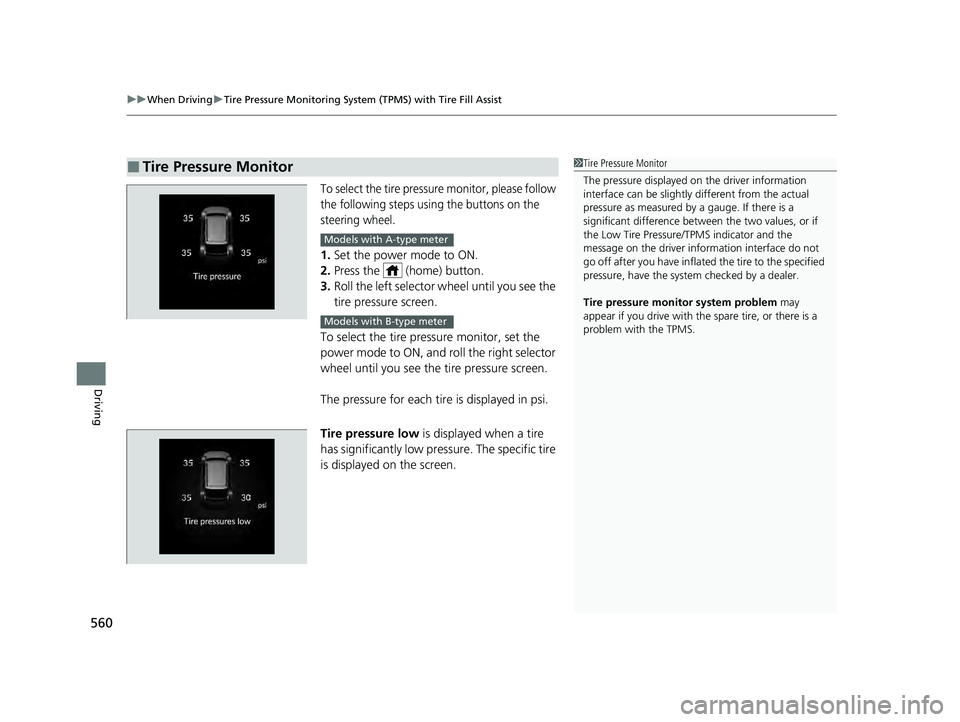
To select the tire pressure monitor, please follow
the following steps using the buttons on the
steering wheel.
1. Set the power mode to ON.
2. Press the (home) button.
3. Roll the left selector wheel until you see the
tire pressure screen.
To select the tire pressure monitor, set the
power mode to ON, and roll the right selector
wheel until you see the tire pressure screen.
The pressure for each tire is displayed in psi.
Tire pressure low is displayed when a tire
has significantly low pressure. The specific tire
is displayed on the screen.
■Tire Pressure Monitor1 Tire Pressure Monitor
The pressure displayed on the driver information
interface can be slightly different from the actual
pressure as measured by a gauge. If there is a
significant di fference between the two values, or if
the Low Tire Pressure/TPMS indicator and the
message on the driver info rmation interface do not
go off after you have inflated the tire to the specified
pressure, have the system checked by a dealer.
Tire pressure monitor system problem may
appear if you drive with the spare tire, or there is a
problem with the TPMS.
Models with A-type meter
Models with B-type meter
23 PILOT-31T906000_03.book 560 ページ 2022年10月31日 月曜日 午前10時26分
Page 628 of 814
Continued627
uuHonda Sensing ®u Traffic Jam Assist
Driving
Traffic Jam Assist is activated when all of the following conditions exist:
• LKAS is activated.
• The lane in which you are driving has detectable lane markers on both sides, and
your vehicle is in the center of the lane.
• The vehicle is traveling between about 0 and 45 mph (0 and 72 km/h).
• You are driving on a straight or slightly curved road.
• The driver is grippi ng the steering wheel.
• The shift position is in
(D or (S.
Do not use Traffic Jam Assist in any of the following situations:
• You are traveling on a road with sharp curves.
u The system may not allow your vehicle to respond in a manner best suited for
the road conditions.
• You are entering a toll booth, inte rchange, service area, or parking area.
• You are driving in adverse weat her (rain, fog, snow, etc.).
• The surface of the road is slippery; for ex ample, it is icy or covered with snow.
u The tire may slip, causing you to lose control of the vehicle.
■Traffic Jam Assist Activation1Traffic Jam Assist Activation
Refer to the following pa ge for proper handling of
the Lane Keeping Assist System (LKAS):
2 Lane Keeping Assist System (LKAS) P. 612
Refer to the following page for steering buttons and
displays: 2 Operation Switches for the Adaptive
Cruise Control (ACC) with Low Speed
Follow/Lane Keeping Assist System
(LKAS)/Traffic Jam Assist P. 568
2 Gauge Content P. 570
23 PILOT-31T906000_03.book 627 ページ 2022年10月31日 月曜日 午前10時26分
Page 740 of 814
739
Maintenance
Remote Transmitter Care
Replacing the Remote Battery
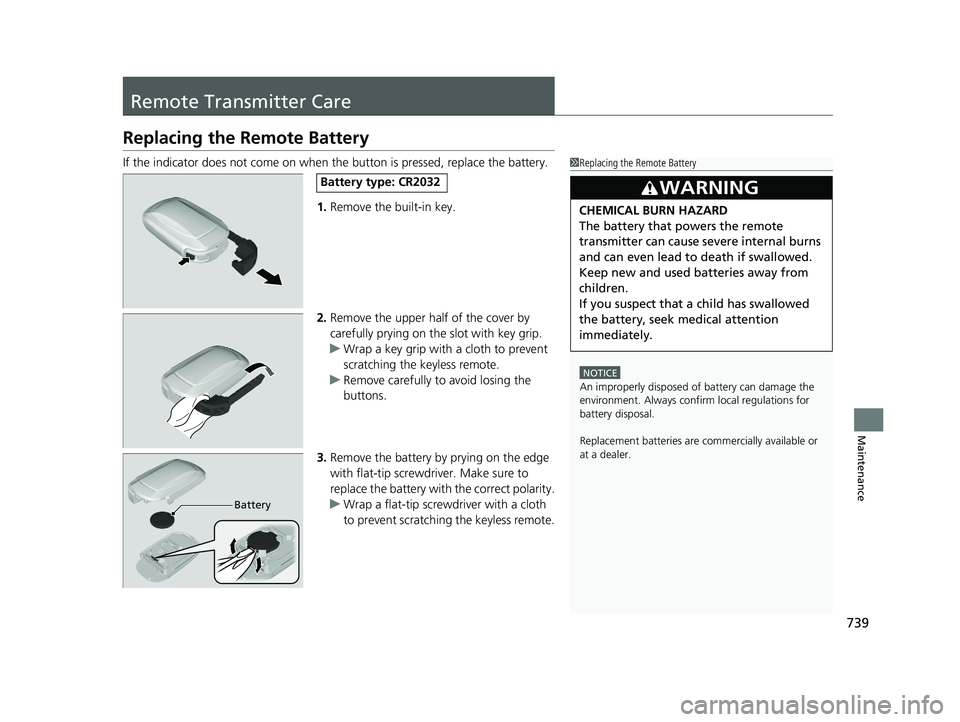
If the indicator does not come on when the button is pressed, replace the battery.
1. Remove the built-in key.
2. Remove the upper half of the cover by
carefully prying on the slot with key grip.
u Wrap a key grip with a cloth to prevent
scratching the keyless remote.
u Remove carefully to avoid losing the
buttons.
3. Remove the battery by prying on the edge
with flat-tip screwdriver. Make sure to
replace the battery with the correct polarity.
u Wrap a flat-tip screwdriver with a cloth
to prevent scratching the keyless remote.1Replacing the Remote Battery
NOTICE
An improperly disposed of battery can damage the
environment. Always conf irm local regulations for
battery disposal.
Replacement batteries are commercially available or
at a dealer.
3WARNING
CHEMICAL BURN HAZARD
The battery that powers the remote
transmitter can cause severe internal burns
and can even lead to death if swallowed.
Keep new and used batteries away from
children.
If you suspect that a child has swallowed
the battery, seek medical attention
immediately.
Battery type: CR2032
Battery
23 PILOT-31T906000_03.book 739 ページ 2022年10月31日 月曜日 午前10時26分
Page 765 of 814
764
uuEngine Does Not Start uIf the Keyless Remote Battery is Weak
Handling the Unexpected
If the Keyless Remote Battery is Weak
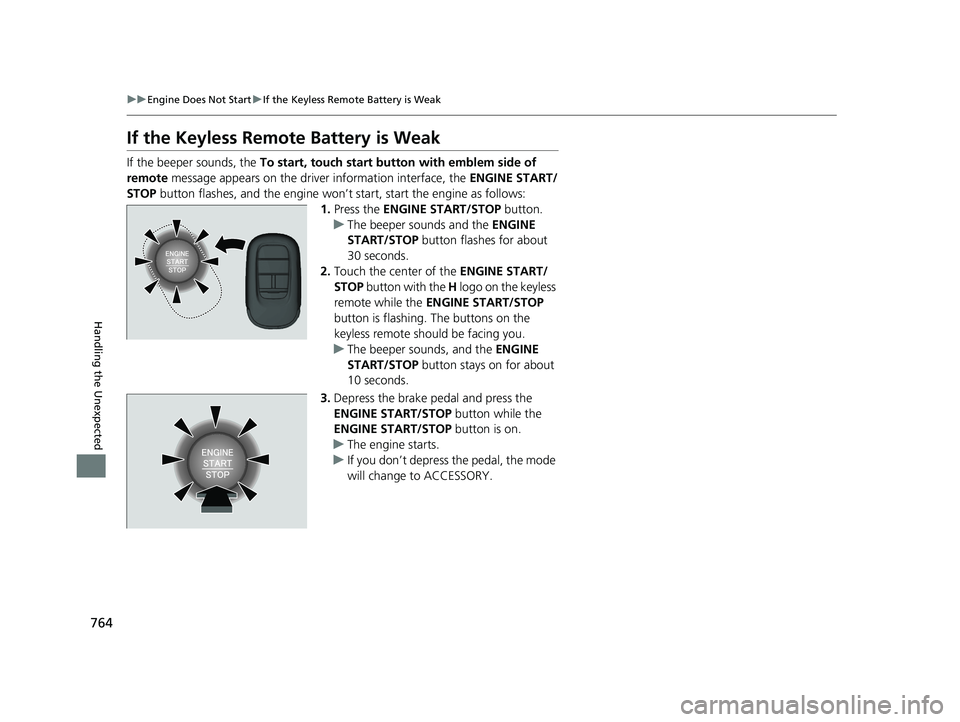
If the beeper sounds, the To start, touch start butto n with emblem side of
remote message appears on the driver information interface, the ENGINE START/
STOP button flashes, and the engine won’t start, start the engine as follows:
1.Press the ENGINE START/STOP button.
u The beeper sounds and the ENGINE
START/STOP button flashes for about
30 seconds.
2. Touch the center of the ENGINE START/
STOP button with the H logo on the keyless
remote while the ENGINE START/STOP
button is flashing. The buttons on the
keyless remote should be facing you.
u The beeper sounds, and the ENGINE
START/STOP button stays on for about
10 seconds.
3. Depress the brake pedal and press the
ENGINE START/STOP button while the
ENGINE START/STOP button is on.
u The engine starts.
u If you don’t depress the pedal, the mode
will change to ACCESSORY.
23 PILOT-31T906000_03.book 764 ページ 2022年10月31日 月曜日 午前10時26分
Page 808 of 814
807
Index
F
Features.................................................... 291
Filters Dust and Pollen....................................... 741
Oil .......................................................... 712
Flat Tire ..................................................... 751
Floor Mats ................................................ 743
Fluids
Automatic Transmission .......................... 716
Brake ...................................................... 717
Engine Coolant ....................................... 714
Transfer Assembly ................................... 716
Windshield Washer ................................. 717
FM/AM Radio ................................... 304, 352
Fog Light Indicator .................................. 108
Folding Down the Second Row Seat ...... 244
Folding Down the Third Row Seat .......... 250
Foot Brake ................................................ 655
Front Airbags (SRS) .................................... 62
Front Seat Heaters ................................... 280
Front Seats Adjusting ................................................ 239
Front Sensor Camera ............................... 648
Fuel ..................................................... 29, 686
Average Fuel Economy .................... 128, 157
Economy................................................. 689
Gauge .................................................... 122
Instant Fuel Economy ...................... 128, 157
Low Fuel Indicator................................... 105
Range ............................................. 128, 157
Recommendation.................................... 686 Refueling ................................................. 686
Fuel Economy ............................................ 689
Fuel Fill Door ............................................. 687
Unable to Unlock ..................................... 786
Fuses .......................................................... 778
Inspecting and Changing ......................... 783
Locations ................................. 778, 780, 782
G
Gasoline (Fuel) Average Fuel Economy .................... 128, 157
Economy ................................................. 689
Gauge ..................................................... 122
Information ............................................. 686
Instant Fuel Economy ....................... 128, 157
Low Fuel Indicator ................................... 105
Refueling ................................................. 686
Gauge Display Settings .................... 139, 167
Gauges ...................................................... 121
Gear Position Indicator .................... 103, 535
Gear Shift Positions Automatic Transmission ........................... 533
Glass (care) ................................................ 745
Glove Box .................................................. 263
H
Handling the Unexpected ........................ 749
HandsFreeLink ® (HFL) ....................... 459, 479
Automatic Import of Ce llular Phonebook and
Call History .................................... 471, 489
Automatic Transferring.................... 469, 488
Favorite Contacts ............................ 472, 490
HFL Buttons..................................... 459, 479
HFL Menus ...................................... 462, 482
HFL Status Display ........................... 461, 481
In Case of Emergency .............................. 496
Limitations for Manual Operation .... 461, 481
Making a Call .................................. 474, 492
Options During a Call ...................... 478, 495
Phone Setup.................................... 464, 484
Receiving a Call ............................... 477, 494
Ringtone ......................................... 469, 488
Hazard Warning Button .............................. 8
HD Radio
TM............................................... 353
Head Restraints ................................ 253, 257
Headlights ................................................. 220
Aiming .................................................... 718
Auto High-Beam ..................................... 226
Dimming ................................................. 220
Operating................................................ 220
Head-Up Display ....................................... 169
Heated Door Mirrors ................................ 232
Heated Steering Wheel ............................ 279
Heated Windshield ................................... 232
Heaters (Front Seat) ................................. 280
Heaters (Seat) ................................... 281, 282
23 PILOT-31T906000_03.book 807 ページ 2022年10月31日 月曜日 午前10時26分