engine HONDA PILOT 2023 Workshop Manual
[x] Cancel search | Manufacturer: HONDA, Model Year: 2023, Model line: PILOT, Model: HONDA PILOT 2023Pages: 814, PDF Size: 29.02 MB
Page 341 of 814
340
uuAudio System Basic Operation uSystem Updates
Features
System Updates
The audio system’s firmware can be updated with a Wi-Fi connection or with a USB
device.
The audio system’s firmware can be also updated with the telematics control unit
(TCU) through the subscription-based service.
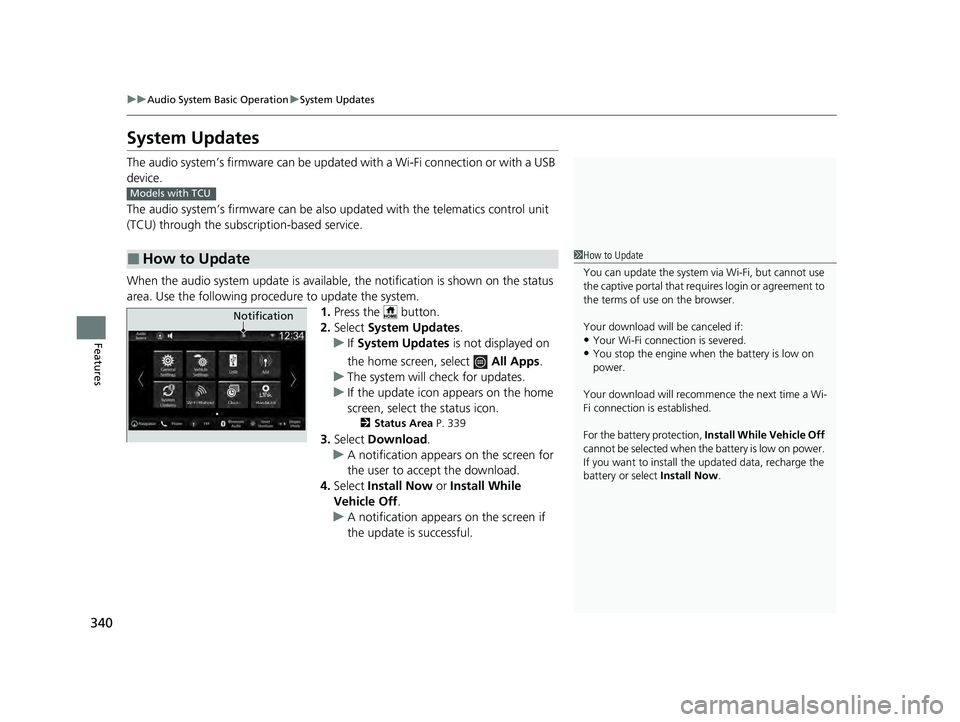
When the audio system update is available, the notification is shown on the status
area. Use the following proc edure to update the system.
1.Press the button.
2. Select System Updates .
u If System Updates is not displayed on
the home screen, select All Apps.
u The system will check for updates.
u If the update icon appears on the home
screen, select the status icon.
2 Status Area P. 339
3.Select Download .
u A notification appears on the screen for
the user to accept the download.
4. Select Install Now or Install While
Vehicle Off .
u A notification appears on the screen if
the update is successful.
■How to Update
Models with TCU
1How to Update
You can update the system vi a Wi-Fi, but cannot use
the captive portal that requir es login or agreement to
the terms of use on the browser.
Your download will be canceled if:
•Your Wi-Fi connection is severed.
•You stop the engine when the battery is low on
power.
Your download will recommence the next time a Wi-
Fi connection is established.
For the battery protection, Install While Vehicle Off
cannot be selected when th e battery is low on power.
If you want to install the updated data, recharge the
battery or select Install Now.
Notification
23 PILOT-31T906000_03.book 340 ページ 2022年10月31日 月曜日 午前10時26分
Page 405 of 814
404
uuGeneral Information on the Audio System uHonda App License Agreement
Features
(b) Restrictions on Use. The licenses granted under this AGREEMENT do not pe rmit you to use the SOFTWARE or SERVICES on a device
other than your VEHICLE. As a condition of using the SOFTWARE and SERVICES, you agree that you may not and will not:
6. Intellectual Property Rights. All title and intellectual property rights in and to the SOFTWARE and SERVICES, the accompanying
DOCUMENTATION, and all copies of the SOFTWARE or SERVICES are ow ned by HONDA, PROVIDERS, or their suppliers or licensors. This
AGREEMENT does not grant you any rights in connection with any trademarks or service marks of HONDA, PROVIDERS, or their licens ors,
affiliates, or suppliers. (1) copy, download, distribute, modify, publish, sell, rent, lease, lend, license, sublicense, reuse, or create derivative works of the
SOFTWARE or SERVICES or any of the content or other material
within the SOFTWARE or SERVICES, including without limitation,
HONDA or PROVIDER names, logos, or any othe r trademarks of HONDA or PROVIDERS or used in association with the SOFTWARE or
any SERVICES, except as required to use the SOFTWARE or SERVICES in accordance with this AGREEMENT, any applicable PROVIDER
TERMS, and the DOCUMENTATION;
(2) access or use the SOFTWARE or SERVICES in any manner intended to damage or impair the operation of the SOFTWARE or SERVICES
or interfere with anyone else’s use a nd enjoyment of the SOFTWARE or SERVICES;
(3) access or attempt to access any system or server on which the SOFTWARE or SERVICES is hosted or modify or alter the SOFTWAR E
or SERVICES in any way;
(4) use the SOFTWARE or SERVICES for any unlawful pu rpose, or in violation of any third party rights;
(5) use the SOFTWARE or SERVICES in violatio n of any applicable traffic regulations, rules or laws, including but not limited t o any driver
distraction laws, rules or regulations;
(6) violate the terms of this AGREEMENT, any HONDA TERMS, any PR OVIDER TERMS or other applicable third-party terms, conditions,
and privacy policies; or
(7) reverse engineer, decompile, disassemble , attempt to derive the source code of, nor permit others to reverse engineer, deco mpile,
or disassemble, or attempt to derive the source code of the SOFT WARE or SERVICES, except and only to the extent that such activity is
expressly permitted (a) by applicable law notwithstanding this limi tation or (b) the terms of applicable free or opensource software
licenses.
23 PILOT-31T906000_03.book 404 ページ 2022年10月31日 月曜日 午前10時26分
Page 409 of 814
408
uuGeneral Information on the Audio System uHonda App License Agreement
Features
E. Information Coll ection and Storage
1. Information Collection, Use, Transmission and Storage of Data. Consent to Use of Data:
You agree that HONDA and PROVIDERS may
collect and use your information gathered in any manner as part of product support services related to the SOFTWARE or related services.
HONDA may share such information with third parties, including, without limitation, PROVIDERS, th ird party software and services
suppliers, their affiliates and/or their desi gnated agents, solely to improve their products or to provide services or technolo gies to you.
HONDA, third party software and systems s uppliers, their affiliates and/or their designated agent may disclose this information to others,
but not in a form that pe rsonally identifies you.
2. Information Storage.
Depending on the type of multimedia system you have in your VEHICLE, certain information may be stored for ease
of use of the SOFTWARE including, without limitation, search hi story, location history in certain applications, previous and saved
destinations, map locations within certain applications, and device numbers and contact information.
(a) Vehicle Health Information.
Your VEHICLE may remotely trans mit information regarding the status and health of your VEHICLE
(“VEHICLE INFORMATION”) to HONDA without notification to you. VEHICLE INFORMATION may contain VEHICLE maintenance and
malfunction status that is derived from VEHICLE diagnostic data and includes, but is not limited to, status of powered doors and windows,
battery life data, battery charging data, VEHICLE speed, coolant temperat ure, air compressor revolution, output power, warning codes,
diagnostic trouble codes, fuel injection volu me, and engine rotations per minute. VEHICL E HEALTH INFORMATION may be used by HON DA
for research and development, to deliver HONDA SERVICES and information to you, and to contact you, and is retained only for a period
of time necessary to fulfill these goals.
(b) VEHICLE Geolocation Data (non-navigation/map based).
If you opt-in to geolocation-based SERVICES, your vehicle’s geolocation data
(latitude and longitude) will be automatically se nt from your VEHICLE to HONDA and PROVIDERS.
(c) You understand that the inputting or uploading of information to your VEHICLE’s multimedia system or the SOFTWARE or SERVIC ES is
at your own risk and that HONDA is not responsible for unauthorized access to or use of any personal or other information. All information
uploaded to the SOFTWARE and SERVICES may be stored on your VEHICLES’s multimedia system and you understand that the security and
safety of your VEHICLE’s multimedia system is your sole responsibility.
23 PILOT-31T906000_03.book 408 ページ 2022年10月31日 月曜日 午前10時26分
Page 452 of 814
451
uuCustomized Features u
Continued
Features
■Driving Position Setup
*1:Default Setting
■Keyless Access Setup
*1:Default Setting
Customizable Features Description Selectable Settings
Memory Position LinkTurns the driving position memory system on and off.ON*1/OFF
Seat Position Movement At
Entry/Exit Causes the driver’s seat to move ba
ck to make it easier to enter or
exit the vehicle. ON
*1/
OFF
Customizable Features Description Selectable Settings
Door Unlock ModeChanges which doors unlock when you grab the driver’s door
handle.Driver Door Only*1/All
Doors
Keyless Access Light Flash Causes some exterior lights to
flash when you unlock/lock the
doors. ON
*1/
OFF
Keyless Access BeepCauses the beeper to sound when you unlock/lock the doors.ON*1/OFF
Remote Start System ON/
OFF Turns the remote engine start feature on and off.
ON
*1/OFF
Lockout ProtectionChanges the settings for the lo ckout protection function.ON*1/OFF
23 PILOT-31T906000_03.book 451 ページ 2022年10月31日 月曜日 午前10時26分
Page 502 of 814
501
Driving
This chapter discusses driving and refueling.
Before Driving....................................... 502
Towing a Trailer .................................... 508
Off-Highway Driving Guidelines ......... 519
When Driving
Starting the Engine .......................... 524
Precautions While Driving................. 531
Automatic Transmission ................... 532
Shifting ............................................ 533
Auto Idle Stop .................................. 542
Drive Mode System .......................... 548
Hill Descent Control System ............. 553
Vehicle Stability AssistTM (VSA ®), aka Electronic
Stability Control (ESC), System ..............555
Agile Handling Assist ....................... 557 Intelligent Variable To
rque Management (i-
VTM4
TM) AWD System*.................. 558
Tire Pressure Monitoring System (TPMS) with Tire Fill Assist .......................... 559
Tire Pressure Monitoring System (TPMS) -
Required Federal Explanation ......... 561
Blind Spot Information System
*....... 563Honda Sensing ®.................................... 567Collision Mitigation Braking SystemTM (CMBSTM) ....572Low Speed Braking Control*............ 584Adaptive Cruise Control (ACC) with Low Speed Follow.. 590Lane Keeping Assist System (LKAS) .. 612
Traffic Jam Assist ............................. 625
Road Departure Mitigation System .. 634
Traffic Sign Recognition System.... 642
Front Sensor Camera ....................... 648
Radar Sensor ................................... 650
Sonar Sensors*............................. 651BrakingBrake System ................................... 652
Anti-lock Brake System (ABS) ........... 659
Brake Assist System ......................... 660
Parking Your VehicleWhen Stopped ................................ 661
Parking Sensor System*................... 663
Cross Traffic Monitor*..................... 668Multi-View Rear Camera*..................... 672
Surround View Camera System*.......... 674Refueling ........................................... 686
Fuel Economy and CO
2 Emissions .... 689
* Not available on all models
23 PILOT-31T906000_03.book 501 ページ 2022年10月31日 月曜日 午前10時26分
Page 503 of 814
502
Driving
Before Driving
Driving Preparation
Check the following items before you start driving.
• Make sure there are no obstructions on the windows, door mirrors, exterior
lights, or other parts of the vehicle.
u Remove any frost, snow, or ice.
u Remove any snow on the roof, as this can slip down and obstruct your field of
vision while driving. If frozen solid , remove ice once it has softened.
u When removing ice from around the wheels, be sure not to damage the wheel
or wheel components.
• Make sure the hood is securely closed.
u If the hood opens while driving, your front view will be blocked.
• Make sure the tires are in good condition.
u Check air pressures, and check for damage and excessive wear.
2Checking and Maintaining Tires P. 728
•Make sure there are no people or ob jects behind or around the vehicle.
u There are blind spots from the inside.
■Exterior Checks1Exterior Checks
NOTICE
When doors are frozen s hut, use warm water around
the door edges to melt any ice. Do not try to force
them open, as this can damage the rubber trim
around the doors. When done, wipe dry to avoid
further freezing.
Do not pour warm water into the key cylinder.
You will be unable to insert the key if the water
freezes in the hole.
Heat from the engine and exhaust can ignite
flammable material s left under the hood, causing a
fire. If you’ve parked y our vehicle for an extended
period, inspect and remove any debris that may have
collected, such as dried grass and leaves that have
fallen or have been carried in for use as a nest by a
small animal. Also, check under the hood for leftover
flammable materials after you or someone else has
performed maintenance on your vehicle.
23 PILOT-31T906000_03.book 502 ページ 2022年10月31日 月曜日 午前10時26分
Page 509 of 814
508
Driving
Towing a Trailer
Towing Preparation
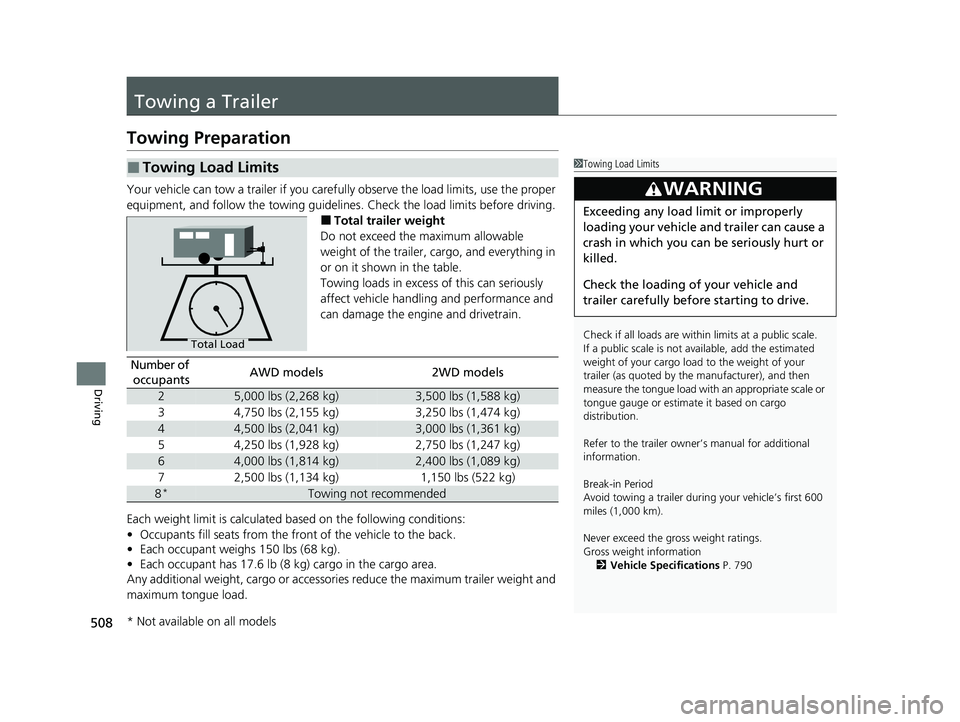
Your vehicle can tow a trailer if you carefully observe the load limits, use the proper
equipment, and follow the towing guidelin es. Check the load limits before driving.
■Total trailer weight
Do not exceed the maximum allowable
weight of the trailer, cargo, and everything in
or on it shown in the table.
Towing loads in excess of this can seriously
affect vehicle handling and performance and
can damage the engine and drivetrain.
Each weight limit is calculated based on the following conditions:
• Occupants fill seats from the front of the vehicle to the back.
• Each occupant weighs 150 lbs (68 kg).
• Each occupant has 17.6 lb (8 kg) cargo in the cargo area.
Any additional weight, cargo or accessori es reduce the maximum trailer weight and
maximum tongue load.
■Towing Load Limits1 Towing Load Limits
Check if all loads are within limits at a public scale.
If a public scale is not av ailable, add the estimated
weight of your cargo load to the weight of your
trailer (as quoted by the manufacturer), and then
measure the tongue load with an appropriate scale or
tongue gauge or estima te it based on cargo
distribution.
Refer to the trailer owner’s manual for additional
information.
Break-in Period
Avoid towing a trailer duri ng your vehicle’s first 600
miles (1,000 km).
Never exceed the gross weight ratings.
Gross weight information 2 Vehicle Specifications P. 790
3WARNING
Exceeding any load limit or improperly
loading your vehicle and trailer can cause a
crash in which you can be seriously hurt or
killed.
Check the loading of your vehicle and
trailer carefully before starting to drive.
Total Load
Number of
occupantsAWD models2WD models
25,000 lbs (2,268 kg)3,500 lbs (1,588 kg)
34,750 lbs (2,155 kg)3,250 lbs (1,474 kg)
44,500 lbs (2,041 kg)3,000 lbs (1,361 kg)
54,250 lbs (1,928 kg)2,750 lbs (1,247 kg)
64,000 lbs (1,814 kg)2,400 lbs (1,089 kg)
72,500 lbs (1,134 kg)1,150 lbs (522 kg)
8*Towing not recommended
* Not available on all models
23 PILOT-31T906000_03.book 508 ページ 2022年10月31日 月曜日 午前10時26分
Page 513 of 814
uuTowing a Trailer uTowing Preparation
512
Driving
■Trailer brakes
Recommended for any trailer with a total weight of 1,000 lbs (450 kg) or more:
There are two common types of trailer brake s: surge and electric. Surge brakes are
common for boat trailers, since the brakes will get wet.
If you choose electric brakes, be sure they are electronically actuated. Do not
attempt to attach trailer brakes to your ve hicle’s hydraulic system, as it will lower
braking effectiveness and create a potential hazard.
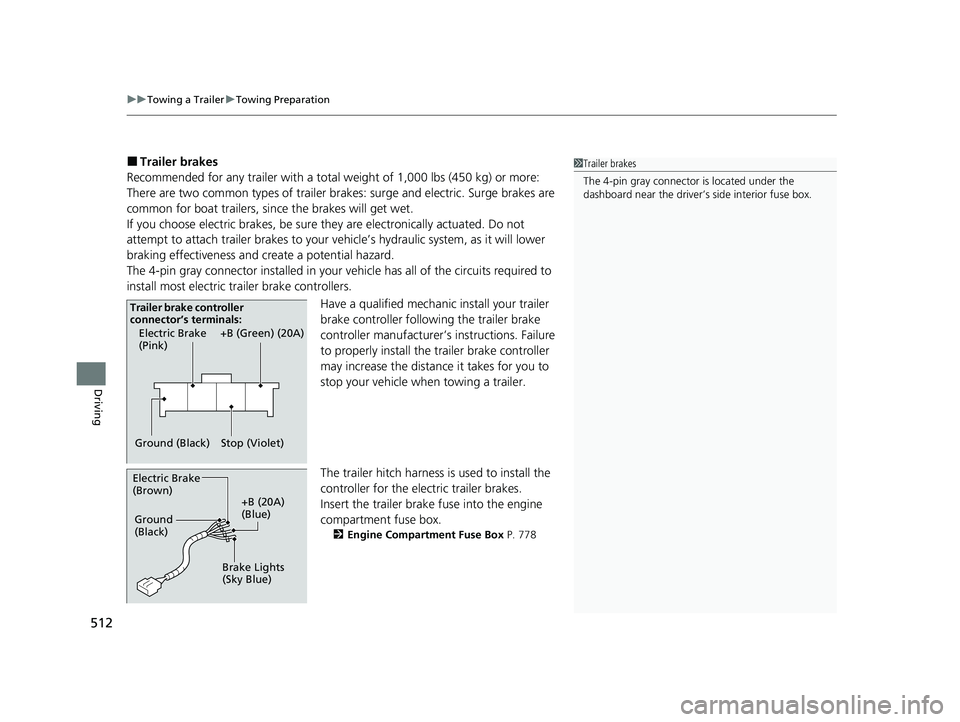
The 4-pin gray connector installed in your vehicle has all of the circuits required to
install most electric trailer brake controllers.
Have a qualified mechanic install your trailer
brake controller following the trailer brake
controller manufacturer’s instructions. Failure
to properly install the trailer brake controller
may increase the distance it takes for you to
stop your vehicle when towing a trailer.
The trailer hitch harness is used to install the
controller for the electric trailer brakes.
Insert the trailer brake fuse into the engine
compartment fuse box.
2 Engine Compartment Fuse Box P. 778
1Trailer brakes
The 4-pin gray connector is located under the
dashboard near the driver’s side interior fuse box.
Electric Brake
(Pink)
Ground (Black) +B (Green) (20A)
Stop (Violet)
Trailer brake controller
connector’s terminals:
Electric Brake
(Brown)
+B (20A)
(Blue)
Ground
(Black)
Brake Lights
(Sky Blue)
23 PILOT-31T906000_03.book 512 ページ 2022年10月31日 月曜日 午前10時26分
Page 516 of 814
515
uuTowing a Trailer uTrailer Stability Assist
Driving
Trailer Stability Assist
Helps stabilize the vehicle and traile r when the trailer severely sways.
■How trailer stability assist works
When the vehicle and trailer become unstable while driving, trailer stability assist
determines the cause. If the trailer oscilla tion is detected as the cause, and the
swaying increases, the system applies the br akes or controls engine output to reduce
vehicle speed.
Both the vehicle and trailer brake lights co me on automatically if you brake to
reduce vehicle speed.
1 Trailer Stability Assist
Trailer stability assist is not a function that prevents
the vehicle and trailer from swaying. Avoid high
speeds, abrupt steering, improper trailer load, and
sudden braking to keep th e trailer from swaying.
When swaying too severely, the system becomes
ineffective, and you may lose control of your vehicle,
causing the trailer to ro ll over or get damaged.
2 Driving Safely with a Trailer P. 516
Trailer towing sway is caused by:
•Crosswinds
•Improper tongue load
•Excessive Speed
The VSA ® system indicator blinks during the trailer
stability assist operation. 2 VSA ® Operation P. 555
23 PILOT-31T906000_03.book 515 ページ 2022年10月31日 月曜日 午前10時26分
Page 518 of 814
517
uuTowing a Trailer uDriving Safely with a Trailer
Driving
• Drive slower than normal.
• Obey posted speed limits fo r vehicles with trailers.
• Use the
(D position when towing a trailer on level roads.
• Turn more slowly and with a wider turning arc than normal.
• Allow more time and distance for braking.
• Do not brake or turn suddenly.
• If the Engine temperature near limit. Av oid heavy acceleration and high
speed. message appears on the driver information interface, turn off the climate
control system and reduce speed.
If the Engine temperature too hot. Do no t drive. Allow engine to cool.
message appears on the driver information interface, pull to the side of the road
safely to cool down the engine.
• Change the gear position to
(S position if the transmission shifts frequently.
When retrieving a boat from the wa ter, the sequential shift mode
(S is
recommended to utilize the transmissions lower gears.
■Towing Speeds and Gears
■Turning and Braking
■Driving in Hilly Terrain
■Retrieving a Boat
1Towing Speeds and Gears
When towing a fixed-sided trailer (e.g., camper), do
not exceed 55 mph (88 km/h).
At higher speeds, the trai ler may sway or affect
vehicle handling.
1 Driving in Hilly Terrain
If the automatic transmission fluid temperature
exceeds the specified limit, the transmission will also
automatically up shift, even in the sequential shift
mode.
23 PILOT-31T906000_03.book 517 ページ 2022年10月31日 月曜日 午前10時26分