light HONDA PRELUDE 1990 Owner's Manual
[x] Cancel search | Manufacturer: HONDA, Model Year: 1990, Model line: PRELUDE, Model: HONDA PRELUDE 1990Pages: 143, PDF Size: 2.07 MB
Page 36 of 143
Cruise Control (cont'd)
To Change the Set Speed: To a faster speed — For gradual acceleration with your foot off the
accelerator, push
and hold the RESUME switch until you reach the
desired speed; release the switch and the system's memory will be re-programmed to the new speed.
For faster acceleration, push the accelerator until you reach the
desired speed, then push and release the SET switch to re-program
the system.
To a slower speed — push and hold the SET switch and the car willcoast; when you reach the desired slower speed, release the switchand the system will be re-programmed.
For temporary acceleration above the set speed, such as for passing,
use the accelerator pedal conventionally. When you want to return
to the set speed, take your foot off the accelerator and coast without applying the brakes.
The Cruise Control automates the function of the accelerator pedal to maintain your car at a constant speed. This can be a
convenience on long trips, but it can also be a danger if there are many other cars on the road or if the road is unfamiliar. Pay strict
attention to the responsibility of driving whenever using the Cruise Control.
CAUTION:
Because the Cruise Control directly activates the accelerator pedal, don't rest your foot under the pedal when the Cruise
Control is on; it may pull the pedal down onto your foot.
NOTE:
With Cruise Control on, your speed will still vary slightly,particularly when going up or down hills.
Do not drive with your foot on the brake or clutch pedal (manual
transmission), as this will cause the Cruise Control to disengage.ProCarManuals.comMain Menu t s
Page 38 of 143
Cigarette Lighter and Ashtrays
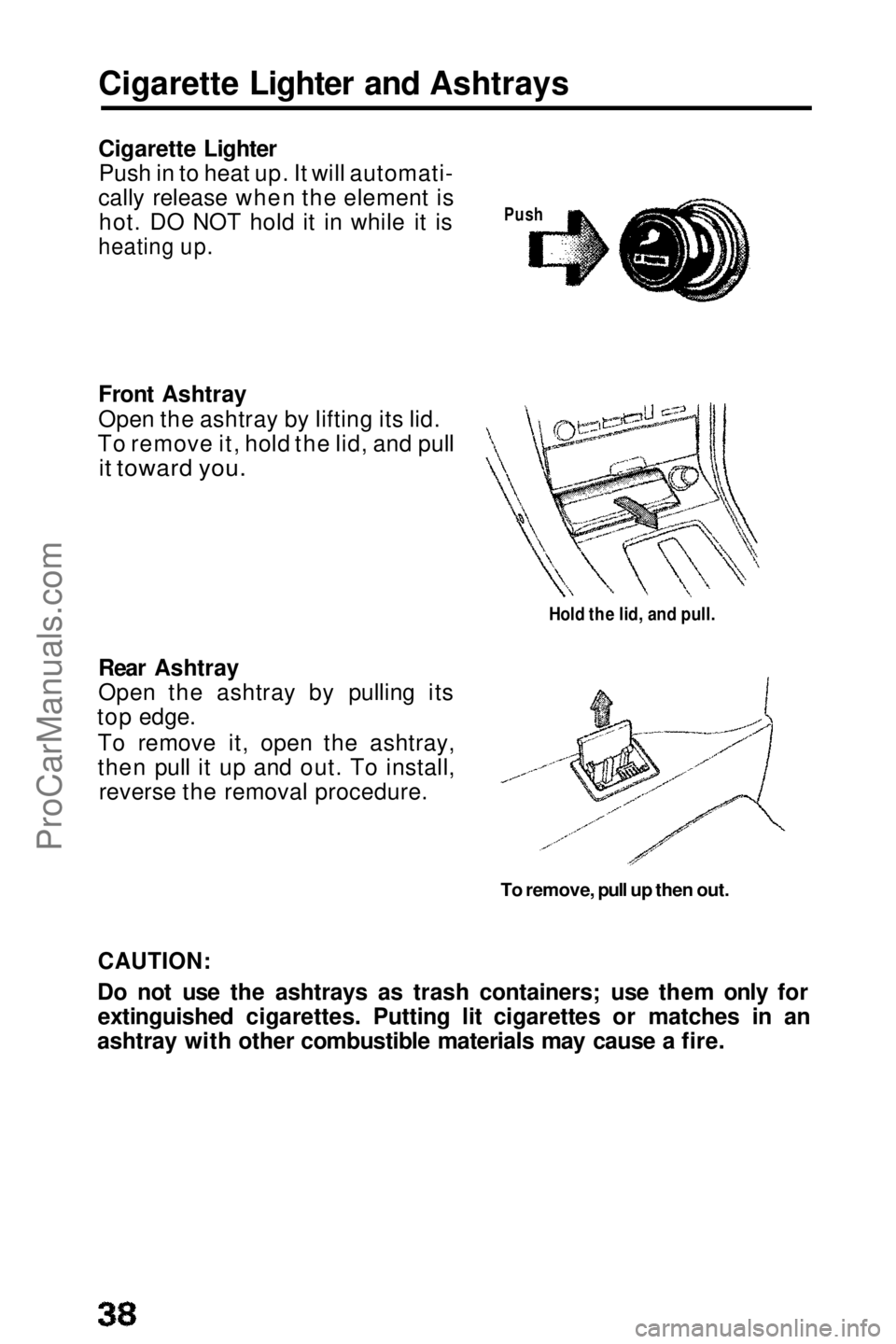
Cigarette Lighter
Push in to heat up. It will automati-
cally release when the element is hot. DO NOT hold it in while it is
heating up.
Front Ashtray
Open the ashtray by lifting its lid.
To remove it, hold the lid, and pull
it toward you.
Rear Ashtray
Open the ashtray by pulling its
top edge.
To remove it, open the ashtray,
then pull it up and out. To install, reverse the removal procedure.
CAUTION:
Do not
use the ashtrays as trash containers; use them only for
extinguished cigarettes. Putting lit cigarettes or matches in an
ashtray with other combustible materials may cause a fire.
Push
Hold the lid, and pull.
To remove, pull up then out.ProCarManuals.comMain Menu t s
Page 39 of 143
Glove Box,Parking Brake and Hood
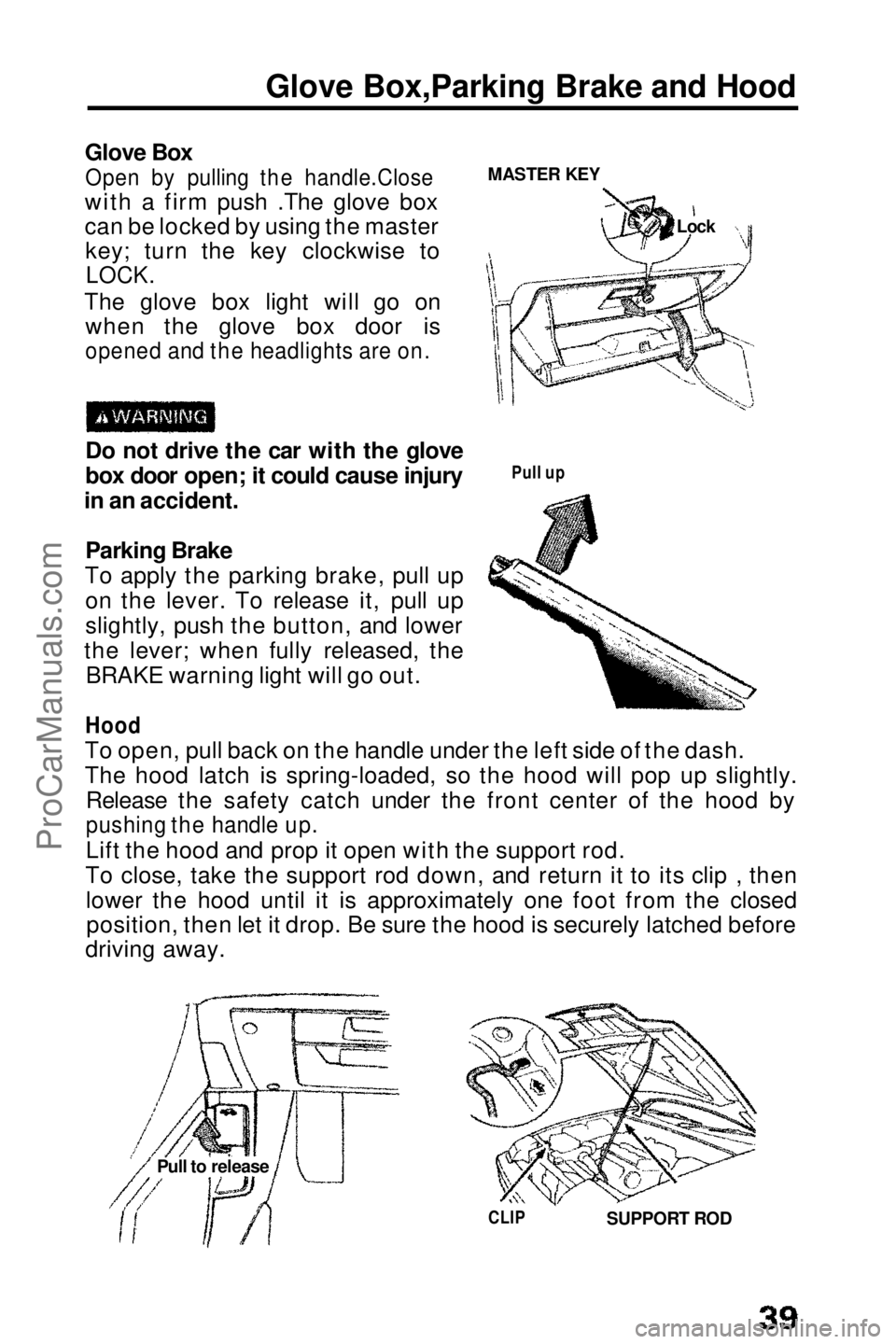
Glove Box
Open by pulling the handle.Close
with a firm push .The glove box
can be locked by using the master key; turn the key clockwise to
LOCK.
The glove box light will go on when the glove box door is
opened and the headlights are on.
Do not drive the car with the glove
box door open; it could cause injury
in an accident.
Parking Brake
To apply the parking brake, pull up on the lever. To release it, pull up
slightly, push the button, and lower
the lever; when fully released, the BRAKE warning light will go out.
Hood
To open, pull back on the handle under the left side of the dash.
The hood latch is spring-loaded, so the hood will pop up slightly. Release the safety catch under the front center of the hood by
pushing the handle up.
Lift the hood and prop it open with the support rod.
To close, take the support rod down, and return it to its clip , then lower the hood until it is approximately one foot from the closedposition, then let it drop. Be sure the hood is securely latched before
driving away. MASTER KEY
Pull up
CLIP
SUPPORT ROD
Pull to release LockProCarManuals.comMain Menu t s
Page 43 of 143
What the Controls Do:
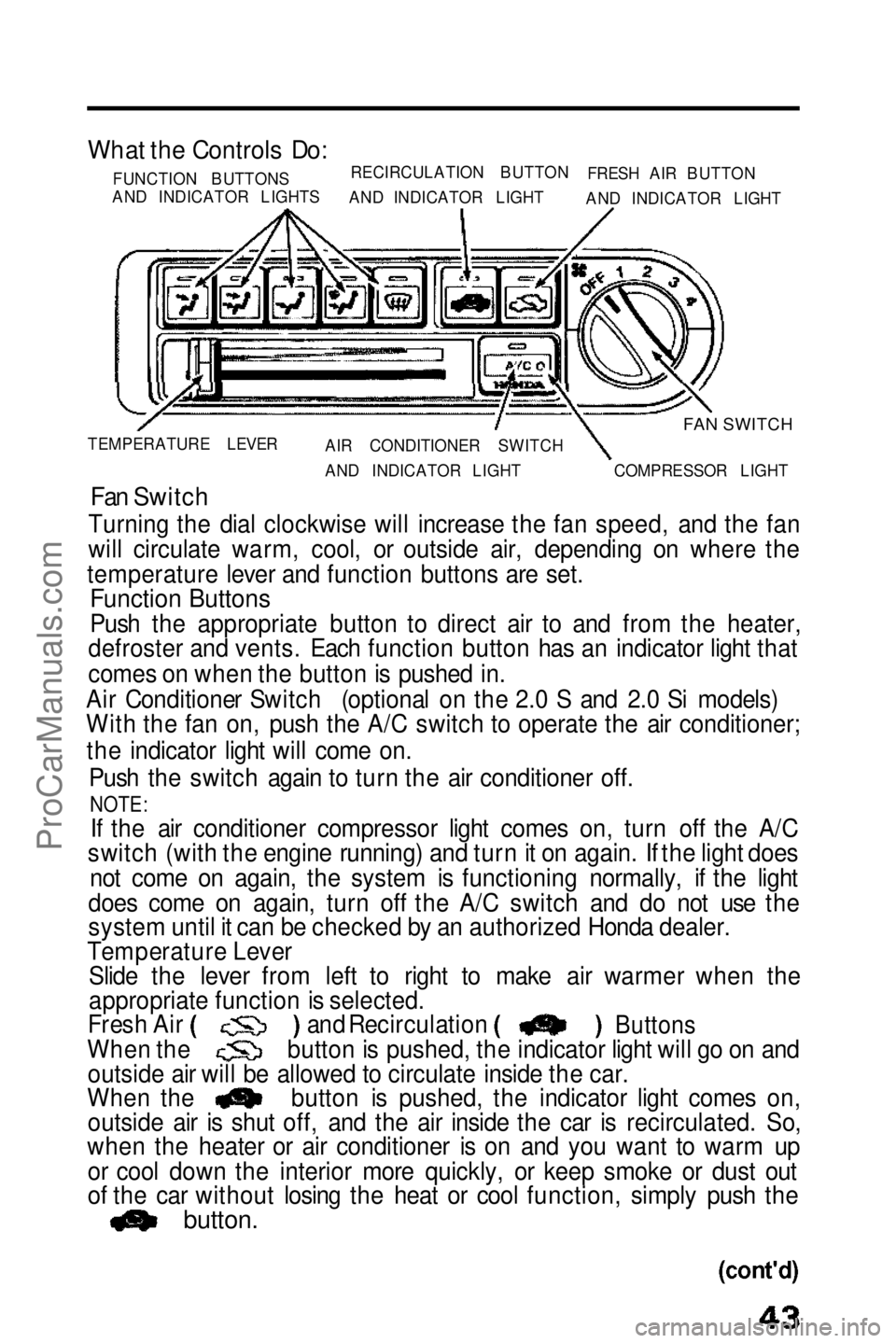
FUNCTION BUTTONS
AND INDICATOR LIGHTS RECIRCULATION BUTTON
AND INDICATOR LIGHT FRESH AIR BUTTON
AND INDICATOR LIGHT
FAN SWITCH
TEMPERATURE LEVER AIR CONDITIONER SWITCH
AND INDICATOR LIGHT COMPRESSOR LIGHT
Fan Switch
Turning the dial clockwise will increase the fan speed, and the fan
will circulate warm, cool, or outside air, depending on where the
temperature lever and function buttons are set.
Function Buttons
Push the appropriate button to direct air to and from the heater,
defroster and vents. Each function button has an indicator light that
comes on when the button is pushed in.
Air Conditioner Switch (optional on the 2.0 S and 2.0 Si models)
With the fan on, push the A/C switch to operate the air conditioner;
the indicator light will come on.
Push the switch again to turn the air conditioner off.
NOTE:
If the air conditioner compressor light comes on, turn off the A/C
switch (with the engine running) and turn it on again. If the light does
not come on again, the system is functioning normally, if the light
does come on again, turn off the A/C switch and do not use the
system until it can be checked by an authorized Honda dealer.
Temperature Lever Slide the lever from left to right to make air warmer when the
appropriate function is selected. and Recirculation
Fresh Air
When the
Buttons
button is pushed, the indicator light will go on and
outside air will be allowed to circulate inside the car.
When the outside air is shut off, and the air inside the car is recirculated. So,
when the heater or air conditioner is on and you want to warm up
or cool down the interior more quickly, or keep smoke or dust out
of the car without losing the heat or cool function, simply push the
button.
button is pushed, the indicator light comes on,ProCarManuals.comMain Menu t s
Page 48 of 143
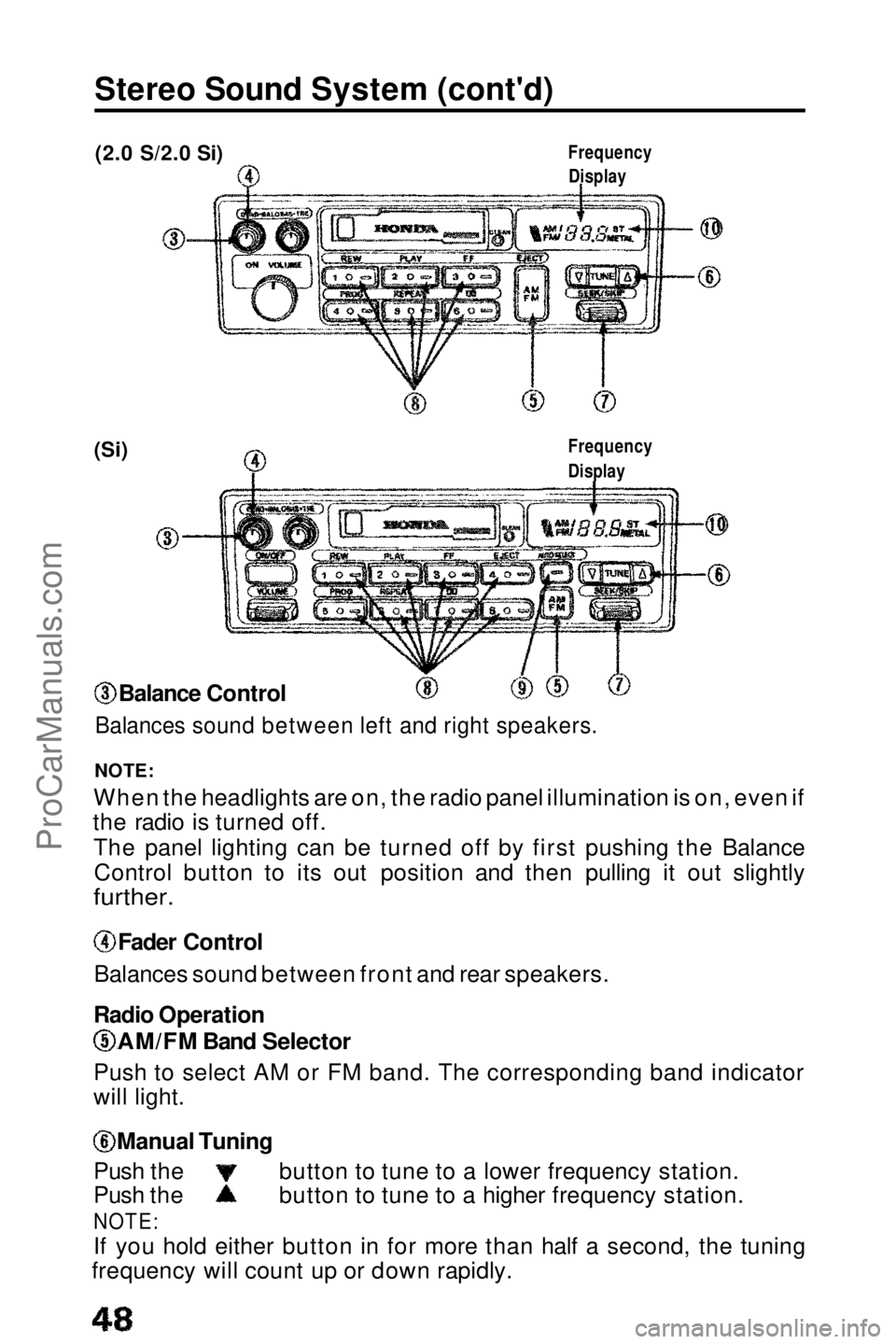
Stereo Sound System (cont'd)
(2.0 S/2.0 Si)
(Si)
NOTE:
When the headlights are on, the radio panel illumination is on, even if
the radio is turned off.
The panel lighting can be turned off by first pushing the BalanceControl button to its out position and then pulling it out slightly
further.
Fader Control
Balances sound between front and rear speakers.
Radio Operation AM/FM Band Selector
Push to select AM or FM band. The corresponding band indicator
will light. Manual Tuning
Push the button to tune to a lower frequency station.
Push the button to tune to a higher frequency station.
NOTE:
If you
hold either button in for more than half a second, the tuning
frequency will count up or down rapidly. Balance Control
Balances sound between left and right speakers.
Frequency
Display
Frequency
DisplayProCarManuals.comMain Menu t s
Page 49 of 143
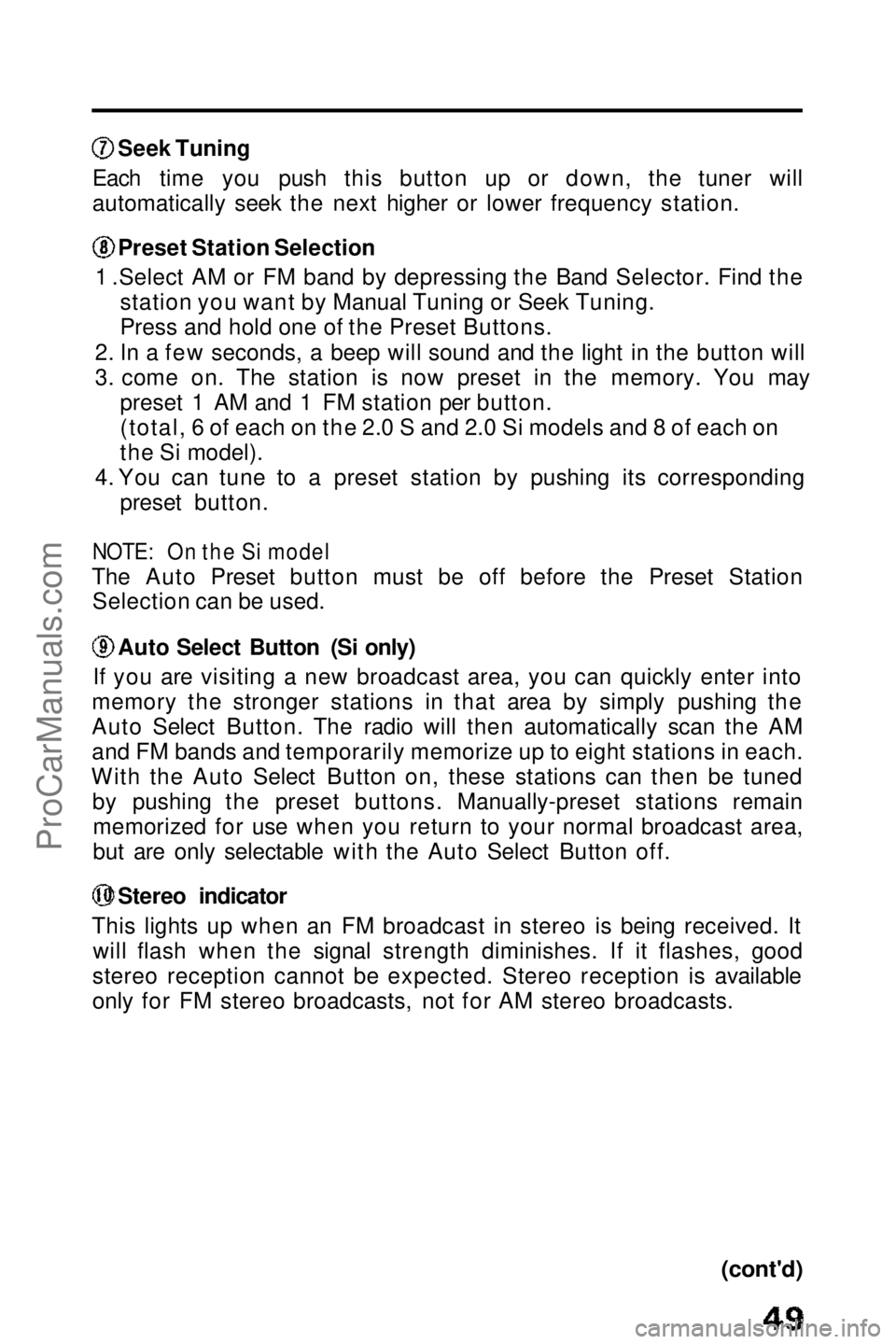
Seek Tuning
Each time you push this button up or down, the tuner will
automatically seek the next higher or lower frequency station. Preset Station Selection
1 .Select AM or FM band by depressing the Band Selector. Find the station you want by Manual Tuning or Seek Tuning.
Press and hold one of the Preset Buttons.
2. In a few seconds, a beep will sound and the light in the button will
3. come on. The station is now preset in the memory. You may preset 1 AM and 1 FM station per button.
(total, 6 of each on the 2.0 S and 2.0 Si models and 8 of each on
the Si model).
4. You can tune to a preset station by pushing its corresponding preset button.
NOTE: On the Si model
The Auto Preset button must be off before the Preset Station Selection can be used. Auto Select Button (Si only)
If you are visiting a new broadcast area, you can quickly enter into
memory the stronger stations in that area by simply pushing the
Auto Select Button. The radio will then automatically scan the AM
and FM bands and temporarily memorize up to eight stations in each.
With the Auto Select Button on, these stations can then be tuned by pushing the preset buttons. Manually-preset stations remainmemorized for use when you return to your normal broadcast area,
but are only selectable with the Auto Select Button off. Stereo indicator
This lights up when an FM broadcast in stereo is being received. It will flash when the signal strength diminishes. If it flashes, good
stereo reception cannot be expected. Stereo reception is available
only for FM stereo broadcasts, not for AM stereo broadcasts.
(cont'd)ProCarManuals.comMain Menu t s
Page 50 of 143
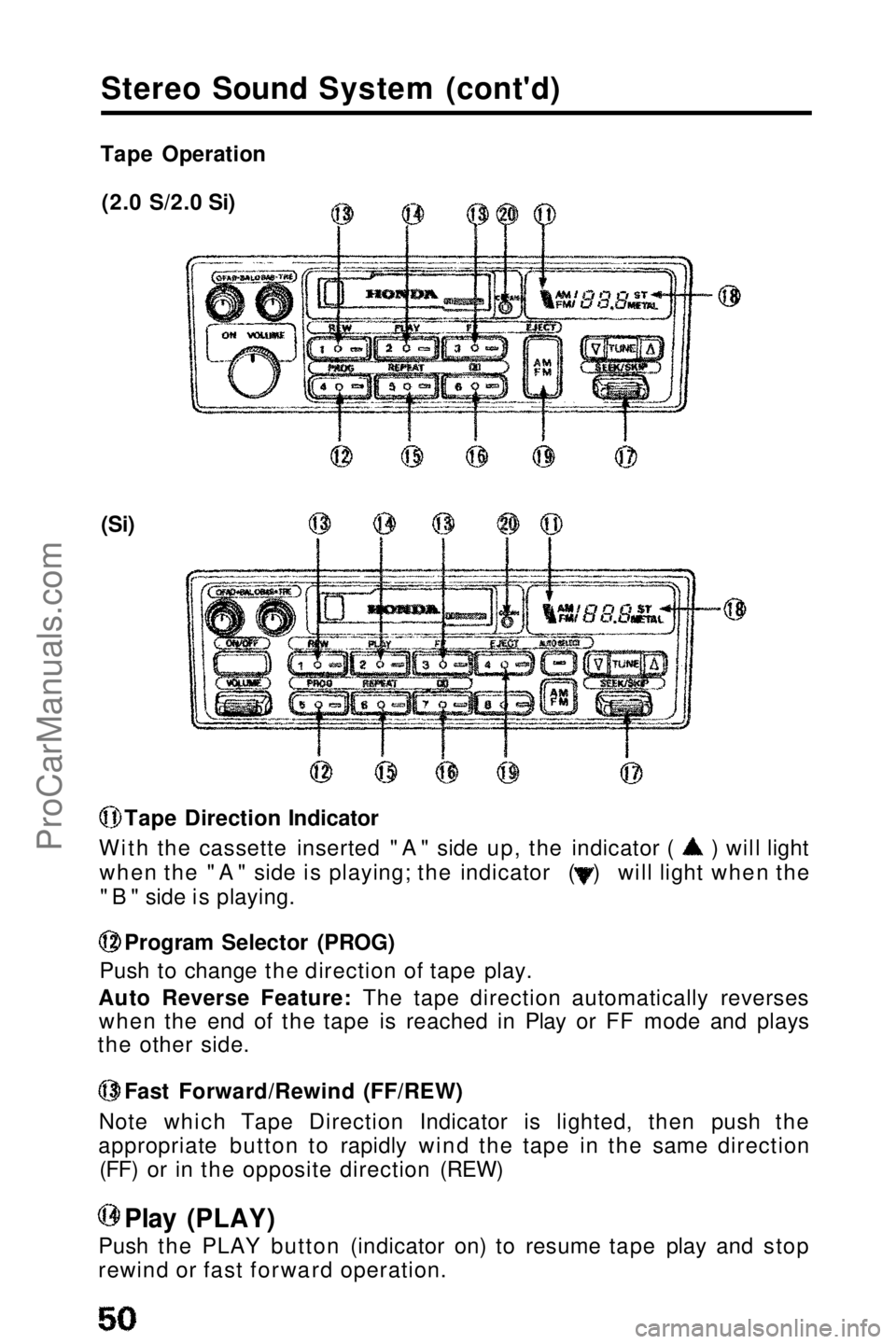
Stereo Sound System (cont'd)
(2.0 S/2.0 Si)
(Si) Tape Direction Indicator
With the cassette inserted "A" side up, the indicator ( ) will light
when the "A" side is playing; the indicator ( ) will light when the
"B" side is playing. Program Selector (PROG)
Push to change the direction of tape play.
Auto Reverse Feature: The tape direction automatically reverses when the end of the tape is reached in Play or FF mode and plays
the other side. Fast Forward/Rewind (FF/REW)
Note which Tape Direction Indicator is lighted, then push the
appropriate button to rapidly wind the tape in the same direction (FF) or in the opposite direction (REW) Play (PLAY)
Push the PLAY button (indicator on) to resume tape play and stop
rewind or fast forward operation. Tape OperationProCarManuals.comMain Menu t s
Page 51 of 143
Repeat Button (REPEAT)
Push the REPEAT button (indicator on) to return to the beginning of
a song or section of programming and repeat its play. Push the
button again (indicator off) to cancel the repeat function and resume
normal play. DOLBY
®
Noise Reduction ( )
Push in when playing tapes recorded in Dolby (the Dolby NR Indicator will light). Push again (out) when playing tapes not recorded
in Dolby. Use of the wrong setting will affect high frequency
response.
NOTE:
The Dolby NR circuit will not operate during radio reception.Dolby noise reduction system is manufactured under license from
Dolby Laboratories Licensing Corporation. "Dolby" and the
double-D symbol are trademarks of Dolby Laboratories Licensing Corporation. Skip Button
The circuit senses silent passages between songs or programs on a
tape. Push upward to automatically advance to the beginning of the next song, or downward return to the beginning of the song just
played.
NOTE:
Tapes that contain short silent passages between songs, a high level
of noise between songs, or silent passages within a song may not be
suitable for this function.
Metal Indicator (METAL)
Most metal or CrO2 cassettes are coded with slots on their back
edge. If such a cassette is inserted, the player will detect the slots and automatically switch to the proper equalization for full
enjoyment of metal/CrO2 tapes. The indicator light will go on when
coded cassettes are played.
Eject
Push this button to stop and eject the tape.
Ignition Key-OFF Eject: The cassette being played will be
automatically ejected when the ignition or the unit is turned off.
NOTE:
When one side of the tape ends, "Auto-Reverse" will automatically begin playing the other side, therefore, you must push the ejectbutton to stop or remove the tape.
(cont'd)ProCarManuals.comMain Menu t s
Page 52 of 143

Stereo Sound System (cont'd)
CLEAN Indicator Light
After 50 hours of cassette tape play, the light will come on as a reminder to clean the tape heads. If the light comes on and the tape
heads were not cleaned at the recommended 30 hours of usage (see maintenance section below), they should be cleaned immediately.
To reset, push the indicator for a minimum of five seconds until the light goes off.
Defective Tape Eject
The tape player includes a protection mechanism to automatically eject defective tapes (warped housing, loose label, faulty tape movement) immediately upon insertion, if a tape malfunctions while
in play, the tape direction will change back and forth and then e|ect
the cassette. Tapes ejected before play should be considered faulty and discarded; tapes ejected during play may only be unevenly
wound and could be re-usable if fully rewound, manually, outside the player.
NOTE:
The tape player may repeat cycle through the loading and unloading
motion several times in an effort to eject a faulty tape. During this
process the tape will either eject fully or rise to the loading level and
have to be pulled out manually. In either case, discard the tape; re-
use may damage the tape player.
Maintenance
The head in the cassette tape player can pick up dirt or tape
deposits each time a cassette is played. The result is low or "muddy" sound from one or both channels, as if the treble tone
control were turned all the way down. To prevent this, you should periodically clean the head with a commercially available cleaning
cassette.
As preventive maintenance, clean the head about every 30 hours of
use. If you wait until the head becomes very dirty (noticeably poor
sound), it may not be possible to remove all deposits with a simple
cleaning cassette.
The use of 120 minutes tape is not recommended.
CAUTION:
Storing cassettes out of their cases, or touching the magnetic
tape with your fingers will increase the amount of dirt that gets to
the tape head. Using low-quality "off-brand" tape will increase the
amount of tape deposits that get on the head. Both of these
practices may eventually lead to damage of the head and playing
mechanism.ProCarManuals.comMain Menu t s
Page 53 of 143
Sunroof
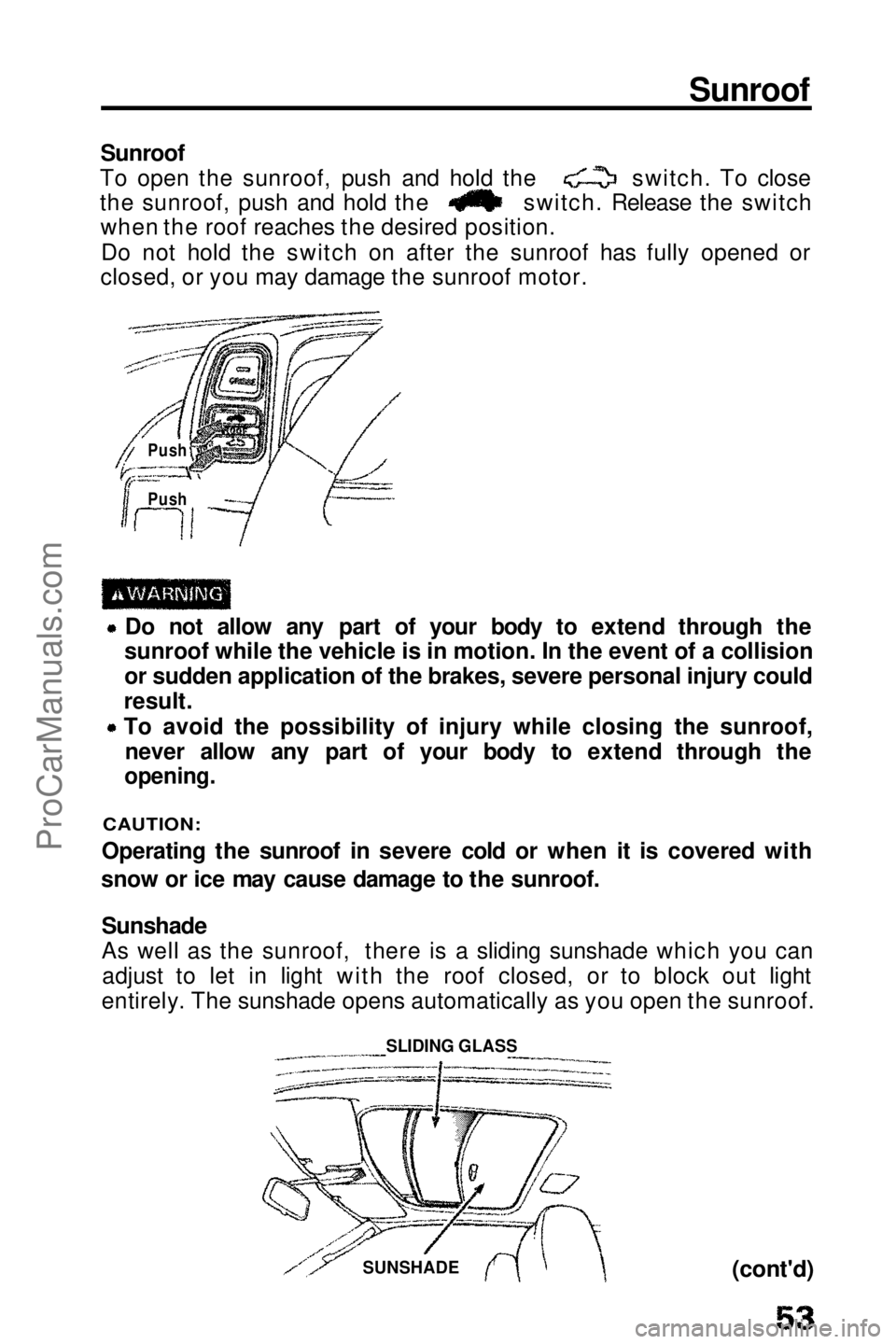
Sunroof
To open the sunroof, push and hold the switch. To close
the sunroof, push and hold the switch. Release the switch
when the roof reaches the desired position.
Do not hold the switch on after the sunroof has fully opened or
closed, or you may damage the sunroof motor. Do not allow any part of your body to extend through the
sunroof while the vehicle is in motion. In the event of a collision
or
sudden application of the brakes, severe personal injury could
result.
To avoid the possibility of injury while closing the sunroof,
never allow
any part of your body to extend through the
opening.
CAUTION:
Operating the sunroof in severe cold or when it is covered with
snow or ice may cause damage to the sunroof.
Sunshade
As well as the sunroof, there is a sliding sunshade which you canadjust to let in light with the roof closed, or to block out light
entirely. The sunshade opens automatically as you open the sunroof.
(cont'd)
Push
Push
SUNSHADE
SLIDING GLASSProCarManuals.comMain Menu t s