brake HONDA PRELUDE 1992 User Guide
[x] Cancel search | Manufacturer: HONDA, Model Year: 1992, Model line: PRELUDE, Model: HONDA PRELUDE 1992Pages: 225, PDF Size: 2.1 MB
Page 97 of 225
Break-in Period, Gasoline
Break-in Period
Help assure your car's future
reliability and performance by
paying extra attention to how you
drive during the first 1,000 km (600
miles).
During thi
s period:
Avoid full-throttle starts and
rapid acceleration.
If you need to add oil, use the
engine oil recommended in this
owner's manual.
Avoid hard braking. New brakes need to be broken-in by moderate
use for the first 300 km (200
miles).
You should follow these same re-
commendations with an overhauled
or exchanged engine, or when the
brakes are relined. Gasoline
Your Honda is designed to operate
most effectively on unleaded
gasoline.
Using gasoline containing lead will
damage your car's emission
controls. Thi s
contributes to air
pollution and can void certain parts
of your warranty.
(S model)
Use an unleaded gasoline with a
pump octane number of 86 or
higher.
Use of a lower octane gasoline can
cause a persistent, heavy metallic
rapping noise that can lead to
engine damage.
(All other models)
Use a
premium unleaded gasoline
with a pump octane number of
91
or higher .
I
f you are unable to find premium
unleaded, you may substitute an
unleaded regular gasoline. The engine will compensate for the
lower octane, but you may notice a
slight decrease in power as a result.
Oxygenated Fuels
Some conventional gasolines are
being blended with alcohol or an
ether compound to increase the
gasoline's octane. These gasolines
are collectively referred to as
oxygenated fuels. Some areas of
the United States and Canada use
oxygenated fuels to help meet clean
air standards.
If you use an oxygenated fuel, be
sure it meets the minimum octane
rating requirement as recom-
mended.
Before DrivingProCarManuals.comMain Menu Table of Contents s t
Page 100 of 225
Service Station Procedures
Opening the Hood
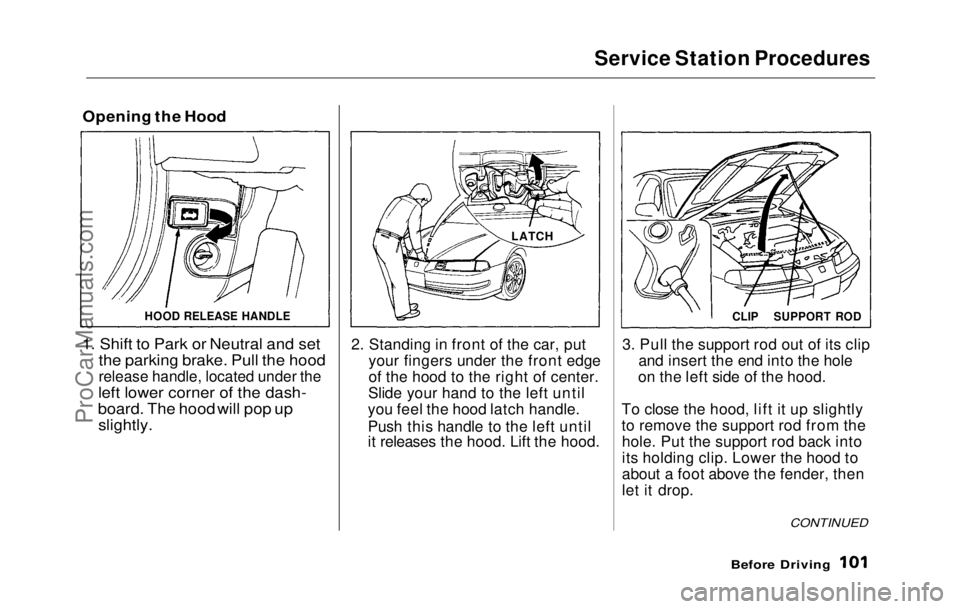
1. Shift to Park or Neutral and set
the parking brake. Pull the hood
release handle, located under the
left lower corner of
the dash-
board. The hood will pop up slightly.
2. Standing
in front of the car, put
your fingers under the front edge
of the hood to the right of center.
Slide your hand to the left until
you feel the hood latch handle.
Push this handle to the left until
it releases the hood. Lift the hood.
3. Pul l
the support rod out of its clip
and insert the end into the hole
on the left side of the hood.
To close the hood, lift it up slightly
to remove the support rod from the hole. Put the support rod back into
its holding clip. Lower the hood to
about a foot above the fender, then
let it drop.
Before Driving
HOOD RELEASE HANDLE
LATCH
CONTINUED
CLIP
SUPPORT RODProCarManuals.comMain Menu Table of Contents s t
Page 104 of 225

Accessories
Your Honda dealer has many acces-
sories available to personalize your
car. Some of these are audio sys-
tems, alloy wheels, air conditioning, and color-coordinated carpet floor
mats. All Genuine Honda Acces-
sories have been approved by our
engineers for installation and use
on your car, and are covered by
warranty. For a complete guide to the Genuine Honda Accessories
available, see your dealer for a 1992
Accessories brochure.
Some non-Honda accessories you
can buy in the "aftermarket" are designed for universal applications.
Although they may fit your Honda,
they may not be within factory specifications. For example, after-
market wheels may not meet
Honda's specifications for width
and offset. They could cause sus-
pension problems which would not
be covered by your warranty. Im- properly-designed accessories can
adversely affect your car's han-
dling and stability.
Your car has several computer-
controlled systems, including the
SRS system, the engine's fuel
injection, and the Anti-lock brake
system. Strong electronic inter-
ference can affect their operation. Electronic communications equip-
ment, such as cellular telephones
and two-way radios are regulated
by the FCC and should not inter-
fere with your car's systems. Improper installation, or using
electrical equipment not intended
for mobile use may interfere with
your car's operation. If you want to
install a cellular telephone, other
mobile communications equipment
or even add-on stereo amplifiers,
please discuss it first with your
Honda dealer.
In many cases, improper instal-
lation is the real cause of problems
with aftermarket accessories. Have
these accessories installed by quali- fied technicians who are familiar
with your Honda. If possible, have
your Honda dealer inspect the final installation.
Before DrivingProCarManuals.comMain Menu Table of Contents s t
Page 105 of 225
Loading Cargo
The maximum load you can carry
in your Honda is 325 kg (700 Ibs). It
includes the total weight of all
passengers and their belongings,
any accessories, and the tongue
weight of a trailer. This 325 kg (700
Ibs) figure
is shown as the Vehicle
Capacity Weight on the tire infor-
mation label attached to the driver's
door jamb.
To figure out how much cargo you
can carry:
Figure the total "occupant
weight" you will be transporting.
To do this, multiply the number
of people (driver and all passen-
gers) by 70 kg (150 Ibs). Subtract this number from the
Vehicle Capacity Weight (325 kg/
700 Ibs).
If you are towing a trailer,
subtract the tongue weight. See
Towing a Trailer on page 121.
This final number is the total
weight of cargo you can load in or on the car. With four occupants
(driver and three passengers), the
maximum recommended weight
for cargo is 45 kg (100 Ibs). Where you store this cargo, and
how well you secure it, are just as
important as how much it weighs.
Make sure you load cargo so it will
not shift while driving. Items
stored in the trunk should be placed as far forward as possible.
You could store additional items on
the floor behind the front seats. Make sure they cannot roll under
the front seat and interfere with
the pedals.
If you must carry large objects that
prevent you from closing the trunk
lid, be aware that exhaust gas can enter the interior. See Carbon
Monoxide Hazard on page 25 .
Never place items on the shelf
behind the back seat. Those items
can fly forward and injure you or
your passengers if you brake hard
or are involved in a collision.
Before DrivingProCarManuals.comMain Menu Table of Contents s t
Page 106 of 225
Driving
This section gives you tips on
starting the engine under various conditions, and how to operate the
5-speed and automatic transmis-
sions. It also includes important information on your car's braking
system and facts you need if you
are planning to tow a trailer. Preparing to Drive ....................... 108
Starting the Engine...................... 109
5-speed Transmission............. 109
Automatic Transmission........ 109 Starting in Cold Weather at High Altitude.................... 110
5-speed Manua l
Transmission...
111
Recommended Shif
t
Points....
111
Maximum Speeds....................
.
112
Automatic Transmission...........
.
112
Shift Leve
r
Positions...............
112
Maximum Speeds....................
.
115
Shift Loc
k
Release...................
115
The Brakin
g
System....................
116
Brake Wea
r
Indicators............
116
Brake Syste
m
Design..............
116
Anti-lock Brakes.....................
.
117
Four Whee
l
Steering....................
118
Driving i
n
Bad Weather..............
119
Towing a
Traile
r ..........................
121
Driving
ProCarManuals.comMain Menu s t
Page 108 of 225

Starting the Engine
5-Speed Transmission 1. Apply the parking brake.
2. In cold weather, turn off all electrical accessories to reduce
the drain on the battery.
3. Push the clutch pedal down all the way. START (III) does not
function unless the clutch pedal
is depressed.
4. Without touching the accelerator pedal, turn the ignition key to the
START (III) position. If the
engine does not start right away,
do not hold the key in START
(III) for more than 15 seconds at
a time. Pause for at least 10
seconds before trying again. 5. If the engine does not start
within 15 seconds, or starts butstalls right away, repeat step 4
with the accelerator pedal pressed half-way down. If theengine starts, release pressure on
the accelerator pedal so the
engine does not race.
6. If the
engine still does not start,
press the accelerator pedal all the
way down and hold it there while
starting i n
order to clear flooding.
As before, keep the ignition key in the START (III) position for
no more than 15 seconds. Return
to step 5 if the engine does not
start. If it starts, lift your foot off
the accelerator pedal so the
engine does not race.
Automatic Transmissio
n
1
. Apply the parking brake.
2. In cold weather, turn off all electrical accessories to reduce
the drain on the battery.
3. Make sure the shift lever is in Park. Press on the brake pedal.
4. Without touching the accelerator pedal, turn the ignition key to the
START (III) position. If the
engine does not start right away,
do not hold the key in START
(III) for more than 15 seconds at
a time. Pause for at least 10
seconds before trying again.
CONTINUED
DrivingProCarManuals.comMain Menu Table of Contents s t
Page 110 of 225
5-speed Manual Transmission
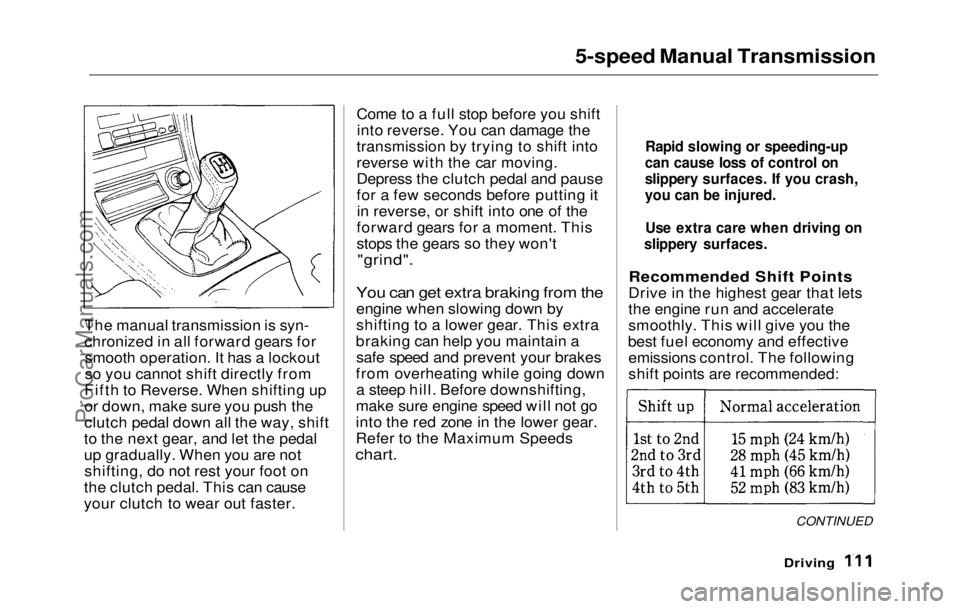
The manual
transmission is syn-
chronized in all forward gears for smooth operation. It has a lockout
so you cannot shift directly from
Fifth to Reverse. When shifting up
or down, make sure you push the
clutch pedal down all the way, shift
to the next gear, and let the pedal
up gradually. When you are not shifting, do not rest your foot on
the clutch pedal. This can cause
your clutch to wear out faster. Come to a full stop before you shift
into reverse. You can damage the
transmission by trying to shift into
reverse with the car moving.
Depress the clutch pedal and pause
for a few seconds before putting it in reverse, or shift into one of the
forward gears for a moment. This
stops the gears so they won't
"grind".
You can get extra braking from the
engine when slowing down by
shifting to a lower gear. This extra
braking can help you maintain a safe speed and prevent your brakes
from overheating while going down a steep hill. Before downshifting,
make sure engine speed will not go
into the red zone in the lower gear.
Refer to the Maximum Speeds
chart.
Recommended Shift Points
Drive in the highest gear that lets
the engine run and accelerate
smoothly. This will give you the
best fuel economy and effective emissions control. The following
shift points are recommended:
CONTINUED
Driving
Rapid slowing or speeding-up
can cause loss of control on
slippery surfaces. If you crash,
you can be injured.
Use extra care when driving on
slippery surfaces.ProCarManuals.comMain Menu Table of Contents s t
Page 112 of 225
Automatic Transmission
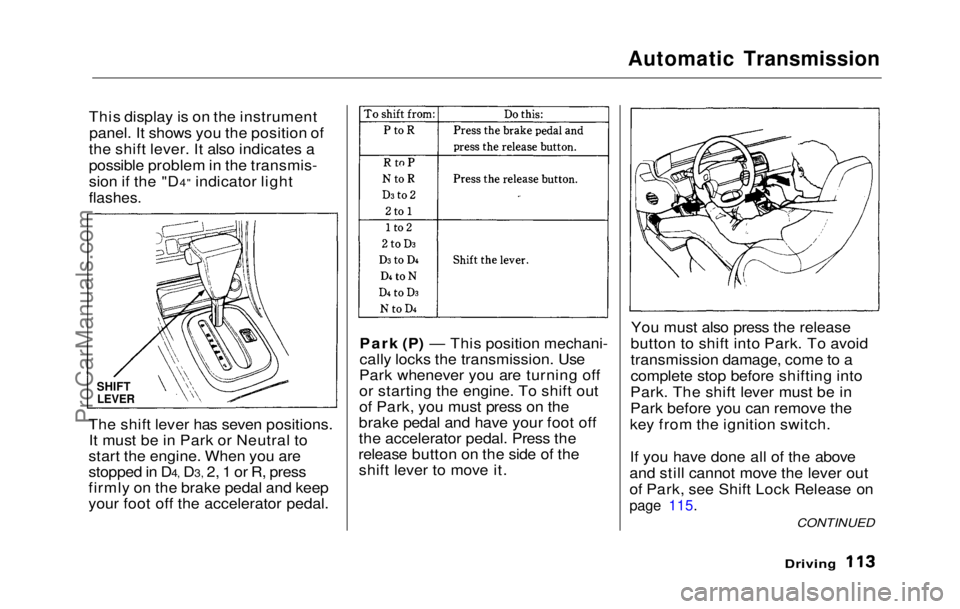
This display is on the instrument panel. It shows you the position of
the shift lever. It also indicates a
possible problem in the transmis-
sion if the "D4" indicator light
flashes.
The shift lever has seven positions. It must be in Park or Neutral to
start the engine. When you are
stopped in D4, D3, 2, 1 or R, press
firmly on the brake pedal and keep
your foot off the accelerator pedal. Park (P) — This position mechani-
cally locks the transmission. Use
Park whenever you are turning off
or starting the engine. To shift out
of Park, you must press on the
brake pedal and have your foot off
the accelerator pedal. Press the
release button on the side of the shift lever to move it. You must also press the release
button to shift into Park. To avoid
transmission damage, come to a
complete stop before shifting into
Park. The shift lever must be in
Park before you can remove the
key from the ignition switch.
If you have done all of the above
and still cannot move the lever out
of Park, see Shift Lock Release on
page 115.
Driving
SHIFT
LEVER
CONTINUEDProCarManuals.comMain Menu Table of Contents s t
Page 113 of 225
Automatic Transmission
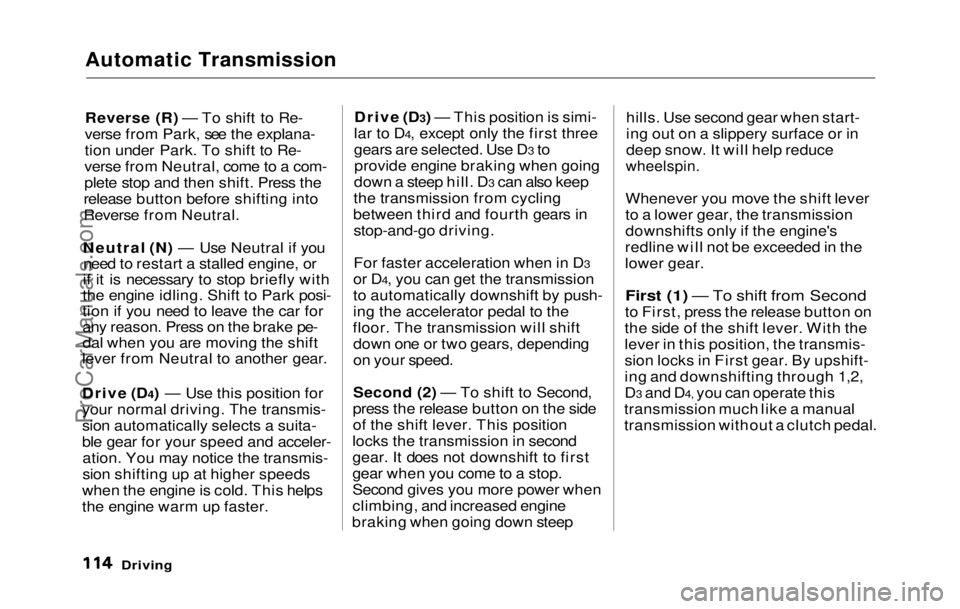
Reverse (R) — To shift to Re-
verse from Park, see the explana-
tion under Park. To shift to Re-
verse from Neutral, come to a com-
plete stop and then shift. Press the
release button before shifting into
Reverse from Neutral.
Neutral (N) — Use Neutral if you need to restart a stalled engine, or
if it is necessary to stop briefly with
the engine idling. Shift to Park posi-
tion if you need to leave the car for
any reason. Press on the brake pe-
dal when you are moving the shift
lever from Neutral to another gear.
Drive (D4) — Use this position for
your normal driving. The transmis-
sion automatically selects a suita-
ble gear for your speed and acceler-
ation. You may notice the transmis-
sion shifting up at higher speeds
when the engine is cold. This helps
the engine warm up faster. Drive (D3) — This position is simi-
lar to D4, except only the first three
gears are selected. Use D3 to provide engine braking when going
down a steep hill. D3 can also keep
the transmission from cycling
between third and fourth gears in stop-and-go driving.
For faster acceleration when in D3
or D4, you can get the transmission
to automatically downshift by push-
ing the accelerator pedal to the
floor. The transmission will shift down one or two gears, depending
on your speed.
Second (2) — To shift to Second,
press the release button on the side
of the shift lever. This position
locks the transmission in second
gear. It does not downshift to first
gear when you come to a stop.
Second gives you more power when
climbing, and increased engine
braking when going down steep hills. Use second gear when start-
ing out on a slippery surface or in
deep snow. It will help reduce
wheelspin.
Whenever you move the shift lever
to a lower gear, the transmission
downshifts only if the engine's
redline will not be exceeded in the
lower gear.First (1) — To shift from Second
to First ,
press the release button on
the side of the shift lever. With the
lever in this position, the transmis-
sion locks in First gear. By upshift-
ing and downshifting through 1,2,
D3 and D4, you can operate this
transmission much like a manual
transmission without a clutch pedal.
DrivingProCarManuals.comMain Menu Table of Contents s t
Page 114 of 225
Automatic Transmission
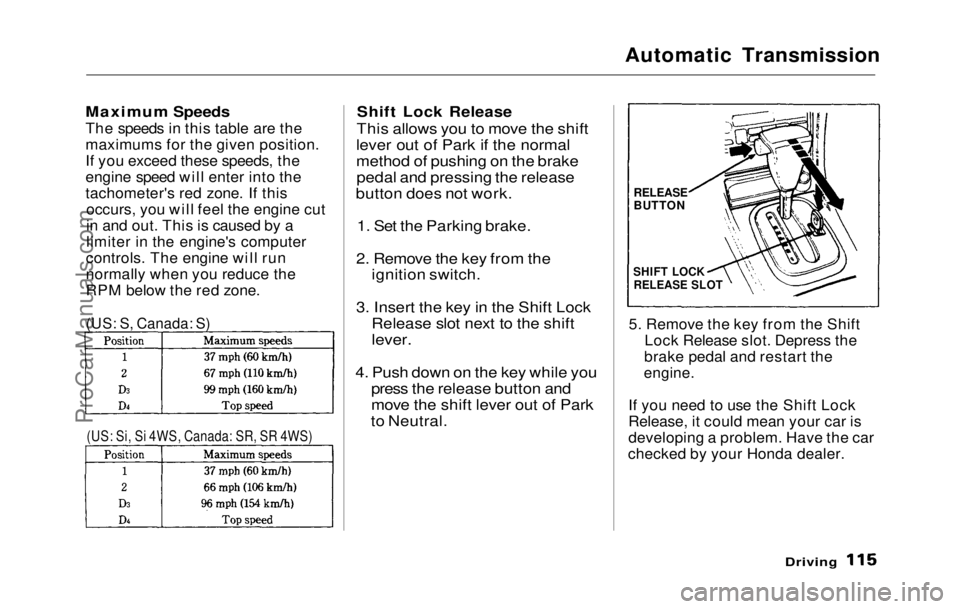
Maximum Speeds
The speeds in this table are the
maximums for the given position.
If you exceed these speeds, the
engine speed will enter into the
tachometer's red zone. If this occurs, you will feel the engine cut
in and out. This is caused by a
limiter in the engine's computer
controls. The engine will run
normally when you reduce the
RPM below the red zone.
Shift Lock Release
This allows you to move the shift
lever out of Park if the normal
method of pushing on the brake pedal and pressing the release
button does not work.
1. Set the Parking brake.
2. Remove the key from the ignition switch.
3. Insert the key in the Shift Lock Release slot next to the shift
lever.
4. Push down on the key while you press the release button and
move the shift lever out of Park
to Neutral.
5. Remove the key from the Shift
Lock Release slot. Depress the
brake pedal and restart the
engine.
If you need to use the Shift Lock
Release, it could mean your car is
developing a problem. Have the car
checked by your Honda dealer.
Driving
(US: S, Canada: S)
(US: Si, Si 4WS, Canada: SR, SR 4WS)
RELEASE
BUTTON
SHIFT LOCK
RELEASE SLOTProCarManuals.comMain Menu Table of Contents s t