automatic transmission HONDA PRELUDE 1992 Owners Manual
[x] Cancel search | Manufacturer: HONDA, Model Year: 1992, Model line: PRELUDE, Model: HONDA PRELUDE 1992Pages: 225, PDF Size: 2.1 MB
Page 36 of 225
Indicator Lights
"Daytime Running
Lights" Indicator
Canadian models only
This indicator lights when you turn
the ignition to ON (II) with the
headlight switch off and the
parking brake set. It should go off
if you turn on the headlights or
release the parking brake. If it comes on at any other time, it
means there is a problem with the
DRL. There may also be a problem
with the high beam headlights.
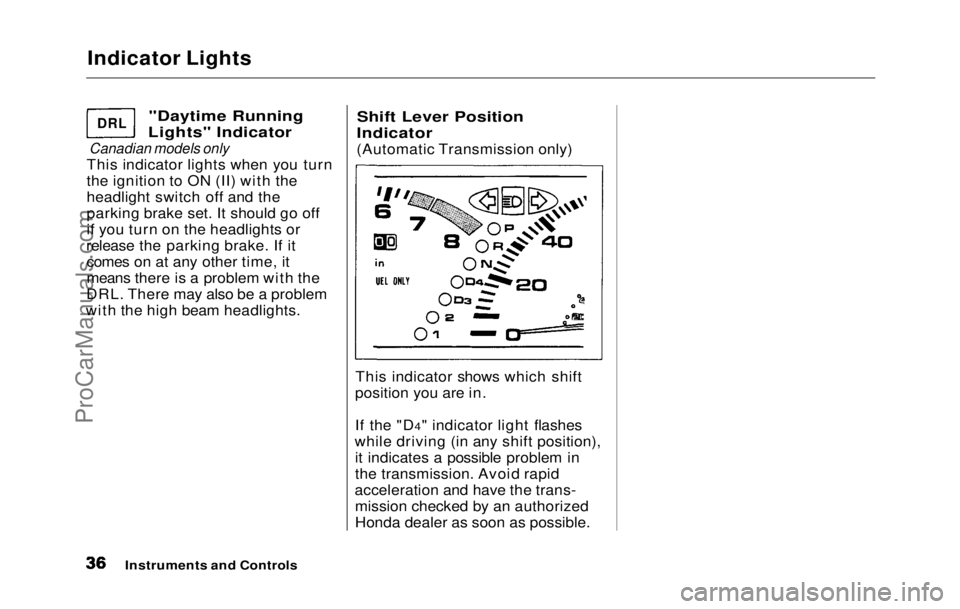
Shift Lever Position
Indicator
(Automatic Transmission only)
This indicator shows which shift
position you are in.
If the "D4" indicator light flashes
while driving (in any shift position), it indicates a possible problem in
the transmission. Avoid rapid
acceleration and have the trans- mission checked by an authorized
Honda dealer as soon as possible.
Instruments and Controls
DRL
ProCarManuals.comMain Menu Table of Contents s t
Page 48 of 225
Keys and Locks
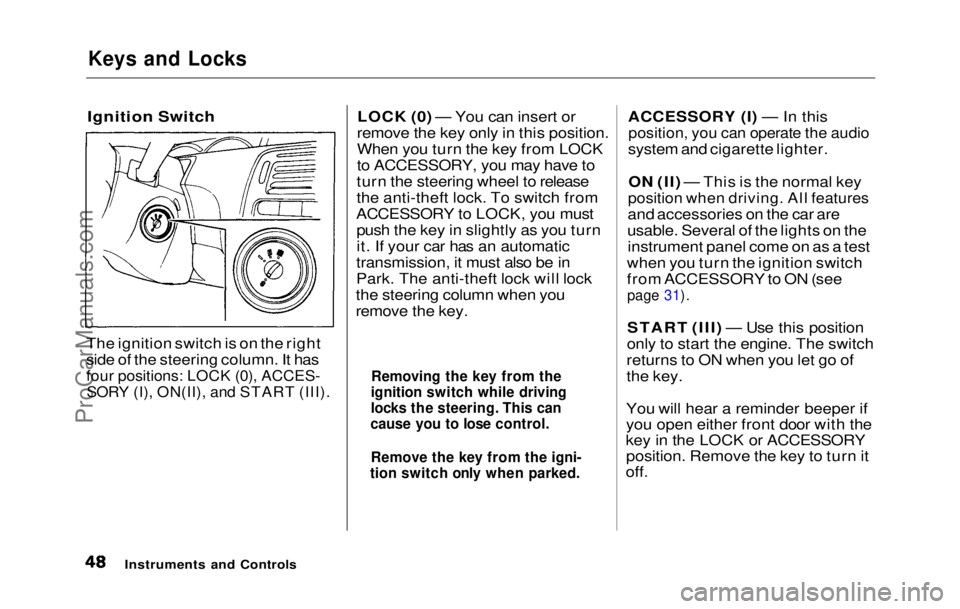
Ignition Switch
The ignition switch is on the right
side of the steering column. It has
four positions: LOCK (0), ACCES-
SORY (I), ON(II), and START (III).
LOCK (0) — You can insert or
remove the key only in this position.
When you turn the key from LOCK
to ACCESSORY, you may have to
turn the steering wheel to release
the anti-theft lock. To switch from
ACCESSORY to LOCK, you must push the key in slightly as you turn
it. If your car has an automatic
transmission, it must also be in
Park. The anti-theft lock will lock
the steering column when you
remove the key. ACCESSORY (I) — In this
position, you can operate the audio
system and cigarette lighter.
ON (II) — This is the normal key
position when driving. All features
and accessories on the car are
usable. Several of the lights on the instrument panel come on as a test
when you turn the ignition switch
from ACCESSORY to ON (see
page 31).
START (III) — Use this position
only to start the engine. The switch
returns to ON when you let go of
the key.
You will hear a reminder beeper if
you open either front door with the
key in the LOCK or ACCESSORY position. Remove the key to turn it
off.
Instruments and Controls
Removing the key from the
ignition switch while driving
locks the steering. This can
cause you to lose control.
Remove the key from the igni-
tion switch only when parked.ProCarManuals.comMain Menu Table of Contents s t
Page 106 of 225

Driving
This section gives you tips on
starting the engine under various conditions, and how to operate the
5-speed and automatic transmis-
sions. It also includes important information on your car's braking
system and facts you need if you
are planning to tow a trailer. Preparing to Drive ....................... 108
Starting the Engine...................... 109
5-speed Transmission............. 109
Automatic Transmission........ 109 Starting in Cold Weather at High Altitude.................... 110
5-speed Manua l
Transmission...
111
Recommended Shif
t
Points....
111
Maximum Speeds....................
.
112
Automatic Transmission...........
.
112
Shift Leve
r
Positions...............
112
Maximum Speeds....................
.
115
Shift Loc
k
Release...................
115
The Brakin
g
System....................
116
Brake Wea
r
Indicators............
116
Brake Syste
m
Design..............
116
Anti-lock Brakes.....................
.
117
Four Whee
l
Steering....................
118
Driving i
n
Bad Weather..............
119
Towing a
Traile
r ..........................
121
Driving
ProCarManuals.comMain Menu s t
Page 108 of 225

Starting the Engine
5-Speed Transmission 1. Apply the parking brake.
2. In cold weather, turn off all electrical accessories to reduce
the drain on the battery.
3. Push the clutch pedal down all the way. START (III) does not
function unless the clutch pedal
is depressed.
4. Without touching the accelerator pedal, turn the ignition key to the
START (III) position. If the
engine does not start right away,
do not hold the key in START
(III) for more than 15 seconds at
a time. Pause for at least 10
seconds before trying again. 5. If the engine does not start
within 15 seconds, or starts butstalls right away, repeat step 4
with the accelerator pedal pressed half-way down. If theengine starts, release pressure on
the accelerator pedal so the
engine does not race.
6. If the
engine still does not start,
press the accelerator pedal all the
way down and hold it there while
starting i n
order to clear flooding.
As before, keep the ignition key in the START (III) position for
no more than 15 seconds. Return
to step 5 if the engine does not
start. If it starts, lift your foot off
the accelerator pedal so the
engine does not race.
Automatic Transmissio
n
1
. Apply the parking brake.
2. In cold weather, turn off all electrical accessories to reduce
the drain on the battery.
3. Make sure the shift lever is in Park. Press on the brake pedal.
4. Without touching the accelerator pedal, turn the ignition key to the
START (III) position. If the
engine does not start right away,
do not hold the key in START
(III) for more than 15 seconds at
a time. Pause for at least 10
seconds before trying again.
CONTINUED
DrivingProCarManuals.comMain Menu Table of Contents s t
Page 111 of 225
5-speed Manual Transmission, Automatic Transmission
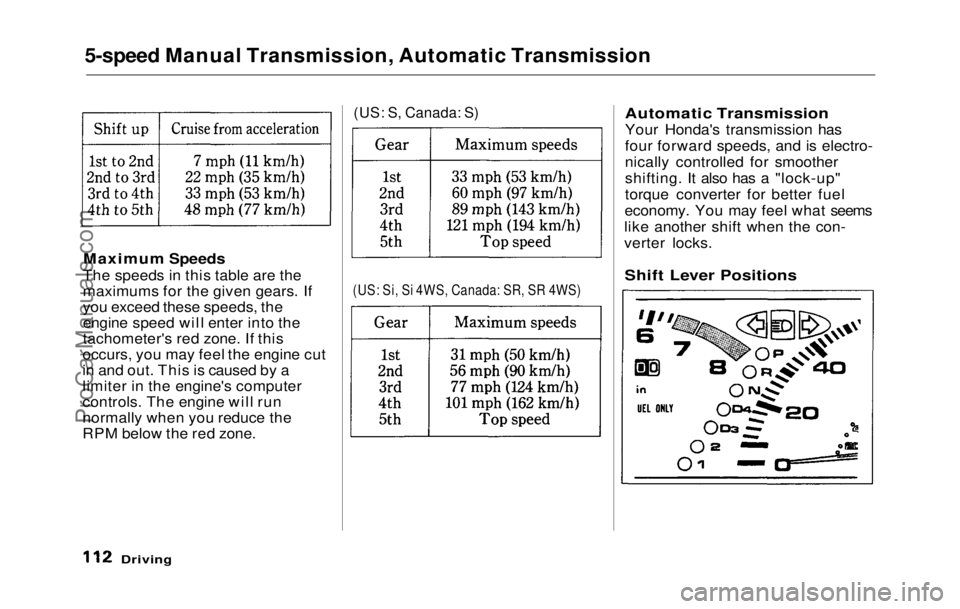
Maximum Speeds
The speeds in this table are the
maximums for the given gears. If
you exceed these speeds, the
engine speed will enter into the
tachometer's red zone. If this
occurs, you may feel the engine cut
in and out. This is caused by a
limiter in the engine's computer
controls. The engine will run
normally when you reduce the
RPM below the red zone.
(US: S, Canada: S)
(US: Si, Si 4WS, Canada: SR, SR 4WS)
Automatic Transmission
Your Honda's transmission has
four forward speeds, and is electro-
nically controlled for smoother
shifting. It also has a "lock-up"
torque converter for better fuel
economy. You may feel what seems
like another shift when the con-
verter locks.
Driving
Shift Lever PositionsProCarManuals.comMain Menu Table of Contents s t
Page 112 of 225
Automatic Transmission
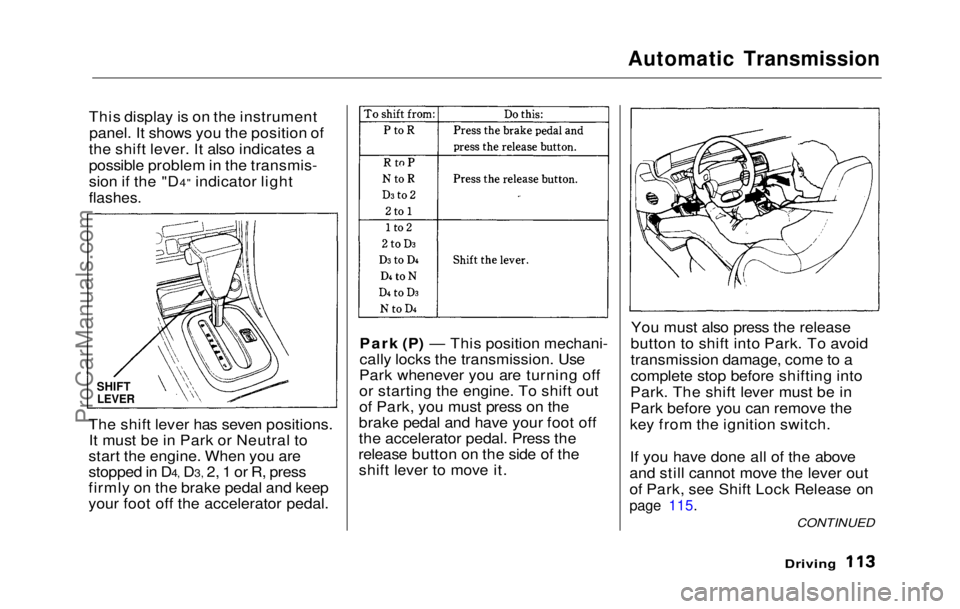
This display is on the instrument panel. It shows you the position of
the shift lever. It also indicates a
possible problem in the transmis-
sion if the "D4" indicator light
flashes.
The shift lever has seven positions. It must be in Park or Neutral to
start the engine. When you are
stopped in D4, D3, 2, 1 or R, press
firmly on the brake pedal and keep
your foot off the accelerator pedal. Park (P) — This position mechani-
cally locks the transmission. Use
Park whenever you are turning off
or starting the engine. To shift out
of Park, you must press on the
brake pedal and have your foot off
the accelerator pedal. Press the
release button on the side of the shift lever to move it. You must also press the release
button to shift into Park. To avoid
transmission damage, come to a
complete stop before shifting into
Park. The shift lever must be in
Park before you can remove the
key from the ignition switch.
If you have done all of the above
and still cannot move the lever out
of Park, see Shift Lock Release on
page 115.
Driving
SHIFT
LEVER
CONTINUEDProCarManuals.comMain Menu Table of Contents s t
Page 113 of 225

Automatic Transmission
Reverse (R) — To shift to Re-
verse from Park, see the explana-
tion under Park. To shift to Re-
verse from Neutral, come to a com-
plete stop and then shift. Press the
release button before shifting into
Reverse from Neutral.
Neutral (N) — Use Neutral if you need to restart a stalled engine, or
if it is necessary to stop briefly with
the engine idling. Shift to Park posi-
tion if you need to leave the car for
any reason. Press on the brake pe-
dal when you are moving the shift
lever from Neutral to another gear.
Drive (D4) — Use this position for
your normal driving. The transmis-
sion automatically selects a suita-
ble gear for your speed and acceler-
ation. You may notice the transmis-
sion shifting up at higher speeds
when the engine is cold. This helps
the engine warm up faster. Drive (D3) — This position is simi-
lar to D4, except only the first three
gears are selected. Use D3 to provide engine braking when going
down a steep hill. D3 can also keep
the transmission from cycling
between third and fourth gears in stop-and-go driving.
For faster acceleration when in D3
or D4, you can get the transmission
to automatically downshift by push-
ing the accelerator pedal to the
floor. The transmission will shift down one or two gears, depending
on your speed.
Second (2) — To shift to Second,
press the release button on the side
of the shift lever. This position
locks the transmission in second
gear. It does not downshift to first
gear when you come to a stop.
Second gives you more power when
climbing, and increased engine
braking when going down steep hills. Use second gear when start-
ing out on a slippery surface or in
deep snow. It will help reduce
wheelspin.
Whenever you move the shift lever
to a lower gear, the transmission
downshifts only if the engine's
redline will not be exceeded in the
lower gear.First (1) — To shift from Second
to First ,
press the release button on
the side of the shift lever. With the
lever in this position, the transmis-
sion locks in First gear. By upshift-
ing and downshifting through 1,2,
D3 and D4, you can operate this
transmission much like a manual
transmission without a clutch pedal.
DrivingProCarManuals.comMain Menu Table of Contents s t
Page 114 of 225
Automatic Transmission
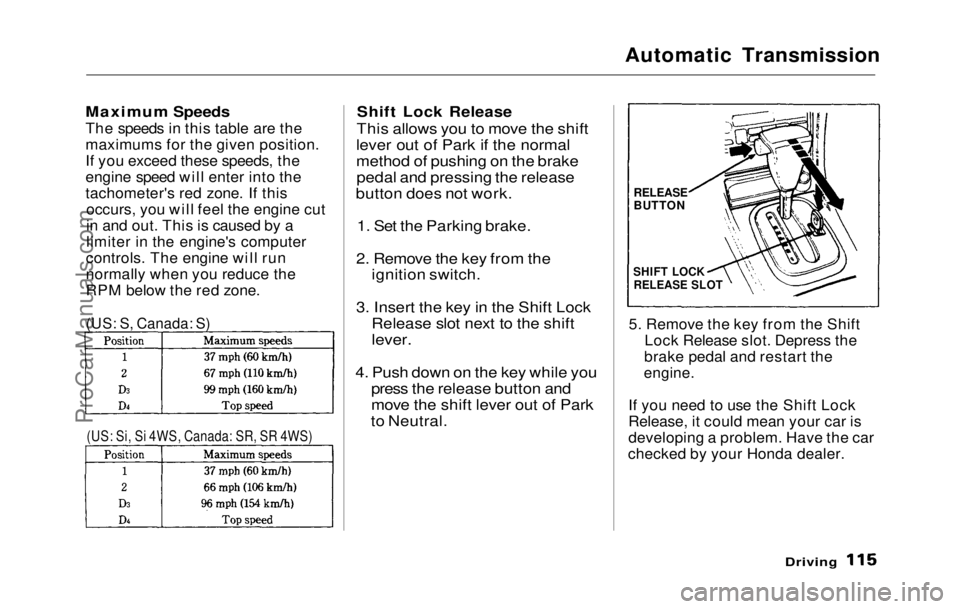
Maximum Speeds
The speeds in this table are the
maximums for the given position.
If you exceed these speeds, the
engine speed will enter into the
tachometer's red zone. If this occurs, you will feel the engine cut
in and out. This is caused by a
limiter in the engine's computer
controls. The engine will run
normally when you reduce the
RPM below the red zone.
Shift Lock Release
This allows you to move the shift
lever out of Park if the normal
method of pushing on the brake pedal and pressing the release
button does not work.
1. Set the Parking brake.
2. Remove the key from the ignition switch.
3. Insert the key in the Shift Lock Release slot next to the shift
lever.
4. Push down on the key while you press the release button and
move the shift lever out of Park
to Neutral.
5. Remove the key from the Shift
Lock Release slot. Depress the
brake pedal and restart the
engine.
If you need to use the Shift Lock
Release, it could mean your car is
developing a problem. Have the car
checked by your Honda dealer.
Driving
(US: S, Canada: S)
(US: Si, Si 4WS, Canada: SR, SR 4WS)
RELEASE
BUTTON
SHIFT LOCK
RELEASE SLOTProCarManuals.comMain Menu Table of Contents s t
Page 123 of 225
Towing a Trailer
Towing Safety
Your car will not stop as quickly
with a trailer in tow. Leave extra distance between your car and
other vehicles. Avoid braking or
turning suddenly. This could cause
the trailer to jackknife or possibly
turn over.
Keep in mind that your total
vehicle is now much longer. Leave
more room when making turns.
The trailer tracks a smaller arc than the car and can hit or run over
something that the car misses.
When passing another vehicle,
make sure the trailer is clear before changing lanes. The car/trailer combination is more
affected by crosswinds and buffet-
ing. When being passed by a large
vehicle, keep a constant speed and steer straight ahead. If there is too
much wind buffeting, slow down to
get out of the other vehicle's air
turbulence.
Towing a trailer puts an extra load on your car. You should have your
car serviced according to the
"Maintenance schedule under
severe driving conditions" on page
130.
This extra load is magnified when
you are driving in hilly terrain.
Watch the temperature gauge
closely when climbing hills. If it
gets near the hot area, turn off the
air conditioner (if it is on). If this
does not reduce the heat, it may be
necessary to pull to the side of the
road and wait for the engine to cool. If the automatic transmission shifts
frequently between 3rd and 4th
gears, put it in D3. This will help
prevent the transmission from
overheating. Help keep the brakes
from overheating by shifting to a
lower gear when going downhill. If you have to stop while going up-
hill, do not hold the car in place by pressing on the accelerator. This
can cause the automatic transmis-
sion to overheat. Use the parking
brake or footbrake.
DrivingProCarManuals.comMain Menu Table of Contents s t
Page 125 of 225
Maintenance
Regularly maintaining your Honda
is the best way to protect your investment. You will be rewarded
with safer, more economical,
trouble-free driving. This section
lists items that need to be checked
regularly and explains how to check them. It also details some
simple maintenance tasks you can
do yourself. The maintenance
schedules for normal and severe
driving conditions show you when
these things need to be done.
If you are interested in how to per-
form more complex maintenance
on your Honda, you can purchase
the Service Manual. See page 221 for information on how to
obtain a copy, or see your Honda
dealer.
Maintenance Schedule................ 128
Maintenance Record................ 131
Periodic Checks............................ 133
Fluid Locations............................. 134
Engine Oil...................................... 135
Checking Engine Oil................ 135
Adding........................................ 135
Recommended Oil.................... 136
Additives.................................... 136 Oil and Filter Changes ............ 137
Cooling System............................. 139 Checking the Coolant Level... 139
Adding Radiator Coolant........ 139
Replacing Coolant.................... 140
Windshield Washers.................... 143
Transmission Oil.......................... 144
Automatic Transmission........ 144
5-speed Transmission.............. 145
Brake and Clutch Fluid............... 146
Brake System............................ 146
Anti-lock Brake System ......... 147 Clutch System........................... 147
Power Steering............................. 148
Air Filter....................................... 149
Fuel Filter..................................... 150
Spark Plugs.................................. .
150
Replacement.............................. 150
Specification.............................. 152
Battery............................................ 152
Windshield Wipers....................... 155
Air Conditioner............................. 157 Engine Belts.................................. 158
Tires................................................ 158 Inflation...................................... 158
Inspection................................... 159
Maintenance.............................. 160
Tire Rotation............................ 160
Replacing Tires ........................ 161
Wheels and Tires...................... 161
DOT Tire Quality Grading..... 161 Treadwear............................. 161
Traction................................. 162
Temperature......................... 162
Winter Driving.......................... 163 Snow Tires............................ 163
Tire Chains............................ 163
Lights.............................................. 164
Replacing Bulbs........................ 164
Storing Your Car.......................... 173
MaintenanceProCarManuals.comMain Menu s t