ABS HONDA PRELUDE 1998 User Guide
[x] Cancel search | Manufacturer: HONDA, Model Year: 1998, Model line: PRELUDE, Model: HONDA PRELUDE 1998Pages: 278, PDF Size: 2.61 MB
Page 200 of 278
Tires
The ABS works by comparing the speed of the wheels. When replacing
tires, use the same size originally supplied with the vehicle. Tire size
and construction can affect wheel speed and may cause the system to
work inconsistently.
If you ever need to replace a wheel,
make sure the wheel's specifications
match those of the original wheel
that came on your vehicle. Re-
placement wheels are available at
your Honda dealer. Wheels and Tires
Wheel:
16x61/2 JJ
Tire:
205/50R1687V
See Tire Information on page 256 for
additional information about tire and
wheel size designations. See page 257 for information about DOT Tire
Quality Grading.
Winter Driving
Tires that are marked "M + S" or "All Season" on the sidewall have an
all-weather tread design. They
should be suitable for most winterdriving conditions. Tires without
these markings are designed for optimum traction in dry conditions.
They may not provide adequate performance in winter driving.
For the best performance in snowyor icy conditions, you should installsnow tires or tire chains. They may
be required by local laws under certain conditions.
CONTINUED
Maintenance
ProCarManuals.comMain Menu Table of Contents s t
Page 206 of 278
Lights
1. Open the hood.
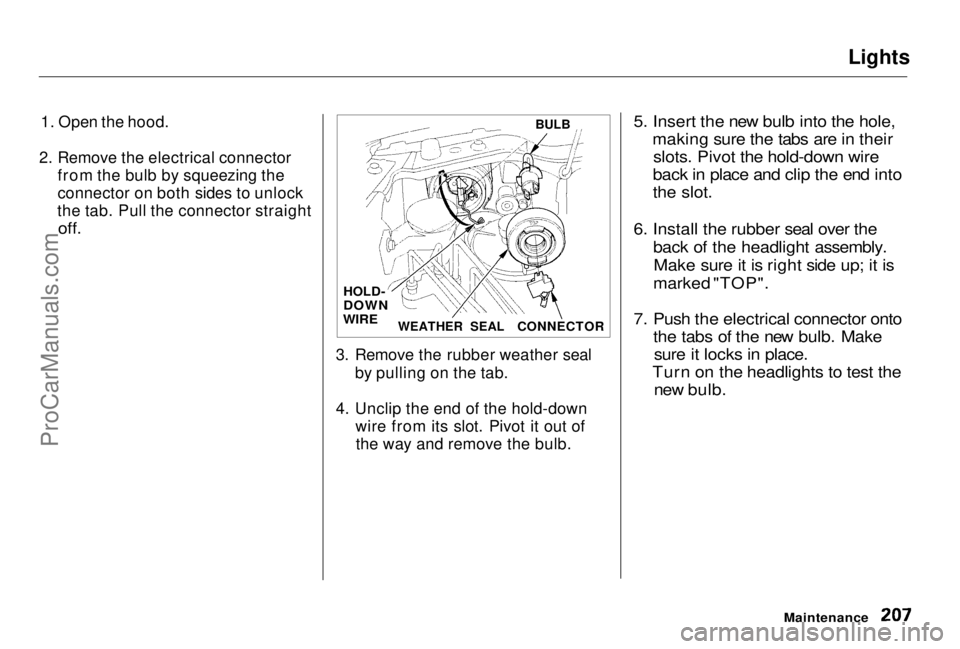
2. Remove the electrical connector from the bulb by squeezing the
connector on both sides to unlock
the tab. Pull the connector straight
off.
3. Remove the rubber weather sealby pulling on the tab.
4. Unclip the end of the hold-down wire from its slot. Pivot it out ofthe way and remove the bulb.
5. Insert the new bulb into the hole,
making sure the tabs are in theirslots. Pivot the hold-down wire
back in place and clip the end into
the slot.
6. Install the rubber seal over the back of the headlight assembly.Make sure it is right side up; it is
marked "TOP".
7. Push the electrical connector onto the tabs of the new bulb. Makesure it locks in place.
Turn on the headlights to test the new bulb.
Maintenance
BULB
CONNECTOR
WEATHER SEAL
HOLD-
DOWN
WIREProCarManuals.comMain Menu Table of Contents s t
Page 212 of 278
Lights
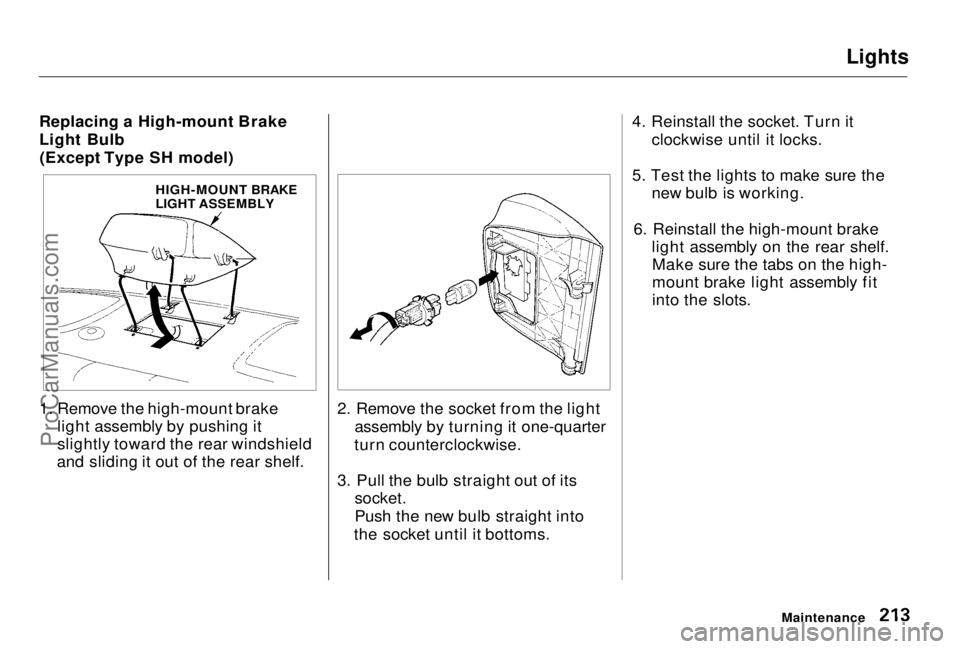
Replacing a High-mount Brake
Light Bulb (Except Type SH model)
1. Remove the high-mount brake light assembly by pushing it
slightly toward the rear windshield
and sliding it out of the rear shelf. 2. Remove the socket from the light
assembly by turning it one-quarter
turn counterclockwise.
3. Pull the bulb straight out of its socket.
Push the new bulb straight into
the socket until it bottoms. 4. Reinstall the socket. Turn it
clockwise until it locks.
5. Test the lights to make sure the new bulb is working.
6. Reinstall the high-mount brake light assembly on the rear shelf.Make sure the tabs on the high-
mount brake light assembly fit
into the slots.
Maintenance
HIGH-MOUNT BRAKE
LIGHT ASSEMBLYProCarManuals.comMain Menu Table of Contents s t
Page 214 of 278
Lights
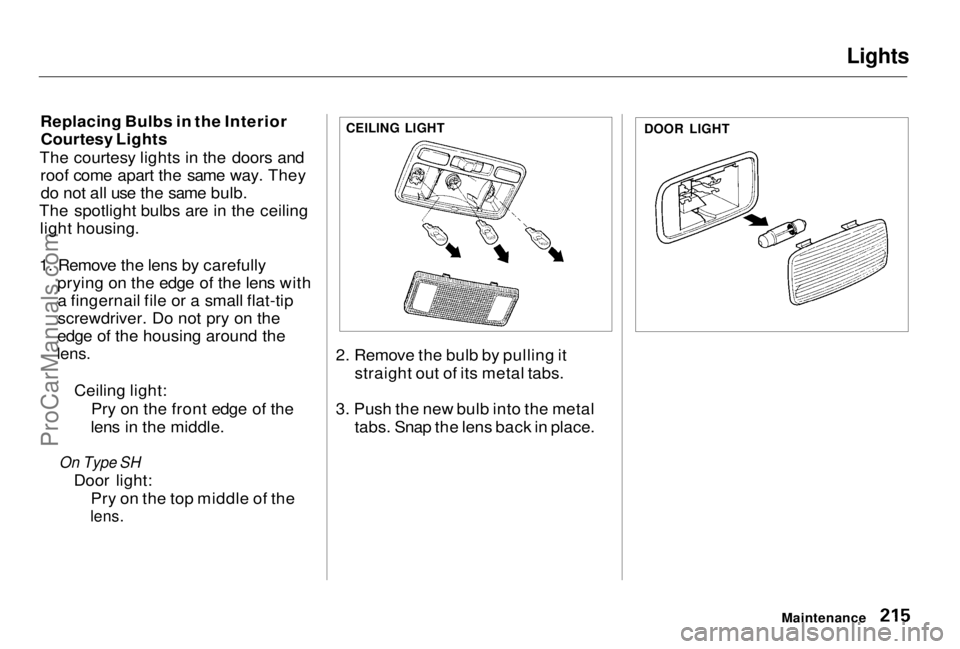
Replacing Bulbs in the Interior Courtesy Lights
The courtesy lights in the doors and roof come apart the same way. Theydo not all use the same bulb.
The spotlight bulbs are in the ceiling light housing.
1. Remove the lens by carefully prying on the edge of the lens witha fingernail file or a small flat-tip
screwdriver. Do not pry on the
edge of the housing around the
lens.
Ceiling light:Pry on the front edge of the
lens in the middle.
On Type SH
Door light: Pry on the top middle of the
lens.
2. Remove the bulb by pulling it
straight out of its metal tabs.
3. Push the new bulb into the metal tabs. Snap the lens back in place.
Maintenance
DOOR LIGHT
CEILING LIGHTProCarManuals.comMain Menu Table of Contents s t
Page 215 of 278
Lights
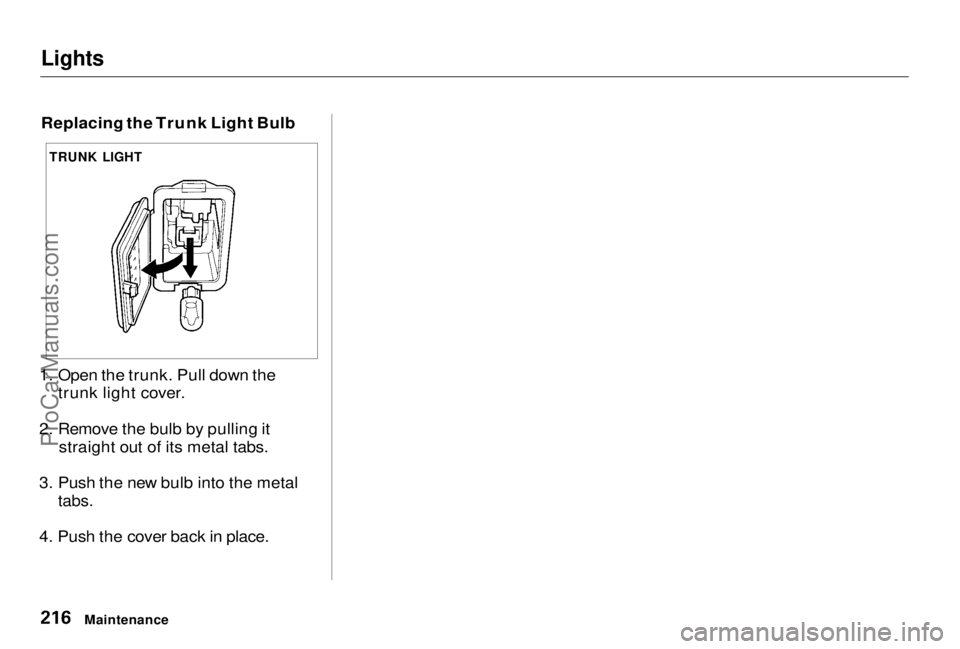
Replacing the Trunk Light Bulb
1. Open the trunk. Pull down the trunk light cover.
2. Remove the bulb by pulling it straight out of its metal tabs.
3. Push the new bulb into the metal
tabs.
4. Push the cover back in place.
Maintenance
TRUNK LIGHTProCarManuals.comMain Menu Table of Contents s t
Page 222 of 278
Interior Care, Corrosion Protection
Air Fresheners If you want to use an air freshener/
deodorizer in the interior of your
vehicle, it is best to use a solid type. Some liquid air fresheners contain
chemicals that may cause parts of
the interior trim and fabric to crack or discolor.
If you use a liquid air freshener,
make sure you fasten it securely so it does not spill as you drive. Corrosion Protection
Two factors normally contribute to causing corrosion in your vehicle:
1. Moisture trapped in body cavities. Dirt and road salt that collects in
hollows on the underside of the
vehicle stays damp, promoting corrosion in that area.
2. Removal of paint and protective coatings from the exterior and
underside of the vehicle.
Many corrosion-preventive measures
are built into your Honda. You can
help keep your vehicle from corroding by performing somesimple periodic maintenance: Repair chips and scratches in the
paint as soon as you discover them.Inspect and clean out the drain
holes in the bottom of the doors and body.
Check the floor coverings for
dampness. Carpeting and floor
mats may remain damp for a long
time, especially in winter. This dampness can eventually cause
the floor panels to corrode.
Use a high-pressure spray to clean
the underside of your vehicle. This is especially important in areas
that use road salt in winter. It isalso a good idea in humid climates
and areas subject to salt air. Be
careful of the ABS wheel sensors
and wiring at each wheel.
Have the corrosion-preventive
coatings on the underside of your
vehicle inspected and repaired periodically.
Appearance CareProCarManuals.comMain Menu Table of Contents s t
Page 269 of 278
Index
Accessories and Modifications.... 126 Accessories................................. 126
Additional Safety Precautions.. 127Modifications............................. 127
ACCESSORY (Ignition Key Position)........................................ 71
Accessory Power Socket................ 88
Active Torque Transfer System
(ATTS)
Indicator................................ 54, 149
Operation.................................... 149
Adding Automatic Transmission
Fluid........................................ 183
Brake Fluid................................. 185
Clutch Fluid................................ 186
Engine Coolant........................... 177
Engine Oil...................................173
Manual Transmission Fluid ..... 184
Power Steering Fluid................. 186
Windshield Washer Fluid......... 182
Additional Information About Your Seat Belts........................ 40
Lap/Shoulder Belt....................... 40
Seat Belt Maintenance................ 42
Seat Belt System Components... 40
Additional Information About
YourSRS................................... 43
Additional Safety Precautions.... 46
How Your Airbags Work............ 43
How Your SRS Indicator Light
Works........................................45
SRS Components......................... 43
Additives, Engine Oil..................... 174
Adjustments
Headlights.................................. 205
Head Restraints........................... 77
Mirrors..........................................
83
Seats.............................................. 7 5
Steerin
g Wheel............................ 64
Airbag (SRS).................................... 43
Air Cleaner Element...................... 187
Air Conditioning............................... 92 Maintenance............................... 195
Usage.............................................92
Air Outlets (Vents).......................... 94
Air Pressure, Tires........................ 197 High Speed Driving................... 257
Normal Driving.......................... 198
Alcohol in Gasoline........................ 259 Antifreeze....................................... 177
Anti-lock Brakes (ABS) Indicator Eight..................... 54, 148Operation.................................... 146
Anti-theft Steering Column
Lock............................................... 71
Appearance Care........................... 219 Ashtrays (Optional)......................... 89
Audio System................................. 100
Automatic Speed Control................ 65
Automatic Transmission............... 136
Capacity, Fluid........................... 254
Checking Fluid Level................ 183
Sequential SportShift Mode..... 139
Shifting........................................ 137
Shift Lever Position Indicator.. 136
Shift Lever Positions................. 137
Shift Lock Release..................... 143
CONTINUEDProCarManuals.comMain Menu s t
Page 270 of 278
Index
Battery Charging SystemIndicator............................ 53, 241
Jump Starting............................. 236 Maintenance............................... 190
Specifications............................. 255
Before Driving............................... 119
Belts, Seat........................................... 4
Beverage Holder.............................. 86
Body Repair.................................... 225
Brakes
Anti-lock System (ABS)............ 146
Break-in, New Linings .............. 120
Fluid............................................ 185
Light, Burned-out...................... 211
Parking.......................................... 84
System Indicator.......................... 53
Wear Indicators......................... 145
Brakes, ABS Operation.................................... 146
System Indicator................. 54, 148
Braking System.............................. 145
Break-in, New Car......................... 120
Brightness Control, Instruments... 61 Brights, Headlights......................... 60
Bulb Replacement
Back-up Lights........................... 211
Brake Lights............................... 211
Ceiling Lights............................. 215Courtesy Lights......................... 215
Front Parking Lights................. 208
Front Side Marker Lights......... 209
Headlights.................................. 206
High-mount Brake Light.......... 213
License Plate Light.................... 214
Rear Side Marker Lights.......... 211
Specifications............................. 255
Trunk Light................................ 216 Turn Signal Lights..................... 210
Bulbs, Halogen............................... 206
Cables, Jump Starting With.......... 236
Capacities Chart............................. 254
Carbon Monoxide Hazard.............. 47
Cargo, Loading...............................
128
Cassette Playe r
Care.............................................
116
Operation....................................
113
CAUTION, Explanatio n
of...............
ii
CD Changer...................................
.
109
CD Player........................................ 109
Certification Label......................... 252
Chains............................................. 202
Change Oil How to.........................................175
When to....................................... 164
Changing a Flat Tire ..................... 229
Changing Engine Coolant............. 179
Charging System Indicator .... 53, 241 Checking Automatic Transmission
Fluid........................................ 183
Battery Condition...................... 190
Brake Fluid................................. 185
Clutch Fluid................................186
Drive Belts.................................. 196
Engine Coolant........................... 124
Engine Oil................................... 123
Fuses........................................... 246
Manual Transmission Fluid ..... 184
Power Steering Fluid................. 186
Checklist, Before Driving............. 132
Child Safety......................................19
Cleaner, Air.................................... 187ProCarManuals.comMain Menu s t